steering CADILLAC STS 2009 1.G Owner's Manual
[x] Cancel search | Manufacturer: CADILLAC, Model Year: 2009, Model line: STS, Model: CADILLAC STS 2009 1.GPages: 514, PDF Size: 2.73 MB
Page 156 of 514
Antilock Brake System (ABS)
Warning Light...........................................3-63
Traction Control System (TCS)
Warning Light...........................................3-63
Lane Departure Warning Light........................3-64
Engine Coolant Temperature
Warning Light...........................................3-64
Engine Coolant Temperature Gage..................3-65
Tire Pressure Light.......................................3-65
Malfunction Indicator Lamp.............................3-66
Oil Pressure Light.........................................3-69
Security Light...............................................3-69
Fog Lamp Light............................................3-70
Lights On Reminder......................................3-70
Cruise Control Light......................................3-70
Highbeam On Light.......................................3-70
Fuel Gage...................................................3-71Driver Information Center (DIC).......................3-72
DIC Operation and Displays...........................3-72
DIC Warnings and Messages.........................3-79
Other Messages...........................................3-96
Audio System(s).............................................3-97
Setting the Clock..........................................3-98
Radio(s)......................................................3-98
Using an MP3............................................3-111
XM Radio Messages...................................3-114
Navigation/Radio System..............................3-116
Bluetooth
®.................................................3-116
Radio Personalization..................................3-126
Theft-Deterrent Feature................................3-130
Audio Steering Wheel Controls......................3-131
Radio Reception.........................................3-133
Backglass Antenna......................................3-134
XM™ Satellite Radio Antenna System............3-134
Section 3 Instrument Panel
3-2
Page 159 of 514
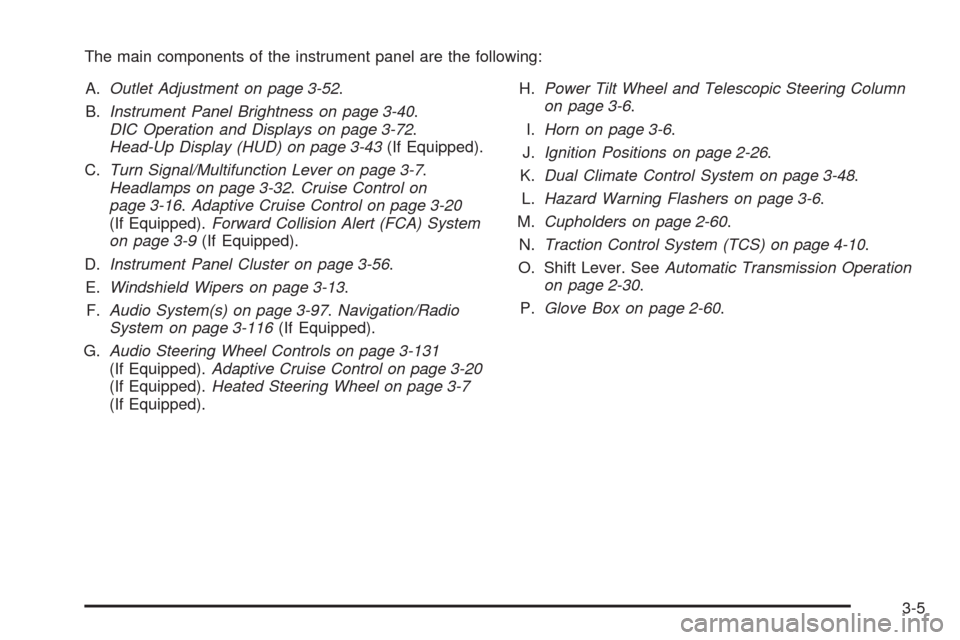
The main components of the instrument panel are the following:
A.Outlet Adjustment on page 3-52.
B.Instrument Panel Brightness on page 3-40.
DIC Operation and Displays on page 3-72.
Head-Up Display (HUD) on page 3-43(If Equipped).
C.Turn Signal/Multifunction Lever on page 3-7.
Headlamps on page 3-32.Cruise Control on
page 3-16.Adaptive Cruise Control on page 3-20
(If Equipped).Forward Collision Alert (FCA) System
on page 3-9(If Equipped).
D.Instrument Panel Cluster on page 3-56.
E.Windshield Wipers on page 3-13.
F.Audio System(s) on page 3-97.Navigation/Radio
System on page 3-116(If Equipped).
G.Audio Steering Wheel Controls on page 3-131
(If Equipped).Adaptive Cruise Control on page 3-20
(If Equipped).Heated Steering Wheel on page 3-7
(If Equipped).H.Power Tilt Wheel and Telescopic Steering Column
on page 3-6.
I.Horn on page 3-6.
J.Ignition Positions on page 2-26.
K.Dual Climate Control System on page 3-48.
L.Hazard Warning Flashers on page 3-6.
M.Cupholders on page 2-60.
N.Traction Control System (TCS) on page 4-10.
O. Shift Lever. SeeAutomatic Transmission Operation
on page 2-30.
P.Glove Box on page 2-60.
3-5
Page 160 of 514
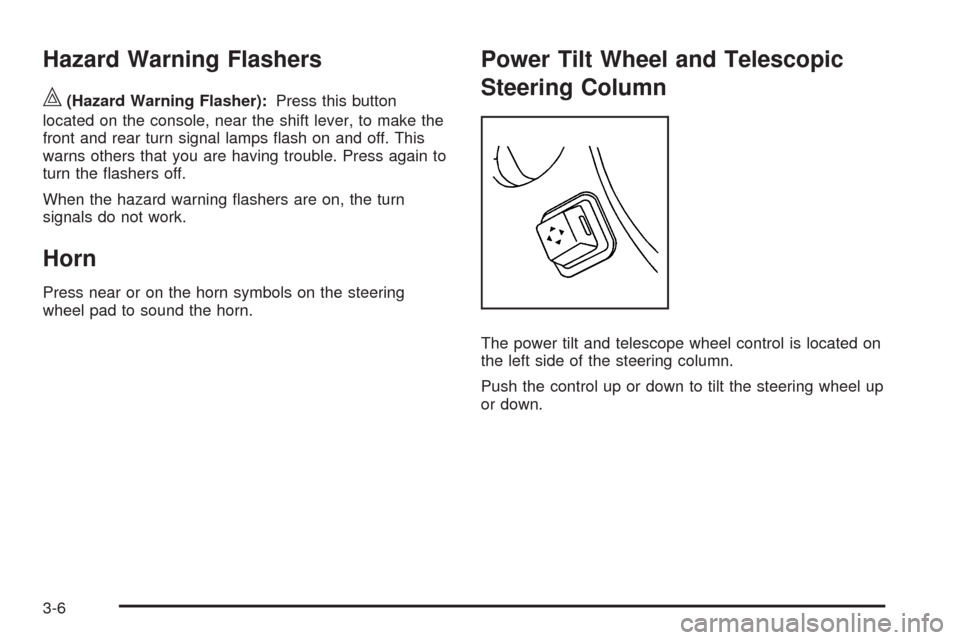
Hazard Warning Flashers
|(Hazard Warning Flasher):Press this button
located on the console, near the shift lever, to make the
front and rear turn signal lamps ash on and off. This
warns others that you are having trouble. Press again to
turn the ashers off.
When the hazard warning ashers are on, the turn
signals do not work.
Horn
Press near or on the horn symbols on the steering
wheel pad to sound the horn.
Power Tilt Wheel and Telescopic
Steering Column
The power tilt and telescope wheel control is located on
the left side of the steering column.
Push the control up or down to tilt the steering wheel up
or down.
3-6
Page 161 of 514
Push the control forward or rearward to move the
steering wheel towards the front or rear of the vehicle.
To set the memory position, seeVehicle Personalization
on page 2-61andMemory Seat, Mirrors and Steering
Wheel on page 2-77.
Heated Steering Wheel
For vehicles with a heated steering wheel, the button for
this feature is located on the steering wheel.
(:Press to turn the heated steering wheel on or off.
A light on the button displays when the feature is
turned on.
The steering wheel takes about three minutes to start
heating.
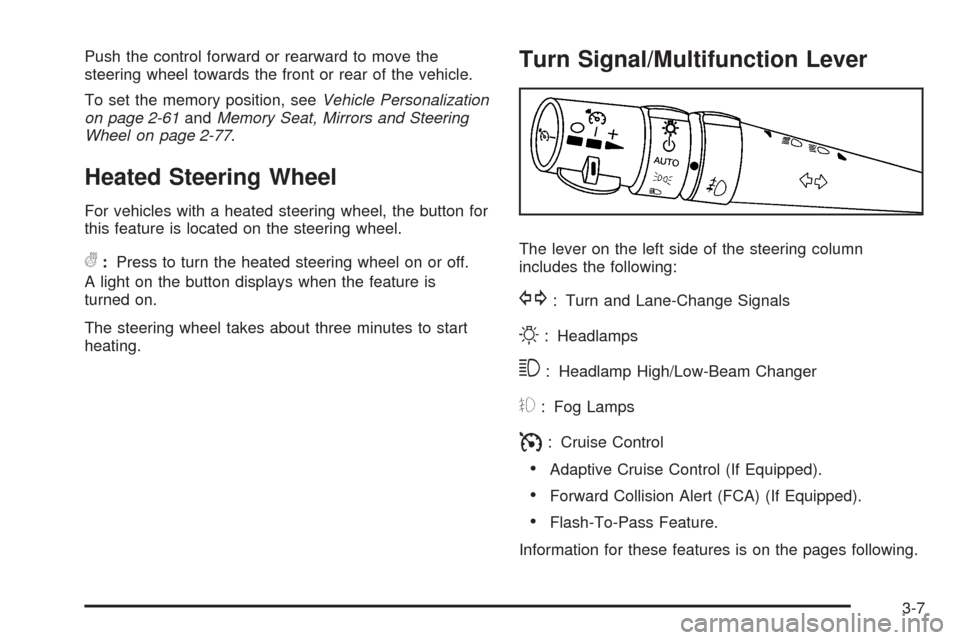
Turn Signal/Multifunction Lever
The lever on the left side of the steering column
includes the following:
G: Turn and Lane-Change Signals
O: Headlamps
3: Headlamp High/Low-Beam Changer
#: Fog Lamps
I: Cruise Control
Adaptive Cruise Control (If Equipped).
Forward Collision Alert (FCA) (If Equipped).
Flash-To-Pass Feature.
Information for these features is on the pages following.
3-7
Page 167 of 514
Cleaning the System
The radar can become blocked by snow, ice, or dirt.
If so, you may need to turn off the engine and clean
the lens. See “Cleaning the System” underAdaptive
Cruise Control on page 3-20.
Flash-to-Pass
This feature allows you to use the high-beam
headlamps to signal the driver in front of you that
you want to pass.
Pull and hold the turn signal/multifunction lever toward
you to use this feature. When this is done the following
will occur:
If the headlamps are off, in low-beam or in
Daytime Running Lamps (DRL) mode, the
high-beam headlamps will turn on. They will
stay on as long as the lever is held there.
Release the lever to turn them off.
If the headlamps are in high-beam mode, they will
switch to low beam. To return to high-beam, push the
lever forward.
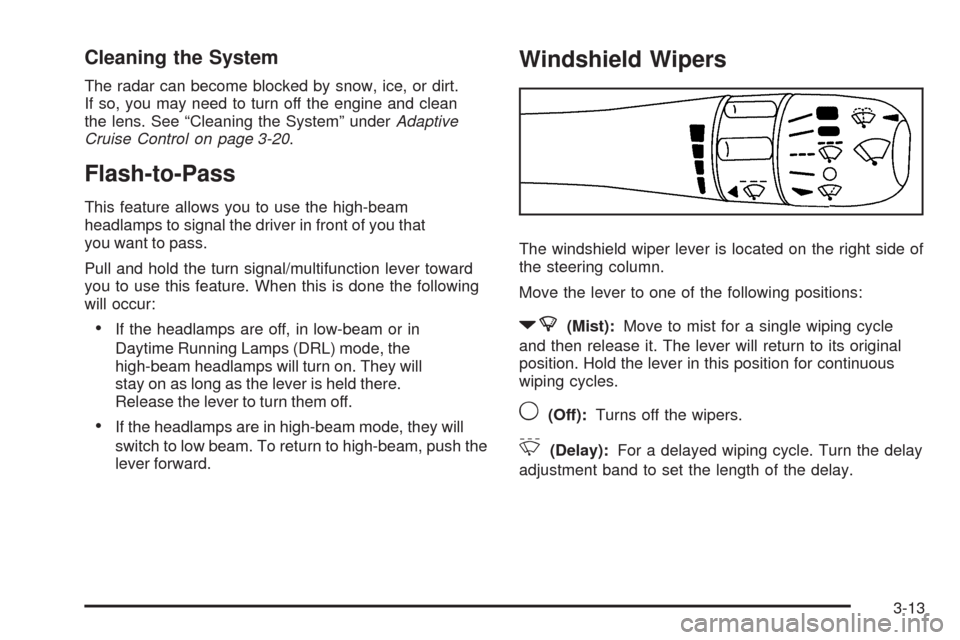
Windshield Wipers
The windshield wiper lever is located on the right side of
the steering column.
Move the lever to one of the following positions:
7(Mist):Move to mist for a single wiping cycle
and then release it. The lever will return to its original
position. Hold the lever in this position for continuous
wiping cycles.
9(Off):Turns off the wipers.
&(Delay):For a delayed wiping cycle. Turn the delay
adjustment band to set the length of the delay.
3-13
Page 169 of 514
Notice:Going through an automatic car wash with
the wipers on can damage them. Turn the wipers
off when going through an automatic car wash.
The mist and wash cycles operate as normal and are
not affected by the Rainsense function. The Rainsense
system can be overridden at any time by manually
turning the wiper band to low or high speed.
When Rainsense is active, the headlamps turn on
automatically. The headlamps will turn off again once
the wipers turn off if it is light enough outside. If it
is dark, they will remain on. SeeWiper Activated
Headlamps on page 3-36.
Notice:Do not place stickers or other items on
the exterior glass surface directly in front of
the moisture sensor. Doing this could cause
the moisture sensor to malfunction.
Windshield Washer
The windshield washer button is located at the end
of the windshield wiper lever on the right side of
the steering column.
K(Washer Fluid):Press and hold to spray
windshield washer uid on the windshield. The washer
will spray until the button is released. The wipers will
continue to clear the window for about six seconds after
the button is released and then stop or return to the
preset speed.
{CAUTION:
In freezing weather, do not use your washer until
the windshield is warmed. Otherwise the washer
uid can form ice on the windshield, blocking your
vision.
If the uid in the windshield washer uid reservoir is
low, the message CHECK WASHER FLUID will appear
on the Driver Information Center (DIC) display. It will
take 60 seconds after the bottle is relled for this
message to turn off. For information on the correct
washer uid mixture to use, seeWindshield Washer
Fluid on page 5-38andRecommended Fluids and
Lubricants on page 6-13.
3-15
Page 171 of 514
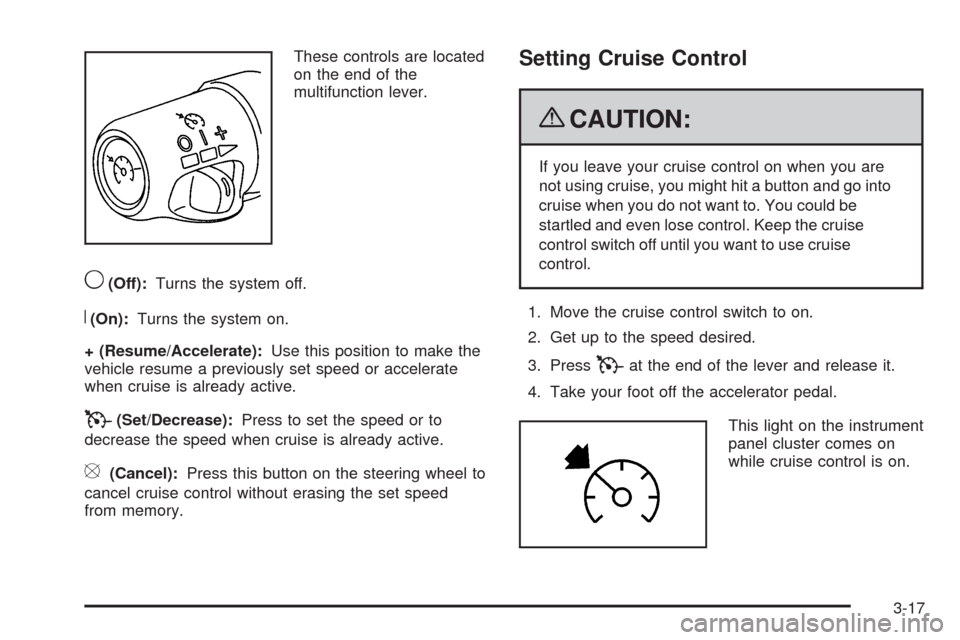
These controls are located
on the end of the
multifunction lever.
9(Off):Turns the system off.
R(On):Turns the system on.
+ (Resume/Accelerate):Use this position to make the
vehicle resume a previously set speed or accelerate
when cruise is already active.
T(Set/Decrease):Press to set the speed or to
decrease the speed when cruise is already active.
[(Cancel):Press this button on the steering wheel to
cancel cruise control without erasing the set speed
from memory.
Setting Cruise Control
{CAUTION:
If you leave your cruise control on when you are
not using cruise, you might hit a button and go into
cruise when you do not want to. You could be
startled and even lose control. Keep the cruise
control switch off until you want to use cruise
control.
1. Move the cruise control switch to on.
2. Get up to the speed desired.
3. Press
Tat the end of the lever and release it.
4. Take your foot off the accelerator pedal.
This light on the instrument
panel cluster comes on
while cruise control is on.
3-17
Page 173 of 514
Reducing Speed While Using Cruise
Control
There are two ways to reduce your speed while using
cruise control:
PressTat the end of the lever until the lower
speed desired is reached, then release it.
To slow down in very small amounts, briey
press
T. Each time this is done, the vehicle
goes about 1 mph (1.6 km/h) slower.
Passing Another Vehicle While Using
Cruise Control
Use the accelerator pedal to increase your vehicle
speed. When you take your foot off the pedal, the
vehicle slows down to the cruise control speed you
set earlier.
Using Cruise Control on Hills
How well the cruise control works on hills depends upon
the vehicle speed, load, and the steepness of the hills.
When going up steep hills, you might have to step on the
accelerator pedal to maintain the vehicle’s speed. When
going downhill, you might have to brake to keep the
vehicle’s speed down. Applying the brake will turn off the
cruise control. If you need to apply the brake due to the
grade of the downhill slope, you might not want to attempt
to use the cruise control feature.
Ending Cruise Control
There are three ways to end cruise control.
Step lightly on the brake pedal. This will end the
current cruise control session.
Move the cruise control switch to9to turn off the
system completely.
Press the[button on the steering wheel.
Erasing Speed Memory
The cruise control set speed memory is erased when
the cruise control or the ignition is turned off.
3-19
Page 176 of 514
The Adaptive Cruise controls are located on the left side
of the steering wheel.
9(Off):Turns the system off.
R(On):Turns the system on.
S(Resume/Increase):Use this position to make the
vehicle resume a previously set speed or increase the set
speed when Adaptive Cruise Control is already active.
T(Set/Decrease):Press to set the speed or to
decrease the set speed when Adaptive Cruise Control
is already active.
[(Cancel):Press this button located on the steering
wheel to cancel adaptive cruise control.
Engaging Adaptive Cruise Control With
the Set Button
{CAUTION:
If you leave your Adaptive Cruise Control switch
on when you are not using cruise, you might hit a
button and go into cruise when you do not want
to. You could be startled and even lose control.
Keep the Adaptive Cruise Control switch off until
you want to use cruise control.
{CAUTION:
If you operate Adaptive Cruise Control without
your Head-up Display (HUD) properly adjusted,
your Adaptive Cruise Control settings may not be
visible. You could forget your settings and be
startled by Adaptive Cruise Control response and
even lose control. Keep your HUD on and properly
adjusted when using Adaptive Cruise Control.
3-22
Page 179 of 514
Selecting the Follow Distance (GAP)
When the system detects a slower moving vehicle, it will
adjust your vehicle’s speed and maintain the following
distance (gap) selected.
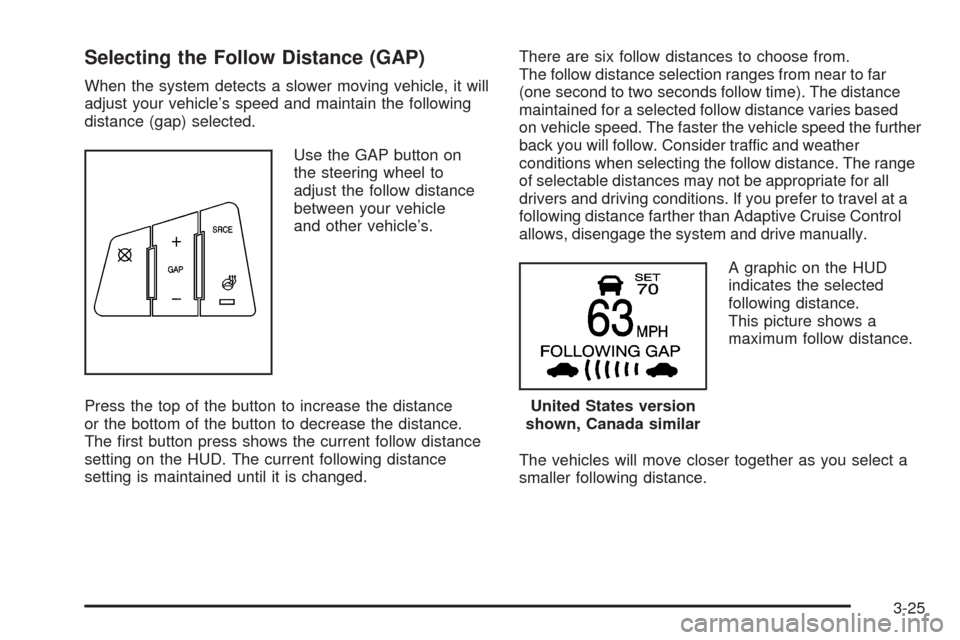
Use the GAP button on
the steering wheel to
adjust the follow distance
between your vehicle
and other vehicle’s.
Press the top of the button to increase the distance
or the bottom of the button to decrease the distance.
The rst button press shows the current follow distance
setting on the HUD. The current following distance
setting is maintained until it is changed.There are six follow distances to choose from.
The follow distance selection ranges from near to far
(one second to two seconds follow time). The distance
maintained for a selected follow distance varies based
on vehicle speed. The faster the vehicle speed the further
back you will follow. Consider traffic and weather
conditions when selecting the follow distance. The range
of selectable distances may not be appropriate for all
drivers and driving conditions. If you prefer to travel at a
following distance farther than Adaptive Cruise Control
allows, disengage the system and drive manually.
A graphic on the HUD
indicates the selected
following distance.
This picture shows a
maximum follow distance.
The vehicles will move closer together as you select a
smaller following distance.
United States version
shown, Canada similar
3-25