ECU CADILLAC STS 2009 1.G Owner's Guide
[x] Cancel search | Manufacturer: CADILLAC, Model Year: 2009, Model line: STS, Model: CADILLAC STS 2009 1.GPages: 514, PDF Size: 2.73 MB
Page 95 of 514
Testing the Alarm
1. From inside the vehicle, roll down the window, then
get out of the vehicle, keeping the door open.
2. From outside of the vehicle, with the door open,
lock the vehicle using the power door lock switch
or the keyless access transmitter and close the
door. Wait about 30 seconds until the security light
goes off.
3. Reach in and open the door using the inside door
handle. The horn will sound and the exterior lamps
will ash.
You can turn off the alarm by pressing the unlock button
on the keyless access transmitter or by starting the car.
If the alarm does not sound when it should, check to
see if the horn works. The horn fuse may be blown.
To replace the fuse, seeFuses and Circuit Breakers on
page 5-123. If the fuse does not need to be replaced,
you may need to have your vehicle serviced.
To reduce the possibility of theft, always arm the
Theft-Deterrent system when leaving your vehicle.
Do not leave the key or device that disarms or
deactivates the theft deterrent system in the vehicle.
Valet Lockout Switch
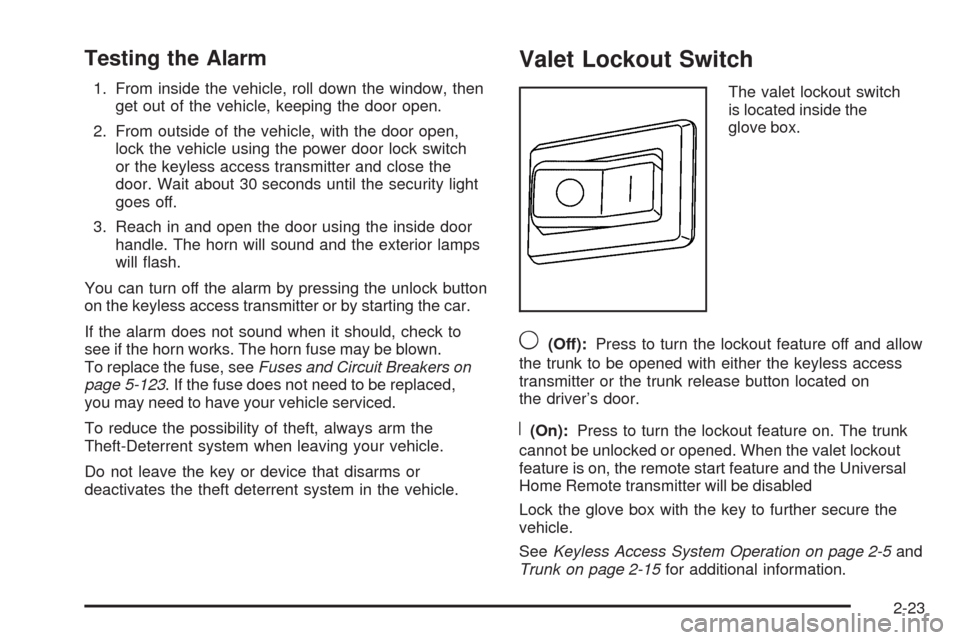
The valet lockout switch
is located inside the
glove box.
9(Off):Press to turn the lockout feature off and allow
the trunk to be opened with either the keyless access
transmitter or the trunk release button located on
the driver’s door.
R(On):Press to turn the lockout feature on. The trunk
cannot be unlocked or opened. When the valet lockout
feature is on, the remote start feature and the Universal
Home Remote transmitter will be disabled
Lock the glove box with the key to further secure the
vehicle.
SeeKeyless Access System Operation on page 2-5and
Trunk on page 2-15for additional information.
2-23
Page 96 of 514
Immobilizer
This device complies with Part 15 of the FCC Rules.
Operation is subject to the following two conditions:
1. This device may not cause interference.
2. This device must accept any interference received,
including interference that may cause undesired
operation.
This device complies with RSS-210 of Industry Canada.
Operation is subject to the following two conditions:
1. This device may not cause interference.
2. This device must accept any interference received,
including interference that may cause undesired
operation of the device.
Changes or modications to this system by other than
an authorized service facility could void authorization to
use this equipment.
Immobilizer Operation
The vehicle has a passive theft-deterrent system.
The system is automatically armed when the ignition is
turned off.
The immobilization system is disarmed when the ignition
is turned to OFF/ACCESSORY or START and a valid
transmitter is found in the vehicle.
You do not have to manually arm or disarm the system.
The security light comes on if there is a problem with
arming or disarming the theft-deterrent system.
The system has one or more keyless access
transmitters that are matched to an immobilizer control
unit in the vehicle. Only a correctly matched keyless
access transmitter starts the vehicle. The vehicle
may not start if the keyless access transmitter is
damaged.
2-24
Page 97 of 514
If the engine does not start and the security light comes
on, there may be a problem with the immobilizer
system. Press the START button again.
If the vehicle does not start and the keyless access
transmitter appears to be undamaged, try another
keyless access transmitter. Or, place the transmitter in
the transmitter pocket. See “NO FOBS DETECTED”
underDIC Warnings and Messages on page 3-79for
additional information. Check the fuse. SeeFuses and
Circuit Breakers on page 5-123. If the engine still does
not start with the other transmitter, the vehicle needs
service. If the engine does start, the rst transmitter may
be faulty. See your dealer/retailer or have a new keyless
access transmitter programmed to the vehicle.
The immobilizer system can learn new or replacement
keyless access transmitters. Up to four keyless access
transmitters can be programmed for the vehicle.
To program additional transmitters, see “Matching
transmitter(s) to Your Vehicle” underKeyless Access
System Operation on page 2-5.
Do not leave the key or device that disarms or
deactivates the theft deterrent system in the vehicle.Starting and Operating Your
Vehicle
New Vehicle Break-In
Notice:The vehicle does not need an elaborate
break-in. But it will perform better in the long run if
you follow these guidelines:
Do not drive at any one constant speed, fast or
slow, for the rst 500 miles (805 km). Do not
make full-throttle starts. Avoid downshifting
to brake or slow the vehicle.
Avoid making hard stops for the rst 200 miles
(322 km) or so. During this time the new brake
linings are not yet broken in. Hard stops with
new linings can mean premature wear and earlier
replacement. Follow this breaking-in guideline
every time you get new brake linings.
Do not tow a trailer during break-in. SeeTowing a
Trailer (Vehicles Without Heavy Duty Cooling) on
page 4-31orTowing a Trailer (Vehicles With
Heavy Duty Cooling) on page 4-32for the trailer
towing capabilities of your vehicle and more
information.
Following break-in, engine speed and load can be
gradually increased.
2-25
Page 122 of 514
LDW Error Message
SERVICE LANE DEPARTURE SYSTEM:This
message may appear in the DIC to indicate that LDW is
not working properly. If this message remains on after
continued driving, the system needs service. Take the
vehicle to your dealer/retailer. SeeDIC Warnings and
Messages on page 3-79for more information.
LANE DEPARTURE SYSTEM UNAVAILABLE:This
message may appear in the DIC if LDW does not
activate due to a temporary condition. SeeDIC
Warnings and Messages on page 3-79for more
information.
OnStar®System
OnStar uses several innovative technologies and live
advisors to provide a wide range of safety, security,
information, and convenience services. If the airbags
deploy, the system is designed to make an automatic
call to OnStar Emergency advisors who can request
emergency services be sent to your location. If the keysare locked in the vehicle, call OnStar at 1-888-4-ONSTAR
to have a signal sent to unlock the doors. OnStar
Hands-Free Calling, including 30 trial minutes good
for 60 days, is available on most vehicles. OnStar
Turn-by-Turn Navigation service, with one trial route,
is available on most vehicles. Press the OnStar button
to have an OnStar advisor contact Roadside Service.
OnStar service is provided subject to the OnStar Terms
and Conditions included in the OnStar Subscriber glove
box literature.
Some services such as Remote Door Unlock or Stolen
Vehicle Location Assistance may not be available until
the owner of the vehicle registers with OnStar. After the
rst prepaid year, contact OnStar to select a monthly
or annual subscription payment plan. If a payment plan
is not selected, the OnStar system and all services,
including airbag notication and emergency services,
may be deactivated and no longer available. For more
information visit onstar.com (U.S.) or onstar.ca (Canada),
or press the OnStar button to speak with an advisor.
Not all OnStar services are available on all vehicles.
To check if this vehicle is able to provide the services
described below, or for a full description of OnStar
services and system limitations, see the OnStar Owner’s
Guide in the glove box or visit onstar.com (U.S.) or
onstar.ca (Canada), contact OnStar at 1-888-4-ONSTAR
(1-888-466-7827) or TTY 1-877-248-2080, or press the
OnStar button to speak with an OnStar advisor 24 hours
a day, 7 days a week.
2-50
Page 125 of 514
The vehicle must have a working electrical system,
including adequate battery power, for the OnStar
equipment to operate. There are other problems OnStar
cannot control that may prevent OnStar from providing
OnStar service at any particular time or place. Some
examples are damage to important parts of the vehicle
in a crash, hills, tall buildings, tunnels, weather or
wireless phone network congestion.
Your Responsibility
Increase the volume of the radio if the OnStar advisor
cannot be heard. If the light next to the OnStar buttons
is red, the system may not be functioning properly.
Press the OnStar button and request a vehicle
diagnostic. If the light appears clear (no light is
appearing), your OnStar subscription has expired and
all services have been deactivated. Press the OnStar
button to conrm that the OnStar equipment is active.
Universal Home Remote
System
The Universal Home Remote System provides a way to
replace up to three hand-held Radio-Frequency (RF)
transmitters used to activate devices such as garage
door openers, security systems, and home lighting.
This device complies with Part 15 of the FCC Rules.
Operation is subject to the following two conditions:
1. This device may not cause harmful interference.
2. This device must accept any interference received,
including interference that may cause undesired
operation.
This device complies with RSS-210 of Industry Canada.
Operation is subject to the following two conditions:
1. This device may not cause interference.
2. This device must accept any interference received,
including interference that may cause undesired
operation of the device.
Changes or modications to this system by other than
an authorized service facility could void authorization to
use this equipment.
2-53
Page 126 of 514
Universal Home Remote System
Operation (With Three Round LED)
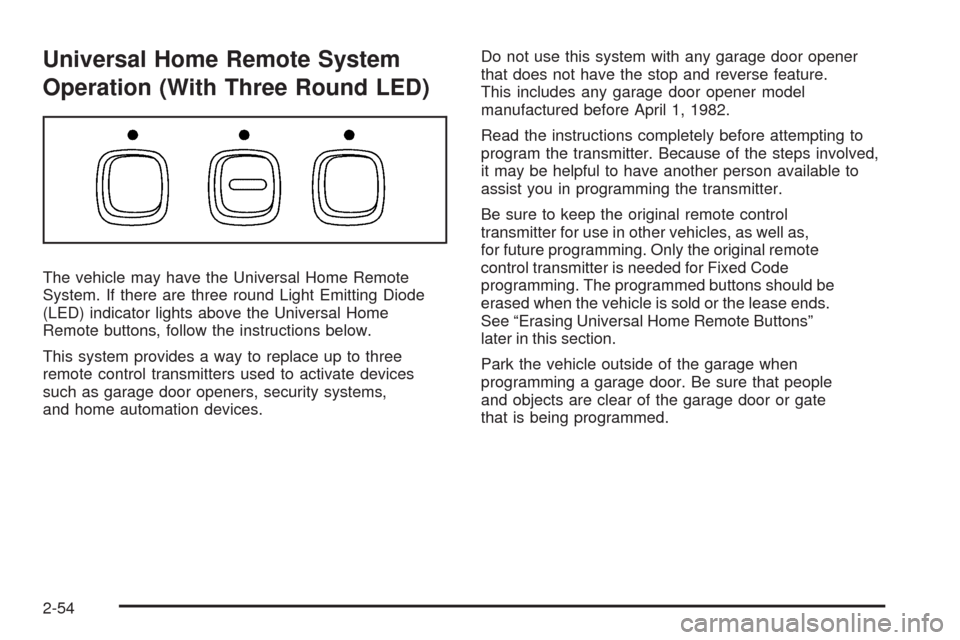
The vehicle may have the Universal Home Remote
System. If there are three round Light Emitting Diode
(LED) indicator lights above the Universal Home
Remote buttons, follow the instructions below.
This system provides a way to replace up to three
remote control transmitters used to activate devices
such as garage door openers, security systems,
and home automation devices.Do not use this system with any garage door opener
that does not have the stop and reverse feature.
This includes any garage door opener model
manufactured before April 1, 1982.
Read the instructions completely before attempting to
program the transmitter. Because of the steps involved,
it may be helpful to have another person available to
assist you in programming the transmitter.
Be sure to keep the original remote control
transmitter for use in other vehicles, as well as,
for future programming. Only the original remote
control transmitter is needed for Fixed Code
programming. The programmed buttons should be
erased when the vehicle is sold or the lease ends.
See “Erasing Universal Home Remote Buttons”
later in this section.
Park the vehicle outside of the garage when
programming a garage door. Be sure that people
and objects are clear of the garage door or gate
that is being programmed.
2-54
Page 128 of 514
4. Immediately, within one second, release the button
when the garage door moves. The indicator light
will blink rapidly until programming is complete.
5. Press and release the same button again.
The garage door should move, conrming
that programming is successful and complete.
To program another Rolling Code device such as
an additional garage door opener, a security device,
or home automation device, repeat Steps 1-5, choosing
a different function button in Step 3 than what was
used for the garage door opener.
If these instructions do not work, the garage door
opener is probably a Fixed Code unit. Follow the
Programming instructions that follow for a Fixed Code
garage door opener.
Programming Universal Home
Remote — Fixed Code
For questions or help programming the Universal
Home Remote System, call 1-866-572-2728 or go to
learcar2u.com.
Most garage door openers sold before 1996 are Fixed
Code units.
Programming a garage door opener involves
time-sensitive actions, so read the entire procedure
before starting. Otherwise, the device will time out
and the procedure will have to be repeated.To program up to three devices:
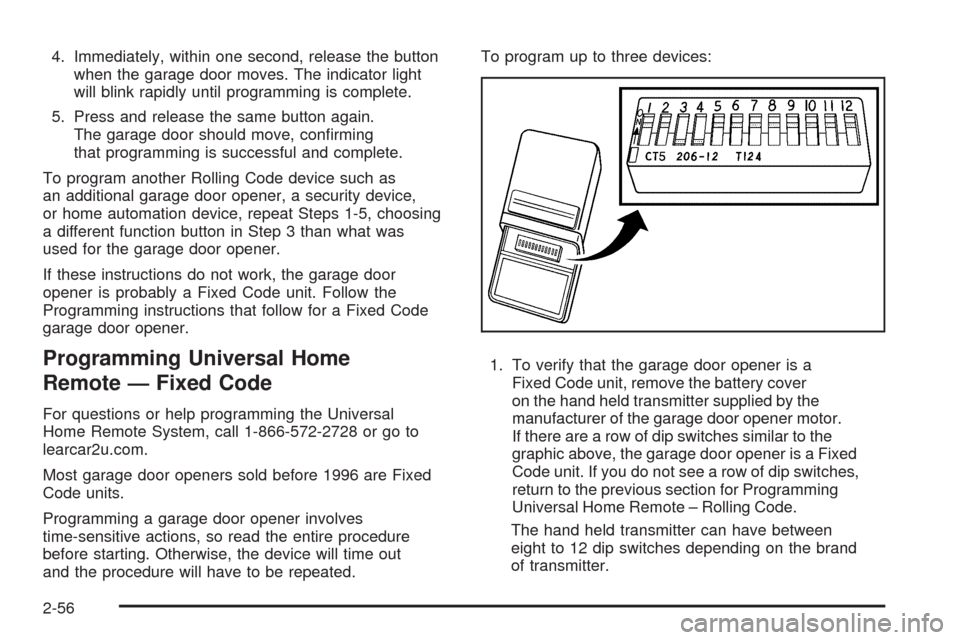
1. To verify that the garage door opener is a
Fixed Code unit, remove the battery cover
on the hand held transmitter supplied by the
manufacturer of the garage door opener motor.
If there are a row of dip switches similar to the
graphic above, the garage door opener is a Fixed
Code unit. If you do not see a row of dip switches,
return to the previous section for Programming
Universal Home Remote – Rolling Code.
The hand held transmitter can have between
eight to 12 dip switches depending on the brand
of transmitter.
2-56
Page 131 of 514
5. After entering all of the switch positions, again,
rmly press and release all three buttons at the
same time. The indicator lights will turn on.
6. Press and hold the button that will be used to
control the garage door until the garage door
moves. The indicator light above the selected
button should slowly blink. This button may
need to be held for up to 55 seconds.
7. Immediately release the button when the garage
door moves. The indicator light will blink rapidly
until programming is complete.
8. Press and release the same button again.
The garage door should move, conrming
that programming is successful and complete.
To program another Fixed Code device such as an
additional garage door opener, a security device,
or home automation device, repeat Steps 1-8, choosing
a different button in Step 6 than what was used for
the garage door opener.
Using Universal Home Remote
Press and hold the appropriate button for at least
half of a second. The indicator light will come on
while the signal is being transmitted.
Reprogramming Universal Home
Remote Buttons
Any of the three buttons can be reprogrammed by
repeating the instructions.
Erasing Universal Home Remote
Buttons
The programmed buttons should be erased when the
vehicle is sold or the lease ends.
To erase either Rolling Code or Fixed Code on the
Universal Home Remote device:
1. Press and hold the two outside buttons at the
same time for approximately 20 seconds, until
the indicator lights, located directly above the
buttons, begin to blink rapidly.
2. Once the indicator lights begin to blink, release both
buttons. The codes from all buttons will be erased.
For help or information on the Universal Home Remote
System, call the customer assistance phone number
underCustomer Assistance Offices on page 7-6.
2-59
Page 156 of 514
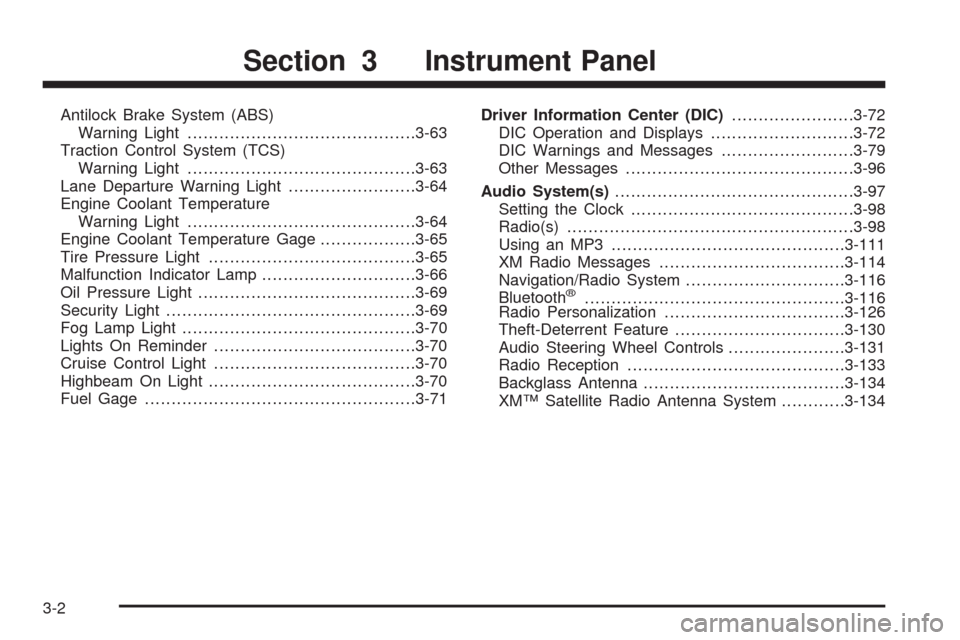
Antilock Brake System (ABS)
Warning Light...........................................3-63
Traction Control System (TCS)
Warning Light...........................................3-63
Lane Departure Warning Light........................3-64
Engine Coolant Temperature
Warning Light...........................................3-64
Engine Coolant Temperature Gage..................3-65
Tire Pressure Light.......................................3-65
Malfunction Indicator Lamp.............................3-66
Oil Pressure Light.........................................3-69
Security Light...............................................3-69
Fog Lamp Light............................................3-70
Lights On Reminder......................................3-70
Cruise Control Light......................................3-70
Highbeam On Light.......................................3-70
Fuel Gage...................................................3-71Driver Information Center (DIC).......................3-72
DIC Operation and Displays...........................3-72
DIC Warnings and Messages.........................3-79
Other Messages...........................................3-96
Audio System(s).............................................3-97
Setting the Clock..........................................3-98
Radio(s)......................................................3-98
Using an MP3............................................3-111
XM Radio Messages...................................3-114
Navigation/Radio System..............................3-116
Bluetooth
®.................................................3-116
Radio Personalization..................................3-126
Theft-Deterrent Feature................................3-130
Audio Steering Wheel Controls......................3-131
Radio Reception.........................................3-133
Backglass Antenna......................................3-134
XM™ Satellite Radio Antenna System............3-134
Section 3 Instrument Panel
3-2
Page 214 of 514

Then, after several more seconds, the status indicator
will light either ON or OFF, or either the on or off symbol
to let you know the status of the right front passenger’s
frontal airbag.
If the word ON or the on symbol is lit on the passenger
airbag status indicator, it means that the right front
passenger’s frontal airbag is enabled (may inate).
{CAUTION:
If the on indicator comes on when you have a
rear-facing child restraint installed in the right front
passenger’s seat, it means that the passenger
sensing system has not turned off the passenger’s
frontal airbag. A child in a rear-facing child restraint
can be seriously injured or killed if the right front
passenger’s airbag inates. This is because the
back of the rear-facing child restraint would be
very close to the inating airbag. Do not use a
rear-facing child restraint in the right front
passenger’s seat if the airbag is turned on.
{CAUTION:
Even though the passenger sensing system is
designed to turn off the right front passenger’s
frontal airbag if the system detects a rear-facing
child restraint, no system is fail-safe, and no one
can guarantee that an airbag will not deploy under
some unusual circumstance, even though it is
turned off. We recommend that rear-facing child
restraints be secured in the rear seat, even if the
airbag is off.
If the word OFF or the off symbol is lit on the airbag
status indicator, it means that the passenger sensing
system has turned off the right front passenger’s frontal
airbag. SeePassenger Sensing System on page 1-59
for more on this, including important safety information.
If, after several seconds, both status indicator lights
remain on, or if there are no lights at all, there may
be a problem with the lights or the passenger sensing
system. See your dealer/retailer for service.
3-60