lock CADILLAC STS 2009 1.G Owner's Guide
[x] Cancel search | Manufacturer: CADILLAC, Model Year: 2009, Model line: STS, Model: CADILLAC STS 2009 1.GPages: 514, PDF Size: 2.73 MB
Page 119 of 514

SBZA is designed to ignore stationary objects; however,
the system may occasionally light up due to guard rails,
signs, trees, shrubs, and other stationary objects. This
is normal system operation, the vehicle does not need
service.
SBZA does not operate when the left or right corners
of the rear bumper are covered with mud, dirt, snow, ice,
slush, or in heavy rainstorms. For cleaning instructions,
seeWashing Your Vehicle on page 5-118.Ifthe
DIC still displays the SIDE BLIND ZONE SYSTEM
UNAVAILABLE message after cleaning the bumper,
see your dealer/retailer.
The SBZA displays may remain on if a trailer is attached
to the vehicle, or a bicycle or object is extending out
to either side of the vehicle.
When SBZA is disabled for any reason other than the
driver turning it off, the driver will not be able to turn SBZA
back on using the DIC. The SIDE BLIND ZONE ALERT
ON option will not be selectable if the conditions for
normal system operation are not met. Until normal
operating conditions for SBZA are met, you should
not rely upon SBZA while driving.SBZA Error Messages
The following messages may appear in the DIC:
SIDE BLIND ZONE ALERT SYSTEM OFF:This
message indicates that the system has been turned off.
SIDE BLIND ZONE SYSTEM UNAVAILABLE:This
message indicates that the SBZA system is disabled
because the sensor is blocked and cannot detect
vehicles in the blind zone. The sensor may be blocked
by mud, dirt, snow, ice, slush, or even heavy rainstorms.
This message may also activate during heavy rain or
due to road spray. The vehicle does not need service.
For cleaning, seeWashing Your Vehicle on page 5-118.
SERVICE SIDE BLIND ZONE ALERT SYSTEM:If this
message appears, both SBZA displays will remain
on indicating there is a problem with the SBZA system.
If these displays remain on after continued driving,
the system needs service. Take the vehicle to your
dealer/retailer.
2-47
Page 121 of 514
How the System Works
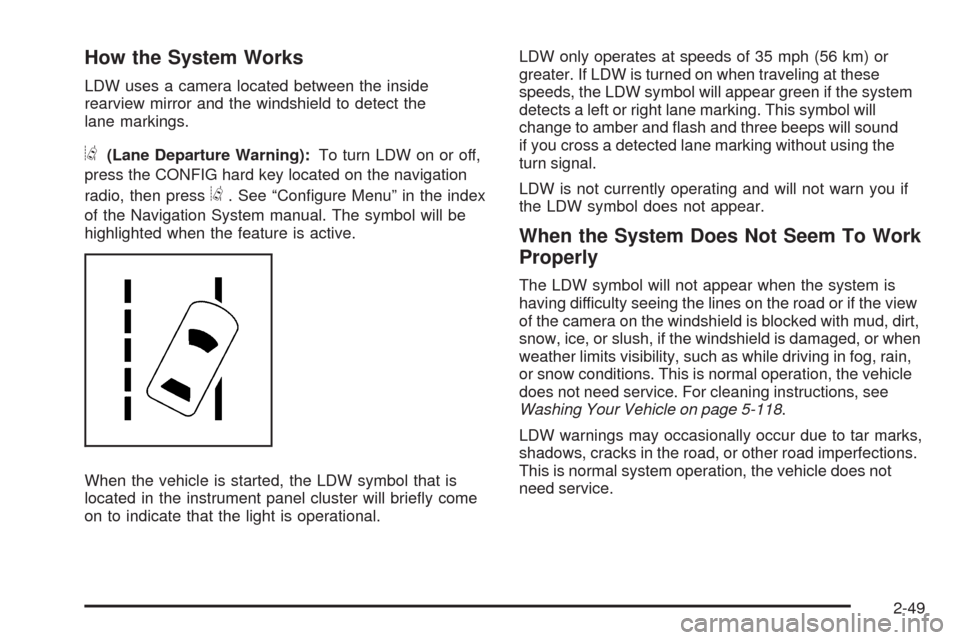
LDW uses a camera located between the inside
rearview mirror and the windshield to detect the
lane markings.
@(Lane Departure Warning):To turn LDW on or off,
press the CONFIG hard key located on the navigation
radio, then press
@. See “Congure Menu” in the index
of the Navigation System manual. The symbol will be
highlighted when the feature is active.
When the vehicle is started, the LDW symbol that is
located in the instrument panel cluster will briey come
on to indicate that the light is operational.LDW only operates at speeds of 35 mph (56 km) or
greater. If LDW is turned on when traveling at these
speeds, the LDW symbol will appear green if the system
detects a left or right lane marking. This symbol will
change to amber and ash and three beeps will sound
if you cross a detected lane marking without using the
turn signal.
LDW is not currently operating and will not warn you if
the LDW symbol does not appear.
When the System Does Not Seem To Work
Properly
The LDW symbol will not appear when the system is
having difficulty seeing the lines on the road or if the view
of the camera on the windshield is blocked with mud, dirt,
snow, ice, or slush, if the windshield is damaged, or when
weather limits visibility, such as while driving in fog, rain,
or snow conditions. This is normal operation, the vehicle
does not need service. For cleaning instructions, see
Washing Your Vehicle on page 5-118.
LDW warnings may occasionally occur due to tar marks,
shadows, cracks in the road, or other road imperfections.
This is normal system operation, the vehicle does not
need service.
2-49
Page 122 of 514
LDW Error Message
SERVICE LANE DEPARTURE SYSTEM:This
message may appear in the DIC to indicate that LDW is
not working properly. If this message remains on after
continued driving, the system needs service. Take the
vehicle to your dealer/retailer. SeeDIC Warnings and
Messages on page 3-79for more information.
LANE DEPARTURE SYSTEM UNAVAILABLE:This
message may appear in the DIC if LDW does not
activate due to a temporary condition. SeeDIC
Warnings and Messages on page 3-79for more
information.
OnStar®System
OnStar uses several innovative technologies and live
advisors to provide a wide range of safety, security,
information, and convenience services. If the airbags
deploy, the system is designed to make an automatic
call to OnStar Emergency advisors who can request
emergency services be sent to your location. If the keysare locked in the vehicle, call OnStar at 1-888-4-ONSTAR
to have a signal sent to unlock the doors. OnStar
Hands-Free Calling, including 30 trial minutes good
for 60 days, is available on most vehicles. OnStar
Turn-by-Turn Navigation service, with one trial route,
is available on most vehicles. Press the OnStar button
to have an OnStar advisor contact Roadside Service.
OnStar service is provided subject to the OnStar Terms
and Conditions included in the OnStar Subscriber glove
box literature.
Some services such as Remote Door Unlock or Stolen
Vehicle Location Assistance may not be available until
the owner of the vehicle registers with OnStar. After the
rst prepaid year, contact OnStar to select a monthly
or annual subscription payment plan. If a payment plan
is not selected, the OnStar system and all services,
including airbag notication and emergency services,
may be deactivated and no longer available. For more
information visit onstar.com (U.S.) or onstar.ca (Canada),
or press the OnStar button to speak with an advisor.
Not all OnStar services are available on all vehicles.
To check if this vehicle is able to provide the services
described below, or for a full description of OnStar
services and system limitations, see the OnStar Owner’s
Guide in the glove box or visit onstar.com (U.S.) or
onstar.ca (Canada), contact OnStar at 1-888-4-ONSTAR
(1-888-466-7827) or TTY 1-877-248-2080, or press the
OnStar button to speak with an OnStar advisor 24 hours
a day, 7 days a week.
2-50
Page 123 of 514
OnStar Services Available with the
Safe & Sound Plan
Automatic Notication of Airbag Deployment
Advanced Automatic Crash Notication (AACN)
(If equipped)
Link to Emergency Services
Roadside Assistance
Stolen Vehicle Location Assistance
Remote Door Unlock/Vehicle Alert
OnStar Vehicle Diagnostic Email
GM Goodwrench On Demand Diagnostics
OnStar Hands-Free Calling with 30 trial minutes
OnStar Virtual Advisor (U.S. Only)
OnStar Services Included with
Directions & Connections Plan
All Safe and Sound Plan Services
OnStar Turn-by-Turn Navigation (If equipped) or
Driving Directions - Advisor delivered
RideAssist
Information and Convenience Services
OnStar Hands-Free Calling
OnStar Hands-Free Calling allows eligible OnStar
subscribers to make and receive calls using voice
commands. Hands-Free Calling is fully integrated into
the vehicle, and can be used with OnStar Pre-Paid
Minute Packages. Most vehicles include 30 trial minutes
good for 60 days. Hands-Free Calling can also be linked
to a Verizon Wireless service plan in the U.S. or a Bell
Mobility service plan in Canada, depending on eligibility.
To nd out more, refer to the OnStar Owner’s Guide in
the vehicle’s glove box, visit onstar.com or onstar.ca, or
speak with an OnStar advisor by pressing the OnStar
button or calling 1-888-4-ONSTAR (1-888-466-7827).
2-51
Page 133 of 514
Vent Open:To open the power sunroof to the vent
position from the closed position, press and hold the
passenger’s side sunroof switch forward. The rear of
the sunroof panel will tilt upward to the full vent position.
The sunshade must be opened manually.
Express Close:The express close feature will operate
from the open or partially open position. To express close
the power sunroof, fully press the driver’s side switch
forward once. To stop the sunroof glass in a desired
position other than closed, press the switch again in
either direction. The sunshade must be closed manually.
Close:To close the power sunroof, operate the controls
according to one of the following:
From the open position, press and hold the driver’s
side sunroof switch forward. The sunshade must be
closed manually.
From the vent position, press and hold the
passenger’s side sunroof switch rearward.
Anti-Pinch:If an object is in the path of the sunroof
while it is closing, the anti-pinch feature will detect the
object and stop the sunroof from closing at the point
of the obstruction. The sunroof will then return to the
full-open or vent position. To close the sunroof once
it has re-opened, refer to the two options previously
described under the “Close” feature instructions.Do not keep the sunroof open for long periods of time
while the vehicle is not in use. Debris can collect in the
tracks and possibly damage the sunroof operation or
plug the water draining system.
Vehicle Personalization
The vehicle has personalization that allows you to
program certain features to a preferred setting for up to
two drivers. The back of the keyless access transmitters
are labelled 1 or 2. Additional keyless access transmitters
programmed to the vehicle, as 3 and/or 4, do not have
a number on the back and are not capable of being
personalized. The number of programmable features
varies depending upon which vehicle options are
purchased.
On all vehicles, features such as climate control settings,
radio and XM™ preset settings, exterior lighting at unlock
and remote lock unlock conrmation, and language have
already been programmed. Your vehicle also has an
automatic door locking feature that is always on. You
cannot turn the automatic door locking feature off. See
Programmable Automatic Door Locks on page 2-14.
Some vehicles have additional features that can be
programmed including the seat, steering column, and
outside rearview mirror position.
If your vehicle has the base audio system, the following
information explains the vehicle personalization on your
vehicle.
2-61
Page 138 of 514
REMOTE RECALL MEMORY
If your vehicle has the optional memory package, you
will have this feature. When this feature is turned on, you
can recall any previously programmed seat position and
mirror position when the unlock button on the keyless
access transmitter is pressed.
Programmable Modes
Mode 1:ON
Mode 2:OFF (default)
The exception to the default is the recall seat to driver
position which is on.
To program the vehicle to a different mode:
1. Enter the PERSONAL SETTINGS MENU by
following the instructions listed previously under
“Entering the Personal Settings Menu.”
2. Turn the tune/select knob until REMOTE RECALL
MEMORY is highlighted.
3. Press the tune/select knob to switch back and forth
between on and off.
When the mode is turned on, a check mark will
appear next to the feature name.
If this feature is selected, START BUTTON RECALL
cannot be selected.
The mode you selected is now set. You can either exit the
programming mode by following the instructions later in
this section or program the next feature available on your
vehicle.
START BUTTON RECALL
If your vehicle has the optional memory package, you
will have this feature. When this feature is turned on, you
can recall any previously programmed seat, mirror, and
steering column position when the start button on the
ignition is pressed.
Programmable Modes
Mode 1:ON
Mode 2:OFF (default)
To program the vehicle to a different mode:
1. Enter the PERSONAL SETTINGS MENU by
following the instructions listed previously under
“Entering the Personal Settings Menu.”
2. Turn the tune/select knob until START BUTTON
RECALL is highlighted.
3. Press the tune/select knob to switch back and forth
between on and off.
When the mode is turned on, a check mark will
appear next to the feature name.
If this feature is selected, REMOTE RECALL MEMORY
cannot be selected.
The mode you selected is now set. You can either exit
the programming mode by following the instructions
later in this section or program the next feature available
on your vehicle.
2-66
Page 140 of 514

LIGHTS FLASH AT UNLOCK
This feature allows the exterior lamps to ash when
the keyless access transmitter is used to unlock
the vehicle. All doors must be closed for this feature
to work, and the lamps will not ash if the parking
lamps or headlamps are on.
If LIGHTS FLASH AT UNLOCK is turned on and either
KEYLESS FT DOOR UNLOCK or KEYLESS DOORS
UNLOCK is turned on, the exterior lamps will ash when
the doors are passively unlocked. See “KEYLESS FT
(Front) DOOR UNLOCK” and “KEYLESS DOORS
UNLOCK” later in this section for more information.
Programmable Modes
Mode 1:ON (default)
Mode 2:OFF
To program the vehicle to a different mode:
1. Enter the PERSONAL SETTINGS MENU by
following the instructions listed previously under
“Entering the Personal Settings Menu.”2. Turn the tune/select knob until LIGHTS FLASH AT
UNLOCK is highlighted.
3. Press the tune/select knob to switch back and forth
between on and off.
When the mode is turned on, a check mark will
appear next to the feature name.
The mode you selected is now set. You can either exit
the programming mode by following the instructions
later in this section or program the next feature available
on your vehicle.
LIGHTS FLASH AT LOCK
This feature allows the exterior lamps to ash once
when the keyless access transmitter is used to lock
the vehicle. All doors must be closed for this feature
to work, and the lamps will not ash if the parking lamps
or headlamps are on.
If LIGHTS FLASH AT LOCK is turned on and either
KEYLESS FT DOOR UNLOCK or KEYLESS DOORS
UNLOCK is turned on, the exterior lamps will ash when
the doors are passively unlocked. See “KEYLESS FT
(Front) DOOR UNLOCK” and “KEYLESS DOORS
UNLOCK” later in this section for more information.
2-68
Page 141 of 514
Programmable Modes
Mode 1:ON (default)
Mode 2:OFF
To program the vehicle to a different mode:
1. Enter the PERSONAL SETTINGS MENU by
following the instructions listed previously under
“Entering the Personal Settings Menu.”
2. Turn the tune/select knob until LIGHTS FLASH AT
LOCK is highlighted.
3. Press the tune/select knob to switch back and forth
between on and off.
When the mode is turned on, a check mark will
appear next to the feature name.
You can select this feature by itself, or you can combine
it with Horn Chirps At Lock so that both the exterior lamps
ash and the horn chirps when you lock your vehicle.
The mode you selected is now set. You can either exit
the programming mode by following the instructions
later in this section or program the next feature available
on your vehicle.EXT. (Exterior) LIGHTS AT UNLOCK
This feature turns on the exterior lamps when the
keyless access transmitter is used to unlock the vehicle.
The lamps will remain on for about 20 seconds unless
a door is opened, the ignition is in ACCESSORY, on, or
START, or the keyless access transmitter is used to
lock the vehicle.
Programmable Modes
Mode 1:ON (default)
Mode 2:OFF
To program the vehicle to a different mode:
1. Enter the PERSONAL SETTINGS MENU by
following the instructions listed previously under
“Entering the Personal Settings Menu.”
2. Turn the tune/select knob until EXT. LIGHTS AT
UNLOCK is highlighted.
3. Press the tune/select knob to switch back and forth
between on and off.
When the mode is turned on, a check mark will
appear next to the feature name.
The mode you selected is now set. You can either exit
the programming mode by following the instructions
later in this section or program the next feature available
on your vehicle.
2-69
Page 142 of 514
HORN CHIRPS AT LOCK
This feature sounds the horn once when the keyless
access transmitter is used to lock the vehicle. All doors
must be closed for this feature to work.
Programmable Modes
Mode 1:ON
Mode 2:OFF (default)
To program the vehicle to a different mode:
1. Enter the PERSONAL SETTINGS MENU by
following the instructions listed previously under
“Entering the Personal Settings Menu.”
2. Turn the tune/select knob until HORN CHIRPS AT
LOCK is highlighted.
3. Press the tune/select knob to switch back and forth
between on and off.
When the mode is turned on, a check mark will
appear next to the feature name.
The mode you selected is now set. You can either exit
the programming mode by following the instructions
later in this section or program the next feature available
on your vehicle.
TWILIGHT DELAY
This feature allows you to set the amount of time you
want the exterior lamps to remain on after you exit
the vehicle.
Programmable Modes
Mode 1:0:00 seconds (off)
Mode 2:0:05 seconds (default)
Mode 3:0:15 seconds
Mode 4:0:30 seconds
Mode 5:1:30 minutes
Mode 6:2:00 minutes
Mode 7:3:00 minutes
Mode 8:4:00 minutes
2-70
Page 143 of 514
To determine the mode to which the vehicle
is programmed or to program the vehicle to a
different mode:
1. Enter the PERSONAL SETTINGS MENU by
following the instructions listed previously under
“Entering the Personal Settings Menu.”
2. Turn the tune/select knob until TWILIGHT DELAY is
highlighted.
3. Press the tune/select knob to scroll through the
available delay settings and set your selection.
If you choose Mode 1, the exterior lamps will not
illuminate when you exit the vehicle. Only one mode
can be selected at a time.
The mode you selected is now set. You can either exit
the programming mode by following the instructions
later in this section or program the next feature available
on your vehicle.DRIVER UNLOCK AT OFF
This feature allows the driver’s door to automatically
unlock when the ignition is turned off.
Programmable Modes
Mode 1:ON
Mode 2:OFF (default)
To program the vehicle to a different mode:
1. Enter the PERSONAL SETTINGS MENU by
following the instructions listed previously under
“Entering the Personal Settings Menu.”
2. Turn the tune/select knob until DRIVER UNLOCK
AT OFF is highlighted.
3. Press the tune/select knob to switch between on
and off.
When the mode is turned on, a check mark will
appear next to the feature name.
The mode you selected is now set. You can either exit
the programming mode by following the instructions
later in this section or program the next feature available
on your vehicle.
2-71