light CADILLAC STS 2009 1.G Workshop Manual
[x] Cancel search | Manufacturer: CADILLAC, Model Year: 2009, Model line: STS, Model: CADILLAC STS 2009 1.GPages: 514, PDF Size: 2.73 MB
Page 151 of 514

Driver Selection Submenu Items
DRIVER 1/DRIVER 2
The numbers on the back of each keyless access
transmitter correspond to DRIVER 1 and DRIVER 2.
If you would like to recall or store driver settings for
the driver that does not correspond to the number on
the back of the keyless access transmitter that you
are using:
1. Enter the memory programming mode for your
driver settings by following the instructions listed
previously under “Entering the Driver Selection
Submenu.”
2. From the DRIVER SELECTION submenu, turn the
tune/select knob to highlight the driver number that
you want, either DRIVER 1 or DRIVER 2.
3. Set your choice by pressing in the tune/select knob.
If you would like to recall or store driver settings for
the selected driver, see “RECALL DRIVER SETTINGS”
or “STORE DRIVER SETTINGS” later in this section.
If you would like to recall or store exit settings for
the selected driver, see “RECALL EXIT SETTINGS”
or “STORE EXIT SETTINGS” later in this section.
RECALL DRIVER SETTINGS
To recall driver settings:
1. Enter the memory programming mode for your
driver settings by following the instructions listed
previously under “Entering the Driver Selection
Submenu.”
2. From the DRIVER SELECTION submenu, turn the
tune/select knob to scroll to RECALL DRIVER
SETTINGS and press in the knob.
If the vehicle is in P (Park), one beep will sound
and your previously saved driving position will then
be recalled.
If the vehicle is not in P (Park), three beeps will
sound and your previously saved driving position
will not be recalled.
A memory recall can be stopped by pressing any
memory seat or mirror position button.
If you would like the stored driving positions to be
recalled when unlocking your vehicle with the keyless
access transmitter or when starting your vehicle, see
“REMOTE RECALL MEMORY” or “START BUTTON
RECALL” underVehicle Personalization on page 2-61.
2-79
Page 155 of 514
Instrument Panel Overview...............................3-4
Hazard Warning Flashers................................3-6
Horn .............................................................3-6
Power Tilt Wheel and Telescopic
Steering Column.........................................3-6
Heated Steering Wheel...................................3-7
Turn Signal/Multifunction Lever.........................3-7
Turn and Lane-Change Signals........................3-8
Headlamp High/Low-Beam Changer..................3-9
Forward Collision Alert (FCA) System................3-9
Flash-to-Pass...............................................3-13
Windshield Wipers........................................3-13
Rainsense™ II Wipers...................................3-14
Windshield Washer.......................................3-15
Headlamp Washer........................................3-16
Cruise Control..............................................3-16
Adaptive Cruise Control.................................3-20
Headlamps..................................................3-32
Wiper Activated Headlamps............................3-36
Headlamps on Reminder................................3-36
Daytime Running Lamps (DRL).......................3-36
Fog Lamps ..................................................3-38
Twilight Sentinel
®..........................................3-38
Exterior Lighting Battery Saver........................3-40Instrument Panel Brightness...........................3-40
Entry Lighting...............................................3-41
Parade Dimming...........................................3-41
Reading Lamps............................................3-41
Battery Load Management.............................3-41
Electric Power Management...........................3-42
Inadvertent Power Battery Saver.....................3-42
Head-Up Display (HUD).................................3-43
Accessory Power Outlet(s).............................3-46
Ashtray(s) and Cigarette Lighter......................3-47
Climate Controls............................................3-48
Dual Climate Control System..........................3-48
Outlet Adjustment.........................................3-52
Rear Climate Control System.........................3-53
Passenger Compartment Air Filter...................3-54
Warning Lights, Gages, and Indicators............3-55
Instrument Panel Cluster................................3-56
Speedometer and Odometer...........................3-57
Tachometer.................................................3-57
Safety Belt Reminders...................................3-57
Airbag Readiness Light..................................3-58
Passenger Airbag Status Indicator...................3-59
Charging System Light..................................3-61
Brake System Warning Light..........................3-62
Section 3 Instrument Panel
3-1
Page 156 of 514
Antilock Brake System (ABS)
Warning Light...........................................3-63
Traction Control System (TCS)
Warning Light...........................................3-63
Lane Departure Warning Light........................3-64
Engine Coolant Temperature
Warning Light...........................................3-64
Engine Coolant Temperature Gage..................3-65
Tire Pressure Light.......................................3-65
Malfunction Indicator Lamp.............................3-66
Oil Pressure Light.........................................3-69
Security Light...............................................3-69
Fog Lamp Light............................................3-70
Lights On Reminder......................................3-70
Cruise Control Light......................................3-70
Highbeam On Light.......................................3-70
Fuel Gage...................................................3-71Driver Information Center (DIC).......................3-72
DIC Operation and Displays...........................3-72
DIC Warnings and Messages.........................3-79
Other Messages...........................................3-96
Audio System(s).............................................3-97
Setting the Clock..........................................3-98
Radio(s)......................................................3-98
Using an MP3............................................3-111
XM Radio Messages...................................3-114
Navigation/Radio System..............................3-116
Bluetooth
®.................................................3-116
Radio Personalization..................................3-126
Theft-Deterrent Feature................................3-130
Audio Steering Wheel Controls......................3-131
Radio Reception.........................................3-133
Backglass Antenna......................................3-134
XM™ Satellite Radio Antenna System............3-134
Section 3 Instrument Panel
3-2
Page 161 of 514
Push the control forward or rearward to move the
steering wheel towards the front or rear of the vehicle.
To set the memory position, seeVehicle Personalization
on page 2-61andMemory Seat, Mirrors and Steering
Wheel on page 2-77.
Heated Steering Wheel
For vehicles with a heated steering wheel, the button for
this feature is located on the steering wheel.
(:Press to turn the heated steering wheel on or off.
A light on the button displays when the feature is
turned on.
The steering wheel takes about three minutes to start
heating.
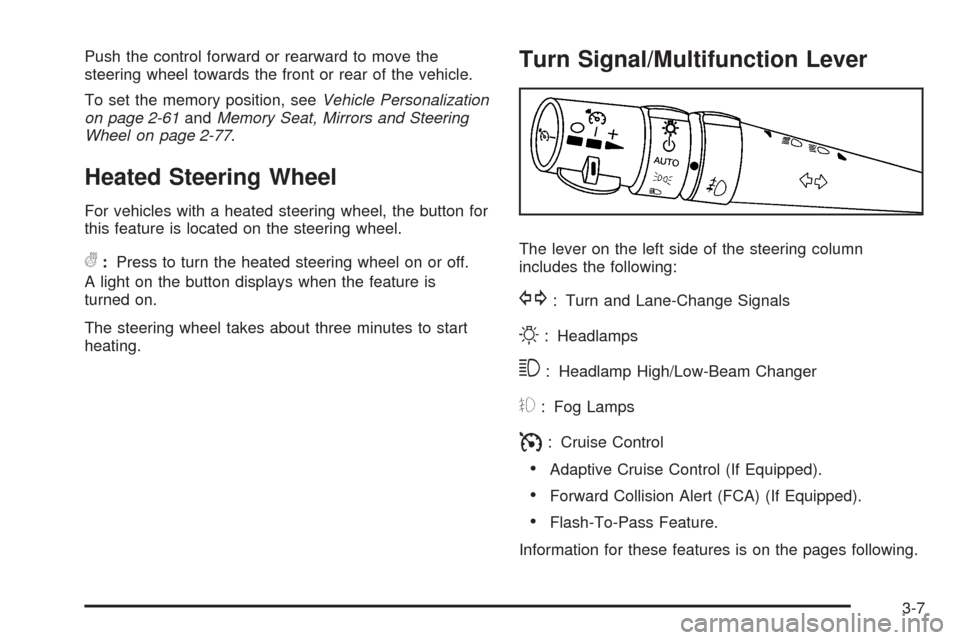
Turn Signal/Multifunction Lever
The lever on the left side of the steering column
includes the following:
G: Turn and Lane-Change Signals
O: Headlamps
3: Headlamp High/Low-Beam Changer
#: Fog Lamps
I: Cruise Control
Adaptive Cruise Control (If Equipped).
Forward Collision Alert (FCA) (If Equipped).
Flash-To-Pass Feature.
Information for these features is on the pages following.
3-7
Page 163 of 514

Headlamp High/Low-Beam Changer
Push forward on the turn signal/multifunction lever
to change the headlamps from low to high beam.
Pull the lever back and then release it to change
from high to low beam.
If you turn the vehicle off with the high beams on, the
next time you start your vehicle the low beams will
be on.
To re-activate high beams, pull lever toward you and
then push it forward again.
This light on the instrument
panel cluster will be on,
indicating high-beam
usage.
Forward Collision Alert (FCA)
System
If the vehicle has this system, read this entire section
before using it.
The system operates on a radio frequency subject to
Federal Communications Commission (FCC) Rules and
with Industry Canada.
This device complies with Part 15 of the FCC Rules.
Operation is subject to the following two conditions:
1. This device may not cause interference, and
2. This device must accept any interference received,
including interference that may cause undesired
operation of the device.
This device complies with RSS-210 of Industry Canada.
Operation is subject to the following two conditions:
1. This device may not cause interference, and
2. This device must accept any interference received,
including interference that may cause undesired
operation of the device.
Changes or modications to this system by other than
an authorized service facility could void authorization to
use this equipment.
3-9
Page 168 of 514
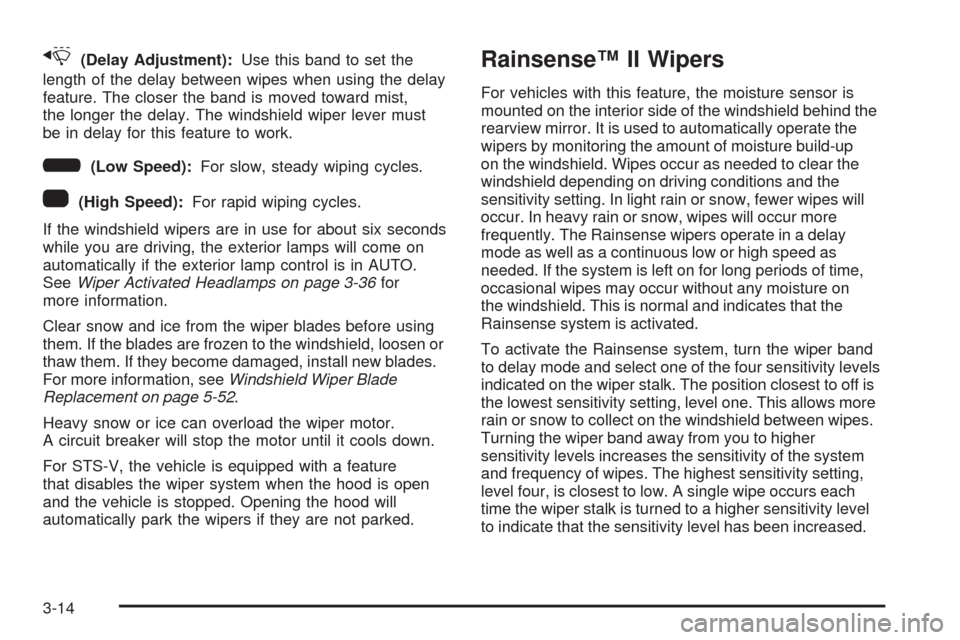
x(Delay Adjustment):Use this band to set the
length of the delay between wipes when using the delay
feature. The closer the band is moved toward mist,
the longer the delay. The windshield wiper lever must
be in delay for this feature to work.
6(Low Speed):For slow, steady wiping cycles.
1(High Speed):For rapid wiping cycles.
If the windshield wipers are in use for about six seconds
while you are driving, the exterior lamps will come on
automatically if the exterior lamp control is in AUTO.
SeeWiper Activated Headlamps on page 3-36for
more information.
Clear snow and ice from the wiper blades before using
them. If the blades are frozen to the windshield, loosen or
thaw them. If they become damaged, install new blades.
For more information, seeWindshield Wiper Blade
Replacement on page 5-52.
Heavy snow or ice can overload the wiper motor.
A circuit breaker will stop the motor until it cools down.
For STS-V, the vehicle is equipped with a feature
that disables the wiper system when the hood is open
and the vehicle is stopped. Opening the hood will
automatically park the wipers if they are not parked.
Rainsense™ II Wipers
For vehicles with this feature, the moisture sensor is
mounted on the interior side of the windshield behind the
rearview mirror. It is used to automatically operate the
wipers by monitoring the amount of moisture build-up
on the windshield. Wipes occur as needed to clear the
windshield depending on driving conditions and the
sensitivity setting. In light rain or snow, fewer wipes will
occur. In heavy rain or snow, wipes will occur more
frequently. The Rainsense wipers operate in a delay
mode as well as a continuous low or high speed as
needed. If the system is left on for long periods of time,
occasional wipes may occur without any moisture on
the windshield. This is normal and indicates that the
Rainsense system is activated.
To activate the Rainsense system, turn the wiper band
to delay mode and select one of the four sensitivity levels
indicated on the wiper stalk. The position closest to off is
the lowest sensitivity setting, level one. This allows more
rain or snow to collect on the windshield between wipes.
Turning the wiper band away from you to higher
sensitivity levels increases the sensitivity of the system
and frequency of wipes. The highest sensitivity setting,
level four, is closest to low. A single wipe occurs each
time the wiper stalk is turned to a higher sensitivity level
to indicate that the sensitivity level has been increased.
3-14
Page 169 of 514
Notice:Going through an automatic car wash with
the wipers on can damage them. Turn the wipers
off when going through an automatic car wash.
The mist and wash cycles operate as normal and are
not affected by the Rainsense function. The Rainsense
system can be overridden at any time by manually
turning the wiper band to low or high speed.
When Rainsense is active, the headlamps turn on
automatically. The headlamps will turn off again once
the wipers turn off if it is light enough outside. If it
is dark, they will remain on. SeeWiper Activated
Headlamps on page 3-36.
Notice:Do not place stickers or other items on
the exterior glass surface directly in front of
the moisture sensor. Doing this could cause
the moisture sensor to malfunction.
Windshield Washer
The windshield washer button is located at the end
of the windshield wiper lever on the right side of
the steering column.
K(Washer Fluid):Press and hold to spray
windshield washer uid on the windshield. The washer
will spray until the button is released. The wipers will
continue to clear the window for about six seconds after
the button is released and then stop or return to the
preset speed.
{CAUTION:
In freezing weather, do not use your washer until
the windshield is warmed. Otherwise the washer
uid can form ice on the windshield, blocking your
vision.
If the uid in the windshield washer uid reservoir is
low, the message CHECK WASHER FLUID will appear
on the Driver Information Center (DIC) display. It will
take 60 seconds after the bottle is relled for this
message to turn off. For information on the correct
washer uid mixture to use, seeWindshield Washer
Fluid on page 5-38andRecommended Fluids and
Lubricants on page 6-13.
3-15
Page 171 of 514
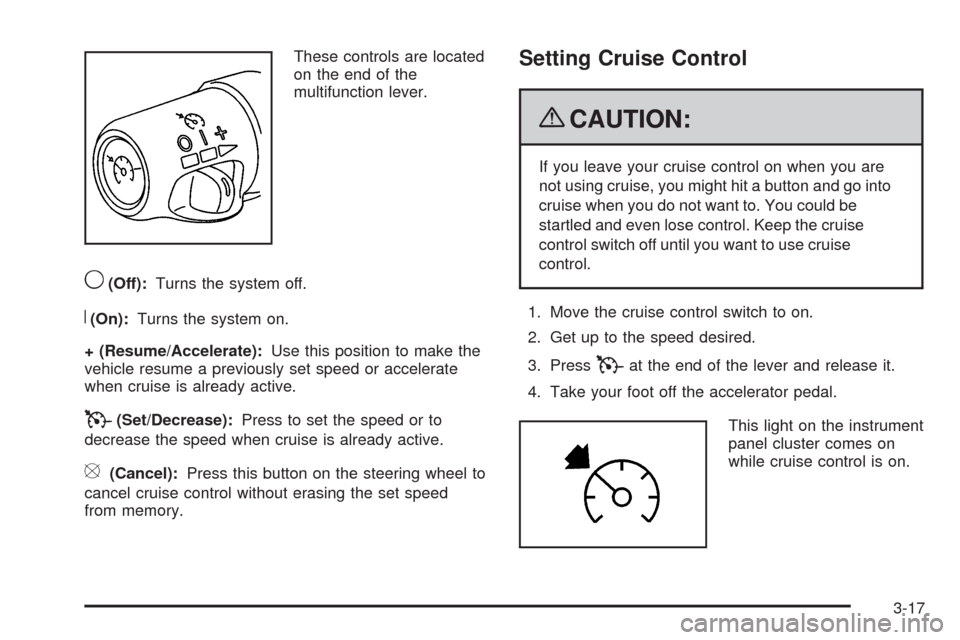
These controls are located
on the end of the
multifunction lever.
9(Off):Turns the system off.
R(On):Turns the system on.
+ (Resume/Accelerate):Use this position to make the
vehicle resume a previously set speed or accelerate
when cruise is already active.
T(Set/Decrease):Press to set the speed or to
decrease the speed when cruise is already active.
[(Cancel):Press this button on the steering wheel to
cancel cruise control without erasing the set speed
from memory.
Setting Cruise Control
{CAUTION:
If you leave your cruise control on when you are
not using cruise, you might hit a button and go into
cruise when you do not want to. You could be
startled and even lose control. Keep the cruise
control switch off until you want to use cruise
control.
1. Move the cruise control switch to on.
2. Get up to the speed desired.
3. Press
Tat the end of the lever and release it.
4. Take your foot off the accelerator pedal.
This light on the instrument
panel cluster comes on
while cruise control is on.
3-17
Page 173 of 514
Reducing Speed While Using Cruise
Control
There are two ways to reduce your speed while using
cruise control:
PressTat the end of the lever until the lower
speed desired is reached, then release it.
To slow down in very small amounts, briey
press
T. Each time this is done, the vehicle
goes about 1 mph (1.6 km/h) slower.
Passing Another Vehicle While Using
Cruise Control
Use the accelerator pedal to increase your vehicle
speed. When you take your foot off the pedal, the
vehicle slows down to the cruise control speed you
set earlier.
Using Cruise Control on Hills
How well the cruise control works on hills depends upon
the vehicle speed, load, and the steepness of the hills.
When going up steep hills, you might have to step on the
accelerator pedal to maintain the vehicle’s speed. When
going downhill, you might have to brake to keep the
vehicle’s speed down. Applying the brake will turn off the
cruise control. If you need to apply the brake due to the
grade of the downhill slope, you might not want to attempt
to use the cruise control feature.
Ending Cruise Control
There are three ways to end cruise control.
Step lightly on the brake pedal. This will end the
current cruise control session.
Move the cruise control switch to9to turn off the
system completely.
Press the[button on the steering wheel.
Erasing Speed Memory
The cruise control set speed memory is erased when
the cruise control or the ignition is turned off.
3-19
Page 181 of 514
{CAUTION:
When the Adaptive Cruise Control radar is blocked
by snow, ice, or dirt, it may not detect a vehicle
ahead. Adaptive Cruise Control may not have time
to slow your vehicle enough to avoid a collision.
Do not use Adaptive Cruise Control when the
radar is blocked by snow, ice, or dirt. Keep your
radar clean. See “Cleaning the System” later in
this section.
Adaptive Cruise Control automatically slows your vehicle
down when approaching a slower moving vehicle. It then
adjusts your speed to follow the vehicle in front at the
selected following distance. Your speed increases or
decreases to follow the vehicle in front of you but will
not exceed the set speed. It may apply limited braking,
if necessary. When braking is active, your brake lights
come on. It may feel or sound different than if you were
applying the brakes yourself. This is normal.
Stationary or Very Slow-Moving Objects
{CAUTION:
Adaptive Cruise Control may not detect and
react to stationary or slow-moving vehicles or
other objects ahead of you. You could crash into
an object ahead of you. Do not use Adaptive
Cruise Control when approaching stationary
or slow-moving vehicles or other objects.
{CAUTION:
Adaptive Cruise Control may not detect and react
to stationary or slow-moving vehicles or other
objects ahead of you. Your vehicle may accelerate
toward objects, such as a stopped vehicle that
suddenly appears after the lead vehicle changes
lanes. Your complete attention is always required
while driving and you should be ready to take
action and apply the brakes.
3-27