tire pressure reset CADILLAC STS 2009 1.G Owners Manual
[x] Cancel search | Manufacturer: CADILLAC, Model Year: 2009, Model line: STS, Model: CADILLAC STS 2009 1.GPages: 514, PDF Size: 2.73 MB
Page 174 of 514
Adaptive Cruise Control
If the vehicle has adaptive cruise control, read this
entire section before using this feature.
The system operates on a radio frequency subject to
Federal Communications Commission (FCC) Rules and
with Industry Canada.
This device complies with Part 15 of the FCC Rules.
Operation is subject to the following two conditions:
1. This device may not cause interference.
2. This device must accept any interference received,
including interference that may cause undesired
operation of the device.
This device complies with RSS-210 of Industry Canada.
Operation is subject to the following two conditions:
1. This device may not cause interference.
2. This device must accept any interference received,
including interference that may cause undesired
operation of the device.
Changes or modications to this system by other than
an authorized service facility could void authorization to
use this equipment.
Adaptive Cruise Control is an enhancement to traditional
cruise control and is not a safety system. It allows
you to keep cruise control engaged in moderate traffic
conditions without having to constantly be reset.Adaptive Cruise Control uses radar to detect a
vehicle directly ahead in your path, within a distance
of 328 ft (100 m), and operates at speeds above
30 mph (48 km/h). When it is engaged by the driver,
the system can apply limited braking or acceleration
of the vehicle, automatically, to maintain a selected
following distance to the vehicle ahead. The vehicle’s
braking during Adaptive Cruise Control is comparable
to a person applying moderate pressure to the vehicle’s
brake pedal. To disengage Adaptive Cruise Control,
apply the brake. If no vehicle is in your path, your
vehicle will react like traditional cruise control.
{CAUTION:
Adaptive Cruise Control will not apply hard braking
or bring the vehicle to a complete stop. It will not
respond to stopped vehicles, pedestrians or
animals. When you are approaching a vehicle or
object, Adaptive Cruise Control may not have time
to slow your vehicle enough to avoid a collision.
Your complete attention is always required while
driving and you should be ready to take action
and apply the brakes. For more information,
seeDefensive Driving on page 4-2.
3-20
Page 227 of 514
DIC Buttons (Base Level)
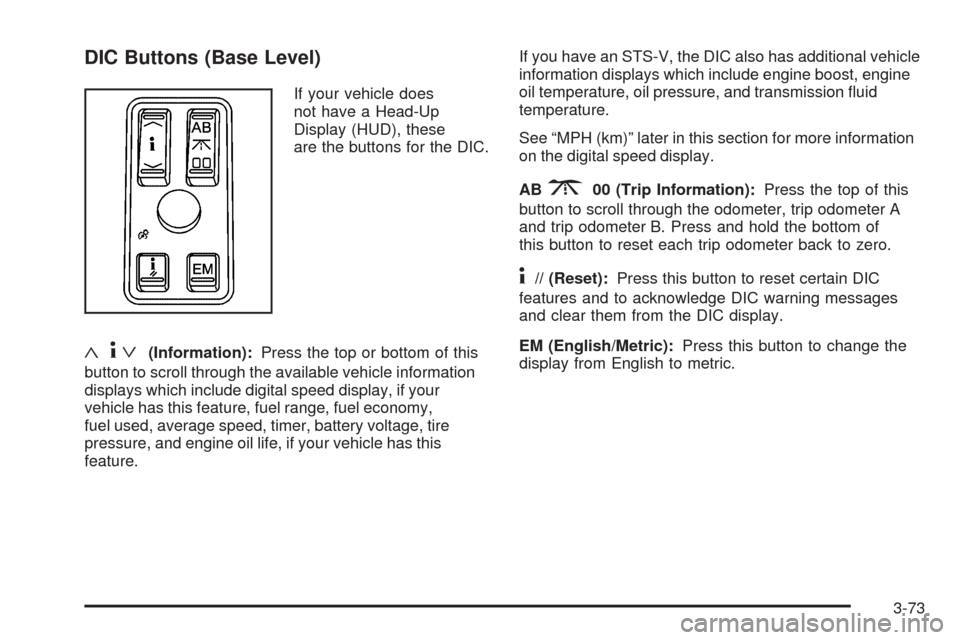
If your vehicle does
not have a Head-Up
Display (HUD), these
are the buttons for the DIC.
«4ª(Information):Press the top or bottom of this
button to scroll through the available vehicle information
displays which include digital speed display, if your
vehicle has this feature, fuel range, fuel economy,
fuel used, average speed, timer, battery voltage, tire
pressure, and engine oil life, if your vehicle has this
feature.If you have an STS-V, the DIC also has additional vehicle
information displays which include engine boost, engine
oil temperature, oil pressure, and transmission uid
temperature.
See “MPH (km)” later in this section for more information
on the digital speed display.
AB
300 (Trip Information):Press the top of this
button to scroll through the odometer, trip odometer A
and trip odometer B. Press and hold the bottom of
this button to reset each trip odometer back to zero.
4// (Reset):Press this button to reset certain DIC
features and to acknowledge DIC warning messages
and clear them from the DIC display.
EM (English/Metric):Press this button to change the
display from English to metric.
3-73
Page 228 of 514
DIC Buttons (Uplevel)
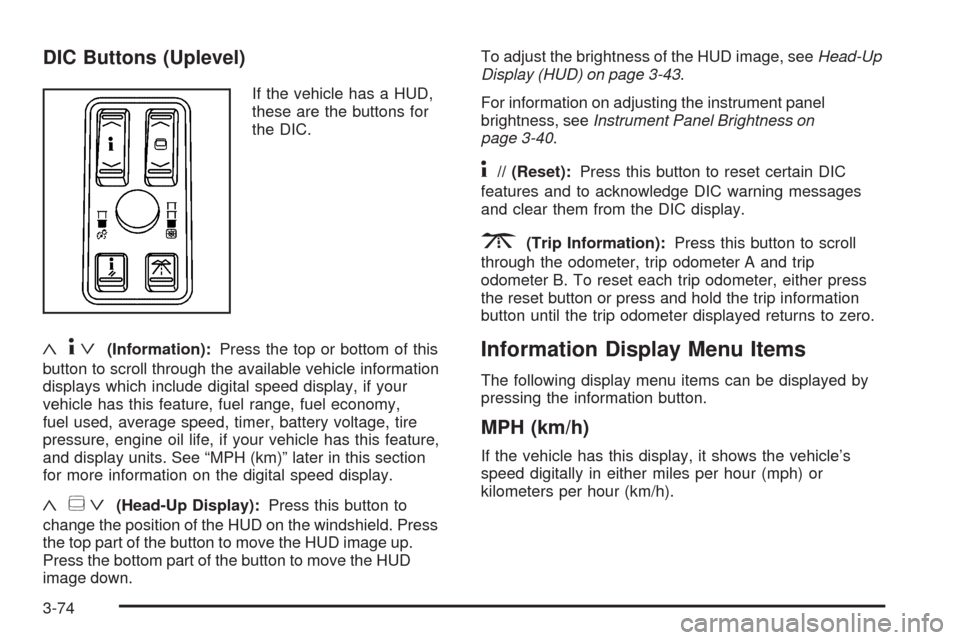
If the vehicle has a HUD,
these are the buttons for
the DIC.
«4ª(Information):Press the top or bottom of this
button to scroll through the available vehicle information
displays which include digital speed display, if your
vehicle has this feature, fuel range, fuel economy,
fuel used, average speed, timer, battery voltage, tire
pressure, engine oil life, if your vehicle has this feature,
and display units. See “MPH (km)” later in this section
for more information on the digital speed display.
«~ª(Head-Up Display):Press this button to
change the position of the HUD on the windshield. Press
the top part of the button to move the HUD image up.
Press the bottom part of the button to move the HUD
image down.To adjust the brightness of the HUD image, seeHead-Up
Display (HUD) on page 3-43.
For information on adjusting the instrument panel
brightness, seeInstrument Panel Brightness on
page 3-40.
4// (Reset):Press this button to reset certain DIC
features and to acknowledge DIC warning messages
and clear them from the DIC display.
3(Trip Information):Press this button to scroll
through the odometer, trip odometer A and trip
odometer B. To reset each trip odometer, either press
the reset button or press and hold the trip information
button until the trip odometer displayed returns to zero.
Information Display Menu Items
The following display menu items can be displayed by
pressing the information button.
MPH (km/h)
If the vehicle has this display, it shows the vehicle’s
speed digitally in either miles per hour (mph) or
kilometers per hour (km/h).
3-74
Page 231 of 514
Tire Pressure
This display shows the pressure for each tire in either
pounds per square inch (psi) or kilopascals (kPa). If the
tire pressure is normal, the value will display. If the tire
pressure is low or high, LOW or HIGH will appear on
the display with the value. SeeInflation - Tire Pressure
on page 5-64andDIC Warnings and Messages on
page 3-79for more information. Press the information
button to scroll through the following displays:
LF TIRE:This display shows the pressure in the driver
side front tire.
RF TIRE:This display shows the pressure in the
passenger side front tire.
LR TIRE:This display shows the pressure in the driver
side rear tire.
RR TIRE:This display shows the pressure in the
passenger side rear tire.
If the tire pressure display shows dashes instead of
a value, there may be a problem with your vehicle. If this
consistently occurs, see your dealer/retailer for service.
ENGINE OIL LIFE
If your vehicle has this display, it shows the estimated
oil life remaining. If you see 99% ENGINE OIL LIFE
on the display, that means that 99% of the current oil
life remains.
When the oil life is depleted, the CHANGE ENGINE OIL
SOON message will appear on the display. Change
the oil as soon as possible. In addition to the engine oil
life system monitoring the oil life, additional maintenance
is recommended in the Maintenance Schedule in this
manual. SeeScheduled Maintenance on page 6-4
andEngine Oil on page 5-18.
After an oil change, reset the ENGINE OIL LIFE display.
To reset, seeEngine Oil Life System on page 5-21.
The display will show 100% ENGINE OIL LIFE after
it has been reset. Also clear the CHANGE ENGINE OIL
SOON message from the display.
ENGLISH DISPLAY UNITS
(METRIC DISPLAY UNITS)
This display allows you to select between English and
metric units of measurement if your vehicle has the
uplevel DIC. Press the reset button to switch between
English and metric units.
Blank Line
This display shows no information.
3-77
Page 398 of 514
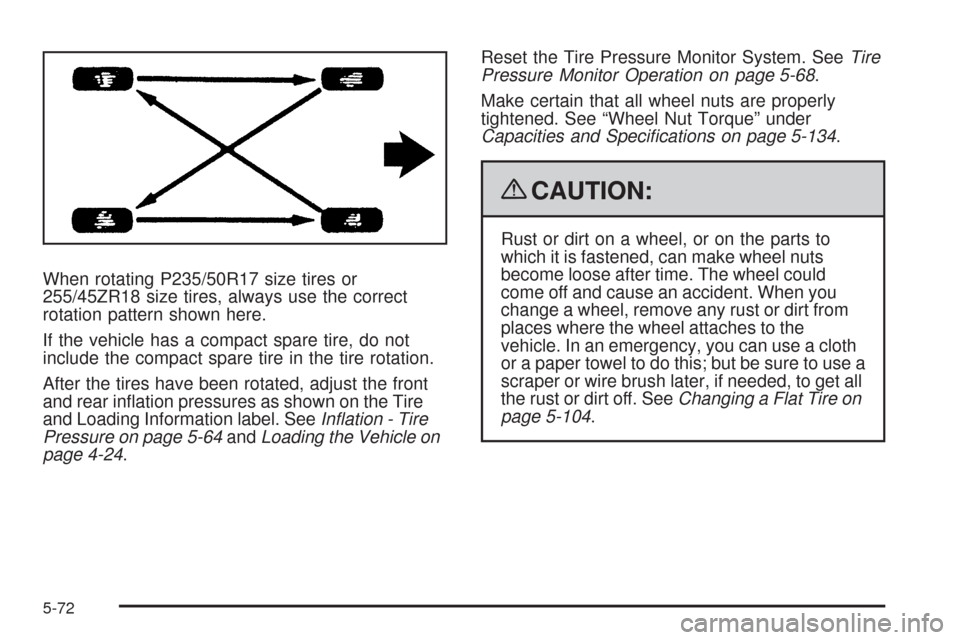
When rotating P235/50R17 size tires or
255/45ZR18 size tires, always use the correct
rotation pattern shown here.
If the vehicle has a compact spare tire, do not
include the compact spare tire in the tire rotation.
After the tires have been rotated, adjust the front
and rear ination pressures as shown on the Tire
and Loading Information label. SeeInflation - Tire
Pressure on page 5-64andLoading the Vehicle on
page 4-24.Reset the Tire Pressure Monitor System. SeeTire
Pressure Monitor Operation on page 5-68.
Make certain that all wheel nuts are properly
tightened. See “Wheel Nut Torque” under
Capacities and Specifications on page 5-134.
{CAUTION:
Rust or dirt on a wheel, or on the parts to
which it is fastened, can make wheel nuts
become loose after time. The wheel could
come off and cause an accident. When you
change a wheel, remove any rust or dirt from
places where the wheel attaches to the
vehicle. In an emergency, you can use a cloth
or a paper towel to do this; but be sure to use a
scraper or wire brush later, if needed, to get all
the rust or dirt off. SeeChanging a Flat Tire on
page 5-104.
5-72
Page 466 of 514

The proper replacement parts, uids, and lubricants to
use are listed inRecommended Fluids and Lubricants
on page 6-13andMaintenance Replacement Parts
on page 6-15. When the vehicle is serviced, make sure
these are used. All parts should be replaced and all
necessary repairs done before you or anyone else
drives the vehicle. We recommend the use of genuine
parts from your dealer/retailer.
Scheduled Maintenance
To maintain the ride, handling, and performance of this
vehicle, it is important that the rst tire rotation service
be performed when the vehicle has 5,000 to 8,000 miles
(8 000 to 13 000 km). Check tires for ination pressures
and wear. SeeTires on page 5-54. If tire rotation is
recommended for the vehicle, rotate tires. SeeTire
Inspection and Rotation on page 5-71and “Tire Wear
Inspection” inAt Least Once a Month on page 6-11.When the CHANGE ENGINE OIL SOON message
displays in the Driver Information Center (DIC),
service is required for the vehicle. Have the vehicle
serviced as soon as possible within the next 600 miles
(1 000 km). It is possible that, if driving under the
best conditions, the engine oil life system may not
indicate that vehicle service is necessary for over a year.
However, the engine oil and lter must be changed at
least once a year and at this time the system must
be reset. Your dealer/retailer has trained service
technicians who will perform this work using genuine
parts and reset the system.
If the engine oil life system is ever reset accidentally,
service the vehicle within 3,000 miles (5 000 km)
since the last service. Remember to reset the oil life
system whenever the oil is changed. SeeEngine Oil Life
System on page 5-21for information on the Engine
Oil Life System and resetting the system.
6-4
Page 467 of 514

When the CHANGE ENGINE OIL SOON message
appears, the following services, checks, and inspections
are required:
❑Change engine oil and lter. SeeEngine Oil on
page 5-18. Reset oil life system. SeeEngine Oil Life
System on page 5-21.An Emission Control Service.
❑Visually check for any leaks or damage.
See footnote (k).
❑Inspect engine air cleaner lter. If necessary, replace
lter. SeeEngine Air Cleaner/Filter on page 5-23.
See footnote (m).
❑Check tires for ination pressures and wear. SeeTires
on page 5-54. If tire rotation is recommended for the
vehicle, rotate tires. SeeTire Inspection and Rotation
on page 5-71and “Tire Wear Inspection” inAt Least
Once a Month on page 6-11.❑Inspect brake system.See footnote (a).
❑Check engine coolant and windshield washer uid
levels. If the vehicle has the 4.4L V8 supercharged
engine, check intercooler uid level. Add uid as
needed.
❑Perform any needed additional services. See
“Additional Required Services” in this section.
❑Inspect suspension and steering components.
See footnote (b).
❑Inspect engine cooling system.See footnote (c).
❑Inspect wiper blades.See footnote (d).
❑Inspect restraint system components.
See footnote (e).
❑Lubricate body components.See footnote (f).
6-5