automatic transmission CADILLAC STS 2011 1.G User Guide
[x] Cancel search | Manufacturer: CADILLAC, Model Year: 2011, Model line: STS, Model: CADILLAC STS 2011 1.GPages: 528, PDF Size: 4.96 MB
Page 143 of 528
Black plate (37,1)Cadillac STS Owner Manual - 2011
WARNING: (Continued)
death. Never run the engine in an enclosed area
that has no fresh air ventilation. For more
information, seeEngine Exhaust on page 3‑36.
{WARNING:
It can be dangerous to get out of the vehicle if the
automatic transmission shift lever is not fully in
P (Park) with the parking brake firmly set. The
vehicle can roll. Do not leave the vehicle when the
engine is running unless you have to. If you have
left the engine running, the vehicle can move
suddenly. You or others could be injured. To be
sure the vehicle will not move, even when you are
on fairly level ground, always set the parking
brake after you move the shift lever to P (Park).
Follow the proper steps to be sure the vehicle will not
move. See Shifting Into Park on page 3‑34.
If parking on a hill and pulling a trailer, see Towing a
Trailer on page 5‑31.
Mirrors
Automatic Dimming Rearview Mirror
The vehicle may have an inside rearview mirror with
automatic dimming and OnStar®controls; or it may
have OnStar®and a compass display. See the OnStar®
owner guide and/or Compasson page 3‑38for more
information.
O(On/Off): Press to turn the dimming feature on or off.
Automatic Dimming Mirror Operation
Automatic dimming reduces the glare of lights from
behind the vehicle. The dimming feature comes on and
the indicator light illuminates each time the vehicle is
started.
Cleaning the Mirror
Do not spray glass cleaner directly on the mirror. Use a
soft towel dampened with water.
3-37
Page 165 of 528
Black plate (59,1)Cadillac STS Owner Manual - 2011
Vehicle Personalization
The vehicle has personalization that allows you to
program certain features to a preferred setting for
up to two drivers. The back of the keyless access
transmitters are labelled 1 or 2. Additional keyless
access transmitters programmed to the vehicle,
as 3 and/or 4, do not have a number on the back and
are not capable of being personalized. The number of
programmable features varies depending upon which
vehicle options are purchased.
On all vehicles, features such as climate control
settings, radio and XM™preset settings, exterior
lighting at unlock and remote lock unlock confirmation,
and language have already been programmed. Your
vehicle also has an automatic door locking feature
that is always on. You cannot turn the automatic door
locking feature off. See Programmable Automatic Door
Locks on page 3‑14.
Some vehicles have additional features that can be
programmed including the seat, steering column, and
outside rearview mirror position.
If your vehicle has the base audio system, the following
information explains the vehicle personalization on your
vehicle.
If your vehicle has the Navigation system, see
“Personalization” in the Index of the Navigation System
manual for information on vehicle personalization. If your vehicle has the ability to program additional
personalization features, the driver's preferences are
recalled by pressing any button on the keyless access
transmitter, 1 or 2, by selecting Driver 1 or 2 on the radio
display, or when a valid keyless access transmitter is
detected upon opening the driver's door.
If more than one valid keyless access transmitter is
detected upon opening the driver's door, the driver
preferences for the lowest driver number will be
recalled.
Certain features can be programmed not to recall until
the ignition is turned off.
The default settings were preset but may have been
changed.
To change feature preferences, use the following
procedure.
Entering the Personal Settings Menu
To enter the feature programming mode:
1. The ignition must be either on, in ACCESSORY, or in RAP and the transmission in P (Park) or the
vehicle speed less than 6 mph (9 km/h).
To avoid excessive drain on the battery, it is
recommended that the headlamps are turned off.
2. Press any button on the appropriate keyless access transmitter to identify yourself as Driver 1 or
Driver 2.
3-59
Page 176 of 528
Black plate (70,1)Cadillac STS Owner Manual - 2011
DRIVER UNLOCK IN PARK
The feature allows the driver's door to automatically
unlock when the transmission is shifted into P (Park).
Programmable Modes
Mode 1:ON
Mode 2: OFF (default)
To program the vehicle to a different mode: 1. Enter the PERSONAL SETTINGS MENU by following the instructions listed previously under
“Entering the Personal Settings Menu.”
2. Turn the tune/select knob until DRIVER UNLOCK IN PARK is highlighted.
3. Press the tune/select knob to switch back and forth between on and off.
When the mode is turned on, a check mark will
appear next to the feature name.
The mode you selected is now set. You can either exit
the programming mode by following the instructions
later in this section or program the next feature
available on your vehicle.
DOORS UNLOCK IN PARK
The feature allows all of the doors to automatically
unlock when the transmission is shifted into P (Park).
Programmable Modes
Mode 1: ON (default)
Mode 2: OFF
To program the vehicle to a different mode: 1. Enter the PERSONAL SETTINGS MENU by following the instructions listed previously under
“Entering the Personal Settings Menu.”
2. Turn the tune/select knob until DOORS UNLOCK IN PARK is highlighted.
3. Press the tune/select knob to switch back and forth between on and off.
When the mode is turned on, a check mark will
appear next to the feature name.
The mode you selected is now set. You can either exit
the programming mode by following the instructions
later in this section or program the next feature
available on your vehicle.
3-70
Page 184 of 528
Black plate (78,1)Cadillac STS Owner Manual - 2011
STORE DRIVER SETTINGS
To store driver settings:1. Adjust your settings for the driver seat, the outside rearview mirrors, and the steering column to a
comfortable driving position.
2. Enter the memory programming mode for your driver settings by following the instructions listed
previously under “Entering the Driver Selection
Submenu.”
3. From the DRIVER SELECTION submenu, turn the tune/select knob to scroll to STORE DRIVER
SETTINGS and press in the knob. Two beeps will
sound to confirm that your driver settings are
saved.
4. Set the HUD position, if your vehicle has this feature, the climate control temperature, fan speed
and mode settings, the radio presets, tone,
volume, playback mode (AM/FM, XM™, or CD),
and compact disc position.
Your memory settings are now programmed.
Any changes that are made to the HUD, audio
system, and climate controls while driving will be
automatically stored when the ignition is turned off.
5. Repeat the procedure for a second driver by programming the other driver number.
Entering the Driver Exit Settings
Submenu
To enter the memory programming mode for your exit
settings:
1. The ignition must be either on, in ACCESSORY, or in RAP and the transmission in P (Park) or the
vehicle speed less than 6 mph (9 km/h).
2. Press any button on the appropriate keyless access transmitter to identify yourself as Driver 1 or
Driver 2.
3. Turn on the radio by pressing the power/ volume knob.
4. Press the CNFG radio button to enter the main menu of the radio.
5. Turn the tune/select knob and scroll to SETUP.
6. Press the tune/select knob to enter the SETUP menu.
7. Turn the tune/select knob and scroll to DRIVER EXIT SETTINGS.
8. Press the tune/select knob to enter the DRIVER EXIT SETTINGS submenu. The following items will
appear:
.RECALL EXIT SETTINGS
.STORE EXIT SETTINGS
3-78
Page 218 of 528
Black plate (32,1)Cadillac STS Owner Manual - 2011
Daytime Running Lamps (DRL)
Daytime Running Lamps (DRL) can make it easier for
others to see the front of your vehicle during the day.
Fully functional daytime running lamps are required on
all vehicles first sold in Canada.
The DRL system comes on when the following
conditions are met:
.It is still daylight and the ignition is on.
.The automatic lights are enabled.
.The transmission is not in P (Park).
When DRL are on, only the front turn signal lamps will
be on. No other exterior lamps will be on when the DRL
are being used. The instrument panel will not be lit.
When the automatic lights are enabled and it is dark
enough outside, the DRL will turn off and the low-beam
headlamps will turn on. When it is bright enough
outside, the low-beam headlamps will go off, and the
DRL will turn back on. If the vehicle is started in a dark
garage, the automatic headlamp system comes on
immediately. Once the vehicle leaves the garage,
it will take about one minute for the automatic
headlamp system to change to DRL if it is light outside. During that delay, the instrument panel cluster may not
be as bright as usual. Make sure the instrument panel
brightness lever is in the full bright position. See
Instrument Panel Brightness on page 4‑35.
To operate the vehicle with the DRL off, turn the exterior
lamp control off and then do one of the following:
.Turn the exterior lamp control to the parking lamp
position.
.Turn the exterior lamp control to the headlamp
position.
.Turn the exterior lamp control from AUTO to off
and back to AUTO.
An AUTOMATIC LIGHTS OFF message will appear on
the DIC, showing that automatic lighting has been
disabled. See DIC Warnings and Messages
on
page 4‑76.
The regular headlamp system should be turned on
when needed.
4-32
Page 224 of 528
Black plate (38,1)Cadillac STS Owner Manual - 2011
Head-Up Display (HUD)
{WARNING:
If the HUD image is too bright, or too high in your
field of view, it may take you more time to see
things you need to see when it is dark outside. Be
sure to keep the HUD image dim and placed low
in your field of view.
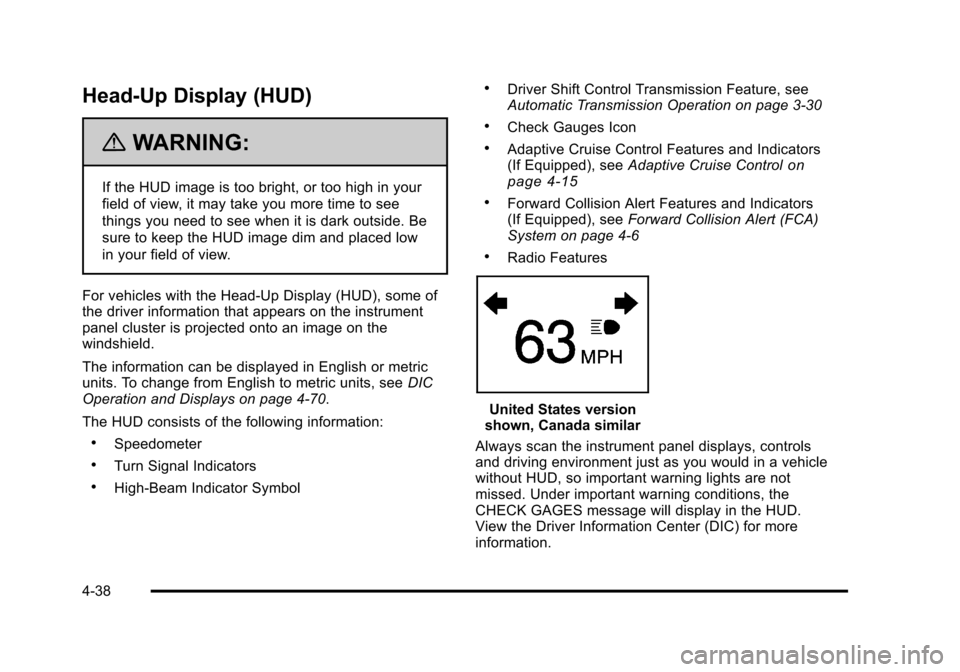
For vehicles with the Head-Up Display (HUD), some of
the driver information that appears on the instrument
panel cluster is projected onto an image on the
windshield.
The information can be displayed in English or metric
units. To change from English to metric units, see DIC
Operation and Displays on page 4‑70.
The HUD consists of the following information:
.Speedometer
.Turn Signal Indicators
.High-Beam Indicator Symbol
.Driver Shift Control Transmission Feature, see
Automatic Transmission Operation on page 3‑30
.Check Gauges Icon
.Adaptive Cruise Control Features and Indicators
(If Equipped), see Adaptive Cruise Controlon
page 4‑15
.Forward Collision Alert Features and Indicators
(If Equipped), see Forward Collision Alert (FCA)
System on page 4‑6
.Radio Features
United States version
shown, Canada similar
Always scan the instrument panel displays, controls
and driving environment just as you would in a vehicle
without HUD, so important warning lights are not
missed. Under important warning conditions, the
CHECK GAGES message will display in the HUD.
View the Driver Information Center (DIC) for more
information.
4-38
Page 255 of 528
Black plate (69,1)Cadillac STS Owner Manual - 2011
Driver Information Center (DIC)
The Driver Information Center (DIC) gives you the
status of many of your vehicle's systems. The DIC is
also used to display warning/status messages. All
messages will appear in the DIC display located at
the bottom of the instrument panel cluster, below the
tachometer and speedometer. The DIC buttons are
located on the instrument panel, to the left of the
steering wheel.
The DIC comes on when the ignition is on. After a short
delay, the DIC will display the current driver and the
information that was last displayed before the engine
was turned off.
The top line of the DIC display shows the vehicle
system information and the warning/status messages.
The bottom line of the DIC display shows either the
odometer, the trip odometer A or the trip odometer B
information on the left side. Only one odometer can
appear at a time. See“Trip Information”underDIC
Operation and Displays
on page 4‑70for information on changing the display to show the odometer or trip
odometer information. The bottom line of the DIC
display also shows the outside temperature on the
right side and the shift lever position indicator in the
center. See
Automatic Transmission Operation
on
page 3‑30for more information on the shift lever
positions.
When the sport mode is active, an S will appear next
to the shift position indicator on the center of the DIC
display. When the manual mode is active, an M will
appear on the DIC display. When the normal mode is
active, only the shift position indicator will appear. While
the Driver Shift Control (DSC) feature is active, the DIC
will change to show the selected gear. See “Driver Shift
Control (DSC)” underAutomatic Transmission
Operation
on page 3‑30for more information.
If a problem is detected, a warning message will appear
on the display. Be sure to take any message that
appears on the display seriously and remember that
clearing the message will only make the message
disappear, not correct the problem.
4-69
Page 324 of 528
Black plate (12,1)Cadillac STS Owner Manual - 2011
SeeDIC Warnings and Messageson page 4‑76. The
normal power steering system is still operational. You
might notice that the center position of the steering
wheel is changed and that more steering effort at low
speeds and less steering effort at high speeds is
required. You can continue to drive the vehicle with
normal power steering but you should have your dealer
inspect the steering system as soon as possible in
order to have the problem corrected and the steering
wheel position centered.
When stability control activates, the system
automatically adjusts the front road wheel steering
angle, modifies the suspension stiffness, and selectively
applies braking pressure at any one of the vehicle's
brakes to help maintain directional control of the
vehicle. Adjustments to the steering will not be felt in
the steering wheel. See Enhanced StabiliTrak
®on
page 5‑7.
It is recommended that the battery not be disconnected
when the steering wheel is turned from the center
position. If this occurs, the center position of the
steering wheel could be temporarily changed a small
amount. You can continue to operate the vehicle and,
after a short time, the center position of the steering
wheel will return to normal.
Steering Tips
It is important to take curves at a reasonable speed.
Traction in a curve depends on the condition of the tires
and the road surface, the angle at which the curve is
banked, and vehicle speed. While in a curve, speed is
the one factor that can be controlled.
If there is a need to reduce speed, do it before entering
the curve, while the front wheels are straight.
Try to adjust the speed so you can drive through the
curve. Maintain a reasonable, steady speed. Wait to
accelerate until out of the curve, and then accelerate
gently into the straightaway.
To help you steer in the direction you want to go, during
certain sharp or sudden cornering maneuvers, gear
selection is controlled. This will maximize the available
drive wheel torque and minimize the transmission
response time and shift activity. During this kind of
maneuver, the transmission shifts automatically as
vehicle speed changes.
5-12
Page 349 of 528
Black plate (37,1)Cadillac STS Owner Manual - 2011
Driving On Grades
Reduce speed and shift to a lower gearbeforestarting
down a long or steep downgrade. If the transmission is
not shifted down, the brakes might have to be used so
much that they would get hot and no longer work well.
On a long uphill grade, shift down and reduce the
vehicle's speed to around 45 mph (70 km/h) to reduce
the possibility of the engine and the transmission
overheating.
Vehicles can tow in D (Drive). Shift the transmission to
a lower gear if the transmission shifts too often under
heavy loads and/or hilly conditions.
When towing at high altitude on steep uphill grades,
consider the following: Engine coolant will boil at a
lower temperature than at normal altitudes. If the engine
is turned off immediately after towing at high altitude on
steep uphill grades, the vehicle may show signs similar
to engine overheating. To avoid this, let the engine run
while parked, preferably on level ground, with the
automatic transmission in P (Park) for a few minutes
before turning the engine off. If the overheat warning
comes on, see Engine Overheating on page 6‑30.
Parking on Hills
{WARNING:
Parking the vehicle on a hill with the trailer
attached can be dangerous. If something goes
wrong, the rig could start to move. People can be
injured, and both the vehicle and the trailer can be
damaged. When possible, always park the rig on
a flat surface.
If parking the rig on a hill: 1. Press the brake pedal, but do not shift into P (Park) yet. Turn the wheels into the curb if facing downhill
or into traffic if facing uphill.
2. Have someone place chocks under the trailer wheels.
3. When the wheel chocks are in place, release the regular brakes until the chocks absorb the load.
4. Reapply the brake pedal. Then apply the parking brake and shift into P (Park).
5. Release the brake pedal.
5-37
Page 350 of 528
Black plate (38,1)Cadillac STS Owner Manual - 2011
Leaving After Parking on a Hill
1. Apply and hold the brake pedal while you:
.Start the engine
.Shift into a gear
.Release the parking brake
2. Let up on the brake pedal.
3. Drive slowly until the trailer is clear of the chocks.
4. Stop and have someone pick up and store the chocks.
Maintenance When Trailer Towing
The vehicle needs service more often when pulling a
trailer. See this manual's Maintenance Schedule or
Index for more information. Things that are especially
important in trailer operation are automatic transmission
fluid, engine oil, axle lubricant, belts, cooling system
and brake system. It is a good idea to inspect these
before and during the trip.
Check periodically to see that all hitch nuts and bolts
are tight.
Engine Cooling When Trailer Towing
The cooling system may temporarily overheat during
severe operating conditions. See Engine Overheating
on page 6‑30.
5-38