change time CADILLAC STS 2011 1.G User Guide
[x] Cancel search | Manufacturer: CADILLAC, Model Year: 2011, Model line: STS, Model: CADILLAC STS 2011 1.GPages: 528, PDF Size: 4.96 MB
Page 192 of 528
Black plate (6,1)Cadillac STS Owner Manual - 2011
Forward Collision Alert (FCA)
System
For vehicles with this feature, read the following section
before using it.
This vehicle has systems that operate on a radio
frequency that comply with Part 15 of the Federal
Communications Commission (FCC) rules and with
Industry Canada Standards RSS‐210/220/310.
Operation is subject to the following two conditions:1. The device may not cause interference.
2. The device must accept any interference received, including interference that may cause undesired
operation of the device.
Changes or modifications to this system by other than
an authorized service facility could void authorization to
use this equipment. The Forward Collision Alert (FCA) system provides an
audible and visual warning if you approach a vehicle
too rapidly. FCA also provides a visual warning with
no audible warning if you are following another vehicle
much too closely. FCA uses the Adaptive Cruise Control
radar to detect a vehicle directly ahead, in your path,
within a distance of 100 m (328 ft) and operates at
speeds above 32 km/h (20 mph).
{WARNING:
FCA is only a warning system and does not apply
the brakes. When you are approaching a vehicle
or object too rapidly or when you are following a
vehicle too closely that is ahead of you, FCA may
not provide you with enough time to avoid a
collision. FCA is not designed to warn the driver of
pedestrians or animals. Your complete attention is
always required while driving and you should be
ready to take action and apply the brakes. For
more information, see
Defensive Driving
on
page 5‑2
.
4-6
Page 206 of 528
Black plate (20,1)Cadillac STS Owner Manual - 2011
.To increase the set speed in small amounts, move
the switch briefly to resume/increase. Each time
this is done, the vehicle set speed increases by
about 1.6 km/h (1 mph).
Your vehicle will not reach the set speed until the
system determines there is no vehicle in front of you.
At that point, your vehicle speed will increase to the set
speed.
Decreasing Set Speed While Using
Adaptive Cruise Control
If the Adaptive Cruise Control system is already
activated,
.PressTat the end of the lever until the lower
speed desired is reached, then release the button.
.To slow down in small amounts, briefly
press
T. Each time this is done, the vehicle
set speed decreases by about 1.6 km/h (1 mph).
Selecting the Follow Distance (GAP)
When the system detects a slower moving vehicle, it
will adjust your vehicle's speed and maintain the
following distance (gap) selected.
Use the GAP button on the steering wheel to adjust
the follow distance between your vehicle and other
vehicle's.
Press the top of the button to increase the distance or
the bottom of the button to decrease the distance. The
first button press shows the current follow distance
setting on the HUD. The current following distance
setting is maintained until it is changed.
There are six follow distances to choose from. The
follow distance selection ranges from near to far
(one second to two seconds follow time). The distance
maintained for a selected follow distance varies based
on vehicle speed. The faster the vehicle speed the
further back you will follow. Consider traffic and weather
conditions when selecting the follow distance.
4-20
Page 215 of 528
Black plate (29,1)Cadillac STS Owner Manual - 2011
been turned on, it remains on each time the vehicle is
started. Additionally, the IntelliBeam system must be
enabled.
To enable the System, turn the exterior lamp control to
AUTO, with the turn signal/multifunction lever in its
starting position. The High-Beam On Light appears on
the instrument panel cluster when the high-beams are
on. SeeHighbeam On Light
on page 4‑68. The vehicle
has variable intensity high-beams. The high-beam
indicator on the instrument panel cluster comes on as
soon as the high-beams start to come on, and remains
on until the high-beams have completely turned off.
Vehicles with IntelliBeam quickly turn off the
high-beams if the system detects the sudden presence
of vehicle lights ahead.
Driving with IntelliBeam
IntelliBeam only activates the high-beams when driving
over 32 km/h (20 mph).
The high-beam headlamps remain on, under the control
of IntelliBeam, until any of the following situations occur:
.The system detects an approaching vehicle's
headlamps.
.The system detects a preceding vehicle's
taillamps.
.The outside light is bright enough that high-beam
headlamps are not required.
.The high-beam headlamps are manually turned
on or you use the flash-to-pass feature. See
Headlamp High/Low-Beam Changer
on page 4‑5and Flash-to-Passon page 4‑9.
When either of these conditions occur, the
IntelliBeam feature is temporarily disabled until the
high-beam stalk is returned to its starting position.
If either of these conditions occur and IntelliBeam
already has the high-beam headlamps on, the
feature is disabled and the light in the mirror
turns off.
.The exterior lamp control is turned to any setting
except AUTO.
When this occurs, IntelliBeam is disabled until the
control is turned back to the AUTO position and
the AUTOMATIC LIGHTS ON message displays
on the DIC.
.The IntelliBeam system is turned off at the inside
rearview mirror.
.The vehicle's speed drops below 24 km/h
(15 mph).
4-29
Page 218 of 528
Black plate (32,1)Cadillac STS Owner Manual - 2011
Daytime Running Lamps (DRL)
Daytime Running Lamps (DRL) can make it easier for
others to see the front of your vehicle during the day.
Fully functional daytime running lamps are required on
all vehicles first sold in Canada.
The DRL system comes on when the following
conditions are met:
.It is still daylight and the ignition is on.
.The automatic lights are enabled.
.The transmission is not in P (Park).
When DRL are on, only the front turn signal lamps will
be on. No other exterior lamps will be on when the DRL
are being used. The instrument panel will not be lit.
When the automatic lights are enabled and it is dark
enough outside, the DRL will turn off and the low-beam
headlamps will turn on. When it is bright enough
outside, the low-beam headlamps will go off, and the
DRL will turn back on. If the vehicle is started in a dark
garage, the automatic headlamp system comes on
immediately. Once the vehicle leaves the garage,
it will take about one minute for the automatic
headlamp system to change to DRL if it is light outside. During that delay, the instrument panel cluster may not
be as bright as usual. Make sure the instrument panel
brightness lever is in the full bright position. See
Instrument Panel Brightness on page 4‑35.
To operate the vehicle with the DRL off, turn the exterior
lamp control off and then do one of the following:
.Turn the exterior lamp control to the parking lamp
position.
.Turn the exterior lamp control to the headlamp
position.
.Turn the exterior lamp control from AUTO to off
and back to AUTO.
An AUTOMATIC LIGHTS OFF message will appear on
the DIC, showing that automatic lighting has been
disabled. See DIC Warnings and Messages
on
page 4‑76.
The regular headlamp system should be turned on
when needed.
4-32
Page 224 of 528
Black plate (38,1)Cadillac STS Owner Manual - 2011
Head-Up Display (HUD)
{WARNING:
If the HUD image is too bright, or too high in your
field of view, it may take you more time to see
things you need to see when it is dark outside. Be
sure to keep the HUD image dim and placed low
in your field of view.
For vehicles with the Head-Up Display (HUD), some of
the driver information that appears on the instrument
panel cluster is projected onto an image on the
windshield.
The information can be displayed in English or metric
units. To change from English to metric units, see DIC
Operation and Displays on page 4‑70.
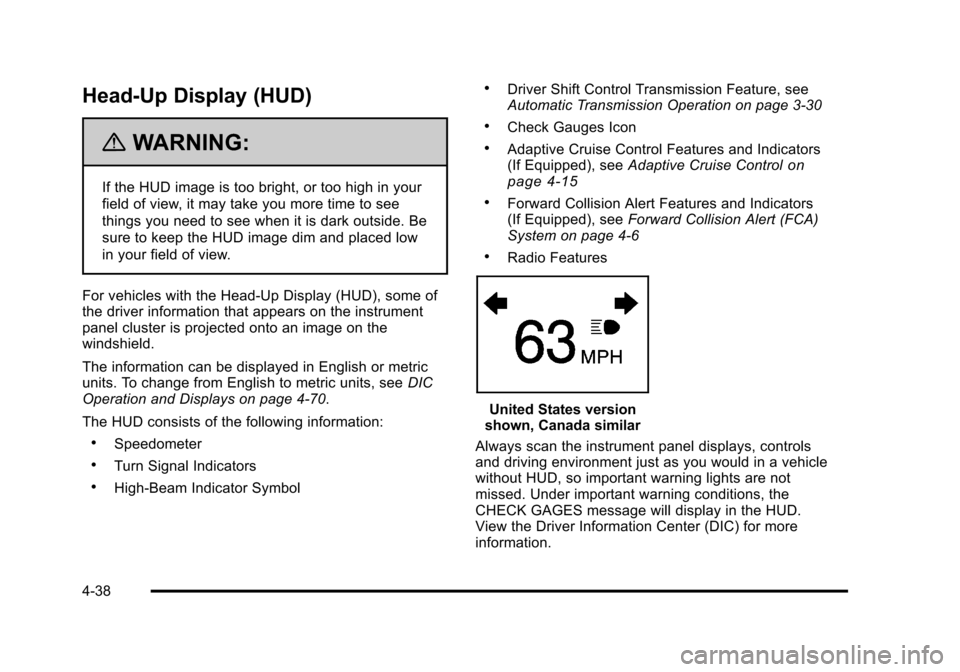
The HUD consists of the following information:
.Speedometer
.Turn Signal Indicators
.High-Beam Indicator Symbol
.Driver Shift Control Transmission Feature, see
Automatic Transmission Operation on page 3‑30
.Check Gauges Icon
.Adaptive Cruise Control Features and Indicators
(If Equipped), see Adaptive Cruise Controlon
page 4‑15
.Forward Collision Alert Features and Indicators
(If Equipped), see Forward Collision Alert (FCA)
System on page 4‑6
.Radio Features
United States version
shown, Canada similar
Always scan the instrument panel displays, controls
and driving environment just as you would in a vehicle
without HUD, so important warning lights are not
missed. Under important warning conditions, the
CHECK GAGES message will display in the HUD.
View the Driver Information Center (DIC) for more
information.
4-38
Page 229 of 528
Black plate (43,1)Cadillac STS Owner Manual - 2011
Climate Controls
Dual Climate Control System
The heating, cooling, and ventilation can be controlled
for the vehicle with this system.
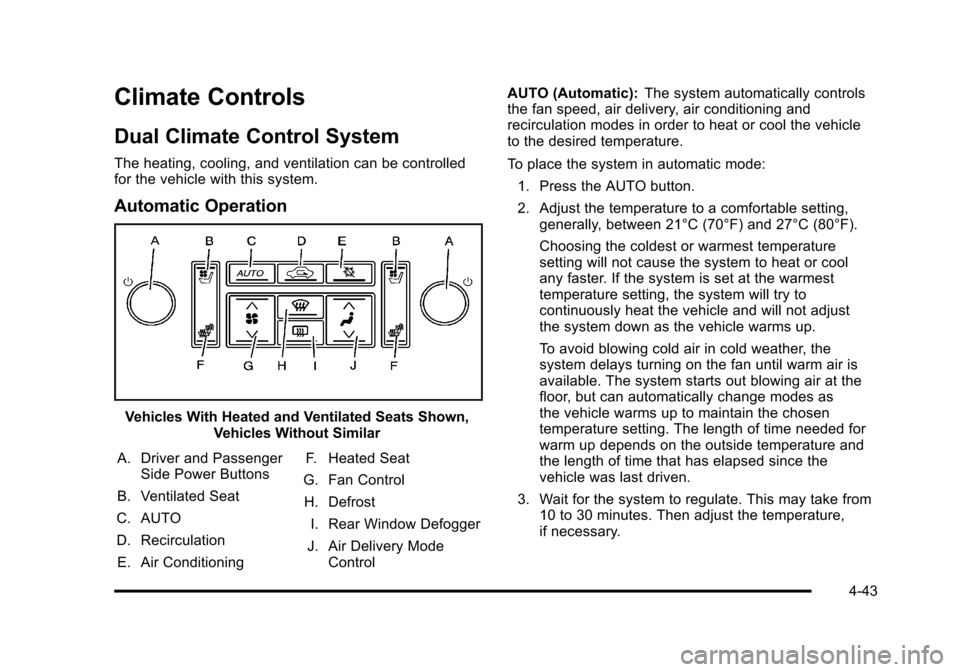
Automatic Operation
Vehicles With Heated and Ventilated Seats Shown,Vehicles Without Similar
A. Driver and Passenger Side Power Buttons
B. Ventilated Seat
C. AUTO
D. Recirculation E. Air Conditioning F. Heated Seat
G. Fan Control H. Defrost I. Rear Window Defogger
J. Air Delivery Mode Control AUTO (Automatic):
The system automatically controls
the fan speed, air delivery, air conditioning and
recirculation modes in order to heat or cool the vehicle
to the desired temperature.
To place the system in automatic mode:
1. Press the AUTO button.
2. Adjust the temperature to a comfortable setting, generally, between 21°C (70°F) and 27°C (80°F).
Choosing the coldest or warmest temperature
setting will not cause the system to heat or cool
any faster. If the system is set at the warmest
temperature setting, the system will try to
continuously heat the vehicle and will not adjust
the system down as the vehicle warms up.
To avoid blowing cold air in cold weather, the
system delays turning on the fan until warm air is
available. The system starts out blowing air at the
floor, but can automatically change modes as
the vehicle warms up to maintain the chosen
temperature setting. The length of time needed for
warm up depends on the outside temperature and
the length of time that has elapsed since the
vehicle was last driven.
3. Wait for the system to regulate. This may take from 10 to 30 minutes. Then adjust the temperature,
if necessary.
4-43
Page 255 of 528
Black plate (69,1)Cadillac STS Owner Manual - 2011
Driver Information Center (DIC)
The Driver Information Center (DIC) gives you the
status of many of your vehicle's systems. The DIC is
also used to display warning/status messages. All
messages will appear in the DIC display located at
the bottom of the instrument panel cluster, below the
tachometer and speedometer. The DIC buttons are
located on the instrument panel, to the left of the
steering wheel.
The DIC comes on when the ignition is on. After a short
delay, the DIC will display the current driver and the
information that was last displayed before the engine
was turned off.
The top line of the DIC display shows the vehicle
system information and the warning/status messages.
The bottom line of the DIC display shows either the
odometer, the trip odometer A or the trip odometer B
information on the left side. Only one odometer can
appear at a time. See“Trip Information”underDIC
Operation and Displays
on page 4‑70for information on changing the display to show the odometer or trip
odometer information. The bottom line of the DIC
display also shows the outside temperature on the
right side and the shift lever position indicator in the
center. See
Automatic Transmission Operation
on
page 3‑30for more information on the shift lever
positions.
When the sport mode is active, an S will appear next
to the shift position indicator on the center of the DIC
display. When the manual mode is active, an M will
appear on the DIC display. When the normal mode is
active, only the shift position indicator will appear. While
the Driver Shift Control (DSC) feature is active, the DIC
will change to show the selected gear. See “Driver Shift
Control (DSC)” underAutomatic Transmission
Operation
on page 3‑30for more information.
If a problem is detected, a warning message will appear
on the display. Be sure to take any message that
appears on the display seriously and remember that
clearing the message will only make the message
disappear, not correct the problem.
4-69
Page 256 of 528
Black plate (70,1)Cadillac STS Owner Manual - 2011
DIC Operation and Displays
The Driver Information Center (DIC) has different
modes which can be accessed by pressing the four
DIC buttons located on the instrument panel, to the
left of the steering wheel.
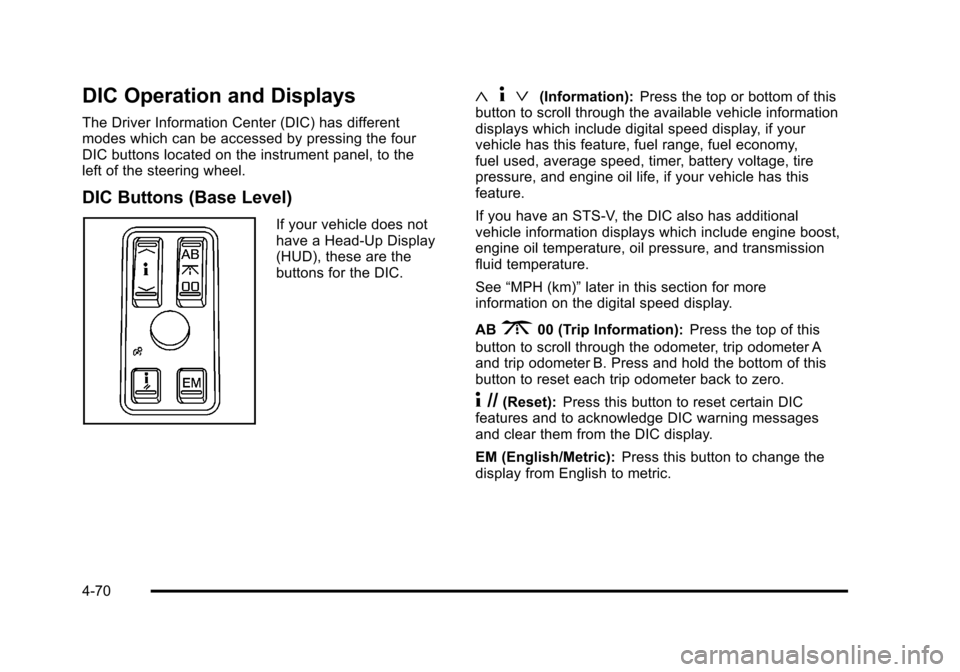
DIC Buttons (Base Level)
If your vehicle does not
have a Head-Up Display
(HUD), these are the
buttons for the DIC.
«4ª(Information): Press the top or bottom of this
button to scroll through the available vehicle information
displays which include digital speed display, if your
vehicle has this feature, fuel range, fuel economy,
fuel used, average speed, timer, battery voltage, tire
pressure, and engine oil life, if your vehicle has this
feature.
If you have an STS-V, the DIC also has additional
vehicle information displays which include engine boost,
engine oil temperature, oil pressure, and transmission
fluid temperature.
See “MPH (km)” later in this section for more
information on the digital speed display.
AB
300 (Trip Information): Press the top of this
button to scroll through the odometer, trip odometer A
and trip odometer B. Press and hold the bottom of this
button to reset each trip odometer back to zero.
4 //(Reset): Press this button to reset certain DIC
features and to acknowledge DIC warning messages
and clear them from the DIC display.
EM (English/Metric): Press this button to change the
display from English to metric.
4-70
Page 257 of 528
Black plate (71,1)Cadillac STS Owner Manual - 2011
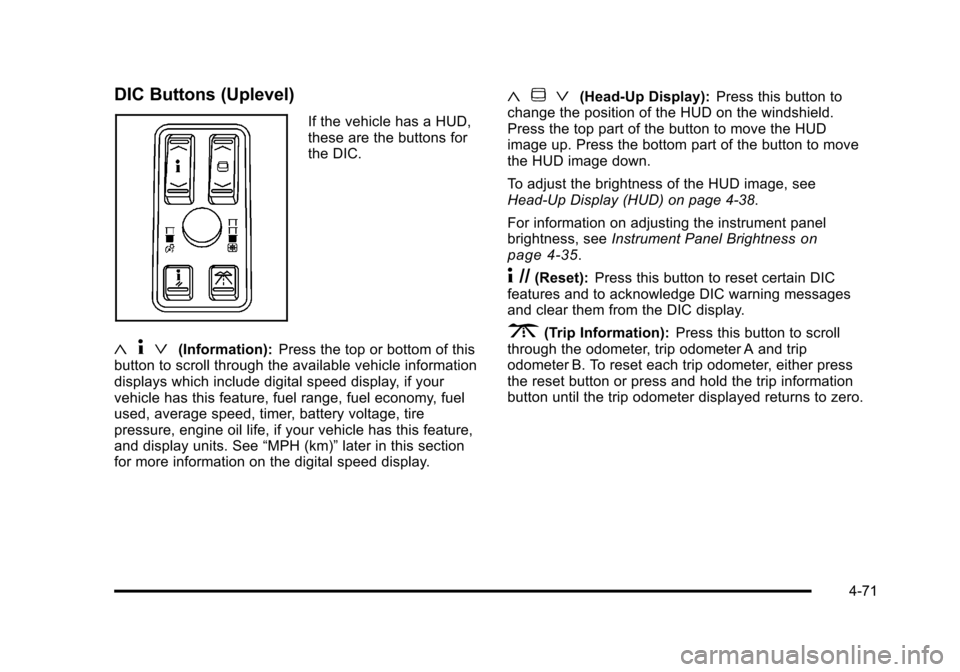
DIC Buttons (Uplevel)
If the vehicle has a HUD,
these are the buttons for
the DIC.
«4ª(Information): Press the top or bottom of this
button to scroll through the available vehicle information
displays which include digital speed display, if your
vehicle has this feature, fuel range, fuel economy, fuel
used, average speed, timer, battery voltage, tire
pressure, engine oil life, if your vehicle has this feature,
and display units. See “MPH (km)”later in this section
for more information on the digital speed display.
« ~ ª(Head-Up Display): Press this button to
change the position of the HUD on the windshield.
Press the top part of the button to move the HUD
image up. Press the bottom part of the button to move
the HUD image down.
To adjust the brightness of the HUD image, see
Head-Up Display (HUD) on page 4‑38.
For information on adjusting the instrument panel
brightness, see Instrument Panel Brightness
on
page 4‑35.
4 //(Reset): Press this button to reset certain DIC
features and to acknowledge DIC warning messages
and clear them from the DIC display.
3(Trip Information): Press this button to scroll
through the odometer, trip odometer A and trip
odometer B. To reset each trip odometer, either press
the reset button or press and hold the trip information
button until the trip odometer displayed returns to zero.
4-71
Page 258 of 528
Black plate (72,1)Cadillac STS Owner Manual - 2011
Information Display Menu Items
The following display menu items can be displayed by
pressing the information button.
MPH (km/h)
If the vehicle has this display, it shows the vehicle's
speed digitally in either miles per hour (mph) or
kilometers per hour (km/h).
MILES RANGE (km RANGE)
This display shows the approximate number of
remaining miles (mi) or kilometers (km) you can drive
without refilling the fuel tank. This estimate is based
on the current driving conditions and will change if the
driving conditions change. For example, if you are
driving in traffic making frequent stops, the display
may read one number, but if you enter the freeway, the
number may change even though you still have the
same amount of fuel in the fuel tank. This is because
different driving conditions produce different fuel
economies. Generally, freeway driving produces better
fuel economy than city driving.
Once the range drops below about 40 miles (64 km)
remaining, the display will show LOW RANGE.If your vehicle is low on fuel, the Fuel Level Low
message will be displayed. See
“Fuel Level Low”under
DIC Warnings and Messages
on page 4‑76for more
information.
MPG AVG (L/100 km AVG)
This display shows the approximate average miles per
gallon (mpg) or liters per 100 kilometers (L/100 km).
This number is calculated based on the number of mpg
(L/100 km) recorded since the last time this display was
reset. To reset MPG AVG, press the reset button. The
display will return to zero.
MPG INST (L/100 km INST)
This display shows the current fuel economy. This
number reflects only the fuel economy that the vehicle
has right now and will change frequently as driving
conditions change. Unlike average fuel economy, this
display cannot be reset.
GAL FUEL USED (L FUEL USED)
This display shows the number of gallons (gal) or
liters (L) of fuel used since the last reset of this display.
To reset GAL FUEL USED, press the reset button. The
display will return to zero.
4-72