climate control CADILLAC STS 2011 1.G User Guide
[x] Cancel search | Manufacturer: CADILLAC, Model Year: 2011, Model line: STS, Model: CADILLAC STS 2011 1.GPages: 528, PDF Size: 4.96 MB
Page 116 of 528
Black plate (10,1)Cadillac STS Owner Manual - 2011
Battery Replacement
Notice:When replacing the battery, do not touch
any of the circuitry on the transmitter. Static from
your body could damage the transmitter.
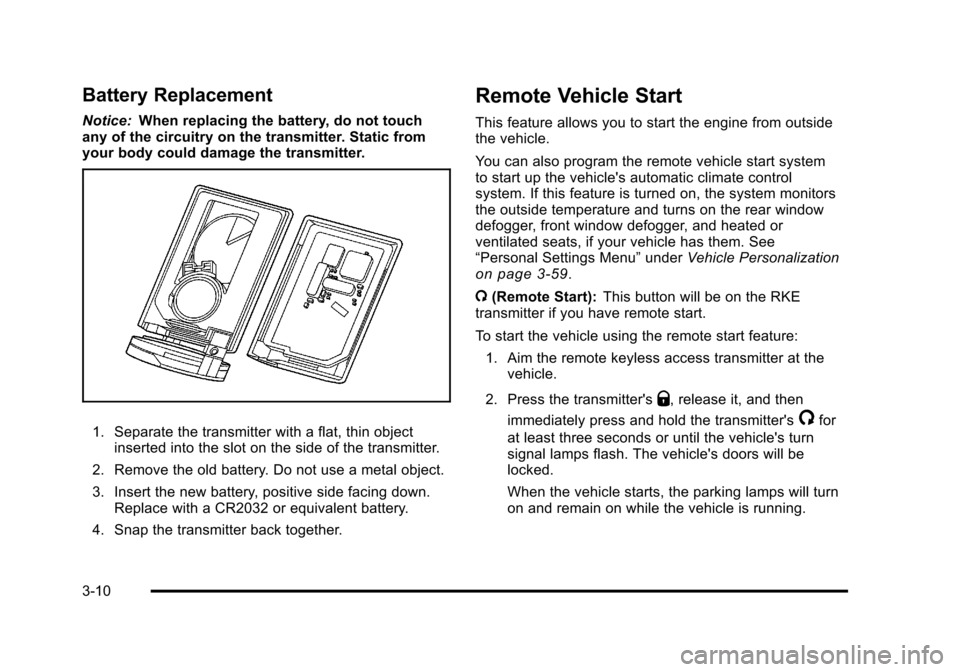
1. Separate the transmitter with a flat, thin object inserted into the slot on the side of the transmitter.
2. Remove the old battery. Do not use a metal object.
3. Insert the new battery, positive side facing down. Replace with a CR2032 or equivalent battery.
4. Snap the transmitter back together.
Remote Vehicle Start
This feature allows you to start the engine from outside
the vehicle.
You can also program the remote vehicle start system
to start up the vehicle's automatic climate control
system. If this feature is turned on, the system monitors
the outside temperature and turns on the rear window
defogger, front window defogger, and heated or
ventilated seats, if your vehicle has them. See
“Personal Settings Menu” underVehicle Personalization
on page 3‑59.
/ (Remote Start): This button will be on the RKE
transmitter if you have remote start.
To start the vehicle using the remote start feature:
1. Aim the remote keyless access transmitter at the vehicle.
2. Press the transmitter's
Q, release it, and then
immediately press and hold the transmitter's
/for
at least three seconds or until the vehicle's turn
signal lamps flash. The vehicle's doors will be
locked.
When the vehicle starts, the parking lamps will turn
on and remain on while the vehicle is running.
3-10
Page 121 of 528
Black plate (15,1)Cadillac STS Owner Manual - 2011
Lockout Protection
The vehicle can be programmed to sound the horn
three times and unlock the driver's door when all doors
are closed and there is a keyless access transmitter
inside the interior of the vehicle. When the driver's door
is reopened, the key in reminder chime will sound
continuously. The vehicle will remain locked only when
at least one transmitter has been removed from the
vehicle and both doors are closed. SeeVehicle
Personalization on page 3‑59.
Trunk
{WARNING:
Exhaust gases can enter the vehicle if it is driven
with the liftgate, trunk/hatch open, or with any
objects that pass through the seal between the
body and the trunk/hatch or liftgate. Engine
exhaust contains Carbon Monoxide (CO) which
cannot be seen or smelled. It can cause
unconsciousness and even death.
(Continued)
WARNING: (Continued)
If the vehicle must be driven with the liftgate,
or trunk/hatch open:
.Close all of the windows.
.Fully open the air outlets on or under the
instrument panel.
.Adjust the Climate Control system to a setting
that brings in only outside air and set the fan
speed to the highest setting. See Climate
Control System in the Index.
.If the vehicle is equipped with a power liftgate,
disable the power liftgate function.
For more information about carbon monoxide, see
Engine Exhaust on page 3‑36.
3-15
Page 146 of 528
Black plate (40,1)Cadillac STS Owner Manual - 2011
Park Tilt Mirrors
This feature assists the driver by improving rear
obstacle detection and is useful in viewing the curb
when parallel parking.
The passenger and/or driver mirror tilts to a preselected
position when the vehicle is in R (Reverse). This feature
lets the driver view the curb when parallel parking.
If further adjustment is needed after the mirror is tilted,
the mirror switch may be used. The mirror then returns
to this new position when the vehicle is shifted into
R (Reverse).
When the vehicle is shifted out of R (Reverse), and a
five-second delay has occurred, the mirror will return to
its original position. The delay prevents movement of
the mirror if multiple gear transitions R (Reverse) to
D (Drive) to R (Reverse) occur during a parallel parking
maneuver.
If the outside mirror selector switch is in the middle
position, neither outside mirror will move.
Side Blind Zone Alert (SBZA)
If the vehicle has the Side Blind Zone Alert (SBZA)
system, seeSide Blind Zone Alert (SBZA)on
page 3‑44for more information.
Outside Convex Mirror
{WARNING:
A convex mirror can make things, like other
vehicles, look farther away than they really are.
If you cut too sharply into the right lane, you could
hit a vehicle on the right. Check the inside mirror
or glance over your shoulder before changing
lanes.
The passenger side mirror is convex shaped. A convex
mirror's surface is curved so more can be seen from the
driver seat.
Outside Heated Mirrors
For vehicles with this feature:
<(Rear Window Defogger): Press to heat the
mirrors. See “Rear Window Defogger” underDual
Climate Control System
on page 4‑43for more
information.
3-40
Page 165 of 528
Black plate (59,1)Cadillac STS Owner Manual - 2011
Vehicle Personalization
The vehicle has personalization that allows you to
program certain features to a preferred setting for
up to two drivers. The back of the keyless access
transmitters are labelled 1 or 2. Additional keyless
access transmitters programmed to the vehicle,
as 3 and/or 4, do not have a number on the back and
are not capable of being personalized. The number of
programmable features varies depending upon which
vehicle options are purchased.
On all vehicles, features such as climate control
settings, radio and XM™preset settings, exterior
lighting at unlock and remote lock unlock confirmation,
and language have already been programmed. Your
vehicle also has an automatic door locking feature
that is always on. You cannot turn the automatic door
locking feature off. See Programmable Automatic Door
Locks on page 3‑14.
Some vehicles have additional features that can be
programmed including the seat, steering column, and
outside rearview mirror position.
If your vehicle has the base audio system, the following
information explains the vehicle personalization on your
vehicle.
If your vehicle has the Navigation system, see
“Personalization” in the Index of the Navigation System
manual for information on vehicle personalization. If your vehicle has the ability to program additional
personalization features, the driver's preferences are
recalled by pressing any button on the keyless access
transmitter, 1 or 2, by selecting Driver 1 or 2 on the radio
display, or when a valid keyless access transmitter is
detected upon opening the driver's door.
If more than one valid keyless access transmitter is
detected upon opening the driver's door, the driver
preferences for the lowest driver number will be
recalled.
Certain features can be programmed not to recall until
the ignition is turned off.
The default settings were preset but may have been
changed.
To change feature preferences, use the following
procedure.
Entering the Personal Settings Menu
To enter the feature programming mode:
1. The ignition must be either on, in ACCESSORY, or in RAP and the transmission in P (Park) or the
vehicle speed less than 6 mph (9 km/h).
To avoid excessive drain on the battery, it is
recommended that the headlamps are turned off.
2. Press any button on the appropriate keyless access transmitter to identify yourself as Driver 1 or
Driver 2.
3-59
Page 168 of 528
Black plate (62,1)Cadillac STS Owner Manual - 2011
KEY FOB REMINDER
This feature sounds the horn three times when the
driver's door is closed and there is a keyless access
transmitter left inside of the vehicle. This will only occur
when the vehicle is off.
Programmable Modes
Mode 1:ON (default)
Mode 2: OFF
To program the vehicle to a different mode: 1. Enter the PERSONAL SETTINGS MENU by following the instructions listed previously under
“Entering the Personal Settings Menu.”
2. Turn the tune/select knob until KEY FOB REMINDER is highlighted.
3. Press the tune/select knob to switch back and forth between on and off.
When the mode is turned on, a check mark will
appear next to the feature name.
The mode you selected is now set. You can either exit
the programming mode by following the instructions
later in this section or program the next feature
available on your vehicle.
REMOTE START
With remote start you can choose which features are
activated when the vehicle is started remotely. These
features include the climate control system, the rear
defogger, and the seat temperature, if your vehicle has
this feature. See Remote Vehicle Start
on page 3‑10for more information.
Mode 1:ON (default)
Mode 2: OFF
To program the vehicle to a different mode: 1. Enter the PERSONAL SETTINGS MENU by following the instructions listed previously under
“Entering the Personal Settings Menu.”
2. Turn the tune/select knob until REMOTE START is highlighted.
3. Press the tune/select knob to switch back and forth between on and off.
When REMOTE START is on, a check mark will appear
next to the feature name. You can then choose to
activate any or all of the following features by turning
the tune/select knob to highlight the feature, then
pressing the knob to turn it on.
3-62
Page 169 of 528

Black plate (63,1)Cadillac STS Owner Manual - 2011
CLIMATE CONTROL:The climate control system will
engage when the vehicle is started using the remote
start feature. It will be at the same climate control
setting that was last used by the driver using that
keyless entry transmitter.
REAR WINDOW DEFOG: If this feature is active, the
rear defogger will engage when the vehicle is started
using the remote start feature.
SEAT TEMP (Temperature) CONTROL: If your vehicle
has this feature and this feature is active, the seats will
be heated or cooled when the vehicle is started using
the remote start feature.
The mode you selected is now set. You can either exit
the programming mode by following the instructions
later in this section or program the next feature
available on your vehicle by pressing the F6 (BACK)
button, located on the radio, to return to the
PERSONAL SETTINGS MENU.
REMOTE RECALL MEMORY
If your vehicle has the optional memory package, you
will have this feature. When this feature is turned on,
you can recall any previously programmed seat position
and mirror position when the unlock button on the
keyless access transmitter is pressed. Programmable Modes
Mode 1:
ON
Mode 2: OFF (default)
The exception to the default is the recall seat to driver
position which is on.
To program the vehicle to a different mode: 1. Enter the PERSONAL SETTINGS MENU by following the instructions listed previously under
“Entering the Personal Settings Menu.”
2. Turn the tune/select knob until REMOTE RECALL MEMORY is highlighted.
3. Press the tune/select knob to switch back and forth between on and off.
When the mode is turned on, a check mark will
appear next to the feature name.
If this feature is selected, START BUTTON RECALL
cannot be selected.
The mode you selected is now set. You can either exit
the programming mode by following the instructions
later in this section or program the next feature
available on your vehicle.
3-63
Page 181 of 528
Black plate (75,1)Cadillac STS Owner Manual - 2011
The mode you selected is now set. You can either exit
the programming mode by following the instructions
later in this section or program the next feature
available on your vehicle by pressing the F6 (BACK)
button, located on the radio, to return to the
PERSONAL SETTINGS MENU.
Exiting the Personal Settings Menu
Once you have finished making your selections on the
base audio system, you will automatically return to the
main audio screen after 15 seconds. You can also press
the F6 (BACK) button, located on the radio, to return to
the main audio screen.
Memory Seat, Mirrors and Steering
Wheel
If the vehicle has the memory feature, you can program
and recall memory settings for the following features for
up to two drivers:
.The driver seat position
.The outside rearview mirrors position
.The power tilt wheel and telescopic steering
column position
The following settings and presets are set automatically:
.The language, radio and XM™ presets, tone,
volume, playback mode (AM/FM or CD), last
displayed stations, and compact disc position
.The last climate control setting
.The Head-Up Display (HUD) position, if your
vehicle has this feature
.Other personalization settings, for example, remote
start settings
See Vehicle Personalization on page 3‑59.
3-75
Page 184 of 528
Black plate (78,1)Cadillac STS Owner Manual - 2011
STORE DRIVER SETTINGS
To store driver settings:1. Adjust your settings for the driver seat, the outside rearview mirrors, and the steering column to a
comfortable driving position.
2. Enter the memory programming mode for your driver settings by following the instructions listed
previously under “Entering the Driver Selection
Submenu.”
3. From the DRIVER SELECTION submenu, turn the tune/select knob to scroll to STORE DRIVER
SETTINGS and press in the knob. Two beeps will
sound to confirm that your driver settings are
saved.
4. Set the HUD position, if your vehicle has this feature, the climate control temperature, fan speed
and mode settings, the radio presets, tone,
volume, playback mode (AM/FM, XM™, or CD),
and compact disc position.
Your memory settings are now programmed.
Any changes that are made to the HUD, audio
system, and climate controls while driving will be
automatically stored when the ignition is turned off.
5. Repeat the procedure for a second driver by programming the other driver number.
Entering the Driver Exit Settings
Submenu
To enter the memory programming mode for your exit
settings:
1. The ignition must be either on, in ACCESSORY, or in RAP and the transmission in P (Park) or the
vehicle speed less than 6 mph (9 km/h).
2. Press any button on the appropriate keyless access transmitter to identify yourself as Driver 1 or
Driver 2.
3. Turn on the radio by pressing the power/ volume knob.
4. Press the CNFG radio button to enter the main menu of the radio.
5. Turn the tune/select knob and scroll to SETUP.
6. Press the tune/select knob to enter the SETUP menu.
7. Turn the tune/select knob and scroll to DRIVER EXIT SETTINGS.
8. Press the tune/select knob to enter the DRIVER EXIT SETTINGS submenu. The following items will
appear:
.RECALL EXIT SETTINGS
.STORE EXIT SETTINGS
3-78
Page 187 of 528

Black plate (1,1)Cadillac STS Owner Manual - 2011
Section 4 Instrument Panel
Instrument Panel Overview. . . . . . . . . . . . . . . . . . . . . . . .4-3
Hazard Warning Flashers . . . . . . . . . . . . . . . . . . . . . . . 4-3
Horn . . . . . . . . . . . . . . . . . . . . . . . . . . . . . . . . . . . . . . . . . . . . 4-3
Power Tilt Wheel and Telescopic Steering Column . . . . . . . . . . . . . . . . . . . . . . . . . . . . . . . . . . . . . . . 4-3
Heated Steering Wheel . . . . . . . . . . . . . . . . . . . . . . . . . 4-4
Turn Signal/Multifunction Lever . . . . . . . . . . . . . . . . . . 4-4
Turn and Lane-Change Signals . . . . . . . . . . . . . . . . . 4-4
Headlamp High/Low-Beam Changer . . . . . . . . . . . . 4-5
Forward Collision Alert (FCA) System . . . . . . . . . . . 4-6
Flash-to-Pass . . . . . . . . . . . . . . . . . . . . . . . . . . . . . . . . . . . 4-9
Windshield Wipers . . . . . . . . . . . . . . . . . . . . . . . . . . . . . 4-10
Windshield Washer . . . . . . . . . . . . . . . . . . . . . . . . . . . . 4-11
Headlamp Washer . . . . . . . . . . . . . . . . . . . . . . . . . . . . . 4-11
Cruise Control . . . . . . . . . . . . . . . . . . . . . . . . . . . . . . . . . 4-12
Adaptive Cruise Control . . . . . . . . . . . . . . . . . . . . . . . 4-15
Headlamps . . . . . . . . . . . . . . . . . . . . . . . . . . . . . . . . . . . . 4-27
Wiper Activated Headlamps . . . . . . . . . . . . . . . . . . . 4-31
Headlamps on Reminder . . . . . . . . . . . . . . . . . . . . . . 4-31
Daytime Running Lamps (DRL) . . . . . . . . . . . . . . . . 4-32
Fog Lamps . . . . . . . . . . . . . . . . . . . . . . . . . . . . . . . . . . . . 4-33
Twilight Sentinel
®. . . . . . . . . . . . . . . . . . . . . . . . . . . . . . 4-34
Exterior Lighting Battery Saver . . . . . . . . . . . . . . . . . 4-35
Instrument Panel Brightness . . . . . . . . . . . . . . . . . . . 4-35
Entry Lighting . . . . . . . . . . . . . . . . . . . . . . . . . . . . . . . . . . 4-36
Parade Dimming . . . . . . . . . . . . . . . . . . . . . . . . . . . . . . . 4-36 Reading Lamps . . . . . . . . . . . . . . . . . . . . . . . . . . . . . . . . 4-36
Battery Load Management . . . . . . . . . . . . . . . . . . . . . 4-36
Electric Power Management . . . . . . . . . . . . . . . . . . . 4-37
Inadvertent Power Battery Saver . . . . . . . . . . . . . . . 4-37
Head-Up Display (HUD) . . . . . . . . . . . . . . . . . . . . . . . 4-38
Accessory Power Outlet(s) . . . . . . . . . . . . . . . . . . . . . 4-42
Climate Controls . . . . . . . . . . . . . . . . . . . . . . . . . . . . . . . . . . 4-43
Dual Climate Control System . . . . . . . . . . . . . . . . . . 4-43
Outlet Adjustment . . . . . . . . . . . . . . . . . . . . . . . . . . . . . . 4-48
Rear Climate Control System . . . . . . . . . . . . . . . . . . 4-49
Passenger Compartment Air Filter . . . . . . . . . . . . . 4-50
Warning Lights, Gauges, and Indicators . . . . . . . .4-51
Instrument Panel Cluster . . . . . . . . . . . . . . . . . . . . . . . 4-52
Speedometer and Odometer . . . . . . . . . . . . . . . . . . . 4-53
Tachometer . . . . . . . . . . . . . . . . . . . . . . . . . . . . . . . . . . . . 4-53
Safety Belt Reminders . . . . . . . . . . . . . . . . . . . . . . . . . 4-53
Airbag Readiness Light . . . . . . . . . . . . . . . . . . . . . . . . 4-54
Passenger Airbag Status Indicator . . . . . . . . . . . . . 4-55
Charging System Light . . . . . . . . . . . . . . . . . . . . . . . . 4-57
Brake System Warning Light . . . . . . . . . . . . . . . . . . . 4-58
Antilock Brake System (ABS) Warning Light . . . 4-59
Traction Control System (TCS) Warning Light . . . . . . . . . . . . . . . . . . . . . . . . . . . . . . . . . . . . . . . . . 4-60
Lane Departure Warning (LDW) Light . . . . . . . . . . 4-60
Engine Coolant Temperature Warning Light . . . . 4-61
4-1
Page 222 of 528
Black plate (36,1)Cadillac STS Owner Manual - 2011
Entry Lighting
The entry lighting system turns on the reading and
dome lamps and the backlighting to the exterior lamp
control when a door is opened or if you press the
remote keyless entry transmitter unlock button.
If activated by the transmitter, the lighting will remain
active for about 25 seconds. The entry lighting system
uses the light sensor; it must be dark outside in order
for the lamps to turn on. The lamps turn off about
25 seconds after the last door is closed. They will dim
to off if the ignition is on, or immediately deactivate if
the power locks are activated.
Parade Dimming
This feature prohibits dimming of the instrument panel
displays and backlighting during daylight hours when
the key is in the ignition and the headlamps are on.
This feature operates with the light sensor and is fully
automatic. When the light sensor reads darkness
outside and the parking lamps are active, the
instrument panel displays can be adjusted by turning
the instrument panel brightness knob. SeeInstrument
Panel Brightness
on page 4‑35for additional
information.
Reading Lamps
The reading lamps are located on the overhead
console. These lamps come on automatically when any
door is opened.
For manual operation, press the button next to each
lamp to turn it on or off.
If the reading lamps are left on, they automatically shut
off 10 minutes after the ignition has been turned off.
Battery Load Management
The battery load management feature is designed to
monitor the vehicle's electrical load and determine when
the battery is in a heavy discharge condition. During
times of high electrical loading, the engine may idle at a
higher revolutions per minute (rpm) setting than normal
to make sure the battery charges. High electrical loads
may occur when several of the following are on:
headlamps, high beams, fog lamps, rear window
defogger, the climate control fan at high speeds, heated
seats and engine cooling fans.
If the battery continues to discharge, even with the
engine idling at a higher rpm setting, some electrical
loads will automatically be reduced. When this occurs,
the rear window defogger may take slightly longer to
clear the glass and the fan may cut back to a lower
4-36