steering CADILLAC STS 2011 1.G User Guide
[x] Cancel search | Manufacturer: CADILLAC, Model Year: 2011, Model line: STS, Model: CADILLAC STS 2011 1.GPages: 528, PDF Size: 4.96 MB
Page 33 of 528
Black plate (1,1)Cadillac STS Owner Manual - 2011
Section 2 Seats and Restraint System
Front Seats. . . . . . . . . . . . . . . . . . . . . . . . . . . . . . . . . . . . . . . . . 2-2
Power Seats . . . . . . . . . . . . . . . . . . . . . . . . . . . . . . . . . . . . 2-2
Power Lumbar . . . . . . . . . . . . . . . . . . . . . . . . . . . . . . . . . . 2-3
Heated Seats . . . . . . . . . . . . . . . . . . . . . . . . . . . . . . . . . . . 2-4
Heated and Ventilated Seats . . . . . . . . . . . . . . . . . . . . 2-5
Memory Seat, Mirrors and Steering Wheel . . . . . . 2-5
Power Reclining Seatbacks . . . . . . . . . . . . . . . . . . . . 2-10
Head Restraints . . . . . . . . . . . . . . . . . . . . . . . . . . . . . . . 2-12
Rear Seats . . . . . . . . . . . . . . . . . . . . . . . . . . . . . . . . . . . . . . . . 2-14
Heated Seats . . . . . . . . . . . . . . . . . . . . . . . . . . . . . . . . . . 2-14
Rear Seat Pass-Through Door . . . . . . . . . . . . . . . . . 2-14
Safety Belts . . . . . . . . . . . . . . . . . . . . . . . . . . . . . . . . . . . . . . . 2-14
Safety Belts: They Are for Everyone . . . . . . . . . . . 2-14
How to Wear Safety Belts Properly . . . . . . . . . . . . 2-19
Lap-Shoulder Belt . . . . . . . . . . . . . . . . . . . . . . . . . . . . . 2-28
Safety Belt Use During Pregnancy . . . . . . . . . . . . . 2-33
Safety Belt Extender . . . . . . . . . . . . . . . . . . . . . . . . . . . 2-34
Child Restraints . . . . . . . . . . . . . . . . . . . . . . . . . . . . . . . . . . 2-34
Older Children . . . . . . . . . . . . . . . . . . . . . . . . . . . . . . . . . 2-34
Infants and Young Children . . . . . . . . . . . . . . . . . . . . 2-38
Child Restraint Systems . . . . . . . . . . . . . . . . . . . . . . . 2-41
Where to Put the Restraint . . . . . . . . . . . . . . . . . . . . . 2-43 Lower Anchors and Tethers for Children
(LATCH) . . . . . . . . . . . . . . . . . . . . . . . . . . . . . . . . . . . . . 2-45
Securing a Child Restraint in a Rear Seat Position . . . . . . . . . . . . . . . . . . . . . . . . . . . . . . . . . . . . . . 2-51
Securing a Child Restraint in the Right Front
Seat Position . . . . . . . . . . . . . . . . . . . . . . . . . . . . . . . . 2-53
Airbag System . . . . . . . . . . . . . . . . . . . . . . . . . . . . . . . . . . . . 2-57
Where Are the Airbags? . . . . . . . . . . . . . . . . . . . . . . . 2-59
When Should an Airbag Inflate? . . . . . . . . . . . . . . . 2-62
What Makes an Airbag Inflate? . . . . . . . . . . . . . . . . 2-63
How Does an Airbag Restrain? . . . . . . . . . . . . . . . . 2-63
What Will You See After an Airbag Inflates? . . . 2-64
Passenger Sensing System . . . . . . . . . . . . . . . . . . . 2-66
Servicing Your Airbag-Equipped Vehicle . . . . . . . 2-70
Adding Equipment to Your Airbag-Equipped Vehicle . . . . . . . . . . . . . . . . . . . . . . . . . . . . . . . . . . . . . . 2-71
Restraint System Check . . . . . . . . . . . . . . . . . . . . . . . . .2-72
Checking the Restraint Systems . . . . . . . . . . . . . . . 2-72
Replacing Restraint System Parts After a Crash . . . . . . . . . . . . . . . . . . . . . . . . . . . . . . . . . . . . . . . . 2-73
2-1
Page 34 of 528

Black plate (2,1)Cadillac STS Owner Manual - 2011
Front Seats
Power Seats
The power seat controls
are located on the
outboard side of the
seats.To adjust the seat:
.Move the seat forward or rearward by sliding the
horizontal control forward or rearward.
.Raise or lower the front part of the seat cushion
by moving the front of the horizontal control up
or down.
.Raise or lower the rear part of the seat cushion
by moving the rear of the horizontal control up
or down.
.Use the vertical control to recline the seatback.
See
Power Reclining Seatbacks on page 2‑10.
If the vehicle has the memory feature, you can program
and recall memory settings for seat positions. See
Memory Seat, Mirrors and Steering Wheel
on
page 3‑75.
2-2
Page 35 of 528
Black plate (3,1)Cadillac STS Owner Manual - 2011
Power Lumbar
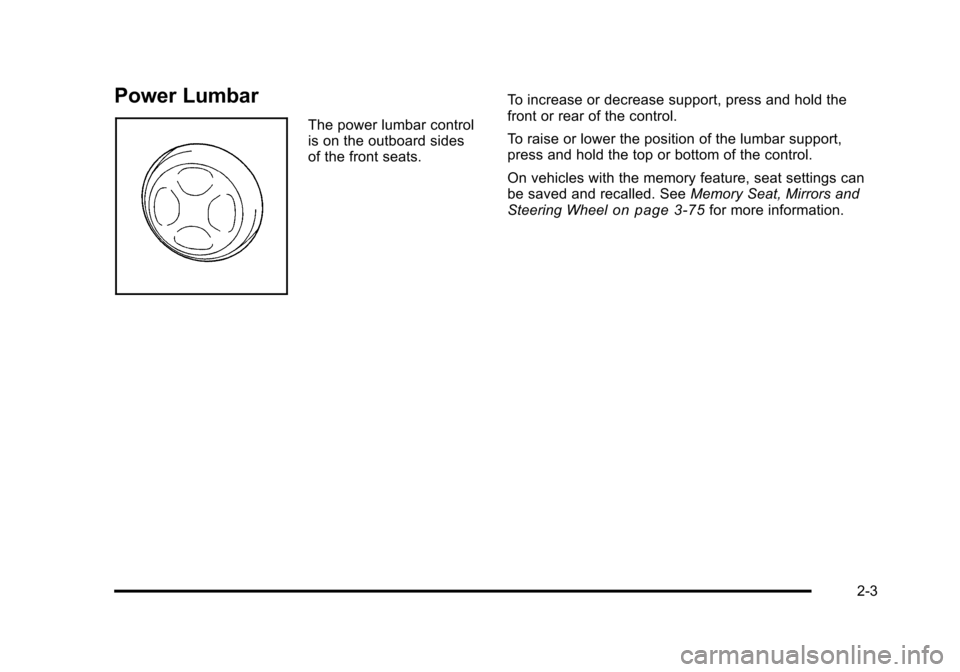
The power lumbar control
is on the outboard sides
of the front seats.To increase or decrease support, press and hold the
front or rear of the control.
To raise or lower the position of the lumbar support,
press and hold the top or bottom of the control.
On vehicles with the memory feature, seat settings can
be saved and recalled. See
Memory Seat, Mirrors and
Steering Wheel
on page 3‑75for more information.
2-3
Page 37 of 528
Black plate (5,1)Cadillac STS Owner Manual - 2011
Heated and Ventilated Seats
{WARNING:
If you cannot feel temperature change or pain to
the skin, the seat heater may cause burns even at
low temperatures. See the Warning underHeated
Seats on page 2‑4.
On vehicles with this feature, the buttons are on the
climate control panel.
z(Heated Seat and Seatback): Press to heat the seat
and seatback.
{(Ventilated Seat): Press to ventilate the seat.
Press the button once for the highest setting. With each
press of the button, the setting will change to the next
lower setting, and then to the off setting.
A light bar in the climate control display shows the
setting: high, medium, or low.
The heated or ventilated seats shut off when the vehicle
is turned off.
Memory Seat, Mirrors and Steering
Wheel
If the vehicle has the memory feature, you can program
and recall memory settings for the following features for
up to two drivers:
.The driver seat position
.The outside rearview mirrors position
.The power tilt wheel and telescopic steering
column position
The following settings and presets are set automatically:
.The language, radio and XM™ presets, tone,
volume, playback mode (AM/FM or CD), last
displayed stations, and compact disc position
.The last climate control setting
.The Head-Up Display (HUD) position, if your
vehicle has this feature
.Other personalization settings, for example, remote
start settings
See Vehicle Personalization on page 3‑59.
2-5
Page 40 of 528
Black plate (8,1)Cadillac STS Owner Manual - 2011
STORE DRIVER SETTINGS
To store driver settings:1. Adjust your settings for the driver seat, the outside rearview mirrors, and the steering column to a
comfortable driving position.
2. Enter the memory programming mode for your driver settings by following the instructions listed
previously under “Entering the Driver Selection
Submenu.”
3. From the DRIVER SELECTION submenu, turn the tune/select knob to scroll to STORE DRIVER
SETTINGS and press in the knob. Two beeps will
sound to confirm that your driver settings are
saved.
4. Set the HUD position, if your vehicle has this feature, the climate control temperature, fan speed
and mode settings, the radio presets, tone,
volume, playback mode (AM/FM, XM™, or CD),
and compact disc position.
Your memory settings are now programmed.
Any changes that are made to the HUD, audio
system, and climate controls while driving will be
automatically stored when the ignition is turned off.
5. Repeat the procedure for a second driver by programming the other driver number.
Entering the Driver Exit Settings
Submenu
To enter the memory programming mode for your exit
settings:
1. The ignition must be either on, in ACCESSORY, or in RAP and the transmission in P (Park) or
the vehicle speed less than 6 mph (9 km/h).
2. Press any button on the appropriate keyless access transmitter to identify yourself as
Driver 1 or Driver 2.
3. Turn on the radio by pressing the power/ volume knob.
4. Press the CNFG radio button to enter the main menu of the radio.
5. Turn the tune/select knob and scroll to SETUP.
6. Press the tune/select knob to enter the SETUP menu.
7. Turn the tune/select knob and scroll to DRIVER EXIT SETTINGS.
8. Press the tune/select knob to enter the DRIVER EXIT SETTINGS submenu. The following items
will appear:
.RECALL EXIT SETTINGS
.STORE EXIT SETTINGS
2-8
Page 41 of 528
Black plate (9,1)Cadillac STS Owner Manual - 2011
Driver Exit Settings Submenu Items
RECALL EXIT SETTINGS
To recall exit settings:1. Enter the memory programming mode for your exit settings by following the instructions listed
previously under “Entering the Driver Exit Settings
Submenu.”
2. From the DRIVER EXIT SETTINGS submenu, turn the tune/select knob to scroll to RECALL EXIT
SETTINGS and press in the knob.
If the vehicle is in P (Park), one beep will sound
and your previously saved exit position will then be
recalled.
If the vehicle is not in P (Park), three beeps will
sound and your previously saved exit position will
not be recalled.
A memory recall can be stopped by pressing any
memory seat or mirror position button.
If you would like the stored exit positions to be recalled
when your vehicle is in P (Park), the vehicle is off, and
the driver door is opened, see “AUTO EXIT SEAT”and
“AUTO EXIT COLUMN” underVehicle Personalization
on page 3‑59.
STORE EXIT SETTINGS
To store exit settings:
1. Adjust your settings for the driver seat, the outside rearview mirrors, and the steering column to a
comfortable exit position.
2. Enter the memory programming mode for your exit settings by following the instructions listed
previously under “Entering the Driver Exit Settings
Submenu.”
3. From the DRIVER EXIT SETTINGS submenu, turn the tune/select knob to scroll to STORE EXIT
SETTINGS and press in the knob. Two beeps will
sound to confirm that your new exit settings are
saved.
4. Repeat the procedure for a second driver by programming the other driver number.
2-9
Page 89 of 528
Black plate (57,1)Cadillac STS Owner Manual - 2011
7. Before placing a child in the child restraint, makesure it is securely held in place. To check, grasp
the child restraint at the safety belt path and
attempt to move it side‐to‐side and back‐and‐forth.
When the child restraint is properly installed, there
should be no more than 2.5 cm (1 in) of movement.
If the airbag is off, the off indicator in the passenger
airbag status indicator will come on and stay on when
the vehicle is started.
If a child restraint has been installed and the on
indicator is lit, see “If the On Indicator is Lit for a Child
Restraint” underPassenger Sensing System
on
page 2‑66for more information.
To remove the child restraint, unbuckle the vehicle
safety belt and let it return to the stowed position.
Airbag System
The vehicle has the following airbags:
.A frontal airbag for the driver.
.A frontal airbag for the right front passenger.
.A seat-mounted side impact airbag for the driver.
.A seat-mounted side impact airbag for the right
front passenger.
.A roof-rail airbag for the driver and the passenger
seated directly behind the driver.
.A roof-rail airbag for the right front passenger and
the passenger seated directly behind the right front
passenger.
All of the airbags in your vehicle will have the word
AIRBAG embossed in the trim or on an attached label
near the deployment opening.
For frontal airbags, the word AIRBAG will appear on the
middle part of the steering wheel for the driver and on
the instrument panel for the right front passenger.
With seat-mounted side impact airbags, the word
AIRBAG will appear on the side of the seatback closest
to the door.
With roof-rail airbags, the word AIRBAG will appear
along the headliner or trim.
Airbags are designed to supplement the protection
provided by safety belts. Even though today's airbags
are also designed to help reduce the risk of injury from
the force of an inflating bag, all airbags must inflate very
quickly to do their job.
2-57
Page 91 of 528
Black plate (59,1)Cadillac STS Owner Manual - 2011
{WARNING:
Children who are up against, or very close to, any
airbag when it inflates can be seriously injured
or killed. Airbags plus lap-shoulder belts offer
protection for adults and older children, but not for
young children and infants. Neither the vehicle's
safety belt system nor its airbag system is
designed for them. Young children and infants
need the protection that a child restraint system
can provide. Always secure children properly in
your vehicle. To read how, seeOlder Children
on
page 2‑34
or Infants and Young Childrenon
page 2‑38
.
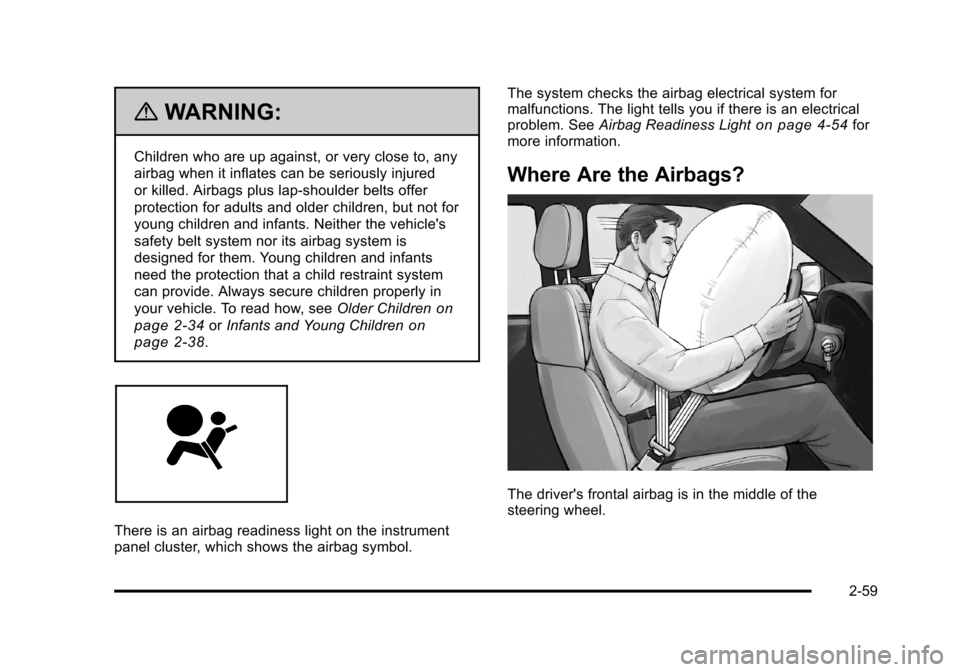
There is an airbag readiness light on the instrument
panel cluster, which shows the airbag symbol. The system checks the airbag electrical system for
malfunctions. The light tells you if there is an electrical
problem. See
Airbag Readiness Light
on page 4‑54for
more information.
Where Are the Airbags?
The driver's frontal airbag is in the middle of the
steering wheel.
2-59
Page 93 of 528
Black plate (61,1)Cadillac STS Owner Manual - 2011
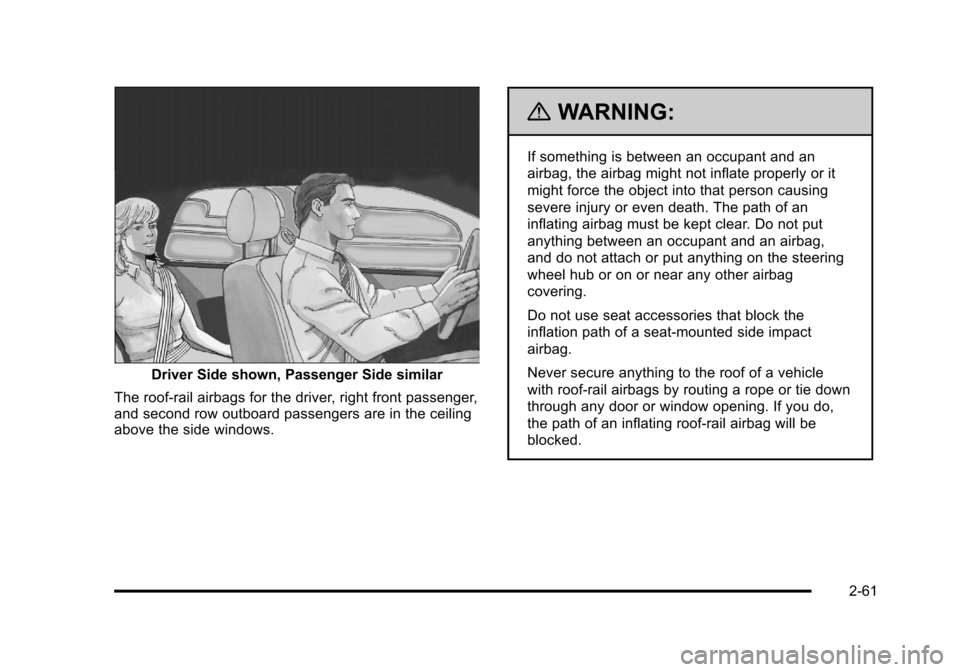
Driver Side shown, Passenger Side similar
The roof-rail airbags for the driver, right front passenger,
and second row outboard passengers are in the ceiling
above the side windows.
{WARNING:
If something is between an occupant and an
airbag, the airbag might not inflate properly or it
might force the object into that person causing
severe injury or even death. The path of an
inflating airbag must be kept clear. Do not put
anything between an occupant and an airbag,
and do not attach or put anything on the steering
wheel hub or on or near any other airbag
covering.
Do not use seat accessories that block the
inflation path of a seat-mounted side impact
airbag.
Never secure anything to the roof of a vehicle
with roof-rail airbags by routing a rope or tie down
through any door or window opening. If you do,
the path of an inflating roof-rail airbag will be
blocked.
2-61
Page 95 of 528
Black plate (63,1)Cadillac STS Owner Manual - 2011
The seat-mounted side impact and roof-rail airbags are
not intended to inflate in frontal impacts, near-frontal
impacts, rollovers, or rear impacts. A seat-mounted side
impact airbag is intended to deploy on the side of the
vehicle that is struck. A roof-rail airbag is intended to
deploy on the side of the vehicle that is struck.
In any particular crash, no one can say whether an
airbag should have inflated simply because of the
damage to a vehicle or because of what the repair costs
were. For frontal airbags, inflation is determined by
what the vehicle hits, the angle of the impact, and how
quickly the vehicle slows down. For seat-mounted side
impact and roof-rail airbags, deployment is determined
by the location and severity of the side impact.
What Makes an Airbag Inflate?
In a deployment event, the sensing system sends an
electrical signal triggering a release of gas from the
inflator. Gas from the inflator fills the airbag causing the
bag to break out of the cover and deploy. The inflator,
the airbag, and related hardware are all part of the
airbag module.Frontal airbag modules are located inside the steering
wheel and instrument panel. For vehicles with
seat-mounted side impact airbags, there are airbag
modules in the side of the front seatbacks closest to the
door. For vehicles with roof-rail airbags, there are airbag
modules in the ceiling of the vehicle, near the side
windows that have occupant seating positions.
How Does an Airbag Restrain?
In moderate to severe frontal or near frontal collisions,
even belted occupants can contact the steering wheel
or the instrument panel. In moderate to severe side
collisions, even belted occupants can contact the inside
of the vehicle.
Airbags supplement the protection provided by safety
belts. Frontal airbags distribute the force of the impact
more evenly over the occupant's upper body, stopping
the occupant more gradually. Seat-mounted side impact
and roof-rail airbags distribute the force of the impact
more evenly over the occupant's upper body.
But airbags would not help in many types of collisions,
primarily because the occupant's motion is not toward
those airbags. See
When Should an Airbag Inflate?
on
page 2‑62for more information.
Airbags should never be regarded as anything more
than a supplement to safety belts.
2-63