battery CADILLAC XLR 2004 1.G Owner's Guide
[x] Cancel search | Manufacturer: CADILLAC, Model Year: 2004, Model line: XLR, Model: CADILLAC XLR 2004 1.GPages: 356, PDF Size: 2.36 MB
Page 264 of 356
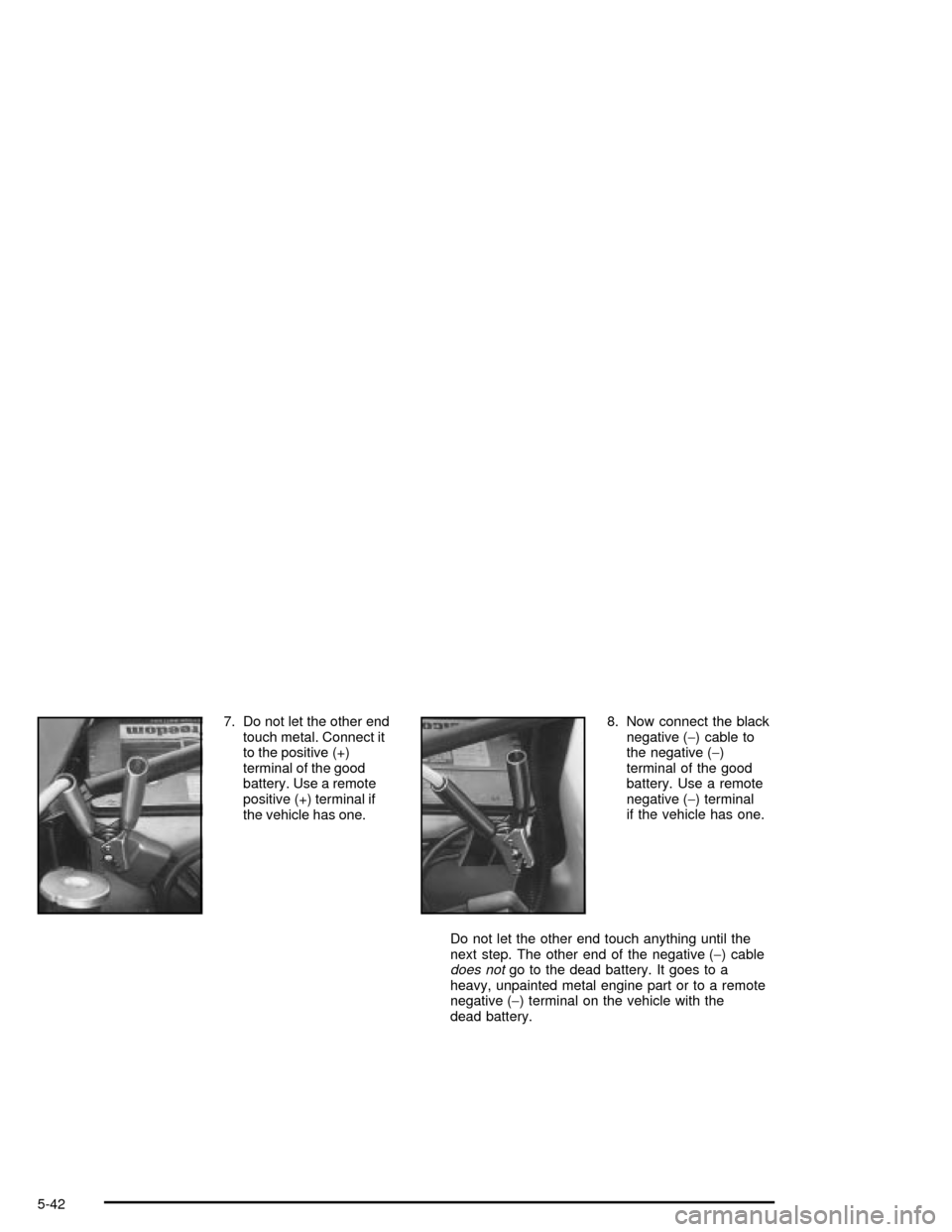
7. Do not let the other end
touch metal. Connect it
to the positive (+)
terminal of the good
battery. Use a remote
positive (+) terminal if
the vehicle has one.8. Now connect the black
negative (-) cable to
the negative (-)
terminal of the good
battery. Use a remote
negative (-) terminal
if the vehicle has one.
Do not let the other end touch anything until the
next step. The other end of the negative (-) cable
does notgo to the dead battery. It goes to a
heavy, unpainted metal engine part or to a remote
negative (-) terminal on the vehicle with the
dead battery.
5-42
Page 265 of 356
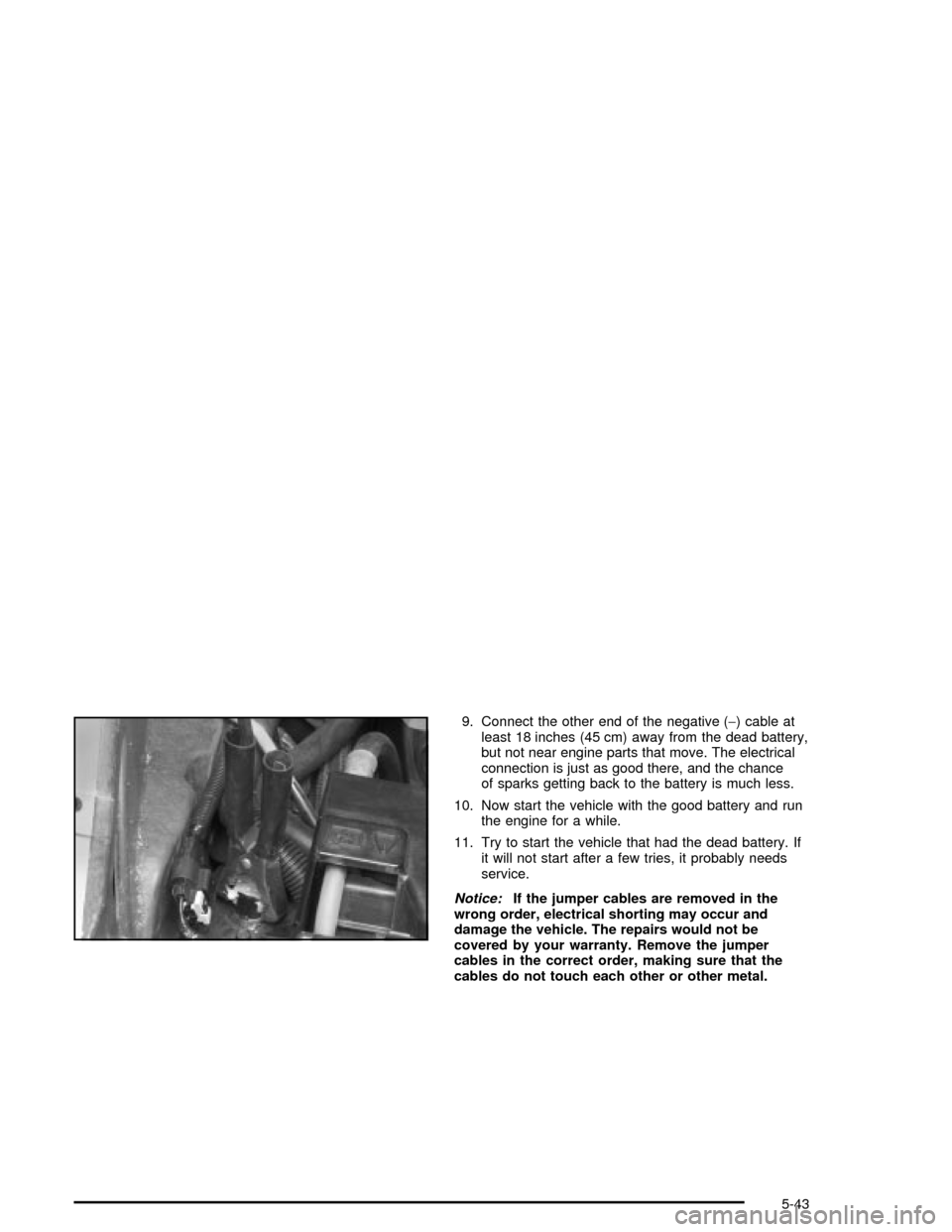
9. Connect the other end of the negative (-) cable at
least 18 inches (45 cm) away from the dead battery,
but not near engine parts that move. The electrical
connection is just as good there, and the chance
of sparks getting back to the battery is much less.
10. Now start the vehicle with the good battery and run
the engine for a while.
11. Try to start the vehicle that had the dead battery. If
it will not start after a few tries, it probably needs
service.
Notice:If the jumper cables are removed in the
wrong order, electrical shorting may occur and
damage the vehicle. The repairs would not be
covered by your warranty. Remove the jumper
cables in the correct order, making sure that the
cables do not touch each other or other metal.
5-43
Page 266 of 356

A. Heavy, Unpainted Metal Engine Part
B. Good Battery
C. Dead BatteryTo disconnect the jumper cables from both vehicles, do
the following:
1. Disconnect the black negative (-) cable from the
vehicle that had the dead battery.
2. Disconnect the black negative (-) cable from the
vehicle with the good battery.
3. Disconnect the red positive (+) cable from the
vehicle with the good battery.
4. Disconnect the red positive (+) cable from the other
vehicle.
Jumper Cable Removal
5-44
Page 311 of 356
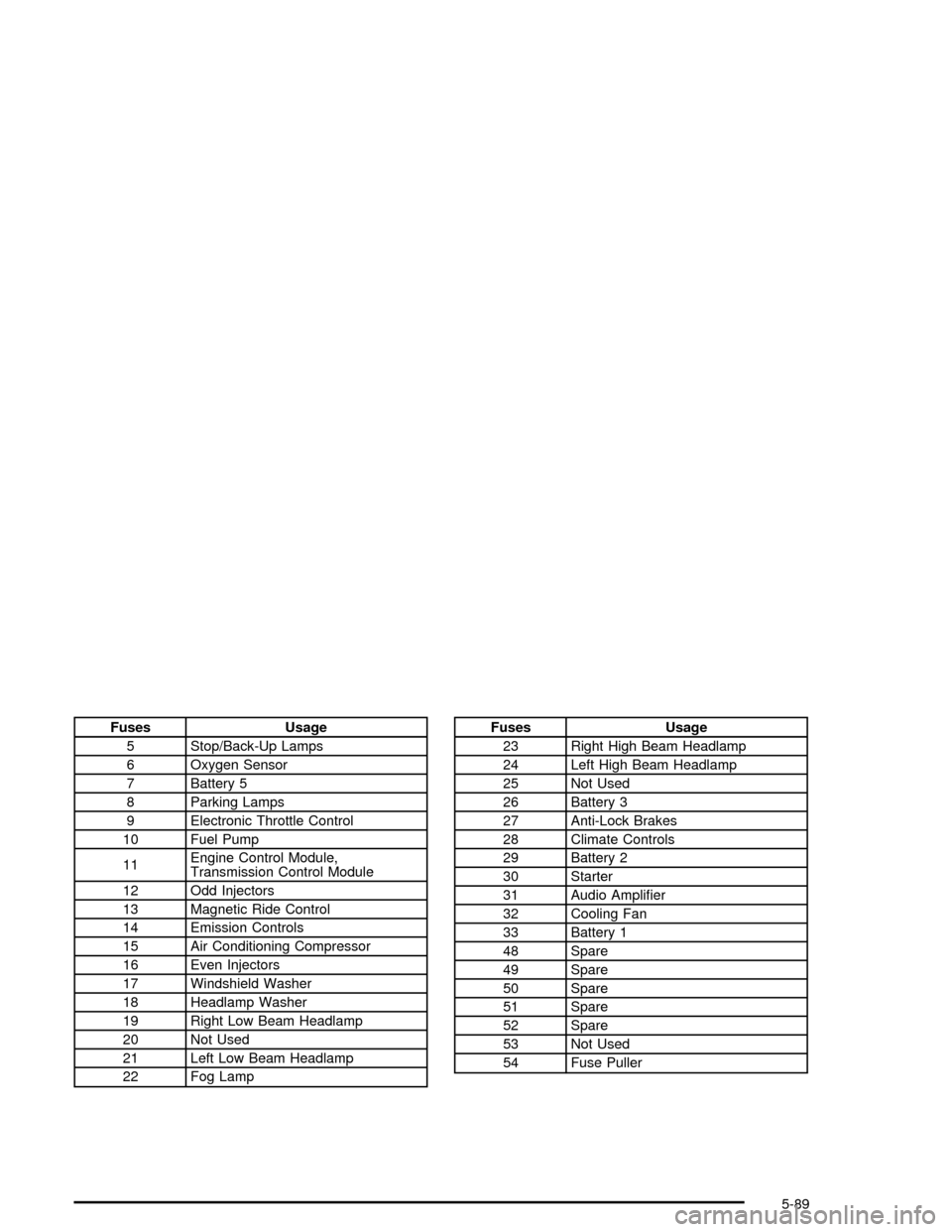
Fuses Usage
5 Stop/Back-Up Lamps
6 Oxygen Sensor
7 Battery 5
8 Parking Lamps
9 Electronic Throttle Control
10 Fuel Pump
11Engine Control Module,
Transmission Control Module
12 Odd Injectors
13 Magnetic Ride Control
14 Emission Controls
15 Air Conditioning Compressor
16 Even Injectors
17 Windshield Washer
18 Headlamp Washer
19 Right Low Beam Headlamp
20 Not Used
21 Left Low Beam Headlamp
22 Fog LampFuses Usage
23 Right High Beam Headlamp
24 Left High Beam Headlamp
25 Not Used
26 Battery 3
27 Anti-Lock Brakes
28 Climate Controls
29 Battery 2
30 Starter
31 Audio Ampli®er
32 Cooling Fan
33 Battery 1
48 Spare
49 Spare
50 Spare
51 Spare
52 Spare
53 Not Used
54 Fuse Puller
5-89
Page 336 of 356

Cadillac Owner PrivilegesŸ
Roadside Service provides several Cadillac Owner
PrivilegesŸ at ªno charge,º throughout yourCadillac
Warranty Period ± 48 months/50,000 miles (80 000 km).
Emergency Road Service is performed on site for the
following situations:
·Towing Service
·Battery Jump Starting
·Lock Out Assistance
·Fuel Delivery
·Flat Tire Change (Covers change only)
·Trip Interruption ± If your trip is interrupted due to a
warranty failure, incidental expenses may be
reimbursed during the 48 months/50,000 miles
(80 000 km) warranty period. Items covered
are hotel, meals and rental car.
Roadside Service Availability
Wherever you drive in the United States or Canada, an
advisor is available to assist you over the phone. A
dealer technician, if available, can travel to your location
within a 30 mile (50 km) radius of a participating
Cadillac dealership. If beyond this radius, we will
arrange to have your car towed to the nearest Cadillac
dealership.
Reaching Roadside Service
Dial the toll-free Roadside Service number:
1-800-882-1112. An experienced Roadside Service
Advisor will assist you and request the following
information:
·A description of the problem
·Name, home address, home telephone number
·Location of your Cadillac and number you are
calling from
·The model year, Vehicle Identi®cation
Number (VIN), mileage and date of delivery
Roadside Service for the Hearing or
Speech Impaired
Roadside Service is prepared to assist owners who
have hearing difficulties or are speech impaired. Cadillac
has installed special telecommunication devices
called Text Telephone (TTY) in the Roadside Service
Center.
Any customer who has access to a (TTY) or a
conventional teletypewriter can communicate with
Cadillac by dialing from the United States or Canada
1-888-889-2438 ± daily, 24 hours.
7-6
Page 344 of 356

B
Battery..........................................................5-38
Battery Replacement......................................... 2-7
Battery Run-Down Protection............................3-26
Before Leaving on a Long Trip.........................4-25
Brake
Parking......................................................2-26
System Warning Light..................................3-45
Brake Fluid....................................................5-35
Brake Wear...................................................5-37
Brakes..........................................................5-35
Braking........................................................... 4-6
Braking in Emergencies..................................... 4-8
Break-In, New Vehicle.....................................2-19
Bulb Replacement...........................................5-49
Headlamp Aiming........................................5-46
Buying New Tires...........................................5-63
C
Cadillac Owner PrivilegesŸ............................... 7-6
California Fuel.................................................. 5-6
Canada ± Customer Assistance.......................... 7-4
Canadian Owners................................................ ii
Capacities and Speci®cations............................5-91Carbon Monoxide...................2-11, 2-31, 4-28, 4-37
Care of
Safety Belts................................................5-78
Your CD Player...........................................3-72
Your CDs ...................................................3-72
Cellular Phone Usage......................................3-72
Center Console Storage Area...........................2-41
Chains, Tires..................................................5-68
Check Engine Light.........................................3-48
Checking Coolant............................................5-22
Checking Engine Oil........................................5-13
Checking Things Under the Hood......................5-10
Chemical Paint Spotting...................................5-81
Child Restraints
Child Restraint Systems...............................1-23
Infants and Young Children...........................1-20
Lower Anchorages and Top Tethers for
Children (LATCH System)..........................1-27
Older Children.............................................1-18
Securing a Child Restraint Designed for
the LATCH System...................................1-29
Securing a Child Restraint in the
Passenger Seat Position...........................1-31
Top Strap...................................................1-27
Cigarette Lighter.............................................3-33
2
Page 346 of 356

Doing Your Own Service Work........................... 5-4
Door
Locks.......................................................... 2-8
Power Door Locks.......................................2-10
Programmable Automatic Door Locks.............2-10
Driver
Position, Safety Belt.....................................1-10
Driver Information Center (DIC).........................3-55
DIC Controls and Displays............................3-55
DIC Vehicle Personalization..........................3-66
DIC Warnings and Messages........................3-57
Other Messages..........................................3-65
Driver Shift Control.........................................2-25
Driving
At Night.....................................................4-18
City...........................................................4-23
Defensive..................................................... 4-2
Drunken....................................................... 4-2
Freeway.....................................................4-24
Hill and Mountain Roads..............................4-26
In Rain and on Wet Roads...........................4-20
Winter........................................................4-28
Driving On Snow or Ice...................................4-29
Driving Through Deep Standing Water...............4-22
Driving Through Flowing Water.........................4-22
Dual Climate Control System............................3-33E
Eight-Way Power Seats..................................... 1-2
Electrical System
Add-On Equipment......................................5-84
Fuses and Circuit Breakers...........................5-85
Power Windows and Other Power Options......5-84
Windshield Wiper Fuses...............................5-84
Emergency Trunk Release Handle.....................2-14
Emissions Inspection and Maintenance
Programs...................................................3-51
Engine
Air Cleaner/Filter.........................................5-18
Battery.......................................................5-38
Check and Service Engine Soon Light............3-48
Coolant......................................................5-20
Coolant Heater............................................2-21
Coolant Temperature Gage...........................3-47
Drive Belt Routing.......................................6-13
Engine Compartment Overview......................5-12
Exhaust.....................................................2-31
Oil .............................................................5-13
Oil Pressure Gage.......................................3-52
Overheating................................................5-23
Starting......................................................2-20
Engine Oil Additives........................................5-16
4
Page 347 of 356

Erasing HomeLinkžButtons..............................2-40
Event Data Recorders (EDR)............................. 7-8
Exit Lights.....................................................3-67
Exit/Entry Lighting...........................................3-26
Express-Down Window....................................2-16
Express-Up Window........................................2-16
Extender, Safety Belt.......................................1-17
Exterior Lamps...............................................3-22
Exterior Lighting Battery Saver..........................3-25
F
Feature Programming......................................3-66
Filter
Engine Air Cleaner......................................5-18
Finish Care....................................................5-79
Finish Damage...............................................5-80
Flash at Lock.................................................3-68
Flash at Unlock..............................................3-68
Flash-to-Pass................................................... 3-7
Flat Tire........................................................5-73
Floor Mats.....................................................2-42
Fluid
Automatic Transmission................................5-19
Power Steering...........................................5-32
Windshield Washer......................................5-33
FM Stereo.....................................................3-72FOB Reminder...............................................3-68
Fog Lamp Light..............................................3-53
Fog Lamps....................................................3-24
Fuel............................................................... 5-5
Additives...................................................... 5-6
California Fuel.............................................. 5-6
Filling a Portable Fuel Container....................5-10
Filling Your Tank........................................... 5-7
Fuels in Foreign Countries.............................. 5-7
Gage.........................................................3-54
Gasoline Octane........................................... 5-5
Gasoline Speci®cations.................................. 5-5
Fuses
Fuses and Circuit Breakers...........................5-85
Windshield Wiper.........................................5-84
G
Gage
Engine Coolant Temperature.........................3-47
Engine Oil Pressure.....................................3-52
Fuel..........................................................3-54
Speedometer..............................................3-41
Tachometer.................................................3-41
Voltmeter Gage...........................................3-44
Garage Door Opener.......................................2-37
5