battery CADILLAC XLR 2006 1.G User Guide
[x] Cancel search | Manufacturer: CADILLAC, Model Year: 2006, Model line: XLR, Model: CADILLAC XLR 2006 1.GPages: 456, PDF Size: 3.74 MB
Page 101 of 456
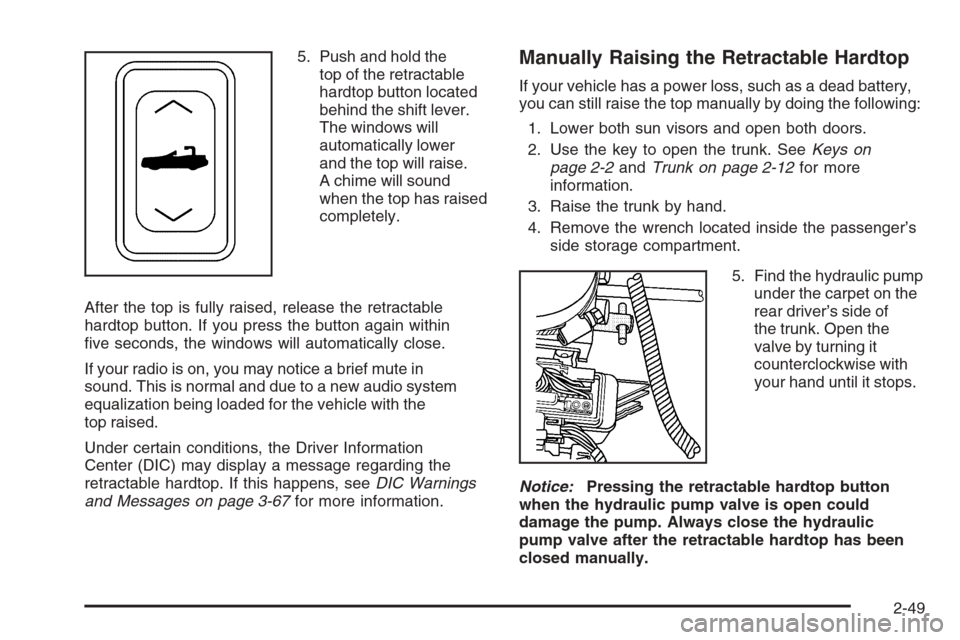
5. Push and hold the
top of the retractable
hardtop button located
behind the shift lever.
The windows will
automatically lower
and the top will raise.
A chime will sound
when the top has raised
completely.
After the top is fully raised, release the retractable
hardtop button. If you press the button again within
ve seconds, the windows will automatically close.
If your radio is on, you may notice a brief mute in
sound. This is normal and due to a new audio system
equalization being loaded for the vehicle with the
top raised.
Under certain conditions, the Driver Information
Center (DIC) may display a message regarding the
retractable hardtop. If this happens, seeDIC Warnings
and Messages on page 3-67for more information.Manually Raising the Retractable Hardtop
If your vehicle has a power loss, such as a dead battery,
you can still raise the top manually by doing the following:
1. Lower both sun visors and open both doors.
2. Use the key to open the trunk. SeeKeys on
page 2-2andTrunk on page 2-12for more
information.
3. Raise the trunk by hand.
4. Remove the wrench located inside the passenger’s
side storage compartment.
5. Find the hydraulic pump
under the carpet on the
rear driver’s side of
the trunk. Open the
valve by turning it
counterclockwise with
your hand until it stops.
Notice:Pressing the retractable hardtop button
when the hydraulic pump valve is open could
damage the pump. Always close the hydraulic
pump valve after the retractable hardtop has been
closed manually.
2-49
Page 111 of 456
Instrument Panel Overview...............................3-4
Hazard Warning Flashers................................3-6
Other Warning Devices...................................3-6
Horn .............................................................3-6
Power Tilt Wheel and Telescopic Steering
Column......................................................3-6
Turn Signal/Multifunction Lever.........................3-7
Turn and Lane-Change Signals........................3-7
Headlamp High/Low-Beam Changer..................3-8
Flash-to-Pass.................................................3-8
Windshield Wipers..........................................3-9
Rainsense™ Wipers......................................3-10
Windshield Washer.......................................3-11
Headlamp Washer........................................3-11
Cruise Control..............................................3-12
Adaptive Cruise Control.................................3-15
Exterior Lamps.............................................3-28
Wiper Activated Headlamps............................3-29
Headlamps on Reminder................................3-29
Daytime Running Lamps (DRL).......................3-30
Adaptive Forward Lighting System...................3-31
Fog Lamps ..................................................3-31
Twilight Sentinel
®..........................................3-32
Exterior Lighting Battery Saver........................3-33
Instrument Panel Brightness...........................3-33
Courtesy Lamps...........................................3-33Entry/Exit Lighting.........................................3-33
Reading Lamps............................................3-33
Battery Run-Down Protection..........................3-34
Head-Up Display (HUD).................................3-34
Ultrasonic Rear Parking Assist (URPA)............3-38
Accessory Power Outlet(s).............................3-40
Ashtray(s) and Cigarette Lighter......................3-41
Climate Controls............................................3-41
Dual Climate Control System..........................3-41
Outlet Adjustment.........................................3-47
Passenger Compartment Air Filter...................3-47
Warning Lights, Gages, and Indicators............3-48
Instrument Panel Cluster................................3-49
Speedometer and Odometer...........................3-50
Trip Odometer..............................................3-50
Tachometer.................................................3-50
Safety Belt Reminder Light.............................3-50
Airbag Readiness Light..................................3-51
Passenger Airbag Status Indicator...................3-52
Voltmeter Gage............................................3-54
Brake System Warning Light..........................3-54
Anti-Lock Brake System Warning Light.............3-55
Traction Control System (TCS)
Warning Light...........................................3-56
Engine Coolant Temperature Gage..................3-57
Section 3 Instrument Panel
3-1
Page 143 of 456

Exterior Lighting Battery Saver
If the manual parking lamps or headlamps have been
left on, the exterior lamps will turn off as soon as
the ignition is turned off or RAP is active. This protects
against draining the battery in case you have
accidentally left the headlamps or parking lamps on.
The battery saver does not work if the headlamps are
turned on after the ignition switch is turned to off.
If you need to leave the lamps on, use the exterior lamp
control to turn the lamps back on.
Instrument Panel Brightness
The button for this feature is located on the instrument
panel to the left of the steering column.
+
!- (Brightness):Press this button to change the
brightness of the instrument panel lights.
Press the DIMMER button until PANEL DIMMING
appears on the Driver Information Center (DIC). Then
use the brightness button to adjust the instrument panel
brightness. Press the top of the button to brighten the
lights or the bottom of the button to dim the lights.
SeeHead-Up Display (HUD) on page 3-34for more
information.
Be sure not to have the brightness turned all the
way down with the lamps on during the day.
Your DIC may not be visible.
Courtesy Lamps
When any door or the trunk lid is opened, the interior
lamps will go on unless it is bright outside.
You can also turn the courtesy lamps on by pressing
the interior lamp button on the right side of the
instrument panel cluster.
Press this button if the courtesy lamps will not go off.
Entry/Exit Lighting
With entry lighting, the interior lamps will come on when
entering the vehicle. The interior lamps will come on
for about 20 seconds when the engine is turned off.
You can turn exit and entry lighting off by quickly turning
the courtesy lamps on and off.
Reading Lamps
Your inside rearview mirror includes two reading lamps.
The lamps will go on when a door is opened.
When the doors are closed, each lamp can be turned
on individually by pressing the button for that lamp.
3-33
Page 144 of 456
Battery Run-Down Protection
Your vehicle has a feature to help prevent you from
draining the battery in case the underhood lamp, vanity
mirror lamps, cargo lamps, reading lamps, console
or glove box lamps are accidentally left on or in case
something is plugged into the accessory power outlet or
cigarette lighter. If you leave any of these lamps on,
they will automatically time-out after about 20 minutes.
To reset it, all of the above lamps must be turned
off or the ignition key must be in ON.
Head-Up Display (HUD)
{CAUTION:
If the HUD image is too bright, or too high in
your eld of view, it may take you more time to
see things you need to see when it is dark
outside. Be sure to keep the HUD image dim
and placed low in your eld of view.The Head-Up Display (HUD) allows you to see some of
the driver information that appears on your instrument
panel cluster.
The information may be displayed in English or metric
units and appears as an image focused out toward
the front of your vehicle. To change from English
to metric units, seeDriver Information Center (DIC)
on page 3-64.
The HUD consists of the following information:
Speedometer
Turn Signal Indicators
High-Beam Indicator Symbol
Tap-Up/Tap-Down Transmission Feature
Check Gages Icon
Adaptive Cruise Control Features and Indicators
Radio Features
3-34
Page 150 of 456
Accessory Power Outlet(s)
The accessory power outlet can be used to connect
electrical equipment such as a cellular phone or
CB radio.
The accessory power outlet is located inside the center
console storage compartment, on the forward left side.
To use the outlet, remove the tethered cap. When not
using it, always cover the outlet with the protective cap.
Notice:When using an accessory power outlet,
maximum electrical load must not exceed 20 amps.
Always turn off any electrical equipment when
not in use. Leaving electrical equipment on for
extended periods will drain your vehicle’s battery.
Certain electrical accessories may not be compatible
with the accessory power outlet and could result
in blown vehicle or adapter fuses. If you experience a
problem, see your dealer for additional information
on accessory power outlets.Notice:Adding any electrical equipment to your
vehicle may damage it or keep other components
from working as they should. The repairs would not
be covered by your warranty. Do not use equipment
exceeding maximum amperage rating. Check
with your dealer before adding electrical equipment.
When adding electrical equipment, be sure to follow
the installation instructions included with the equipment.
We recommend that you see a qualied technician or
your dealer for the proper installation of your equipment.
Notice:Improper use of the power outlet can
cause damage not covered by your warranty. Do not
hang any type of accessory or accessory bracket
from the plug because the power outlets are
designed for accessory power plugs only.
3-40
Page 157 of 456

Outlet Adjustment
Use the thumbwheel to open or close the outlets.
Operation Tips
Clear away any ice, snow or leaves from the air
inlets at the base of the windshield that may
block the ow of air into your vehicle.
Use of non-GM approved hood deectors may
adversely affect the performance of the system.
Keep the area around the base of the instrument
panel console and air path under the seats clear
of objects to help circulate the air inside of
your vehicle more effectively.
Passenger Compartment Air Filter
The passenger compartment air lter removes certain
odor and particles from the air including pollen and dust
particles. Reductions in airow, which may occur more
often in dusty areas, indicate that the lter may need to
be replaced early.
The lter should be replaced as part of the routine
scheduled maintenance. SeeScheduled Maintenance
on page 7-4for more information.
To check or replace the air lter, do the following:
1. With the hood open, unlatch and remove the
access panel.
The passenger compartment air lter and access
panel are located on the passenger’s side of
the engine compartment near the battery.
SeeEngine Compartment Overview on page 6-12
for more information on location.
2. Pull the old lter out of the housing.
3. Insert the new lter into the housing. The lter should
be fully inserted with the arrows pointing up.
4. Reinstall the air lter access panel.
3-47
Page 164 of 456

Voltmeter Gage
When the vehicle is in
accessory mode, the
voltmeter shows the
voltage output of your
battery. When the
engine is running,
it shows the voltage
output of the charging
system.
The reading will change as the rate of charge changes
(with engine speed, for example), but if the voltmeter
reads at 9 volts or below, your instrument panel
cluster and other systems may shut down. The Driver
Information Center (DIC) will read LOW VOLTAGE
when your vehicle is at 10 volts or below. Have
it checked right away. Driving with the voltmeter
reading at 10 volts or below could drain your battery
and disable your vehicle.
Brake System Warning Light
Your vehicle’s hydraulic brake system is divided into
two parts. If one part is not working, the other part can
still work and stop you. For good braking, though,
you need both parts working well.
This light should come on when you start the engine.
If it does not come on then, have it xed so it will
be ready to warn you if there is a problem.
If this warning light stays on after you start the engine,
the parking brake may still be set or there could be
a brake problem. Refer toParking Brake on page 2-29
to see if it is set. If the parking brake is not set, have
your brake system inspected right away.
United StatesCanada
3-54
Page 170 of 456

Emissions Inspection and
Maintenance Programs
Some state/provincial and local governments have or
may begin programs to inspect the emission control
equipment on your vehicle. Failure to pass this
inspection could prevent you from getting a vehicle
registration.
Here are some things you need to know to help
your vehicle pass an inspection:
Your vehicle will not pass this inspection if the
Check Engine light is on or not working properly.
To perform a Check Engine light bulb check with the
keyless ignition, make sure the transmitter fob is in
the passenger compartment. SeeIgnition Positions
on page 2-21. Press the bottom of the ACC button
on the instrument panel and hold the button down
for ve seconds. The instrument panel, including
the Check Engine light, will light up and the ignitionwill be on, but the engine will not start — if you press
the bottom of the ACC button only briey, less than
ve seconds, the accessory power mode will be turned
on, but not the ignition. After the bulb check, be sure
to press and release the ACC button again to turn
the ignition off and avoid draining the vehicle’s battery.
Your vehicle will not pass this inspection if the
OBD (on-board diagnostic) system determines that
critical emission control systems have not been
completely diagnosed by the system. The vehicle
would be considered not ready for inspection. This can
happen if you have recently replaced your battery or
if your battery has run down. The diagnostic system is
designed to evaluate critical emission control systems
during normal driving. This may take several days
of routine driving. If you have done this and your vehicle
still does not pass the inspection for lack of OBD
system readiness, your GM dealer can prepare the
vehicle for inspection.
3-60
Page 177 of 456
DIC Warnings and Messages
These messages will appear if there is a problem
detected in one of your vehicle’s systems. You must
then press RESET to clear the display screen for
further use. However, be sure to take any message that
appears on the display screen seriously and remember
that pressing the RESET button will only make the
message disappear, not the problem.
DIC messages can also be displayed in English,
French, German, Italian, and Spanish.
ABS (Anti-Lock Brake System) ACTIVE:When your
anti-lock system is adjusting brake pressure to help
avoid a braking skid, the ABS ACTIVE message will
be displayed.
Slippery road conditions may exist if this message
is displayed, so adjust your driving accordingly.
The message may stay on for a few seconds after
the system stops adjusting brake pressure.BATTERY SAVER ACTIVE:This message is displayed
when the vehicle has detected that the battery voltage
is dropping beyond a reasonable point. The battery
saver system will start reducing certain features of the
vehicle that you may not be able to notice. At the
point that features are disabled, this message is
displayed. It means that the vehicle is trying to save the
charge in the battery. Turn off unnecessary accessories
to allow the battery to recharge.
BUCKLE PASSENGER:This message reminds you to
buckle the passenger’s seat belt.
This message will display and a chime will sound when
the ignition is on, the driver’s seat belt is buckled, the
passenger’s seat belt is unbuckled with the passenger
airbag enabled, and the vehicle is in motion. You should
have the passenger buckle their seat belt.
The reminder will be repeated if the ignition is on, the
vehicle is in motion, the driver is buckled and the
passenger is still unbuckled, and the passenger airbag is
enabled. If the passenger’s seat belt is already buckled,
this message and chime will not come on.
3-67
Page 179 of 456

CRUISE NOT READY:This message indicates that
ACC will not activate due to a temporary condition.
Your vehicle does not require service. If this message
appears when you attempt to activate the system,
continue driving for several minutes then try again to
activate the system.
DRIVER NO. X (1 OR 2):This message will be
displayed when the vehicle is started or when there
is a change of driver. The message will show which
driver is activating the personalization feature. It will
only stay on for ve seconds.
ENGINE HOT, STOP ENGINE:This message will
appear when the engine has overheated. Stop and
turn the engine off immediately to avoid severe engine
damage. SeeEngine Overheating on page 6-25.
A multiple chime will also sound when this message
is displayed.
ENGINE PROTECTION REDUCE ENGINE RPM:
If this message appears, the control system has
determined that continued operation at the existing
engine speed may lead to engine overheating.
Therefore, you should lower the engine speed by
upshifting the transmission or drive at a lower speed.HEADLAMPS SUGGESTED:If it is dark enough
outside and the headlamps and Twilight Sentinel®
controls are off, this message will display on the DIC.
This message informs the driver that turning on the
exterior lamps is recommended. It has become
dark enough outside to require the headlamps and/or
other exterior lamps. This message will also appear
if the optional Rainsense™ wiping feature is on and
the Twilight Sentinel
®is off.
HIGH TRANS (Transmission) TEMP (Temperature):
This message indicates that the transmission uid in
your vehicle is too hot. Stop and allow your vehicle to idle
until it cools down or until this message is removed.
HIGH VOLTAGE:This message shows that the
electrical charging system is overcharging. To avoid
being stranded, have the electrical system checked
by your GM dealer. You can reduce the charging
overload by using the accessories. Turn on the lamps
and radio, set the climate control on AUTO and the
fan speed on HI, and turn the rear window defogger
on. You can monitor battery voltage on the DIC
by pressing the information button. The normal range
is 11.5 to 15.5 volts when the engine is running.
3-69