trunk CADILLAC XLR 2006 1.G Owner's Manual
[x] Cancel search | Manufacturer: CADILLAC, Model Year: 2006, Model line: XLR, Model: CADILLAC XLR 2006 1.GPages: 456, PDF Size: 3.74 MB
Page 178 of 456

BUCKLE SEAT BELT:This message reminds you to
buckle the driver’s seat belt.
This message will display and a chime will sound when
the ignition is on, the driver’s seat belt is unbuckled,
and the vehicle is in motion. You should buckle
your seat belt.
If the driver remains unbuckled when the ignition is on
and the vehicle is in motion, the reminder will be
repeated. If the driver’s seat belt is already buckled,
this message and chime will not come on.
This message is an additional reminder to the Safety
Belt Reminder Light in the instrument panel cluster.
SeeSafety Belt Reminder Light on page 3-50for more
information.
CHANGE OIL NOW:This means that the life of the
engine oil has expired. SeeScheduled Maintenance on
page 7-4. After an oil change, the Oil Life Indicator
must be reset. SeeOil Life Indicator on page 3-82and
Engine Oil Life System on page 6-18.
CHARGE SYSTEM FAULT:This message will display
when a problem with the charging system has been
detected. Have your vehicle serviced by your GM dealer.CHECK GAS CAP:This message will appear if the gas
cap has not been fully tightened. You should recheck
your gas cap to ensure that it is on properly.
CLEAN RADAR CRUISE:If your vehicle has this
feature, this message indicates the Adaptive Cruise
Control (ACC) system is disabled because the radar is
blocked and cannot detect vehicles in your path.
It may also activate during heavy rain or due to road
spray. To clean the system, seeAdaptive Cruise Control
on page 3-15.
CLOSE CARGO DIVIDER:This message indicates that
the cargo divider is not in place. Open the trunk and
make sure the cargo divider is secure and no objects are
on the divider. SeeRear Storage Area on page 2-46
for more information.
COOLANT OVER TEMP (Temperature):This message
will appear when the engine coolant temperature is
too hot. Stop and allow your vehicle to idle in PARK (P)
until it cools down and the message is removed. Do
not increase engine speed above a normal idle. If it does
not cool down, turn off the engine and have it serviced
by your GM dealer before driving it again. Severe
engine damage can result from an overheated engine.
SeeEngine Overheating on page 6-25.
3-68
Page 186 of 456

TOP INOP (Inoperative) – VALET ON:This message
will display when the retractable hardtop button is
pressed and the valet switch is on. Turn off the valet
switch before using the retractable hardtop.
TOP INOP (Inoperative) OUT OF PARK:This
message will display if the retractable hardtop button is
pressed while the vehicle is not in PARK (P).
TOP MOTOR OVER TEMP (Temperature):This
message will display when the retractable hardtop button
is pressed and the hardtop pump motor temperature
is over 221°F (105°C). Wait for the hardtop pump motor
to cool down before using the retractable hardtop.
TOP NOT SECURE:This message will display when
the retractable hardtop button is released before the top
open or close operation is complete. Press and hold the
retractable hardtop button to fully open or close the top.
TRAC (Traction) SYSTEM ACTIVE:When your
traction control system is limiting wheel spin, the
TRACTION SYSTEM ACTIVE message will be
displayed. Slippery road conditions may exist if this
message is displayed, so adjust your driving accordingly.
This message will stay on for a few seconds after the
traction control system stops limited wheel spin.TRAC (Traction)/STABILITRAK OFF:This message
indicates that both the Traction Control System
(TCS) and StabiliTrak
®are off. The message will remain
until the systems are turned on again.
TRAC (Traction)/STABILITRAK ON:This message
indicates that both the Traction Control System
(TCS) and the StabiliTrak
®are on.
TRACTION SYSTEM OFF:This message indicates
that the Traction Control System (TCS) is off but
StabiliTrak
®remains on.
TRACTION SYSTEM ON:This message indicates that
the Traction Control System (TCS) is on.
TRUNK AJAR:This message indicates that the trunk is
open while the vehicle is running and not in PARK (P).
WAIT FOR STABILITRAK:This message will be
displayed after driving 19 mph (30 km/h) for 10 seconds
if the steering is not centered. StabiliTrak
®is not
available until the steering centers itself and the
STABILITRAK READY message is displayed in the DIC.
3-76
Page 189 of 456

Auto Exit Recall
This feature allows the steering column and driver’s
seat to automatically move to the current driver’s
exit position when one of the following occurs:
The vehicle is turned off or in RAP or accessory
mode and the driver’s door is opened.
The vehicle is turned off or in RAP and the unlock
button on the keyless access transmitter is
pressed.
The DIC will display AUTO EXIT RECALL OFF or
AUTO EXIT RECALL ON. Press the OPTIONS button
to change the setting.
Approach Lights
This feature activates the parking lamps, front fog lamps
and back-up lamps during low light periods when the
unlock button on the keyless access transmitter is
pressed, both doors are closed and the vehicle is off or
in RAP. The lamps remain on for 20 seconds or until
a door is opened, the lock button on the keyless access
transmitter is pressed or the vehicle is no longer off
or in RAP.
The DIC will display APPROACH LIGHTS OFF or
APPROACH LIGHTS ON. Press the OPTIONS button
to change the setting.
Exit Lights
This feature activates the parking lamps and front fog
lamps for 15, 30 or 90 seconds. This will occur when the
vehicle is off or in RAP and the headlamps are on
due to the automatic headlamp system. The parking
lamps and front fog lamps will remain on until the driver
selected time period expires, the exterior lamp control
is activated or the vehicle is no longer off or in RAP.
The DIC will display EXIT LIGHTS OFF, EXIT
LIGHTS - 15 SEC, EXIT LIGHTS - 30 SEC or
EXIT LIGHTS - 90 SEC. Press the OPTIONS button
to change the setting.
Flash at Unlock
This feature activates the front and rear turn signals for
two short ashes when the unlock or trunk button on
the keyless access transmitter is pressed. This will only
occur when the vehicle is off.
The DIC will display NO FLASH AT UNLOCK or FLASH
AT UNLOCK. Press the OPTIONS button to change
the setting.
3-79
Page 196 of 456

Care of Your CDs
Handle CDs carefully. Store them in their original cases
or other protective cases and away from direct
sunlight and dust. The CD player scans the bottom
surface of the disc. If the surface of a CD is damaged,
such as cracked, broken, or scratched, the CD will
not play properly or not at all. If the surface of a CD is
soiled, take a soft, lint free cloth or dampen a clean,
soft cloth in a mild, neutral detergent solution mixed
with water, and clean it. Make sure the wiping process
starts from the center to the edge.
Do not touch the bottom side of a CD while handling
it; this could damage the surface. Pick up CDs by
grasping the outer edges or the edge of the hole
and the outer edge.
Care of the CD Player
The use of CD lens cleaners for CD players is not
advised, due to the risk of contaminating the internal
lens of the CD optics with lubricants.
Diversity Antenna System
The AM-FM antennas are located under the decklid
surface in the trunk compartment. the antennas
are hidden from view and are not accessible.
If adding an aftermarket cellular telephone to your
vehicle, do not attach the antenna to the rear glass.
This would interfere with the convertible top retraction
operation and could cause damage to the
nished/painted surfaces.
XM™ Satellite Radio Antenna
System (Trunk Mounted)
Your vehicle may have the XM™ Satellite Radio
antenna that is located on the trunk of your vehicle.
Keep this antenna clear of snow and ice build up
for clear radio reception.
XM™ Satellite Radio Antenna
System (Diversity System)
Your vehicle may have the XM™ Satellite Radio
antennas that are located in the outside rear view
mirrors. These antennas are hidden from view and
are not accessible.
3-86
Page 324 of 456
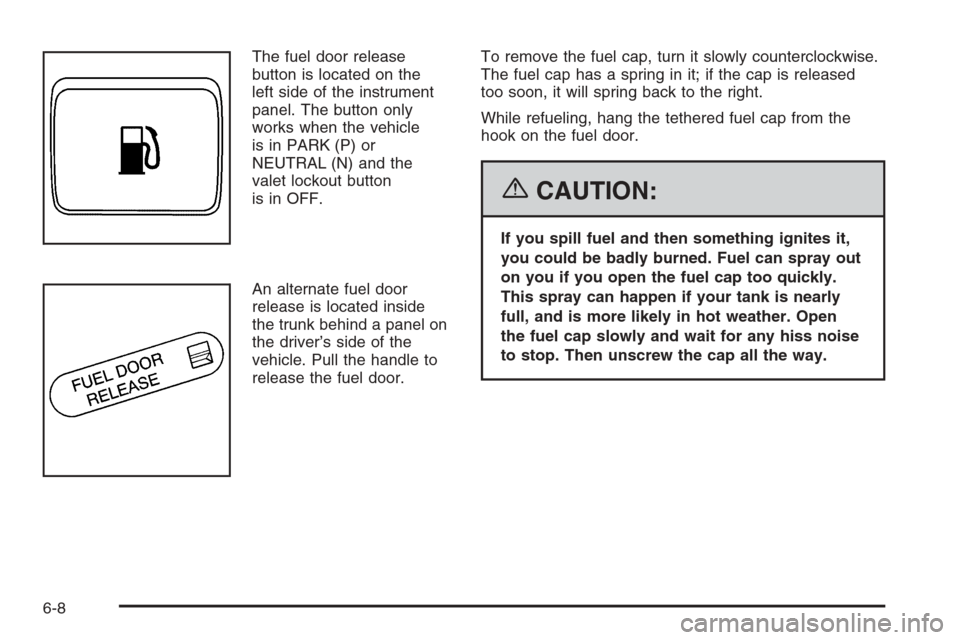
The fuel door release
button is located on the
left side of the instrument
panel. The button only
works when the vehicle
is in PARK (P) or
NEUTRAL (N) and the
valet lockout button
is in OFF.
An alternate fuel door
release is located inside
the trunk behind a panel on
the driver’s side of the
vehicle. Pull the handle to
release the fuel door.To remove the fuel cap, turn it slowly counterclockwise.
The fuel cap has a spring in it; if the cap is released
too soon, it will spring back to the right.
While refueling, hang the tethered fuel cap from the
hook on the fuel door.
{CAUTION:
If you spill fuel and then something ignites it,
you could be badly burned. Fuel can spray out
on you if you open the fuel cap too quickly.
This spray can happen if your tank is nearly
full, and is more likely in hot weather. Open
the fuel cap slowly and wait for any hiss noise
to stop. Then unscrew the cap all the way.
6-8
Page 326 of 456

Filling a Portable Fuel Container
{CAUTION:
Never ll a portable fuel container while it is in
your vehicle. Static electricity discharge from
the container can ignite the gasoline vapor.
You can be badly burned and your vehicle
damaged if this occurs. To help avoid injury
to you and others:
Dispense gasoline only into approved
containers.
Do not ll a container while it is inside a
vehicle, in a vehicle’s trunk, pickup bed,
or on any surface other than the ground.
Bring the ll nozzle in contact with the
inside of the ll opening before operating
the nozzle. Contact should be maintained
until the lling is complete.
Do not smoke while pumping gasoline.
Checking Things Under
the Hood
{CAUTION:
An electric fan under the hood can start up
and injure you even when the engine is not
running. Keep hands, clothing, and tools away
from any underhood electric fan.
{CAUTION:
Things that burn can get on hot engine parts
and start a re. These include liquids like fuel,
oil, coolant, brake uid, windshield washer
and other uids, and plastic or rubber. You or
others could be burned. Be careful not to drop
or spill things that will burn onto a hot engine.
6-10
Page 355 of 456

Vehicle Storage
If you are not going to drive your vehicle for 25 days
or more, remove the black, negative (−) cable from
the battery. This will help keep your battery from
running down.
{CAUTION:
Batteries have acid that can burn you and gas
that can explode. You can be badly hurt if
you are not careful. SeeJump Starting on
page 6-39for tips on working around a battery
without getting hurt.
You must close all doors and the trunk before
reconnecting the battery. After reconnecting the battery,
you must press the unlock button on the keyless
access transmitter. Failure to follow this procedure may
result in the alarm sounding. Pressing unlock on the
keyless access transmitter would stop the alarm.
Jump Starting
If your vehicle’s battery has run down, you may want to
use another vehicle and some jumper cables to start
your vehicle. Be sure to use the following steps to do
it safely.
{CAUTION:
Batteries can hurt you. They can be dangerous
because:
They contain acid that can burn you.
They contain gas that can explode or ignite.
They contain enough electricity to burn you.
If you do not follow these steps exactly, some or
all of these things can hurt you.
6-39
Page 404 of 456
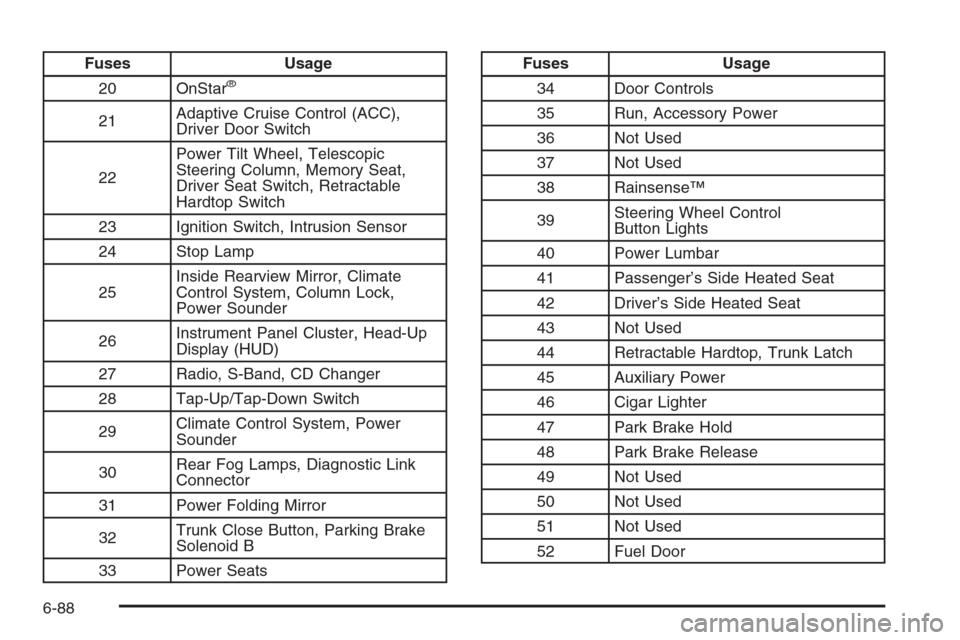
Fuses Usage
20 OnStar
®
21Adaptive Cruise Control (ACC),
Driver Door Switch
22Power Tilt Wheel, Telescopic
Steering Column, Memory Seat,
Driver Seat Switch, Retractable
Hardtop Switch
23 Ignition Switch, Intrusion Sensor
24 Stop Lamp
25Inside Rearview Mirror, Climate
Control System, Column Lock,
Power Sounder
26Instrument Panel Cluster, Head-Up
Display (HUD)
27 Radio, S-Band, CD Changer
28 Tap-Up/Tap-Down Switch
29Climate Control System, Power
Sounder
30Rear Fog Lamps, Diagnostic Link
Connector
31 Power Folding Mirror
32Trunk Close Button, Parking Brake
Solenoid B
33 Power Seats
Fuses Usage
34 Door Controls
35 Run, Accessory Power
36 Not Used
37 Not Used
38 Rainsense™
39Steering Wheel Control
Button Lights
40 Power Lumbar
41 Passenger’s Side Heated Seat
42 Driver’s Side Heated Seat
43 Not Used
44 Retractable Hardtop, Trunk Latch
45 Auxiliary Power
46 Cigar Lighter
47 Park Brake Hold
48 Park Brake Release
49 Not Used
50 Not Used
51 Not Used
52 Fuel Door
6-88
Page 415 of 456
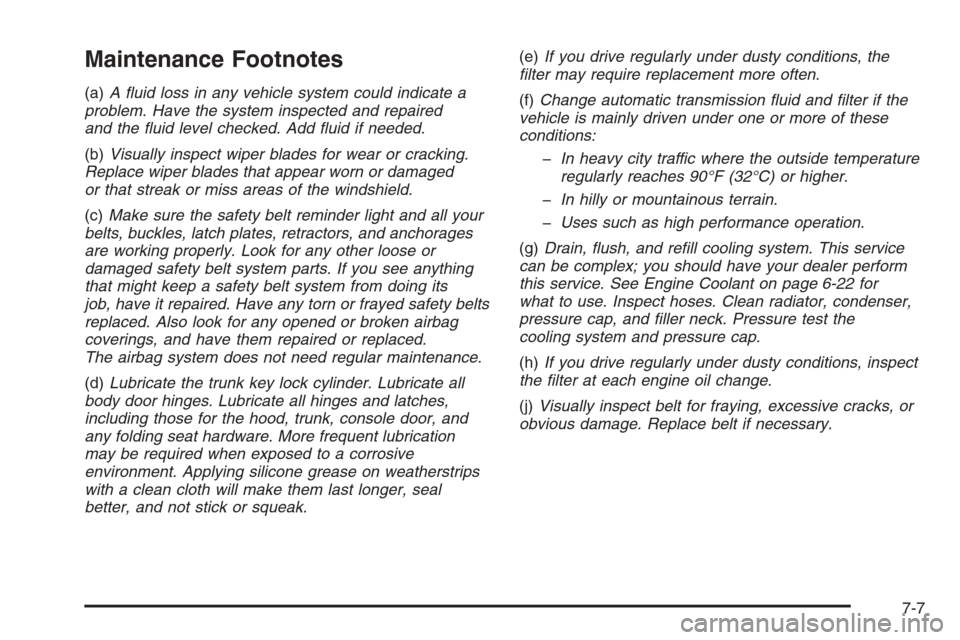
Maintenance Footnotes
(a)A uid loss in any vehicle system could indicate a
problem. Have the system inspected and repaired
and the uid level checked. Add uid if needed.
(b)Visually inspect wiper blades for wear or cracking.
Replace wiper blades that appear worn or damaged
or that streak or miss areas of the windshield.
(c)Make sure the safety belt reminder light and all your
belts, buckles, latch plates, retractors, and anchorages
are working properly. Look for any other loose or
damaged safety belt system parts. If you see anything
that might keep a safety belt system from doing its
job, have it repaired. Have any torn or frayed safety belts
replaced. Also look for any opened or broken airbag
coverings, and have them repaired or replaced.
The airbag system does not need regular maintenance.
(d)Lubricate the trunk key lock cylinder. Lubricate all
body door hinges. Lubricate all hinges and latches,
including those for the hood, trunk, console door, and
any folding seat hardware. More frequent lubrication
may be required when exposed to a corrosive
environment. Applying silicone grease on weatherstrips
with a clean cloth will make them last longer, seal
better, and not stick or squeak.(e)If you drive regularly under dusty conditions, the
lter may require replacement more often.
(f)Change automatic transmission uid and lter if the
vehicle is mainly driven under one or more of these
conditions:
In heavy city traffic where the outside temperature
regularly reaches 90°F (32°C) or higher.
In hilly or mountainous terrain.
Uses such as high performance operation.
(g)Drain, ush, and rell cooling system. This service
can be complex; you should have your dealer perform
this service. See Engine Coolant on page 6-22 for
what to use. Inspect hoses. Clean radiator, condenser,
pressure cap, and ller neck. Pressure test the
cooling system and pressure cap.
(h)If you drive regularly under dusty conditions, inspect
the lter at each engine oil change.
(j)Visually inspect belt for fraying, excessive cracks, or
obvious damage. Replace belt if necessary.
7-7
Page 420 of 456
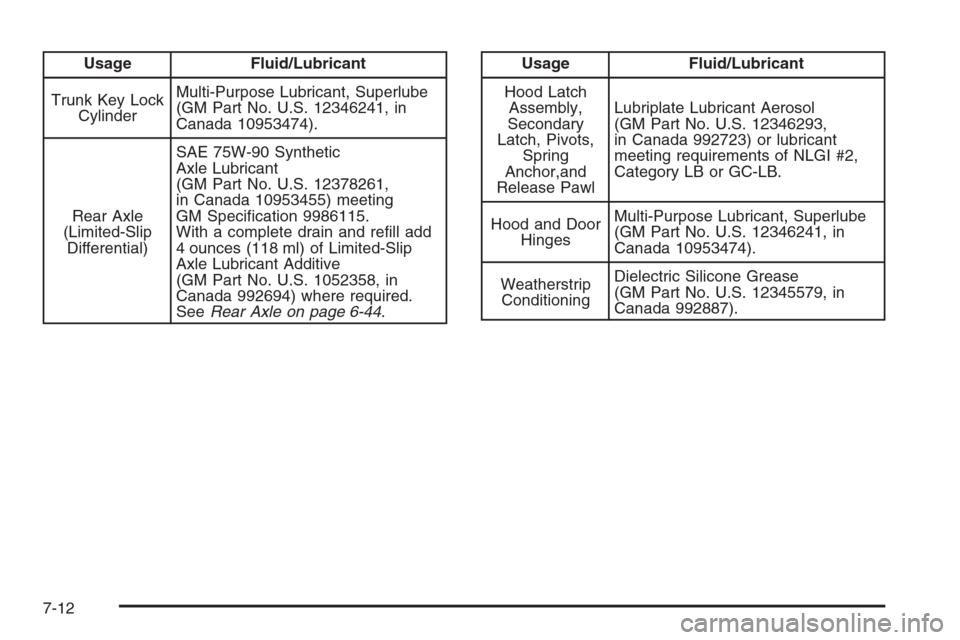
Usage Fluid/Lubricant
Trunk Key Lock
CylinderMulti-Purpose Lubricant, Superlube
(GM Part No. U.S. 12346241, in
Canada 10953474).
Rear Axle
(Limited-Slip
Differential)SAE 75W-90 Synthetic
Axle Lubricant
(GM Part No. U.S. 12378261,
in Canada 10953455) meeting
GM Specication 9986115.
With a complete drain and rell add
4 ounces (118 ml) of Limited-Slip
Axle Lubricant Additive
(GM Part No. U.S. 1052358, in
Canada 992694) where required.
SeeRear Axle on page 6-44.Usage Fluid/Lubricant
Hood Latch
Assembly,
Secondary
Latch, Pivots,
Spring
Anchor,and
Release PawlLubriplate Lubricant Aerosol
(GM Part No. U.S. 12346293,
in Canada 992723) or lubricant
meeting requirements of NLGI #2,
Category LB or GC-LB.
Hood and Door
HingesMulti-Purpose Lubricant, Superlube
(GM Part No. U.S. 12346241, in
Canada 10953474).
Weatherstrip
ConditioningDielectric Silicone Grease
(GM Part No. U.S. 12345579, in
Canada 992887).
7-12