cruise control CADILLAC XLR 2007 1.G Owner's Manual
[x] Cancel search | Manufacturer: CADILLAC, Model Year: 2007, Model line: XLR, Model: CADILLAC XLR 2007 1.GPages: 512, PDF Size: 3.84 MB
Page 163 of 512

Using Adaptive Cruise Control on Hills
How well Adaptive Cruise Control will work on hills
depends on your speed, vehicle load, traffic
conditions and the steepness of the hills. It may
not detect a vehicle in your lane while driving
on hills. When going up steep hills, you may want
to use the accelerator pedal to maintain your
speed. When going downhill, you may have to
brake to keep your speed down. Applying
the brake disengages the system. You may
choose not to use Adaptive Cruise Control on
steep hills.
Disengaging Adaptive Cruise Control
To disengage the system, apply the brake pedal
or move the Adaptive Cruise Control switch to
off. Adaptive Cruise Control information will
not appear on the HUD when the system is not
engaged.
Erasing Set Speed Memory
When you turn the Adaptive Cruise Control switch
or the ignition off, the set speed memory is
erased.
Other Messages
There are three messages that may appear in the
Driver Information Center (DIC). They are
SERVICE RADAR CRUISE, CRUISE NOT READY
and CLEAN RADAR CRUISE. These messages
will only appear to indicate a problem if Adaptive
Cruise Control is active. SeeDIC Warnings
and Messages on page 206for more information.
You may also see CRUISE SPEED LIMITED
displayed in the HUD. SeeHead-Up Display
(HUD) on page 171for more information.
163
Page 164 of 512
Cleaning the System
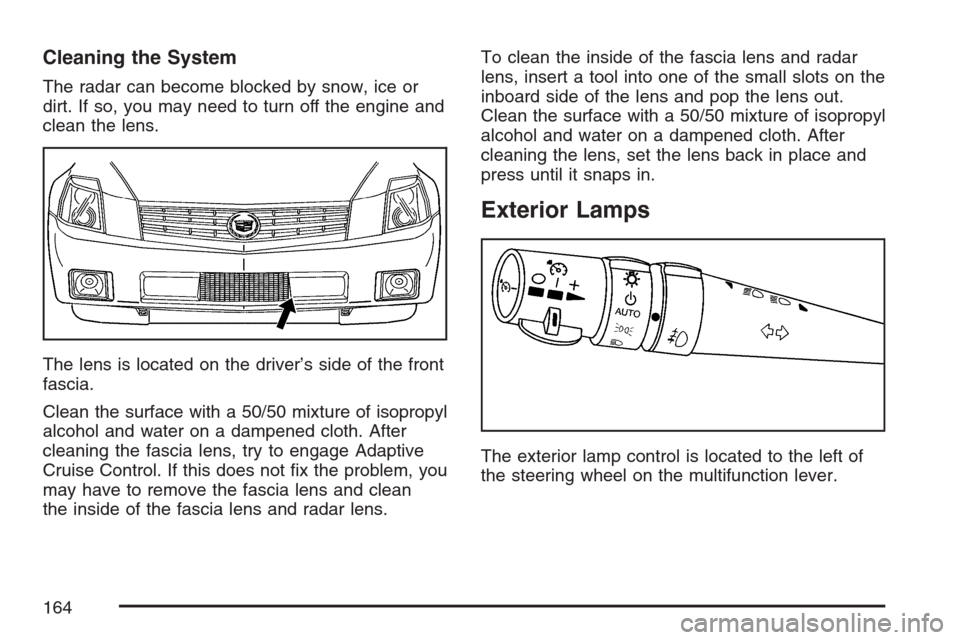
The radar can become blocked by snow, ice or
dirt. If so, you may need to turn off the engine and
clean the lens.
The lens is located on the driver’s side of the front
fascia.
Clean the surface with a 50/50 mixture of isopropyl
alcohol and water on a dampened cloth. After
cleaning the fascia lens, try to engage Adaptive
Cruise Control. If this does not x the problem, you
may have to remove the fascia lens and clean
the inside of the fascia lens and radar lens.To clean the inside of the fascia lens and radar
lens, insert a tool into one of the small slots on the
inboard side of the lens and pop the lens out.
Clean the surface with a 50/50 mixture of isopropyl
alcohol and water on a dampened cloth. After
cleaning the lens, set the lens back in place and
press until it snaps in.
Exterior Lamps
The exterior lamp control is located to the left of
the steering wheel on the multifunction lever.
164
Page 172 of 512
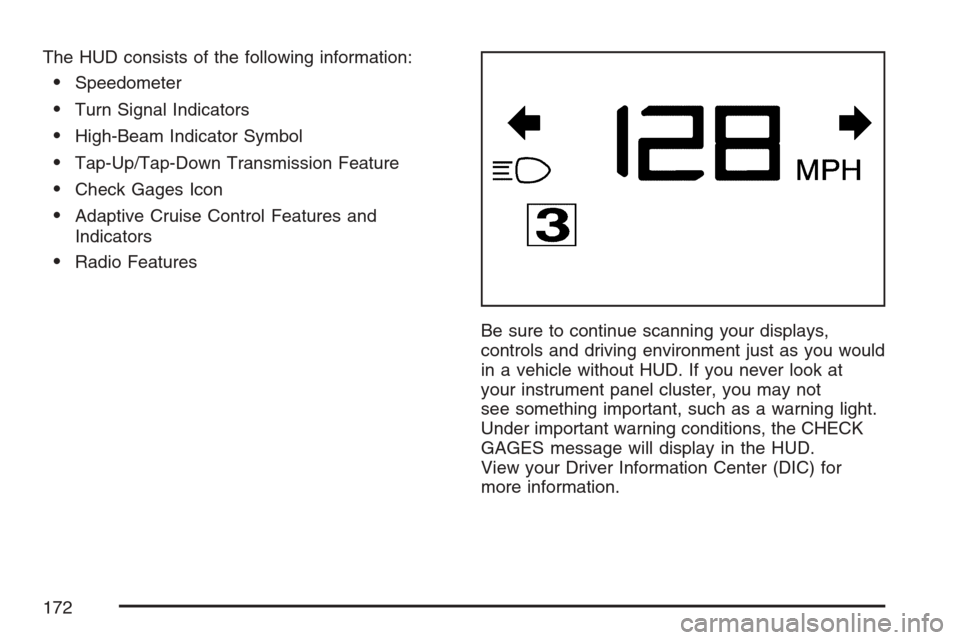
The HUD consists of the following information:
Speedometer
Turn Signal Indicators
High-Beam Indicator Symbol
Tap-Up/Tap-Down Transmission Feature
Check Gages Icon
Adaptive Cruise Control Features and
Indicators
Radio Features
Be sure to continue scanning your displays,
controls and driving environment just as you would
in a vehicle without HUD. If you never look at
your instrument panel cluster, you may not
see something important, such as a warning light.
Under important warning conditions, the CHECK
GAGES message will display in the HUD.
View your Driver Information Center (DIC) for
more information.
172
Page 174 of 512
As light shines out from the HUD, it is possible for
light to shine back in. In rare occurrences,
when the sun is at a specic angle and position,
the sun’s rays can shine back into the HUD. When
this occurs, the display device within the HUD
will be temporarily illuminated. The event will end
when the vehicle’s angle to the sun changes.
Clean the inside of the windshield as needed to
remove any dirt or lm that reduces the sharpness
or clarity of the HUD image.
To clean the HUD, spray household glass cleaner
on a soft, clean cloth. Wipe the HUD lens gently,
then dry it. Do not spray cleaner directly on the lens
because the cleaner could leak into the unit.
If the ignition is on and you cannot see the HUD
image, check to see if:
Something is covering the HUD unit.
The brightness is adjusted properly.
The HUD image is adjusted to the proper
height.
Ambient light in the direction your vehicle is
facing is low.
A fuse is blown. SeeFuses and Circuit
Breakers on page 453.Keep in mind that your windshield is part of the
HUD system. SeeWindshield Replacement
on page 412.
The following Adaptive Cruise Control (ACC)
messages may appear in the HUD:
CRUISE SPEED LIMITED:This message
indicates that your vehicle speed has been
reduced below your set speed due to ACC
limitations. Your set speed is too high and ACC
cannot detect other vehicles at far enough
distances for the system to operate properly.
TIGHT CURVE:This message indicates that ACC
has reduced your vehicle speed due to a tight
curve in the road. Once the road straightens, ACC
will return to your selected set speed or follow
distance setting. See “Adaptive Cruise Control
(ACC)” underTurn Signal/Multifunction Lever on
page 141for more information.
You may also see an ACC active symbol, alert
symbol or vehicle ahead symbol. See “Adaptive
Cruise Control (ACC)” underTurn
Signal/Multifunction Lever on page 141for more
information.
174
Page 208 of 512
CLEAN RADAR CRUISE
If your vehicle has this feature, this message
displays when the Adaptive Cruise Control (ACC)
system is disabled because the radar is blocked
and cannot detect vehicles in your path. It
may also activate during heavy rain or due to road
spray. To clean the system, seeAdaptive Cruise
Control on page 150.
CLOSE CARGO DIVIDER
This message displays if the cargo divider is not in
place. Open the trunk and make sure the cargo
divider is secure and no objects are on the divider.
SeeRear Storage Area on page 123for more
information.
COOLANT OVER TEMP (Temperature)
This message displays when the engine coolant
temperature is too hot. Stop and allow your vehicle
to idle in PARK (P) until it cools down and the
message is removed. Do not increase engine
speed above a normal idle. If it does not
cool down, turn off the engine and have your
vehicle serviced by your dealer before driving itagain. Severe engine damage can result from an
overheated engine. SeeEngine Overheating
on page 388.
CRUISE NOT READY
This message indicates that the Adaptive Cruise
Control (ACC) will not activate due to a temporary
condition. Your vehicle does not require service.
If this message displays when you attempt to
activate the system, continue driving for several
minutes, then try to activate the system again.
DRIVER NO. X (1 OR 2)
This message displays when the vehicle is started
or when there is a change of driver. The
message shows which driver is activating the
personalization feature. It will only stay on for
ve seconds.
ENGINE HOT, STOP ENGINE
This message displays when the engine has
overheated. Stop and turn the engine off
immediately to avoid severe engine damage. See
Engine Overheating on page 388. A multiple
chime also sounds when this message displays.
208
Page 215 of 512

SERVICE FUEL SYSTEM
This message displays when the Powertrain
Control Module (PCM) has detected a problem
within the fuel system. Have your vehicle serviced
by your dealer. This message will also be
displayed when the cluster is not getting fuel
information from the PCM.
SERVICE RADAR CRUISE
If your vehicle has this feature, this message
displays when the Adaptive Cruise Control (ACC)
system is disabled and needs service. See
your dealer.
SERVICE RIDE CONTROL
This message displays when there is a problem
with the Magnetic Ride Control System. Have your
vehicle serviced by your dealer.
SERVICE TRACTION SYS (System)
This message displays when there is a problem
with the Traction Control System (TCS). Have your
vehicle serviced by your dealer.
SERVICE STABILITRAK
If this message displays, it means there may be a
problem with the stability enhancement system.
If you see this message, try to reset the system.
Stop, turn off the engine, then start the engine
again. If this message still comes on, it means
there is a problem. You should see your dealer for
service. Reduce your speed and drive accordingly.
A single chime also sounds when this message
is displayed.
SERVICE TRANSMISSION
This message displays when there is a problem
with the transmission. Have your vehicle serviced
by your dealer.
SERVICE VEHICLE SOON
This message displays when a non-emissions
related powertrain malfunction occurs. Have your
vehicle serviced by your dealer as soon as
possible.
215
Page 329 of 512

Remember: ABS does not change the time you
need to get your foot up to the brake pedal
or always decrease stopping distance. If you get
too close to the vehicle in front of you, you will not
have time to apply your brakes if that vehicle
suddenly slows or stops. Always leave enough
room up ahead to stop, even though you
have ABS.
Using ABS
Do not pump the brakes. Just hold the brake
pedal down rmly and let anti-lock work for you.
You may hear a motor or clicking noise and
feel the brake pedal move a little during a stop,
but this is normal.
Braking in Emergencies
With ABS, you can steer and brake at the same
time. In many emergencies, steering can help you
more than even the very best braking.
Traction Control System (TCS)
Your vehicle has a traction control system that
limits wheel spin. This is especially useful in
slippery road conditions. The system operates only
if it senses that one or both of the rear wheels
are spinning or beginning to lose traction. When
this happens, the system works the rear brakes
and reduces engine power to limit wheel spin.
The TRAC SYSTEM ACTIVE message will display
on the Driver Information Center (DIC) when the
traction control system is limiting wheel spin.
SeeDIC Warnings and Messages on page 206.
You may feel or hear the system working, but this
is normal.
If your vehicle is in cruise control when the
traction control system begins to limit wheel spin,
the cruise control will automatically disengage.
When road conditions allow you to safely
use it again, you may reengage the cruise control.
SeeAdaptive Cruise Control on page 150or
Cruise Control on page 147for more information.
329
Page 454 of 512

Fuses Usage
4 Spare Fuse
5 Fuse Pull
6 Reverse Lamp
7 Starter/Crank
8 Parking Brake Solenoid A
9 Reverse Lamps
10 BTSI Solenoid, Column Lock
11 Not Used
12 Not Used
13 GMLAN Devices
14Rear Park Aid, Heated/Cooled
Seats, Windshield Wiper Relays
15 Door Locks
16 Engine Control Module
17 Interior Lights
18 Airbags
19 Not Used
20 OnStar
®
21Adaptive Cruise Control (ACC),
Driver Door Switch
22Power Tilt Wheel, Telescopic
Steering Column, Memory Seat,
Driver Seat Switch, Retractable
Hardtop Switch
23 Ignition Switch, Intrusion Sensor
Fuses Usage
24 Stop Lamp
25Inside Rearview Mirror, Climate
Control System, Column Lock,
Power Sounder
26Instrument Panel Cluster, Head-Up
Display (HUD)
27 Radio, S-Band, CD Changer
28 Tap-Up/Tap-Down Switch
29Climate Control System, Power
Sounder
30Rear Fog Lamps, Diagnostic Link
Connector
31 Power Folding Mirror
32Trunk Close Button, Parking Brake
Solenoid B
33 Power Seats
34 Door Controls
35 Run, Accessory Power
36 Not Used
37 Not Used
38 Rainsense™
39Steering Wheel Control Button
Lights
40 Power Lumbar
41 Passenger’s Side Heated Seat
454
Page 456 of 512

Fuses Usage
1Anti-lock Brake System, Electronic
Suspension Control, Adaptive
Forward Lighting System (AFS)
2 Horn
3Adaptive Cruise Control (ACC),
Transmission Controls
4 Windshield Wipers
5 Stop/Back-Up Lamps
6 Oxygen Sensor
7 Battery 5
8 Parking Lamps
Fuses Usage
9 Electronic Throttle Control
10 Fuel Pump
11Engine Control Module,
Transmission Control Module
12 Odd Injectors
13 Electronic Suspension Control
14 Emission Controls
15 Air Conditioning Compressor
16 Even Injectors
17Windshield Washer, Adaptive
Forward Lighting System (AFS),
Intercooler Pump
18 Headlamp Washer
19 Right Low Beam Headlamp
20 Not Used
21 Left Low Beam Headlamp
22 Fog Lamp
23 Right High Beam Headlamp
24 Left High Beam Headlamp
25 Cooling Fan
26 Battery 3
27 Anti-lock Brakes
28 Climate Controls
29 Battery 2
456
Page 499 of 512
A
Accessories and Modications..................... 363
Accessory Power Outlet(s).......................... 177
Adaptive Cruise Control............................... 150
Adaptive Forward Lighting System............... 167
Adding Equipment to Your Airbag-Equipped
Vehicle....................................................... 59
Additives, Fuel............................................ 367
Add-On Electrical Equipment....................... 452
Air Cleaner/Filter, Engine............................. 382
Air Conditioning........................................... 178
Airbag
Passenger Status Indicator....................... 189
Readiness Light....................................... 188
Airbag Sensing and Diagnostic
Module (SDM).......................................... 491
Airbag System............................................... 44
Adding Equipment to Your
Airbag-Equipped Vehicle......................... 59
How Does an Airbag Restrain?.................. 51
Passenger Sensing System....................... 53
Servicing Your Airbag-Equipped Vehicle..... 58
What Makes an Airbag Inate?.................. 51
What Will You See After an Airbag
Inates?................................................. 52Airbag System (cont.)
When Should an Airbag Inate?................. 49
Where Are the Airbags?............................. 47
Antenna, Diversity Antenna System............. 230
Antenna, XM™ Satellite Radio Antenna
System.................................................... 230
Anti-Lock Brake System (ABS).................... 327
Anti-Lock Brake, System Warning Light....... 193
Appearance Care
Aluminum or Chrome-Plated Wheels........ 448
Care of Safety Belts................................ 445
Chemical Paint Spotting........................... 450
Cleaning Exterior Lamps/Lenses.............. 446
Cleaning the Inside of Your Vehicle.......... 441
Fabric/Carpet........................................... 443
Finish Care.............................................. 447
Finish Damage......................................... 449
Instrument Panel, Vinyl, and Other
Plastic Surfaces.................................... 444
Leather.................................................... 444
Sheet Metal Damage............................... 449
Speaker Covers....................................... 445
Tires........................................................ 449
Underbody Maintenance........................... 449
Vehicle Care/Appearance Materials.......... 450
Washing Your Vehicle .............................. 446
499