ABS CADILLAC XLR 2007 1.G Owners Manual
[x] Cancel search | Manufacturer: CADILLAC, Model Year: 2007, Model line: XLR, Model: CADILLAC XLR 2007 1.GPages: 512, PDF Size: 3.84 MB
Page 123 of 512
Rear Storage Area
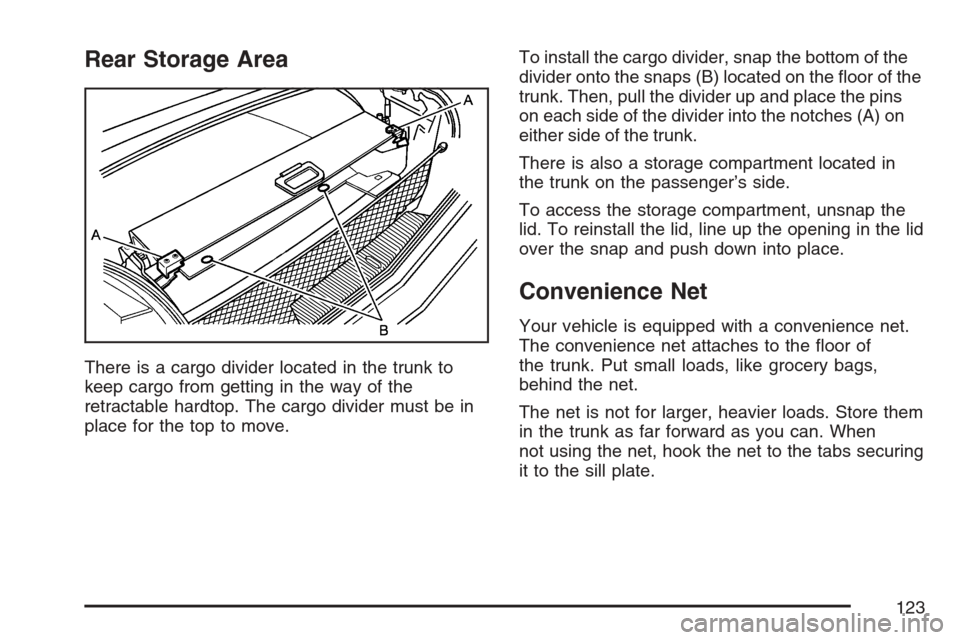
There is a cargo divider located in the trunk to
keep cargo from getting in the way of the
retractable hardtop. The cargo divider must be in
place for the top to move.To install the cargo divider, snap the bottom of the
divider onto the snaps (B) located on the oor of the
trunk. Then, pull the divider up and place the pins
on each side of the divider into the notches (A) on
either side of the trunk.
There is also a storage compartment located in
the trunk on the passenger’s side.
To access the storage compartment, unsnap the
lid. To reinstall the lid, line up the opening in the lid
over the snap and push down into place.
Convenience Net
Your vehicle is equipped with a convenience net.
The convenience net attaches to the oor of
the trunk. Put small loads, like grocery bags,
behind the net.
The net is not for larger, heavier loads. Store them
in the trunk as far forward as you can. When
not using the net, hook the net to the tabs securing
it to the sill plate.
123
Page 193 of 512

If the light comes on while you are driving and you
have a LOW BRAKE FLUID message showing
on the DIC, pull off the road and stop carefully.
You may notice that the pedal is harder to
push. Or, the pedal may go closer to the oor. It
may take longer to stop. If the light is still on, have
the vehicle towed for service. SeeTowing Your
Vehicle on page 359.
{CAUTION:
Your brake system may not be working
properly if the brake system warning light
is on. Driving with the brake system
warning light on can lead to an accident.
If the light is still on after you have pulled
off the road and stopped carefully, have
the vehicle towed for service.
Anti-Lock Brake System Warning
Light
With the Anti-Lock
Brake System (ABS),
this light will come
on when your engine is
started and may stay
on for several seconds.
That is normal.
If the light stays on, turn the ignition off or if the light
comes on when you are driving, stop as soon as
possible and turn the ignition off. Then start the
engine again to reset the system. If the light still
stays on, or comes on again while you are driving,
your vehicle needs service. If the regular brake
system warning light is not on, you still have brakes,
but you do not have anti-lock brakes. If the regular
brake system warning light is also on, you do not
have anti-lock brakes and there is a problem with
your regular brakes. See “Service ABS” underDIC
Warnings and Messages on page 206.
The ABS warning light will come on briey when
you turn the ignition on. This is normal. If the
light does not come on then, have it xed so it will
be ready to warn you if there is a problem.
193
Page 206 of 512
FRONT Lxx Rxx PSI:This feature shows the tire
pressure for the front left and right tires.
REAR Lxx Rxx PSI:This feature shows the tire
pressure for the rear left and right tires.
OIL LIFE:This feature shows the estimated oil
life remaining. SeeOil Life Indicator on page 224
for more information. To reset the engine oil
life system, seeEngine Oil Life System on
page 380. This only needs to be reset after you
have had the oil changed.
In addition to the engine oil life system monitoring
oil life, additional maintenance is recommended
in the Maintenance Schedule in this manual.
SeeScheduled Maintenance on page 465and
Engine Oil on page 377for more information.
ENG/METRIC (English/Metric):This feature
allows you to switch the DIC displays between
English and Metric. Press the RESET button
to switch the display between English and Metric.
There will be an arrow next to the option that
is selected.DIC Warnings and Messages
These messages appear if there is a problem
detected in one of your vehicle’s systems.
You must then press RESET to clear the display
screen for further use. However, be sure to
take any message that appears on the display
screen seriously and remember that pressing the
RESET button will only make the message
disappear, not the problem.
DIC messages can also be displayed in English,
French, German, Italian, Japanese, and Spanish.
ABS (Anti-Lock Brake System)
ACTIVE
This message displays when the Anti-lock Brake
System (ABS) is adjusting brake pressure to
help avoid a braking skid.
Slippery road conditions may exist if this message
displays, so adjust your driving accordingly.
The message may stay on for a few seconds after
the system stops adjusting brake pressure.
206
Page 214 of 512

SERVICE A/C
This message displays when the electronic
sensors that control the air conditioning and
heating systems are no longer working. Have the
climate control system serviced by your dealer
if you notice a drop in heating and air conditioning
efficiency.
SERVICE ABS (Anti-lock Brake System)
If this message displays when you are driving,
stop as soon as possible and turn the ignition off.
Then start the engine again to reset the system.
If the message stays on, or comes back on again
while you are driving, your vehicle is in need of
service. See your dealer.
If the SERVICE ABS message is being displayed,
the Traction Control System (TCS) and
StabiliTrak
®System will also be disabled. The
Driver Information Center will scroll three
messages: SERVICE ABS, SERVICE TRACTION
SYS, and SERVICE STABILITRAK, and the
anti-lock brake system and traction control warning
lights on the instrument panel cluster will beilluminated. SeeAnti-Lock Brake System Warning
Light on page 193andTraction Control System
(TCS) Warning Light on page 194. The driver can
acknowledge these messages by pressing the
RESET button three times. When the service
message is displayed, the computer controlled
systems will not assist the driver and you should
have the system repaired by your dealer as
soon as possible. Adjust your driving accordingly.
SERVICE AFS (Adaptive Forward
Lighting System) LAMPS
This message displays when the Adaptive
Forward Lighting System (AFS) is disabled and
needs service. See your dealer. SeeAdaptive
Forward Lighting System on page 167for more
information.
SERVICE ELECT (Electrical) SYSTEM
This message displays if an electrical problem has
occurred within the Powertrain Control Module
(PCM). Have your vehicle serviced by your dealer.
214
Page 321 of 512
Your Driving, the Road, and
Your Vehicle............................................ 322
Defensive Driving...................................... 322
Drunken Driving........................................ 323
Control of a Vehicle.................................. 326
Braking...................................................... 326
Anti-Lock Brake System (ABS).................. 327
Braking in Emergencies............................. 329
Traction Control System (TCS).................. 329
Magnetic Ride Control............................... 331
Limited-Slip Rear Axle............................... 331
StabiliTrak
®System................................... 331
Steering.................................................... 333
Off-Road Recovery.................................... 335
Passing..................................................... 335
Loss of Control.......................................... 337
Racing or Other Competitive
Driving (XLR-V)...................................... 338Driving at Night......................................... 339
Driving in Rain and on Wet Roads............ 340
City Driving............................................... 343
Freeway Driving........................................ 344
Before Leaving on a Long Trip.................. 345
Highway Hypnosis..................................... 346
Hill and Mountain Roads........................... 347
Winter Driving........................................... 349
If Your Vehicle is Stuck in Sand, Mud,
Ice, or Snow.......................................... 353
Rocking Your Vehicle to Get It Out........... 354
Loading Your Vehicle................................ 354
Towing........................................................ 359
Towing Your Vehicle ................................. 359
Recreational Vehicle Towing...................... 359
Towing a Trailer........................................ 359
Section 5 Driving Your Vehicle
321
Page 327 of 512

Avoid needless heavy braking. Some people drive
in spurts — heavy acceleration followed by
heavy braking — rather than keeping pace with
traffic. This is a mistake. The brakes may not have
time to cool between hard stops. The brakes
will wear out much faster if you do a lot of heavy
braking. If you keep pace with the traffic and
allow realistic following distances, you will
eliminate a lot of unnecessary braking. That means
better braking and longer brake life.
If your vehicle’s engine ever stops while you are
driving, brake normally but do not pump the
brakes. If you do, the pedal may get harder to
push down. If the engine stops, you will still have
some power brake assist. But you will use it
when you brake. Once the power assist is used
up, it may take longer to stop and the brake pedal
will be harder to push.
Adding non-GM accessories can affect your
vehicle’s performance. SeeAccessories and
Modications on page 363.Anti-Lock Brake System (ABS)
Your vehicle has the Anti-Lock Brake System
(ABS), an advanced electronic braking system that
will help prevent a braking skid.
When you start your engine and begin to drive
away, ABS will check itself. You may hear a
momentary motor or clicking noise while this test
is going on, and you may even notice that
your brake pedal moves a little. This is normal.
If there is a problem
with ABS, this warning
light will stay on.
SeeAnti-Lock Brake
System Warning
Light on page 193.
327
Page 328 of 512
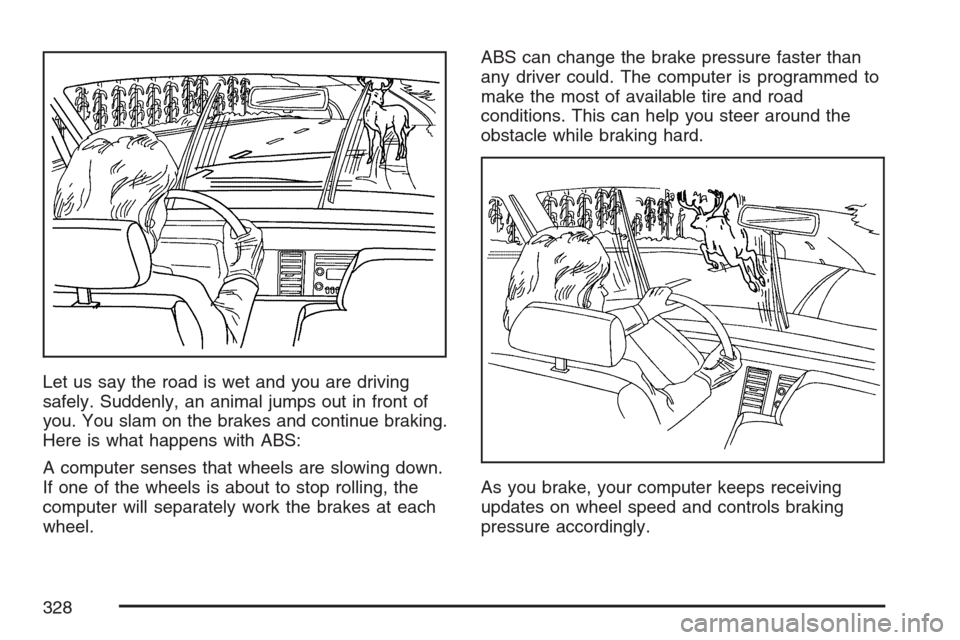
Let us say the road is wet and you are driving
safely. Suddenly, an animal jumps out in front of
you. You slam on the brakes and continue braking.
Here is what happens with ABS:
A computer senses that wheels are slowing down.
If one of the wheels is about to stop rolling, the
computer will separately work the brakes at each
wheel.ABS can change the brake pressure faster than
any driver could. The computer is programmed to
make the most of available tire and road
conditions. This can help you steer around the
obstacle while braking hard.
As you brake, your computer keeps receiving
updates on wheel speed and controls braking
pressure accordingly.
328
Page 329 of 512

Remember: ABS does not change the time you
need to get your foot up to the brake pedal
or always decrease stopping distance. If you get
too close to the vehicle in front of you, you will not
have time to apply your brakes if that vehicle
suddenly slows or stops. Always leave enough
room up ahead to stop, even though you
have ABS.
Using ABS
Do not pump the brakes. Just hold the brake
pedal down rmly and let anti-lock work for you.
You may hear a motor or clicking noise and
feel the brake pedal move a little during a stop,
but this is normal.
Braking in Emergencies
With ABS, you can steer and brake at the same
time. In many emergencies, steering can help you
more than even the very best braking.
Traction Control System (TCS)
Your vehicle has a traction control system that
limits wheel spin. This is especially useful in
slippery road conditions. The system operates only
if it senses that one or both of the rear wheels
are spinning or beginning to lose traction. When
this happens, the system works the rear brakes
and reduces engine power to limit wheel spin.
The TRAC SYSTEM ACTIVE message will display
on the Driver Information Center (DIC) when the
traction control system is limiting wheel spin.
SeeDIC Warnings and Messages on page 206.
You may feel or hear the system working, but this
is normal.
If your vehicle is in cruise control when the
traction control system begins to limit wheel spin,
the cruise control will automatically disengage.
When road conditions allow you to safely
use it again, you may reengage the cruise control.
SeeAdaptive Cruise Control on page 150or
Cruise Control on page 147for more information.
329
Page 338 of 512
If your vehicle starts to slide, ease your foot off
the accelerator pedal and quickly steer the
way you want the vehicle to go. If you start
steering quickly enough, your vehicle may
straighten out. Always be ready for a second skid
if it occurs.
Of course, traction is reduced when water, snow,
ice, gravel, or other material is on the road.
For safety, you will want to slow down and adjust
your driving to these conditions. It is important
to slow down on slippery surfaces because
stopping distance will be longer and vehicle control
more limited.
While driving on a surface with reduced traction, try
your best to avoid sudden steering, acceleration, or
braking, including reducing vehicle speed by
shifting to a lower gear. Any sudden changes could
cause the tires to slide. You may not realize the
surface is slippery until your vehicle is skidding.
Learn to recognize warning clues — such as
enough water, ice, or packed snow on the road to
make a mirrored surface — and slow down when
you have any doubt.
Remember: Any Anti-Lock Brake System (ABS)
helps avoid only the braking skid.Racing or Other Competitive
Driving (XLR-V)
See your warranty book before using your vehicle
for racing or other competitive driving.
Notice:If you use your vehicle for racing or
other competitive driving, the engine may
use more oil than it would with normal use.
Low oil levels can damage the engine. Be sure
to check the oil level often during racing or
other competitive driving and keep the level at
or near 2 quarts (2 L) above the upper mark
that shows the proper operating range on the
engine oil dipstick. For information on how
to add oil, seeEngine Oil on page 377.
After the competitive driving, remove excess
oil so that the level on the dipstick is not above
the upper mark that shows the proper
operating range.
338
Page 351 of 512
The Anti-Lock Brake System (ABS) improves your
vehicle’s stability when you make a hard stop
on a slippery road. Even though you have ABS,
you will want to begin stopping sooner than
you would on dry pavement. SeeAnti-Lock Brake
System (ABS) on page 327.
Allow greater following distance on any
slippery road.
Watch for slippery spots. The road might be
ne until you hit a spot that is covered with
ice. On an otherwise clear road, ice patches
may appear in shaded areas where the
sun cannot reach, such as around clumps of
trees, behind buildings, or under bridges.
Sometimes the surface of a curve or an
overpass may remain icy when the
surrounding roads are clear. If you see a
patch of ice ahead of you, brake before you
are on it. Try not to brake while you are
actually on the ice, and avoid sudden steering
maneuvers.
If You Are Caught in a Blizzard
If you are stopped by heavy snow, you could be in
a serious situation. You should probably stay
with your vehicle unless you know for sure that you
are near help and you can hike through the
snow. Here are some things to do to summon
help and keep yourself and your passengers safe:
Turn on your hazard ashers.
Tie a red cloth to your vehicle to alert police
that you have been stopped by the snow.
Put on extra clothing or wrap a blanket
around you. If you do not have blankets or
extra clothing, make body insulators from
newspapers, burlap bags, rags, oor
mats — anything you can wrap around
yourself or tuck under your clothing to
keep warm.
351