ad blue CADILLAC XLR 2009 1.G User Guide
[x] Cancel search | Manufacturer: CADILLAC, Model Year: 2009, Model line: XLR, Model: CADILLAC XLR 2009 1.GPages: 462, PDF Size: 3.72 MB
Page 211 of 462
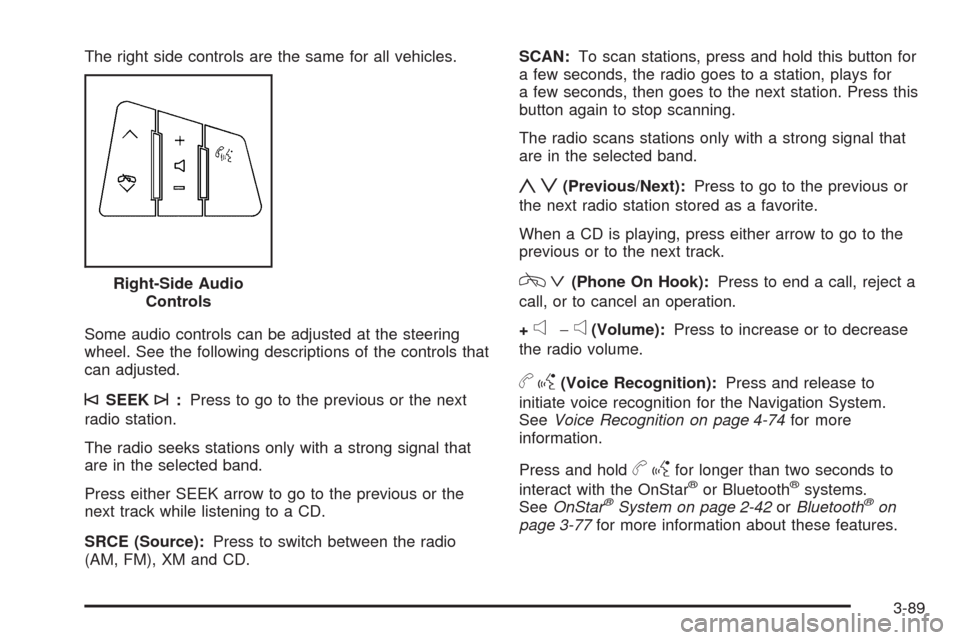
The right side controls are the same for all vehicles.
Some audio controls can be adjusted at the steering
wheel. See the following descriptions of the controls that
can adjusted.
©SEEK¨:Press to go to the previous or the next
radio station.
The radio seeks stations only with a strong signal that
are in the selected band.
Press either SEEK arrow to go to the previous or the
next track while listening to a CD.
SRCE (Source):Press to switch between the radio
(AM, FM), XM and CD.SCAN:To scan stations, press and hold this button for
a few seconds, the radio goes to a station, plays for
a few seconds, then goes to the next station. Press this
button again to stop scanning.
The radio scans stations only with a strong signal that
are in the selected band.
yz(Previous/Next):Press to go to the previous or
the next radio station stored as a favorite.
When a CD is playing, press either arrow to go to the
previous or to the next track.
cª(Phone On Hook):Press to end a call, reject a
call, or to cancel an operation.
+
e−e(Volume):Press to increase or to decrease
the radio volume.
bg(Voice Recognition):Press and release to
initiate voice recognition for the Navigation System.
SeeVoice Recognition on page 4-74for more
information.
Press and hold
bgfor longer than two seconds to
interact with the OnStar®or Bluetooth®systems.
SeeOnStar®System on page 2-42orBluetooth®on
page 3-77for more information about these features. Right-Side Audio
Controls
3-89
Page 226 of 462
Select the space symbol to enter a space between
characters or the words of a name.
V:Select the backspace symbol if an incorrect
character has been selected.
To make the name selections easier, the system only
allows a selection of a character which can follow
the last one entered. For example, if Z is entered,
T could not be entered after it. The system highlights
the available characters and darken the unavailable
characters.
If unsuccessful when entering a name, it may need to
be entered differently. It is also possible that the
map DVD database may not contain that information or
the correct search area has not been selected. See
Database Coverage Explanations on page 4-52for more
information.
Touch Sensitive Buttons
Touch-sensitive buttons are located on the screen.
After successfully selecting a screen button, a beep is
heard. These buttons highlight when a feature is
available and are dim when not unavailable. There are
some toggle screen buttons that are light blue when
active and dark blue when inactive.
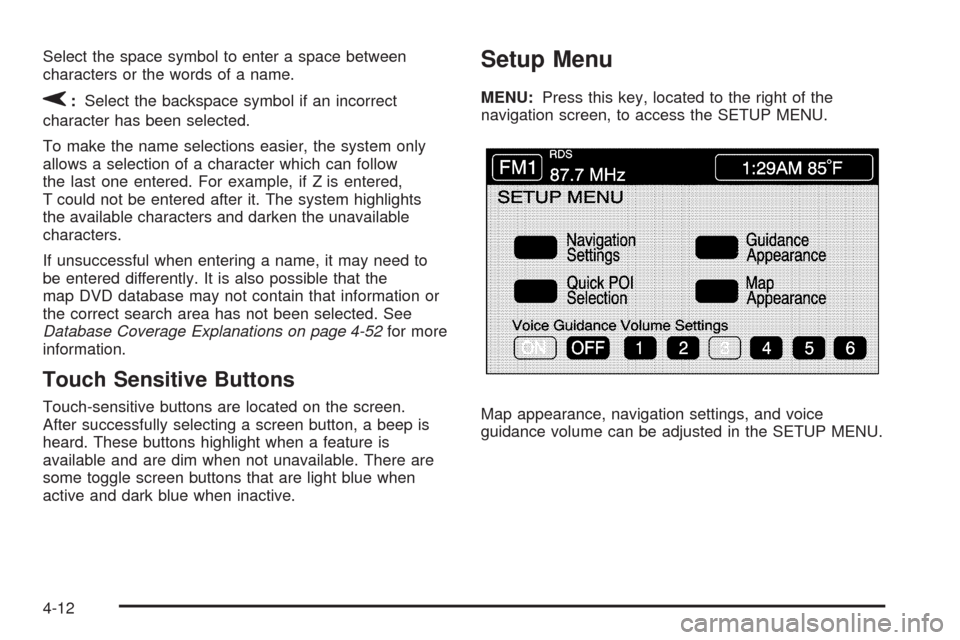
Setup Menu
MENU:Press this key, located to the right of the
navigation screen, to access the SETUP MENU.
Map appearance, navigation settings, and voice
guidance volume can be adjusted in the SETUP MENU.
4-12
Page 230 of 462
Guidance Appearance
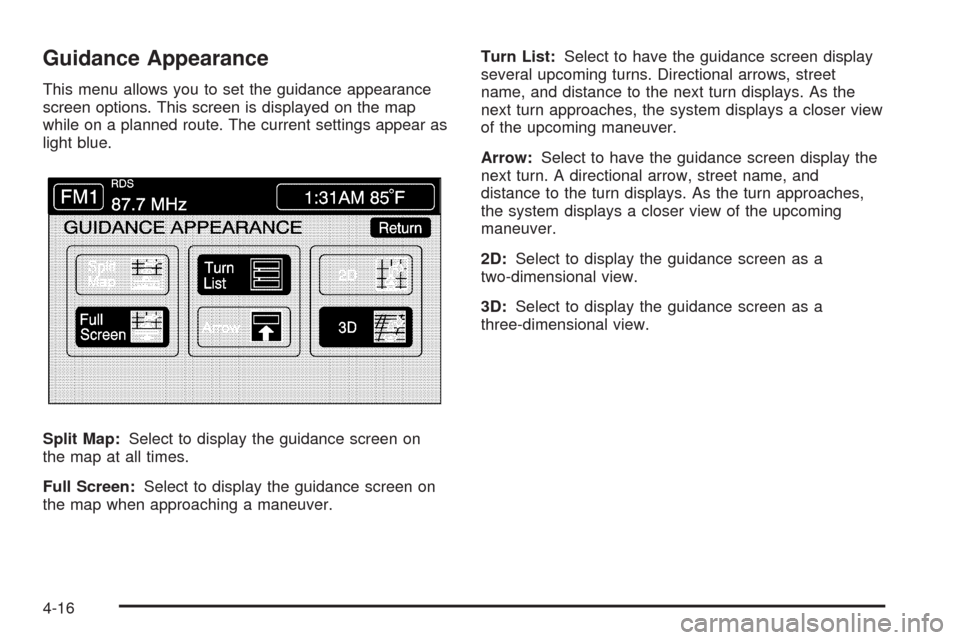
This menu allows you to set the guidance appearance
screen options. This screen is displayed on the map
while on a planned route. The current settings appear as
light blue.
Split Map:Select to display the guidance screen on
the map at all times.
Full Screen:Select to display the guidance screen on
the map when approaching a maneuver.Turn List:Select to have the guidance screen display
several upcoming turns. Directional arrows, street
name, and distance to the next turn displays. As the
next turn approaches, the system displays a closer view
of the upcoming maneuver.
Arrow:Select to have the guidance screen display the
next turn. A directional arrow, street name, and
distance to the turn displays. As the turn approaches,
the system displays a closer view of the upcoming
maneuver.
2D:Select to display the guidance screen as a
two-dimensional view.
3D:Select to display the guidance screen as a
three-dimensional view.
4-16
Page 231 of 462
Map Appearance
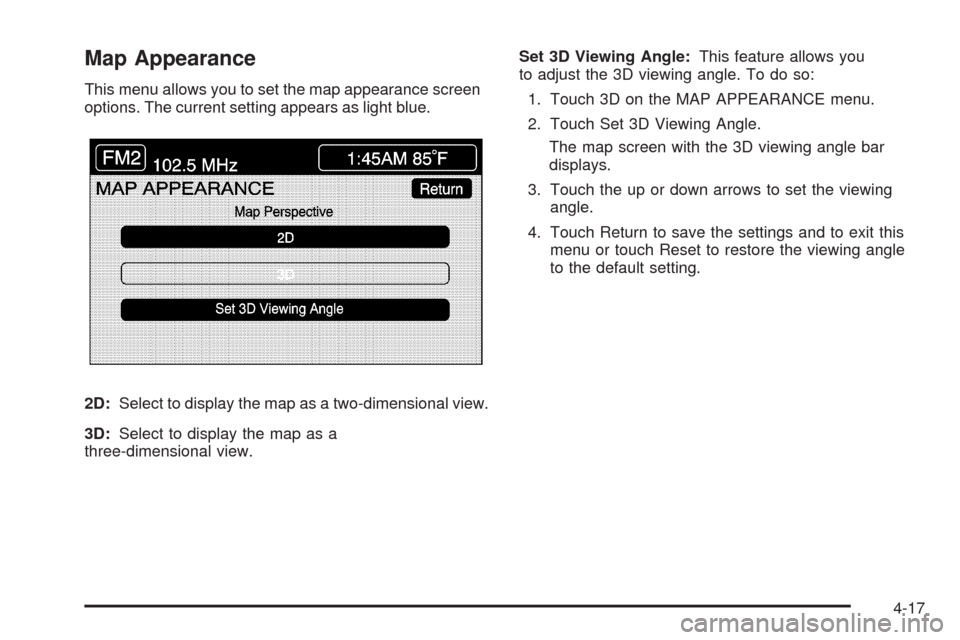
This menu allows you to set the map appearance screen
options. The current setting appears as light blue.
2D:Select to display the map as a two-dimensional view.
3D:Select to display the map as a
three-dimensional view.Set 3D Viewing Angle:This feature allows you
to adjust the 3D viewing angle. To do so:
1. Touch 3D on the MAP APPEARANCE menu.
2. Touch Set 3D Viewing Angle.
The map screen with the 3D viewing angle bar
displays.
3. Touch the up or down arrows to set the viewing
angle.
4. Touch Return to save the settings and to exit this
menu or touch Reset to restore the viewing angle
to the default setting.
4-17
Page 269 of 462
GPS TIME:The current GPS time displays to the right of
this screen button. Touch GPS TIME to set the navigation
system time to match current GPS time. If the seconds for
the present minute are greater than thirty when GPS
TIME is selected, the clock rounds up to the next minute.
Daylight Saving Time:Touch this screen button to
increase the time setting by one hour. Then touch GPS
TIME to save the new setting. If the screen button is light
blue, the daylight savings time feature is on. If the button
is dark blue, the daylight savings time feature is off.
TIME ZONE:The selected time zone appears to the
right of this screen button. Touch this screen button to
toggle between time zones and select the desired
one. The time of the selected zone displays to the right
of the GPS TIME screen button. To set the clock to
the new setting, touch GPS TIME.
If the system is not receiving GPS information, the time
can still be set manually as described above but the
GPS time and Daylight Saving Time features will not
be available.
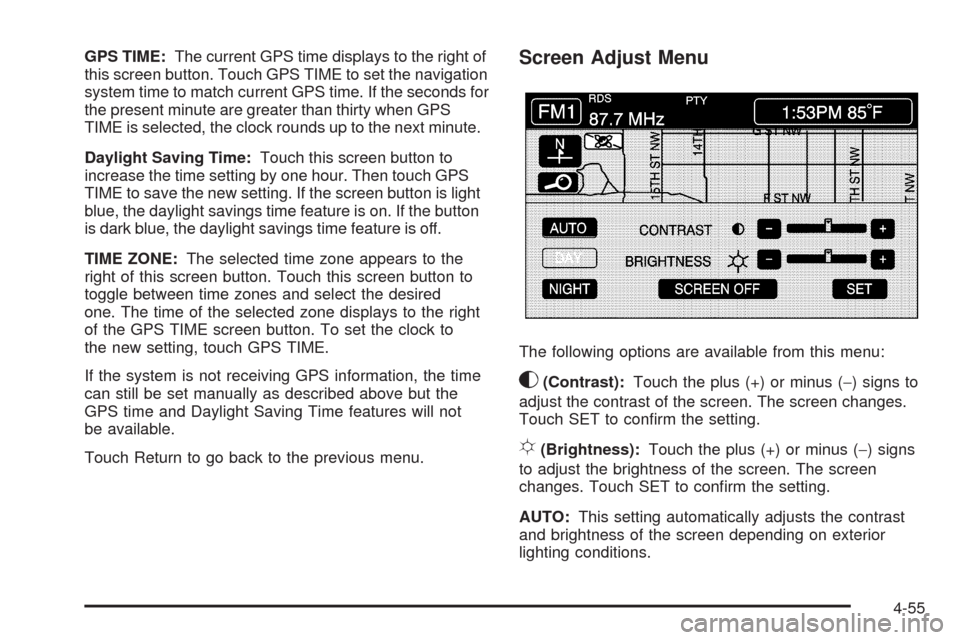
Touch Return to go back to the previous menu.Screen Adjust Menu
The following options are available from this menu:
K(Contrast):Touch the plus (+) or minus (−) signs to
adjust the contrast of the screen. The screen changes.
Touch SET to conrm the setting.
!(Brightness):Touch the plus (+) or minus (−) signs
to adjust the brightness of the screen. The screen
changes. Touch SET to conrm the setting.
AUTO:This setting automatically adjusts the contrast
and brightness of the screen depending on exterior
lighting conditions.
4-55
Page 450 of 462
Ashtray.........................................................3-35
Audio System.........................................3-76, 4-52
Audio Steering Wheel Controls......................3-88
Care of Your CD Player...............................3-91
Care of Your CDs ........................................3-91
Diversity Antenna System.............................3-91
Radio Reception..........................................3-90
Theft-Deterrent Feature................................3-88
XM™ Satellite Radio Antenna System............3-91
Automatic Door Lock.......................................2-13
Automatic Transmission
Fluid..........................................................6-21
Operation...................................................2-28
Avoid Point/Area, Edit......................................4-25
B
Battery..........................................................6-35
Exterior Lighting Battery Saver......................3-30
Run-Down Protection...................................3-31
Bluetooth
®.....................................................3-77
Brake
Emergencies................................................ 5-6
Brake Fluid....................................................6-32
Brakes..........................................................6-32
System Warning Light..................................3-47Braking........................................................... 5-4
Braking in Emergencies..................................... 5-6
Break-In, New Vehicle.....................................2-24
Bulb Replacement...........................................6-45
Headlamp Aiming........................................6-42
Buying New Tires...........................................6-62
C
California Fuel.................................................. 6-6
California Perchlorate Materials Requirements....... 6-4
California Proposition 65 Warning....................... 6-4
Canadian Owners............................................... iii
Capacities and Specications............................6-90
Carbon Monoxide...........................2-14, 2-36, 5-18
Care of
Safety Belts................................................6-76
Your CD Player...........................................3-91
Your CDs ...................................................3-91
CD
Six-Disc Changer.........................................4-65
CD/DVD Player..............................................4-68
Center Console Storage Area...........................2-53
Chains, Tire...................................................6-68
Charging System Light....................................3-46
2
Page 457 of 462
O
Odometer......................................................3-43
Odometer, Trip...............................................3-43
Off-Road Recovery..........................................5-12
Oil
Engine.......................................................6-15
Engine Oil Pressure Gage............................3-54
Life Indicator...............................................3-76
Oil, Engine Oil Life System..............................6-18
Older Children, Restraints................................1-23
Online Owner Center........................................ 8-5
OnStar, Privacy..............................................8-18
OnStar
®System.............................................4-48
OnStar®System, see OnStar®Manual...............2-42
Operation, Universal Home Remote System........2-46
Ordering
Map DVDs .................................................4-52
Outlet Adjustment............................................3-40
Outlets
Accessory Power.........................................3-34
Outside
Automatic Dimming Mirror.............................2-39
Convex Mirror.............................................2-39
Heated Mirrors............................................2-39
Power Mirrors.............................................2-38Overheated Engine Protection
Operating Mode..........................................6-29
Owner Checks and Services.............................. 7-9
Owners, Canadian.............................................. iii
P
Paint, Damage...............................................6-80
Park
Shifting Into................................................2-33
Shifting Out of............................................2-35
Park Aid........................................................2-40
Park Assist Mirror...........................................2-39
Park Brake....................................................2-32
Parking
Assist........................................................2-40
Over Things That Burn.................................2-35
Passenger Airbag Status Indicator.....................3-45
Passenger Compartment Air Filter.....................3-41
Passenger Sensing System..............................1-45
Passing.........................................................5-12
Perchlorate Materials Requirements, California....... 6-4
Phone
Bluetooth
®..................................................3-77
Plan Route....................................................4-18
9