tire pressure CADILLAC XLR 2009 1.G User Guide
[x] Cancel search | Manufacturer: CADILLAC, Model Year: 2009, Model line: XLR, Model: CADILLAC XLR 2009 1.GPages: 462, PDF Size: 3.72 MB
Page 301 of 462

When this light and SERVICE STABILITRAK comes on,
the system is not operational and needs to be serviced.
Adjust your driving accordingly.
The system comes on automatically whenever the
vehicle is started. To help maintain directional control
of the vehicle, the system should always be left on.
The system can be turned off if needed. If the StabiliTrak
system is turned off, the Traction Control System will
also be turned off. Adjust your driving accordingly.
The Traction Control
button is located on
the console.To turn the system off, press and hold the TCS/
StabiliTrak button until the light comes on the instrument
panel and STABILITRAK OFF comes on the DIC.
The system can be turned back on at any time by
pressing the button. The TCS/StabiliTrak light turns off
and STABILITRAK ON briey comes on the DIC.
If the Tire Pressure Monitor (TPM) system detects a at
tire and FLAT TIRE comes on the DIC, or if the TPM
system is not working and SERVICE TIRE MONITOR
comes on the DIC, StabiliTrak can be affected in
the following ways:
StabiliTrak cannot be turned off by the driver.
If StabiliTrak is off, it will be turned on automatically.
Performance Mode is unavailable — XLR-V only.
5-7
Page 310 of 462

Before Leaving on a Long Trip
To prepare your vehicle for a long trip, consider having
it serviced by your dealer/retailer before departing.
Things to check on your own include:
Windshield Washer Fluid:Reservoir full? Windows
clean — inside and outside?
Wiper Blades:In good shape?
Fuel, Engine Oil, Other Fluids:All levels checked?
Lamps:Do they all work and are lenses clean?
Tires:Are treads good? Are tires inated to
recommended pressure?
Weather and Maps:Safe to travel? Have
up-to-date maps?
Highway Hypnosis
Always be alert and pay attention to your surroundings
while driving. If you become tired or sleepy, nd a
safe place to park your vehicle and rest.
Other driving tips include:
Keep the vehicle well ventilated.
Keep interior temperature cool.
Keep your eyes moving — scan the road ahead
and to the sides.
Check the rearview mirror and vehicle instruments
often.
5-16
Page 315 of 462
Loading the Vehicle
It is very important to know how much weight your
vehicle can carry. This weight is called the vehicle
capacity weight and includes the weight of all
occupants, cargo, and all nonfactory-installed
options. Two labels on your vehicle show how much
weight it may properly carry, the Tire and Loading
Information label and the Certication label.
{CAUTION:
Do not load the vehicle any heavier than the
Gross Vehicle Weight Rating (GVWR), or
either the maximum front or rear Gross Axle
Weight Rating (GAWR). If you do, parts on the
vehicle can break, and it can change the way
your vehicle handles. These could cause you
to lose control and crash. Also, overloading
can shorten the life of the vehicle.
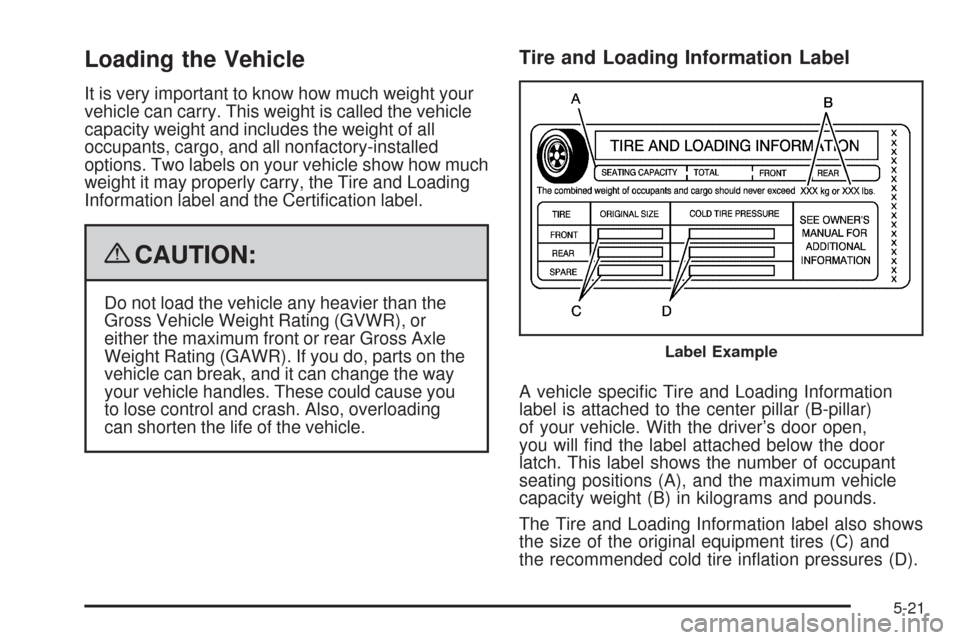
Tire and Loading Information Label
A vehicle specic Tire and Loading Information
label is attached to the center pillar (B-pillar)
of your vehicle. With the driver’s door open,
you will nd the label attached below the door
latch. This label shows the number of occupant
seating positions (A), and the maximum vehicle
capacity weight (B) in kilograms and pounds.
The Tire and Loading Information label also shows
the size of the original equipment tires (C) and
the recommended cold tire ination pressures (D).
Label Example
5-21
Page 316 of 462
For more information on tires and ination see
Tires on page 6-46andInflation - Tire Pressure
on page 6-54.
There is also important loading information on the
vehicle Certication label. It tells you the Gross
Vehicle Weight Rating (GVWR) and the Gross Axle
Weight Rating (GAWR) for the front and rear axle.
See “Certication Label” later in this section.
Steps for Determining Correct Load Limit
1.Locate the statement “The combined weight of
occupants and cargo should never exceed
XXX kg or XXX lbs” on your vehicle’s placard.
2.Determine the combined weight of the driver
and passengers that will be riding in your
vehicle.
3.Subtract the combined weight of the driver
and passengers from XXX kg or XXX lbs.
4.The resulting gure equals the available
amount of cargo and luggage load capacity.
For example, if the “XXX” amount equals
1400 lbs and there will be ve 150 lb
passengers in your vehicle, the amount of
available cargo and luggage load capacity is
650 lbs (1400−750 (5 x 150) = 650 lbs).
5.Determine the combined weight of luggage
and cargo being loaded on the vehicle.
That weight may not safely exceed the
available cargo and luggage load capacity
calculated in Step 4.
6.If your vehicle will be towing a trailer, the load
from your trailer will be transferred to your
vehicle. Consult this manual to determine how
this reduces the available cargo and luggage
load capacity of your vehicle.
Your vehicle is neither designed nor intended
to tow a trailer.
5-22
Page 321 of 462
Service............................................................6-3
Accessories and Modications..........................6-3
California Proposition 65 Warning.....................6-4
California Perchlorate Materials Requirements.....6-4
Doing Your Own Service Work.........................6-4
Adding Equipment to the Outside of the
Vehicle......................................................6-5
Fuel................................................................6-5
Gasoline Octane............................................6-5
Gasoline Specications....................................6-6
California Fuel...............................................6-6
Additives.......................................................6-6
Fuels in Foreign Countries...............................6-7
Filling the Tank..............................................6-8
Filling a Portable Fuel Container.....................6-10
Checking Things Under the Hood....................6-10
Hood Release..............................................6-11
Engine Compartment Overview.......................6-12
Engine Oil...................................................6-15
Engine Oil Life System..................................6-18
Engine Air Cleaner/Filter................................6-20
Automatic Transmission Fluid.........................6-21
Cooling System............................................6-22
Engine Coolant.............................................6-23Engine Overheating.......................................6-27
Overheated Engine Protection
Operating Mode........................................6-29
Power Steering Fluid.....................................6-30
Windshield Washer Fluid................................6-31
Brakes........................................................6-32
Battery........................................................6-35
Jump Starting...............................................6-36
Rear Axle.......................................................6-41
Headlamp Aiming...........................................6-42
Headlamp Vertical Aiming..............................6-43
Bulb Replacement..........................................6-45
Windshield Replacement.................................6-45
Windshield Wiper Blade Replacement..............6-45
Tires..............................................................6-46
Winter Tires (XLR-V).....................................6-47
Tire Sidewall Labeling...................................6-48
Tire Terminology and Denitions.....................6-50
Run-Flat Tires..............................................6-52
Ination - Tire Pressure.................................6-54
Tire Pressure Monitor System.........................6-55
Tire Pressure Monitor Operation.....................6-57
Tire Inspection and Rotation...........................6-60
Section 6 Service and Appearance Care
6-1
Page 366 of 462
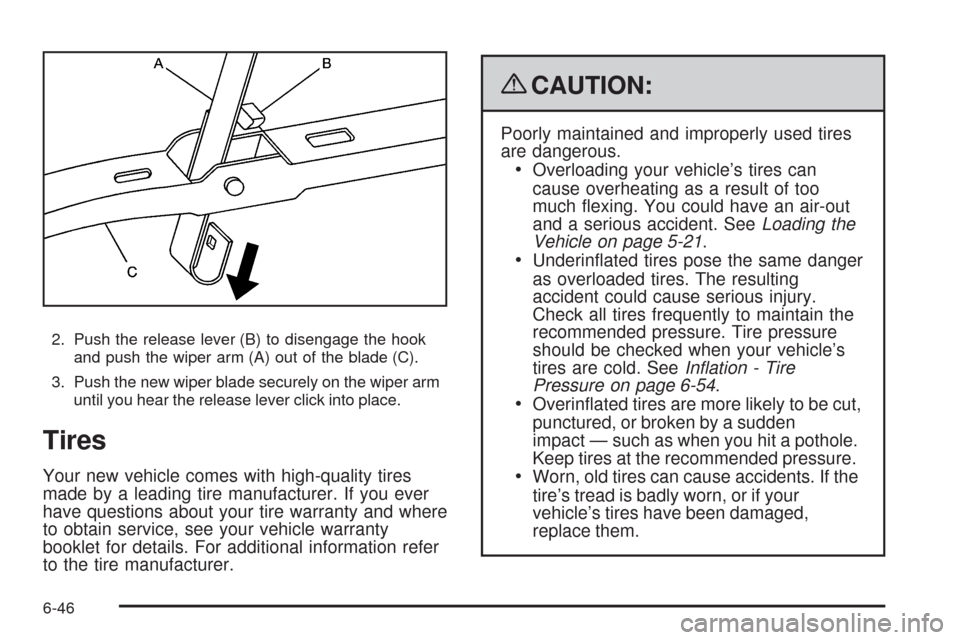
2. Push the release lever (B) to disengage the hook
and push the wiper arm (A) out of the blade (C).
3. Push the new wiper blade securely on the wiper arm
until you hear the release lever click into place.
Tires
Your new vehicle comes with high-quality tires
made by a leading tire manufacturer. If you ever
have questions about your tire warranty and where
to obtain service, see your vehicle warranty
booklet for details. For additional information refer
to the tire manufacturer.
{CAUTION:
Poorly maintained and improperly used tires
are dangerous.
Overloading your vehicle’s tires can
cause overheating as a result of too
much exing. You could have an air-out
and a serious accident. SeeLoading the
Vehicle on page 5-21.
Underinated tires pose the same danger
as overloaded tires. The resulting
accident could cause serious injury.
Check all tires frequently to maintain the
recommended pressure. Tire pressure
should be checked when your vehicle’s
tires are cold. SeeInflation - Tire
Pressure on page 6-54.
Overinated tires are more likely to be cut,
punctured, or broken by a sudden
impact — such as when you hit a pothole.
Keep tires at the recommended pressure.
Worn, old tires can cause accidents. If the
tire’s tread is badly worn, or if your
vehicle’s tires have been damaged,
replace them.
6-46
Page 367 of 462
Low-Prole Tires (XLR-V)
If your vehicle has P235/45R19 or P255/40R19
size tires, they are classied as low-prole tires.
These tires are designed for very responsive driving
on wet or dry pavement. You may also notice more
road noise with low-prole performance tires and
that they tend to wear faster.
Notice:If the vehicle has low-prole tires,
they are more susceptible to damage from road
hazards or curb impact than standard prole
tires. Tire and/or wheel assembly damage
can occur when coming into contact with road
hazards like, potholes, or sharp edged
objects, or when sliding into a curb. The
vehicle warranty does not cover this type of
damage. Keep tires set to the correct ination
pressure and, when possible avoid contact
with curbs, potholes, and other road hazards.
Winter Tires (XLR-V)
If you expect to drive on snow or ice covered roads
often, you may want to get winter tires for your vehicle.
All season tires provide good overall performance on
most surfaces but they may not offer the traction
you would like or the same level of performance as
winter tires on snow or ice covered roads.Winter tires, in general, are designed for increased
traction on snow and ice covered roads. With winter
tires, there may be decreased dry road traction,
increased road noise, and shorter tread life. After
switching to winter tires, be alert for changes in vehicle
handling and braking.
See your dealer for details regarding winter tire
availability and proper tire selection. Also, seeBuying
New Tires on page 6-62.
If you choose to use winter tires:
Use tires of the same brand and tread type on all
four wheel positions.
Use only radial ply tires of the same size, load
range, and speed rating as the original equipment
tires.
Winter tires with the same speed rating as your original
equipment tires may not be available for H, V, W, Y,
and ZR speed rated tires. If you choose winter tires with
a lower speed rating, never exceed the tire’s maximum
speed capability.
6-47
Page 369 of 462
(F) Uniform Tire Quality Grading (UTQG):Tire manufacturers are required to grade tires
based on three performance factors: treadwear,
traction and temperature resistance. For more
information seeUniform Tire Quality Grading on
page 6-64.
(G) Maximum Cold Ination Load Limit
:Maximum load that can be carried and the
maximum pressure needed to support that load.
Tire Size
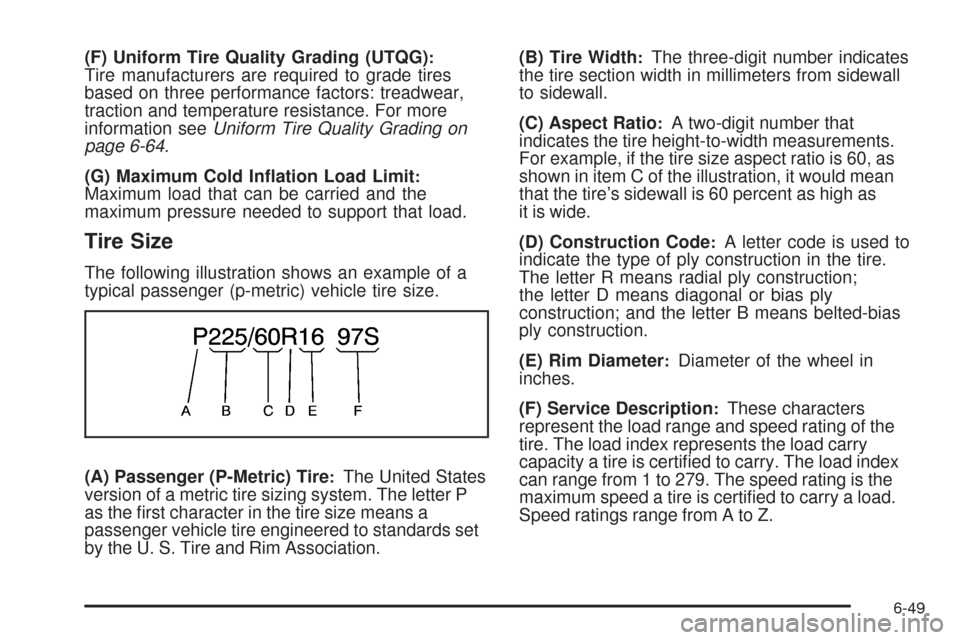
The following illustration shows an example of a
typical passenger (p-metric) vehicle tire size.
(A) Passenger (P-Metric) Tire
:The United States
version of a metric tire sizing system. The letter P
as the rst character in the tire size means a
passenger vehicle tire engineered to standards set
by the U. S. Tire and Rim Association.(B) Tire Width
:The three-digit number indicates
the tire section width in millimeters from sidewall
to sidewall.
(C) Aspect Ratio
:A two-digit number that
indicates the tire height-to-width measurements.
For example, if the tire size aspect ratio is 60, as
shown in item C of the illustration, it would mean
that the tire’s sidewall is 60 percent as high as
it is wide.
(D) Construction Code
:A letter code is used to
indicate the type of ply construction in the tire.
The letter R means radial ply construction;
the letter D means diagonal or bias ply
construction; and the letter B means belted-bias
ply construction.
(E) Rim Diameter
:Diameter of the wheel in
inches.
(F) Service Description
:These characters
represent the load range and speed rating of the
tire. The load index represents the load carry
capacity a tire is certied to carry. The load index
can range from 1 to 279. The speed rating is the
maximum speed a tire is certied to carry a load.
Speed ratings range from A to Z.
6-49
Page 370 of 462
Tire Terminology and Denitions
Air Pressure:The amount of air inside the
tire pressing outward on each square inch of the
tire. Air pressure is expressed in pounds per
square inch (psi) or kilopascal (kPa).
Accessory Weight
:This means the combined
weight of optional accessories. Some examples of
optional accessories are, automatic transmission,
power steering, power brakes, power windows,
power seats, and air conditioning.
Aspect Ratio
:The relationship of a tire’s height
to its width.
Belt
:A rubber coated layer of cords that is
located between the plies and the tread. Cords
may be made from steel or other reinforcing
materials.
Bead
:The tire bead contains steel wires wrapped
by steel cords that hold the tire onto the rim.
Bias Ply Tire
:A pneumatic tire in which the plies
are laid at alternate angles less than 90 degrees
to the centerline of the tread.Cold Tire Pressure
:The amount of air pressure in
a tire, measured in pounds per square inch (psi) or
kilopascals (kPa) before a tire has built up heat
from driving. SeeInflation - Tire Pressure on
page 6-54.
Curb Weight
:The weight of a motor vehicle with
standard and optional equipment including the
maximum capacity of fuel, oil, and coolant,
but without passengers and cargo.
DOT Markings
:A code molded into the sidewall
of a tire signifying that the tire is in compliance
with the U.S. Department of Transportation (DOT)
motor vehicle safety standards. The DOT code
includes the Tire Identication Number (TIN),
an alphanumeric designator which can also identify
the tire manufacturer, production plant, brand,
and date of production.
GVWR
:Gross Vehicle Weight Rating. See
Loading the Vehicle on page 5-21.
GAWR FRT
:Gross Axle Weight Rating for the
front axle. SeeLoading the Vehicle on page 5-21.
GAWR RR
:Gross Axle Weight Rating for the
rear axle. SeeLoading the Vehicle on page 5-21.
6-50
Page 371 of 462
Intended Outboard Sidewall:The side of an
asymmetrical tire, that must always face outward
when mounted on a vehicle.
Kilopascal (kPa)
:The metric unit for air pressure.
Light Truck (LT-Metric) Tire
:A tire used on light
duty trucks and some multipurpose passenger
vehicles.
Load Index
:An assigned number ranging
from 1 to 279 that corresponds to the load
carrying capacity of a tire.
Maximum Ination Pressure
:The maximum air
pressure to which a cold tire can be inated.
The maximum air pressure is molded onto the
sidewall.
Maximum Load Rating
:The load rating for a tire
at the maximum permissible ination pressure
for that tire.
Maximum Loaded Vehicle Weight
:The sum of
curb weight, accessory weight, vehicle capacity
weight, and production options weight.
Normal Occupant Weight
:The number of
occupants a vehicle is designed to seat multiplied
by 150 lbs (68 kg). SeeLoading the Vehicle on
page 5-21.Occupant Distribution
:Designated seating
positions.
Outward Facing Sidewall
:The side of an
asymmetrical tire that has a particular side that
faces outward when mounted on a vehicle.
The side of the tire that contains a whitewall, bears
white lettering, or bears manufacturer, brand,
and/or model name molding that is higher
or deeper than the same moldings on the other
sidewall of the tire.
Passenger (P-Metric) Tire
:A tire used on
passenger cars and some light duty trucks and
multipurpose vehicles.
Recommended Ination Pressure
:Vehicle
manufacturer’s recommended tire ination
pressure as shown on the tire placard. See
Inflation - Tire Pressure on page 6-54andLoading
the Vehicle on page 5-21.
Radial Ply Tire
:A pneumatic tire in which the
ply cords that extend to the beads are laid at
90 degrees to the centerline of the tread.
Rim
:A metal support for a tire and upon which
the tire beads are seated.
Sidewall
:The portion of a tire between the tread
and the bead.
6-51