steering wheel CADILLAC XLR V 2006 1.G Owner's Guide
[x] Cancel search | Manufacturer: CADILLAC, Model Year: 2006, Model line: XLR V, Model: CADILLAC XLR V 2006 1.GPages: 456, PDF Size: 3.74 MB
Page 258 of 456
Once you have stored a PTY for each of your preset
stations, you can recall a PTY preset by touching
the preset station for less than two seconds. Then use
TUNE/SEEK or SCAN to locate a station for that
PTY selection.
ALERT:This type of announcement warns of national
or local emergencies. You will not be able to turn
off alert announcements. Alert announcements will come
on even if RDS mode is turned off. ALERT appears
on the display when an alert announcement plays.
The audio system uses TA volume during these
announcements. To increase volume, touch the VOL
button on your steering wheel or use the VOL up
and down buttons during the announcement. See
“Voice Guidance Volume Settings” underSetup Menu
on page 4-13for more information. When an alert
announcement comes on the tuned radio station or a
related network station, you will hear it even if the
volume is muted or a CD is playing. If the audio
system tunes to a related network station for an alert
announcement, it will return to the original station when
the announcement is nished. If the CD player is
playing, the player will stop for the announcement and
resume when the announcement is nished.XM™ Satellite Radio Service
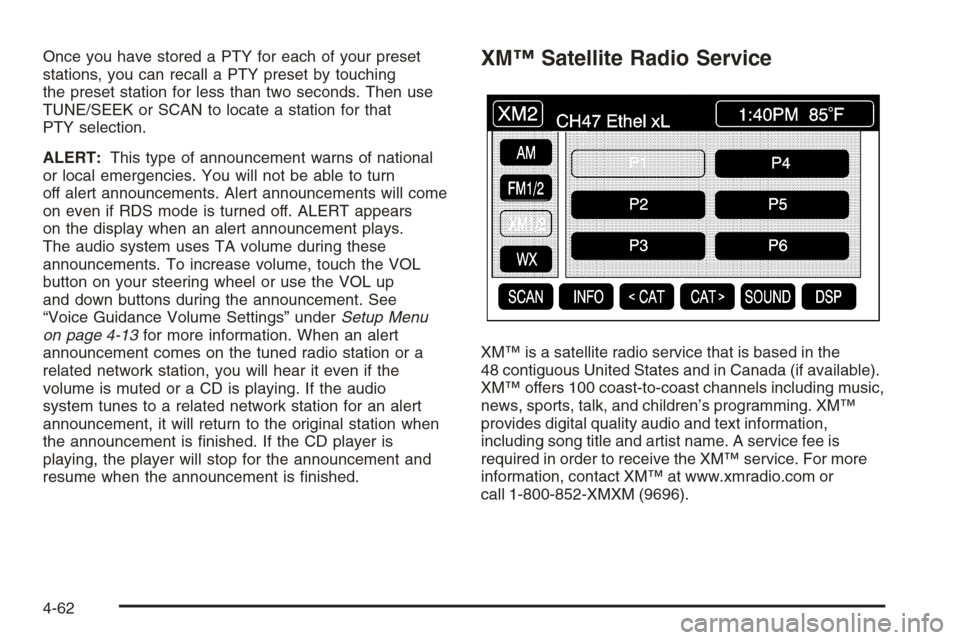
XM™ is a satellite radio service that is based in the
48 contiguous United States and in Canada (if available).
XM™ offers 100 coast-to-coast channels including music,
news, sports, talk, and children’s programming. XM™
provides digital quality audio and text information,
including song title and artist name. A service fee is
required in order to receive the XM™ service. For more
information, contact XM™ at www.xmradio.com or
call 1-800-852-XMXM (9696).
4-62
Page 271 of 456
Voice Recognition
The navigation system’s voice recognition allows for
hands-free operation of navigation and audio system
features. Voice recognition can be used when the
ignition is on or when Retained Accessory Power (RAP)
is active.
This feature only works if the map DVD is inserted and
I AGREE has been selected. If you try to use voice
recognition without the map DVD inserted, the system
will display “Please insert the navigation map DVD
to use the voice recognition feature.”
To use navigation voice recognition, do the following:
1. Press the talk symbol
steering wheel control
and release it, when
you hear a beep.
The audio system,
if on, will mute.2. Clearly state one of the commands listed on the
following pages. For example, say “FM1”.
3. The system will tell you the command being
implemented. For example, the system will
say “FM1 Radio” and change the audio system to
the FM1 source.
You can end voice recognition by not speaking any
commands. After about ve seconds of silence,
the system will automatically cancel voice recognition.
At times, the system may not understand a spoken
command. If this happens, try saying the command
again. If a spoken command is not available, the system
will provide feedback based on availability.
While using voice recognition, make sure to keep
interior noise levels to a minimum. Otherwise, the
system might not recognize voice commands.
The system will only recognize commands spoken
in English.
4-75
Page 287 of 456
Remember: ABS does not change the time you need to
get your foot up to the brake pedal or always decrease
stopping distance. If you get too close to the vehicle
in front of you, you will not have time to apply your
brakes if that vehicle suddenly slows or stops. Always
leave enough room up ahead to stop, even though
you have ABS.
Using ABS
Do not pump the brakes. Just hold the brake pedal
down rmly and let anti-lock work for you. You may
hear a motor or clicking noise and feel the brake pedal
move a little during a stop, but this is normal.
Braking in Emergencies
With ABS, you can steer and brake at the same time.
In many emergencies, steering can help you more
than even the very best braking.
Traction Control System (TCS)
Your vehicle has a traction control system that limits
wheel spin. This is especially useful in slippery
road conditions. The system operates only if it senses
that one or both of the rear wheels are spinning or
beginning to lose traction. When this happens,
the system works the rear brakes and reduces engine
power to limit wheel spin.
The TRAC SYSTEM ACTIVE message will display on
the Driver Information Center (DIC) when the traction
control system is limiting wheel spin. SeeDIC Warnings
and Messages on page 3-67. You may feel or hear
the system working, but this is normal.
If your vehicle is in cruise control when the traction
control system begins to limit wheel spin, the cruise
control will automatically disengage. When road
conditions allow you to safely use it again, you may
reengage the cruise control. SeeAdaptive Cruise
Control on page 3-15orCruise Control on page 3-12
for more information.
5-9
Page 289 of 456
Magnetic Ride Control
Magnetic Ride Control automatically adjusts the ride
of your vehicle. Automatic ride control is achieved
through a computer used to control and monitor the
suspension system. The controller receives input
from various sensors to determine the proper system
response. If the controller detects a problem within
the system, the DIC will display a SERVICE RIDE
CONTROL message. SeeDIC Warnings and Messages
on page 3-67for more information. See your dealer
for service.
Limited-Slip Rear Axle
Your limited-slip rear axle can give you additional
traction on snow, mud, ice, sand or gravel. It works
like a standard axle most of the time, but when one
of the rear wheels has no traction and the other
does, this feature will allow the wheel with traction
to move the vehicle.
StabiliTrak®System
The StabiliTrak®System is a computer controlled
system that helps the driver maintain directional control
of the vehicle in difficult driving conditions. This is
accomplished by selectively applying any one of the
vehicle’s brakes.
When you rst start your vehicle and begin to drive
away (6 mph (10 km/h)), especially during cold weather,
the message STABILITRAK WARMING may be
displayed in the Driver Information Center (DIC), the
instrument cluster light will be on, and a chime will
sound. This is normal. You can acknowledge this
message by pressing the RESET button. The
StabiliTrak
®System performance is affected until the
message, STABILITRAK READY, is displayed in
the DIC. This can take up to 15 minutes.
The WAIT FOR STABILITRAK message may be
displayed in the DIC after exceeding 19 mph (30 km/h)
for 10 seconds if the steering is not centered.
The system is off until the STABILITRAK ACTIVE
message is displayed.
5-11
Page 291 of 456
Steering
Power Steering
If you lose power steering assist because the engine
stops or the system is not functioning, you can steer
but it will take much more effort.
Magnetic Speed Variable Assist
Steering
Your vehicle is equipped with a steering system that
continuously adjusts the effort you feel when steering
at all vehicle speeds. It provides ease when parking,
yet a rm, solid feel at highway speeds.
Steering Tips
It is important to take curves at a reasonable speed.
A lot of the “driver lost control” accidents mentioned
on the news happen on curves. Here is why:
Experienced driver or beginner, each of us is subject
to the same laws of physics when driving on curves.The traction of the tires against the road surface
makes it possible for the vehicle to change its path
when you turn the front wheels. If there is no traction,
inertia will keep the vehicle going in the same direction.
If you have ever tried to steer a vehicle on wet ice,
you will understand this.
The traction you can get in a curve depends on the
condition of your tires and the road surface, the angle
at which the curve is banked, and your speed. While you
are in a curve, speed is the one factor you can control.
Suppose you are steering through a sharp curve.
Then you suddenly accelerate. Both control
systems — steering and acceleration — have to do
their work where the tires meet the road. Adding the
sudden acceleration can demand too much of those
places. You can lose control. SeeTraction Control
System (TCS) on page 5-9.
What should you do if this ever happens? Ease up
on the accelerator pedal, steer the vehicle the way
you want it to go, and slow down.
5-13
Page 292 of 456

Speed limit signs near curves warn that you should
adjust your speed. Of course, the posted speeds
are based on good weather and road conditions. Under
less favorable conditions you will want to go slower.
If you need to reduce your speed as you approach
a curve, do it before you enter the curve, while your
front wheels are straight ahead.
Try to adjust your speed so you can “drive” through
the curve. Maintain a reasonable, steady speed.
Wait to accelerate until you are out of the curve, and
then accelerate gently into the straightaway.
Adding non-GM accessories can affect your vehicle’s
performance. SeeAccessories and Modications
on page 6-3.Steering in Emergencies
There are times when steering can be more effective
than braking. For example, you come over a hill and
nd a truck stopped in your lane, or a car suddenly
pulls out from nowhere, or a child darts out from
between parked cars and stops right in front of you.
You can avoid these problems by braking — if you can
stop in time. But sometimes you cannot; there is not
room. That is the time for evasive action — steering
around the problem.
Your vehicle can perform very well in emergencies like
these. First apply your brakes.
SeeBraking on page 5-6. It is better to remove as much
speed as you can from a possible collision. Then steer
around the problem, to the left or right depending on the
space available.
5-14
Page 293 of 456

An emergency like this requires close attention and a
quick decision. If you are holding the steering wheel at
the recommended 9 and 3 o’clock positions, you can turn
it a full 180 degrees very quickly without removing either
hand. But you have to act fast, steer quickly, and just as
quickly straighten the wheel once you have avoided
the object.
The fact that such emergency situations are always
possible is a good reason to practice defensive
driving at all times and wear safety belts properly.
Off-Road Recovery
You may nd that your right wheels have dropped off the
edge of a road onto the shoulder while you are driving.
If the level of the shoulder is only slightly below the
pavement, recovery should be fairly easy. Ease off the
accelerator and then, if there is nothing in the way,
steer so that your vehicle straddles the edge of
the pavement. You can turn the steering wheel up to
one-quarter turn until the right front tire contacts
the pavement edge. Then turn your steering wheel
to go straight down the roadway.
5-15
Page 295 of 456
Check your mirrors, glance over your shoulder,
and start your left lane change signal before moving
out of the right lane to pass. When you are far
enough ahead of the passed vehicle to see its front
in your inside mirror, activate your right lane change
signal and move back into the right lane. Remember
that your passenger side outside mirror is convex.
The vehicle you just passed may seem to be farther
away from you than it really is.
Try not to pass more than one vehicle at a time on
two-lane roads. Reconsider before passing the
next vehicle.
Do not overtake a slowly moving vehicle too rapidly.
Even though the brake lamps are not ashing,
it may be slowing down or starting to turn.
If you are being passed, make it easy for the
following driver to get ahead of you. Perhaps you
can ease a little to the right.
Loss of Control
Let us review what driving experts say about what
happens when the three control systems — brakes,
steering, and acceleration — do not have enough
friction where the tires meet the road to do what the
driver has asked.
In any emergency, do not give up. Keep trying to
steer and constantly seek an escape route or area of
less danger.
Skidding
In a skid, a driver can lose control of the vehicle.
Defensive drivers avoid most skids by taking reasonable
care suited to existing conditions, and by not overdriving
those conditions. But skids are always possible.
The three types of skids correspond to your vehicle’s
three control systems. In the braking skid, your wheels
are not rolling. In the steering or cornering skid, too much
speed or steering in a curve causes tires to slip and lose
cornering force. And in the acceleration skid, too much
throttle causes the driving wheels to spin.
A cornering skid is best handled by easing your foot
off the accelerator pedal.
5-17
Page 310 of 456
If Your Vehicle is Stuck in Sand,
Mud, Ice, or Snow
In order to free your vehicle when it is stuck, you will
need to spin the wheels, but you do not want to spin your
wheels too fast. The method known as rocking can
help you get out when you are stuck, but you must
use caution.
{CAUTION:
If you let your tires spin at high speed, they
can explode, and you or others could be
injured. And, the transmission or other parts
of the vehicle can overheat. That could cause
an engine compartment re or other damage.
When you are stuck, spin the wheels as
little as possible. Do not spin the wheels
above 35 mph (55 km/h) as shown on the
speedometer.Notice:Spinning your wheels can destroy parts of
your vehicle as well as the tires. If you spin the
wheels too fast while shifting your transmission
back and forth, you can destroy your transmission.
For more information about using tire chains on your
vehicle, seeTire Chains on page 6-70.
Rocking Your Vehicle to Get It Out
First, turn your steering wheel left and right. That
will clear the area around your front wheels. You should
turn your traction control system off. SeeTraction
Control System (TCS) on page 5-9. Then shift back
and forth between REVERSE (R) and a forward gear,
spinning the wheels as little as possible. Release
the accelerator pedal while you shift, and press lightly
on the accelerator pedal when the transmission is
in gear. By slowly spinning your wheels in the forward
and reverse directions, you will cause a rocking
motion that may free your vehicle. If that does not get
you out after a few tries, you may need to be towed
out. If you do need to be towed out, seeTowing Your
Vehicle on page 5-37.
5-32
Page 317 of 456
Service............................................................6-3
Accessories and Modications..........................6-3
California Proposition 65 Warning.....................6-3
Doing Your Own Service Work.........................6-4
Adding Equipment to the Outside
of Your Vehicle...........................................6-4
Fuel................................................................6-4
Gasoline Octane............................................6-5
Gasoline Specications....................................6-5
California Fuel...............................................6-5
Additives.......................................................6-6
Fuels in Foreign Countries...............................6-6
Filling the Tank..............................................6-7
Filling a Portable Fuel Container.....................6-10
Checking Things Under the Hood....................6-10
Hood Release..............................................6-11
Engine Compartment Overview.......................6-12
Engine Oil...................................................6-15
Engine Oil Life System..................................6-18
Engine Air Cleaner/Filter................................6-20
Automatic Transmission Fluid.........................6-21
Engine Coolant.............................................6-22
Coolant Surge Tank Pressure Cap..................6-25
Engine Overheating.......................................6-25
Overheated Engine Protection
Operating Mode........................................6-27Cooling System............................................6-28
Power Steering Fluid.....................................6-33
Windshield Washer Fluid................................6-34
Brakes........................................................6-35
Battery........................................................6-38
Jump Starting...............................................6-39
Rear Axle.......................................................6-44
Headlamp Aiming...........................................6-45
Headlamp Vertical Aiming..............................6-46
Bulb Replacement..........................................6-48
Windshield Replacement.................................6-49
Windshield Wiper Blade Replacement..............6-49
Tires..............................................................6-50
Tire Sidewall Labeling...................................6-52
Tire Terminology and Denitions.....................6-54
Run-Flat Tires..............................................6-56
Ination - Tire Pressure.................................6-58
Tire Pressure Monitor System.........................6-59
Tire Inspection and Rotation...........................6-62
When It Is Time for New Tires.......................6-63
Buying New Tires.........................................6-64
Different Size Tires and Wheels......................6-65
Uniform Tire Quality Grading..........................6-66
Wheel Alignment and Tire Balance..................6-67
Wheel Replacement......................................6-67
Section 6 Service and Appearance Care
6-1