lights CADILLAC XLR V 2007 1.G User Guide
[x] Cancel search | Manufacturer: CADILLAC, Model Year: 2007, Model line: XLR V, Model: CADILLAC XLR V 2007 1.GPages: 512, PDF Size: 3.84 MB
Page 176 of 512

How the System Works
URPA comes on automatically when the shift lever
is moved into REVERSE (R) and the vehicle
speed is less than 3 mph (5 km/h). When
the system comes on, the three lights on the
display will illuminate to let you know that
the system is working. URPA senses how close
your vehicle is to an object. The distance is
determined by the four ultrasonic sensors located
on the rear bumper. When you shift into
REVERSE (R) and an object is detected, the
following will occur in sequence depending on the
distance from the object:
At 5 feet (1.5 m) a chime will sound and
one amber light will be lit;
at 40 inches (1.0 m) both amber lights will be lit;
at 20 inches (0.5 m) a continuous chime will
sound and all three lights (amber/amber/red)
will be lit; and
at 1 foot (0.3 m) a continuous chime will sound
and all three lights (amber/amber/red) will ash.
URPA can detect objects 3 inches (7.6 cm) and
wider, and at least 10 inches (25.4 cm) tall, but it
cannot detect objects that are above trunklevel. In order for the rear sensors to recognize an
object, it must be within operating range.
If the URPA system is not functioning properly, the
display will ash red, indicating that there is a
problem. The light will also ash red while driving if
a trailer is attached to your vehicle, or a bicycle or
object is on the back of, or hanging out of your
trunk. The light will continue to ash until the trailer
or the object is removed and your vehicle is driven
forward at least 15 mph (25 km/h).
It may also ash red if the ultrasonic sensors are
not kept clean. So be sure to keep your rear
bumper free of mud, dirt, snow, ice and slush or
materials such as paint or the system may
not work properly. If after cleaning the rear bumper
and driving forward at least 15 mph (25 km/h),
the display continues to ash red, see your dealer.
For cleaning instructions, seeWashing Your
Vehicle on page 446.
It may also ash red if your vehicle is moving in
REVERSE (R) at a speed greater than 3 mph
(5 km/h). Other conditions that may affect system
performance include things like the vibrations
from a jackhammer or the compression of
air brakes on a very large truck.
176
Page 185 of 512
Warning Lights, Gages, and
Indicators
This part describes the warning lights and gages
that may be on your vehicle. The pictures will
help you locate them.
Warning lights and gages can signal that
something is wrong before it becomes serious
enough to cause an expensive repair or
replacement. Paying attention to your warning
lights and gages could also save you or others
from injury.
Warning lights come on when there may be or is a
problem with one of your vehicle’s functions. As
you will see in the details on the next few
pages, some warning lights come on briey when
you start the engine just to let you know they
are working. If you are familiar with this section,
you should not be alarmed when this happens.Gages can indicate when there may be or is a
problem with one of your vehicle’s functions. Often
gages and warning lights work together to let
you know when there is a problem with your
vehicle.
When one of the warning lights comes on and
stays on when you are driving, or when one of the
gages shows there may be a problem, check
the section that tells you what to do about
it. Please follow this manual’s advice. Waiting to
do repairs can be costly — and even dangerous.
So please get to know your warning lights and
gages. They are a big help.
Your vehicle has a Driver Information Center that
works along with the warning lights and gages.
SeeDriver Information Center (DIC) on page 203
for more information.
185
Page 186 of 512

Instrument Panel Cluster
Your instrument panel cluster and Driver Information Center (DIC) are designed to let you know at a
glance how the vehicle is running. You will know how fast you are going, about how much fuel you have
left and many other things you will need to know to drive safely and economically. The instrument
panel cluster indicator warning lights, gages and DIC messages are explained on the following pages.
United States Base Cluster shown, Canada and Uplevel similar
186
Page 191 of 512

If the word OFF or the off symbol is lit on the
passenger airbag status indicator, it means that
the passenger sensing system has turned off
the passenger’s airbags. SeePassenger Sensing
System on page 53for more on this, including
important safety information.
If, after several seconds, all status indicator lights
remain on, or if there are no lights at all, there
may be a problem with the lights or the passenger
sensing system. See your dealer for service.
{CAUTION:
If the airbag off indicator and the airbag
readiness light ever come on together, it
means that something may be wrong with
the airbag system. If this ever happens,
have the vehicle serviced promptly,
because an adult-size person sitting in the
right front passenger seat may not have
the protection of the airbag. SeeAirbag
Readiness Light on page 188.
Charging System Light
When you turn the
engine on, this light will
come on briey to
show that the generator
and battery charging
systems are working
properly.
If this light stays on, your vehicle needs service.
You should take your vehicle to the dealer at once.
To save your battery until you get there, turn off
all accessories. SeeDIC Controls and Displays on
page 204for more information.
191
Page 202 of 512
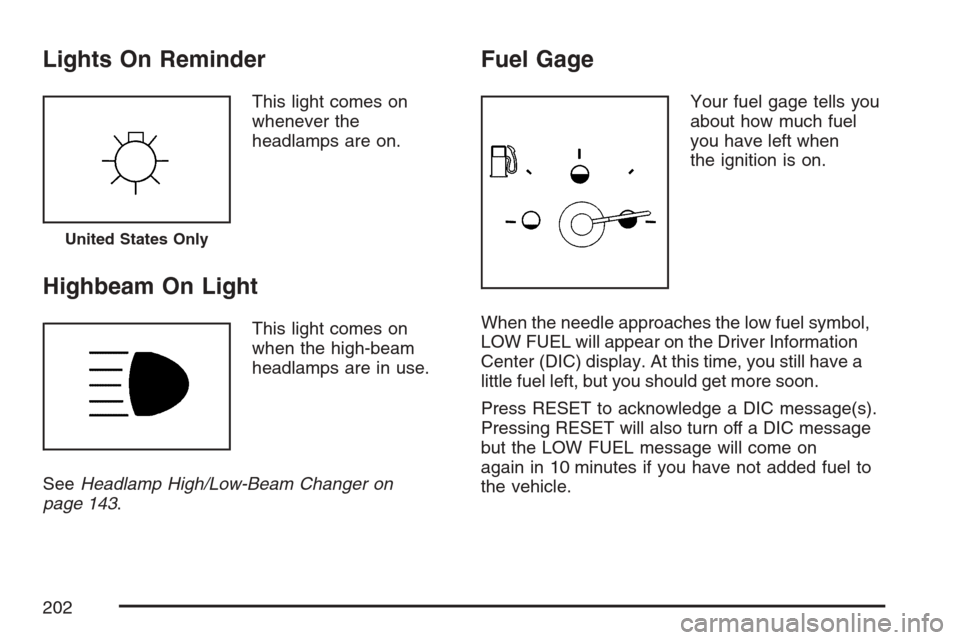
Lights On Reminder
This light comes on
whenever the
headlamps are on.
Highbeam On Light
This light comes on
when the high-beam
headlamps are in use.
SeeHeadlamp High/Low-Beam Changer on
page 143.
Fuel Gage
Your fuel gage tells you
about how much fuel
you have left when
the ignition is on.
When the needle approaches the low fuel symbol,
LOW FUEL will appear on the Driver Information
Center (DIC) display. At this time, you still have a
little fuel left, but you should get more soon.
Press RESET to acknowledge a DIC message(s).
Pressing RESET will also turn off a DIC message
but the LOW FUEL message will come on
again in 10 minutes if you have not added fuel to
the vehicle.
United States Only
202
Page 214 of 512

SERVICE A/C
This message displays when the electronic
sensors that control the air conditioning and
heating systems are no longer working. Have the
climate control system serviced by your dealer
if you notice a drop in heating and air conditioning
efficiency.
SERVICE ABS (Anti-lock Brake System)
If this message displays when you are driving,
stop as soon as possible and turn the ignition off.
Then start the engine again to reset the system.
If the message stays on, or comes back on again
while you are driving, your vehicle is in need of
service. See your dealer.
If the SERVICE ABS message is being displayed,
the Traction Control System (TCS) and
StabiliTrak
®System will also be disabled. The
Driver Information Center will scroll three
messages: SERVICE ABS, SERVICE TRACTION
SYS, and SERVICE STABILITRAK, and the
anti-lock brake system and traction control warning
lights on the instrument panel cluster will beilluminated. SeeAnti-Lock Brake System Warning
Light on page 193andTraction Control System
(TCS) Warning Light on page 194. The driver can
acknowledge these messages by pressing the
RESET button three times. When the service
message is displayed, the computer controlled
systems will not assist the driver and you should
have the system repaired by your dealer as
soon as possible. Adjust your driving accordingly.
SERVICE AFS (Adaptive Forward
Lighting System) LAMPS
This message displays when the Adaptive
Forward Lighting System (AFS) is disabled and
needs service. See your dealer. SeeAdaptive
Forward Lighting System on page 167for more
information.
SERVICE ELECT (Electrical) SYSTEM
This message displays if an electrical problem has
occurred within the Powertrain Control Module
(PCM). Have your vehicle serviced by your dealer.
214
Page 221 of 512

Auto Recall
This feature allows the steering column, outside
mirrors and the driver’s seat to automatically move
to the current driver’s set position when the
engine starts. The DIC will display AUTO RECALL
OFF or AUTO RECALL ON. Press the OPTIONS
button to change the setting.
Auto Exit Recall
This feature allows the steering column and
driver’s seat to automatically move to the current
driver’s exit position when one of the following
occurs:
The vehicle is turned off or in RAP or
accessory mode and the driver’s door
is opened.
The vehicle is turned off or in RAP and the
unlock button on the keyless access
transmitter is pressed.
The DIC will display AUTO EXIT RECALL OFF or
AUTO EXIT RECALL ON. Press the OPTIONS
button to change the setting.
Approach Lights
This feature activates the parking lamps, front fog
lamps and back-up lamps during low light periods
when the unlock button on the keyless access
transmitter is pressed, both doors are closed and
the vehicle is off or in RAP. The lamps remain on for
20 seconds or until a door is opened, the lock
button on the keyless access transmitter is pressed
or the vehicle is no longer off or in RAP.
The DIC will display APPROACH LIGHTS OFF or
APPROACH LIGHTS ON. Press the OPTIONS
button to change the setting.
Exit Lights
This feature activates the parking lamps and front
fog lamps for 15, 30 or 90 seconds. This will
occur when the vehicle is off or in RAP and the
headlamps are on due to the automatic headlamp
system. The parking lamps and front fog lamps
will remain on until the driver selected time period
expires, the exterior lamp control is activated or
the vehicle is no longer off or in RAP.
The DIC will display EXIT LIGHTS OFF, EXIT
LIGHTS - 15 SEC, EXIT LIGHTS - 30 SEC,
or EXIT LIGHTS - 90 SEC. Press the OPTIONS
button to change the setting.
221
Page 340 of 512

Keep the windshield and all the glass on your
vehicle clean — inside and out. Glare at night is
made much worse by dirt on the glass. Even
the inside of the glass can build up a lm caused
by dust. Dirty glass makes lights dazzle and
ash more than clean glass would, making the
pupils of your eyes contract repeatedly.
Remember that the headlamps light up far less of a
roadway when you are in a turn or curve. Keep your
eyes moving; that way, it is easier to pick out dimly
lighted objects. Just as the headlamps should be
checked regularly for proper aim, so should your
eyes be examined regularly. Some drivers suffer
from night blindness — the inability to see in dim
light — and are not even aware of it.Driving in Rain and on Wet Roads
Rain and wet roads can mean driving trouble. On a
wet road, you cannot stop, accelerate, or turn as
well because your tire-to-road traction is not as
good as on dry roads. And, if your tires do not have
much tread left, you will get even less traction. It is
always wise to go slower and be cautious if rain
starts to fall while you are driving. The surface may
get wet suddenly when your reexes are tuned for
driving on dry pavement.
340
Page 385 of 512

Change the uid and lter at the intervals listed in
Additional Required Services on page 467, and
be sure to use the uid listed inRecommended
Fluids and Lubricants on page 473.
Engine Coolant
The cooling system in your vehicle is lled with
DEX-COOL®engine coolant. This coolant is
designed to remain in your vehicle for ve years or
150,000 miles (240 000 km), whichever occurs
rst, if you add only DEX-COOL
®extended
life coolant.
The following explains your cooling system and
how to add coolant when it is low. If you have
a problem with engine overheating, seeEngine
Overheating on page 388.A 50/50 mixture of clean, drinkable water and
DEX-COOL
®coolant will:
Giving freezing protection down to−34°F
(−37°C).
Give boiling protection up to 265°F (129°C).
Protect against rust and corrosion.
Help keep the proper engine temperature.
Let the warning lights and gages work as they
should.
Notice:Using coolant other than DEX-COOL
®
may cause premature engine, heater core,
or radiator corrosion. In addition, the engine
coolant may require changing sooner, at
the rst maintenance service after each
30,000 miles (50 000 km) or 24 months,
whichever occurs rst. Any repairs would not
be covered by your warranty. Always use
DEX-COOL
®(silicate-free) coolant in your
vehicle.
385
Page 454 of 512
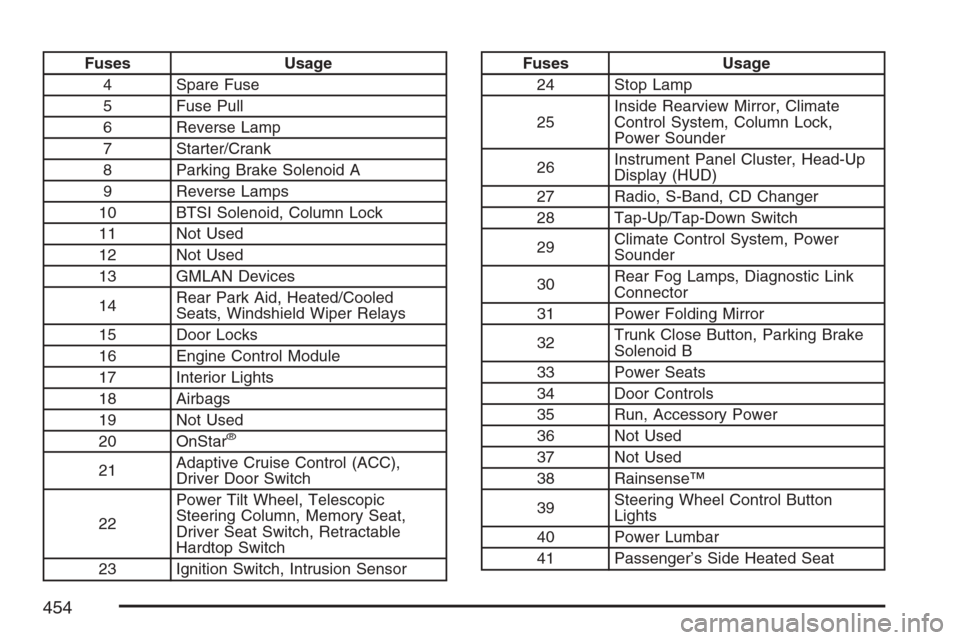
Fuses Usage
4 Spare Fuse
5 Fuse Pull
6 Reverse Lamp
7 Starter/Crank
8 Parking Brake Solenoid A
9 Reverse Lamps
10 BTSI Solenoid, Column Lock
11 Not Used
12 Not Used
13 GMLAN Devices
14Rear Park Aid, Heated/Cooled
Seats, Windshield Wiper Relays
15 Door Locks
16 Engine Control Module
17 Interior Lights
18 Airbags
19 Not Used
20 OnStar
®
21Adaptive Cruise Control (ACC),
Driver Door Switch
22Power Tilt Wheel, Telescopic
Steering Column, Memory Seat,
Driver Seat Switch, Retractable
Hardtop Switch
23 Ignition Switch, Intrusion Sensor
Fuses Usage
24 Stop Lamp
25Inside Rearview Mirror, Climate
Control System, Column Lock,
Power Sounder
26Instrument Panel Cluster, Head-Up
Display (HUD)
27 Radio, S-Band, CD Changer
28 Tap-Up/Tap-Down Switch
29Climate Control System, Power
Sounder
30Rear Fog Lamps, Diagnostic Link
Connector
31 Power Folding Mirror
32Trunk Close Button, Parking Brake
Solenoid B
33 Power Seats
34 Door Controls
35 Run, Accessory Power
36 Not Used
37 Not Used
38 Rainsense™
39Steering Wheel Control Button
Lights
40 Power Lumbar
41 Passenger’s Side Heated Seat
454