trunk CADILLAC XLR V 2007 1.G Owner's Manual
[x] Cancel search | Manufacturer: CADILLAC, Model Year: 2007, Model line: XLR V, Model: CADILLAC XLR V 2007 1.GPages: 512, PDF Size: 3.84 MB
Page 176 of 512

How the System Works
URPA comes on automatically when the shift lever
is moved into REVERSE (R) and the vehicle
speed is less than 3 mph (5 km/h). When
the system comes on, the three lights on the
display will illuminate to let you know that
the system is working. URPA senses how close
your vehicle is to an object. The distance is
determined by the four ultrasonic sensors located
on the rear bumper. When you shift into
REVERSE (R) and an object is detected, the
following will occur in sequence depending on the
distance from the object:
At 5 feet (1.5 m) a chime will sound and
one amber light will be lit;
at 40 inches (1.0 m) both amber lights will be lit;
at 20 inches (0.5 m) a continuous chime will
sound and all three lights (amber/amber/red)
will be lit; and
at 1 foot (0.3 m) a continuous chime will sound
and all three lights (amber/amber/red) will ash.
URPA can detect objects 3 inches (7.6 cm) and
wider, and at least 10 inches (25.4 cm) tall, but it
cannot detect objects that are above trunklevel. In order for the rear sensors to recognize an
object, it must be within operating range.
If the URPA system is not functioning properly, the
display will ash red, indicating that there is a
problem. The light will also ash red while driving if
a trailer is attached to your vehicle, or a bicycle or
object is on the back of, or hanging out of your
trunk. The light will continue to ash until the trailer
or the object is removed and your vehicle is driven
forward at least 15 mph (25 km/h).
It may also ash red if the ultrasonic sensors are
not kept clean. So be sure to keep your rear
bumper free of mud, dirt, snow, ice and slush or
materials such as paint or the system may
not work properly. If after cleaning the rear bumper
and driving forward at least 15 mph (25 km/h),
the display continues to ash red, see your dealer.
For cleaning instructions, seeWashing Your
Vehicle on page 446.
It may also ash red if your vehicle is moving in
REVERSE (R) at a speed greater than 3 mph
(5 km/h). Other conditions that may affect system
performance include things like the vibrations
from a jackhammer or the compression of
air brakes on a very large truck.
176
Page 208 of 512

CLEAN RADAR CRUISE
If your vehicle has this feature, this message
displays when the Adaptive Cruise Control (ACC)
system is disabled because the radar is blocked
and cannot detect vehicles in your path. It
may also activate during heavy rain or due to road
spray. To clean the system, seeAdaptive Cruise
Control on page 150.
CLOSE CARGO DIVIDER
This message displays if the cargo divider is not in
place. Open the trunk and make sure the cargo
divider is secure and no objects are on the divider.
SeeRear Storage Area on page 123for more
information.
COOLANT OVER TEMP (Temperature)
This message displays when the engine coolant
temperature is too hot. Stop and allow your vehicle
to idle in PARK (P) until it cools down and the
message is removed. Do not increase engine
speed above a normal idle. If it does not
cool down, turn off the engine and have your
vehicle serviced by your dealer before driving itagain. Severe engine damage can result from an
overheated engine. SeeEngine Overheating
on page 388.
CRUISE NOT READY
This message indicates that the Adaptive Cruise
Control (ACC) will not activate due to a temporary
condition. Your vehicle does not require service.
If this message displays when you attempt to
activate the system, continue driving for several
minutes, then try to activate the system again.
DRIVER NO. X (1 OR 2)
This message displays when the vehicle is started
or when there is a change of driver. The
message shows which driver is activating the
personalization feature. It will only stay on for
ve seconds.
ENGINE HOT, STOP ENGINE
This message displays when the engine has
overheated. Stop and turn the engine off
immediately to avoid severe engine damage. See
Engine Overheating on page 388. A multiple
chime also sounds when this message displays.
208
Page 218 of 512

TRAC (Traction) SYSTEM ACTIVE
This message displays when the Traction Control
System (TCS) is limiting wheel spin. Slippery
road conditions may exist if this message
is displayed, so adjust your driving accordingly.
This message stays on for a few seconds after the
TCS stops limited wheel spin.
TRAC (Traction)/STABILITRAK OFF
This message displays when both the Traction
Control System (TCS) and the StabiliTrak®System
are off. This message will remain until the
systems are turned on again.
TRAC (Traction)/STABILITRAK ON
This message displays when both the Traction
Control System (TCS) and the StabiliTrak®System
are on.
TRACTION SYSTEM OFF
This message displays when the Traction Control
System (TCS) is off, but the StabiliTrak®System
remains on.
TRACTION SYSTEM ON
This message displays when the Traction Control
System (TCS) is on.
TRUNK AJAR
This message displays when the trunk is open
while the vehicle is running and is not in PARK (P).
WAIT FOR STABILITRAK
This message displays after driving 19 mph
(30 km/h) for 10 seconds if the steering is not
centered. The StabiliTrak
®System is not available
until the steering centers itself and the
STABILITRAK READY message is displayed in
the DIC.
218
Page 222 of 512

Flash at Unlock
This feature activates the front and rear turn signals
for two short ashes when the unlock or trunk
button on the keyless access transmitter is pressed.
This will only occur when the vehicle is off.
The DIC will display NO FLASH AT UNLOCK or
FLASH AT UNLOCK. Press the OPTIONS
button to change the setting.
Flash at Lock
This feature activates the front and rear turn
signals for one long ash when the lock button on
the keyless access transmitter is pressed. This
will only occur when the vehicle is off. If the lock
button is pressed again within ve seconds,
the horn will sound regardless of which setting you
have selected.
The DIC will display NO FLASH AT LOCK or
FLASH AT LOCK. Press the OPTIONS button to
change the setting.
FOB Reminder
This feature sounds the horn three times when the
driver door is closed and there is a keyless
access transmitter inside the interior of the vehicle.
This will only occur when the vehicle is off.
The DIC will display FOB REMINDER OFF or
FOB REMINDER HORN. Press the OPTIONS
button to change the setting.
Passive Locking
This feature allows you to select whether the doors
automatically lock during normal vehicle exit. When
the ignition is turned off and all doors become
closed, the vehicle will determine how many
keyless access transmitters remain in the vehicle
interior. If at least one keyless access transmitter
has been removed from the interior of the vehicle,
the doors will lock after eight seconds.
For example, if there are two keyless access
transmitters in the vehicle and one is removed, the
other will be locked in. The keyless access
transmitter locked in the vehicle can still be used to
start the vehicle or unlock the doors, if needed.
222
Page 230 of 512

Care of the CD Player
Do not use CD lens cleaners for CD players
because the lens of the CD optics can become
contaminated by lubricants.
Diversity Antenna System
The AM-FM antennas are located under the
decklid surface in the trunk compartment. The
antennas are hidden from view and are not
accessible.If adding an aftermarket cellular telephone to your
vehicle, do not attach the antenna to the rear
glass. This would interfere with the convertible top
retraction operation and could cause damage to
the nished/painted surfaces.
XM™ Satellite Radio Antenna
System
Your vehicle may have the XM™ Satellite Radio
antennas that are located in the outside rear
view mirrors. These antennas are hidden from
view and are not accessible.
230
Page 370 of 512

An alternate fuel door
release is located inside
the trunk behind a
panel on the driver’s
side of the vehicle. Pull
the handle to release
the fuel door.
To remove the fuel cap, turn it slowly
counterclockwise. The fuel cap has a spring in it; if
the cap is released too soon, it will spring back
to the right.
While refueling, hang the tethered fuel cap from
the hook on the fuel door.
{CAUTION:
If you spill fuel and then something
ignites it, you could be badly burned. Fuel
can spray out on you if you open the fuel
cap too quickly. This spray can happen if
your tank is nearly full, and is more likely
in hot weather. Open the fuel cap slowly
and wait for any hiss noise to stop. Then
unscrew the cap all the way.
Be careful not to spill fuel. Do not top off or overll
the tank and wait a few seconds after you have
nished pumping before removing the nozzle.
Clean fuel from painted surfaces as soon
as possible. SeeWashing Your Vehicle on
page 446.
When replacing the fuel cap, turn it clockwise until
it clicks. Make sure the cap is fully installed.
The diagnostic system can determine if the fuel
cap has been left off or improperly installed.
This would allow fuel to evaporate into the
atmosphere. SeeMalfunction Indicator Lamp on
page 196.
370
Page 371 of 512
The CHECK GAS CAP message in the Driver
Information Center (DIC) will be displayed if
the fuel cap is not properly installed.
{CAUTION:
If a re starts while you are refueling, do
not remove the nozzle. Shut off the ow of
fuel by shutting off the pump or by
notifying the station attendant. Leave the
area immediately.
Notice:If you need a new fuel cap, be sure to
get the right type. Your dealer can get one
for you. If you get the wrong type, it may not
t properly. This may cause your malfunction
indicator lamp to light and may damage
your fuel tank and emissions system. See
Malfunction Indicator Lamp on page 196.
Filling a Portable Fuel Container
{CAUTION:
Never ll a portable fuel container while it
is in your vehicle. Static electricity
discharge from the container can ignite the
gasoline vapor. You can be badly burned
and your vehicle damaged if this occurs.
To help avoid injury to you and others:
Dispense gasoline only into approved
containers.
Do not ll a container while it is inside a
vehicle, in a vehicle’s trunk, pickup
bed, or on any surface other than the
ground.
Bring the ll nozzle in contact with the
inside of the ll opening before
operating the nozzle. Contact should
be maintained until the lling is
complete.
Do not smoke while pumping gasoline.
371
Page 402 of 512

Battery
Your vehicle has a maintenance free battery.
When it is time for a new battery, get one that has
the replacement number shown on the original
battery’s label. We recommend an ACDelco
®
replacement battery.
For battery replacement, see your dealer or the
service manual. To purchase a service manual,
seeService and Owner PublicationsinService
Publications Ordering Information on page 497.
Warning:Battery posts, terminals, and related
accessories contain lead and lead compounds,
chemicals known to the State of California
to cause cancer and reproductive harm. Wash
hands after handling.
Vehicle Storage
If you are not going to drive your vehicle for 25 days
or more, remove the black, negative (−) cable from
the battery. This will help keep your battery from
running down.
{CAUTION:
Batteries have acid that can burn you and
gas that can explode. You can be badly
hurt if you are not careful. SeeJump
Starting on page 403for tips on working
around a battery without getting hurt.
You must close all doors and the trunk before
reconnecting the battery. After reconnecting
the battery, you must press the unlock button on
the keyless access transmitter. Failure to
follow this procedure may result in the alarm
sounding. Pressing unlock on the keyless access
transmitter would stop the alarm.
402
Page 451 of 512

Vehicle Identication
Vehicle Identication Number (VIN)
This is the legal identier for your vehicle. It
appears on a plate in the front corner of the
instrument panel, on the driver’s side. You can see
it if you look through the windshield from outside
your vehicle. The VIN also appears on the Vehicle
Certication and Service Parts labels and the
certicates of title and registration.
Engine Identication
The eighth character in the VIN is the engine
code. This code will help you identify your vehicle’s
engine, specications, and replacement parts.
Service Parts Identication Label
You will nd this label on the rear compartment
cover in the trunk. It is very helpful if you ever need
to order parts. On this label, you will nd the
following:
VIN
Model designation
Paint information
Production options and special equipment
Do not remove this label from the vehicle.
451
Page 454 of 512
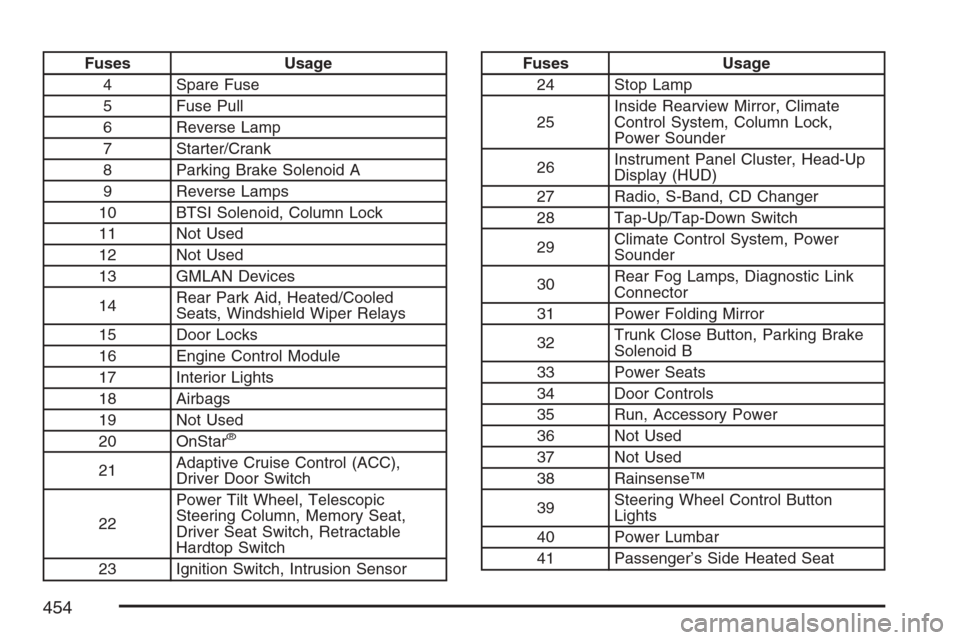
Fuses Usage
4 Spare Fuse
5 Fuse Pull
6 Reverse Lamp
7 Starter/Crank
8 Parking Brake Solenoid A
9 Reverse Lamps
10 BTSI Solenoid, Column Lock
11 Not Used
12 Not Used
13 GMLAN Devices
14Rear Park Aid, Heated/Cooled
Seats, Windshield Wiper Relays
15 Door Locks
16 Engine Control Module
17 Interior Lights
18 Airbags
19 Not Used
20 OnStar
®
21Adaptive Cruise Control (ACC),
Driver Door Switch
22Power Tilt Wheel, Telescopic
Steering Column, Memory Seat,
Driver Seat Switch, Retractable
Hardtop Switch
23 Ignition Switch, Intrusion Sensor
Fuses Usage
24 Stop Lamp
25Inside Rearview Mirror, Climate
Control System, Column Lock,
Power Sounder
26Instrument Panel Cluster, Head-Up
Display (HUD)
27 Radio, S-Band, CD Changer
28 Tap-Up/Tap-Down Switch
29Climate Control System, Power
Sounder
30Rear Fog Lamps, Diagnostic Link
Connector
31 Power Folding Mirror
32Trunk Close Button, Parking Brake
Solenoid B
33 Power Seats
34 Door Controls
35 Run, Accessory Power
36 Not Used
37 Not Used
38 Rainsense™
39Steering Wheel Control Button
Lights
40 Power Lumbar
41 Passenger’s Side Heated Seat
454