wheel CADILLAC XT4 2020 Owner's Guide
[x] Cancel search | Manufacturer: CADILLAC, Model Year: 2020, Model line: XT4, Model: CADILLAC XT4 2020Pages: 372, PDF Size: 6.25 MB
Page 127 of 372
Cadillac XT4 Owner Manual (GMNA-Localizing-U.S./Canada/Mexico-
13527548) - 2020 - CRC - 9/5/19
126 INSTRUMENTS AND CONTROLS
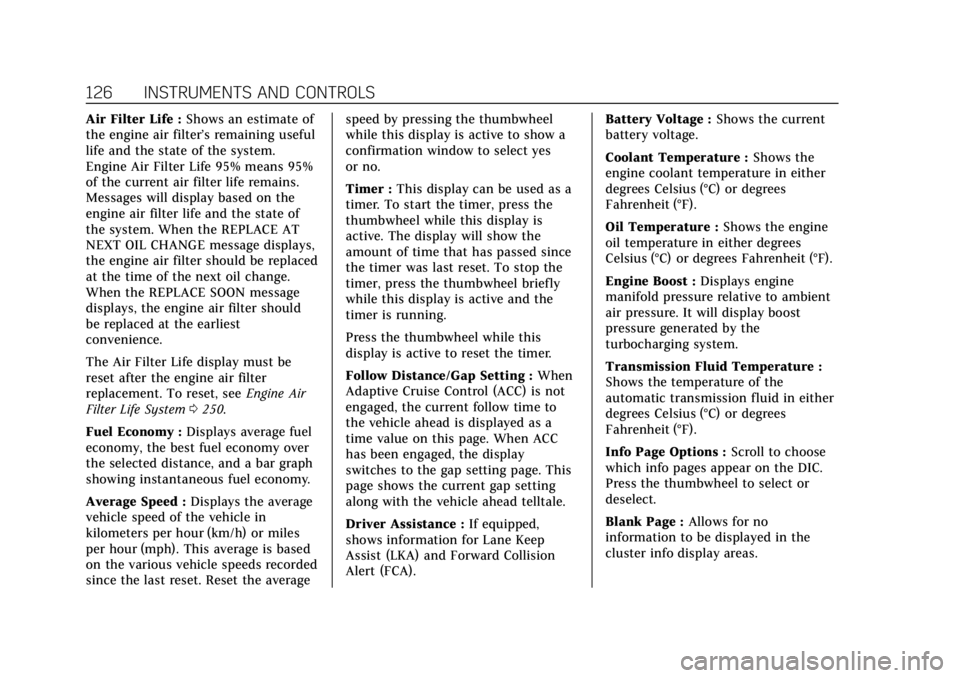
Air Filter Life :Shows an estimate of
the engine air filter’s remaining useful
life and the state of the system.
Engine Air Filter Life 95% means 95%
of the current air filter life remains.
Messages will display based on the
engine air filter life and the state of
the system. When the REPLACE AT
NEXT OIL CHANGE message displays,
the engine air filter should be replaced
at the time of the next oil change.
When the REPLACE SOON message
displays, the engine air filter should
be replaced at the earliest
convenience.
The Air Filter Life display must be
reset after the engine air filter
replacement. To reset, see Engine Air
Filter Life System 0250.
Fuel Economy : Displays average fuel
economy, the best fuel economy over
the selected distance, and a bar graph
showing instantaneous fuel economy.
Average Speed : Displays the average
vehicle speed of the vehicle in
kilometers per hour (km/h) or miles
per hour (mph). This average is based
on the various vehicle speeds recorded
since the last reset. Reset the average speed by pressing the thumbwheel
while this display is active to show a
confirmation window to select yes
or no.
Timer :
This display can be used as a
timer. To start the timer, press the
thumbwheel while this display is
active. The display will show the
amount of time that has passed since
the timer was last reset. To stop the
timer, press the thumbwheel briefly
while this display is active and the
timer is running.
Press the thumbwheel while this
display is active to reset the timer.
Follow Distance/Gap Setting : When
Adaptive Cruise Control (ACC) is not
engaged, the current follow time to
the vehicle ahead is displayed as a
time value on this page. When ACC
has been engaged, the display
switches to the gap setting page. This
page shows the current gap setting
along with the vehicle ahead telltale.
Driver Assistance : If equipped,
shows information for Lane Keep
Assist (LKA) and Forward Collision
Alert (FCA). Battery Voltage :
Shows the current
battery voltage.
Coolant Temperature : Shows the
engine coolant temperature in either
degrees Celsius (°C) or degrees
Fahrenheit (°F).
Oil Temperature : Shows the engine
oil temperature in either degrees
Celsius (°C) or degrees Fahrenheit (°F).
Engine Boost : Displays engine
manifold pressure relative to ambient
air pressure. It will display boost
pressure generated by the
turbocharging system.
Transmission Fluid Temperature :
Shows the temperature of the
automatic transmission fluid in either
degrees Celsius (°C) or degrees
Fahrenheit (°F).
Info Page Options : Scroll to choose
which info pages appear on the DIC.
Press the thumbwheel to select or
deselect.
Blank Page : Allows for no
information to be displayed in the
cluster info display areas.
Page 128 of 372

Cadillac XT4 Owner Manual (GMNA-Localizing-U.S./Canada/Mexico-
13527548) - 2020 - CRC - 9/5/19
INSTRUMENTS AND CONTROLS 127
Head-Up Display (HUD)
{Warning
If the HUD image is too bright or
too high in your field of view, it
may take you more time to see
things you need to see when it is
dark outside. Be sure to keep the
HUD image dim and placed low in
your field of view.
If equipped with HUD, some
information concerning the operation
of the vehicle is projected onto the
windshield. The image is projected
through the HUD lens on top of the
instrument panel. The information
appears as an image focused out
toward the front of the vehicle.
Caution
If you try to use the HUD image as
a parking aid, you may misjudge
the distance and damage your
vehicle. Do not use the HUD image
as a parking aid. The HUD information can be
displayed in various languages. The
speedometer reading and other
numerical values can be displayed in
either English or metric units.
The language selection is changed
through the radio and the units of
measurement is changed through the
instrument cluster. See
“Settings”in
the Infotainment Manual and
“Options” underInstrument Cluster
0 108.HUD Display on the Windshield
The HUD may display some of the
following vehicle information and
vehicle messages or alerts: .
Speed
. Audio
. Phone
. Navigation
. Performance
. Driver Assistance Features
. Vehicle Messages
Some vehicle messages or alerts
displayed in the HUD may be cleared
by using the steering wheel controls.
See Vehicle Messages 0130.
The HUD control is to the left of the
steering wheel.
To adjust the HUD image:
1. Adjust the driver seat.
2. Start the engine.
3. Use the following settings to adjust the HUD.
Page 129 of 372
Cadillac XT4 Owner Manual (GMNA-Localizing-U.S./Canada/Mexico-
13527548) - 2020 - CRC - 9/5/19
128 INSTRUMENTS AND CONTROLS
$:Press or lift to center the HUD
image. The HUD image can only be
adjusted up and down, not side
to side.
!: Press to select the display view.
Each press will change the
display view.
D: Lift and hold to brighten the
display. Press and hold to dim the
display. Continue to hold to turn the
display off.
The HUD image will automatically
dim and brighten to compensate for
outside lighting. The HUD brightness
control can also be adjusted as
needed.
The HUD image can temporarily light
up depending on the angle and
position of sunlight on the HUD
display. This is normal.
Polarized sunglasses could make the
HUD image harder to see.
Head-Up Display (HUD) Rotation
Option
This feature allows the angle of the
HUD image to be adjusted. Press the thumbwheel while Adjust
Rotation is highlighted to enter Adjust
Mode. Scroll to adjust the angle of the
HUD display. Press the thumbwheel to
confirm and save the setting. This
feature may only be available in
P (Park). See
Instrument Cluster 0108.
HUD Views
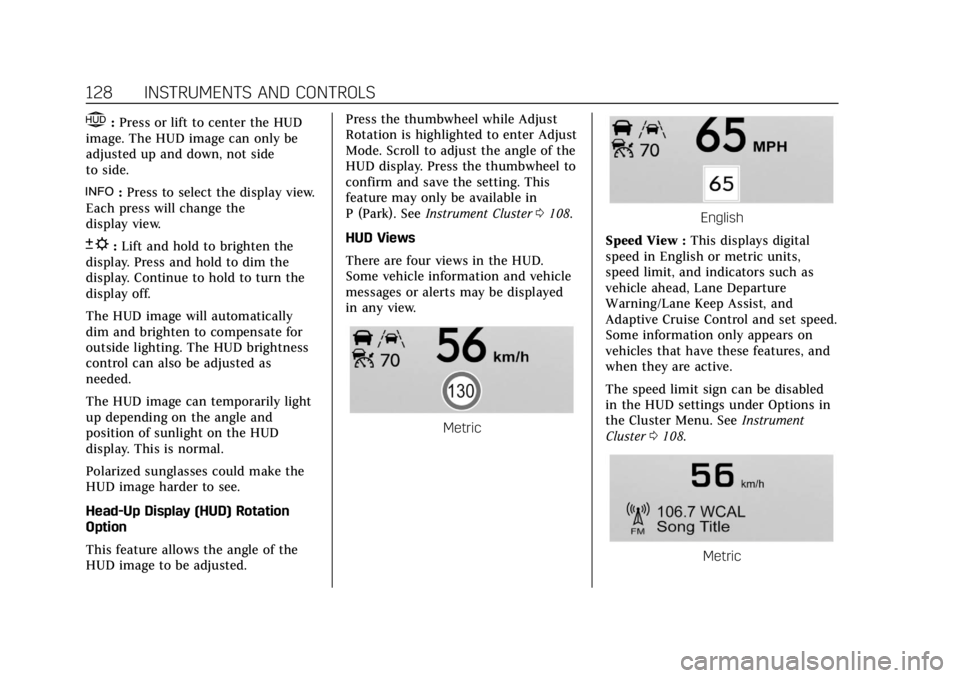
There are four views in the HUD.
Some vehicle information and vehicle
messages or alerts may be displayed
in any view.
Metric
English
Speed View : This displays digital
speed in English or metric units,
speed limit, and indicators such as
vehicle ahead, Lane Departure
Warning/Lane Keep Assist, and
Adaptive Cruise Control and set speed.
Some information only appears on
vehicles that have these features, and
when they are active.
The speed limit sign can be disabled
in the HUD settings under Options in
the Cluster Menu. See Instrument
Cluster 0108.
Metric
Page 130 of 372
Cadillac XT4 Owner Manual (GMNA-Localizing-U.S./Canada/Mexico-
13527548) - 2020 - CRC - 9/5/19
INSTRUMENTS AND CONTROLS 129
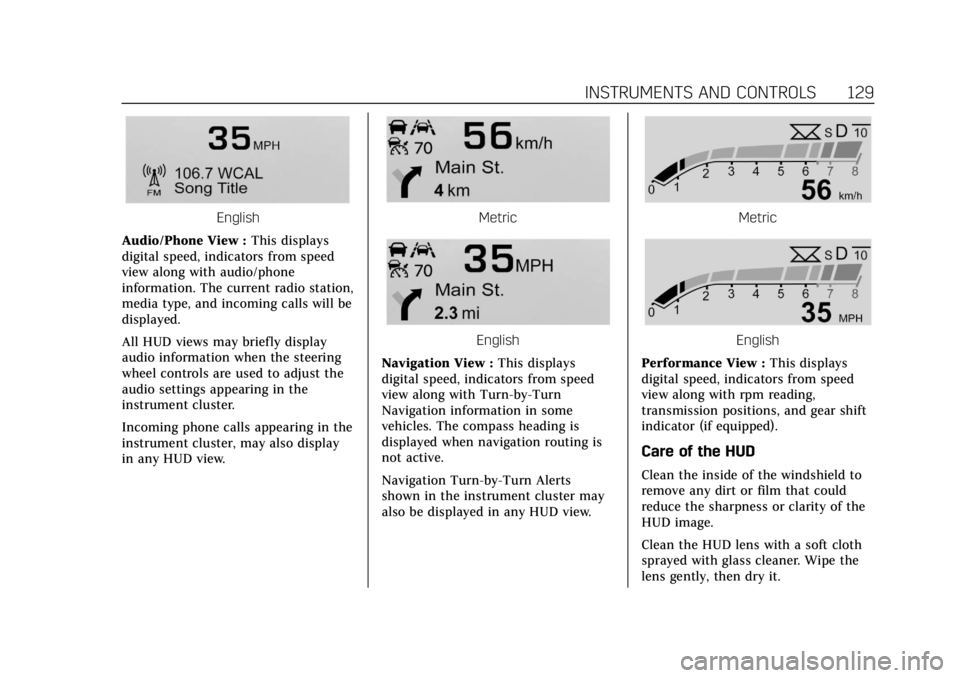
English
Audio/Phone View : This displays
digital speed, indicators from speed
view along with audio/phone
information. The current radio station,
media type, and incoming calls will be
displayed.
All HUD views may briefly display
audio information when the steering
wheel controls are used to adjust the
audio settings appearing in the
instrument cluster.
Incoming phone calls appearing in the
instrument cluster, may also display
in any HUD view.Metric
English
Navigation View : This displays
digital speed, indicators from speed
view along with Turn-by-Turn
Navigation information in some
vehicles. The compass heading is
displayed when navigation routing is
not active.
Navigation Turn-by-Turn Alerts
shown in the instrument cluster may
also be displayed in any HUD view.
Metric
English
Performance View : This displays
digital speed, indicators from speed
view along with rpm reading,
transmission positions, and gear shift
indicator (if equipped).
Care of the HUD
Clean the inside of the windshield to
remove any dirt or film that could
reduce the sharpness or clarity of the
HUD image.
Clean the HUD lens with a soft cloth
sprayed with glass cleaner. Wipe the
lens gently, then dry it.
Page 131 of 372

Cadillac XT4 Owner Manual (GMNA-Localizing-U.S./Canada/Mexico-
13527548) - 2020 - CRC - 9/5/19
130 INSTRUMENTS AND CONTROLS
HUD Troubleshooting
If you cannot see the HUD image
when the ignition is on, check that:
.Nothing is covering the HUD lens.
. The HUD brightness setting is not
too dim or too bright.
. The HUD is adjusted to the proper
height.
. Polarized sunglasses are not worn.
. The windshield and HUD lens are
clean.
If the HUD image is not correct,
contact your dealer.
The windshield is part of the HUD
system. See Windshield Replacement
0 262.
Vehicle Messages
Messages displayed on the Driver
Information Center (DIC) indicate the
status of the vehicle or some action
that may be needed to correct a
condition. Multiple messages may
appear one after another.
The messages that do not require
immediate action can be
acknowledged and cleared by pressing
the thumbwheel. The messages that
require immediate action cannot be
cleared until that action is performed.
All messages should be taken
seriously; clearing the message does
not correct the problem.
If a SERVICE message appears, see
your dealer.
Follow the instructions given in the
messages. The system displays
messages regarding the following
topics:
.
Service Messages
. Fluid Levels
. Vehicle Security
. Brakes .
Steering
. Ride Control Systems
. Driver Assistance Systems
. Cruise Control
. Lighting and Bulb Replacement
. Wiper/Washer Systems
. Doors and Windows
. Seat Belts
. Airbag Systems
. Engine and Transmission
. Tire Pressure
. Battery
Engine Power Messages
ENGINE POWER IS REDUCED
This message displays when the
vehicle's propulsion power is reduced.
A reduction in propulsion power can
affect the vehicle's ability to
accelerate. If this message is on, but
there is no observed reduction in
performance, proceed to your
destination. The performance may be
reduced the next time the vehicle is
Page 134 of 372

Cadillac XT4 Owner Manual (GMNA-Localizing-U.S./Canada/Mexico-
13527548) - 2020 - CRC - 9/5/19
INSTRUMENTS AND CONTROLS 133
Adaptive Cruise Go Notifier
This setting determines if an alert will
appear when Adaptive Cruise Control
brings the vehicle to a complete stop
and the vehicle ahead of you starts
moving again. SeeAdaptive Cruise
Control 0197.
Touch Off or On.
Lane Change Alert
This setting specifies if an alert will
display on the outside mirror to help
you avoid crashing into a vehicle in
your blind spot, or rapidly
approaching your blind spot, during a
lane change maneuver. See Lane
Change Alert (LCA) 0222.
When Lane Change Alert is disabled,
Side Blind Zone Alert is also disabled.
Touch Off or On.
Rear Camera Park Assist Symbols
This setting enables the Rear Camera
Park Assist Symbols. See Assistance
Systems for Parking or Backing 0207.
Touch Off or On. Rear Cross Traffic Alert
This setting specifies if an alert will
display when the vehicle detects
approaching rear cross traffic when in
R (Reverse). See
Assistance Systems for
Parking or Backing 0207.
Touch Off or On.
Comfort and Convenience
Touch and the following may display:
. Chime Volume
. Reverse Tilt Mirror
. Remote Mirror Folding
. Rain Sense Wipers
. Auto Wipe in Reverse Gear
. Hands Free Liftgate Control
Chime Volume
This setting determines the chime
volume level.
Touch the controls on the
infotainment display to adjust the
volume. Reverse Tilt Mirror
When on, both the driver and
passenger, driver, or passenger outside
mirrors will tilt downward when the
vehicle is shifted to R (Reverse) to
improve visibility of the ground near
the rear wheels. They will return to
their previous driving position when
the vehicle is shifted out of
R (Reverse) or the engine is turned off.
See
Reverse Tilt Mirrors 033.
Touch Off, On - Driver and Passenger,
On - Driver, or On - Passenger.
Remote Mirror Folding
When on, the outside mirrors will
automatically fold or unfold when the
Remote Keyless Entry (RKE)
transmitter
QorKbutton is pressed
and held. See Folding Mirrors 032.
Touch Off or On.
Rain Sense Wipers
This setting automatically turns on
the wipers when moisture is detected
and the wiper switch is in
intermittent mode.
Touch Disabled or Enabled.
Page 137 of 372
Cadillac XT4 Owner Manual (GMNA-Localizing-U.S./Canada/Mexico-
13527548) - 2020 - CRC - 9/5/19
136 INSTRUMENTS AND CONTROLS
or ACC/ACCESSORY to off if the driver
door is open or opened. SeeMemory
Seats 045.
Touch Off or On.
Teen Driver
See “Teen Driver” under“Settings ”in
the infotainment manual.
Valet Mode
This will lock the infotainment system
and steering wheel controls. It may
also limit access to vehicle storage
locations, if equipped.
To enable valet mode:
1. Enter a four-digit code on the keypad.
2. Touch Enter to go to the confirmation screen.
3. Re-enter the four-digit code.
Touch Lock or Unlock to lock or
unlock the system. Touch Back to go
back to the previous menu.
Universal Remote
System
See Radio Frequency Statement 0345.
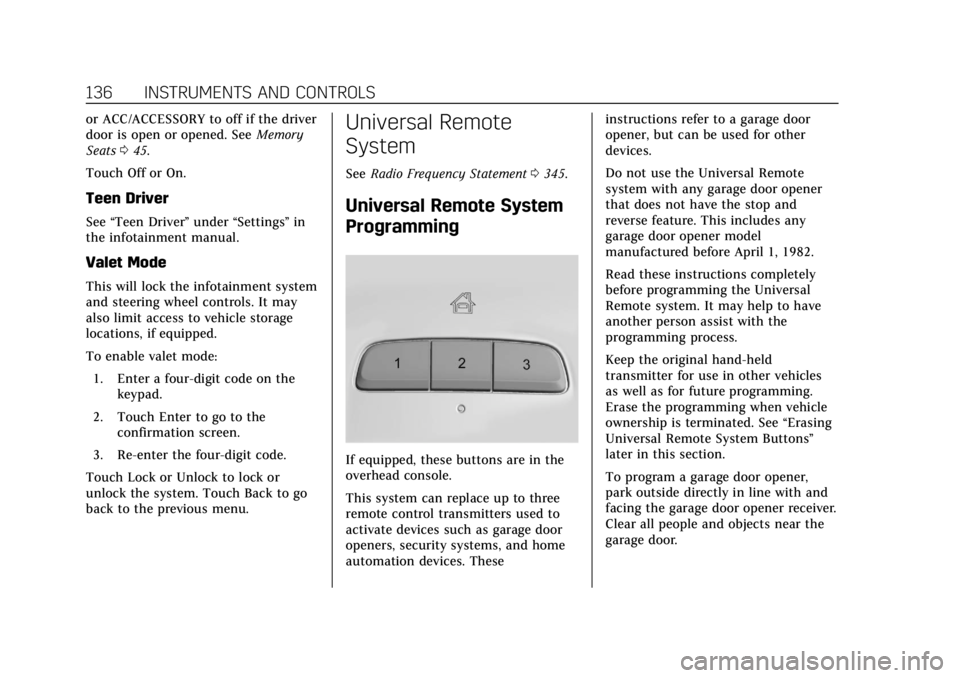
Universal Remote System
Programming
If equipped, these buttons are in the
overhead console.
This system can replace up to three
remote control transmitters used to
activate devices such as garage door
openers, security systems, and home
automation devices. These instructions refer to a garage door
opener, but can be used for other
devices.
Do not use the Universal Remote
system with any garage door opener
that does not have the stop and
reverse feature. This includes any
garage door opener model
manufactured before April 1, 1982.
Read these instructions completely
before programming the Universal
Remote system. It may help to have
another person assist with the
programming process.
Keep the original hand-held
transmitter for use in other vehicles
as well as for future programming.
Erase the programming when vehicle
ownership is terminated. See
“Erasing
Universal Remote System Buttons”
later in this section.
To program a garage door opener,
park outside directly in line with and
facing the garage door opener receiver.
Clear all people and objects near the
garage door.
Page 145 of 372

Cadillac XT4 Owner Manual (GMNA-Localizing-U.S./Canada/Mexico-
13527548) - 2020 - CRC - 9/5/19
144 LIGHTING
The turn and lane-change signal can
be turned off manually by moving the
lever back to its original position.
If after signaling a turn or lane
change, the arrow flashes rapidly or
does not come on, a signal bulb may
be burned out.
Replace any burned out bulbs. If a
bulb is not burned out, check the fuse.
SeeFuses and Circuit Breakers 0265.
Cornering Lamps
If equipped with cornering lamps, they
automatically come on when all of the
following occur:
.
The low-beam headlamps are on.
. The turn signals are activated or
the steering wheel is at a turning
angle.
. The vehicle speed is below
40 km/h (25 mph).
Interior Lighting
Instrument Panel
Illumination Control
The brightness of the instrument
panel lighting and steering wheel
controls can be adjusted.
D:Move the thumbwheel up or
down to brighten or dim the lights.
The brightness of the displays
automatically adjusts based on
outdoor lighting. The instrument panel illumination control will set the
lowest level to which the display will
be automatically adjusted.
Courtesy Lamps
The courtesy lamps come on when
any door is opened unless the dome
lamp override is activated. To
deactivate the dome lamp override,
press
jOFF and the indicator
light on the button will turn off.
Dome Lamps
The dome lamp controls are in the
overhead console.
Page 153 of 372

Cadillac XT4 Owner Manual (GMNA-Localizing-U.S./Canada/Mexico-
13527548) - 2020 - CRC - 9/5/19
152 CLIMATE CONTROLS
Caution (Continued)
stations clearly. The repairs would
not be covered by the vehicle
warranty.
Remote Start Climate Control
Operation : If equipped with remote
start, the climate control system may
run when the vehicle is started
remotely. The system will determine
the best mode and temperature
setting for operation. Once the vehicle
is started with the Engine Start/Stop
button, the climate control system will
begin to operate at the last customer
selected operating mode and
temperature. The rear defog may come
on during remote start based on cold
ambient conditions. The rear defog
indicator light does not come on
during a remote start.
If equipped, the heated seats will turn
on if it is cold outside or the
ventilated seats will turn on if it is hot
outside. The heated and ventilated
seat indicator lights may not come on
during a remote start. If equipped, the heated steering wheel will come on in
a remote start if it is cold outside. The
heated steering wheel indicator light
may not come on. See
Remote Vehicle
Start 015 and
Heated and Ventilated Front Seats 048.
Sensor
The solar sensor, on top of the
instrument panel near the windshield,
monitors the solar intensity.
The climate control system uses the
sensor information to adjust the
temperature, fan speed, recirculation,
and air delivery mode for best
comfort. If the sensor is covered, the automatic
climate control system may not work
properly.
Page 156 of 372

Cadillac XT4 Owner Manual (GMNA-Localizing-U.S./Canada/Mexico-
13527548) - 2020 - CRC - 9/5/19
DRIVING AND OPERATING 155
Driving and
Operating
Driving Information
Driver Behavior . . . . . . . . . . . . . . . . . . . 156
Driving Environment . . . . . . . . . . . . . 156
Vehicle Design . . . . . . . . . . . . . . . . . . . . 156
Driving for Better FuelEconomy . . . . . . . . . . . . . . . . . . . . . . . . 157
Distracted Driving . . . . . . . . . . . . . . . . 157
Defensive Driving . . . . . . . . . . . . . . . . 158
Drunk Driving . . . . . . . . . . . . . . . . . . . . 158
Control of a Vehicle . . . . . . . . . . . . . . 158
Braking . . . . . . . . . . . . . . . . . . . . . . . . . . . . 158
Steering . . . . . . . . . . . . . . . . . . . . . . . . . . . 159
Off-Road Recovery . . . . . . . . . . . . . . . . 160
Loss of Control . . . . . . . . . . . . . . . . . . . 160
Off-Road Driving . . . . . . . . . . . . . . . . . 161
Driving on Wet Roads . . . . . . . . . . . 165
Hill and Mountain Roads . . . . . . . . 165
Winter Driving . . . . . . . . . . . . . . . . . . . . 166
If the Vehicle Is Stuck . . . . . . . . . . . 167
Vehicle Load Limits . . . . . . . . . . . . . . 168
Starting and Operating
New Vehicle Break-In . . . . . . . . . . . . 172
Ignition Positions . . . . . . . . . . . . . . . . 172
Starting the Engine . . . . . . . . . . . . . . 173 Stop/Start System . . . . . . . . . . . . . . . . 174
Engine Heater . . . . . . . . . . . . . . . . . . . . 176
Retained Accessory
Power (RAP) . . . . . . . . . . . . . . . . . . . . 177
Shifting Into Park . . . . . . . . . . . . . . . . 177
Shifting out of Park . . . . . . . . . . . . . . 178
Parking over Things
That Burn . . . . . . . . . . . . . . . . . . . . . . . 180
Active Fuel Management . . . . . . . . 180
Extended Parking . . . . . . . . . . . . . . . . . 180
Engine Exhaust
Engine Exhaust . . . . . . . . . . . . . . . . . . . 181
Running the Vehicle While Parked . . . . . . . . . . . . . . . . . . . . . . . . . . . 181
Automatic Transmission
Automatic Transmission . . . . . . . . . 182
Manual Mode . . . . . . . . . . . . . . . . . . . . . 186
Drive Systems
All-Wheel Drive . . . . . . . . . . . . . . . . . . 188
Brakes
Brakes . . . . . . . . . . . . . . . . . . . . . . . . . . . . . 188
Antilock Brake System (ABS) . . . . 188
Electric Parking Brake . . . . . . . . . . . . 189
Brake Assist . . . . . . . . . . . . . . . . . . . . . . . 190
Hill Start Assist (HSA) . . . . . . . . . . . 191
Ride Control Systems
Traction Control/ElectronicStability Control . . . . . . . . . . . . . . . . 191
Driver Mode Control . . . . . . . . . . . . . 193
Cruise Control
Cruise Control . . . . . . . . . . . . . . . . . . . . 194
Adaptive Cruise Control . . . . . . . . . 197
Driver Assistance Systems
Driver Assistance Systems . . . . . . . 206
Assistance Systems for Parking or Backing . . . . . . . . . . . . . . . . . . . . . . . 207
Rear Pedestrian Alert . . . . . . . . . . . . 214
Assistance Systems for Driving . . . . . . . . . . . . . . . . . . . . . . . . . . 215
Forward Collision Alert (FCA) System . . . . . . . . . . . . . . . . . . . . . . . . . . 215
Automatic Emergency Braking (AEB) . . . . . . . . . . . . . . . . . . . 218
Front Pedestrian Braking (FPB) System . . . . . . . . . . . . . . . . . . . . . . . . . . 219
Side Blind Zone Alert (SBZA) . . . . 221
Lane Change Alert (LCA) . . . . . . . . 222
Lane Keep Assist (LKA) . . . . . . . . . . 224
Fuel
Top Tier Fuel . . . . . . . . . . . . . . . . . . . . . 226
Recommended Fuel . . . . . . . . . . . . . . 226
Prohibited Fuels . . . . . . . . . . . . . . . . . . 226
Fuels in Foreign Countries . . . . . . . 227