replacement CADILLAC XT4 2021 User Guide
[x] Cancel search | Manufacturer: CADILLAC, Model Year: 2021, Model line: XT4, Model: CADILLAC XT4 2021Pages: 408, PDF Size: 8.33 MB
Page 100 of 408
Cadillac XT4 Owner Manual (GMNA-Localizing-U.S./Canada/Mexico-
14584367) - 2021 - CRC - 10/14/20
INSTRUMENTS AND CONTROLS 99
Warning Lights, Gauges,
and Indicators
Warning lights and gauges can signal
that something is wrong before it
becomes serious enough to cause an
expensive repair or replacement.
Paying attention to the warning lights
and gauges could prevent injury.
Some warning lights come on briefly
when the engine is started to indicate
they are working. When one of the
warning lights comes on and stays on
while driving, or when one of the
gauges shows there may be a problem,
check the section that explains what
to do. Waiting to do repairs can be
costly and even dangerous.
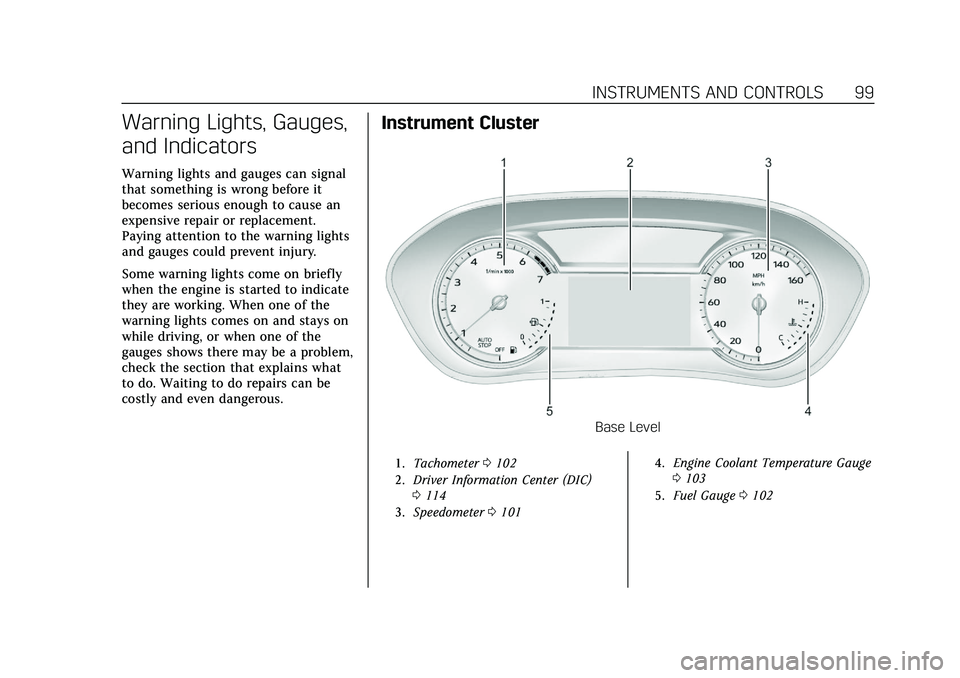
Instrument Cluster
Base Level
1.Tachometer 0102
2. Driver Information Center (DIC)
0114
3. Speedometer 0101 4.
Engine Coolant Temperature Gauge
0103
5. Fuel Gauge 0102
Page 107 of 408
Cadillac XT4 Owner Manual (GMNA-Localizing-U.S./Canada/Mexico-
14584367) - 2021 - CRC - 10/14/20
106 INSTRUMENTS AND CONTROLS
Caution
Modifications to the engine,
transmission, exhaust, intake,
or fuel system, or the use of
replacement tires that do not meet
the original tire specifications, can
cause this light to come on. This
could lead to costly repairs not
covered by the vehicle warranty.
This could also affect the vehicle’s
ability to pass an Emissions
Inspection/Maintenance test. See
Accessories and Modifications0283.
If the light is f lashing : A
malfunction has been detected that
could damage the emission control
system and increase vehicle
emissions. Diagnosis and service may
be required.
To help prevent damage, reduce
vehicle speed and avoid hard
accelerations and uphill grades.
If towing a trailer, reduce the amount
of cargo being hauled as soon as
possible. If the light continues to flash, find a
safe place to park. Turn the vehicle off
and wait at least 10 seconds before
restarting the engine. If the light is
still flashing, follow the previous
guidelines and see your dealer for
service as soon as possible.
If the light is on steady :
A
malfunction has been detected.
Diagnosis and service may be
required.
Check the following:
.If fuel has been added to the vehicle
using the capless fuel funnel
adapter, make sure that it has been
removed. See “Filling the Tank with
a Portable Gas Can ”under Filling the
Tank 0268. The diagnostic system
can detect if the adapter has been
left installed in the vehicle, allowing
fuel to evaporate into the
atmosphere. A few driving trips with
the adapter removed may turn off
the light.
.Poor fuel quality can cause
inefficient engine operation and
poor driveability, which may go
away once the engine is warmed up.
If this occurs, change the fuel brand. It may require at least one
full tank of the proper fuel to turn
the light off. See
Recommended Fuel
0 267.
If the light remains on, see your
dealer.
Emissions Inspection and
Maintenance Programs
If the vehicle requires an Emissions
Inspection/Maintenance test, the test
equipment will likely connect to the
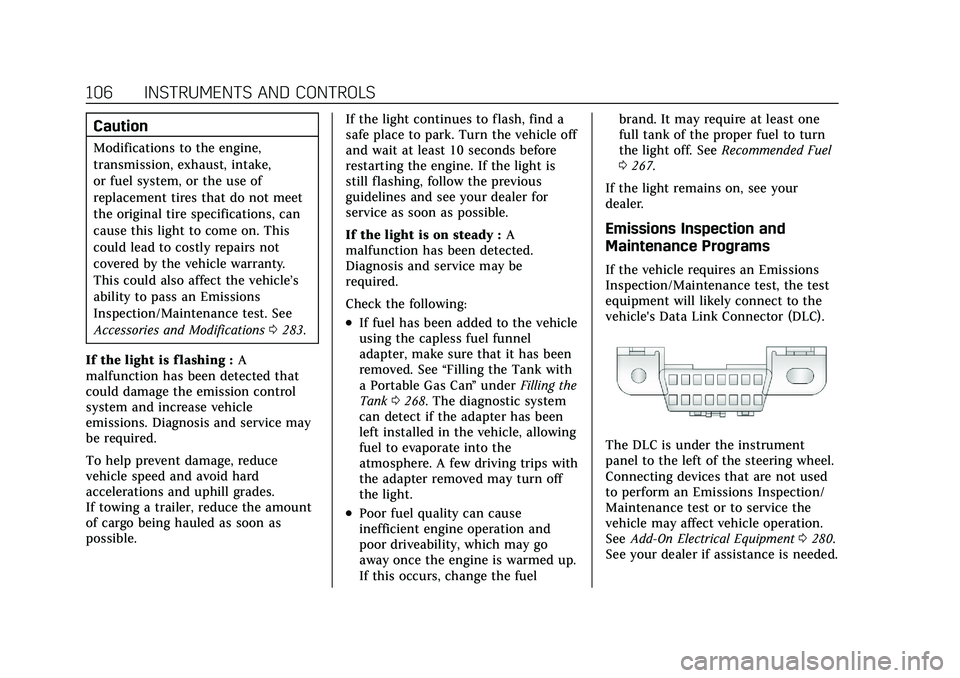
vehicle's Data Link Connector (DLC).
The DLC is under the instrument
panel to the left of the steering wheel.
Connecting devices that are not used
to perform an Emissions Inspection/
Maintenance test or to service the
vehicle may affect vehicle operation.
See Add-On Electrical Equipment 0280.
See your dealer if assistance is needed.
Page 116 of 408
Cadillac XT4 Owner Manual (GMNA-Localizing-U.S./Canada/Mexico-
14584367) - 2021 - CRC - 10/14/20
INSTRUMENTS AND CONTROLS 115
Speed :Shows the vehicle speed in
either kilometers per hour (km/h) or
miles per hour (mph).
Trip 1 or Trip 2 and Average Fuel
Economy : The Trip display shows the
current distance traveled, in either
kilometers (km) or miles (mi), since
the trip odometer was last reset. The
trip odometer can be reset by pressing
Vand selecting yes or no while this
display is active.
Shows the approximate average liters
per 100 kilometers (L/100 km),
kilometers per liter (km/L), or miles
per gallon (mpg). This number is
calculated based on the number of
L/100 km or km/L recorded since the
last time this menu item was reset.
This number reflects only the
approximate average fuel economy
that the vehicle has right now, and
will change as driving conditions
change. The Average Fuel Economy
can be reset by pressing
Vand
selecting yes or no while this display
is active.
Fuel Range : Shows the approximate
distance the vehicle can be driven
without refueling. LOW will be displayed when the vehicle is low on
fuel. The fuel range estimate is based
on an average of the vehicle's fuel
economy over recent driving history
and the amount of fuel remaining in
the fuel tank.
Oil Life :
Shows an estimate of the
oil's remaining useful life.
If REMAINING OIL LIFE 99% is
displayed, that means 99% of the
current oil life remains.
When the remaining oil life is low, the
CHANGE ENGINE OIL SOON message
will appear on the display. The oil
should be changed as soon as
possible. See Engine Oil0286. In
addition to the engine oil life system
monitoring the oil life, additional
maintenance is recommended. See
Maintenance Schedule 0358.
The Oil Life display must be reset
after each oil change. It will not reset
itself. Do not reset the Oil Life display
accidentally at any time other than
when the oil has just been changed.
It cannot be reset accurately until the
next oil change. To reset the engine
oil life system, see Engine Oil Life
System 0288. Tire Pressure :
Shows the
approximate pressures of all four tires.
Tire pressure is displayed in either
kilopascal (kPa) or in pounds per
square inch (psi). If the pressure is
low, the value for that tire is shown in
amber. See Tire Pressure Monitor
System 0318 and
Tire Pressure Monitor Operation 0319.
Air Filter Life : Shows an estimate of
the engine air filter’s remaining useful
life and the state of the system.
Engine Air Filter Life 95% means 95%
of the current air filter life remains.
Messages will display based on the
engine air filter life and the state of
the system. When the REPLACE AT
NEXT OIL CHANGE message displays,
the engine air filter should be replaced
at the time of the next oil change.
When the REPLACE SOON message
displays, the engine air filter should
be replaced at the earliest
convenience.
The Air Filter Life display must be
reset after the engine air filter
replacement. To reset, see Engine Air
Filter Life System 0289.
Page 120 of 408
Cadillac XT4 Owner Manual (GMNA-Localizing-U.S./Canada/Mexico-
14584367) - 2021 - CRC - 10/14/20
INSTRUMENTS AND CONTROLS 119
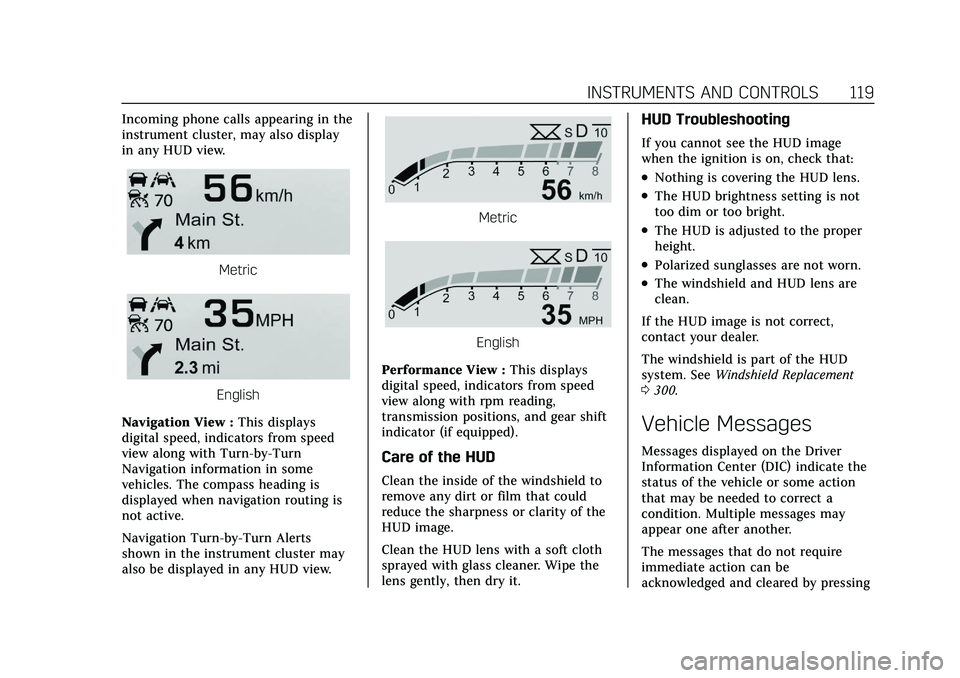
Incoming phone calls appearing in the
instrument cluster, may also display
in any HUD view.
Metric
English
Navigation View : This displays
digital speed, indicators from speed
view along with Turn-by-Turn
Navigation information in some
vehicles. The compass heading is
displayed when navigation routing is
not active.
Navigation Turn-by-Turn Alerts
shown in the instrument cluster may
also be displayed in any HUD view.
Metric
English
Performance View : This displays
digital speed, indicators from speed
view along with rpm reading,
transmission positions, and gear shift
indicator (if equipped).
Care of the HUD
Clean the inside of the windshield to
remove any dirt or film that could
reduce the sharpness or clarity of the
HUD image.
Clean the HUD lens with a soft cloth
sprayed with glass cleaner. Wipe the
lens gently, then dry it.
HUD Troubleshooting
If you cannot see the HUD image
when the ignition is on, check that:
.Nothing is covering the HUD lens.
.The HUD brightness setting is not
too dim or too bright.
.The HUD is adjusted to the proper
height.
.Polarized sunglasses are not worn.
.The windshield and HUD lens are
clean.
If the HUD image is not correct,
contact your dealer.
The windshield is part of the HUD
system. See Windshield Replacement
0 300.
Vehicle Messages
Messages displayed on the Driver
Information Center (DIC) indicate the
status of the vehicle or some action
that may be needed to correct a
condition. Multiple messages may
appear one after another.
The messages that do not require
immediate action can be
acknowledged and cleared by pressing
Page 121 of 408
Cadillac XT4 Owner Manual (GMNA-Localizing-U.S./Canada/Mexico-
14584367) - 2021 - CRC - 10/14/20
120 INSTRUMENTS AND CONTROLS
the thumbwheel. The messages that
require immediate action cannot be
cleared until that action is performed.
All messages should be taken
seriously; clearing the message does
not correct the problem.
If a SERVICE message appears, see
your dealer.
Follow the instructions given in the
messages. The system displays
messages regarding the following
topics:
.Service Messages
.Fluid Levels
.Vehicle Security
.Brakes
.Steering
.Ride Control Systems
.Driver Assistance Systems
.Cruise Control
.Lighting and Bulb Replacement
.Wiper/Washer Systems
.Doors and Windows
.Seat Belts
.Airbag Systems
.Engine and Transmission
.Tire Pressure
.Battery
Engine Power Messages
ENGINE POWER IS REDUCED
This message displays when the
vehicle's propulsion power is reduced.
A reduction in propulsion power can
affect the vehicle's ability to
accelerate. If this message is on, but
there is no observed reduction in
performance, proceed to your
destination. Under certain conditions
the performance may be reduced the
next time the vehicle is driven. The
vehicle may be driven while this
message is on, but maximum
acceleration and speed may be
reduced. Anytime this message stays
on, or displays repeatedly, the vehicle
should be taken to your dealer for
service as soon as possible.
Under certain operating conditions,
propulsion will be disabled. Try
restarting after the ignition has been
off for 30 seconds.
Vehicle Speed Messages
SPEED LIMITED TO XXX
KM/H (MPH)
This message shows that the vehicle
speed has been limited to the speed
displayed. The limited speed is a
protection for various propulsion and
vehicle systems, such as lubrication,
thermal, brakes, suspension, Teen
Driver if equipped, or tires.
Vehicle Personalization
The following are all possible vehicle
personalization features. Depending
on the vehicle, some may not be
available.
For System, Apps, and Personal
features and functions, seeSettings
0 177.
To access the vehicle
personalization menu: 1. Touch the Settings icon on the Home Page of the infotainment
display.
2. Touch Vehicle to display a list of available options.
Page 165 of 408
Cadillac XT4 Owner Manual (GMNA-Localizing-U.S./Canada/Mexico-
14584367) - 2021 - CRC - 10/14/20
164 INFOTAINMENT SYSTEM
.Route guidance might not be
available when using automatic
rerouting for the next right or
left turn.
.The route might not be changed
when using automatic rerouting.
.There is no route guidance when
turning at an intersection.
.Plural names of places might be
announced occasionally.
.It could take a long time to operate
automatic rerouting during
high-speed driving.
.Automatic rerouting might display a
route returning to the set waypoint
if heading for a destination without
passing through a set waypoint.
.The route prohibits the entry of a
vehicle due to a regulation by time
or season or any other regulation
which may be given.
.Some routes might not be searched.
.The route to the destination might
not be shown if there are new roads,
if roads have recently changed, or if
certain roads are not listed in the
map data. SeeMaps0154. To recalibrate the vehicle's position on
the map, park with the vehicle
running for two to five minutes, until
the vehicle position updates. Make
sure the vehicle is parked in a location
that is safe and has a clear view of the
sky and away from large obstructions.
If the System Needs
Service
If the navigation system needs service,
see your dealer.
Map Data Updates
The map data in the vehicle is the
most up-to-date information available
when the vehicle was produced.
See www.gmnavdisc.com for details on
ordering, purchasing, and installing a
new or replacement SD card. Features
are subject to change. For more
information on this feature, see
my.cadillac.com/learn.
Database Coverage
Explanations
Coverage areas vary with respect to
the level of map detail available for
any given area. Some areas feature
greater levels of detail than others.
If this happens, it does not mean
there is a problem with the system. As
the map data is updated, more detail
can become available for areas that
previously had limited detail. See
Map
Data Updates 0164.
Voice Recognition
If equipped, voice recognition allows
for hands-free operation within the
navigation, audio, phone, and weather
applications. This feature can be
started by pressing
gon the steering
wheel or touching
gon the
infotainment display.
However, not all features within these
areas are supported by voice
commands. Generally, only complex
tasks that require multiple manual
interactions to complete are
supported by voice commands.
Page 202 of 408
Cadillac XT4 Owner Manual (GMNA-Localizing-U.S./Canada/Mexico-
14584367) - 2021 - CRC - 10/14/20
CLIMATE CONTROLS 201
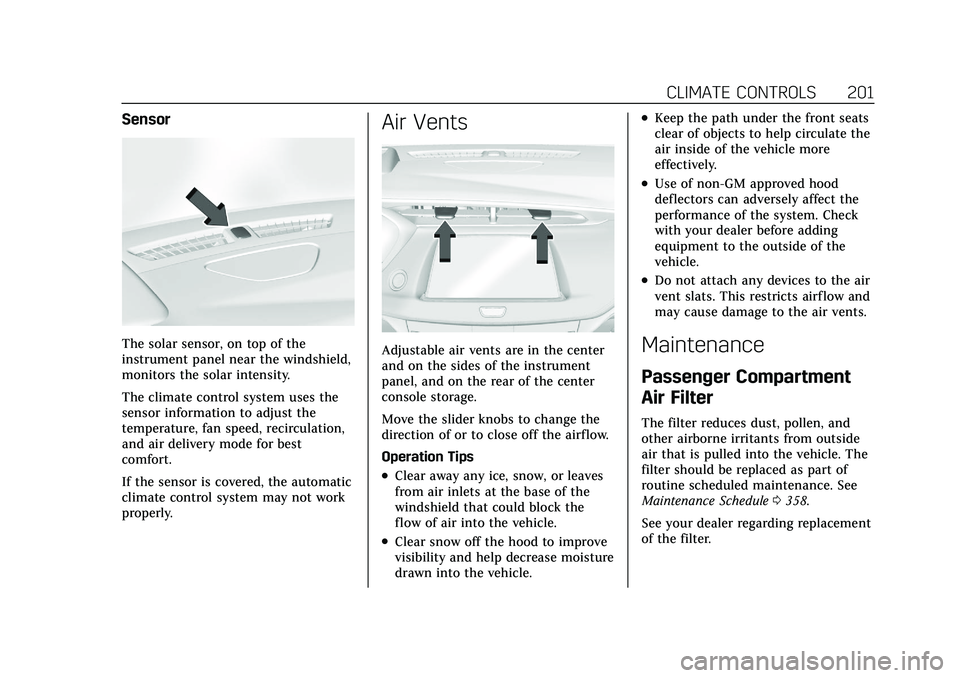
Sensor
The solar sensor, on top of the
instrument panel near the windshield,
monitors the solar intensity.
The climate control system uses the
sensor information to adjust the
temperature, fan speed, recirculation,
and air delivery mode for best
comfort.
If the sensor is covered, the automatic
climate control system may not work
properly.
Air Vents
Adjustable air vents are in the center
and on the sides of the instrument
panel, and on the rear of the center
console storage.
Move the slider knobs to change the
direction of or to close off the airf low.
Operation Tips
.Clear away any ice, snow, or leaves
from air inlets at the base of the
windshield that could block the
flow of air into the vehicle.
.Clear snow off the hood to improve
visibility and help decrease moisture
drawn into the vehicle.
.Keep the path under the front seats
clear of objects to help circulate the
air inside of the vehicle more
effectively.
.Use of non-GM approved hood
deflectors can adversely affect the
performance of the system. Check
with your dealer before adding
equipment to the outside of the
vehicle.
.Do not attach any devices to the air
vent slats. This restricts airf low and
may cause damage to the air vents.
Maintenance
Passenger Compartment
Air Filter
The filter reduces dust, pollen, and
other airborne irritants from outside
air that is pulled into the vehicle. The
filter should be replaced as part of
routine scheduled maintenance. See
Maintenance Schedule0358.
See your dealer regarding replacement
of the filter.
Page 220 of 408
Cadillac XT4 Owner Manual (GMNA-Localizing-U.S./Canada/Mexico-
14584367) - 2021 - CRC - 10/14/20
DRIVING AND OPERATING 219
Starting and Operating
New Vehicle Break-In
Caution
The vehicle does not need an
elaborate break-in. But it will
perform better in the long run if
you follow these guidelines:
.Do not drive at any one constant
speed, fast or slow, for the first
800 km (500 mi). Do not make
full-throttle starts. Avoid
downshifting to brake or slow the
vehicle.
.Avoid making hard stops for the
first 300 km (200 mi) or so.
During this time the new brake
linings are not yet broken in.
Hard stops with new linings can
mean premature wear and earlier
replacement. Follow this
breaking-in guideline every time
you get new brake linings.
Following break-in, engine speed
and load can be gradually
increased.
Ignition Positions
The vehicle has an electronic keyless
ignition with pushbutton start.
If the pushbutton start is not working,
the vehicle may be near a strong radio
antenna signal causing interference to
the Remote Keyless Entry (RKE)
system. See Remote Keyless Entry
(RKE) System Operation 07.
To shift out of P (Park), the vehicle
must be turned on and the brake
pedal must be applied. Stopping the Engine/OFF (No
Indicator Light) :
When the vehicle is
stopped, press ENGINE START/STOP
once to turn the engine off.
If the vehicle is in P (Park), the
ignition will turn off, and Retained
Accessory Power (RAP) will remain
active. See Retained Accessory Power
(RAP) 0224.
If the vehicle is in R (Reverse), D
(Drive) or M (Manual Mode), the
vehicle will shift to P (Park), the
ignition will turn off, and RAP will
remain active.
If the vehicle is in N (Neutral), the
ignition will return to ACC/
ACCESSORY and display the message
SHIFT TO PARK in the Driver
Information Center (DIC).
When the vehicle is shifted into
P (Park), the ignition will turn off.
{Warning
Turning off the vehicle while
moving may cause loss of power
assist in the brake and steering (Continued)
Page 224 of 408
Cadillac XT4 Owner Manual (GMNA-Localizing-U.S./Canada/Mexico-
14584367) - 2021 - CRC - 10/14/20
DRIVING AND OPERATING 223
To Use the Engine Heater
1. Turn off the engine.
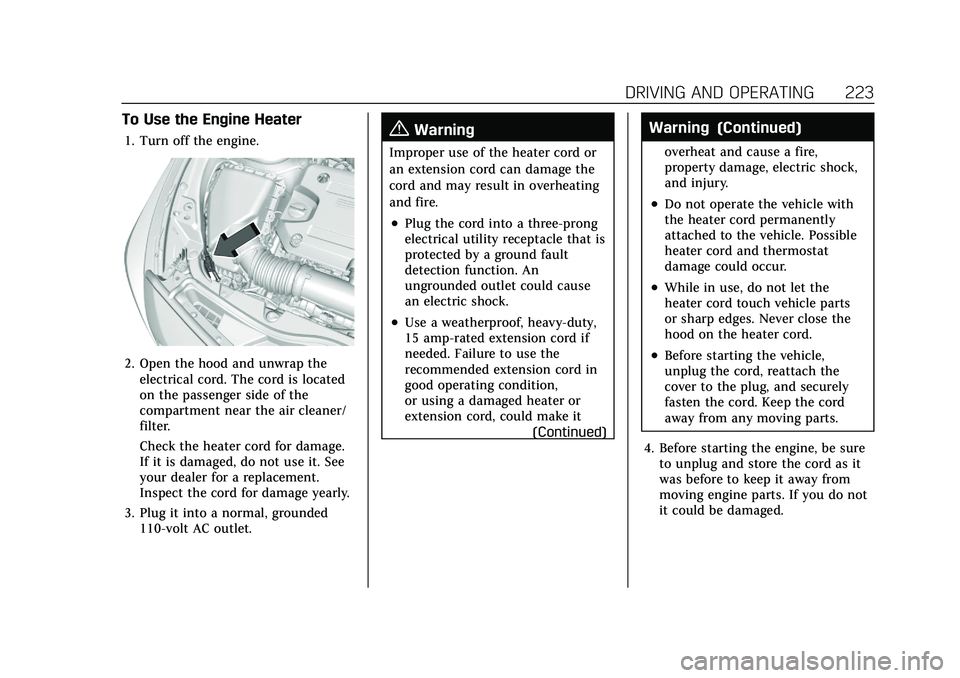
2. Open the hood and unwrap theelectrical cord. The cord is located
on the passenger side of the
compartment near the air cleaner/
filter.
Check the heater cord for damage.
If it is damaged, do not use it. See
your dealer for a replacement.
Inspect the cord for damage yearly.
3. Plug it into a normal, grounded 110-volt AC outlet.
{Warning
Improper use of the heater cord or
an extension cord can damage the
cord and may result in overheating
and fire.
.Plug the cord into a three-prong
electrical utility receptacle that is
protected by a ground fault
detection function. An
ungrounded outlet could cause
an electric shock.
.Use a weatherproof, heavy-duty,
15 amp-rated extension cord if
needed. Failure to use the
recommended extension cord in
good operating condition,
or using a damaged heater or
extension cord, could make it
(Continued)
Warning (Continued)
overheat and cause a fire,
property damage, electric shock,
and injury.
.Do not operate the vehicle with
the heater cord permanently
attached to the vehicle. Possible
heater cord and thermostat
damage could occur.
.While in use, do not let the
heater cord touch vehicle parts
or sharp edges. Never close the
hood on the heater cord.
.Before starting the vehicle,
unplug the cord, reattach the
cover to the plug, and securely
fasten the cord. Keep the cord
away from any moving parts.
4. Before starting the engine, be sure to unplug and store the cord as it
was before to keep it away from
moving engine parts. If you do not
it could be damaged.
Page 282 of 408
Cadillac XT4 Owner Manual (GMNA-Localizing-U.S./Canada/Mexico-
14584367) - 2021 - CRC - 10/14/20
VEHICLE CARE 281
Vehicle Care
General Information
General Information . . . . . . . . . . . . . 282
California Proposition65 Warning . . . . . . . . . . . . . . . . . . . . . 282
California Perchlorate Materials Requirements . . . . . . . . . . . . . . . . . . . 282
Accessories and Modifications . . . . . . . . . . . . . . . . . . . 283
Vehicle Checks
Doing Your OwnService Work . . . . . . . . . . . . . . . . . . . . 283
Hood . . . . . . . . . . . . . . . . . . . . . . . . . . . . . . 284
Engine Compartment Overview . . . . . . . . . . . . . . . . . . . . . . . . . 285
Engine Oil . . . . . . . . . . . . . . . . . . . . . . . . . 286
Engine Oil Life System . . . . . . . . . . . 288
Automatic Transmission Fluid . . . . . . . . . . . . . . . . . . . . . . . . . . . . . 289
Engine Air Filter Life System . . . . 289
Engine Air Cleaner/Filter . . . . . . . . . 290
Cooling System . . . . . . . . . . . . . . . . . . . 291
Engine Overheating . . . . . . . . . . . . . . 294
Washer Fluid . . . . . . . . . . . . . . . . . . . . . 295
Brakes . . . . . . . . . . . . . . . . . . . . . . . . . . . . . 296
Brake Fluid . . . . . . . . . . . . . . . . . . . . . . . 296
Battery - North America . . . . . . . . . 297
All-Wheel Drive . . . . . . . . . . . . . . . . . . 298 Park Brake and P (Park)
Mechanism Check . . . . . . . . . . . . . . 298
Wiper Blade Replacement . . . . . . . 299
Windshield Replacement . . . . . . . . 300
Gas Strut(s) . . . . . . . . . . . . . . . . . . . . . . . 300
Headlamp Aiming
Front Headlamp Aiming . . . . . . . . . 301
Bulb Replacement
Bulb Replacement . . . . . . . . . . . . . . . . 301
LED Lighting . . . . . . . . . . . . . . . . . . . . . 301
Back-Up Lamps . . . . . . . . . . . . . . . . . . . 302
Electrical System
Electrical System Overload . . . . . . 302
Fuses and Circuit Breakers . . . . . . 303
Engine Compartment Fuse Block . . . . . . . . . . . . . . . . . . . . . . . . . . . . 303
Instrument Panel Fuse Block . . . . 306
Wheels and Tires
Tires . . . . . . . . . . . . . . . . . . . . . . . . . . . . . . . 308
All-Season Tires . . . . . . . . . . . . . . . . . . 309
Winter Tires . . . . . . . . . . . . . . . . . . . . . . 310
Summer Tires . . . . . . . . . . . . . . . . . . . . 310
Tire Sidewall Labeling . . . . . . . . . . . 310
Tire Designations . . . . . . . . . . . . . . . . . 312
Tire Terminology and Definitions . . . . . . . . . . . . . . . . . . . . . . 313
Tire Pressure . . . . . . . . . . . . . . . . . . . . . . 316 Tire Pressure for High-Speed
Operation . . . . . . . . . . . . . . . . . . . . . . . . 317
Tire Pressure Monitor System . . . 318
Tire Pressure Monitor Operation . . . . . . . . . . . . . . . . . . . . . . . . 319
Tire Inspection . . . . . . . . . . . . . . . . . . . 322
Tire Rotation . . . . . . . . . . . . . . . . . . . . . 323
When It Is Time for New Tires . . . . . . . . . . . . . . . . . . . . . . . . . . . . . 324
Buying New Tires . . . . . . . . . . . . . . . . 325
Different Size Tires and Wheels . . . . . . . . . . . . . . . . . . . . . . . . . . 326
Uniform Tire Quality Grading . . . 326
Wheel Alignment and Tire Balance . . . . . . . . . . . . . . . . . . . . . . . . . . 328
Wheel Replacement . . . . . . . . . . . . . . 328
Tire Chains . . . . . . . . . . . . . . . . . . . . . . . 328
If a Tire Goes Flat . . . . . . . . . . . . . . . . 329
Tire Sealant and Compressor Kit . . . . . . . . . . . . . . . . . 331
Storing the Tire Sealant and Compressor Kit . . . . . . . . . . . . . . . . . 336
Tire Changing . . . . . . . . . . . . . . . . . . . . . 337
Compact Spare Tire . . . . . . . . . . . . . . 341
Jump Starting
Jump Starting - North America . . . . . . . . . . . . . . . . . . . . . . . . . 342