sport mode CADILLAC XT4 2021 Owner's Manual
[x] Cancel search | Manufacturer: CADILLAC, Model Year: 2021, Model line: XT4, Model: CADILLAC XT4 2021Pages: 408, PDF Size: 8.33 MB
Page 110 of 408

Cadillac XT4 Owner Manual (GMNA-Localizing-U.S./Canada/Mexico-
14584367) - 2021 - CRC - 10/14/20
INSTRUMENTS AND CONTROLS 109
Performance Shifting Light
If equipped, this light may display
green when Sport Mode is activated
and certain driving conditions are
met. Sport Mode detects when the
vehicle is being driven in a sporty
manner, and adjusts the shifting of
the gears accordingly. SeeDriver Mode
Control 0236.
All-Wheel-Drive Light
All-Wheel-Drive
LightFront-Wheel-Drive Light If equipped, the corresponding light
comes on when an All-Wheel Drive
(AWD) mode or Front-Wheel-Drive
mode is selected. See
Driver Mode
Control 0236.
If the light turns amber, there may be
a malfunction. See your dealer.
Lane Keep Assist (LKA)
Light
After the vehicle is started, this light
turns off and stays off if LKA has not
been turned on or is unavailable.
If equipped, this light is white if LKA
is turned on, but not ready to assist.
This light is green if LKA is turned on
and is ready to assist.
LKA may assist by gently turning the
steering wheel if the vehicle
approaches a detected lane marking.
The LKA light is amber when
assisting. This light flashes amber as a Lane
Departure Warning (LDW) alert, to
indicate that the lane marking has
been crossed.
LKA will not assist or alert if the turn
signal is active in the direction of lane
departure, or if LKA detects that you
are accelerating, braking, or actively
steering.
See
Lane Keep Assist (LKA) 0265.
Vehicle Ahead Indicator
If equipped, this indicator will display
green when a vehicle is detected
ahead and amber when you are
following a vehicle ahead much too
closely.
See Forward Collision Alert (FCA)
System 0258.
Page 112 of 408

Cadillac XT4 Owner Manual (GMNA-Localizing-U.S./Canada/Mexico-
14584367) - 2021 - CRC - 10/14/20
INSTRUMENTS AND CONTROLS 111
If the light is on and not flashing, the
TCS and potentially the StabiliTrak/
ESC system have been disabled.
A Driver Information Center (DIC)
message may display. Check the DIC
messages to determine which
feature(s) is no longer functioning and
whether the vehicle requires service.
If the light is on and flashing, the TCS
and/or the StabiliTrak/ESC system is
actively working.
SeeTraction Control/Electronic Stability
Control 0235.
Engine Coolant
Temperature Warning Light
(Uplevel)
This light comes on briefly while
starting the vehicle. If it does not, have the vehicle
serviced by your dealer. If the system
is working normally the indicator light
goes off.
Caution
The engine coolant temperature
warning light indicates that the
vehicle has overheated. Driving with
this light on can damage the engine
and it may not be covered by the
vehicle warranty. See
Engine
Overheating 0294.
The engine coolant temperature
warning light comes on when the
engine has overheated.
If this happens, pull over and turn off
the engine as soon as possible. See
Engine Overheating 0294.
Driver Mode Control Light
This light comes on when Sport Mode
is selected.
This light comes on when Snow/Ice
Mode is selected.
This light comes on when Off-Road
Mode is selected.
See Driver Mode Control 0236.
Tire Pressure Light
Page 232 of 408

Cadillac XT4 Owner Manual (GMNA-Localizing-U.S./Canada/Mexico-
14584367) - 2021 - CRC - 10/14/20
DRIVING AND OPERATING 231
Manual Mode
Tap ShiftCaution
Driving with the engine at a high
rpm without upshifting while using
Tap Shift, could damage the vehicle.
Always upshift when necessary
while using Tap Shift.
If equipped, vehicles with Tap Shift
have controls on the back of the
steering wheel to manually shift the
automatic transmission. Permanent Tap Shift Mode
To enter Permanent Tap Shift Mode:
1. With the vehicle in D (Drive), pull back on the shift lever to activate
M (Manual Mode). The M in the
shift pattern will illuminate in red,
and the D will switch to white.
2. After releasing the shift lever, it will return to the center position.
3. Pull the control toward you to shift. Pull the left control to
downshift, and the right control to
upshift. To shift to the lowest
available gear, pull and hold the
left control.
To exit Permanent Tap Shift Mode: 1. To exit M (Manual Mode) and return to D (Drive), pull back on
the shift lever. The D in the shift
pattern will illuminate in red, and
the M will switch to white.
2. After releasing the shift lever, it will return to the center position.
M (Manual Mode) can be exited to
return to D (Drive) at any speed by
pulling the lever rearward from the
center position. It is not necessary to stop the vehicle or shift to N (Neutral)
or P (Park) prior to shifting back to
D (Drive).
Temporary Tap Manual Shift Mode
To enter Temporary Tap Shift Mode:
1. With the transmission in D (Drive) and not in Permanent Tap Shift
Mode, the Tap Shift controls will
activate a temporary tap manual
shift mode, allowing the
transmission to be manually
shifted.
2. To deactivate, hold the right control briefly. Automatic shifts
return after no manual shifts have
been done for seven to 10 seconds.
While using Tap Shift, the vehicle will
have firmer, quicker shifting. This can
be used for sport driving or when
climbing or descending hills, to stay in
gear longer, or to downshift for more
power or engine braking.
The transmission will only allow
shifting into gears appropriate for the
vehicle speed and engine revolutions
per minute (rpm). If shifting is
prevented for any reason, the M or D
will flash in the instrument cluster.
Page 236 of 408

Cadillac XT4 Owner Manual (GMNA-Localizing-U.S./Canada/Mexico-
14584367) - 2021 - CRC - 10/14/20
DRIVING AND OPERATING 235
R (Reverse). The vehicle must come to
a complete stop on a grade for HSA to
activate.
Ride Control Systems
Traction Control/Electronic
Stability Control
System Operation
The vehicle has a Traction Control
System (TCS) and StabiliTrak/
Electronic Stability Control (ESC).
These systems help limit wheel spin
and assist the driver in maintaining
control, especially on slippery road
conditions.
TCS activates if it senses that any of
the drive wheels are spinning or
beginning to lose traction. On an
All-Wheel Drive (AWD) vehicle in
AWD or Sport Mode, the system will
operate if it senses that any of the
wheels are spinning or beginning to
lose traction. When this happens, TCS
applies the brakes to the spinning
wheels and reduces engine power to
limit wheel spin.StabiliTrak/ESC activates when the
system senses a discrepancy between
the intended path and the direction
the vehicle is actually traveling.
StabiliTrak/ESC selectively applies
braking pressure at any one of the
vehicle's brakes to help steer the
vehicle in the direction which you are
steering.
If cruise control is being used and
traction control or StabiliTrak/ESC
begins to limit wheel spin, cruise
control will disengage. Cruise control
may be turned back on when road
conditions allow. TCS and StabiliTrak/
ESC will automatically turn on when
cruise control is set.
Both systems come on automatically
when the vehicle is started and begins
to move. The systems may be heard or
felt while they are operating or while
performing diagnostic checks. This is
normal and does not mean there is a
problem with the vehicle.
It is recommended to leave both
systems on for normal driving
conditions, but it may be necessary to
turn TCS off if the vehicle gets stuckin sand, mud, ice, or snow. See
If the
Vehicle Is Stuck 0214 and “Turning
the Systems Off and On ”later in this
section.The indicator light for both systems is
in the instrument cluster. This
light will:
.Flash when TCS is limiting
wheel spin.
.Flash when StabiliTrak/ESC is
activated.
.Turn on and stay on when either
system is not working.
If either system fails to turn on or to
activate, a message may display in the
Driver Information Center (DIC), and
dcomes on and stays on to indicate
that the system is inactive and is not
assisting the driver in maintaining
control. The vehicle is safe to drive,
but driving should be adjusted
accordingly.
Page 238 of 408
Cadillac XT4 Owner Manual (GMNA-Localizing-U.S./Canada/Mexico-
14584367) - 2021 - CRC - 10/14/20
DRIVING AND OPERATING 237
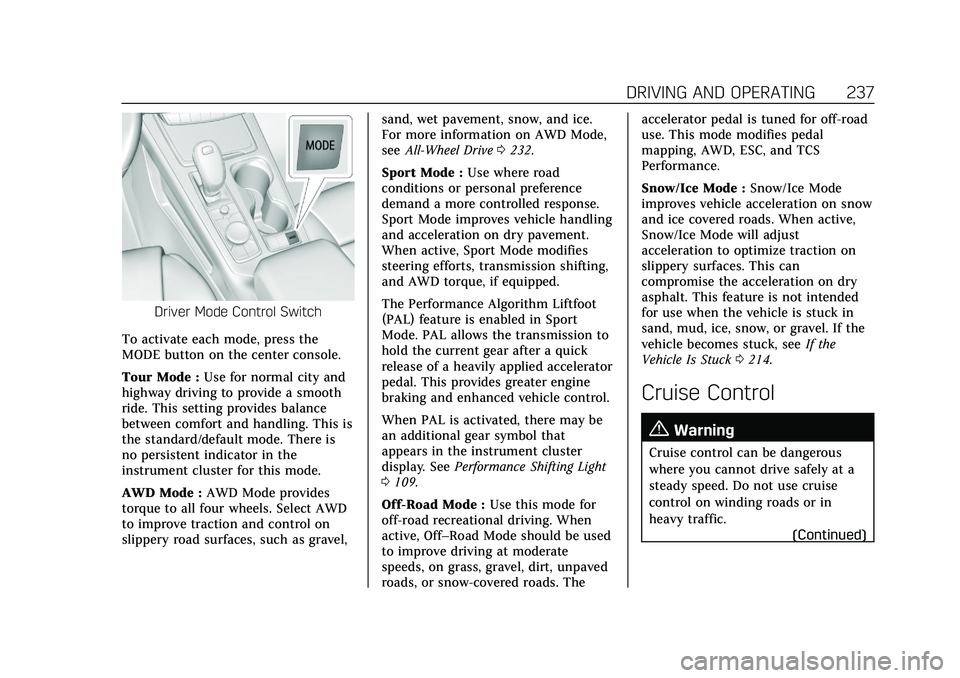
Driver Mode Control Switch
To activate each mode, press the
MODE button on the center console.
Tour Mode : Use for normal city and
highway driving to provide a smooth
ride. This setting provides balance
between comfort and handling. This is
the standard/default mode. There is
no persistent indicator in the
instrument cluster for this mode.
AWD Mode : AWD Mode provides
torque to all four wheels. Select AWD
to improve traction and control on
slippery road surfaces, such as gravel, sand, wet pavement, snow, and ice.
For more information on AWD Mode,
see
All-Wheel Drive 0232.
Sport Mode : Use where road
conditions or personal preference
demand a more controlled response.
Sport Mode improves vehicle handling
and acceleration on dry pavement.
When active, Sport Mode modifies
steering efforts, transmission shifting,
and AWD torque, if equipped.
The Performance Algorithm Liftfoot
(PAL) feature is enabled in Sport
Mode. PAL allows the transmission to
hold the current gear after a quick
release of a heavily applied accelerator
pedal. This provides greater engine
braking and enhanced vehicle control.
When PAL is activated, there may be
an additional gear symbol that
appears in the instrument cluster
display. See Performance Shifting Light
0 109.
Off-Road Mode : Use this mode for
off-road recreational driving. When
active, Off–Road Mode should be used
to improve driving at moderate
speeds, on grass, gravel, dirt, unpaved
roads, or snow-covered roads. The accelerator pedal is tuned for off-road
use. This mode modifies pedal
mapping, AWD, ESC, and TCS
Performance.
Snow/Ice Mode :
Snow/Ice Mode
improves vehicle acceleration on snow
and ice covered roads. When active,
Snow/Ice Mode will adjust
acceleration to optimize traction on
slippery surfaces. This can
compromise the acceleration on dry
asphalt. This feature is not intended
for use when the vehicle is stuck in
sand, mud, ice, snow, or gravel. If the
vehicle becomes stuck, see If the
Vehicle Is Stuck 0214.
Cruise Control
{
Warning
Cruise control can be dangerous
where you cannot drive safely at a
steady speed. Do not use cruise
control on winding roads or in
heavy traffic. (Continued)
Page 315 of 408
Cadillac XT4 Owner Manual (GMNA-Localizing-U.S./Canada/Mexico-
14584367) - 2021 - CRC - 10/14/20
314 VEHICLE CARE
maximum capacity of fuel, oil, and
coolant, but without passengers
and cargo.
DOT Markings
:A code molded
into the sidewall of a tire
signifying that the tire is in
compliance with the U.S.
Department of Transportation
(DOT) Motor Vehicle Safety
Standards. The DOT code includes
the Tire Identification Number
(TIN), an alphanumeric designator
which can also identify the tire
manufacturer, production plant,
brand, and date of production.
GVWR
:Gross Vehicle Weight
Rating. See Vehicle Load Limits
0 215.
GAWR FRT
:Gross Axle Weight
Rating for the front axle. See
Vehicle Load Limits 0215.
GAWR RR
:Gross Axle Weight
Rating for the rear axle. See
Vehicle Load Limits 0215. Intended Outboard Sidewall
:
The side of an asymmetrical tire
that must always face outward
when mounted on a vehicle.
Kilopascal (kPa)
:The metric unit
for air pressure.
Light Truck (LT-Metric) Tire
:A
tire used on light duty trucks and
some multipurpose passenger
vehicles.
Load Index
:An assigned number
ranging from 1 to 279 that
corresponds to the load carrying
capacity of a tire.
Maximum Inf lation Pressure
:
The maximum air pressure to
which a cold tire can be inflated.
The maximum air pressure is
molded onto the sidewall.
Maximum Load Rating
:The load
rating for a tire at the maximum
permissible inflation pressure for
that tire. Maximum Loaded Vehicle
Weight
:The sum of curb weight,
accessory weight, vehicle capacity
weight, and production options
weight.
Normal Occupant Weight
:The
number of occupants a vehicle is
designed to seat multiplied by
68 kg (150 lb). See Vehicle Load
Limits 0215.
Occupant Distribution
:
Designated seating positions.
Outward Facing Sidewall
:The
side of an asymmetrical tire that
has a particular side that faces
outward when mounted on a
vehicle. The side of the tire that
contains a whitewall, bears white
lettering, or bears manufacturer,
brand, and/or model name
molding that is higher or deeper
than the same moldings on the
other sidewall of the tire.