transmission CADILLAC XT4 2023 User Guide
[x] Cancel search | Manufacturer: CADILLAC, Model Year: 2023, Model line: XT4, Model: CADILLAC XT4 2023Pages: 476, PDF Size: 5.37 MB
Page 146 of 476
Cadillac XT4 Owner Manual (GMNA-Localizing-U.S./Canada/Mexico-
16412876) - 2023 - CRC - 3/25/22
Instruments and Controls 145
door opener receiver. Clear all
people and objects near the
garage door.
Make sure the hand-held
transmitter has a new battery
for quick and accurate
transmission of the
radio-frequency signal.
Programming the
Universal Remote System
Programming involves
time-sensitive actions and may
time out, requiring the
procedure to be repeated.
Read these instructions
completely before
programming the Universal
Remote system. It may help to
have another person assist
with the programming
process.1. Hold the end of the hand-held transmitter
about 3 to 8 cm (1 to 3 in)
away from the Universal
Remote system buttons
with the indicator light in
view. The hand-held transmitter was supplied
by the manufacturer of the
garage door opener
receiver.
2. Press and release one of the three Universal
Remote system buttons to
be programmed. Press and
hold the hand-held
transmitter button. Do not
release the hand-held
transmitter button until
the indicator light changes
from a slow to a rapid flash
or continuous light. Then
release the hand-held
transmitter button.
Some garage door
openers may require
substitution of Step 2 with
the procedure under
“Radio Signals for Some
Gate Operators” later in
this section.
3. Press and hold the newly programmed Universal
Remote system button for
five seconds while watching the indicator light
and garage door
activation.
.If the indicator light
stays on continuously or
the garage door moves
when the button is
pressed, then
programming is
complete. There is no
need to complete
Steps 4–6.
.If the indicator light does
not come on or the
garage door does not
move, a second button
press may be required.
For a second time, press
and hold the newly
programmed button for
five seconds. If the
indicator light stays on
continuously or the
garage door moves
when the button is
pressed, then
programming is
complete. There is no
need to complete
Steps 4–6.
Page 147 of 476
Cadillac XT4 Owner Manual (GMNA-Localizing-U.S./Canada/Mexico-
16412876) - 2023 - CRC - 3/25/22
146 Instruments and Controls
.If the garage door does
not move, continue with
programming Steps 4–6.
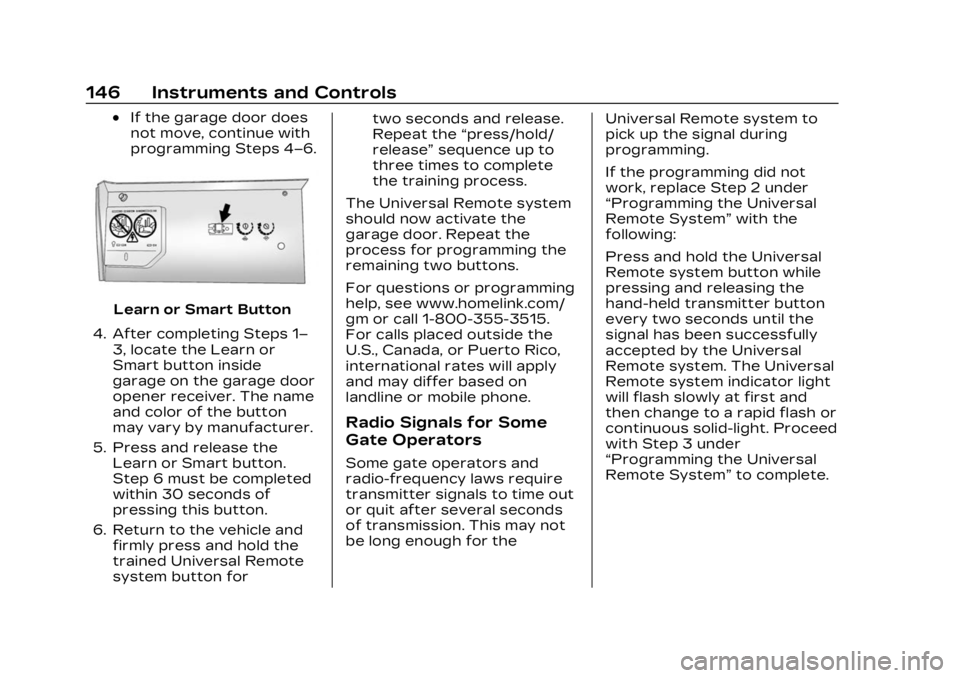
Learn or Smart Button
4. After completing Steps 1– 3, locate the Learn or
Smart button inside
garage on the garage door
opener receiver. The name
and color of the button
may vary by manufacturer.
5. Press and release the Learn or Smart button.
Step 6 must be completed
within 30 seconds of
pressing this button.
6. Return to the vehicle and firmly press and hold the
trained Universal Remote
system button for two seconds and release.
Repeat the
“press/hold/
release” sequence up to
three times to complete
the training process.
The Universal Remote system
should now activate the
garage door. Repeat the
process for programming the
remaining two buttons.
For questions or programming
help, see www.homelink.com/
gm or call 1-800-355-3515.
For calls placed outside the
U.S., Canada, or Puerto Rico,
international rates will apply
and may differ based on
landline or mobile phone.
Radio Signals for Some
Gate Operators
Some gate operators and
radio-frequency laws require
transmitter signals to time out
or quit after several seconds
of transmission. This may not
be long enough for the Universal Remote system to
pick up the signal during
programming.
If the programming did not
work, replace Step 2 under
“Programming the Universal
Remote System”
with the
following:
Press and hold the Universal
Remote system button while
pressing and releasing the
hand-held transmitter button
every two seconds until the
signal has been successfully
accepted by the Universal
Remote system. The Universal
Remote system indicator light
will flash slowly at first and
then change to a rapid flash or
continuous solid-light. Proceed
with Step 3 under
“Programming the Universal
Remote System” to complete.
Page 152 of 476

Cadillac XT4 Owner Manual (GMNA-Localizing-U.S./Canada/Mexico-
16412876) - 2023 - CRC - 3/25/22
Lighting 151
.The exterior lamp control is
in AUTO.
.The light sensor determines
it is daytime.
.The parking brake is
released or the vehicle is not
in P (Park).
When the DRL are on, the
taillamps, sidemarker lamps,
and other lamps will not be on.
The DRL turn off when the
headlamps are turned to
Oor
the ignition is off. For vehicles
first sold in Canada, the DRL
can only be turned off when
the vehicle is parked.
Automatic Headlamp
System
When the exterior lamp
control is set to AUTO and it is
dark enough outside, the
headlamps come on
automatically.
There is a light sensor on top
of the instrument panel. Do
not cover the sensor.
The system may also turn on
the headlamps when driving
through a parking garage or
tunnel.
If the vehicle is started in a
dark garage, the automatic
headlamp system comes on
immediately. If it is light
outside when the vehicle
leaves the garage, there is a
slight delay before the
automatic headlamp system
changes to the Daytime
Running Lamps (DRL). During that delay, the instrument
cluster may not be as bright as
usual. Make sure the
instrument panel brightness
control is in the full bright
position. See Instrument Panel
Illumination Control
0153.
When it is bright enough
outside, the headlamps will
turn off or may change
to DRL.
The automatic headlamp
system turns off when the
exterior lamp control is turned
to
Oor the ignition is off.
For vehicles sold in Canada,
this control only works when
the transmission is in P (Park).
Lights On with Wipers
If the windshield wipers are
activated in daylight with the
engine on, and the exterior
lamp control is in AUTO, the
headlamps, parking lamps, and
other exterior lamps come on.
The transition time for the
lamps coming on varies based
on wiper speed. When the
Page 209 of 476
Cadillac XT4 Owner Manual (GMNA-Localizing-U.S./Canada/Mexico-
16412876) - 2023 - CRC - 3/25/22
208 Infotainment System
To access:1. Touch Settings on the Home Page, then touch
Vehicle, and then Teen
Driver.
2. Create a Personal Identification Number (PIN)
by choosing a four-digit
PIN. Re-enter the PIN to
confirm. To change the
PIN, touch Change PIN.
The PIN is required to:
.Set up/Add or remove keys.
.Change Teen Driver
settings.
.Change or clear the Teen
Driver PIN.
.Access or delete Report
Card data.
Set up/Add keys to activate
Teen Driver and assign
restrictions to the key:
Any vehicle key can be
registered, up to a maximum
of eight keys. Label the key to
tell it apart from the
other keys. For a pushbutton start
system:
1. Start the vehicle.
2. For automatic transmissions, the vehicle
must be in P (Park). For
manual transmissions, the
vehicle must be stopped
with the parking brake set.
3. From the Settings menu, touch Vehicle and then
Teen Driver.
4. Enter the PIN.
5. Place the remote key you wish to register in the
transmitter pocket. The
key does not need to be
the one that started the
vehicle. See Remote Key
Operation 09 for
transmitter pocket
location. 6. From the Teen Driver
menu, touch Setup Keys or
Add/Remove Teen
Driver Keys.
.If the remote key has
not previously been
registered, the option to
add the key displays.
Touch Add and a
confirmation message
displays. Teen Driver
restrictions will be
applied whenever this
remote key is used to
operate the vehicle.
.If the remote key has
already been registered,
the option to remove
the key displays.
If Remove is touched,
the remote key is no
longer registered.
A confirmation message
displays, and Teen
Driver restrictions will
not be applied if this
remote key is used to
operate the vehicle.
Page 210 of 476
Cadillac XT4 Owner Manual (GMNA-Localizing-U.S./Canada/Mexico-
16412876) - 2023 - CRC - 3/25/22
Infotainment System 209
In vehicles with a pushbutton
start system, if a Teen Driver
and a non-Teen Driver key are
both present at start up, the
vehicle will recognize the
non-Teen Driver key to start
the vehicle. The Teen Driver
settings will not be active.
For a keyed ignition system:1. Start the vehicle.
2. For automatic transmissions, the vehicle
must be in P (Park). For
manual transmissions, the
vehicle must be stopped
with the parking brake set.
3. From the Settings menu, touch Vehicle and then
Teen Driver.
4. Enter the PIN.
5. Touch Setup Keys or Add/ Remove Teen Driver Keys.
The system displays
instructions for registering
or unregistering a key.
A confirmation message
displays. Manage Settings or Teen
Driver Settings
Depending on the options of
your vehicle, the following
menu items may be displayed:
Buckle to Drive :
When turned
ON, Buckle to Drive prevents
the driver from shifting out of
P (Park) for a period of time
after the brake pedal is
pressed if the driver, or on
some vehicles the detected
passenger, has not buckled
their seat belt. On some
vehicles, Buckle to Drive is
always ON when Teen Driver
is active and is not
configurable.
Audio Volume Limit : Allows a
maximum audio volume to be
set. Turn the audio volume
limit on or off. Use the arrows
to choose the maximum
allowable level for the audio
volume. On some infotainment
systems, touch Set Audio
Volume Limit to choose the
maximum allowable audio
volume level. Set Audio Volume Limit :
Use
the arrows to choose the
maximum allowable level for
the audio volume.
Teen Driver Speed Limiter :
Limits the maximum speed of
the vehicle. When the speed
limiter is turned on and the
vehicle is started with a Teen
Driver key, the DIC displays a
message that the top speed is
limited.
On certain vehicles, when the
Speed Limiter is turned ON,
the vehicle’s maximum
acceleration will be limited.
The DIC will display a message
that the acceleration is limited.
Teen Driver Speed Warning :
Displays a warning in the DIC
when exceeding a selectable
speed. Turn the speed
warning on or off and choose
the desired speed warning
level. The speed warning does
not limit the speed of the
vehicle. On some infotainment
Page 228 of 476

Cadillac XT4 Owner Manual (GMNA-Localizing-U.S./Canada/Mexico-
16412876) - 2023 - CRC - 3/25/22
Driving and Operating 227
Driving and
Operating
Driving Information
Driver Behavior . . . . . . . . . . . . 228
Driving Environment . . . . . . 229
Vehicle Design . . . . . . . . . . . . . . 229
Driving for Better FuelEconomy . . . . . . . . . . . . . . . . . . . 229
Distracted Driving . . . . . . . . . 229
Defensive Driving . . . . . . . . . 230
Impaired Driving . . . . . . . . . . . 230
Control of a Vehicle . . . . . . . 231
Braking . . . . . . . . . . . . . . . . . . . . . . . . 231
Steering . . . . . . . . . . . . . . . . . . . . . . 231
Off-Road Recovery . . . . . . . 232
Loss of Control . . . . . . . . . . . . 233
Off-Road Driving . . . . . . . . . . . 233
Driving on Wet Roads . . . . 238
Hill and Mountain Roads . . . . . . . . . . . . . . . . . . . . . . . 239
Winter Driving . . . . . . . . . . . . . . 239
If the Vehicle Is Stuck . . . . . 241
Vehicle Load Limits . . . . . . . 242
Starting and Operating
New Vehicle Break-In . . . . 246
Ignition Positions . . . . . . . . . . 247
Starting the Engine . . . . . . . 248 Stop/Start System . . . . . . . . 249
Winter Cover . . . . . . . . . . . . . . . . 251
Engine Heater . . . . . . . . . . . . . . 252
Retained Accessory
Power (RAP) . . . . . . . . . . . . . . . 253
Shifting Into Park . . . . . . . . . . 254
Shifting out of Park . . . . . . . 254
Parking over Things That Burn . . . . . . . . . . . . . . . . . . 255
Active Fuel Management . . . . . . . . . . . . . . 255
Extended Parking . . . . . . . . . 255
Engine Exhaust
Engine Exhaust . . . . . . . . . . . . 256
Running the Vehicle While Parked . . . . . . . . . . . . . . 256
Automatic Transmission
Automatic
Transmission . . . . . . . . . . . . . . 257
Manual Mode . . . . . . . . . . . . . . . 262
Drive Systems
All-Wheel Drive . . . . . . . . . . . . . 263
Brakes
Electric Brake Boost . . . . . 264
Antilock Brake System (ABS) . . . . . . . . . . . . . 264
Electric Parking Brake . . . 264
Brake Assist . . . . . . . . . . . . . . . . 266 Hill Start Assist (HSA) . . . . 266
Ride Control Systems
Traction Control/
Electronic Stability
Control . . . . . . . . . . . . . . . . . . . . . . 267
Driver Mode Control . . . . . . 269
Cruise Control
Cruise Control . . . . . . . . . . . . . . 270
Adaptive Cruise Control (Advanced) . . . . . . . . . . . . . . . . . 273
Driver Assistance
Systems
Driver AssistanceSystems . . . . . . . . . . . . . . . . . . . . 284
Assistance Systems for Parking or Backing . . . . . . 286
Rear Vision Camera (RVC) . . . . . . . . . . . . . 286
Surround Vision System . . . . . . . . . . . . . . . . . . . . . . 287
Park Assist . . . . . . . . . . . . . . . . . . 289
Automatic Parking Assist (APA) . . . . . . . . . . . . . . . . 291
Reverse Automatic Braking (RAB) . . . . . . . . . . . . . 294
Rear Pedestrian Alert . . . . 296
Rear Cross Traffic Alert (RCTA) System . . . . . . . . . . . 297
Page 236 of 476

Cadillac XT4 Owner Manual (GMNA-Localizing-U.S./Canada/Mexico-
16412876) - 2023 - CRC - 3/25/22
Driving and Operating 235
.Do not damage shrubs,
flowers, trees, or grasses or
disturb wildlife.
.Do not park over things that
burn. See Parking over
Things That Burn0255.
Driving on Hills
Driving safely on hills requires
good judgment and an
understanding of what the
vehicle can and cannot do.
{Warning
Many hills are simply too
steep for any vehicle. Driving
up hills can cause the vehicle
to stall. Driving down hills
can cause loss of control.
Driving across hills can
cause a rollover. You could
be injured or killed. Do not
drive on steep hills.
Before driving on a hill, assess
the steepness, traction, and
obstructions. If the terrain ahead cannot be seen, get out
of the vehicle and walk the hill
before driving further.
When driving on hills:
.Use a low gear and keep a
firm grip on the steering
wheel.
.Maintain a slow speed.
.When possible, drive straight
up or down the hill.
.Slow down when
approaching the top of
the hill.
{Warning
Driving to the top of a hill at
high speed can cause a
crash. There could be a
drop-off, embankment, cliff,
or even another vehicle. You
could be seriously injured or
killed. As you near the top of
a hill, slow down and stay
alert.
.Use headlamps even during
the day to make the vehicle
more visible.
.Never go downhill forward
or backward with the
transmission in N (Neutral).
The brakes could overheat
and you could lose control.
.When driving down a hill,
keep the vehicle headed
straight down. Use a low
gear because the engine will
work with the brakes to slow
the vehicle and help keep
the vehicle under control.
{Warning
Heavy braking when going
down a hill can cause your
brakes to overheat and fade.
This could cause loss of
control and you or others
could be injured or killed.
Apply the brakes lightly
when descending a hill and
use a low gear to keep
vehicle speed under control.
.Avoid turns that take the
vehicle across the incline of
the hill. Driving across an
incline puts more weight on
Page 240 of 476

Cadillac XT4 Owner Manual (GMNA-Localizing-U.S./Canada/Mexico-
16412876) - 2023 - CRC - 3/25/22
Driving and Operating 239
.Turn off cruise control.
.Activate All-Wheel Drive
(AWD) mode. See Driver
Mode Control0269.
Hill and Mountain
Roads
Driving on steep hills or
through mountains is different
than driving on flat or rolling
terrain. Tips include:
.Keep the vehicle serviced
and in good shape.
.Check all fluid levels and
brakes, tires, cooling system,
and transmission.
.Shift to a lower gear when
going down steep or long
hills.
{Warning
Using the brakes to slow the
vehicle on a long downhill
slope can cause brake
overheating, can reduce
brake performance, and
could result in a loss of
(Continued)
Warning (Continued)
braking. Shift the
transmission to a lower gear
to let the engine assist the
brakes on a steep downhill
slope.
{Warning
Coasting downhill in
N (Neutral) or with the
ignition off is dangerous.
This can cause overheating
of the brakes and loss of
steering assist. Always have
the engine running and the
vehicle in gear.
.Drive at speeds that keep
the vehicle in its own lane.
Do not swing wide or cross
the center line.
.Be alert on top of hills;
something could be in your
lane (e.g., stalled car, crash).
.Pay attention to special road
signs (e.g., falling rocks area,
winding roads, long grades,
passing or no-passing zones)
and take appropriate action.
.Select All-Wheel Drive (AWD)
Mode. See Driver Mode
Control0269 and
All-Wheel Drive 0263.
Winter Driving
Driving on Snow or Ice
Caution
To avoid damage to the
wheels and brake
components, always clear
snow and ice from inside the
wheels and underneath the
vehicle before driving.
Snow or ice between the tires
and the road creates less
traction or grip, so drive
carefully. Wet ice can occur at
about 0 °C (32 °F) when
freezing rain begins to fall.
Page 241 of 476

Cadillac XT4 Owner Manual (GMNA-Localizing-U.S./Canada/Mexico-
16412876) - 2023 - CRC - 3/25/22
240 Driving and Operating
Avoid driving on wet ice or in
freezing rain until roads can be
treated.
For Slippery Road Driving:
.Accelerate gently.
Accelerating too quickly
causes the wheels to spin
and makes the surface under
the tires slick.
.Turn on Traction Control.
See Traction Control/
Electronic Stability Control
0267.
.The Antilock Brake System
(ABS) improves vehicle
stability during hard stops,
but the brakes should be
applied sooner than when on
dry pavement. See Antilock
Brake System (ABS) 0264.
.Allow greater following
distance and watch for
slippery spots. Icy patches
can occur on otherwise clear
roads in shaded areas. The
surface of a curve or an
overpass can remain icy
when the surrounding roads are clear. Avoid sudden
steering maneuvers and
braking while on ice.
.Turn off cruise control.
.Select All-Wheel Drive (AWD)
Mode for vehicles equipped
with AWD. Select Snow/Ice
Mode for FWD only vehicles.
See Driver Mode Control
0
269 and
All-Wheel Drive 0263.
Cold Weather Mode
In very low temperatures, a
cold weather message may
display on the Driver
Information Center (DIC). The
engine speed, transmission
shift patterns, and cabin fan
speed may operate differently
to enable the vehicle to warm
up quicker. You can manually
override the cabin fan speed in
cold weather mode.
Blizzard Conditions
Stop the vehicle in a safe
place and signal for help. Stay
with the vehicle unless there is
help nearby. If possible, use Roadside Assistance. See
Roadside Assistance Program
0
439. To get help and keep
everyone in the vehicle safe:
.Turn on the hazard warning
flashers.
.Tie a red cloth to an outside
mirror.
{Warning
Snow can trap engine
exhaust under the vehicle.
This may cause exhaust
gases to get inside. Engine
exhaust contains carbon
monoxide (CO), which cannot
be seen or smelled. It can
cause unconsciousness and
even death.
If the vehicle is stuck
in snow:
.Clear snow from the base
of the vehicle, especially
any blocking the
exhaust pipe.
(Continued)
Page 242 of 476

Cadillac XT4 Owner Manual (GMNA-Localizing-U.S./Canada/Mexico-
16412876) - 2023 - CRC - 3/25/22
Driving and Operating 241
Warning (Continued)
.Open a window about
5 cm (2 in) on the vehicle
side that is away from the
wind, to bring in fresh air.
.Fully open the air outlets
on or under the
instrument panel.
.Adjust the climate control
system to circulate the air
inside the vehicle and set
the fan speed to the
highest setting. See
“Climate Control Systems.”
For more information about
CO, see Engine Exhaust
0 256.
To save fuel, run the engine
for short periods to warm the
vehicle and then shut the
engine off and partially close
the window. Moving about to
keep warm also helps.
If it takes time for help to
arrive, when running the
engine, push the accelerator
pedal slightly so the engine runs faster than the idle
speed. This keeps the battery
charged to restart the vehicle
and to signal for help with the
headlamps. Do this as little as
possible, to save fuel.
If the Vehicle Is Stuck
Slowly and cautiously spin the
wheels to free the vehicle
when stuck in sand, mud, ice,
or snow.
If stuck too severely for the
traction system to free the
vehicle, turn the traction
system off and use the rocking
method. See Traction Control/
Electronic Stability Control
0
267.
{Warning
If the vehicle's tires spin at
high speed, they can
explode, and you or others
could be injured. The vehicle
can overheat, causing an
engine compartment fire or
other damage. Spin the
(Continued)
Warning (Continued)
wheels as little as possible
and avoid going above
56 km/h (35 mph).
For All-Wheel Drive (AWD),
select Off-Road or AWD mode.
See Driver Mode Control
0 269 and
All-Wheel Drive 0263.
Rocking the Vehicle to Get
it Out
Turn the steering wheel left
and right to clear the area
around the front wheels. Turn
off any traction system. Shift
back and forth between
R (Reverse) and a low forward
gear, spinning the wheels as
little as possible. To prevent
transmission wear, wait until
the wheels stop spinning
before shifting gears. Release
the accelerator pedal while
shifting, and press lightly on
the accelerator pedal when
the transmission is in gear.
Slowly spinning the wheels in