brakes CADILLAC XT4 2024 User Guide
[x] Cancel search | Manufacturer: CADILLAC, Model Year: 2024, Model line: XT4, Model: CADILLAC XT4 2024Pages: 373, PDF Size: 8.01 MB
Page 175 of 373

Cadillac XT4 Owner Manual (GMNA-Localizing-U.S./Canada/Mexico-
17180837) - 2024 - CRC - 2/28/23
174 Driving and Operating
Normal driving charges the vehicle’s battery
to achieve the best operation of the vehicle,
including fuel economy and the Stop/Start
System. SeeStop/Start System 0176.
Ignition Positions
The vehicle has an electronic keyless ignition
with pushbutton start.
If the pushbutton start is not working, the
vehicle may be near a strong radio antenna
signal causing interference to the Keyless
Access system. See Remote Key Operation
0 8.
To shift out of P (Park), the vehicle must be
turned on and the brake pedal must be
applied. Stopping the Engine/OFF (No Indicator
Light) :
When the vehicle is stopped, press
ENGINE START/STOP once to turn the
engine off.
If the vehicle is in P (Park), the ignition will
turn off, and Retained Accessory Power (RAP)
will remain active. See Retained Accessory
Power (RAP) 0179.
If the vehicle is in R (Reverse), D (Drive) or
M (Manual Mode), the vehicle will shift to
P (Park), the ignition will turn off, and RAP
will remain active.
If the vehicle is in N (Neutral), the ignition
will return to accessory mode and display
the message SHIFT TO PARK in the Driver
Information Center (DIC).
When the vehicle is shifted into P (Park), the
ignition will turn off.
{Warning
Turning off the vehicle while moving may
cause loss of power assist in the brake
and steering systems and disable the
airbags. While driving, only shut the
vehicle off in an emergency. If the vehicle must be shut off in an
emergency:
1. Brake using a firm and steady pressure. Do not pump the brakes repeatedly. This
may deplete power assist, requiring
increased brake pedal force.
2. Shift the vehicle to N (Neutral). This can be done while the vehicle is moving.
After shifting to N (Neutral), firmly apply
the brakes and steer the vehicle to a
safe location.
3. Come to a complete stop and shift to P (Park).
4. Set the parking brake. See Electric
Parking Brake 0187. Press ENGINE
START/STOP to turn the vehicle off.
If the vehicle cannot be pulled over and
must be shut off while driving, press and
hold ENGINE START/STOP for longer than
two seconds, or press twice in five seconds.
Accessory Mode (Amber Indicator Light) :
This mode allows you to use some electrical
accessories when the engine is off.
With the ignition off, pressing ENGINE
START/STOP once without the brake pedal
applied will place the ignition system in
accessory mode.
Page 177 of 373

Cadillac XT4 Owner Manual (GMNA-Localizing-U.S./Canada/Mexico-
17180837) - 2024 - CRC - 2/28/23
176 Driving and Operating
immediately after starting it. Operate
the engine and transmission gently until
the oil warms up and lubricates all
moving parts.
Stop/Start System
The Stop/Start system shuts off the engine
to help conserve fuel. The system is
designed to manage the increased number
of starts.
{Warning
The automatic engine Stop/Start feature
causes the engine to shut off while the
vehicle is still on. Do not exit the vehicle
before shifting to P (Park). The vehicle
may restart and move unexpectedly.
Always shift to P (Park), and then turn
the ignition off before exiting the vehicle.
Auto Engine Stop/Start
When the brakes are applied and the vehicle
is at a complete stop, the engine may turn
off. When stopped, the tachometer displays
AUTO STOP. See Tachometer096. When
the brake pedal is released or the
accelerator pedal is pressed, the engine will
restart. To maintain vehicle performance, other
conditions may cause the engine to
automatically restart before the brake pedal
is released.
Auto Stops may not occur and/or Auto
Starts may occur because:
.The climate control settings require the
engine to be running to cool or heat the
vehicle interior.
.The vehicle battery needs to charge.
.The vehicle battery has recently been
disconnected.
.Minimum vehicle speed has not been
reached since the last Auto Stop.
.The accelerator pedal is pressed.
.The engine or transmission is not at the
required operating temperature.
.The outside temperature is not in the
required operating range.
.The vehicle transmission is shifted out of
D (Drive) to any gear other than P (Park).
.Certain driver modes have been selected.
See
Driver Mode Control 0190.
.The vehicle is on a steep hill or grade.
.The driver door has been opened or the
driver seat belt has been unbuckled.
.The hood has been opened.
.The Auto Stop has reached the maximum
allowed time.
Auto Stop Disable Switch
The automatic engine Stop/Start feature can
be disabled and enabled by pressing
h.
Auto Stop/Start is enabled each time you
start the vehicle.
When the
hindicator is illuminated, the
system is enabled.
Page 186 of 373

Cadillac XT4 Owner Manual (GMNA-Localizing-U.S./Canada/Mexico-
17180837) - 2024 - CRC - 2/28/23
Driving and Operating 185
Caution (Continued)
transmission fluid. This message clears
when the transmission fluid has cooled
sufficiently.
D : This position is for normal driving.
If more power is needed for passing, press
the accelerator pedal down.
To shift into D (Drive):
1. Bring the vehicle to a complete stop.
2. From the center position, move the shift lever back.
.If the vehicle is in P (Park), press the
shift lock release button while pulling
the shift lever back.
.D will illuminate in red.
.After releasing the shift lever, it will
return to the center position.
To shift out of D (Drive): 1. Bring the vehicle to a complete stop.
2. Shift to the desired gear.
3. After releasing the shift lever, it will return to the center position.
Downshifting the transmission in slippery
road conditions could result in skidding. See
“Skidding” underLoss of Control 0166.
Caution
Spinning the tires or holding the vehicle
in one place on a hill using only the
accelerator pedal may damage the
transmission. The repair will not be
covered by the vehicle warranty. If the
vehicle is stuck, do not spin the tires.
When stopping on a hill, use the brakes
to hold the vehicle in place.
Engine speeds may be increased while
driving at highway speeds while the engine
is still warming up.
Manual Mode
Tap Shift Caution
Driving with the engine at a high rpm
without upshifting while using Tap Shift,
could damage the vehicle. Always upshift
when necessary while using Tap Shift.
If equipped, vehicles with Tap Shift have
controls on the back of the steering wheel
to manually shift the automatic
transmission.
Permanent Tap Shift Mode
To enter Permanent Tap Shift Mode:1. With the vehicle in D (Drive), pull back on the shift lever to activate M (Manual
Mode). The M in the shift pattern will
illuminate in red, and the D will switch
to white.
2. After releasing the shift lever, it will return to the center position.
Page 188 of 373
Cadillac XT4 Owner Manual (GMNA-Localizing-U.S./Canada/Mexico-
17180837) - 2024 - CRC - 2/28/23
Driving and Operating 187
Brakes
Electric Brake Boost
Vehicles equipped with electric brake boost
have hydraulic brake circuits that are
electronically controlled when the brake
pedal is applied during normal operation.
The system performs routine tests and turns
off within a few minutes after the vehicle is
turned off. Noise may be heard during this
time. If the brake pedal is pressed during
the tests or when the electric brake boost
system is off, a noticeable change in pedal
force and travel may be felt. This is normal.
Antilock Brake System (ABS)
The Antilock Brake System (ABS) helps
prevent a braking skid and maintain steering
while braking hard.
If there is a problem with ABS, this warning
light stays on. SeeAntilock Brake System
(ABS) Warning Light 0105. ABS does not change the time needed to
get a foot on the brake pedal and does not
always decrease stopping distance. If you
get too close to the vehicle ahead, there will
not be enough time to apply the brakes if
that vehicle suddenly slows or stops. Always
leave enough room ahead to stop, even
with ABS.
Using ABS
Do not pump the brakes. Just hold the brake
pedal down firmly. Hearing and feeling ABS
operate is normal.
Braking in Emergencies
ABS allows steering and braking at the same
time. In many emergencies, steering can
help even more than braking.
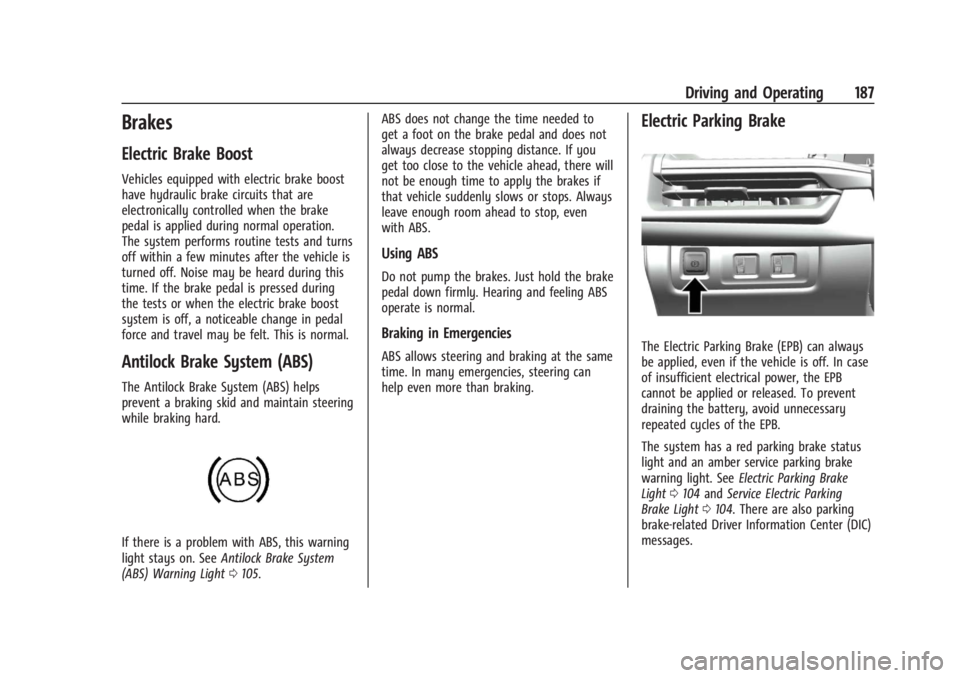
Electric Parking Brake
The Electric Parking Brake (EPB) can always
be applied, even if the vehicle is off. In case
of insufficient electrical power, the EPB
cannot be applied or released. To prevent
draining the battery, avoid unnecessary
repeated cycles of the EPB.
The system has a red parking brake status
light and an amber service parking brake
warning light. See
Electric Parking Brake
Light 0104 and Service Electric Parking
Brake Light 0104. There are also parking
brake-related Driver Information Center (DIC)
messages.
Page 190 of 373

Cadillac XT4 Owner Manual (GMNA-Localizing-U.S./Canada/Mexico-
17180837) - 2024 - CRC - 2/28/23
Driving and Operating 189
apply the brake pedal as the driving
situation dictates. Brake Assist disengages
when the brake pedal is released.
Hill Start Assist (HSA)
{Warning
Do not rely on the HSA feature. HSA does
not replace the need to pay attention
and drive safely. You may not hear or
feel alerts or warnings provided by this
system. Failure to use proper care when
driving may result in injury, death,
or vehicle damage. SeeDefensive Driving
0 164.
When the vehicle is stopped on a grade, Hill
Start Assist (HSA) prevents the vehicle from
rolling in an unintended direction during the
transition from brake pedal release to
accelerator pedal apply. The brakes release
when the accelerator pedal is applied. If the
accelerator pedal is not applied within a few
minutes, the Electric Parking Brake will
apply. The brakes may also release under
other conditions. Do not rely on HSA to hold
the vehicle. HSA is available when the vehicle is facing
uphill in a forward gear, or when facing
downhill in R (Reverse). The vehicle must
come to a complete stop on a grade for HSA
to activate.
Ride Control Systems
Traction Control/Electronic
Stability Control
System Operation
The vehicle has a Traction Control System
(TCS) and StabiliTrak/Electronic Stability
Control (ESC). These systems help limit
wheel spin and assist the driver in
maintaining control, especially on slippery
road conditions.
TCS activates if it senses that any of the
drive wheels are spinning or beginning to
lose traction. On an All-Wheel Drive (AWD)
vehicle in AWD or Sport Mode, the system
will operate if it senses that any of the
wheels are spinning or beginning to lose
traction. When this happens, TCS applies the
brakes to the spinning wheels and reduces
engine power to limit wheel spin.StabiliTrak/ESC activates when the system
senses a discrepancy between the intended
path and the direction the vehicle is actually
traveling. StabiliTrak/ESC selectively applies
braking pressure at any one of the vehicle's
brakes to help steer the vehicle in the
direction which you are steering.
If cruise control is being used and traction
control or StabiliTrak/ESC begins to limit
wheel spin, cruise control will disengage.
Cruise control may be turned back on when
road conditions allow. TCS and StabiliTrak/
ESC will automatically turn on when cruise
control is set.
Both systems come on automatically when
the vehicle is started and begins to move.
The systems may be heard or felt while
they are operating or while performing
diagnostic checks. This is normal and does
not mean there is a problem with the
vehicle.
It is recommended to leave both systems on
for normal driving conditions, but it may be
necessary to turn TCS off if the vehicle gets
stuck in sand, mud, ice, or snow. See
If the
Vehicle Is Stuck 0169 and “Turning the
Systems Off and On” later in this section.
Page 193 of 373

Cadillac XT4 Owner Manual (GMNA-Localizing-U.S./Canada/Mexico-
17180837) - 2024 - CRC - 2/28/23
192 Driving and Operating
Brake Feel :Tour, Sport
Steering : Tour, Sport
For a more detailed description of each
selectable option, refer to “Drive Mode
Customization.”
Drive Mode Customization
The vehicle is equipped to modify the
following settings based on vehicle content.
Through the infotainment home screen,
select Settings > Vehicle > Drive Mode
Customization to personalize My mode.
These settings will be retained over each
on/off cycle, and do not have to be reset
each time the vehicle is started.
Acceleration Feel : Choose how responsive
you want acceleration to feel. You can
adjust the accelerator pedal to provide
increased power.
Brake Feel : Brake response settings adjust
the brake pedal response. Brake pedal feel is
less sensitive at lower settings and more
sensitive at higher settings.
Steering : Choose how responsive you want
the steering to feel. You can set the steering
wheel to provide more feedback, which
requires more steering effort.
Cruise Control
{
Warning
Cruise control can be dangerous where
you cannot drive safely at a steady
speed. Do not use cruise control on
winding roads or in heavy traffic.
Cruise control can be dangerous on
slippery roads. On such roads, fast
changes in tire traction can cause
excessive wheel slip, and you could lose
control. Do not use cruise control on
slippery roads.
With cruise control, a speed of about
40 km/h (25 mph) or more can be
maintained without keeping your foot on
the accelerator. Cruise control does not work
at speeds below about 40 km/h (25 mph).
If the Traction Control System (TCS) or
StabiliTrak/Electronic Stability Control (ESC)
begins to limit wheel spin while using cruise
control, the cruise control automatically
disengages. See Traction Control/Electronic
Stability Control. If a collision alert occurs
when cruise control is activated, cruise
control is disengaged. See Forward Collision Alert (FCA) System. When road conditions
allow cruise control to be safely used, it can
be turned back on.
Cruise control will disengage if either TCS or
StabiliTrak/ESC is turned off.
If the brakes are applied, cruise control
disengages.
J:
Press to turn the system on and off.
A white indicator appears in the instrument
cluster when cruise is turned on.
RES+ : If there is a set speed in memory,
move the thumbwheel up briefly to resume
that speed or press and hold to accelerate.
If the cruise control is already active, use to
increase vehicle speed. To increase speed by
1 km/h (1 mph), press the thumbwheel up to
Page 194 of 373

Cadillac XT4 Owner Manual (GMNA-Localizing-U.S./Canada/Mexico-
17180837) - 2024 - CRC - 2/28/23
Driving and Operating 193
the first detent toward RES+. To increase
speed to the next 5 km/h (5 mph) mark on
the speedometer, press the thumbwheel up
to the second detent.
SET−:Move the thumbwheel down briefly
to set the speed and activate cruise control.
If the cruise control is already active, use to
decrease vehicle speed. To decrease speed
by 1 km/h (1 mph), move the thumbwheel
down toward SET−. To decrease speed to the
next 5 km/h (5 mph) mark on the
speedometer, move the thumbwheel down
toward SET− to the second detent.
*:Press to disengage cruise control
without erasing the set speed from memory.
Setting Cruise Control
If
Jis on when not in use, SET− or RES+
could get pressed and go into cruise when
not desired. Keep
Joff when cruise is not
being used.
1. Press
J.
2. Get up to the desired speed.
3. Move the thumbwheel down to SET−. The desired set speed briefly appears in
the instrument cluster.
4. Remove your foot from the accelerator. When the cruise control has been set to the
desired speed, a green cruise control
indicator appears on the instrument cluster
and a cruise set speed message appears on
the Head-Up Display (HUD), if equipped.
Resuming a Set Speed
If the cruise control is set at a desired speed
and then the brakes are applied or
*is
pressed, the cruise control is disengaged
without erasing the set speed from memory.
Once the vehicle speed reaches about
40 km/h (25 mph) or more, move the
thumbwheel up toward RES+ briefly. The
vehicle returns to the previous set speed.
Increasing Speed While Using Cruise Control
If the cruise control system is already
activated:
.Move the thumbwheel up toward RES+
until the desired speed is reached, then
release it.
.To increase vehicle speed in small
increments, move the thumbwheel up
toward RES+ briefly. For each press, the
vehicle goes about 1 km/h (1 mph) faster.
.To increase vehicle speed in larger
increments, move the thumbwheel up
toward RES+ to the second detent. For each press, the vehicle speed increases to
the next 5 km/h (5 mph) mark on the
speedometer.
The speedometer reading can be displayed
in either English or metric units. See
Instrument Cluster 094. The increment
value used depends on the units displayed.
Reducing Speed While Using Cruise Control
If the cruise control system is already
activated:
.Move the thumbwheel down toward SET−
until the desired lower speed is reached,
then release it.
.To decrease the vehicle speed in small
increments, move the thumbwheel down
toward SET− briefly. For each press, the
vehicle goes about 1 km/h (1 mph) slower.
.To decrease the vehicle speed in larger
increments, move the thumbwheel down
toward SET− to the second detent. For
each press, the vehicle speed decreases to
the next 5 km/h (5 mph) mark on the
speedometer.
The cruise control system may automatically
brake to slow the vehicle down.
Page 195 of 373

Cadillac XT4 Owner Manual (GMNA-Localizing-U.S./Canada/Mexico-
17180837) - 2024 - CRC - 2/28/23
194 Driving and Operating
The speedometer reading can be displayed
in either English or metric units. See
Instrument Cluster094. The increment
value used depends on the units displayed.
Passing Another Vehicle While Using Cruise
Control
Use the accelerator pedal to increase the
vehicle speed. When you take your foot off
the pedal, the vehicle will slow down to the
previous set cruise speed.
While pressing the accelerator pedal or
shortly following the release to override
cruise, briefly moving the thumbwheel down
toward SET− will result in cruise set to the
current vehicle speed.
Using Cruise Control on Hills
How well the cruise control will work on
hills depends upon the vehicle speed, load,
and the steepness of the hills. When going
up steep hills, you might have to step on
the accelerator pedal to maintain your
speed. When going downhill, the cruise
control system may automatically brake to
slow the vehicle down. Also, you may have
to brake or shift to a lower gear to keep
your speed down. If the brake pedal is
applied, cruise control disengages. Ending Cruise Control
There are four ways to end cruise control:
.Step lightly on the brake pedal.
.Press*.
.Shift the transmission to N (Neutral).
.PressJ.
Erasing Speed Memory
The cruise control set speed is erased from
memory if
Jis pressed or if the ignition is
turned off.
Speed Limiter
If equipped, Speed Limiter allows you to set
a maximum speed limit. When Speed Limiter
is active at a set speed, it prevents the
vehicle from accelerating above the set
speed even if you continue to accelerate.
Speed Limiter can be used at speeds of
about 20 km/h (12 mph) or more. You can
temporarily override the set speed. See
“Overriding Speed Limiter” later in this
section.
Speed Limiter does not limit the vehicle
speed when driving down a hill. If the
vehicle speed exceeds the set speed when driving down a hill, beeps will sound to alert
you that the vehicle has exceeded the set
speed.
{Warning
Speed Limiter does not automatically
apply the brakes in emergency braking
situations. To avoid possible injury or
death, always be prepared to brake in
emergencies and pay careful attention to
the road ahead while driving.
Speed Limiter will automatically be
disabled if:
.Cruise control or Adaptive Cruise Control
(ACC) is turned on, if equipped.
.Super Cruise is turned on, if equipped.
Speed Limiter is controlled using the RES+
and SET− thumbwheel and the
*button on
the steering wheel:
RES+ : Move the thumbwheel up to resume
Speed Limiter at the last set speed in
memory, to increase the set speed (Manual
mode), or to increase the offset
(Auto mode).
Page 198 of 373

Cadillac XT4 Owner Manual (GMNA-Localizing-U.S./Canada/Mexico-
17180837) - 2024 - CRC - 2/28/23
Driving and Operating 197
time between your vehicle and a vehicle
detected directly ahead in your path,
moving in the same direction. If no vehicle
is detected in your path, ACC works like
regular cruise control. ACC uses camera and
radar sensors. SeeRadio Frequency
Statement 0348.
If a vehicle is detected in your path, ACC can
apply acceleration or limited, moderate
braking to maintain the selected following
gap. To disengage ACC, apply the brake.
If ACC is controlling your vehicle speed
when the Traction Control System (TCS) or
StabiliTrak/Electronic Stability Control (ESC)
system activates, the ACC may automatically
disengage. See Traction Control/Electronic
Stability Control 0189. When road
conditions allow ACC to be safely used, the
ACC can be turned back on.
Disabling the TCS or StabiliTrak/ESC system
will disengage and prevent engagement
of ACC. ACC can reduce the need for you to
frequently brake and accelerate, especially
when used on expressways, freeways, and
interstate highways. When used on other
roads, you may need to take over the
control of braking or acceleration more
often.
ACC automatically slows the vehicle down
while navigating the curve and may increase
speed out of the curve, but will not exceed
the set speed.
{Warning
ACC has limited braking ability and may
not have time to slow the vehicle down
enough to avoid a collision with another
vehicle you are following. This can occur
when vehicles suddenly slow or stop
ahead, or enter your lane. Also see
“Alerting the Driver”
in this section.
Complete attention is always required
while driving and you should be ready to
take action and apply the brakes. See
Defensive Driving 0164.
{Warning
ACC will not detect or brake for children,
pedestrians, animals, or other objects.
Do not use ACC when:
.On winding and hilly roads or when
the sensors are blocked by snow, ice,
or dirt. The system may not detect a
vehicle ahead. Keep the entire front of
the vehicle clean.
.Visibility is poor due to rain, snow,
fog, dirt, insect residue, or dust; when
other foreign objects obscure the
camera and/or radar; or when the
vehicle in front or oncoming traffic
causes additional environmental
obstructions, such as road spray. ACC
performance is limited under these
conditions.
.On slippery roads where fast changes
in tire traction can cause excessive
wheel slip.
Page 199 of 373
Cadillac XT4 Owner Manual (GMNA-Localizing-U.S./Canada/Mexico-
17180837) - 2024 - CRC - 2/28/23
198 Driving and Operating
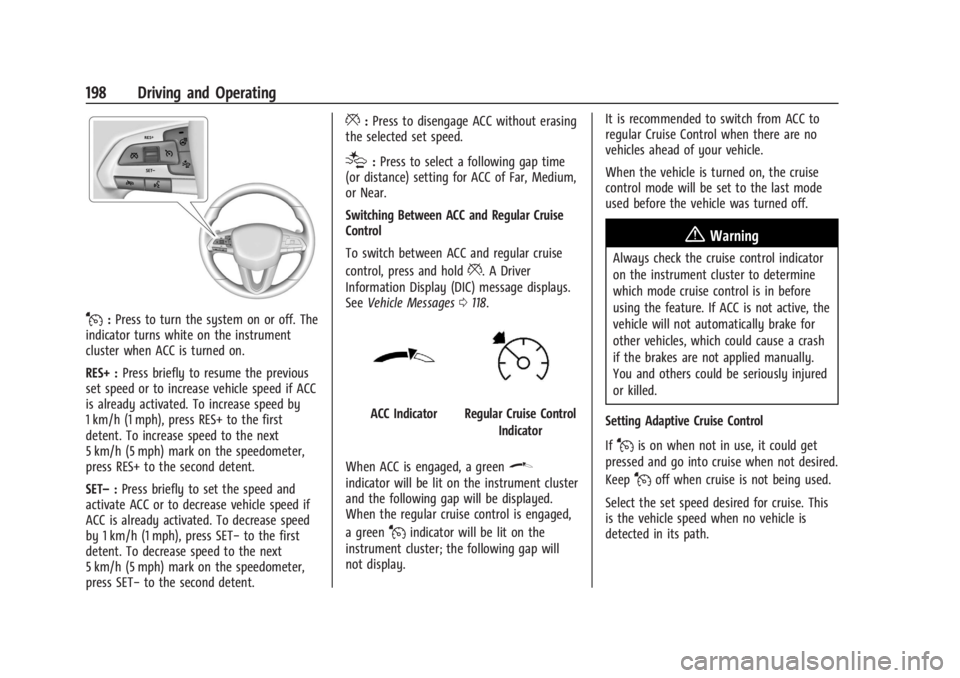
J:Press to turn the system on or off. The
indicator turns white on the instrument
cluster when ACC is turned on.
RES+ : Press briefly to resume the previous
set speed or to increase vehicle speed if ACC
is already activated. To increase speed by
1 km/h (1 mph), press RES+ to the first
detent. To increase speed to the next
5 km/h (5 mph) mark on the speedometer,
press RES+ to the second detent.
SET– :Press briefly to set the speed and
activate ACC or to decrease vehicle speed if
ACC is already activated. To decrease speed
by 1 km/h (1 mph), press SET− to the first
detent. To decrease speed to the next
5 km/h (5 mph) mark on the speedometer,
press SET− to the second detent.
*:Press to disengage ACC without erasing
the selected set speed.
[: Press to select a following gap time
(or distance) setting for ACC of Far, Medium,
or Near.
Switching Between ACC and Regular Cruise
Control
To switch between ACC and regular cruise
control, press and hold
*. A Driver
Information Display (DIC) message displays.
See Vehicle Messages 0118.
ACC IndicatorRegular Cruise Control
Indicator
When ACC is engaged, a green
\
indicator will be lit on the instrument cluster
and the following gap will be displayed.
When the regular cruise control is engaged,
a green
Jindicator will be lit on the
instrument cluster; the following gap will
not display. It is recommended to switch from ACC to
regular Cruise Control when there are no
vehicles ahead of your vehicle.
When the vehicle is turned on, the cruise
control mode will be set to the last mode
used before the vehicle was turned off.
{Warning
Always check the cruise control indicator
on the instrument cluster to determine
which mode cruise control is in before
using the feature. If ACC is not active, the
vehicle will not automatically brake for
other vehicles, which could cause a crash
if the brakes are not applied manually.
You and others could be seriously injured
or killed.
Setting Adaptive Cruise Control
If
Jis on when not in use, it could get
pressed and go into cruise when not desired.
Keep
Joff when cruise is not being used.
Select the set speed desired for cruise. This
is the vehicle speed when no vehicle is
detected in its path.