Instruments and controls CADILLAC XT4 2024 Owner's Manual
[x] Cancel search | Manufacturer: CADILLAC, Model Year: 2024, Model line: XT4, Model: CADILLAC XT4 2024Pages: 373, PDF Size: 8.01 MB
Page 106 of 373

Cadillac XT4 Owner Manual (GMNA-Localizing-U.S./Canada/Mexico-
17180837) - 2024 - CRC - 2/28/23
Instruments and Controls 105
This light should come on briefly when the
vehicle is turned on. If it does not come on,
have it fixed so it will be ready to warn if
there is a problem.
If this light stays on or comes on while
driving, there is a problem with the Electric
Parking Brake (EPB). Take the vehicle to a
dealer as soon as possible. In addition to the
parking brake, other safety functions that
utilize the EPB may also be degraded.
A message may also display in the Driver
Information Center (DIC). SeeElectric Parking
Brake 0187.
Antilock Brake System (ABS)
Warning Light
This light comes on briefly when the vehicle
is turned on to show that the light is
working. If it does not come on then, have
it fixed so it will be ready to warn you if
there is a problem. If the ABS warning light stays on, or comes
on again while driving, the vehicle needs
service. A chime may also sound when the
light stays on.
If the ABS warning light is the only light on,
the vehicle has regular brakes, but ABS is
not functioning.
If both the ABS warning light and the brake
system warning light are on, ABS is not
functioning and there is a problem with the
regular brakes. See your dealer for service.
See
Brake System Warning Light 0104.
Gear Shifting Light
If equipped, this light comes on when a gear
shift is recommended for best fuel economy.
When the arrow is pointed up, an upshift is
recommended. When the arrow is pointed
down, a downshift is recommended. The
number displayed with the arrow indicates
the recommended gear.
Performance Shifting Light
If equipped, this light may display green
when Sport Mode is activated and certain
driving conditions are met. Sport Mode
detects when the vehicle is being driven in a
sporty manner, and adjusts the shifting of
the gears accordingly. See Driver Mode
Control 0190.
All-Wheel-Drive Light
All-Wheel-Drive LightFront-Wheel-Drive
Light
If equipped, the corresponding light comes
on when an All-Wheel Drive (AWD) mode or
Front-Wheel-Drive mode is selected. See
All-Wheel Drive 0186.
Page 107 of 373
Cadillac XT4 Owner Manual (GMNA-Localizing-U.S./Canada/Mexico-
17180837) - 2024 - CRC - 2/28/23
106 Instruments and Controls
If the light turns amber, there may be a
malfunction. See your dealer.
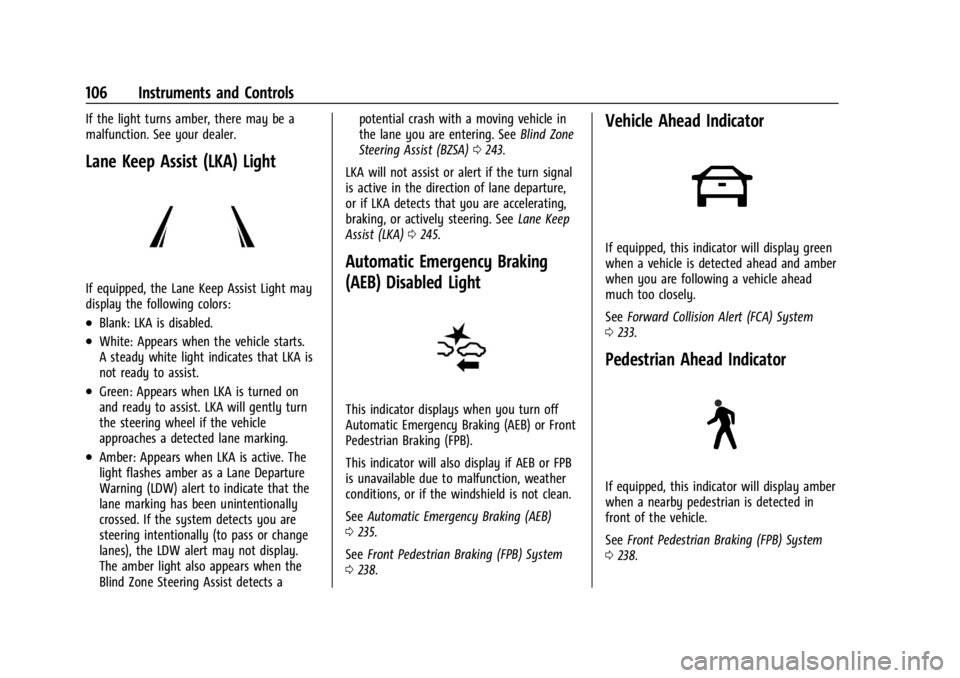
Lane Keep Assist (LKA) Light
If equipped, the Lane Keep Assist Light may
display the following colors:
.Blank: LKA is disabled.
.White: Appears when the vehicle starts.
A steady white light indicates that LKA is
not ready to assist.
.Green: Appears when LKA is turned on
and ready to assist. LKA will gently turn
the steering wheel if the vehicle
approaches a detected lane marking.
.Amber: Appears when LKA is active. The
light flashes amber as a Lane Departure
Warning (LDW) alert to indicate that the
lane marking has been unintentionally
crossed. If the system detects you are
steering intentionally (to pass or change
lanes), the LDW alert may not display.
The amber light also appears when the
Blind Zone Steering Assist detects apotential crash with a moving vehicle in
the lane you are entering. See
Blind Zone
Steering Assist (BZSA) 0243.
LKA will not assist or alert if the turn signal
is active in the direction of lane departure,
or if LKA detects that you are accelerating,
braking, or actively steering. See Lane Keep
Assist (LKA) 0245.
Automatic Emergency Braking
(AEB) Disabled Light
This indicator displays when you turn off
Automatic Emergency Braking (AEB) or Front
Pedestrian Braking (FPB).
This indicator will also display if AEB or FPB
is unavailable due to malfunction, weather
conditions, or if the windshield is not clean.
See Automatic Emergency Braking (AEB)
0 235.
See Front Pedestrian Braking (FPB) System
0 238.
Vehicle Ahead Indicator
If equipped, this indicator will display green
when a vehicle is detected ahead and amber
when you are following a vehicle ahead
much too closely.
See Forward Collision Alert (FCA) System
0 233.
Pedestrian Ahead Indicator
If equipped, this indicator will display amber
when a nearby pedestrian is detected in
front of the vehicle.
See Front Pedestrian Braking (FPB) System
0 238.
Page 108 of 373
Cadillac XT4 Owner Manual (GMNA-Localizing-U.S./Canada/Mexico-
17180837) - 2024 - CRC - 2/28/23
Instruments and Controls 107
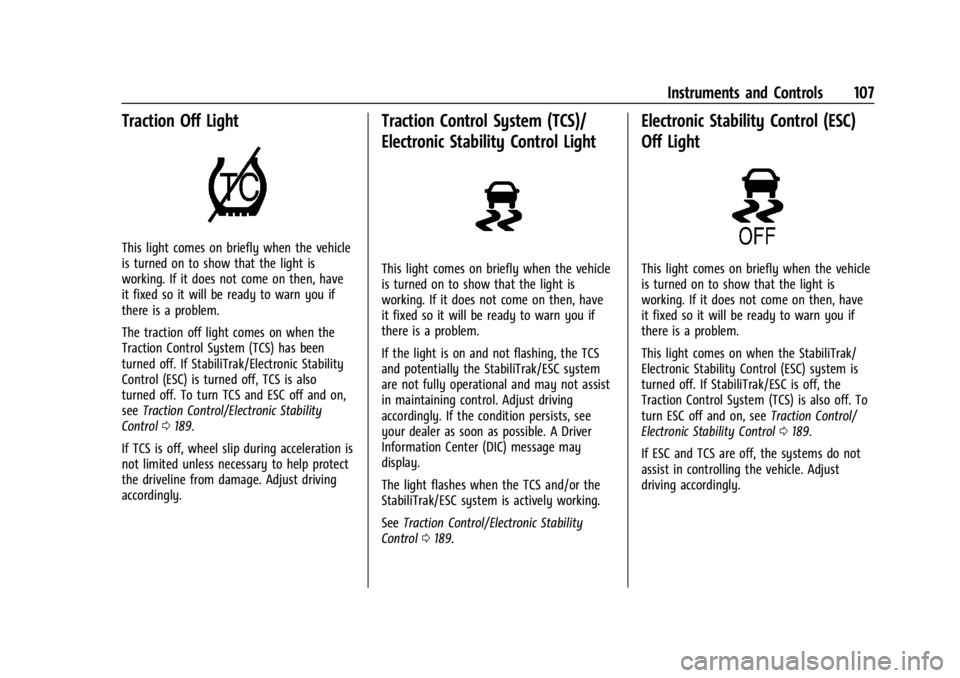
Traction Off Light
This light comes on briefly when the vehicle
is turned on to show that the light is
working. If it does not come on then, have
it fixed so it will be ready to warn you if
there is a problem.
The traction off light comes on when the
Traction Control System (TCS) has been
turned off. If StabiliTrak/Electronic Stability
Control (ESC) is turned off, TCS is also
turned off. To turn TCS and ESC off and on,
seeTraction Control/Electronic Stability
Control 0189.
If TCS is off, wheel slip during acceleration is
not limited unless necessary to help protect
the driveline from damage. Adjust driving
accordingly.
Traction Control System (TCS)/
Electronic Stability Control Light
This light comes on briefly when the vehicle
is turned on to show that the light is
working. If it does not come on then, have
it fixed so it will be ready to warn you if
there is a problem.
If the light is on and not flashing, the TCS
and potentially the StabiliTrak/ESC system
are not fully operational and may not assist
in maintaining control. Adjust driving
accordingly. If the condition persists, see
your dealer as soon as possible. A Driver
Information Center (DIC) message may
display.
The light flashes when the TCS and/or the
StabiliTrak/ESC system is actively working.
See Traction Control/Electronic Stability
Control 0189.
Electronic Stability Control (ESC)
Off Light
This light comes on briefly when the vehicle
is turned on to show that the light is
working. If it does not come on then, have
it fixed so it will be ready to warn you if
there is a problem.
This light comes on when the StabiliTrak/
Electronic Stability Control (ESC) system is
turned off. If StabiliTrak/ESC is off, the
Traction Control System (TCS) is also off. To
turn ESC off and on, see Traction Control/
Electronic Stability Control 0189.
If ESC and TCS are off, the systems do not
assist in controlling the vehicle. Adjust
driving accordingly.
Page 109 of 373

Cadillac XT4 Owner Manual (GMNA-Localizing-U.S./Canada/Mexico-
17180837) - 2024 - CRC - 2/28/23
108 Instruments and Controls
Engine Coolant Temperature
Warning Light
On some vehicles this light comes on briefly
while starting the vehicle. If it does not,
have the vehicle serviced by the dealer.
If the system is working normally the
indicator light goes off. For vehicles with the
reconfigurable cluster, this light may not
come on when starting the vehicle.
Caution
The engine coolant temperature warning
light indicates that the vehicle has
overheated. Driving with this light on can
damage the engine and it may not be
covered by the vehicle warranty. See
Engine Overheating0271.
The engine coolant temperature warning
light comes on when the engine has
overheated. If this happens pull over and turn off the
engine as soon as possible. See
Engine
Overheating 0271.
Driver Mode Control Light
This light comes on when Normal Mode is
selected.
This light comes on when Sport Mode is
selected.
This light comes on when Snow/Ice Mode is
selected.
This light comes on when Off-Road Mode is
selected.
This light comes on when My Mode is
selected. See Driver Mode Control 0190.
Tire Pressure Light
Page 110 of 373
Cadillac XT4 Owner Manual (GMNA-Localizing-U.S./Canada/Mexico-
17180837) - 2024 - CRC - 2/28/23
Instruments and Controls 109
If equipped with the Tire Pressure Monitor
System (TPMS), this light comes on briefly
when the vehicle is started. It provides
information about tire pressures and
the TPMS.
When the Light Is On Steady
This indicates that one or more of the tires
are significantly underinflated.
A Driver Information Center (DIC) tire
pressure message may also display. Stop as
soon as possible, and inflate the tires to the
pressure value shown on the Tire and
Loading Information label. SeeTire Pressure
0 292.
When the Light Flashes First and Then Is On
Steady
If the light flashes for about a minute and
then stays on, there may be a problem with
the TPMS. If the problem is not corrected,
the light will come on every time the
vehicle is started. See Tire Pressure Monitor
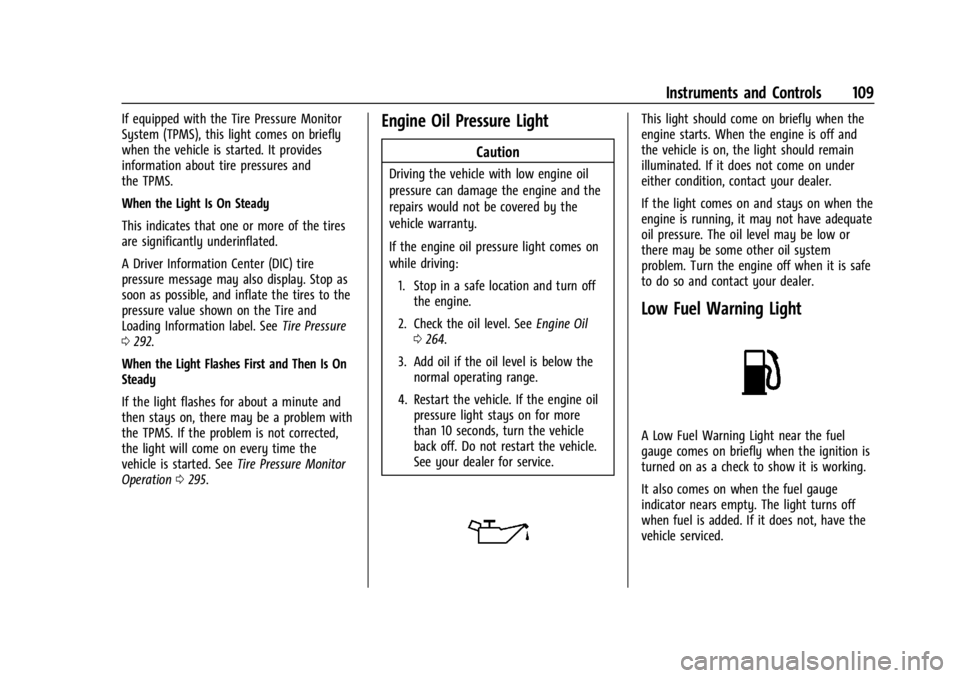
Operation 0295.Engine Oil Pressure Light
Caution
Driving the vehicle with low engine oil
pressure can damage the engine and the
repairs would not be covered by the
vehicle warranty.
If the engine oil pressure light comes on
while driving:
1. Stop in a safe location and turn off the engine.
2. Check the oil level. See Engine Oil
0 264.
3. Add oil if the oil level is below the normal operating range.
4. Restart the vehicle. If the engine oil pressure light stays on for more
than 10 seconds, turn the vehicle
back off. Do not restart the vehicle.
See your dealer for service.
This light should come on briefly when the
engine starts. When the engine is off and
the vehicle is on, the light should remain
illuminated. If it does not come on under
either condition, contact your dealer.
If the light comes on and stays on when the
engine is running, it may not have adequate
oil pressure. The oil level may be low or
there may be some other oil system
problem. Turn the engine off when it is safe
to do so and contact your dealer.
Low Fuel Warning Light
A Low Fuel Warning Light near the fuel
gauge comes on briefly when the ignition is
turned on as a check to show it is working.
It also comes on when the fuel gauge
indicator nears empty. The light turns off
when fuel is added. If it does not, have the
vehicle serviced.
Page 111 of 373

Cadillac XT4 Owner Manual (GMNA-Localizing-U.S./Canada/Mexico-
17180837) - 2024 - CRC - 2/28/23
110 Instruments and Controls
Auto Stop Indicator
This light comes on when the engine is in
an Auto Stop.
SeeStop/Start System 0176.
Security Light
The security light should come on briefly as
the vehicle is started. If it does not come
on, have the vehicle serviced by your dealer.
If the system is working normally, the
indicator light turns off.
If the light stays on and the vehicle does
not start, there could be a problem with the
theft-deterrent system.
High-Beam On Light
This light comes on when the high-beam
headlamps are in use.
See Headlamp High/Low-Beam Changer
0 124.
See Exterior Lamp Controls 0122.
Automatic High-Beam Light
If equipped, this light comes on when the
IntelliBeam system or Adaptive Headlight
system is enabled.
See Exterior Lamp Controls 0122.
Adaptive Forward Lighting (AFL)
Light
If equipped, this light comes on solid when
there is a problem with the AFL system or
Adaptive Headlight system.
See Adaptive Forward Lighting (AFL) 0125.
See Exterior Lamp Controls 0122.
Lamps On Reminder
This light comes on when the exterior lamps
are in use, except when only the Daytime
Running Lamps (DRL) are active. See Exterior
Lamp Controls 0122.
Page 112 of 373
Cadillac XT4 Owner Manual (GMNA-Localizing-U.S./Canada/Mexico-
17180837) - 2024 - CRC - 2/28/23
Instruments and Controls 111
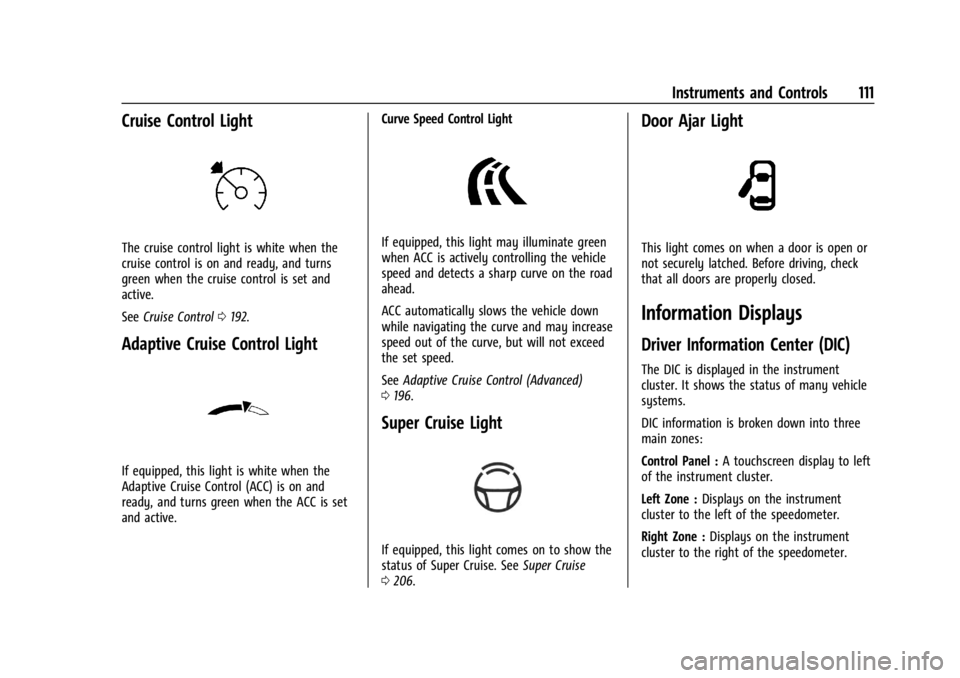
Cruise Control Light
The cruise control light is white when the
cruise control is on and ready, and turns
green when the cruise control is set and
active.
SeeCruise Control 0192.
Adaptive Cruise Control Light
If equipped, this light is white when the
Adaptive Cruise Control (ACC) is on and
ready, and turns green when the ACC is set
and active. Curve Speed Control Light
If equipped, this light may illuminate green
when ACC is actively controlling the vehicle
speed and detects a sharp curve on the road
ahead.
ACC automatically slows the vehicle down
while navigating the curve and may increase
speed out of the curve, but will not exceed
the set speed.
See
Adaptive Cruise Control (Advanced)
0 196.
Super Cruise Light
If equipped, this light comes on to show the
status of Super Cruise. See Super Cruise
0 206.
Door Ajar Light
This light comes on when a door is open or
not securely latched. Before driving, check
that all doors are properly closed.
Information Displays
Driver Information Center (DIC)
The DIC is displayed in the instrument
cluster. It shows the status of many vehicle
systems.
DIC information is broken down into three
main zones:
Control Panel : A touchscreen display to left
of the instrument cluster.
Left Zone : Displays on the instrument
cluster to the left of the speedometer.
Right Zone : Displays on the instrument
cluster to the right of the speedometer.
Page 113 of 373
Cadillac XT4 Owner Manual (GMNA-Localizing-U.S./Canada/Mexico-
17180837) - 2024 - CRC - 2/28/23
112 Instruments and Controls
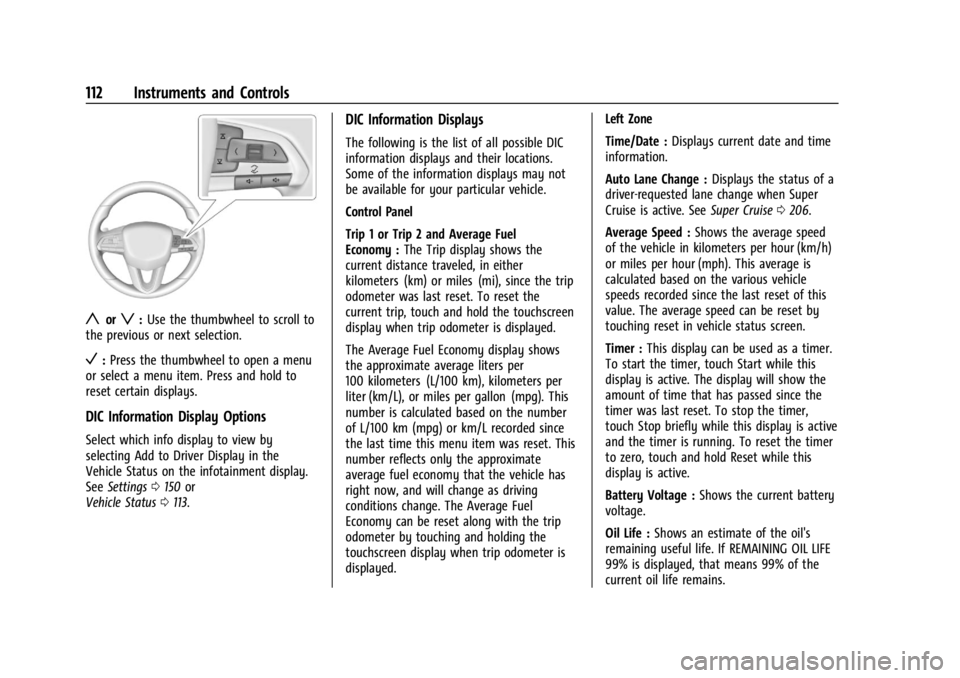
yorz:Use the thumbwheel to scroll to
the previous or next selection.
V: Press the thumbwheel to open a menu
or select a menu item. Press and hold to
reset certain displays.
DIC Information Display Options
Select which info display to view by
selecting Add to Driver Display in the
Vehicle Status on the infotainment display.
See Settings 0150 or
Vehicle Status 0113.
DIC Information Displays
The following is the list of all possible DIC
information displays and their locations.
Some of the information displays may not
be available for your particular vehicle.
Control Panel
Trip 1 or Trip 2 and Average Fuel
Economy : The Trip display shows the
current distance traveled, in either
kilometers (km) or miles (mi), since the trip
odometer was last reset. To reset the
current trip, touch and hold the touchscreen
display when trip odometer is displayed.
The Average Fuel Economy display shows
the approximate average liters per
100 kilometers (L/100 km), kilometers per
liter (km/L), or miles per gallon (mpg). This
number is calculated based on the number
of L/100 km (mpg) or km/L recorded since
the last time this menu item was reset. This
number reflects only the approximate
average fuel economy that the vehicle has
right now, and will change as driving
conditions change. The Average Fuel
Economy can be reset along with the trip
odometer by touching and holding the
touchscreen display when trip odometer is
displayed. Left Zone
Time/Date :
Displays current date and time
information.
Auto Lane Change : Displays the status of a
driver-requested lane change when Super
Cruise is active. See Super Cruise0206.
Average Speed : Shows the average speed
of the vehicle in kilometers per hour (km/h)
or miles per hour (mph). This average is
calculated based on the various vehicle
speeds recorded since the last reset of this
value. The average speed can be reset by
touching reset in vehicle status screen.
Timer : This display can be used as a timer.
To start the timer, touch Start while this
display is active. The display will show the
amount of time that has passed since the
timer was last reset. To stop the timer,
touch Stop briefly while this display is active
and the timer is running. To reset the timer
to zero, touch and hold Reset while this
display is active.
Battery Voltage : Shows the current battery
voltage.
Oil Life : Shows an estimate of the oil's
remaining useful life. If REMAINING OIL LIFE
99% is displayed, that means 99% of the
current oil life remains.
Page 114 of 373
Cadillac XT4 Owner Manual (GMNA-Localizing-U.S./Canada/Mexico-
17180837) - 2024 - CRC - 2/28/23
Instruments and Controls 113
When the remaining oil life is low, the
CHANGE ENGINE OIL SOON message will
appear on the display. The oil should be
changed as soon as possible. SeeEngine Oil
0 264. In addition to the engine oil life
system monitoring the oil life, additional
maintenance is recommended. See
Maintenance Schedule 0330.
The Oil Life display must be reset after each
oil change. It will not reset itself. Do not
reset the Oil Life display accidentally at any
time other than when the oil has just been
changed. It cannot be reset accurately until
the next oil change. To reset, see Engine Oil
Life System 0266.
Engine Air Filter Life : Displays an estimate
of the engine air filter’s remaining useful life
and the state of the system. Engine Air
Filter Life 95% means 95% of the current air
filter life remains. Messages are displayed
based on the engine air filter life and the
state of the system. When the REPLACE AT
NEXT OIL CHANGE message displays, the
engine air filter should be replaced at the
time of the next oil change. When the
REPLACE NOW message displays, the engine
air filter should be replaced as soon as
possible. To reset, see Engine Air Filter Life
System 0267. Fuel Economy :
Displays information about
current and average fuel economy.
Oil Pressure : Shows the engine oil pressure
in kPa (kilopascals) or psi (pounds per
square inch).
Engine Hours : Shows the total number of
hours the engine has run.
Coolant Temperature : Shows the
temperature of the coolant in either degrees
Celsius (°C) or degrees Fahrenheit (°F).
Transmission Fluid Temperature : Shows the
temperature of the automatic transmission
fluid in either degrees Celsius (°C) or degrees
Fahrenheit (°F).
Oil Temperature : Displays the current oil
temperature in either degrees Celsius (°C) or
degrees Fahrenheit (°F).
Tire Pressure : Shows the approximate
pressures of all four tires. Tire pressure is
displayed in either kilopascal (kPa) or in
pounds per square inch (psi). If the pressure
is low, the value for that tire is shown in
amber. See Tire Pressure Monitor System
0 294 and Tire Pressure Monitor Operation
0 295. Driver Assistance :
If equipped, shows
information for Adaptive Cruise Control
(ACC), Lane Keep Assist (LKA), and Forward
Collision Alert (FCA).
Right Zone
Audio Now Playing : Displays the actively
playing audio.
Navigation : Displays a variety of navigation
information.
Phone : Displays a variety of call
information.
Vehicle Status
The following are all possible vehicle status
features.
To access the vehicle status menu touch
A
from the list of home page icons displayed
on the left side of the infotainment display.
Vehicle status content is shown on cards
that are grouped together in option tabs
that are displayed on the infotainment
display.
Touching a card on the infotainment display
opens up a dialog box for that card. To
select a desired option within a dialog box,
Page 115 of 373
Cadillac XT4 Owner Manual (GMNA-Localizing-U.S./Canada/Mexico-
17180837) - 2024 - CRC - 2/28/23
114 Instruments and Controls
touch the option and follow any message or
alerts that may display. Some options may
be unavailable while driving.
Touch Add to Driver Display to send the
desired card to the Driver Information
Center (DIC) on the instrument cluster.
Touch Remove from Driver Display to
remove the selected card from the
instrument cluster. SeeDriver Information
Center (DIC) 0111.
Options
The following is the list of all possible cards
and their locations. Some of the cards may
not be available for your particular vehicle.
Overview
Displays an interactive 3-D rendered image
of your vehicle that shows performance and
health information.
Tires & Brakes
Tire Pressure : Displays the approximate
pressures of all four tires. Tire pressure is
displayed in either kilopascal (kPa) or in
pounds per square inch (psi). If the pressure
is low, the value for that tire is shown in
amber. See Tire Pressure Monitor System
0 294 and Tire Pressure Monitor Operation
0 295. When selected, the following options may
be chosen in the dialog: Relearn Tire
Pressure, Turn Off/On Leak Detection, Reset
Leak Detection, and Add to Driver Display.
When enabled, you will receive alerts when
a fast and/or slow tire leak is detected. The
Leak Detection speeds shown are either Tire
Leak or Fast Leak. When disabled, you will
still receive low tire pressure alerts.
However, you will stop receiving additional
alerts when a tire is leaking air.
Fluids & Filters
Oil Life :
Displays an estimate of the oil's
remaining useful life. If REMAINING OIL LIFE
99% is displayed, that means 99% of the
current oil life remains.
When the remaining oil life is low, the
CHANGE ENGINE OIL SOON message will
appear on the display. The oil should be
changed as soon as possible. See Engine Oil
0 264. In addition to the engine oil life
system monitoring the oil life, additional
maintenance is recommended. See
Maintenance Schedule 0330.
When selected, the following options may
be chosen in the dialog: Reset, and Add to
Driver Display. The Oil Life must be reset
after each oil change. It will not reset itself.
Do not reset the Oil Life display accidentally at any time other than when the oil has
just been changed. It cannot be reset
accurately until the next oil change. To
reset, see
Engine Oil Life System 0266.
Engine Air Filter Life : Displays an estimate
of the engine air filter’s remaining useful life
and the state of the system. Engine Air
Filter Life 95% means 95% of the current air
filter life remains. Messages are displayed
based on the engine air filter life and the
state of the system. When the REPLACE AT
NEXT OIL CHANGE message displays, the
engine air filter should be replaced at the
time of the next oil change. When the
REPLACE NOW message displays, the engine
air filter should be replaced as soon as
possible.
When selected, the following options may
be chosen in the dialog: Turn Off/On, Reset,
and Add to Driver Display.
Engine & Battery
Battery Voltage : Displays the current
battery voltage.
When selected, Add to Driver Display may
be chosen in the dialog.
Coolant Temperature : Displays the
temperature of the coolant in either degrees
Celsius (°C) or degrees Fahrenheit (°F).