ad blue CADILLAC XT4 2024 Owner's Manual
[x] Cancel search | Manufacturer: CADILLAC, Model Year: 2024, Model line: XT4, Model: CADILLAC XT4 2024Pages: 373, PDF Size: 8.01 MB
Page 211 of 373
Cadillac XT4 Owner Manual (GMNA-Localizing-U.S./Canada/Mexico-
17180837) - 2024 - CRC - 2/28/23
210 Driving and Operating
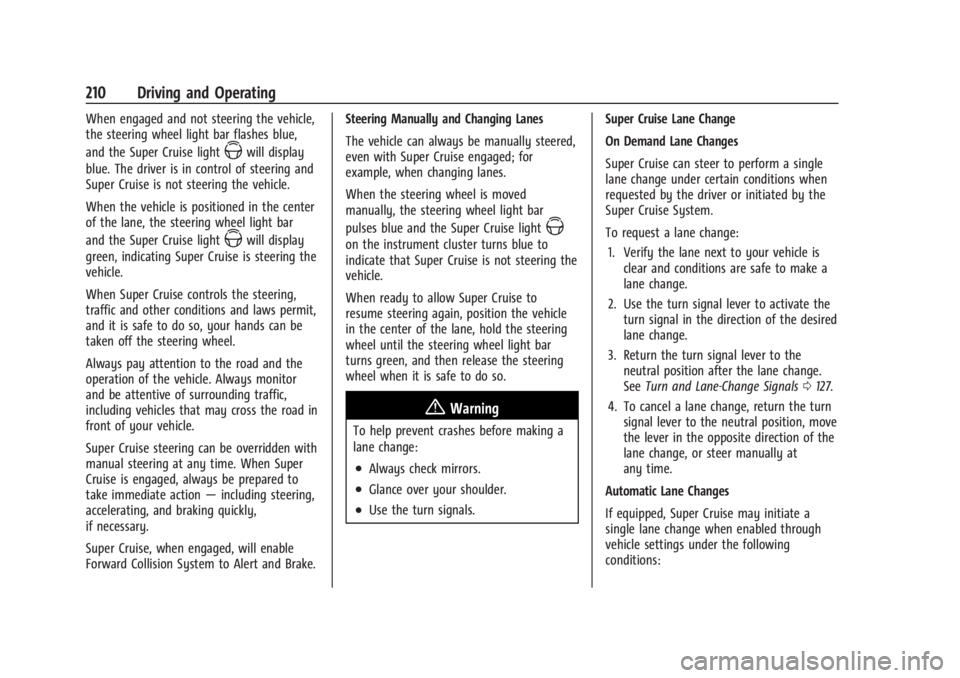
When engaged and not steering the vehicle,
the steering wheel light bar flashes blue,
and the Super Cruise light
Zwill display
blue. The driver is in control of steering and
Super Cruise is not steering the vehicle.
When the vehicle is positioned in the center
of the lane, the steering wheel light bar
and the Super Cruise light
Zwill display
green, indicating Super Cruise is steering the
vehicle.
When Super Cruise controls the steering,
traffic and other conditions and laws permit,
and it is safe to do so, your hands can be
taken off the steering wheel.
Always pay attention to the road and the
operation of the vehicle. Always monitor
and be attentive of surrounding traffic,
including vehicles that may cross the road in
front of your vehicle.
Super Cruise steering can be overridden with
manual steering at any time. When Super
Cruise is engaged, always be prepared to
take immediate action —including steering,
accelerating, and braking quickly,
if necessary.
Super Cruise, when engaged, will enable
Forward Collision System to Alert and Brake. Steering Manually and Changing Lanes
The vehicle can always be manually steered,
even with Super Cruise engaged; for
example, when changing lanes.
When the steering wheel is moved
manually, the steering wheel light bar
pulses blue and the Super Cruise lightZ
on the instrument cluster turns blue to
indicate that Super Cruise is not steering the
vehicle.
When ready to allow Super Cruise to
resume steering again, position the vehicle
in the center of the lane, hold the steering
wheel until the steering wheel light bar
turns green, and then release the steering
wheel when it is safe to do so.
{Warning
To help prevent crashes before making a
lane change:
.Always check mirrors.
.Glance over your shoulder.
.Use the turn signals.
Super Cruise Lane Change
On Demand Lane Changes
Super Cruise can steer to perform a single
lane change under certain conditions when
requested by the driver or initiated by the
Super Cruise System.
To request a lane change:
1. Verify the lane next to your vehicle is clear and conditions are safe to make a
lane change.
2. Use the turn signal lever to activate the turn signal in the direction of the desired
lane change.
3. Return the turn signal lever to the neutral position after the lane change.
See Turn and Lane-Change Signals 0127.
4. To cancel a lane change, return the turn signal lever to the neutral position, move
the lever in the opposite direction of the
lane change, or steer manually at
any time.
Automatic Lane Changes
If equipped, Super Cruise may initiate a
single lane change when enabled through
vehicle settings under the following
conditions:
Page 215 of 373

Cadillac XT4 Owner Manual (GMNA-Localizing-U.S./Canada/Mexico-
17180837) - 2024 - CRC - 2/28/23
214 Driving and Operating
Pay close attention to the road ahead to avoid these three increasing alerts:First Alert
.If the steering wheel light bar flashes green, the system has detected that your head and eyes may not
be directed toward the road.
.The flashing will stop when the system detects that your head and eyes appear to be directed toward
the road.
Second Alert
.If the steering wheel light bar flashes green for too long, Super Cruise will alert the driver to take
control of steering immediately by flashing the light bar red. Also, either beeps will sound or the Safety
Alert Seat will vibrate. To view available settings from the infotainment home screen, touch Settings >
Vehicle > Collision/Detection Systems.
.Take over steering, then Super Cruise may disengage or the steering wheel light bar will flash blue to
indicate the need for a driver override. Do not take hands off the steering wheel until the steering
wheel light bar is green.
.To re-engage Super Cruise after disengagement, pressZon the steering wheel. See “Using Super
Cruise” previously in this section.
Third Alert
.If the steering wheel light bar flashes red for too long, a voice command will tell you to take control of
the vehicle.
.Take control of the steering immediately; ACC and Super Cruise will disengage.
.A DIC message will indicate that Super Cruise is locked out. Super Cruise cannot be re-engaged until the
vehicle is turned off and back on.
.Continued failure to take over steering will cause the vehicle to brake to a stop and OnStar will be
called. The brake lamps and hazard warning flashers will come on.
.Take control of the vehicle and continue driving.
Page 218 of 373
Cadillac XT4 Owner Manual (GMNA-Localizing-U.S./Canada/Mexico-
17180837) - 2024 - CRC - 2/28/23
Driving and Operating 217
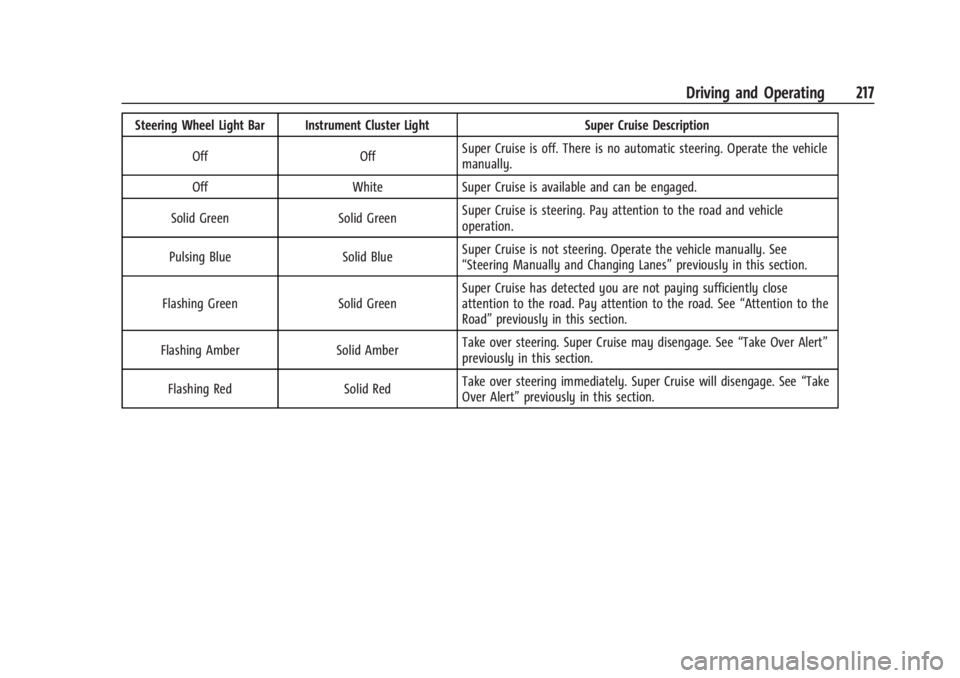
Steering Wheel Light Bar Instrument Cluster LightSuper Cruise Description
Off OffSuper Cruise is off. There is no automatic steering. Operate the vehicle
manually.
Off WhiteSuper Cruise is available and can be engaged.
Solid Green Solid GreenSuper Cruise is steering. Pay attention to the road and vehicle
operation.
Pulsing Blue Solid BlueSuper Cruise is not steering. Operate the vehicle manually. See
“Steering Manually and Changing Lanes”
previously in this section.
Flashing Green Solid GreenSuper Cruise has detected you are not paying sufficiently close
attention to the road. Pay attention to the road. See
“Attention to the
Road” previously in this section.
Flashing Amber Solid AmberTake over steering. Super Cruise may disengage. See
“Take Over Alert”
previously in this section.
Flashing Red Solid RedTake over steering immediately. Super Cruise will disengage. See
“Take
Over Alert” previously in this section.
Page 220 of 373
Cadillac XT4 Owner Manual (GMNA-Localizing-U.S./Canada/Mexico-
17180837) - 2024 - CRC - 2/28/23
Driving and Operating 219
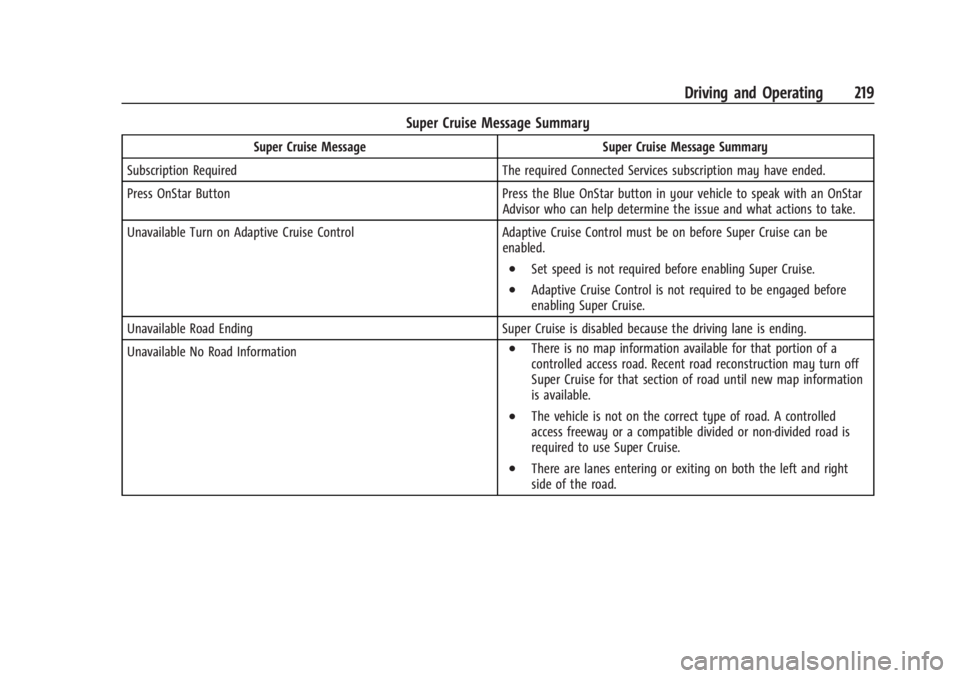
Super Cruise Message Summary
Super Cruise MessageSuper Cruise Message Summary
Subscription Required The required Connected Services subscription may have ended.
Press OnStar Button Press the Blue OnStar button in your vehicle to speak with an OnStar
Advisor who can help determine the issue and what actions to take.
Unavailable Turn on Adaptive Cruise Control Adaptive Cruise Control must be on before Super Cruise can be
enabled.
.Set speed is not required before enabling Super Cruise.
.Adaptive Cruise Control is not required to be engaged before
enabling Super Cruise.
Unavailable Road Ending Super Cruise is disabled because the driving lane is ending.
Unavailable No Road Information
.There is no map information available for that portion of a
controlled access road. Recent road reconstruction may turn off
Super Cruise for that section of road until new map information
is available.
.The vehicle is not on the correct type of road. A controlled
access freeway or a compatible divided or non-divided road is
required to use Super Cruise.
.There are lanes entering or exiting on both the left and right
side of the road.
Page 351 of 373
Cadillac XT4 Owner Manual (GMNA-Localizing-U.S./Canada/Mexico-
17180837) - 2024 - CRC - 2/28/23
350 Customer Information
The protection of vehicle electronics systems
and customer data from unauthorized
outside electronic access or control is
important to GM. GM maintains appropriate
security standards, practices, guidelines and
controls aimed at defending the vehicle and
the vehicle service ecosystem against
unauthorized electronic access, detecting
possible malicious activity in related
networks, and responding to suspected
cybersecurity incidents in a timely,
coordinated and effective manner. Security
incidents could impact your safety or
compromise your private data. To minimize
security risks, please do not connect your
vehicle electronic systems to unauthorized
devices or connect your vehicle to any
unknown or untrusted networks (such as
Bluetooth, WIFI or similar technology). In
the event you suspect any security incident
impacting your data or the safe operation of
your vehicle, please stop operating your
vehicle and contact your dealer.
Event Data Recorders
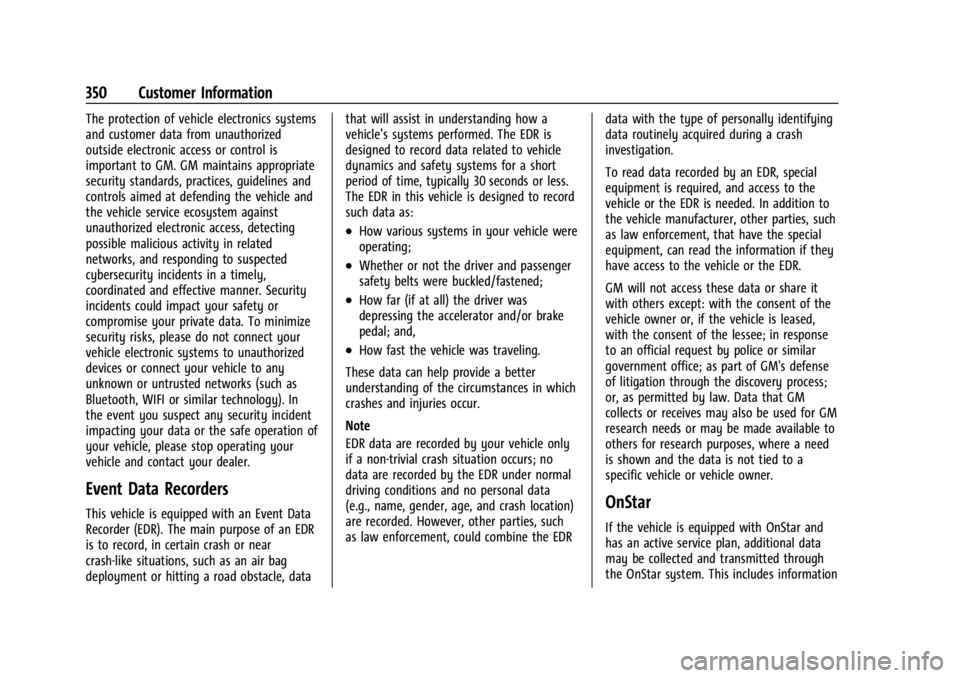
This vehicle is equipped with an Event Data
Recorder (EDR). The main purpose of an EDR
is to record, in certain crash or near
crash-like situations, such as an air bag
deployment or hitting a road obstacle, datathat will assist in understanding how a
vehicle’s systems performed. The EDR is
designed to record data related to vehicle
dynamics and safety systems for a short
period of time, typically 30 seconds or less.
The EDR in this vehicle is designed to record
such data as:
.How various systems in your vehicle were
operating;
.Whether or not the driver and passenger
safety belts were buckled/fastened;
.How far (if at all) the driver was
depressing the accelerator and/or brake
pedal; and,
.How fast the vehicle was traveling.
These data can help provide a better
understanding of the circumstances in which
crashes and injuries occur.
Note
EDR data are recorded by your vehicle only
if a non-trivial crash situation occurs; no
data are recorded by the EDR under normal
driving conditions and no personal data
(e.g., name, gender, age, and crash location)
are recorded. However, other parties, such
as law enforcement, could combine the EDR data with the type of personally identifying
data routinely acquired during a crash
investigation.
To read data recorded by an EDR, special
equipment is required, and access to the
vehicle or the EDR is needed. In addition to
the vehicle manufacturer, other parties, such
as law enforcement, that have the special
equipment, can read the information if they
have access to the vehicle or the EDR.
GM will not access these data or share it
with others except: with the consent of the
vehicle owner or, if the vehicle is leased,
with the consent of the lessee; in response
to an official request by police or similar
government office; as part of GM's defense
of litigation through the discovery process;
or, as permitted by law. Data that GM
collects or receives may also be used for GM
research needs or may be made available to
others for research purposes, where a need
is shown and the data is not tied to a
specific vehicle or vehicle owner.
OnStar
If the vehicle is equipped with OnStar and
has an active service plan, additional data
may be collected and transmitted through
the OnStar system. This includes information
Page 353 of 373
Cadillac XT4 Owner Manual (GMNA-Localizing-U.S./Canada/Mexico-
17180837) - 2024 - CRC - 2/28/23
352 OnStar
OnStar
OnStar Overview
OnStar Overview . . . . . . . . . . . . . . . . . . . . . . 352
OnStar Services
Emergency . . . . . . . . . . . . . . . . . . . . . . . . . . . . 353
Security . . . . . . . . . . . . . . . . . . . . . . . . . . . . . . . 353
OnStar Additional Information
OnStar Additional Information . . . . . . . . . 354
OnStar Overview
=Voice Command Button
QBlue OnStar Button
>Red Emergency Button
This vehicle may be equipped with a
comprehensive, in-vehicle system that can
connect to an OnStar Advisor for Emergency,
Security, Navigation, Connections, and
Diagnostics Services. OnStar services may
require a paid service plan and data plan.
OnStar requires the vehicle battery and
electrical system, cellular service, and GPS
satellite signals to be available and
operating. OnStar acts as a link to existing
emergency service providers. OnStar may
collect information about you and your
vehicle, including location information. See
OnStar User Terms, Privacy Statement, and
Software Terms for more details including
system limitations at www.onstar.com (U.S.)
or www.onstar.ca (Canada). The OnStar system status light is next to
the OnStar buttons. If the status light is:
.Solid Green: System is ready.
.Flashing Green: On a call.
.Red: Indicates a problem.
.Off: System is off. PressQtwice to
speak with an OnStar Advisor.
Press
Qor call 1-888-4ONSTAR
(1-888-466-7827) to speak to an Advisor.
Functionality of the Voice Command button
may vary by vehicle and region.
Press
=to:
.Open the OnStar app on the infotainment
display. If equipped, the infotainment
system has OnStar controls in the
embedded OnStar app on the Home Page.
Most OnStar functions that can be
performed with the buttons can be done
using the app. To open the app, touch
the OnStar icon on the Home Page. App
updates require a corresponding service
plan. Features vary by region and model.
Features are subject to change. For more
information, see my.cadillac.com/learn or
press
Q.
Page 362 of 373

Cadillac XT4 Owner Manual (GMNA-Localizing-U.S./Canada/Mexico-
17180837) - 2024 - CRC - 2/28/23
Index 361
Antilock Brake System (ABS) . . . . . . . . . . . . . .187Warning Light . . . . . . . . . . . . . . . . . . . . . . . . . 105
Appearance Care Exterior . . . . . . . . . . . . . . . . . . . . . . . . . . . . . . . . 321
Interior . . . . . . . . . . . . . . . . . . . . . . . . . . . . . . . . 325
Apple CarPlay and Android Auto . . . . . . . . . 148
Assistance Program, Roadside . . . . . . . . . . . . 343
Assistance Systems Advanced . . . . . . . . . . . . . . . . . . . . . . . . . . . . . . 223
Automatic EmergencyBraking (AEB) . . . . . . . . . . . . . . . . . . . . . . . . 235
Automatic Parking Assist (APA) . . . . . . . . 228
Blind Zone Alert (SBZA) . . . . . . . . . . . . . . . . 240
Blind Zone Steering (BZSA) . . . . . . . . . . . . 243
Driving . . . . . . . . . . . . . . . . . . . . . . . . . . . . . . . . 233
Forward Collision Alert (FCA) System . . . . . . . . . . . . . . . . . . . . . . . . . . . . . . 233
Front Pedestrian Braking (FPB) . . . . . . . . . 238
Lane Change Alert (LCA) . . . . . . . . . . . . . . . 241
Lane Keep Assist (LKA) . . . . . . . . . . . . . . . . . 245
Parking . . . . . . . . . . . . . . . . . . . . . . . . . . . . . . . . 227
Parking and Backing . . . . . . . . . . . . . . . . . . . 224
Rear Cross Traffic Alert (RCTA) . . . . . . . . . 232
Rear Pedestrian Alert . . . . . . . . . . . . . . . . . . 231
Rear Vision Camera (RVC) . . . . . . . . . . . . . . 225
Reverse Automatic Braking (RAB) . . . . . . 230
Surround Vision System . . . . . . . . . . . . . . . 225
Traffic Sign . . . . . . . . . . . . . . . . . . . . . . . . . . . . 243 Audio
Bluetooth . . . . . . . . . . . . . . . . . . . . . . . . . . . . . . 138
Auto Stop Indicator . . . . . . . . . . . . . . . . . . . . . . . . . . . . . . . 110
Automatic Dimming Mirrors . . . . . . . . . . . . . . . . . . . . . . . 28
Door Locks . . . . . . . . . . . . . . . . . . . . . . . . . . . . . . 18
Emergency Braking (AEB) DisabledLight . . . . . . . . . . . . . . . . . . . . . . . . . . . . . . . . . 106
Headlamp System . . . . . . . . . . . . . . . . . . . . . 125
Parking Assist (APA) . . . . . . . . . . . . . . . . . . . 228
Transmission . . . . . . . . . . . . . . . . . . . . . . . . . . . . 181
Transmission Fluid . . . . . . . . . . . . . . . . . . . . . 266
Automatic Transmission Manual Mode . . . . . . . . . . . . . . . . . . . . . . . . . 185
Avoiding Untrusted Media Devices . . . . . . . .138
B
Battery
Exterior Lighting Battery Saver . . . . . . . . 129
Power Protection . . . . . . . . . . . . . . . . . . . . . . 129
Battery - North America . . . . . . . . . . . . . 274, 315
Blade Replacement, Wiper . . . . . . . . . . . . . . . 275
Bluetooth Audio . . . . . . . . . . . . . . . . . . . . . . . . . . . . . . . . . . 138
Overview . . . . . . . . . . . . . . . . . . . . . . . . . . 144, 145
Brake Fluid . . . . . . . . . . . . . . . . . . . . . . . . . . . . . . . . . . . 273 Brake (cont'd)
System Warning Light . . . . . . . . . . . . . . . . . 104
Brakes . . . . . . . . . . . . . . . . . . . . . . . . . . . . . . . . . . . 272 Antilock . . . . . . . . . . . . . . . . . . . . . . . . . . . . . . . . 187
Brake Assist . . . . . . . . . . . . . . . . . . . . . . . . . . . 188
Electric Brake Boost . . . . . . . . . . . . . . . . . . . . 187
Electric Parking Brake . . . . . . . . . . . . . . . . . . 187
Braking . . . . . . . . . . . . . . . . . . . . . . . . . . . . . . . . . . 165 Automatic Emergency (AEB) . . . . . . . . . . . 235
Front Pedestrian (FPB) System . . . . . . . . . 238
Reverse Automatic . . . . . . . . . . . . . . . . . . . . . 230
Break-In, New Vehicle . . . . . . . . . . . . . . . . . . . . . 173
Buckle To Drive . . . . . . . . . . . . . . . . . . . . . . . . . . . 46
Bulb Replacement . . . . . . . . . . . . . . . . . . . . . . . . 278
Back-up Lamps . . . . . . . . . . . . . . . . . . . . . . . . . 278
Front Turn Signal Lamps . . . . . . . . . . . . . . . 278
Headlamp Aiming . . . . . . . . . . . . . . . . . . . . . . 277
Buying New Tires . . . . . . . . . . . . . . . . . . . . . . . . 299
C
Calibration Compass . . . . . . . . . . . . . . . . . . . . . . . . . . . . . . . . 91
California Perchlorate Materials Requirements . . . 261
California Proposition 65 Warning . . . . . 1, 315
Camera Rear Vision (RVC) . . . . . . . . . . . . . . . . . . . . . . 225
Canadian Vehicle Owners . . . . . . . . . . . . . . . . . . .2
Page 368 of 373

Cadillac XT4 Owner Manual (GMNA-Localizing-U.S./Canada/Mexico-
17180837) - 2024 - CRC - 2/28/23
Index 367
Mirrors (cont'd)Automatic Dimming Rearview . . . . . . . . . . 29
Convex . . . . . . . . . . . . . . . . . . . . . . . . . . . . . . . . . 26
Folding . . . . . . . . . . . . . . . . . . . . . . . . . . . . . . . . . 27
Heated . . . . . . . . . . . . . . . . . . . . . . . . . . . . . . . . . 28
Interior Rearview . . . . . . . . . . . . . . . . . . . . . . . 28
Manual Rearview . . . . . . . . . . . . . . . . . . . . . . . 28
Power . . . . . . . . . . . . . . . . . . . . . . . . . . . . . . . . . . 27
Rear Camera . . . . . . . . . . . . . . . . . . . . . . . . . . . . 29
Tilt in Reverse . . . . . . . . . . . . . . . . . . . . . . . . . . 28
Mode Driver Control . . . . . . . . . . . . . . . . . . . . . . . . . 190
Monitor System, Tire Pressure . . . . . . . . . . . 294
Multi-band Antenna . . . . . . . . . . . . . . . . . . . . . .138
Multi-Point Vehicle Inspection (MPVI) . . . . 332
N
Navigation Connected Services . . . . . . . . . . . . . . . . . . . . 357
Destination . . . . . . . . . . . . . . . . . . . . . . . . . . . . 140
Symbols . . . . . . . . . . . . . . . . . . . . . . . . . . . . . . . 140
Using the System . . . . . . . . . . . . . . . . . . . . . . 139
New Vehicle Break-In . . . . . . . . . . . . . . . . . . . . . 173
O
Odometer . . . . . . . . . . . . . . . . . . . . . . . . . . . . . . . . 96 Trip . . . . . . . . . . . . . . . . . . . . . . . . . . . . . . . . . . . . . 96
Off-Road Recovery . . . . . . . . . . . . . . . . . . . . . . . . . . . . . . . 166 Oil
Engine . . . . . . . . . . . . . . . . . . . . . . . . . . . . . . . . . 264
Engine Oil Life System . . . . . . . . . . . . . . . . . 266
Engine Oil Pressure Gauge . . . . . . . . . . . . . . 98
Pressure Light . . . . . . . . . . . . . . . . . . . . . . . . . 109
Older Children, Restraints . . . . . . . . . . . . . . . . . 63
Online Account . . . . . . . . . . . . . . . . . . . . . . . . . . 342
OnStar . . . . . . . . . . . . . . . . . . . . . . . . . . . . . . . . . . . 350 Additional Information . . . . . . . . . . . . . . . . . 354
Overview . . . . . . . . . . . . . . . . . . . . . . . . . . . . . . 352
OnStar Emergency . . . . . . . . . . . . . . . . . . . . . . . 353
OnStar Security . . . . . . . . . . . . . . . . . . . . . . . . . . 353
Outlets
Power . . . . . . . . . . . . . . . . . . . . . . . . . . . . . . . . . . 91
Overheating, Engine . . . . . . . . . . . . . . . . . . . . . . 271
Overview . . . . . . . . . . . . . . . . . . . . . . . . . . . . . . . . . 131 Instrument Panel . . . . . . . . . . . . . . . . . . . . . . . . 5
P
ParkAssist . . . . . . . . . . . . . . . . . . . . . . . . . . . . . 224, 227
Shifting Into . . . . . . . . . . . . . . . . . . . . . . . . . . . 179
Shifting Out of . . . . . . . . . . . . . . . . . . . . . . . . 180
Parking Brake and P (Park) MechanismCheck . . . . . . . . . . . . . . . . . . . . . . . . . . . . . . . . 275
Extended . . . . . . . . . . . . . . . . . . . . . . . . . . . . . . 180
Over Things That Burn . . . . . . . . . . . . . . . . . 180 Parking Assist
Automatic . . . . . . . . . . . . . . . . . . . . . . . . . . . . . 228
Parking or Backing Assistance Systems . . . . . . . . . . . . . . . . . . . . 224
Passenger Airbag Status Indicator . . . . . . . . . . . . . . . . 101
Compartment Air Filter . . . . . . . . . . . . . . . . . 161
Sensing System . . . . . . . . . . . . . . . . . . . . . . . . . 58
Pedestrian Ahead Indicator . . . . . . . . . . . . . . 106
Perchlorate Materials Requirements, California . . . . . . . . . . . . . . . . . . . . . . . . . . . . . . 261
Performance Shifting Light . . . . . . . . . . . . . . . . . . . . . . . . . . 105
Phone Apple CarPlay and Android Auto . . . . . . . 148
Bluetooth . . . . . . . . . . . . . . . . . . . . . . . . . . 144, 145
Port USB . . . . . . . . . . . . . . . . . . . . . . . . . . . . . . . . . . . . 138
Positioning Vehicle . . . . . . . . . . . . . . . . . . . . . . . . . . . . . . . . . 141
Power
Door Locks . . . . . . . . . . . . . . . . . . . . . . . . . . . . . . . 17
Mirrors . . . . . . . . . . . . . . . . . . . . . . . . . . . . . . . . . 27
Outlets . . . . . . . . . . . . . . . . . . . . . . . . . . . . . . . . . 91
Protection, Battery . . . . . . . . . . . . . . . . . . . . . 129
Retained Accessory (RAP) . . . . . . . . . . . . . . 179
Seat Adjustment . . . . . . . . . . . . . . . . . . . . . . . . 37
Windows . . . . . . . . . . . . . . . . . . . . . . . . . . . . . . . . 31