seats CADILLAC XT4 2024 Workshop Manual
[x] Cancel search | Manufacturer: CADILLAC, Model Year: 2024, Model line: XT4, Model: CADILLAC XT4 2024Pages: 373, PDF Size: 8.01 MB
Page 80 of 373
Cadillac XT4 Owner Manual (GMNA-Localizing-U.S./Canada/Mexico-
17180837) - 2024 - CRC - 2/28/23
Seats and Restraints 79
Do not secure a child seat in a position
without a top tether anchor if a national or
local law requires that the top tether be
anchored, or if the instructions that come
with the child restraint say that the top
tether must be anchored.
In Canada, the law requires that
forward-facing child restraints have a top
tether, and that the tether be attached.
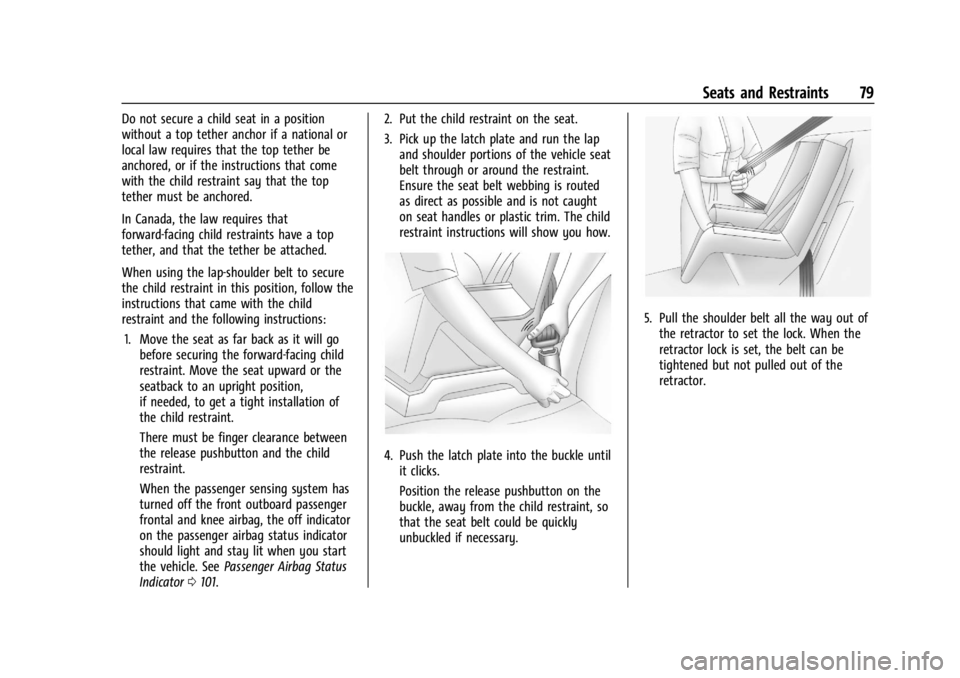
When using the lap-shoulder belt to secure
the child restraint in this position, follow the
instructions that came with the child
restraint and the following instructions:1. Move the seat as far back as it will go before securing the forward-facing child
restraint. Move the seat upward or the
seatback to an upright position,
if needed, to get a tight installation of
the child restraint.
There must be finger clearance between
the release pushbutton and the child
restraint.
When the passenger sensing system has
turned off the front outboard passenger
frontal and knee airbag, the off indicator
on the passenger airbag status indicator
should light and stay lit when you start
the vehicle. See Passenger Airbag Status
Indicator 0101. 2. Put the child restraint on the seat.
3. Pick up the latch plate and run the lap
and shoulder portions of the vehicle seat
belt through or around the restraint.
Ensure the seat belt webbing is routed
as direct as possible and is not caught
on seat handles or plastic trim. The child
restraint instructions will show you how.
4. Push the latch plate into the buckle untilit clicks.
Position the release pushbutton on the
buckle, away from the child restraint, so
that the seat belt could be quickly
unbuckled if necessary.
5. Pull the shoulder belt all the way out ofthe retractor to set the lock. When the
retractor lock is set, the belt can be
tightened but not pulled out of the
retractor.
Page 81 of 373

Cadillac XT4 Owner Manual (GMNA-Localizing-U.S./Canada/Mexico-
17180837) - 2024 - CRC - 2/28/23
80 Seats and Restraints
6. To tighten the belt, push down on thechild restraint, pull the shoulder portion
of the belt to tighten the lap portion of
the belt, and feed the shoulder belt back
into the retractor.
There must be finger clearance between
the release pushbutton and the child
restraint. If there is not clearance
between the buckle release pushbutton
and the child restraint, move the seat
upward and repeat prior installation
steps. Otherwise secure the child
restraint in a rear seat.
When installing a forward-facing child
restraint, it may be helpful to use your
knee to push down on the child restraint
as you tighten the belt. Try to pull the belt out of the retractor
to make sure the retractor is locked.
If the retractor is not locked, repeat
Steps 5 and 6.
7. Before placing a child in the child restraint, make sure it is securely held in
place. To check, grasp the child restraint
at the seat belt path and attempt to
move it side to side and back and forth.
When the child restraint is properly
installed, there should be no more than
2.5 cm (1 in) of movement.
If the airbags are off, the off indicator in the
passenger airbag status indicator will come
on and stay on when the vehicle is started.
If a child restraint has been installed and
the on indicator is lit, see “If the On
Indicator Is Lit for a Child Restraint” under
Passenger Sensing System 058.
To remove the child restraint, unbuckle the
vehicle seat belt and let it return to the
stowed position.
Page 88 of 373

Cadillac XT4 Owner Manual (GMNA-Localizing-U.S./Canada/Mexico-
17180837) - 2024 - CRC - 2/28/23
Instruments and Controls 87
Controls
Steering Wheel Adjustment
Manual Steering Wheel
To adjust the steering wheel:1. Pull the lever down.
2. Move the steering wheel up or down.
3. Pull or push the steering wheel closer or away from you.
4. Pull the lever up to lock the steering wheel in place.
Do not adjust the steering wheel while
driving. Power Tilt and Telescoping Steering Wheel
Press the control to move the tilt and
telescoping steering wheel up and down or
forward and rearward.
Do not adjust the steering wheel while
driving.
Heated Steering Wheel
(:
If equipped, press to turn on or off.
A light near the button displays when the
feature is turned on.
The steering wheel takes about
three minutes to reach maximum heat.
Automatic Heated Steering Wheel
If equipped with remote start, the heated
steering wheel will turn on automatically
during a remote start along with the heated
seats when it is cold outside. The heated
steering wheel indicator light may come on.
Page 89 of 373

Cadillac XT4 Owner Manual (GMNA-Localizing-U.S./Canada/Mexico-
17180837) - 2024 - CRC - 2/28/23
88 Instruments and Controls
If equipped with auto heated seats, the
heated steering wheel will turn on when the
auto heated seats are activated. The heated
steering wheel indicator will follow the state
of the steering wheel heat.
SeeHeated and Ventilated Front Seats 042.
To turn this feature on or off, select Settings
> Vehicle > Comfort and Convenience >
Heated Steering Wheel > Select ON or OFF.
Horn
Pressaon the steering wheel pad to
sound the horn.
Windshield Wiper/Washer
Windshield Wiper with Rainsense (AUTO
Shown), If Equipped
Windshield Wiper without Rainsense (INT
Shown)
With the ignition on or in accessory mode,
move the windshield wiper lever to select
the wiper speed.
HI : Use for fast wipes.
LO : Use for slow wipes.
AUTO : If equipped with Rainsense, use this
setting for intermittent wipes when
Rainsense is disabled, or Rainsense wipes when Rainsense is enabled. For intermittent
wipes, move the windshield wiper lever to
AUTO, then turn the band up for more
frequent wipes or down for less frequent
wipes. If Rainsense is turned on, see
“Rainsense”
later in this section.
INT :If equipped with intermittent wipers
only, move the windshield wiper lever to
INT. Turn the band up for more frequent
wipes or down for less frequent wipes.
OFF : Use to turn the wipers off.
1X : For a single wipe, briefly move the
wiper lever down. For several wipes, hold
the wiper lever down.
f: Pull the windshield wiper lever
toward you to spray windshield washer fluid
and activate the wipers. The wipers will
continue until the lever is released or the
maximum wash time is reached. When the
Page 129 of 373

Cadillac XT4 Owner Manual (GMNA-Localizing-U.S./Canada/Mexico-
17180837) - 2024 - CRC - 2/28/23
128 Lighting
Interior Lighting
Instrument Panel Illumination
Control
This feature adjusts the brightness of all
illuminated controls. This feature is on the
left side of the instrument panel.
D:Move the thumbwheel up or down to
brighten or dim the lights.
The thumbwheel is functional at night,
or when the headlamps or parking lamps
are on.
Courtesy Lamps
The courtesy lamps come on when
any door is opened,
Kon the remote
key is pressed, or when the vehicle is
turned off. See Dome Lamps0128.
Dome Lamps
The dome lamp controls are in the overhead
console.
To operate, press the following buttons:
jOFF : Press to turn off the dome
lamps when any door is opened,
Kon the
remote key is pressed, or when the vehicle
is turned off. An indicator light on the
button will turn on when the dome lamp override is activated. Press
jOFF again
to deactivate this feature and the indicator
light will turn off.
+ON/OFF : Press to turn the dome lamps
on or off manually.
Reading Lamps
There are reading lamps on the overhead
console and over the rear seats. These lamps
come on automatically when any door is
opened.
Front Reading Lamps
The front reading lamps are in the overhead
console.
Page 130 of 373

Cadillac XT4 Owner Manual (GMNA-Localizing-U.S./Canada/Mexico-
17180837) - 2024 - CRC - 2/28/23
Lighting 129
Press the lamp lenses to turn the front
reading lamps on or off.
Rear Reading Lamps
The rear reading lamps are over the rear
seats.
Press the lamp lens to turn the rear reading
lamps on or off.
Lighting Features
Entry Lighting
The interior lamps turn on when pressingK
on the remote key or opening any doors,
and the dome lamp control is in the door
position.Some exterior lamps also turn on when
pressing
Kon the remote key or opening
any doors. Low-Beam lamps will only turn
on briefly at night, or in areas with limited
lighting.
All lamps will gradually fade out after about
30 seconds.
Entry lighting can be disabled manually by
closing all doors, pressing
Qon the remote
key, or starting the vehicle.
This feature can be changed. On the
infotainment home screen, select Settings
T
VehicleTLightingTVehicle Locator Lights.
Exit Lighting
Some exterior lamps and interior lamps turn
on when the driver door is opened after the
vehicle is turned off.
The exterior and interior lamps remain on
for a set amount of time, then automatically
turn off.
The interior lights turn on when the vehicle
is turned off.
The exterior lamps turn off immediately by
turning the exterior lamp control off. This feature can be changed. On the
infotainment home screen, select Settings
T
VehicleTLightingTExit Lighting.
Battery Power Protection
This feature helps prevent the battery from
being drained, if the interior courtesy lamps
or reading lamps are accidentally left on.
If any of these lamps are left on, they
automatically turn off after 10 minutes,
if the ignition is off. The lamps will not
come back on again until one of the
following occurs:
.The ignition is turned on.
.The doors are closed and then re-opened.
Exterior Lighting Battery Saver
The exterior lamps turn off about 10 minutes
after the vehicle is turned off, if the parking
lamps or headlamps have been manually
left on. This protects against draining the
battery. To restart the 10-minute timer, turn
the exterior lamp control to the
Oposition
and then back to the
;or2position.
To keep the lamps on for more than
10 minutes, the vehicle must be on or in
accessory mode.
Page 161 of 373

Cadillac XT4 Owner Manual (GMNA-Localizing-U.S./Canada/Mexico-
17180837) - 2024 - CRC - 2/28/23
160 Climate Controls
The defogger can be turned off by turning
the vehicle off or to accessory mode.
To turn Auto Rear Defog off or on, select
Settings > Vehicle > Climate and Air Quality
> Auto Rear Defog > Select ON or OFF.
When auto rear defog is selected, the rear
window defogger turns on automatically
when the interior temperature is cold and
the outside temperature is about 7 °C (44 °F)
and below. The auto rear defogger turns off
automatically.
If equipped, the heated outside mirrors turn
on when the rear window defogger button
is on and help to clear fog or frost from the
surface of the mirror. SeeHeated Mirrors
0 28.
Caution
Do not try to clear frost or other material
from the inside of the front windshield
and rear window with a razor blade or
anything else that is sharp. This may
damage the rear window defogger grid
and affect the radio's ability to pick up
stations clearly. The repairs would not be
covered by the vehicle warranty. Remote Start Climate Control Operation :
If equipped with remote start, the climate
control system may run when the vehicle is
started remotely. The system uses the
driver’s previous settings to heat or cool the
inside of the vehicle. The rear defog
indicator light does not come on during a
remote start. If equipped with heated or
ventilated seats, they may come on during a
remote start. See
Remote Vehicle Start 014
and Heated and Ventilated Front Seats 042.
Sensor
The solar sensor, on top of the instrument
panel near the windshield, monitors the
solar intensity. The climate control system uses the sensor
information to adjust the temperature, fan
speed, recirculation, and air delivery mode
for best comfort.
If the sensor is covered, the automatic
climate control system may not work
properly.
Afterblow Feature
If equipped, under certain conditions, the
fan may stay on or may turn on and off
several times after you turn off and lock the
vehicle. This is normal.
Air Vents
Page 162 of 373

Cadillac XT4 Owner Manual (GMNA-Localizing-U.S./Canada/Mexico-
17180837) - 2024 - CRC - 2/28/23
Climate Controls 161
Adjustable air vents are in the center and on
the sides of the instrument panel, and on
the rear of the center console storage.
Move the slider knobs to change the
direction of or to close off the airflow.
Operation Tips
.Clear away any ice, snow, or leaves from
air inlets at the base of the windshield
that could block the flow of air into the
vehicle.
.Clear snow off the hood to improve
visibility and help decrease moisture
drawn into the vehicle.
.Keep the path under the front seats clear
of objects to help circulate the air inside
of the vehicle more effectively.
.Use of non-GM approved hood deflectors
can adversely affect the performance of
the system. Check with your dealer
before adding equipment to the outside
of the vehicle.
.Do not attach any devices to the air vent
slats. This restricts airflow and may cause
damage to the air vents.
Maintenance
Passenger Compartment Air Filter
The filter reduces dust, pollen, and other
airborne irritants from outside air that is
pulled into the vehicle. The filter should be
replaced as part of routine scheduled
maintenance. SeeMaintenance Schedule
0 330.
See your dealer regarding replacement of
the filter.
Service
All vehicles have a label underhood that
identifies the refrigerant used in the vehicle.
The refrigerant system should only be
serviced by trained and certified technicians.
The air conditioning evaporator should never
be repaired or replaced by one from a
salvage vehicle. It should only be replaced
by a new evaporator to ensure proper and
safe operation.
During service, all refrigerants should be
reclaimed with proper equipment. Venting
refrigerants directly to the atmosphere is
harmful to the environment and may also create unsafe conditions based on
inhalation, combustion, frostbite, or other
health-based concerns.
The air conditioning system requires periodic
maintenance. See
Maintenance Schedule
0 330.
Page 174 of 373

Cadillac XT4 Owner Manual (GMNA-Localizing-U.S./Canada/Mexico-
17180837) - 2024 - CRC - 2/28/23
Driving and Operating 173
The Certification/Tire label may also
show the maximum weights for the
front and rear axles, called the Gross
Axle Weight Rating (GAWR). To find out
the actual loads on the front and rear
axles, weigh the vehicle at a weigh
station. Your dealer can help with this.
Be sure to spread the load equally on
both sides of the centerline.Caution
Overloading the vehicle may cause
damage. Repairs would not be covered by
the vehicle warranty. Do not overload the
vehicle.
{Warning
Things inside the vehicle can strike
and injure people in a sudden stop or
turn, or in a crash.
.Put things in the cargo area of the
vehicle. In the cargo area, put
them as far forward as possible.
Try to spread the weight evenly.
(Continued)
Warning (Continued)
.Never stack heavier things, like
suitcases, inside the vehicle so
that some of them are above the
tops of the seats.
.Do not leave an unsecured child
restraint in the vehicle.
.Secure loose items in the vehicle.
.Do not leave a seat folded down
unless needed.
Starting and Operating
New Vehicle Break-In
Caution
The vehicle does not need an elaborate
break-in. But it will perform better in the
long run if you follow these guidelines:
.Do not drive at any one constant
speed, fast or slow, for the first
800 km (500 mi). Do not make
full-throttle starts. Avoid downshifting
to brake or slow the vehicle.
(Continued)
Caution (Continued)
.Avoid making hard stops for the first
300 km (200 mi) or so. During this
time the new brake linings are not yet
broken in. Hard stops with new linings
can mean premature wear and earlier
replacement. Follow this breaking-in
guideline every time you get new
brake linings.
.Do not tow a trailer during break-in.
See Trailer Towing 0253 for the trailer
towing capabilities of the vehicle and
more information.
Following break-in, engine speed and load
can be gradually increased.
On new vehicles, the various mechanical and
electrical systems experience a “break-in”
period during the first 6 400 km (4,000 mi)
of routine driving. As the vehicle is driven,
the mechanical systems adjust to provide
optimal fuel economy and transmission shift
performance.
Electrical systems will adapt and calibrate
during the break-in period. A one-time
occurrence of clicks and similar vehicle
noises is normal during this process.
Page 299 of 373

Cadillac XT4 Owner Manual (GMNA-Localizing-U.S./Canada/Mexico-
17180837) - 2024 - CRC - 2/28/23
298 Vehicle Care
Anytime unusual wear is noticed, rotate
the tires as soon as possible, check for
proper tire inflation pressure, and check
for damaged tires or wheels. If the
unusual wear continues after the
rotation, check the wheel alignment.
SeeWhen It Is Time for New Tires
0 298 and Wheel Replacement 0302.
Use this rotation pattern when rotating
the tires.
Do not include the compact spare tire
in the tire rotation. Adjust the front and rear tires to the
recommended inflation pressure on the
Tire and Loading Information label after
the tires have been rotated. See
Tire
Pressure 0292 and
Vehicle Load Limits 0170.
Reset the Tire Pressure Monitor System.
See Tire Pressure Monitor Operation
0 295.
Check that all wheel nuts are properly
tightened. See “Wheel Nut Torque”
under Capacities and Specifications
0 338, and “Removing the Flat Tire and
Installing the Spare Tire” underTire
Changing 0310.
{Warning
Rust or dirt on a wheel, or on the
parts to which it is fastened, can
cause wheel nuts to become loose
over time. The wheel could come off
and cause a crash. When changing a
wheel, remove any rust or dirt from
places where the wheel attaches to
the vehicle. In an emergency, a cloth
(Continued)
Warning (Continued)
or paper towel can be used; however,
use a scraper or wire brush later to
remove all rust or dirt.
Lightly coat the inner diameter of the
wheel hub opening with wheel bearing
grease after a wheel change or tire
rotation to prevent corrosion or rust
buildup.
{Warning
Do not apply grease to the wheel
mounting surface, wheel conical
seats, or the wheel nuts or bolts.
Grease applied to these areas could
cause a wheel to become loose or
come off, resulting in a crash.
When It Is Time for New Tires
Factors, such as maintenance, temperatures,
driving speeds, vehicle loading, and road
conditions affect the wear rate of the tires.