Neutral CADILLAC XT4 2024 Owners Manual
[x] Cancel search | Manufacturer: CADILLAC, Model Year: 2024, Model line: XT4, Model: CADILLAC XT4 2024Pages: 373, PDF Size: 8.01 MB
Page 14 of 373
Cadillac XT4 Owner Manual (GMNA-Localizing-U.S./Canada/Mexico-
17180837) - 2024 - CRC - 2/28/23
Keys, Doors, and Windows 13
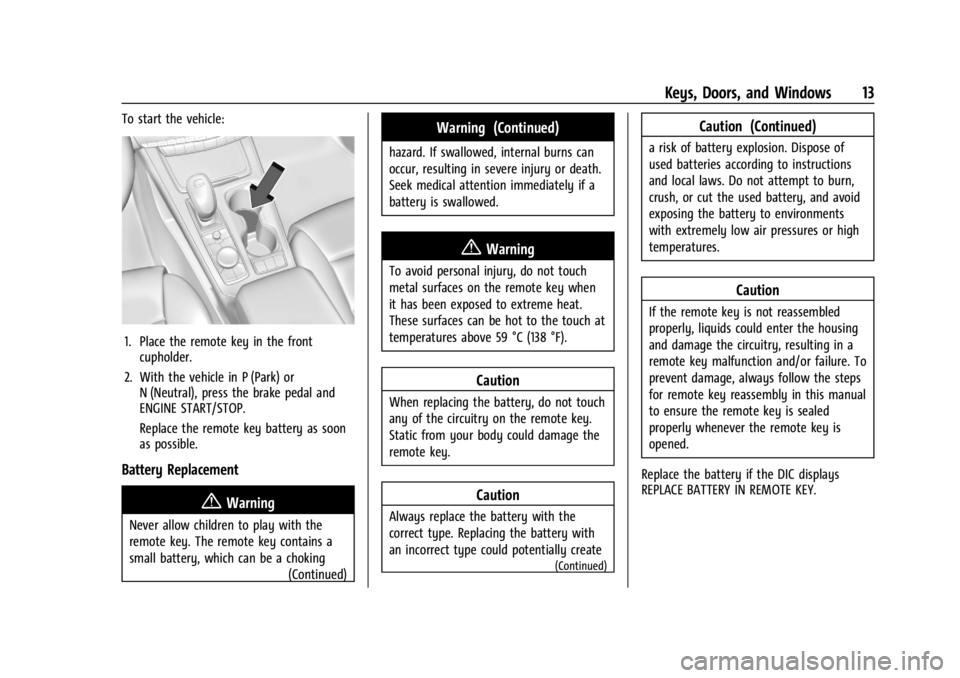
To start the vehicle:
1. Place the remote key in the frontcupholder.
2. With the vehicle in P (Park) or N (Neutral), press the brake pedal and
ENGINE START/STOP.
Replace the remote key battery as soon
as possible.
Battery Replacement
{Warning
Never allow children to play with the
remote key. The remote key contains a
small battery, which can be a choking
(Continued)
Warning (Continued)
hazard. If swallowed, internal burns can
occur, resulting in severe injury or death.
Seek medical attention immediately if a
battery is swallowed.
{Warning
To avoid personal injury, do not touch
metal surfaces on the remote key when
it has been exposed to extreme heat.
These surfaces can be hot to the touch at
temperatures above 59 °C (138 °F).
Caution
When replacing the battery, do not touch
any of the circuitry on the remote key.
Static from your body could damage the
remote key.
Caution
Always replace the battery with the
correct type. Replacing the battery with
an incorrect type could potentially create
(Continued)
Caution (Continued)
a risk of battery explosion. Dispose of
used batteries according to instructions
and local laws. Do not attempt to burn,
crush, or cut the used battery, and avoid
exposing the battery to environments
with extremely low air pressures or high
temperatures.
Caution
If the remote key is not reassembled
properly, liquids could enter the housing
and damage the circuitry, resulting in a
remote key malfunction and/or failure. To
prevent damage, always follow the steps
for remote key reassembly in this manual
to ensure the remote key is sealed
properly whenever the remote key is
opened.
Replace the battery if the DIC displays
REPLACE BATTERY IN REMOTE KEY.
Page 91 of 373

Cadillac XT4 Owner Manual (GMNA-Localizing-U.S./Canada/Mexico-
17180837) - 2024 - CRC - 2/28/23
90 Instruments and Controls
With Rainsense, if the transmission is in
N (Neutral) and the vehicle speed is very
slow, the wipers will automatically stop at
the base of the windshield.
The wiper operations return to normal when
the transmission is no longer in N (Neutral)
or the vehicle speed has increased.
Rear Window Wiper/Washer
The rear window wiper/washer controls are
on the end of the windshield wiper lever.
Turn the controls to adjust the setting.
OFF :Turns the wiper off.
INT : Turns on the rear wiper with a delay
between wipes.
ON : Turns on the rear wiper.
1:Push the windshield wiper lever
forward to spray washer fluid on the rear
window and the rear camera lens,
if equipped. See Rear Camera Mirror 029.
The wipers will clear the rear window and
either stop or return to your preset speed.
For more washer cycles, push and hold the
lever.
The rear window wiper/washer will not
operate if the liftgate is open or ajar. If the
liftgate is opened while the rear wiper is on,
the wiper returns to the parked position and
stops.
Rear Wiper Arm Assembly Protection
When using an automatic car wash, move
the rear wiper control to OFF to disable the
rear wiper. In some vehicles, if the
transmission is in N (Neutral) and the
vehicle speed is very slow, the rear wiper
will automatically park under the rear
spoiler.
The wiper operations return to normal when
the transmission is no longer in N (Neutral)
or the vehicle speed has increased.
Auto Wipe in Reverse Gear
If the rear wiper control is off, the rear
wiper will automatically operate
continuously when the transmission is in R (Reverse), and the front windshield wiper
is performing low or high speed wipes.
If the rear wiper control is off, the
transmission is in R (Reverse), and the front
windshield wiper is performing INT wipes,
then the rear wiper automatically performs
INT wipes.
This feature can be turned on or off. Go to
Settings > Vehicle > Comfort and
Convenience > Auto Wipe in Reverse Gear >
Select ON or OFF.
The windshield washer reservoir is used for
the windshield, rear window, and Rear
Camera Mirror, if equipped. See
Rear Camera
Mirror 029. Check the fluid level in the
reservoir if either washer is not working. See
Washer Fluid 0272.
Rear Camera Washer
Page 169 of 373
Cadillac XT4 Owner Manual (GMNA-Localizing-U.S./Canada/Mexico-
17180837) - 2024 - CRC - 2/28/23
168 Driving and Operating
.Check all fluid levels and brakes, tires,
cooling system, and transmission.
.Shift to a lower gear when going down
steep or long hills.
{Warning
Using the brakes to slow the vehicle on a
long downhill slope can cause brake
overheating, can reduce brake
performance, and could result in a loss of
braking. Shift the transmission to a lower
gear to let the engine assist the brakes
on a steep downhill slope.
{Warning
Coasting downhill in N (Neutral) or with
the ignition off is dangerous. This can
cause overheating of the brakes and loss
of steering assist. Always have the engine
running and the vehicle in gear.
.Drive at speeds that keep the vehicle in
its own lane. Do not swing wide or cross
the center line.
.Be alert on top of hills; something could
be in your lane (e.g., stalled car, crash).
.Pay attention to special road signs (e.g.,
falling rocks area, winding roads, long
grades, passing or no-passing zones) and
take appropriate action.
.Select All-Wheel Drive (AWD) Mode. See
Driver Mode Control0190 and
All-Wheel Drive 0186.
Winter Driving
Driving on Snow or Ice
Caution
To avoid damage to the wheels and
brake components, always clear snow and
ice from inside the wheels and
underneath the vehicle before driving.
Snow or ice between the tires and the road
creates less traction or grip, so drive
carefully. Wet ice can occur at about 0 °C
(32 °F) when freezing rain begins to fall.
Avoid driving on wet ice or in freezing rain
until roads can be treated.
For Slippery Road Driving:
.Accelerate gently. Accelerating too quickly
causes the wheels to spin and makes the
surface under the tires slick.
.Turn on Traction Control. See Traction
Control/Electronic Stability Control 0189.
.The Antilock Brake System (ABS) improves
vehicle stability during hard stops, but
the brakes should be applied sooner than
when on dry pavement. See Antilock
Brake System (ABS) 0187.
.Allow greater following distance and
watch for slippery spots. Icy patches can
occur on otherwise clear roads in shaded
areas. The surface of a curve or an
overpass can remain icy when the
surrounding roads are clear. Avoid sudden
steering maneuvers and braking while
on ice.
.Turn off cruise control.
.Select All-Wheel Drive (AWD) Mode for
vehicles equipped with AWD. Select
Snow/Ice Mode for FWD only vehicles.
See Driver Mode Control 0190 and
All-Wheel Drive 0186.
Cold Weather Mode
In very low temperatures, a cold weather
message may display on the Driver
Information Center (DIC). The engine speed,
transmission shift patterns, and cabin fan
speed may operate differently to enable the
Page 175 of 373

Cadillac XT4 Owner Manual (GMNA-Localizing-U.S./Canada/Mexico-
17180837) - 2024 - CRC - 2/28/23
174 Driving and Operating
Normal driving charges the vehicle’s battery
to achieve the best operation of the vehicle,
including fuel economy and the Stop/Start
System. SeeStop/Start System 0176.
Ignition Positions
The vehicle has an electronic keyless ignition
with pushbutton start.
If the pushbutton start is not working, the
vehicle may be near a strong radio antenna
signal causing interference to the Keyless
Access system. See Remote Key Operation
0 8.
To shift out of P (Park), the vehicle must be
turned on and the brake pedal must be
applied. Stopping the Engine/OFF (No Indicator
Light) :
When the vehicle is stopped, press
ENGINE START/STOP once to turn the
engine off.
If the vehicle is in P (Park), the ignition will
turn off, and Retained Accessory Power (RAP)
will remain active. See Retained Accessory
Power (RAP) 0179.
If the vehicle is in R (Reverse), D (Drive) or
M (Manual Mode), the vehicle will shift to
P (Park), the ignition will turn off, and RAP
will remain active.
If the vehicle is in N (Neutral), the ignition
will return to accessory mode and display
the message SHIFT TO PARK in the Driver
Information Center (DIC).
When the vehicle is shifted into P (Park), the
ignition will turn off.
{Warning
Turning off the vehicle while moving may
cause loss of power assist in the brake
and steering systems and disable the
airbags. While driving, only shut the
vehicle off in an emergency. If the vehicle must be shut off in an
emergency:
1. Brake using a firm and steady pressure. Do not pump the brakes repeatedly. This
may deplete power assist, requiring
increased brake pedal force.
2. Shift the vehicle to N (Neutral). This can be done while the vehicle is moving.
After shifting to N (Neutral), firmly apply
the brakes and steer the vehicle to a
safe location.
3. Come to a complete stop and shift to P (Park).
4. Set the parking brake. See Electric
Parking Brake 0187. Press ENGINE
START/STOP to turn the vehicle off.
If the vehicle cannot be pulled over and
must be shut off while driving, press and
hold ENGINE START/STOP for longer than
two seconds, or press twice in five seconds.
Accessory Mode (Amber Indicator Light) :
This mode allows you to use some electrical
accessories when the engine is off.
With the ignition off, pressing ENGINE
START/STOP once without the brake pedal
applied will place the ignition system in
accessory mode.
Page 176 of 373

Cadillac XT4 Owner Manual (GMNA-Localizing-U.S./Canada/Mexico-
17180837) - 2024 - CRC - 2/28/23
Driving and Operating 175
The ignition will switch from accessory
mode to OFF after 10 minutes to prevent
battery rundown.
ON/RUN/START (Green Indicator Light) :This
mode is for driving and starting. With the
ignition off and the brake pedal applied,
pressing ENGINE START/STOP once will place
the ignition system in ON/RUN/START. Once
engine cranking begins, release the button.
Engine cranking will continue until the
engine starts. The ignition will then remain
on. See Starting the Engine 0175.
Service Mode
This mode is available to verify the proper
operation of the malfunction indicator lamp
as may be required for emissions inspection
purposes and for service and diagnostics.
See Automatic Transmission 0181.
With the vehicle off, and the brake pedal
not applied, pressing and holding ENGINE
START/STOP for more than five seconds will
place the vehicle in Service Mode. The
instruments and audio systems will operate
as they do in ON/RUN, but the vehicle will
not be able to be driven. The engine will not
start in Service Mode. Press ENGINE START/
STOP again to turn the vehicle off.Starting the Engine
Place the transmission in the proper gear,
P (Park) or N (Neutral). To restart the engine
when the vehicle is already moving, use
N (Neutral).
Caution
Do not try to shift to P (Park) if the
vehicle is moving. If you do, you could
damage the transmission. Shift to P (Park)
only when the vehicle is stopped.
Caution
If you add electrical parts or accessories,
you could change the way the engine
operates. Any resulting damage would
not be covered by the vehicle warranty.
See Add-On Electrical Equipment 0259.
To start the vehicle: 1. With the Keyless Access system, the remote key must be in the vehicle. Press
ENGINE START/STOP with the brake pedal
applied. When the engine begins
cranking, let go of the button. The idle
speed will go down as the engine warms
up. Do not race the engine immediately
after starting it. If the remote key is not in the vehicle,
if there is interference, or if the remote
key battery is low, a Driver Information
Center (DIC) message will display. See
Remote Key Operation
08.
Caution
Cranking the engine for long periods of
time, by pressing ENGINE START/STOP
immediately after cranking has ended,
can overheat and damage the cranking
motor, and drain the battery. Wait at
least 15 seconds between each try, to let
the cranking motor cool down.
2. If the engine does not start after five to 10 seconds, especially in very cold
weather (below −18 °C or 0 °F), it could
be flooded with too much gasoline. Try
pushing the accelerator pedal all the way
to the floor and hold it there, then press
ENGINE START/STOP for up to a
maximum of 15 seconds. Wait at least
15 seconds between each try, to allow
the cranking motor to cool down. When
the engine starts, let go of the button
and the accelerator. If the vehicle starts
briefly but then stops again, do the
same thing. This clears the extra gasoline
from the engine. Do not race the engine
Page 183 of 373

Cadillac XT4 Owner Manual (GMNA-Localizing-U.S./Canada/Mexico-
17180837) - 2024 - CRC - 2/28/23
182 Driving and Operating
The shift lever always starts from a center
position, represented by an up/down arrow
on the shift pattern. After releasing the shift
lever, it will return to the center position.
The transmission does not operate when the
vehicle is off.
If the vehicle is in accessory mode, the
transmission can be shifted into P (Park).
If the vehicle is turned off while at a
relatively high vehicle speed, the
transmission will automatically shift to
N (Neutral). Once the vehicle is stopped,
P (Park) is automatically selected.
P :This position locks the drive wheels. Use
P (Park) when starting the engine to prevent
the vehicle from moving easily.
{Warning
It is dangerous to get out of the vehicle
if the transmission is not in P (Park) with
the parking brake set. The vehicle
can roll.
Do not leave the vehicle when the engine
is running. If the engine has been left
running, the vehicle can move suddenly.
You or others could be injured. To be
sure the vehicle will not move, even
when on fairly level ground, always set
the parking brake and place the
transmission into P (Park). See Shifting
Into Park 0179 and
Electric Parking Brake 0187.
This vehicle is equipped with an
electronically controlled transmission. The
shift lock release button is designed to
prevent inadvertent shifting out of P (Park)
unless the ignition is on, the brake pedal is
applied, and the shift lock release button is
pressed.
When the vehicle is stopped, press ENGINE
START/STOP to turn off the vehicle. The
transmission will shift to P (Park)
automatically unless the vehicle is in
N (Neutral), See “Car Wash Mode” following.
The vehicle will not shift into P (Park) if it is
moving too fast. Stop the vehicle and shift
into P (Park).
Page 184 of 373

Cadillac XT4 Owner Manual (GMNA-Localizing-U.S./Canada/Mexico-
17180837) - 2024 - CRC - 2/28/23
Driving and Operating 183
To shift in and out of P (Park), seeShifting
Into Park 0179 and
Shifting out of Park 0180.
Service Shift Lever Message
If the message SERVICE SHIFTER SEE
OWNER’S MANUAL appears in the Driver
Information Center (DIC), the shift lever
needs service. Have the vehicle serviced as
soon as possible. If the vehicle is
automatically shifting into P (Park), check to
see if the P (Park) button on top of the shift
lever is stuck. To operate the vehicle, hold
the shift lever in the desired gear,
R (Reverse) or D (Drive), until vehicle speed
exceeds 15 km/h (10 mph), then release the
shift lever.
R : Use this gear to back up.
If the vehicle is shifted from either
R (Reverse) to D (Drive) or M (Manual Mode),
or M (Manual Mode) or D (Drive) to
R (Reverse) while the speed is too high, the
vehicle will shift to N (Neutral). Reduce the
vehicle speed and try the shift again.
To shift into R (Reverse): 1. Bring the vehicle to a complete stop.
2. Press and hold shift lock release button on the side of the shift lever. 3. From the center position, move the shift
lever forward through the first detent to
the end of travel. R is illuminated in red.
4. After releasing the shift lever, it will return to the center position.
To shift out of R (Reverse): 1. Bring the vehicle to a complete stop.
2. Shift to the desired gear.
3. After releasing the shift lever, it will return to the center position.
At low vehicle speeds, R (Reverse) can be
used to rock the vehicle back and forth to
get out of snow, ice, or sand without
damaging the transmission. See If the
Vehicle Is Stuck 0169.
N : In this position, the engine does not
connect with the wheels. To restart the
engine when the vehicle is already moving,
use N (Neutral) only.
{Warning
Shifting into a drive gear while the
engine is running at high speed is
dangerous. Unless your foot is firmly on
the brake pedal, the vehicle could move
very rapidly. You could lose control and
(Continued)
Warning (Continued)
hit people or objects. Do not shift into a
drive gear while the engine is running at
high speed.
Caution
Shifting out of P (Park) or N (Neutral) with
the engine running at high speed may
damage the transmission. The repairs
would not be covered by the vehicle
warranty. Be sure the engine is not
running at high speed when shifting the
vehicle.
The vehicle is not designed to stay in
N (Neutral) for more than five minutes.
It may automatically shift into P (Park).
N (Neutral) is not intended for towing. If the
vehicle needs to be towed, see Transporting
a Disabled Vehicle 0317.
To shift into N (Neutral): 1. Move the shift lever forward to the first detent from the center position.
.If the vehicle is in P (Park), apply the
brake pedal and press the shift lock
release button while moving the shift
lever forward.
Page 185 of 373

Cadillac XT4 Owner Manual (GMNA-Localizing-U.S./Canada/Mexico-
17180837) - 2024 - CRC - 2/28/23
184 Driving and Operating
.N will illuminate in red.
2. After releasing the shift lever, it will return to the center position.
To shift out of N (Neutral): 1. Bring the vehicle to a complete stop.
2. Shift to the desired gear. If shifting from N (Neutral) to R (Reverse), press the shift
lock release button.
3. After releasing the shift lever, it will return to the center position.
Car Wash Mode
This vehicle includes a Car Wash Mode that
allows the vehicle to remain in N (Neutral)
for use in automatic car washes.
Car Wash Mode (Engine Off –Driver in
Vehicle)
To place the vehicle in N (Neutral) with the
engine off and the vehicle occupied:
1. Drive to the entrance of the car wash.
2. Apply the brake pedal.
3. Shift to N (Neutral).
4. Turn off the engine and release the brake pedal.
5. The indicator should continue to show N. If it does not, repeat Steps 2–4. 6. The vehicle is now ready for the
car wash.
Car Wash Mode (Engine Off –Driver out of
Vehicle)
To place the vehicle in N (Neutral) with the
engine off and the vehicle unoccupied:
1. Drive to the entrance of the car wash.
2. Apply the brake pedal.
3. Open the door.
4. Shift to N (Neutral).
5. Turn off the engine and release the brake pedal.
6. The indicator should continue to show N. If it does not, repeat Steps 2–5.
7. Exit the vehicle and close the door. The vehicle is now ready for the car wash.
8. The vehicle may automatically shift to P (Park) upon re-entry.
Car Wash Mode (Engine On –Driver in
Vehicle)
To place the vehicle in N (Neutral) with the
engine on and the vehicle occupied:
1. Drive to the entrance of the car wash.
2. Apply the brake pedal.
3. Shift to N (Neutral). 4. Release the brake pedal. The vehicle is
now ready for the car wash.
Car Wash Mode (Engine On –Driver out of
Vehicle)
To place the vehicle in N (Neutral) with the
engine on and the vehicle unoccupied:
1. Drive to the entrance of the car wash.
2. Apply the brake pedal.
3. Open the door.
4. Shift to N (Neutral), then release the brake pedal.
5. The indicator should continue to show N. If it does not, repeat Steps 2–4.
6. Exit the vehicle and close the door. The vehicle is now ready for the car wash.
7. The vehicle may automatically shift to P (Park) upon re-entry.
Caution
A transmission hot message may display
if the automatic transmission fluid is too
hot. Driving under this condition can
damage the vehicle. Stop and idle the
engine to cool the automatic
(Continued)
Page 187 of 373

Cadillac XT4 Owner Manual (GMNA-Localizing-U.S./Canada/Mexico-
17180837) - 2024 - CRC - 2/28/23
186 Driving and Operating
3. Pull the control toward you to shift. Pullthe left control to downshift, and the
right control to upshift. To shift to the
lowest available gear, pull and hold the
left control.
To exit Permanent Tap Shift Mode: 1. To exit M (Manual Mode) and return to D (Drive), pull back on the shift lever.
The D in the shift pattern will illuminate
in red, and the M will switch to white.
2. After releasing the shift lever, it will return to the center position.
M (Manual Mode) can be exited to return to
D (Drive) at any speed by pulling the lever
rearward from the center position. It is not
necessary to stop the vehicle or shift to
N (Neutral) or P (Park) prior to shifting back
to D (Drive).
Temporary Tap Manual Shift Mode
To enter Temporary Tap Shift Mode: 1. With the transmission in D (Drive) and not in Permanent Tap Shift Mode, the
Tap Shift controls will activate a
temporary tap manual shift mode,
allowing the transmission to be manually
shifted. 2. To deactivate, hold the right control
briefly. Automatic shifts return after no
manual shifts have been done for seven
to 10 seconds.
While using Tap Shift, the vehicle will have
firmer, quicker shifting. This can be used for
sport driving or when climbing or
descending hills, to stay in gear longer,
or to downshift for more power or engine
braking.
The transmission will only allow shifting
into gears appropriate for the vehicle speed
and engine revolutions per minute (rpm).
If shifting is prevented for any reason, the
M or D will flash in the instrument cluster.
The transmission will not automatically shift
to the next higher gear if the engine rpm is
too high. It will only automatically shift to
the next lower gear if the engine rpm is
much too low.
Drive Systems
All-Wheel Drive
Vehicles with this feature can operate in
All-Wheel Drive (AWD) Mode. When the
AWD feature is active, the system transfers
engine power, if required, to all four wheels.
The system is fully automatic and adjusts to road conditions for improved traction and
control. In FWD Mode engine power is
transferred to the front wheels only, and
the AWD feature is off.
The AWD feature is automatically activated
when certain modes are selected using the
Driver Mode Control switch. When an AWD
mode change is requested the light will
flash briefly while the system is engaging
and the AWD light will be displayed when
the system is active. When a non-AWD
Mode is selected, the light will flash briefly
while the system disengages and a 2WD
light will be displayed when the AWD
system is off. See
Driver Mode Control
0 190.
When a compact spare tire is installed on an
AWD vehicle, the system will automatically
detect the compact spare and reduce AWD
performance to protect the system. To
restore AWD operation and prevent
excessive wear on the system, replace the
compact spare with a full-size tire as soon as
possible. See Compact Spare Tire 0315.
Page 195 of 373

Cadillac XT4 Owner Manual (GMNA-Localizing-U.S./Canada/Mexico-
17180837) - 2024 - CRC - 2/28/23
194 Driving and Operating
The speedometer reading can be displayed
in either English or metric units. See
Instrument Cluster094. The increment
value used depends on the units displayed.
Passing Another Vehicle While Using Cruise
Control
Use the accelerator pedal to increase the
vehicle speed. When you take your foot off
the pedal, the vehicle will slow down to the
previous set cruise speed.
While pressing the accelerator pedal or
shortly following the release to override
cruise, briefly moving the thumbwheel down
toward SET− will result in cruise set to the
current vehicle speed.
Using Cruise Control on Hills
How well the cruise control will work on
hills depends upon the vehicle speed, load,
and the steepness of the hills. When going
up steep hills, you might have to step on
the accelerator pedal to maintain your
speed. When going downhill, the cruise
control system may automatically brake to
slow the vehicle down. Also, you may have
to brake or shift to a lower gear to keep
your speed down. If the brake pedal is
applied, cruise control disengages. Ending Cruise Control
There are four ways to end cruise control:
.Step lightly on the brake pedal.
.Press*.
.Shift the transmission to N (Neutral).
.PressJ.
Erasing Speed Memory
The cruise control set speed is erased from
memory if
Jis pressed or if the ignition is
turned off.
Speed Limiter
If equipped, Speed Limiter allows you to set
a maximum speed limit. When Speed Limiter
is active at a set speed, it prevents the
vehicle from accelerating above the set
speed even if you continue to accelerate.
Speed Limiter can be used at speeds of
about 20 km/h (12 mph) or more. You can
temporarily override the set speed. See
“Overriding Speed Limiter” later in this
section.
Speed Limiter does not limit the vehicle
speed when driving down a hill. If the
vehicle speed exceeds the set speed when driving down a hill, beeps will sound to alert
you that the vehicle has exceeded the set
speed.
{Warning
Speed Limiter does not automatically
apply the brakes in emergency braking
situations. To avoid possible injury or
death, always be prepared to brake in
emergencies and pay careful attention to
the road ahead while driving.
Speed Limiter will automatically be
disabled if:
.Cruise control or Adaptive Cruise Control
(ACC) is turned on, if equipped.
.Super Cruise is turned on, if equipped.
Speed Limiter is controlled using the RES+
and SET− thumbwheel and the
*button on
the steering wheel:
RES+ : Move the thumbwheel up to resume
Speed Limiter at the last set speed in
memory, to increase the set speed (Manual
mode), or to increase the offset
(Auto mode).