Symbols CADILLAC XT4 2024 Owners Manual
[x] Cancel search | Manufacturer: CADILLAC, Model Year: 2024, Model line: XT4, Model: CADILLAC XT4 2024Pages: 373, PDF Size: 8.01 MB
Page 4 of 373
Cadillac XT4 Owner Manual (GMNA-Localizing-U.S./Canada/Mexico-
17180837) - 2024 - CRC - 2/28/23
Introduction 3
Caution
Caution indicates a hazard that could
result in property or vehicle damage.
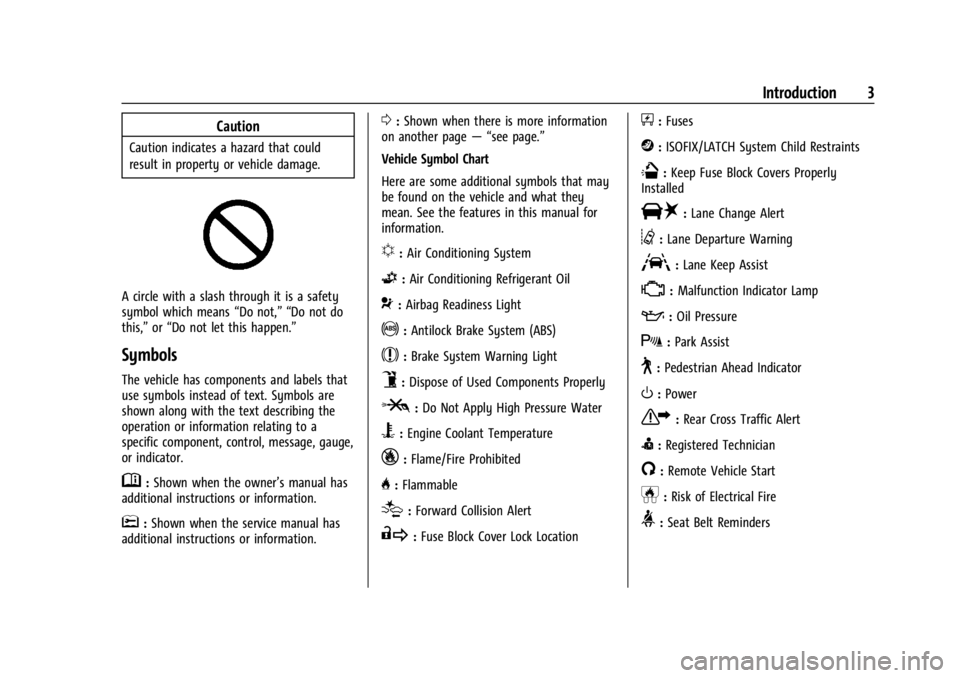
A circle with a slash through it is a safety
symbol which means“Do not,” “Do not do
this,” or“Do not let this happen.”
Symbols
The vehicle has components and labels that
use symbols instead of text. Symbols are
shown along with the text describing the
operation or information relating to a
specific component, control, message, gauge,
or indicator.
M:Shown when the owner’s manual has
additional instructions or information.
*: Shown when the service manual has
additional instructions or information.
0: Shown when there is more information
on another page — “see page.”
Vehicle Symbol Chart
Here are some additional symbols that may
be found on the vehicle and what they
mean. See the features in this manual for
information.
u: Air Conditioning System
G:Air Conditioning Refrigerant Oil
9:Airbag Readiness Light
!:Antilock Brake System (ABS)
$:Brake System Warning Light
9:Dispose of Used Components Properly
P:Do Not Apply High Pressure Water
B:Engine Coolant Temperature
_:Flame/Fire Prohibited
H: Flammable
[:Forward Collision Alert
R:Fuse Block Cover Lock Location
+:Fuses
j:ISOFIX/LATCH System Child Restraints
Q:Keep Fuse Block Covers Properly
Installed
|: Lane Change Alert
@:Lane Departure Warning
A:Lane Keep Assist
*: Malfunction Indicator Lamp
::Oil Pressure
X:Park Assist
~:Pedestrian Ahead Indicator
O:Power
7:Rear Cross Traffic Alert
I:Registered Technician
/:Remote Vehicle Start
h:Risk of Electrical Fire
>:Seat Belt Reminders
Page 59 of 373
Cadillac XT4 Owner Manual (GMNA-Localizing-U.S./Canada/Mexico-
17180837) - 2024 - CRC - 2/28/23
58 Seats and Restraints
system will not be there to help protect
you in another crash. A new system will
include airbag modules and possibly other
parts. The service manual for the vehicle
covers the need to replace other parts.
.The vehicle has a crash sensing and
diagnostic module which records
information after a crash. SeeVehicle
Data Recording and Privacy 0349 and
Event Data Recorders 0350.
.Let only qualified technicians work on the
airbag system. Improper service can mean
that an airbag system will not work
properly. See your dealer for service.
Passenger Sensing System
The vehicle has a passenger sensing system
for the front outboard passenger position.
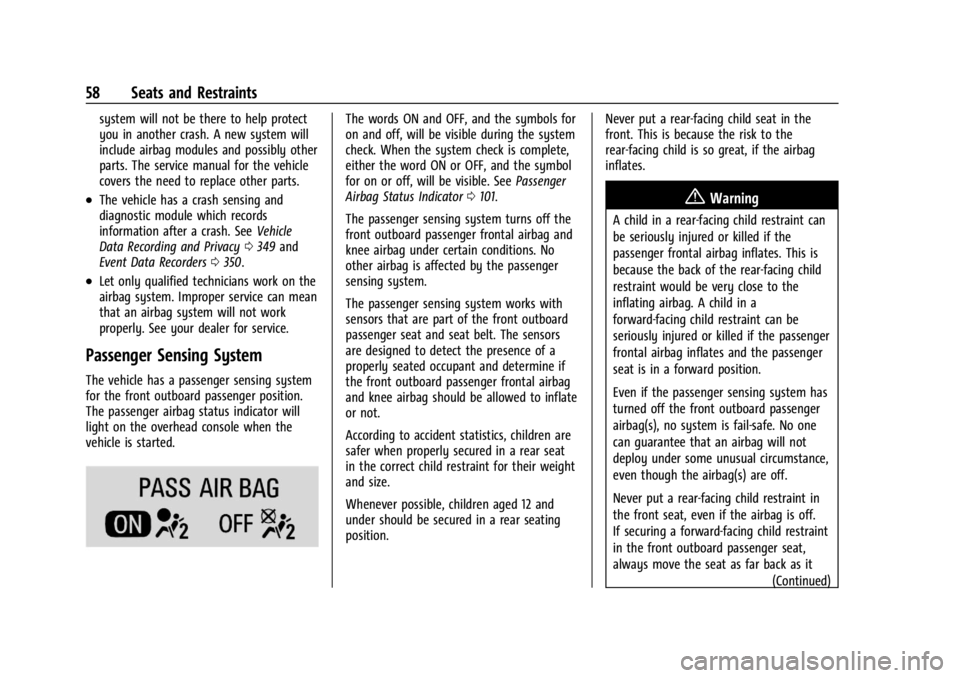
The passenger airbag status indicator will
light on the overhead console when the
vehicle is started.
The words ON and OFF, and the symbols for
on and off, will be visible during the system
check. When the system check is complete,
either the word ON or OFF, and the symbol
for on or off, will be visible. See Passenger
Airbag Status Indicator 0101.
The passenger sensing system turns off the
front outboard passenger frontal airbag and
knee airbag under certain conditions. No
other airbag is affected by the passenger
sensing system.
The passenger sensing system works with
sensors that are part of the front outboard
passenger seat and seat belt. The sensors
are designed to detect the presence of a
properly seated occupant and determine if
the front outboard passenger frontal airbag
and knee airbag should be allowed to inflate
or not.
According to accident statistics, children are
safer when properly secured in a rear seat
in the correct child restraint for their weight
and size.
Whenever possible, children aged 12 and
under should be secured in a rear seating
position. Never put a rear-facing child seat in the
front. This is because the risk to the
rear-facing child is so great, if the airbag
inflates.
{Warning
A child in a rear-facing child restraint can
be seriously injured or killed if the
passenger frontal airbag inflates. This is
because the back of the rear-facing child
restraint would be very close to the
inflating airbag. A child in a
forward-facing child restraint can be
seriously injured or killed if the passenger
frontal airbag inflates and the passenger
seat is in a forward position.
Even if the passenger sensing system has
turned off the front outboard passenger
airbag(s), no system is fail-safe. No one
can guarantee that an airbag will not
deploy under some unusual circumstance,
even though the airbag(s) are off.
Never put a rear-facing child restraint in
the front seat, even if the airbag is off.
If securing a forward-facing child restraint
in the front outboard passenger seat,
always move the seat as far back as it
(Continued)
Page 102 of 373

Cadillac XT4 Owner Manual (GMNA-Localizing-U.S./Canada/Mexico-
17180837) - 2024 - CRC - 2/28/23
Instruments and Controls 101
When the vehicle is started, these lights
come on solid to remind rear passengers to
fasten their seat belts. Then each light may
stay on solid or flash, and a chime may
come on if the rear passenger remains
unbuckled, or becomes unbuckled, when the
vehicle is moving. A shaded or green light
indicates the seat belt is buckled.
If all rear seat positions are buckled, neither
the chime nor the lights will come on.
The rear passenger seat belt reminder light
and chime may come on if an object is put
on the seat such as a briefcase, handbag,
grocery bag, laptop, or other electronic
device. To turn off the reminder light and/or
chime, remove the object from the seat or
buckle the seat belt.
Airbag Readiness Light
This light shows if there is an electrical
problem with the airbag system. It is
located in the instrument cluster. The
system check includes the airbag sensor(s),the passenger sensing system, the
pretensioners, the airbag modules, the
wiring, and the crash sensing and diagnostic
module. For more information on the airbag
system, see
Airbag System 053.
The airbag readiness light comes on for
several seconds when the vehicle is started.
If the light does not come on then, have it
fixed immediately.
{Warning
If the airbag readiness light stays on
after the vehicle is started or comes on
while driving, it means the airbag system
might not be working properly. The
airbags in the vehicle might not inflate in
a crash, or they could even inflate
without a crash. To help avoid injury,
have the vehicle serviced right away. If there is a problem with the airbag
system, a Driver Information Center (DIC)
message may also come on.
Passenger Airbag Status Indicator
The vehicle has a passenger sensing system.
See
Passenger Sensing System 058 for
important safety information. The overhead
console has a passenger airbag status
indicator.
When the vehicle is started, the passenger
airbag status indicator will light ON and OFF,
and the symbols for on and off, for several
seconds as a system check. Then, after
several more seconds, the status indicator
will light either ON or OFF, and either the
symbol for on or off, to let you know the
status of the front outboard passenger
frontal airbag and knee airbag.
Page 131 of 373
Cadillac XT4 Owner Manual (GMNA-Localizing-U.S./Canada/Mexico-
17180837) - 2024 - CRC - 2/28/23
130 Infotainment System
Infotainment System
Introduction
Introduction . . . . . . . . . . . . . . . . . . . . . . . . . . . 130
Overview . . . . . . . . . . . . . . . . . . . . . . . . . . . . . . . 131
Steering Wheel Controls . . . . . . . . . . . . . . . 132
Using the System . . . . . . . . . . . . . . . . . . . . . . 133
Software Updates . . . . . . . . . . . . . . . . . . . . . . 135
Radio
AM-FM Radio . . . . . . . . . . . . . . . . . . . . . . . . . . 135
Satellite Radio . . . . . . . . . . . . . . . . . . . . . . . . . 137
Radio Reception . . . . . . . . . . . . . . . . . . . . . . . . 137
Multi-Band Antenna . . . . . . . . . . . . . . . . . . . 138
Audio Players
Avoiding Untrusted Media Devices . . . . . 138
USB Port . . . . . . . . . . . . . . . . . . . . . . . . . . . . . . . 138
Bluetooth Audio . . . . . . . . . . . . . . . . . . . . . . . 138
Navigation
Using the Navigation System . . . . . . . . . . 139
Maps . . . . . . . . . . . . . . . . . . . . . . . . . . . . . . . . . . 140
Navigation Symbols . . . . . . . . . . . . . . . . . . . 140
Destination . . . . . . . . . . . . . . . . . . . . . . . . . . . . 140
Global Positioning System (GPS) . . . . . . . 141
Vehicle Positioning . . . . . . . . . . . . . . . . . . . . . 141
Problems with Route Guidance . . . . . . . . 142
Voice Recognition
Voice Recognition . . . . . . . . . . . . . . . . . . . . . . 142
Phone
Bluetooth (Overview) . . . . . . . . . . . . . . . . . . 144
Bluetooth (Pairing and Using aPhone) . . . . . . . . . . . . . . . . . . . . . . . . . . . . . . . 145
Apple CarPlay and Android Auto . . . . . . 148
Settings
Settings . . . . . . . . . . . . . . . . . . . . . . . . . . . . . . . 150
Teen Driver . . . . . . . . . . . . . . . . . . . . . . . . . . . . 152
Trademarks and License Agreements
Trademarks and License Agreements . . . 155
Introduction
Read the following pages to become familiar
with the features.
{Warning
Taking your eyes off the road for too
long or too often while using any
infotainment feature can cause a crash.
You or others could be injured or killed.
Do not give extended attention to
infotainment tasks while driving. Limit
your glances at the vehicle displays and
focus your attention on driving. Use voice
commands whenever possible.
The infotainment system has built-in
features intended to help avoid distraction
by disabling some features when driving.
These features may gray out when they are
unavailable. Many infotainment features are
also available through the instrument cluster
and steering wheel controls.
Before driving:
.Become familiar with the operation,
center stack controls, steering wheel
controls, and infotainment display.
Page 141 of 373
Cadillac XT4 Owner Manual (GMNA-Localizing-U.S./Canada/Mexico-
17180837) - 2024 - CRC - 2/28/23
140 Infotainment System
Super Cruise
If equipped, Super Cruise highlights routes in
a specific outline, seeSuper Cruise0206.
Maps
Auto-downloaded Maps
Google Maps downloads maps automatically
for use when not connected to the Internet.
Offline maps make map data available to
vehicle features regardless of connectivity.
These offline maps are only available with
an applicable connected services plan.
To turn on auto-download:
1. Open Google Maps.
2. Touch the settings icon.
3. Touch Privacy center, then select Offline maps.
4. Select Auto-download offline maps.
5. Check the Internet connection and wait for the download to finish.
Downloading Offline Maps 1. Open Google Maps.
2. Touch Settings, then Offline maps.
3. Touch the Select your own map square icon. 4. Adjust the map to cover the desired area
to download.
5. Touch Download.
Navigation Symbols
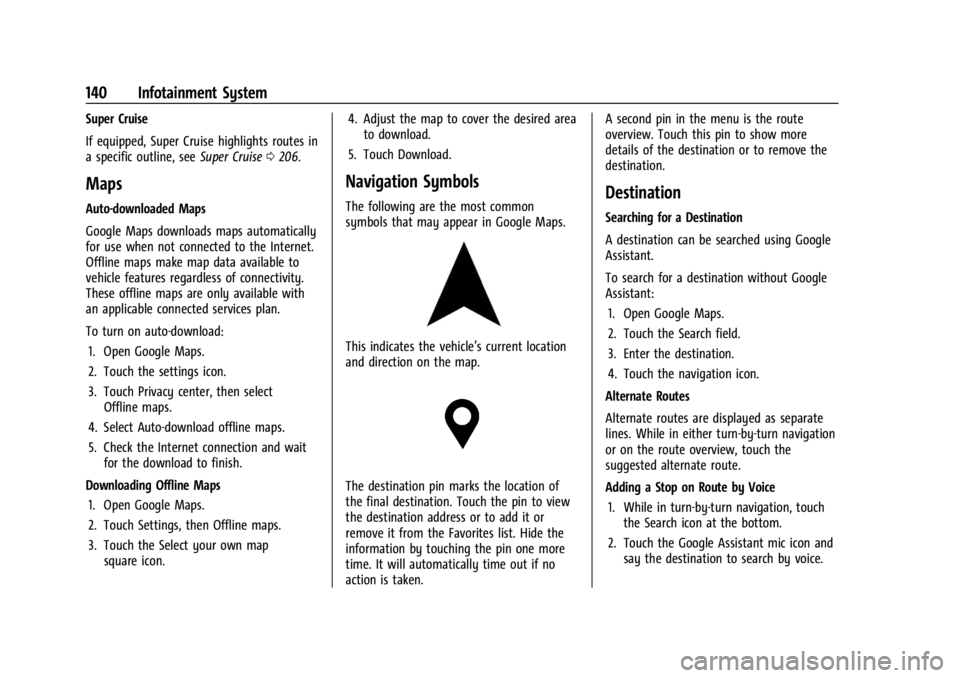
The following are the most common
symbols that may appear in Google Maps.
This indicates the vehicle’s current location
and direction on the map.
The destination pin marks the location of
the final destination. Touch the pin to view
the destination address or to add it or
remove it from the Favorites list. Hide the
information by touching the pin one more
time. It will automatically time out if no
action is taken. A second pin in the menu is the route
overview. Touch this pin to show more
details of the destination or to remove the
destination.
Destination
Searching for a Destination
A destination can be searched using Google
Assistant.
To search for a destination without Google
Assistant:
1. Open Google Maps.
2. Touch the Search field.
3. Enter the destination.
4. Touch the navigation icon.
Alternate Routes
Alternate routes are displayed as separate
lines. While in either turn-by-turn navigation
or on the route overview, touch the
suggested alternate route.
Adding a Stop on Route by Voice 1. While in turn-by-turn navigation, touch the Search icon at the bottom.
2. Touch the Google Assistant mic icon and say the destination to search by voice.
Page 368 of 373

Cadillac XT4 Owner Manual (GMNA-Localizing-U.S./Canada/Mexico-
17180837) - 2024 - CRC - 2/28/23
Index 367
Mirrors (cont'd)Automatic Dimming Rearview . . . . . . . . . . 29
Convex . . . . . . . . . . . . . . . . . . . . . . . . . . . . . . . . . 26
Folding . . . . . . . . . . . . . . . . . . . . . . . . . . . . . . . . . 27
Heated . . . . . . . . . . . . . . . . . . . . . . . . . . . . . . . . . 28
Interior Rearview . . . . . . . . . . . . . . . . . . . . . . . 28
Manual Rearview . . . . . . . . . . . . . . . . . . . . . . . 28
Power . . . . . . . . . . . . . . . . . . . . . . . . . . . . . . . . . . 27
Rear Camera . . . . . . . . . . . . . . . . . . . . . . . . . . . . 29
Tilt in Reverse . . . . . . . . . . . . . . . . . . . . . . . . . . 28
Mode Driver Control . . . . . . . . . . . . . . . . . . . . . . . . . 190
Monitor System, Tire Pressure . . . . . . . . . . . 294
Multi-band Antenna . . . . . . . . . . . . . . . . . . . . . .138
Multi-Point Vehicle Inspection (MPVI) . . . . 332
N
Navigation Connected Services . . . . . . . . . . . . . . . . . . . . 357
Destination . . . . . . . . . . . . . . . . . . . . . . . . . . . . 140
Symbols . . . . . . . . . . . . . . . . . . . . . . . . . . . . . . . 140
Using the System . . . . . . . . . . . . . . . . . . . . . . 139
New Vehicle Break-In . . . . . . . . . . . . . . . . . . . . . 173
O
Odometer . . . . . . . . . . . . . . . . . . . . . . . . . . . . . . . . 96 Trip . . . . . . . . . . . . . . . . . . . . . . . . . . . . . . . . . . . . . 96
Off-Road Recovery . . . . . . . . . . . . . . . . . . . . . . . . . . . . . . . 166 Oil
Engine . . . . . . . . . . . . . . . . . . . . . . . . . . . . . . . . . 264
Engine Oil Life System . . . . . . . . . . . . . . . . . 266
Engine Oil Pressure Gauge . . . . . . . . . . . . . . 98
Pressure Light . . . . . . . . . . . . . . . . . . . . . . . . . 109
Older Children, Restraints . . . . . . . . . . . . . . . . . 63
Online Account . . . . . . . . . . . . . . . . . . . . . . . . . . 342
OnStar . . . . . . . . . . . . . . . . . . . . . . . . . . . . . . . . . . . 350 Additional Information . . . . . . . . . . . . . . . . . 354
Overview . . . . . . . . . . . . . . . . . . . . . . . . . . . . . . 352
OnStar Emergency . . . . . . . . . . . . . . . . . . . . . . . 353
OnStar Security . . . . . . . . . . . . . . . . . . . . . . . . . . 353
Outlets
Power . . . . . . . . . . . . . . . . . . . . . . . . . . . . . . . . . . 91
Overheating, Engine . . . . . . . . . . . . . . . . . . . . . . 271
Overview . . . . . . . . . . . . . . . . . . . . . . . . . . . . . . . . . 131 Instrument Panel . . . . . . . . . . . . . . . . . . . . . . . . 5
P
ParkAssist . . . . . . . . . . . . . . . . . . . . . . . . . . . . . 224, 227
Shifting Into . . . . . . . . . . . . . . . . . . . . . . . . . . . 179
Shifting Out of . . . . . . . . . . . . . . . . . . . . . . . . 180
Parking Brake and P (Park) MechanismCheck . . . . . . . . . . . . . . . . . . . . . . . . . . . . . . . . 275
Extended . . . . . . . . . . . . . . . . . . . . . . . . . . . . . . 180
Over Things That Burn . . . . . . . . . . . . . . . . . 180 Parking Assist
Automatic . . . . . . . . . . . . . . . . . . . . . . . . . . . . . 228
Parking or Backing Assistance Systems . . . . . . . . . . . . . . . . . . . . 224
Passenger Airbag Status Indicator . . . . . . . . . . . . . . . . 101
Compartment Air Filter . . . . . . . . . . . . . . . . . 161
Sensing System . . . . . . . . . . . . . . . . . . . . . . . . . 58
Pedestrian Ahead Indicator . . . . . . . . . . . . . . 106
Perchlorate Materials Requirements, California . . . . . . . . . . . . . . . . . . . . . . . . . . . . . . 261
Performance Shifting Light . . . . . . . . . . . . . . . . . . . . . . . . . . 105
Phone Apple CarPlay and Android Auto . . . . . . . 148
Bluetooth . . . . . . . . . . . . . . . . . . . . . . . . . . 144, 145
Port USB . . . . . . . . . . . . . . . . . . . . . . . . . . . . . . . . . . . . 138
Positioning Vehicle . . . . . . . . . . . . . . . . . . . . . . . . . . . . . . . . . 141
Power
Door Locks . . . . . . . . . . . . . . . . . . . . . . . . . . . . . . . 17
Mirrors . . . . . . . . . . . . . . . . . . . . . . . . . . . . . . . . . 27
Outlets . . . . . . . . . . . . . . . . . . . . . . . . . . . . . . . . . 91
Protection, Battery . . . . . . . . . . . . . . . . . . . . . 129
Retained Accessory (RAP) . . . . . . . . . . . . . . 179
Seat Adjustment . . . . . . . . . . . . . . . . . . . . . . . . 37
Windows . . . . . . . . . . . . . . . . . . . . . . . . . . . . . . . . 31
Page 370 of 373

Cadillac XT4 Owner Manual (GMNA-Localizing-U.S./Canada/Mexico-
17180837) - 2024 - CRC - 2/28/23
Index 369
Seat Belts (cont'd)Lap-Shoulder Belt . . . . . . . . . . . . . . . . . . . . . . . 49
Reminders . . . . . . . . . . . . . . . . . . . . . . . . . . . . . 100
Replacing after a Crash . . . . . . . . . . . . . . . . . 52
Use During Pregnancy . . . . . . . . . . . . . . . . . . . 51
Seats Head Restraints . . . . . . . . . . . . . . . . . . . . . . . . . 35
Heated and Ventilated, Front . . . . . . . . . . . 42
Heated, Rear . . . . . . . . . . . . . . . . . . . . . . . . . . . . 45
Lumbar Adjustment, Front . . . . . . . . . . . . . . 38
Massage . . . . . . . . . . . . . . . . . . . . . . . . . . . . . . . . 39
Memory . . . . . . . . . . . . . . . . . . . . . . . . . . . . . . . . 40
Power Adjustment, Front . . . . . . . . . . . . . . . 37
Rear . . . . . . . . . . . . . . . . . . . . . . . . . . . . . . . . . . . . 43
Reclining Seatbacks . . . . . . . . . . . . . . . . . . . . . 38
Securing Child Restraints . . . . . . . . . . . . . . .76, 78
Security
Light . . . . . . . . . . . . . . . . . . . . . . . . . . . . . . . . . . . 110
OnStar . . . . . . . . . . . . . . . . . . . . . . . . . . . . . . . . . 353
Vehicle . . . . . . . . . . . . . . . . . . . . . . . . . . . . . . . . . 25
Vehicle Alarm . . . . . . . . . . . . . . . . . . . . . . . . . . . 25
Service . . . . . . . . . . . . . . . . . . . . . . . . . . . . . . . . . . . . 161 Accessories and Modifications . . . . . . . . . 261
Doing Your Own Work . . . . . . . . . . . . . . . . . 261
Electric Parking Brake Light . . . . . . . . . . . . 104
Maintenance Records . . . . . . . . . . . . . . . . . . 336
Maintenance, General Information . . . . . 329
Parts Identification . . . . . . . . . . . . . . . . . . . . . 337 Service (cont'd)
Scheduling Appointments . . . . . . . . . . . . . . 345
Services Special Application . . . . . . . . . . . . . . . . . . . . . 333
Servicing the Airbag . . . . . . . . . . . . . . . . . . . . . . .61
Settings . . . . . . . . . . . . . . . . . . . . . . . . . . . . . . . . . . 150
Shifting Into Park . . . . . . . . . . . . . . . . . . . . . . . . . . . . . . 179
Out of Park . . . . . . . . . . . . . . . . . . . . . . . . . . . . 180
Signals, Turn and Lane-Change . . . . . . . . . . . . 127
Software Updates . . . . . . . . . . . . . . . . . . . . . . . . . 135
Spare Tire Compact . . . . . . . . . . . . . . . . . . . . . . . . . . . . . . . 315
Special Application Services . . . . . . . . . . . . . . 333
Specifications and Capacities . . . . . . . . . . . . . 338
Speed Limiter . . . . . . . . . . . . . . . . . . . . . . . . . . . . . . . . . 194
Limiter Indicator . . . . . . . . . . . . . . . . . . . . . . . . 97
Speedometer . . . . . . . . . . . . . . . . . . . . . . . . . . . . . 96
Start Assist, Hill . . . . . . . . . . . . . . . . . . . . . . . . . . 189
Start Vehicle, Remote . . . . . . . . . . . . . . . . . . . . . .14
Starting the Engine . . . . . . . . . . . . . . . . . . . . . . . 175
Status Vehicle . . . . . . . . . . . . . . . . . . . . . . . . . . . . . . . . . 113
Steering . . . . . . . . . . . . . . . . . . . . . . . . . . . . . . . . . 165 Heated Wheel . . . . . . . . . . . . . . . . . . . . . . . . . . 87
Wheel Adjustment . . . . . . . . . . . . . . . . . . . . . . 87
Wheel Controls . . . . . . . . . . . . . . . . . . . . . . . . 132 Stop/Start System . . . . . . . . . . . . . . . . . . . . . . . 176
Storage
Center Console . . . . . . . . . . . . . . . . . . . . . . . . . 83
Compartments . . . . . . . . . . . . . . . . . . . . . . . . . . 81
Cupholders . . . . . . . . . . . . . . . . . . . . . . . . . . . . . 81
Front . . . . . . . . . . . . . . . . . . . . . . . . . . . . . . . . . . . 82
Glove Box . . . . . . . . . . . . . . . . . . . . . . . . . . . . . . 81
Rear . . . . . . . . . . . . . . . . . . . . . . . . . . . . . . . . . . . . 82
Roof Rack System . . . . . . . . . . . . . . . . . . . . . . . 85
Sunglasses . . . . . . . . . . . . . . . . . . . . . . . . . . . . . . 82
Umbrella . . . . . . . . . . . . . . . . . . . . . . . . . . . . . . . 84
Storage Areas Cargo Cover . . . . . . . . . . . . . . . . . . . . . . . . . . . . 84
Storing the Tire Sealant and Compressor Kit . . . . . . . . . . . . . . . . . . . . . . . . . 310
Struts
Gas . . . . . . . . . . . . . . . . . . . . . . . . . . . . . . . . . . . . 277
Stuck Vehicle . . . . . . . . . . . . . . . . . . . . . . . . . . . . 169
Summer Tires . . . . . . . . . . . . . . . . . . . . . . . . . . . . 288
Sun Visors . . . . . . . . . . . . . . . . . . . . . . . . . . . . . . . . .33
Sunglass Storage . . . . . . . . . . . . . . . . . . . . . . . . . 82
Sunroof . . . . . . . . . . . . . . . . . . . . . . . . . . . . . . . . . . . .33
Super Cruise . . . . . . . . . . . . . . . . . . . . . . . . . . . . . 206 Light . . . . . . . . . . . . . . . . . . . . . . . . . . . . . . . . . . . . 111
Surround
Vision System . . . . . . . . . . . . . . . . . . . . . . . . . 225
Symbols . . . . . . . . . . . . . . . . . . . . . . . . . . . . . . . . . . . .3 Navigation . . . . . . . . . . . . . . . . . . . . . . . . . . . . . 140
Page 372 of 373

Cadillac XT4 Owner Manual (GMNA-Localizing-U.S./Canada/Mexico-
17180837) - 2024 - CRC - 2/28/23
Index 371
V
VehicleAhead Indicator . . . . . . . . . . . . . . . . . . . . . . . . 106
Alarm System . . . . . . . . . . . . . . . . . . . . . . . . . . 25
Canadian Owners . . . . . . . . . . . . . . . . . . . . . . . . 2
Control . . . . . . . . . . . . . . . . . . . . . . . . . . . . . . . . 165
Data Recording and Privacy . . . . . . . . . . . . 349
Design . . . . . . . . . . . . . . . . . . . . . . . . . . . . . . . . . 163
Identification Number (VIN) . . . . . . . . . . . . 337
Load Limits . . . . . . . . . . . . . . . . . . . . . . . . . . . . 170
Messages . . . . . . . . . . . . . . . . . . . . . . . . . . . . . . . 118
Positioning . . . . . . . . . . . . . . . . . . . . . . . . . . . . . 141
Remote Start . . . . . . . . . . . . . . . . . . . . . . . . . . . 14
Security . . . . . . . . . . . . . . . . . . . . . . . . . . . . . . . . . 25
Speed Messages . . . . . . . . . . . . . . . . . . . . . . . . 118
Status . . . . . . . . . . . . . . . . . . . . . . . . . . . . . . . . . . 113
Symbols . . . . . . . . . . . . . . . . . . . . . . . . . . . . . . . . . 3
Vehicle Care Storing the Tire Sealant and
Compressor Kit . . . . . . . . . . . . . . . . . . . . . . . 310
Tire Pressure . . . . . . . . . . . . . . . . . . . . . . . . . . . 292
Ventilation, Air . . . . . . . . . . . . . . . . . . . . . . . . . . 160
Visors . . . . . . . . . . . . . . . . . . . . . . . . . . . . . . . . . . . . . .33
Voice Recognition . . . . . . . . . . . . . . . . . . . . . . . . .142
W
Warning Brake System Light . . . . . . . . . . . . . . . . . . . . 104 Warning (cont'd)
Caution and Danger . . . . . . . . . . . . . . . . . . . . . 2
Hazard Flashers . . . . . . . . . . . . . . . . . . . . . . . . . 127
Lights, Gauges, and Indicators . . . . . . . . . . 94
Washer Fluid . . . . . . . . . . . . . . . . . . . . . . . . . . . . 272
Wheels Alignment and Tire Balance . . . . . . . . . . . . 302
Different Size . . . . . . . . . . . . . . . . . . . . . . . . . . 300
Replacement . . . . . . . . . . . . . . . . . . . . . . . . . . . 302
When It Is Time for New Tires . . . . . . . . . . . 298
Where to Put the Restraint . . . . . . . . . . . . . . . 68
Windows . . . . . . . . . . . . . . . . . . . . . . . . . . . . . . . . . . 31 Power . . . . . . . . . . . . . . . . . . . . . . . . . . . . . . . . . . . 31
Windshield Replacement . . . . . . . . . . . . . . . . . . . . . . . . . . . 276
Wiper/Washer . . . . . . . . . . . . . . . . . . . . . . . . . . 88
Winter Cover . . . . . . . . . . . . . . . . . . . . . . . . . . . . . . . . . . . 177
Driving . . . . . . . . . . . . . . . . . . . . . . . . . . . . . . . . 168
Tires . . . . . . . . . . . . . . . . . . . . . . . . . . . . . . . . . . . 287
Wiper
Blade Replacement . . . . . . . . . . . . . . . . . . . . 275
Rear Washer . . . . . . . . . . . . . . . . . . . . . . . . . . . . 90
Wireless Charging . . . . . . . . . . . . . . . . . . . . . . . . .91