center console CADILLAC XT4 2024 Owners Manual
[x] Cancel search | Manufacturer: CADILLAC, Model Year: 2024, Model line: XT4, Model: CADILLAC XT4 2024Pages: 373, PDF Size: 8.01 MB
Page 27 of 373

Cadillac XT4 Owner Manual (GMNA-Localizing-U.S./Canada/Mexico-
17180837) - 2024 - CRC - 2/28/23
26 Keys, Doors, and Windows
How to Detect a Tamper Condition
IfIis pressed and the horn chirps and the
lights flash three times, the alarm was
activated while the alarm system was
armed.
If the alarm system has been activated, a
message will appear on the DIC.
Immobilizer
See Radio Frequency Statement 0348.
Immobilizer Operation
This vehicle has a passive theft-deterrent
system.
The system does not have to be manually
armed or disarmed.
The vehicle is automatically immobilized
when the vehicle is turned off.
The immobilization system is disarmed
when the ignition is on or in accessory
mode and a valid remote key is present in
the vehicle.
The security light, in the instrument cluster,
comes on if there is a problem with arming
or disarming the theft-deterrent system.
The system has one or more remote keys
matched to an immobilizer control unit in
your vehicle. Only a correctly matched
remote key will start the vehicle. If the
remote key is ever damaged, you may not
be able to start your vehicle.
When trying to start the vehicle, the
security light may come on briefly when the
ignition is turned on.
If the engine does not start and the security
light stays on, there is a problem with the
system. Turn the ignition off and try again.
If the vehicle will not change ignition modes
(accessory mode, on, off), and the remote
key appears to be undamaged, try another
remote key. Or, you may try placing the
remote key in the front cupholder located in
the center console. See Remote Key
Operation 08. If the ignition mode will not change with
the other remote key or in the front
cupholder, your vehicle needs service. If the
ignition does change modes, the first
remote key may be faulty. See your dealer
who can service the theft-deterrent system
and have a new remote key programmed to
the vehicle.
It is possible for the immobilizer system to
learn new or replacement remote keys. Up
to eight remote keys can be programmed
for the vehicle. To program additional
remote keys, see
“Programming Remote
Keys to the Vehicle” underRemote Key
Operation 08.
Do not leave the key or device that disarms
or deactivates the theft-deterrent system in
the vehicle.
Exterior Mirrors
Convex Mirrors
{Warning
A convex mirror can make things, like
other vehicles, look farther away than
they really are. If you cut too sharply (Continued)
Page 46 of 373

Cadillac XT4 Owner Manual (GMNA-Localizing-U.S./Canada/Mexico-
17180837) - 2024 - CRC - 2/28/23
Seats and Restraints 45
Heated Rear Seats
{Warning
If temperature change or pain to the skin
cannot be felt, the seat heater may cause
burns. See the Warning underHeated
and Ventilated Front Seats 042.
If equipped, the rear heated seat buttons
are on the rear of the center console.
With the engine running, press
MorLto
heat the left outboard or right outboard
seat. Press the button once for the highest
setting. With each press of the button, the
seat will change to the next lower setting, and then to the off setting. The indicator
lights on the buttons indicate three for the
highest setting and one for the lowest.
If the heated rear seats are on the highest
setting, the level may automatically be
lowered after approximately 30 minutes.
Seat Belts
This section describes how to use seat belts
properly, and some things not to do.
{Warning
Do not let anyone ride where a seat belt
cannot be worn properly. In a crash,
if you or your passenger(s) are not
wearing seat belts, injuries can be much
worse than if you are wearing seat belts.
You can be seriously injured or killed by
hitting things inside the vehicle harder or
by being ejected from the vehicle. In
addition, anyone who is not buckled up
can strike other passengers in the vehicle.
It is extremely dangerous to ride in a
cargo area, inside or outside of a vehicle.
In a collision, passengers riding in these
areas are more likely to be seriously
(Continued)
Warning (Continued)
injured or killed. Do not allow passengers
to ride in any area of the vehicle that is
not equipped with seats and seat belts.
Always wear a seat belt, and check that
all passenger(s) are restrained
properly too.
This vehicle has indicators as a reminder to
buckle the seat belts. See Seat Belt
Reminders 0100.
Why Seat Belts Work
Page 82 of 373

Cadillac XT4 Owner Manual (GMNA-Localizing-U.S./Canada/Mexico-
17180837) - 2024 - CRC - 2/28/23
Storage 81
Storage
Storage Compartments
Storage Compartments . . . . . . . . . . . . . . . . . 81
Glove Box . . . . . . . . . . . . . . . . . . . . . . . . . . . . . . 81
Cupholders . . . . . . . . . . . . . . . . . . . . . . . . . . . . . 81
Front Storage . . . . . . . . . . . . . . . . . . . . . . . . . . . 82
Sunglasses Storage . . . . . . . . . . . . . . . . . . . . . 82
Rear Storage . . . . . . . . . . . . . . . . . . . . . . . . . . . 82
Center Console Storage . . . . . . . . . . . . . . . . . 83
Umbrella Storage . . . . . . . . . . . . . . . . . . . . . . . 84
Additional Storage Features
Cargo Cover . . . . . . . . . . . . . . . . . . . . . . . . . . . . 84
Cargo Tie-Downs . . . . . . . . . . . . . . . . . . . . . . . 85
Roof Rack System
Roof Rack System . . . . . . . . . . . . . . . . . . . . . . 85
Storage Compartments{
Warning
Do not store heavy or sharp objects in
storage compartments. In a crash, these
objects may cause the cover to open and
could result in injury.
Glove Box
Lift the handle to open the glove box. Close
until it latches. Use the vehicle key to lock
or unlock. See Keys07.
Cupholders
The front cupholders are in the center
console.
If equipped, lower the armrest to access the
rear cupholders.
Page 84 of 373

Cadillac XT4 Owner Manual (GMNA-Localizing-U.S./Canada/Mexico-
17180837) - 2024 - CRC - 2/28/23
Storage 83
Remove the load floor hook from the holder
and hook to the weatherstrip above.
When done, return the load floor hook to
the holder.
To install the load floor hook into the
holder:
1. Insert one side of the load floor hookinto the holder.
2. Push down on the other side of the loadfloor hook to lock into place.
Center Console Storage
Press the button to access the storage area
in front of the armrest cover.
There is a 12-volt power outlet inside.
If equipped, there are two charge-only USB
ports on the rear of the center console.
Page 92 of 373
Cadillac XT4 Owner Manual (GMNA-Localizing-U.S./Canada/Mexico-
17180837) - 2024 - CRC - 2/28/23
Instruments and Controls 91
If equipped, push the windshield wiper lever
forward to spray washer fluid on the rear
camera lens. The lever returns to its starting
position when released. SeeRear Camera
Mirror 029.
Compass
The vehicle may have a compass display on
the Driver Information Center (DIC). The
compass receives its heading and other
information from the Global Positioning
System (GPS) antenna, StabiliTrak/Electronic
Stability Control (ESC), and vehicle speed
information.
The compass system is designed to operate
for a certain number of miles or degrees of
turn before needing a signal from the GPS
satellites. When the compass display shows
CAL, drive the vehicle for a short distance in
an open area where it can receive a GPS
signal. The compass system will
automatically determine when a GPS signal
is restored and provide a heading again.
Clock
Set the time and date using the
infotainment system. See "Time/Date" under
Settings 0150.
Power Outlets
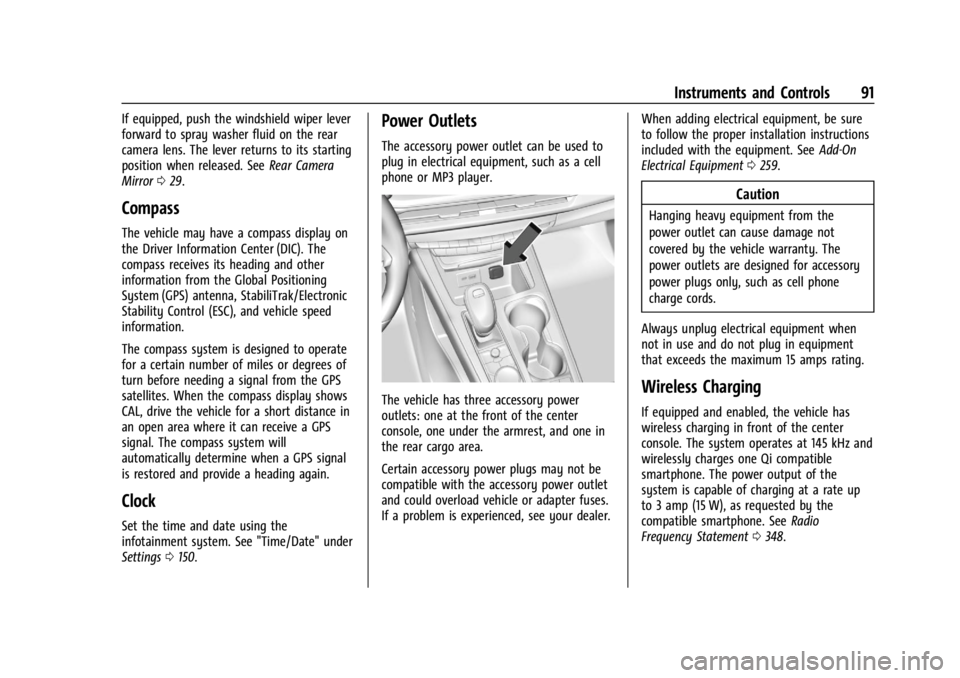
The accessory power outlet can be used to
plug in electrical equipment, such as a cell
phone or MP3 player.
The vehicle has three accessory power
outlets: one at the front of the center
console, one under the armrest, and one in
the rear cargo area.
Certain accessory power plugs may not be
compatible with the accessory power outlet
and could overload vehicle or adapter fuses.
If a problem is experienced, see your dealer. When adding electrical equipment, be sure
to follow the proper installation instructions
included with the equipment. See
Add-On
Electrical Equipment 0259.
Caution
Hanging heavy equipment from the
power outlet can cause damage not
covered by the vehicle warranty. The
power outlets are designed for accessory
power plugs only, such as cell phone
charge cords.
Always unplug electrical equipment when
not in use and do not plug in equipment
that exceeds the maximum 15 amps rating.
Wireless Charging
If equipped and enabled, the vehicle has
wireless charging in front of the center
console. The system operates at 145 kHz and
wirelessly charges one Qi compatible
smartphone. The power output of the
system is capable of charging at a rate up
to 3 amp (15 W), as requested by the
compatible smartphone. See Radio
Frequency Statement 0348.
Page 102 of 373

Cadillac XT4 Owner Manual (GMNA-Localizing-U.S./Canada/Mexico-
17180837) - 2024 - CRC - 2/28/23
Instruments and Controls 101
When the vehicle is started, these lights
come on solid to remind rear passengers to
fasten their seat belts. Then each light may
stay on solid or flash, and a chime may
come on if the rear passenger remains
unbuckled, or becomes unbuckled, when the
vehicle is moving. A shaded or green light
indicates the seat belt is buckled.
If all rear seat positions are buckled, neither
the chime nor the lights will come on.
The rear passenger seat belt reminder light
and chime may come on if an object is put
on the seat such as a briefcase, handbag,
grocery bag, laptop, or other electronic
device. To turn off the reminder light and/or
chime, remove the object from the seat or
buckle the seat belt.
Airbag Readiness Light
This light shows if there is an electrical
problem with the airbag system. It is
located in the instrument cluster. The
system check includes the airbag sensor(s),the passenger sensing system, the
pretensioners, the airbag modules, the
wiring, and the crash sensing and diagnostic
module. For more information on the airbag
system, see
Airbag System 053.
The airbag readiness light comes on for
several seconds when the vehicle is started.
If the light does not come on then, have it
fixed immediately.
{Warning
If the airbag readiness light stays on
after the vehicle is started or comes on
while driving, it means the airbag system
might not be working properly. The
airbags in the vehicle might not inflate in
a crash, or they could even inflate
without a crash. To help avoid injury,
have the vehicle serviced right away. If there is a problem with the airbag
system, a Driver Information Center (DIC)
message may also come on.
Passenger Airbag Status Indicator
The vehicle has a passenger sensing system.
See
Passenger Sensing System 058 for
important safety information. The overhead
console has a passenger airbag status
indicator.
When the vehicle is started, the passenger
airbag status indicator will light ON and OFF,
and the symbols for on and off, for several
seconds as a system check. Then, after
several more seconds, the status indicator
will light either ON or OFF, and either the
symbol for on or off, to let you know the
status of the front outboard passenger
frontal airbag and knee airbag.
Page 118 of 373
Cadillac XT4 Owner Manual (GMNA-Localizing-U.S./Canada/Mexico-
17180837) - 2024 - CRC - 2/28/23
Instruments and Controls 117
Speed Limit Style Adjustment
If equipped, the speed limit style can be
changed to a speed limit bar or speed limit
sign from the Options menu in the
infotainment display. The multifunction
controller (MFC) on the center console can
be used while Speed Limit Style is selected
to change the speed sign style or to turn
it off.
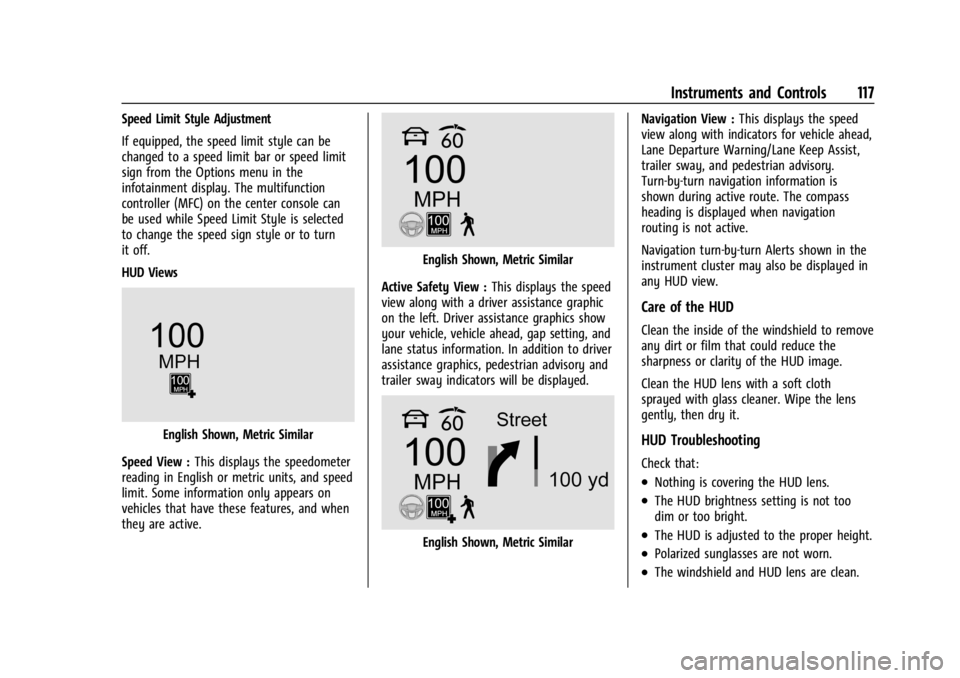
HUD Views
English Shown, Metric Similar
Speed View : This displays the speedometer
reading in English or metric units, and speed
limit. Some information only appears on
vehicles that have these features, and when
they are active.
English Shown, Metric Similar
Active Safety View : This displays the speed
view along with a driver assistance graphic
on the left. Driver assistance graphics show
your vehicle, vehicle ahead, gap setting, and
lane status information. In addition to driver
assistance graphics, pedestrian advisory and
trailer sway indicators will be displayed.
English Shown, Metric Similar Navigation View :
This displays the speed
view along with indicators for vehicle ahead,
Lane Departure Warning/Lane Keep Assist,
trailer sway, and pedestrian advisory.
Turn-by-turn navigation information is
shown during active route. The compass
heading is displayed when navigation
routing is not active.
Navigation turn-by-turn Alerts shown in the
instrument cluster may also be displayed in
any HUD view.
Care of the HUD
Clean the inside of the windshield to remove
any dirt or film that could reduce the
sharpness or clarity of the HUD image.
Clean the HUD lens with a soft cloth
sprayed with glass cleaner. Wipe the lens
gently, then dry it.
HUD Troubleshooting
Check that:
.Nothing is covering the HUD lens.
.The HUD brightness setting is not too
dim or too bright.
.The HUD is adjusted to the proper height.
.Polarized sunglasses are not worn.
.The windshield and HUD lens are clean.
Page 132 of 373
Cadillac XT4 Owner Manual (GMNA-Localizing-U.S./Canada/Mexico-
17180837) - 2024 - CRC - 2/28/23
Infotainment System 131
.Set up the audio by presetting favorite
stations, setting the tone, and adjusting
the speakers.
.Set up phone numbers in advance so they
can be called easily by pressing a single
control or by using a single voice
command.
See Distracted Driving 0164.
Active Noise Cancellation (ANC)
If equipped, ANC reduces engine noise in the
vehicle’s interior. ANC requires the
factory-installed audio system, radio,
speakers, amplifier (if equipped), induction
system, and exhaust system to work
properly. Deactivation is required by your
dealer if related aftermarket equipment is
installed.
Overview
Infotainment System
The infotainment system is controlled by
using the infotainment display,
multifunction controller (MFC) on the center
console, steering wheel controls, and voice
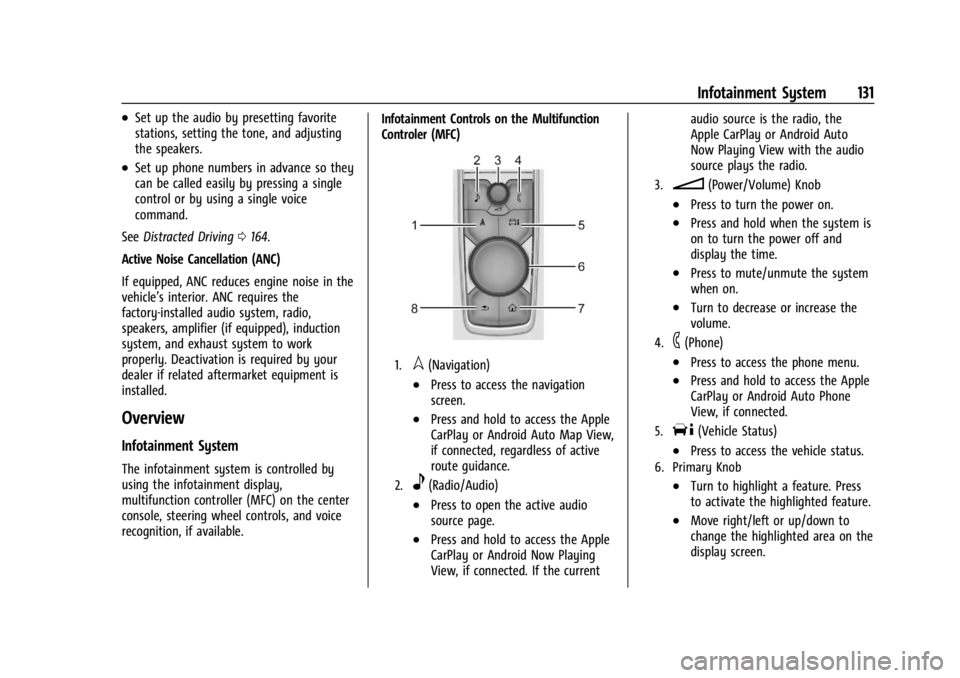
recognition, if available. Infotainment Controls on the Multifunction
Controler (MFC)
1.l(Navigation)
.Press to access the navigation
screen.
.Press and hold to access the Apple
CarPlay or Android Auto Map View,
if connected, regardless of active
route guidance.
2.e(Radio/Audio)
.Press to open the active audio
source page.
.Press and hold to access the Apple
CarPlay or Android Now Playing
View, if connected. If the currentaudio source is the radio, the
Apple CarPlay or Android Auto
Now Playing View with the audio
source plays the radio.
3.n(Power/Volume) Knob
.Press to turn the power on.
.Press and hold when the system is
on to turn the power off and
display the time.
.Press to mute/unmute the system
when on.
.Turn to decrease or increase the
volume.
4.6(Phone)
.Press to access the phone menu.
.Press and hold to access the Apple
CarPlay or Android Auto Phone
View, if connected.
5.T(Vehicle Status)
.Press to access the vehicle status.
6. Primary Knob
.Turn to highlight a feature. Press
to activate the highlighted feature.
.Move right/left or up/down to
change the highlighted area on the
display screen.
Page 162 of 373

Cadillac XT4 Owner Manual (GMNA-Localizing-U.S./Canada/Mexico-
17180837) - 2024 - CRC - 2/28/23
Climate Controls 161
Adjustable air vents are in the center and on
the sides of the instrument panel, and on
the rear of the center console storage.
Move the slider knobs to change the
direction of or to close off the airflow.
Operation Tips
.Clear away any ice, snow, or leaves from
air inlets at the base of the windshield
that could block the flow of air into the
vehicle.
.Clear snow off the hood to improve
visibility and help decrease moisture
drawn into the vehicle.
.Keep the path under the front seats clear
of objects to help circulate the air inside
of the vehicle more effectively.
.Use of non-GM approved hood deflectors
can adversely affect the performance of
the system. Check with your dealer
before adding equipment to the outside
of the vehicle.
.Do not attach any devices to the air vent
slats. This restricts airflow and may cause
damage to the air vents.
Maintenance
Passenger Compartment Air Filter
The filter reduces dust, pollen, and other
airborne irritants from outside air that is
pulled into the vehicle. The filter should be
replaced as part of routine scheduled
maintenance. SeeMaintenance Schedule
0 330.
See your dealer regarding replacement of
the filter.
Service
All vehicles have a label underhood that
identifies the refrigerant used in the vehicle.
The refrigerant system should only be
serviced by trained and certified technicians.
The air conditioning evaporator should never
be repaired or replaced by one from a
salvage vehicle. It should only be replaced
by a new evaporator to ensure proper and
safe operation.
During service, all refrigerants should be
reclaimed with proper equipment. Venting
refrigerants directly to the atmosphere is
harmful to the environment and may also create unsafe conditions based on
inhalation, combustion, frostbite, or other
health-based concerns.
The air conditioning system requires periodic
maintenance. See
Maintenance Schedule
0 330.
Page 192 of 373

Cadillac XT4 Owner Manual (GMNA-Localizing-U.S./Canada/Mexico-
17180837) - 2024 - CRC - 2/28/23
Driving and Operating 191
affected vehicle systems are dependent on
vehicle trim level, region, and optional
features.
If the vehicle is in Tour or AWD Mode, it
will stay in that mode through future
ignition cycles. If the vehicle is in any other
mode, it will return to Tour Mode when the
vehicle is restarted. When a mode is
selected, an indicator will come on in the
instrument cluster and stay on.
Driver Mode Control Switch
To activate each mode, press the MODE
button on the center console.
Tour Mode : Use for normal city and
highway driving to provide a smooth ride.
This setting provides balance between comfort and handling. This is the standard/
default mode. There is no persistent
indicator in the instrument cluster for
this mode.
AWD Mode :
AWD Mode provides torque to
all four wheels. Select AWD to improve
traction and control on slippery road
surfaces, such as gravel, sand, wet
pavement, snow, and ice. For more
information on AWD Mode, see All-Wheel
Drive 0186.
Sport Mode : Use where road conditions or
personal preference demand a more
controlled response. Sport Mode improves
vehicle handling and acceleration on dry
pavement. When active, Sport Mode
modifies steering efforts, transmission
shifting, and AWD torque, if equipped.
The Performance Algorithm Liftfoot (PAL)
feature is enabled in Sport Mode. PAL allows
the transmission to hold the current gear
after a quick release of a heavily applied
accelerator pedal. This provides greater
engine braking and enhanced vehicle control.
When PAL is activated, there may be an
additional gear symbol that appears in the
instrument cluster display. See Performance
Shifting Light 0105. Off-Road Mode :
Use this mode for off-road
recreational driving. When active, Off–Road
Mode should be used to improve driving at
moderate speeds, on grass, gravel, dirt,
unpaved roads, or snow-covered roads. The
accelerator pedal is tuned for off-road use.
This mode modifies pedal mapping, AWD,
ESC, and TCS Performance.
Snow/Ice Mode : Snow/Ice Mode improves
vehicle acceleration on snow and ice covered
roads. When active, Snow/Ice Mode will
adjust acceleration to optimize traction on
slippery surfaces. This can compromise the
acceleration on dry asphalt. This feature is
not intended for use when the vehicle is
stuck in sand, mud, ice, snow, or gravel.
If the vehicle becomes stuck, see If the
Vehicle Is Stuck 0169.
qMy Mode : Use this mode to
personalize everyday driving. This mode
allows the driver to configure the vehicle
subsystem settings to their driving
preferences. My mode remains active across
on/off cycles.
Through the infotainment display, the
following vehicle subsystems may be
available for customization in this mode:
Acceleration Feel : Relaxed, Tour, Sport