power steering CADILLAC XT4 2024 Owners Manual
[x] Cancel search | Manufacturer: CADILLAC, Model Year: 2024, Model line: XT4, Model: CADILLAC XT4 2024Pages: 373, PDF Size: 8.01 MB
Page 7 of 373

Cadillac XT4 Owner Manual (GMNA-Localizing-U.S./Canada/Mexico-
17180837) - 2024 - CRC - 2/28/23
6 Introduction
1.Air Vents 0160.
2. Exterior Lamp Controls 0122.
Turn Signal Lever. See Turn and
Lane-Change Signals 0127.
IntelliBeam System Button (If Equipped).
See Exterior Lamp Controls 0122.
3. Tap Shift Controls. See Manual Mode
0 185 (If Equipped).
4. Instrument Cluster 094.
Driver Information Center (DIC) Display.
See Driver Information Center (DIC) 0111.
5. Windshield Wiper/Washer 088.
Rear Window Wiper/Washer 090.
6. ENGINE START/STOP Button. See Ignition
Positions 0174.
7. Infotainment Display. See Introduction
0 130.
8. Light Sensor. See Automatic Headlamp
System 0125.
9. Dual Automatic Climate Control System
0157.
10. Heated and Ventilated Front Seats 042
(If Equipped).
Park Assist Button. See Assistance
Systems for Parking or Backing 0224. Automatic Parking Assist (APA) Button.
See
Assistance Systems for Parking or
Backing 0224.
Hazard Warning Flashers 0127.
Lane Keep Assist (LKA) 0245 (If
Equipped).
11. Power Outlets 091.
12. Traction Control/Electronic Stability
Control 0189.
Auto Stop Disable Switch. See Stop/Start
System 0176.
MODE Switch. See Driver Mode Control
0 190.
13. Wireless Charging 091 (Out of View) (If
Equipped).
14. USB Port 0138.
15. Infotainment Controls. See Overview
0 131.
16. Shift Lever. See Automatic Transmission
0 181.
17. Steering Wheel Controls 0132.
Driver Information Center (DIC) Controls.
See Driver Information Center (DIC) 0111.
18. Horn 088.
19. Steering Wheel Adjustment 087 (Out
of View). 20.
Cruise Control 0192.
Adaptive Cruise Control (Advanced) 0196
(If Equipped).
Super Cruise 0206 (If Equipped).
Heated Steering Wheel 087 (If
Equipped).
Forward Collision Alert (FCA) System
0 233 (If Equipped).
21. Data Link Connector. See Malfunction
Indicator Lamp (Check Engine Light)
0 102 (Out of View).
22. Hood Release. See Hood0262 (Out
of View).
23. Instrument Panel Illumination Control
0128.
24. Electric Parking Brake 0187.
Page 87 of 373

Cadillac XT4 Owner Manual (GMNA-Localizing-U.S./Canada/Mexico-
17180837) - 2024 - CRC - 2/28/23
86 Instruments and Controls
Instruments and Controls
Controls
Steering Wheel Adjustment . . . . . . . . . . . . 87
Heated Steering Wheel . . . . . . . . . . . . . . . . . 87
Horn . . . . . . . . . . . . . . . . . . . . . . . . . . . . . . . . . . . 88
Windshield Wiper/Washer . . . . . . . . . . . . . 88
Rear Window Wiper/Washer . . . . . . . . . . . 90
Compass . . . . . . . . . . . . . . . . . . . . . . . . . . . . . . . . 91
Clock . . . . . . . . . . . . . . . . . . . . . . . . . . . . . . . . . . . 91
Power Outlets . . . . . . . . . . . . . . . . . . . . . . . . . . 91
Wireless Charging . . . . . . . . . . . . . . . . . . . . . . 91
Warning Lights, Gauges, and Indicators
Warning Lights, Gauges, andIndicators . . . . . . . . . . . . . . . . . . . . . . . . . . . . . 94
Instrument Cluster . . . . . . . . . . . . . . . . . . . . . 94
Speedometer . . . . . . . . . . . . . . . . . . . . . . . . . . . 96
Odometer . . . . . . . . . . . . . . . . . . . . . . . . . . . . . . 96
Trip Odometer . . . . . . . . . . . . . . . . . . . . . . . . . 96
Tachometer . . . . . . . . . . . . . . . . . . . . . . . . . . . . 96
Fuel Gauge . . . . . . . . . . . . . . . . . . . . . . . . . . . . . 97
Speed Limiter Indicator . . . . . . . . . . . . . . . . . 97
Engine Oil Pressure Gauge . . . . . . . . . . . . . 98
Engine Oil Temperature Gauge . . . . . . . . . 99
Engine Coolant Temperature Gauge . . . . 99
Seat Belt Reminders . . . . . . . . . . . . . . . . . . . 100
Airbag Readiness Light . . . . . . . . . . . . . . . . . 101
Passenger Airbag Status Indicator . . . . . . 101
Charging System Light . . . . . . . . . . . . . . . . 102 Malfunction Indicator Lamp (Check
Engine Light) . . . . . . . . . . . . . . . . . . . . . . . . 102
Brake System Warning Light . . . . . . . . . . 104
Electric Parking Brake Light . . . . . . . . . . . . 104
Service Electric Parking Brake Light . . . . 104
Antilock Brake System (ABS) Warning Light . . . . . . . . . . . . . . . . . . . . . . . . . . . . . . . . . 105
Gear Shifting Light . . . . . . . . . . . . . . . . . . . . 105
Performance Shifting Light . . . . . . . . . . . . 105
All-Wheel-Drive Light . . . . . . . . . . . . . . . . . . 105
Lane Keep Assist (LKA) Light . . . . . . . . . . . 106
Automatic Emergency Braking (AEB) Disabled Light . . . . . . . . . . . . . . . . . . . . . . . 106
Vehicle Ahead Indicator . . . . . . . . . . . . . . . 106
Pedestrian Ahead Indicator . . . . . . . . . . . . 106
Traction Off Light . . . . . . . . . . . . . . . . . . . . . . 107
Traction Control System (TCS)/Electronic Stability Control Light . . . . . . . . . . . . . . . 107
Electronic Stability Control (ESC) Off Light . . . . . . . . . . . . . . . . . . . . . . . . . . . . . . . . . 107
Engine Coolant Temperature Warning Light . . . . . . . . . . . . . . . . . . . . . . . . . . . . . . . . . 108
Driver Mode Control Light . . . . . . . . . . . . . 108
Tire Pressure Light . . . . . . . . . . . . . . . . . . . . 108
Engine Oil Pressure Light . . . . . . . . . . . . . . 109
Low Fuel Warning Light . . . . . . . . . . . . . . . 109
Auto Stop Indicator . . . . . . . . . . . . . . . . . . . . 110
Security Light . . . . . . . . . . . . . . . . . . . . . . . . . . 110
High-Beam On Light . . . . . . . . . . . . . . . . . . . 110 Adaptive Forward Lighting (AFL)
Light . . . . . . . . . . . . . . . . . . . . . . . . . . . . . . . . . 110
Lamps On Reminder . . . . . . . . . . . . . . . . . . . 110
Cruise Control Light . . . . . . . . . . . . . . . . . . . . 111
Adaptive Cruise Control Light . . . . . . . . . . . 111
Super Cruise Light . . . . . . . . . . . . . . . . . . . . . . 111
Door Ajar Light . . . . . . . . . . . . . . . . . . . . . . . . . 111
Information Displays
Driver Information Center (DIC) . . . . . . . . 111
Vehicle Status . . . . . . . . . . . . . . . . . . . . . . . . . . 113
Head-Up Display (HUD) . . . . . . . . . . . . . . . . 115
Vehicle Messages
Vehicle Messages . . . . . . . . . . . . . . . . . . . . . . 118
Engine Power Messages . . . . . . . . . . . . . . . 118
Vehicle Speed Messages . . . . . . . . . . . . . . . 118
Universal Remote System
Universal Remote System . . . . . . . . . . . . . . 119
Universal Remote System Programming . . . . . . . . . . . . . . . . . . . . . . . . 119
Universal Remote System Operation . . . 121
Page 88 of 373

Cadillac XT4 Owner Manual (GMNA-Localizing-U.S./Canada/Mexico-
17180837) - 2024 - CRC - 2/28/23
Instruments and Controls 87
Controls
Steering Wheel Adjustment
Manual Steering Wheel
To adjust the steering wheel:1. Pull the lever down.
2. Move the steering wheel up or down.
3. Pull or push the steering wheel closer or away from you.
4. Pull the lever up to lock the steering wheel in place.
Do not adjust the steering wheel while
driving. Power Tilt and Telescoping Steering Wheel
Press the control to move the tilt and
telescoping steering wheel up and down or
forward and rearward.
Do not adjust the steering wheel while
driving.
Heated Steering Wheel
(:
If equipped, press to turn on or off.
A light near the button displays when the
feature is turned on.
The steering wheel takes about
three minutes to reach maximum heat.
Automatic Heated Steering Wheel
If equipped with remote start, the heated
steering wheel will turn on automatically
during a remote start along with the heated
seats when it is cold outside. The heated
steering wheel indicator light may come on.
Page 119 of 373
Cadillac XT4 Owner Manual (GMNA-Localizing-U.S./Canada/Mexico-
17180837) - 2024 - CRC - 2/28/23
118 Instruments and Controls
If the HUD image is not correct, contact
your dealer.
The windshield is part of the HUD system.
SeeWindshield Replacement 0276.
Vehicle Messages
Messages displayed on the Driver
Information Center (DIC) indicate the status
of the vehicle or some action that may be
needed to correct a condition. Multiple
messages may appear one after another.
Vehicle status notifications are also sent to
the infotainment display. Touching
Uon
the infotainment display opens the
notification drawer where all the active
vehicle messages can be viewed. Depending
on the message, you can schedule a service
or find the nearest dealer. When there are
active messages that can be viewed, a red
dot appears on top of the notification icon
on the infotainment display.
The messages that do not require
immediate action can be acknowledged and
cleared by pressing the thumbwheel. The
messages that require immediate action
cannot be cleared until that action is
performed. All messages should be taken seriously;
clearing the message does not correct the
problem.
If a SERVICE message appears, see your
dealer.
Follow the instructions given in the
messages. The system displays messages
regarding the following topics:
.Service Messages
.Fluid Levels
.Vehicle Security
.Brakes
.Ride Control Systems
.Advanced Driver Assistance Systems
.Cruise Control
.Lighting and Bulb Replacement
.Wiper/Washer Systems
.Doors and Windows
.Seat Belts
.Airbag Systems
.Propulsion
.Tire Pressure
.Battery
.Steering
Engine Power Messages
REDUCED ACCELERATION DRIVE
WITH CARE
This message displays when the vehicle's
propulsion power is reduced. A reduction in
propulsion power can affect the vehicle's
ability to accelerate. If this message is on,
but there is no observed reduction in
performance, proceed to your destination.
Under certain conditions the performance
may be reduced the next time the vehicle is
driven. The vehicle may be driven while this
message is on, but maximum acceleration
and speed may be reduced. Anytime this
message stays on, or displays repeatedly,
the vehicle should be taken to your dealer
for service as soon as possible.
Under certain operating conditions,
propulsion will be disabled. Try restarting
after the ignition has been off for
two minutes.
Vehicle Speed Messages
SPEED LIMITED TO XXX KM/H (MPH)
This message shows that the vehicle speed
has been limited to the speed displayed. The
limited speed is a protection for various
Page 132 of 373
Cadillac XT4 Owner Manual (GMNA-Localizing-U.S./Canada/Mexico-
17180837) - 2024 - CRC - 2/28/23
Infotainment System 131
.Set up the audio by presetting favorite
stations, setting the tone, and adjusting
the speakers.
.Set up phone numbers in advance so they
can be called easily by pressing a single
control or by using a single voice
command.
See Distracted Driving 0164.
Active Noise Cancellation (ANC)
If equipped, ANC reduces engine noise in the
vehicle’s interior. ANC requires the
factory-installed audio system, radio,
speakers, amplifier (if equipped), induction
system, and exhaust system to work
properly. Deactivation is required by your
dealer if related aftermarket equipment is
installed.
Overview
Infotainment System
The infotainment system is controlled by
using the infotainment display,
multifunction controller (MFC) on the center
console, steering wheel controls, and voice
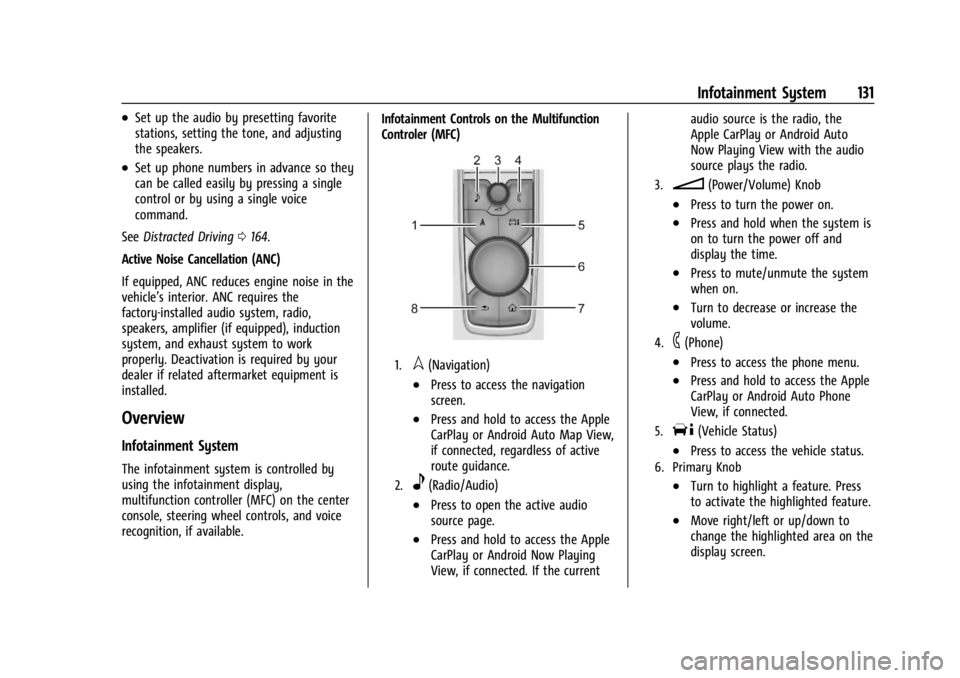
recognition, if available. Infotainment Controls on the Multifunction
Controler (MFC)
1.l(Navigation)
.Press to access the navigation
screen.
.Press and hold to access the Apple
CarPlay or Android Auto Map View,
if connected, regardless of active
route guidance.
2.e(Radio/Audio)
.Press to open the active audio
source page.
.Press and hold to access the Apple
CarPlay or Android Now Playing
View, if connected. If the currentaudio source is the radio, the
Apple CarPlay or Android Auto
Now Playing View with the audio
source plays the radio.
3.n(Power/Volume) Knob
.Press to turn the power on.
.Press and hold when the system is
on to turn the power off and
display the time.
.Press to mute/unmute the system
when on.
.Turn to decrease or increase the
volume.
4.6(Phone)
.Press to access the phone menu.
.Press and hold to access the Apple
CarPlay or Android Auto Phone
View, if connected.
5.T(Vehicle Status)
.Press to access the vehicle status.
6. Primary Knob
.Turn to highlight a feature. Press
to activate the highlighted feature.
.Move right/left or up/down to
change the highlighted area on the
display screen.
Page 163 of 373

Cadillac XT4 Owner Manual (GMNA-Localizing-U.S./Canada/Mexico-
17180837) - 2024 - CRC - 2/28/23
162 Driving and Operating
Driving and Operating
Driving Information
Driver Behavior . . . . . . . . . . . . . . . . . . . . . . . . 163
Driving Environment . . . . . . . . . . . . . . . . . . . 163
Vehicle Design . . . . . . . . . . . . . . . . . . . . . . . . . 163
Driving for Better Fuel Economy . . . . . . . 163
Distracted Driving . . . . . . . . . . . . . . . . . . . . . 164
Defensive Driving . . . . . . . . . . . . . . . . . . . . . . 164
Impaired Driving . . . . . . . . . . . . . . . . . . . . . . . 165
Control of a Vehicle . . . . . . . . . . . . . . . . . . . 165
Braking . . . . . . . . . . . . . . . . . . . . . . . . . . . . . . . . 165
Steering . . . . . . . . . . . . . . . . . . . . . . . . . . . . . . . 165
Off-Road Recovery . . . . . . . . . . . . . . . . . . . . . 166
Loss of Control . . . . . . . . . . . . . . . . . . . . . . . . 166
Driving on Wet Roads . . . . . . . . . . . . . . . . . 167
Hill and Mountain Roads . . . . . . . . . . . . . . 167
Winter Driving . . . . . . . . . . . . . . . . . . . . . . . . 168
If the Vehicle Is Stuck . . . . . . . . . . . . . . . . . 169
Vehicle Load Limits . . . . . . . . . . . . . . . . . . . . 170
Starting and Operating
New Vehicle Break-In . . . . . . . . . . . . . . . . . . 173
Ignition Positions . . . . . . . . . . . . . . . . . . . . . . 174
Starting the Engine . . . . . . . . . . . . . . . . . . . . 175
Stop/Start System . . . . . . . . . . . . . . . . . . . . . 176
Winter Cover . . . . . . . . . . . . . . . . . . . . . . . . . . 177
Engine Heater . . . . . . . . . . . . . . . . . . . . . . . . . 178
Retained Accessory Power (RAP) . . . . . . . 179
Shifting Into Park . . . . . . . . . . . . . . . . . . . . . . 179Shifting out of Park . . . . . . . . . . . . . . . . . . . 180
Parking over Things That Burn . . . . . . . . 180
Active Fuel Management . . . . . . . . . . . . . . 180
Extended Parking . . . . . . . . . . . . . . . . . . . . . . 180
Engine Exhaust
Engine Exhaust . . . . . . . . . . . . . . . . . . . . . . . . 181
Running the Vehicle While Parked . . . . . 181
Automatic Transmission
Automatic Transmission . . . . . . . . . . . . . . . . 181
Manual Mode . . . . . . . . . . . . . . . . . . . . . . . . . 185
Drive Systems
All-Wheel Drive . . . . . . . . . . . . . . . . . . . . . . . . 186
Brakes
Electric Brake Boost . . . . . . . . . . . . . . . . . . . . 187
Antilock Brake System (ABS) . . . . . . . . . . . 187
Electric Parking Brake . . . . . . . . . . . . . . . . . . 187
Brake Assist . . . . . . . . . . . . . . . . . . . . . . . . . . . 188
Hill Start Assist (HSA) . . . . . . . . . . . . . . . . . 189
Ride Control Systems
Traction Control/Electronic Stability
Control . . . . . . . . . . . . . . . . . . . . . . . . . . . . . . 189
Driver Mode Control . . . . . . . . . . . . . . . . . . 190
Cruise Control
Cruise Control . . . . . . . . . . . . . . . . . . . . . . . . . 192
Speed Limiter . . . . . . . . . . . . . . . . . . . . . . . . . 194
Adaptive Cruise Control (Advanced) . . . 196 Super Cruise . . . . . . . . . . . . . . . . . . . . . . . . . . 206
Advanced Driver Assistance Systems
Advanced Driver Assistance Systems . . . 223
Assistance Systems for Parking or
Backing . . . . . . . . . . . . . . . . . . . . . . . . . . . . . . 224
Rear Vision Camera (RVC) . . . . . . . . . . . . . . 225
Surround Vision System . . . . . . . . . . . . . . . 225
Park Assist . . . . . . . . . . . . . . . . . . . . . . . . . . . . . 227
Automatic Parking Assist (APA) . . . . . . . . 228
Reverse Automatic Braking (RAB) . . . . . . 230
Rear Pedestrian Alert . . . . . . . . . . . . . . . . . . 231
Rear Cross Traffic Alert (RCTA) System . . . . . . . . . . . . . . . . . . . . . . . . . . . . . . 232
Assistance Systems for Driving . . . . . . . . 233
Forward Collision Alert (FCA) System . . . . . . . . . . . . . . . . . . . . . . . . . . . . . . 233
Automatic Emergency Braking (AEB) . . . 235
Front Pedestrian Braking (FPB) System . . . . . . . . . . . . . . . . . . . . . . . . . . . . . . 238
Side Blind Zone Alert (SBZA) . . . . . . . . . . 240
Lane Change Alert (LCA) . . . . . . . . . . . . . . . 241
Blind Zone Steering Assist (BZSA) . . . . . . 243
Traffic Sign Assistant . . . . . . . . . . . . . . . . . . 243
Lane Keep Assist (LKA) . . . . . . . . . . . . . . . . 245
Fuel
Top Tier Fuel . . . . . . . . . . . . . . . . . . . . . . . . . . 247
Recommended Fuel . . . . . . . . . . . . . . . . . . . . 247
Prohibited Fuels . . . . . . . . . . . . . . . . . . . . . . . 247
Fuels in Foreign Countries . . . . . . . . . . . . . 248
Page 166 of 373

Cadillac XT4 Owner Manual (GMNA-Localizing-U.S./Canada/Mexico-
17180837) - 2024 - CRC - 2/28/23
Driving and Operating 165
Impaired Driving
Death and injury associated with impaired
driving is a global tragedy.
{Warning
Drinking alcohol or taking drugs and then
driving is very dangerous. Your reflexes,
perceptions, attentiveness, and judgment
can be affected by even a small amount
of alcohol or drugs. You can have a
serious—or even fatal —collision if you
drive after drinking or taking drugs.
Do not drive while under the influence of
alcohol or drugs, or ride with a driver
who has been drinking or is impaired by
drugs. Find alternate transportation
home; or if you are with a group,
designate a driver who will remain sober.
Control of a Vehicle
Braking, steering, and accelerating are
important factors in helping to control a
vehicle while driving.
Braking
Braking action involves perception time and
reaction time. Deciding to push the brake
pedal is perception time. Actually doing it is
reaction time.
Average driver reaction time is about
three-quarters of a second. In that time, a
vehicle moving at 100 km/h (60 mph) travels
20 m (66 ft), which could be a lot of
distance in an emergency.
Helpful braking tips to keep in mind include:
.Keep enough distance between you and
the vehicle in front of you.
.Avoid needless heavy braking.
.Keep pace with traffic.
If the engine ever stops while the vehicle is
being driven, brake normally but do not
pump the brakes. Doing so could make the
pedal harder to push down. If the engine
stops, there will be some power brake assist
but it will be used when the brake is
applied. Once the power assist is used up, it
can take longer to stop and the brake pedal
will be harder to push.
Steering
Caution
To avoid damage to the steering system,
do not drive over curbs, parking barriers,
or similar objects at speeds greater than
3 km/h (1 mph). Use care when driving
over other objects such as lane dividers
and speed bumps. Damage caused by
misuse of the vehicle is not covered by
the vehicle warranty.
Page 167 of 373

Cadillac XT4 Owner Manual (GMNA-Localizing-U.S./Canada/Mexico-
17180837) - 2024 - CRC - 2/28/23
166 Driving and Operating
Electric Power Steering
The vehicle is equipped with an electric
power steering system, which reduces the
amount of effort needed to steer the
vehicle. It does not have power steering
fluid. Regular maintenance is not required.
If the vehicle experiences a system
malfunction and loses power steering,
greater steering effort may be required.
Power steering assist also may be reduced if
you turn the steering wheel as far as it can
turn and hold it there with force for an
extended period of time.
See your dealer if there is a problem.
Curve Tips
.Take curves at a reasonable speed.
.Reduce speed before entering a curve.
.Maintain a reasonable steady speed
through the curve.
.Wait until the vehicle is out of the curve
before accelerating gently into the
straightaway.
Steering in Emergencies
.There are some situations when steering
around a problem may be more effective
than braking.
.Holding both sides of the steering wheel
allows you to turn 180 degrees without
removing a hand.
.The Antilock Brake System (ABS) allows
steering while braking.
Off-Road Recovery
The vehicle's right wheels can drop off the
edge of a road onto the shoulder while
driving. Follow these tips:1. Ease off the accelerator and then, if there is nothing in the way, steer the
vehicle so that it straddles the edge of
the pavement. 2. Turn the steering wheel about
one-eighth of a turn, until the right front
tire contacts the pavement edge.
3. Turn the steering wheel to go straight down the roadway.
Loss of Control
Skidding
There are three types of skids that
correspond to the vehicle's three control
systems:
.Braking Skid —wheels are not rolling.
.Steering or Cornering Skid —too much
speed or steering in a curve causes tires
to slip and lose cornering force.
.Acceleration Skid —too much throttle
causes the driving wheels to spin.
Antilock brakes help to avoid only the
braking skid.
Defensive drivers avoid most skids by taking
reasonable care suited to existing conditions,
and by not exceeding those conditions. But
skids are always possible.
Page 175 of 373

Cadillac XT4 Owner Manual (GMNA-Localizing-U.S./Canada/Mexico-
17180837) - 2024 - CRC - 2/28/23
174 Driving and Operating
Normal driving charges the vehicle’s battery
to achieve the best operation of the vehicle,
including fuel economy and the Stop/Start
System. SeeStop/Start System 0176.
Ignition Positions
The vehicle has an electronic keyless ignition
with pushbutton start.
If the pushbutton start is not working, the
vehicle may be near a strong radio antenna
signal causing interference to the Keyless
Access system. See Remote Key Operation
0 8.
To shift out of P (Park), the vehicle must be
turned on and the brake pedal must be
applied. Stopping the Engine/OFF (No Indicator
Light) :
When the vehicle is stopped, press
ENGINE START/STOP once to turn the
engine off.
If the vehicle is in P (Park), the ignition will
turn off, and Retained Accessory Power (RAP)
will remain active. See Retained Accessory
Power (RAP) 0179.
If the vehicle is in R (Reverse), D (Drive) or
M (Manual Mode), the vehicle will shift to
P (Park), the ignition will turn off, and RAP
will remain active.
If the vehicle is in N (Neutral), the ignition
will return to accessory mode and display
the message SHIFT TO PARK in the Driver
Information Center (DIC).
When the vehicle is shifted into P (Park), the
ignition will turn off.
{Warning
Turning off the vehicle while moving may
cause loss of power assist in the brake
and steering systems and disable the
airbags. While driving, only shut the
vehicle off in an emergency. If the vehicle must be shut off in an
emergency:
1. Brake using a firm and steady pressure. Do not pump the brakes repeatedly. This
may deplete power assist, requiring
increased brake pedal force.
2. Shift the vehicle to N (Neutral). This can be done while the vehicle is moving.
After shifting to N (Neutral), firmly apply
the brakes and steer the vehicle to a
safe location.
3. Come to a complete stop and shift to P (Park).
4. Set the parking brake. See Electric
Parking Brake 0187. Press ENGINE
START/STOP to turn the vehicle off.
If the vehicle cannot be pulled over and
must be shut off while driving, press and
hold ENGINE START/STOP for longer than
two seconds, or press twice in five seconds.
Accessory Mode (Amber Indicator Light) :
This mode allows you to use some electrical
accessories when the engine is off.
With the ignition off, pressing ENGINE
START/STOP once without the brake pedal
applied will place the ignition system in
accessory mode.
Page 186 of 373

Cadillac XT4 Owner Manual (GMNA-Localizing-U.S./Canada/Mexico-
17180837) - 2024 - CRC - 2/28/23
Driving and Operating 185
Caution (Continued)
transmission fluid. This message clears
when the transmission fluid has cooled
sufficiently.
D : This position is for normal driving.
If more power is needed for passing, press
the accelerator pedal down.
To shift into D (Drive):
1. Bring the vehicle to a complete stop.
2. From the center position, move the shift lever back.
.If the vehicle is in P (Park), press the
shift lock release button while pulling
the shift lever back.
.D will illuminate in red.
.After releasing the shift lever, it will
return to the center position.
To shift out of D (Drive): 1. Bring the vehicle to a complete stop.
2. Shift to the desired gear.
3. After releasing the shift lever, it will return to the center position.
Downshifting the transmission in slippery
road conditions could result in skidding. See
“Skidding” underLoss of Control 0166.
Caution
Spinning the tires or holding the vehicle
in one place on a hill using only the
accelerator pedal may damage the
transmission. The repair will not be
covered by the vehicle warranty. If the
vehicle is stuck, do not spin the tires.
When stopping on a hill, use the brakes
to hold the vehicle in place.
Engine speeds may be increased while
driving at highway speeds while the engine
is still warming up.
Manual Mode
Tap Shift Caution
Driving with the engine at a high rpm
without upshifting while using Tap Shift,
could damage the vehicle. Always upshift
when necessary while using Tap Shift.
If equipped, vehicles with Tap Shift have
controls on the back of the steering wheel
to manually shift the automatic
transmission.
Permanent Tap Shift Mode
To enter Permanent Tap Shift Mode:1. With the vehicle in D (Drive), pull back on the shift lever to activate M (Manual
Mode). The M in the shift pattern will
illuminate in red, and the D will switch
to white.
2. After releasing the shift lever, it will return to the center position.