sport mode CADILLAC XT4 2024 Owners Manual
[x] Cancel search | Manufacturer: CADILLAC, Model Year: 2024, Model line: XT4, Model: CADILLAC XT4 2024Pages: 373, PDF Size: 8.01 MB
Page 95 of 373

Cadillac XT4 Owner Manual (GMNA-Localizing-U.S./Canada/Mexico-
17180837) - 2024 - CRC - 2/28/23
94 Instruments and Controls
Warning Lights, Gauges, and
Indicators
Warning lights and gauges can signal that
something is wrong before it becomes
serious enough to cause an expensive repair
or replacement. Paying attention to the
warning lights and gauges could prevent
injury.
Some warning lights come on briefly when
the engine is started to indicate they are
working. When one of the warning lights
comes on and stays on while driving,
or when one of the gauges shows there
may be a problem, check the section that
explains what to do. Waiting to do repairs
can be costly and even dangerous.
Instrument Cluster
English Sport Mode Gauge View Shown, Others and Metric Similar
1.Driver Information Center (DIC) 0111
2. Engine Oil Pressure Gauge 098
3. Fuel Gauge 097
4. Speedometer 096
5. Tachometer 096
6. Engine Coolant Temperature Gauge
099
7. Engine Oil Temperature Gauge 099Reconfigurable Instrument Cluster
The instrument cluster display layout can be
changed. There are two display
configurations to choose from based on the
driver mode selected: Tour, and Sport. To
Page 96 of 373
Cadillac XT4 Owner Manual (GMNA-Localizing-U.S./Canada/Mexico-
17180837) - 2024 - CRC - 2/28/23
Instruments and Controls 95
see how to change the Driver Mode, see
“Mode Activation”underDriver Mode
Control 0190.
.Tour configuration displays the
speedometer in the center of the display.
The fuel gauge is located on the right of
the speedometer and the tachometer is
on the left of it. There are two DIC areas
on the left and right of the display.
.Sport configuration displays the
tachometer in the center of the display.
The gauges are located on the left and
right of the tachometer. The speedometer
is located near the fuel gauge and the
tachometer is above it. There are two DIC
areas on the left and right of the display.
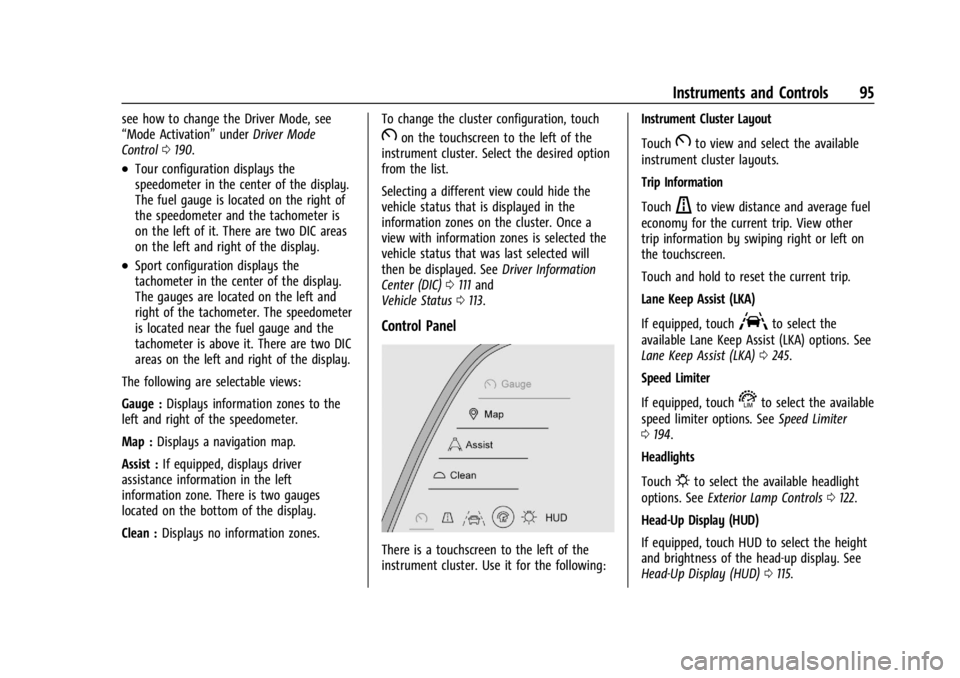
The following are selectable views:
Gauge : Displays information zones to the
left and right of the speedometer.
Map : Displays a navigation map.
Assist : If equipped, displays driver
assistance information in the left
information zone. There is two gauges
located on the bottom of the display.
Clean : Displays no information zones. To change the cluster configuration, touch
Bon the touchscreen to the left of the
instrument cluster. Select the desired option
from the list.
Selecting a different view could hide the
vehicle status that is displayed in the
information zones on the cluster. Once a
view with information zones is selected the
vehicle status that was last selected will
then be displayed. See Driver Information
Center (DIC) 0111 and
Vehicle Status 0113.
Control Panel
There is a touchscreen to the left of the
instrument cluster. Use it for the following: Instrument Cluster Layout
Touch
Bto view and select the available
instrument cluster layouts.
Trip Information
Touch
ato view distance and average fuel
economy for the current trip. View other
trip information by swiping right or left on
the touchscreen.
Touch and hold to reset the current trip.
Lane Keep Assist (LKA)
If equipped, touch
Ato select the
available Lane Keep Assist (LKA) options. See
Lane Keep Assist (LKA) 0245.
Speed Limiter
If equipped, touch
sto select the available
speed limiter options. See Speed Limiter
0 194.
Headlights
Touch
Pto select the available headlight
options. See Exterior Lamp Controls 0122.
Head-Up Display (HUD)
If equipped, touch HUD to select the height
and brightness of the head-up display. See
Head-Up Display (HUD) 0115.
Page 98 of 373

Cadillac XT4 Owner Manual (GMNA-Localizing-U.S./Canada/Mexico-
17180837) - 2024 - CRC - 2/28/23
Instruments and Controls 97
Fuel Gauge
Metric Sport Mode Gauge View Shown,Others Similar
English Sport Mode Gauge View Shown, Others Similar
When the ignition is on, the fuel gauge
indicates about how much fuel is left in
the tank.
There is an arrow near the fuel gauge
pointing to the side of the vehicle the fuel
door is on.
When the indicator nears empty, the low
fuel light comes on. There still is a little fuel
left, but the vehicle should be refueled soon.
The fuel gauge may:
.Take a little more, or less fuel to fill up
than it indicates. For example, the gauge
may have indicated the tank is half full, but it actually will take a little more,
or less than half the tank's capacity to fill
the tank.
.Moves a little while turning a corner,
speeding up, or braking.
.Take a few seconds to stabilize after the
ignition is turned on and goes back to
empty when the ignition is turned off.
These are normal conditions, none of which
indicate a problem with the fuel gauge.
Speed Limiter Indicator
This light is white when the speed limiter is
on and ready, and turns green when the
speed limiter is set and active.
See Speed Limiter 0194.
Page 99 of 373

Cadillac XT4 Owner Manual (GMNA-Localizing-U.S./Canada/Mexico-
17180837) - 2024 - CRC - 2/28/23
98 Instruments and Controls
Engine Oil Pressure Gauge
Metric Sport Mode Gauge View Shown,Others Similar
English Sport Mode Gauge View Shown, Others Similar
The engine oil pressure gauge shows the
engine oil pressure in kPa (kilopascals)
or psi (pounds per square inch) when the
engine is running.
Oil pressure can vary with engine speed,
outside temperature, coolant temperature,
and oil viscosity.
On some models, the oil pump will vary
engine oil pressure according to engine
needs. Oil pressure may change quickly as
the engine speed or load varies. This is
normal. If the oil pressure warning light or
Driver Information Center (DIC) message indicates oil pressure outside the normal
operating range, check the engine oil as
soon as possible.
See
Engine Oil 0264.
Caution
Lack of proper engine oil maintenance
can damage the engine. Driving with the
engine oil low can also damage the
engine. The repairs would not be covered
by the vehicle warranty. Check the oil
level as soon as possible. Add oil if
required, but if the oil level is within the
operating range and the oil pressure is
still low, have the vehicle serviced.
Always follow the maintenance schedule
for changing engine oil.
Page 100 of 373

Cadillac XT4 Owner Manual (GMNA-Localizing-U.S./Canada/Mexico-
17180837) - 2024 - CRC - 2/28/23
Instruments and Controls 99
Engine Oil Temperature Gauge
Metric Sport Mode Gauge View Shown,Others Similar
English Sport Mode Gauge View Shown, Others Similar
This gauge shows the engine oil
temperature.
If the gauge pointer moves into the high
end, it means that the engine oil has
overheated. If the vehicle has been operated
under normal driving conditions, pull off the
road, stop the vehicle, and turn off the
engine as soon as possible.
See Engine Oil 0264.
Engine Coolant Temperature
Gauge
Metric Sport Mode Gauge View Shown,
Others Similar
Page 101 of 373

Cadillac XT4 Owner Manual (GMNA-Localizing-U.S./Canada/Mexico-
17180837) - 2024 - CRC - 2/28/23
100 Instruments and Controls
English Sport Mode Gauge View Shown,Others Similar
This gauge shows the engine coolant
temperature.
If the pointer moves toward the warning
area at the high end of the gauge, the
engine is too hot.
This reading indicates the same thing as the
warning light. It means that the engine
coolant has overheated. If the vehicle has
been operating under normal driving
conditions, pull off the road, stop the
vehicle, and turn off the engine as soon as
possible. See Engine Overheating 0271.
Seat Belt Reminders
Driver Seat Belt Reminder Light
There is a driver seat belt reminder light on
the instrument cluster.
When the vehicle is started, this light
flashes and a chime may come on to remind
the driver to fasten their seat belt. Then the
light stays on solid until the belt is buckled.
This cycle may continue several times if the
driver remains or becomes unbuckled while
the vehicle is moving.
If the driver seat belt is buckled, neither the
light nor the chime comes on.
Front Passenger Seat Belt Reminder
Light
The vehicle may have a front passenger seat
belt reminder light near the passenger
airbag status indicator.
See Passenger Sensing System 058.
When the vehicle is started, this light
flashes and a chime may come on to remind
passengers to fasten their seat belt. Then
the light stays on solid until the belt is
buckled. This cycle continues several times if
the front passenger remains or becomes
unbuckled while the vehicle is moving.
If the front passenger seat belt is buckled,
neither the chime nor the light comes on.
The front passenger seat belt reminder light
and chime may turn on if an object is put
on the seat such as a briefcase, handbag,
grocery bag, laptop, or other electronic
device. To turn off the reminder light and/or
chime, remove the object from the seat or
buckle the seat belt.
Second Row Passenger Seat Belt
Reminder Lights
The vehicle may have second row passenger
seat belt reminder lights.
Page 106 of 373

Cadillac XT4 Owner Manual (GMNA-Localizing-U.S./Canada/Mexico-
17180837) - 2024 - CRC - 2/28/23
Instruments and Controls 105
This light should come on briefly when the
vehicle is turned on. If it does not come on,
have it fixed so it will be ready to warn if
there is a problem.
If this light stays on or comes on while
driving, there is a problem with the Electric
Parking Brake (EPB). Take the vehicle to a
dealer as soon as possible. In addition to the
parking brake, other safety functions that
utilize the EPB may also be degraded.
A message may also display in the Driver
Information Center (DIC). SeeElectric Parking
Brake 0187.
Antilock Brake System (ABS)
Warning Light
This light comes on briefly when the vehicle
is turned on to show that the light is
working. If it does not come on then, have
it fixed so it will be ready to warn you if
there is a problem. If the ABS warning light stays on, or comes
on again while driving, the vehicle needs
service. A chime may also sound when the
light stays on.
If the ABS warning light is the only light on,
the vehicle has regular brakes, but ABS is
not functioning.
If both the ABS warning light and the brake
system warning light are on, ABS is not
functioning and there is a problem with the
regular brakes. See your dealer for service.
See
Brake System Warning Light 0104.
Gear Shifting Light
If equipped, this light comes on when a gear
shift is recommended for best fuel economy.
When the arrow is pointed up, an upshift is
recommended. When the arrow is pointed
down, a downshift is recommended. The
number displayed with the arrow indicates
the recommended gear.
Performance Shifting Light
If equipped, this light may display green
when Sport Mode is activated and certain
driving conditions are met. Sport Mode
detects when the vehicle is being driven in a
sporty manner, and adjusts the shifting of
the gears accordingly. See Driver Mode
Control 0190.
All-Wheel-Drive Light
All-Wheel-Drive LightFront-Wheel-Drive
Light
If equipped, the corresponding light comes
on when an All-Wheel Drive (AWD) mode or
Front-Wheel-Drive mode is selected. See
All-Wheel Drive 0186.
Page 109 of 373

Cadillac XT4 Owner Manual (GMNA-Localizing-U.S./Canada/Mexico-
17180837) - 2024 - CRC - 2/28/23
108 Instruments and Controls
Engine Coolant Temperature
Warning Light
On some vehicles this light comes on briefly
while starting the vehicle. If it does not,
have the vehicle serviced by the dealer.
If the system is working normally the
indicator light goes off. For vehicles with the
reconfigurable cluster, this light may not
come on when starting the vehicle.
Caution
The engine coolant temperature warning
light indicates that the vehicle has
overheated. Driving with this light on can
damage the engine and it may not be
covered by the vehicle warranty. See
Engine Overheating0271.
The engine coolant temperature warning
light comes on when the engine has
overheated. If this happens pull over and turn off the
engine as soon as possible. See
Engine
Overheating 0271.
Driver Mode Control Light
This light comes on when Normal Mode is
selected.
This light comes on when Sport Mode is
selected.
This light comes on when Snow/Ice Mode is
selected.
This light comes on when Off-Road Mode is
selected.
This light comes on when My Mode is
selected. See Driver Mode Control 0190.
Tire Pressure Light
Page 138 of 373
Cadillac XT4 Owner Manual (GMNA-Localizing-U.S./Canada/Mexico-
17180837) - 2024 - CRC - 2/28/23
Infotainment System 137
RDS features
.Display radio station call letters
.Display messages from radio stations
.Provide radio station category information
(when available)
Satellite Radio
SiriusXM Radio Service
If equipped, vehicles with a valid SiriusXM
radio subscription can receive SiriusXM
programming.
SiriusXM radio has a wide variety of
programming and commercial-free music,
coast to coast, in digital-quality sound. In
the U.S., see www.siriusxm.com or call
1-888-601-6296. In Canada, see
www.siriusxm.ca or call 1-877-438-9677.
When SiriusXM is active, the channel name,
number, song title, and artist appear on the
display.
SiriusXM with 360L
SiriusXM with 360L interface has enhanced
in-vehicle listening experience for
subscribers. The experience now offers more
categories and system learned
recommendations toward discovering more
personalized content.To use the full SiriusXM 360L program,
including streaming content and listening
recommendations, OnStar Connected Access
is required and Terms and Conditions
accepted. Connected vehicle services vary by
model and require a complete working
electrical system, cell reception, and GPS
signal.
Reference the SiriusXM user guide for use
and subscription information.
Playing SiriusXM Content
Touchr,j,ror[on the now playing
screen to rewind, pause, play, or fast
forward content.
Finding a Channel
From the SiriusXM now playing screen,
touch
oCH or CHpto open the SXM tuner
channel list.
To directly tune to a channel, touch the
Tune icon to enter a channel number using
the keypad.
Browsing Content
Touch(to view different browsing
content. Browse will include Channels, Music, On
Demand shows and episodes, Sports and
News content.
SiriusXM Settings
From the SiriusXM now playing screen,
touch the user settings icon in the upper
right to display the SiriusXM settings
The settings include subscription
information, help and support, and listener
preferences.
Radio Reception
Unplug electronic devices from the accessory
power outlets if there is interference or
static in the radio.
FM
FM signals only reach about 16 to 65 km (10
to 40 mi). Although the radio has a built-in
electronic circuit that automatically works to
reduce interference, some static can occur,
especially around tall buildings or hills,
causing the sound to fade in and out.
AM
The range for most AM stations is greater
than for FM, especially at night. The longer
range can cause station frequencies to
Page 184 of 373

Cadillac XT4 Owner Manual (GMNA-Localizing-U.S./Canada/Mexico-
17180837) - 2024 - CRC - 2/28/23
Driving and Operating 183
To shift in and out of P (Park), seeShifting
Into Park 0179 and
Shifting out of Park 0180.
Service Shift Lever Message
If the message SERVICE SHIFTER SEE
OWNER’S MANUAL appears in the Driver
Information Center (DIC), the shift lever
needs service. Have the vehicle serviced as
soon as possible. If the vehicle is
automatically shifting into P (Park), check to
see if the P (Park) button on top of the shift
lever is stuck. To operate the vehicle, hold
the shift lever in the desired gear,
R (Reverse) or D (Drive), until vehicle speed
exceeds 15 km/h (10 mph), then release the
shift lever.
R : Use this gear to back up.
If the vehicle is shifted from either
R (Reverse) to D (Drive) or M (Manual Mode),
or M (Manual Mode) or D (Drive) to
R (Reverse) while the speed is too high, the
vehicle will shift to N (Neutral). Reduce the
vehicle speed and try the shift again.
To shift into R (Reverse): 1. Bring the vehicle to a complete stop.
2. Press and hold shift lock release button on the side of the shift lever. 3. From the center position, move the shift
lever forward through the first detent to
the end of travel. R is illuminated in red.
4. After releasing the shift lever, it will return to the center position.
To shift out of R (Reverse): 1. Bring the vehicle to a complete stop.
2. Shift to the desired gear.
3. After releasing the shift lever, it will return to the center position.
At low vehicle speeds, R (Reverse) can be
used to rock the vehicle back and forth to
get out of snow, ice, or sand without
damaging the transmission. See If the
Vehicle Is Stuck 0169.
N : In this position, the engine does not
connect with the wheels. To restart the
engine when the vehicle is already moving,
use N (Neutral) only.
{Warning
Shifting into a drive gear while the
engine is running at high speed is
dangerous. Unless your foot is firmly on
the brake pedal, the vehicle could move
very rapidly. You could lose control and
(Continued)
Warning (Continued)
hit people or objects. Do not shift into a
drive gear while the engine is running at
high speed.
Caution
Shifting out of P (Park) or N (Neutral) with
the engine running at high speed may
damage the transmission. The repairs
would not be covered by the vehicle
warranty. Be sure the engine is not
running at high speed when shifting the
vehicle.
The vehicle is not designed to stay in
N (Neutral) for more than five minutes.
It may automatically shift into P (Park).
N (Neutral) is not intended for towing. If the
vehicle needs to be towed, see Transporting
a Disabled Vehicle 0317.
To shift into N (Neutral): 1. Move the shift lever forward to the first detent from the center position.
.If the vehicle is in P (Park), apply the
brake pedal and press the shift lock
release button while moving the shift
lever forward.