indicator CADILLAC XT5 2017 1.G Workshop Manual
[x] Cancel search | Manufacturer: CADILLAC, Model Year: 2017, Model line: XT5, Model: CADILLAC XT5 2017 1.GPages: 339, PDF Size: 2.75 MB
Page 192 of 339
Cadillac XT5 Owner Manual (GMNA-Localizing-MidEast-10260744) - 2017 -
crc - 1/14/16
192 Driving and Operating
If the pushbutton start is not
working, the vehicle may be near a
strong radio antenna signal causing
interference to the Remote Keyless
Entry (RKE) system. SeeRemote
Keyless Entry (RKE) System
Operation 026.
To shift out of P (Park), the vehicle
must be in ON/RUN mode and the
brake pedal must be applied.
Stopping the Engine/OFF (No
Indicator Light) : When the vehicle
is stopped, press ENGINE START/
STOP once to turn the engine off.
The transmission will shift to
P (Park) automatically.
If the vehicle is in P (Park), the
ignition will turn off, and Retained
Accessory Power (RAP) will remain
active. See Retained Accessory
Power (RAP) 0195.
{Warning
Turning off the vehicle while
moving may cause loss of power
assist in the brake and steering
(Continued)
Warning (Continued)
systems and disable the airbags.
While driving, only shut the
vehicle off in an emergency.
If the vehicle must be shut off in an
emergency: 1. Brake using a firm and steady pressure. Do not pump the
brakes repeatedly. This may
deplete power assist, requiring
increased brake pedal force.
2. Shift the vehicle to N (Neutral). This can be done while the
vehicle is moving. After shifting
to N (Neutral), firmly apply the
brakes and steer the vehicle to
a safe location.
3. Come to a complete stop, shift to P (Park), and press ENGINE
START/STOP. The
transmission must be in
P (Park) to turn the ignition
switch to the OFF position.
4. Set the parking brake. See Electric Parking Brake 0204. If the vehicle cannot be pulled over
and must be shut off while driving,
press and hold ENGINE START/
STOP for longer than two seconds,
or press twice in five seconds.
ACC/ACCESSORY (Amber
Indicator Light) :
This mode allows
you to use some electrical
accessories when the engine is off.
With the ignition off, pressing
ENGINE START/STOP once without
the brake pedal applied will place
the ignition system in ACC/
ACCESSORY.
The ignition will switch from ACC/
ACCESSORY to OFF after
10 minutes to prevent battery
rundown.
ON/RUN/START (Green Indicator
Light) : This mode is for driving and
starting. With the ignition off and the
brake pedal applied, pressing
ENGINE START/STOP once will
place the ignition system in ON/
RUN/START. Once engine cranking
begins, release the button. Engine
cranking will continue until the
Page 193 of 339
Cadillac XT5 Owner Manual (GMNA-Localizing-MidEast-10260744) - 2017 -
crc - 1/14/16
Driving and Operating 193
engine starts. SeeStarting the
Engine 0193. The ignition will then
remain in ON/RUN.
Service Only Mode
This power mode is available for
service and diagnostics, and Car
Wash Mode, see Automatic
Transmission 0198. And to verify
the proper operation of the
malfunction indicator lamp as may
be required for emission inspection
purposes. With the vehicle off, and
the brake pedal not applied,
pressing and holding ENGINE
START/STOP for more than
five seconds will place the vehicle in
Service Only Mode. The instruments
and audio systems will operate as
they do in ON/RUN, but the vehicle
will not be able to be driven. The
engine will not start in Service Only
Mode. Press ENGINE START/STOP
again to turn the vehicle off.
Starting the Engine
Place the transmission in the proper
gear, P (Park) or N (Neutral). To
restart the engine when the vehicle
is already moving, use N (Neutral).
Caution
Do not try to shift to P (Park) if the
vehicle is moving. If you do, you
could damage the transmission.
Shift to P (Park) only when the
vehicle is stopped.
Caution
If you add electrical parts or
accessories, you could change
the way the engine operates. Any
resulting damage would not be
covered by the vehicle warranty.
See Add-On Electrical
Equipment 0248.
To start the vehicle: 1. With the Keyless Access system, the RKE transmitter
must be in the vehicle. Press
ENGINE START/STOP with the
brake pedal applied. When the
engine begins cranking, let go
of the button. The idle speed
will go down as the engine warms up. Do not race the
engine immediately after
starting it.
If the RKE transmitter is not in
the vehicle, if there is
interference, or if the RKE
battery is low, a Driver
Information Center (DIC)
message will display. See
Key
and Lock Messages 0144 and
Remote Keyless Entry (RKE)
System Operation 026.
Caution
Cranking the engine for long
periods of time, by pressing
ENGINE START/STOP
immediately after cranking has
ended, can overheat and damage
the cranking motor, and drain the
battery. Wait at least 15 seconds
between each try, to let the
cranking motor cool down.
2. If the engine does not start after five to 10 seconds,
especially in very cold weather
(below −18 °C or 0 °F), it could
Page 195 of 339
Cadillac XT5 Owner Manual (GMNA-Localizing-MidEast-10260744) - 2017 -
crc - 1/14/16
Driving and Operating 195
Retained Accessory
Power (RAP)
These accessories can be used
after the engine is turned off:
.Infotainment system (up to
10 minutes or until the driver
door is opened).
. Power windows, sunroof (if
equipped), and power outlets (up
to 10 minutes or until any door is
opened).
Shifting Into Park
To shift into P (Park):
1. Hold the brake pedal down and set the parking brake. See
Electric Parking Brake 0204.
2. Press the button on top of the shift lever to shift into P (Park).
See Automatic
Transmission 0198.
3. The P indicator on the shift lever will turn red when the
vehicle is in P (Park).
4. Turn the ignition off.
Leaving the Vehicle with the
Engine Running
{Warning
It can be dangerous to leave the
vehicle with the engine running.
It could overheat and catch fire.
It is dangerous to get out of the
vehicle if the vehicle is not in
P (Park) with the parking brake
firmly set. The vehicle can roll.
Do not leave the vehicle when the
engine is running. If you have left
the engine running, the vehicle
can move suddenly. You or others
could be injured. To be sure the
vehicle will not move, even when
you are on fairly level ground,
always set the parking brake and
shift to P (Park). See Shifting Into
Park 0195. If you are towing a
trailer, see Driving Characteristics
and Towing Tips 0239. If you have to leave the vehicle with
the engine running, be sure the
vehicle is in P (Park) and the
parking brake is firmly set before
you leave it.
If you are towing a trailer and
parking on a hill, see
Driving
Characteristics and Towing
Tips 0239.
Shifting out of Park
This vehicle is equipped with an
electronic transmission. The shift
unlock button is designed to prevent
inadvertent shifting out of P (Park)
unless the ignition is in ON/RUN,
the brake pedal is applied, and the
unlock button is pressed.
The shift lock control is always
functional except in the case of an
uncharged or low voltage (less than
9-volt) battery.
If the vehicle has an uncharged
battery or a battery with low voltage,
try charging or jump starting the
battery. See Jump Starting 0301.
To shift out of P (Park): 1. Apply the brake pedal.
Page 196 of 339
Cadillac XT5 Owner Manual (GMNA-Localizing-MidEast-10260744) - 2017 -
crc - 1/14/16
196 Driving and Operating
2. Press ENGINE START/STOP.
3. Press the shift lever button onthe side of shift lever.
4. Move the shift lever to the desired position.
5. The P indicator will turn white and the gear indicator on the
shift lever will turn red when
the vehicle is no longer in
P (Park).
6. After releasing the shift lever, it will return to the center
position.
If the vehicle cannot shift from
P (Park), a Driver Information Center
(DIC) message will be displayed.
See your dealer for service.Parking over Things
That Burn
{Warning
Things that can burn could touch
hot exhaust parts under the
vehicle and ignite. Do not park
over papers, leaves, dry grass,
or other things that can burn.
Extended Parking
It is better not to park with the
vehicle running. If the vehicle is left
while running, follow the proper
steps to be sure the vehicle will not
move and there is adequate
ventilation. See Shifting Into Park
0 195 andEngine Exhaust 0197.
If the vehicle is left in P (Park) while
running and the Remote Keyless
Entry (RKE) transmitter is outside
the vehicle, the vehicle will turn off
after one hour. If the vehicle is left in P (Park) while
running and the RKE transmitter is
inside, the vehicle will run for two
hours. At the end of the second
hour, the vehicle will turn off.
The timer will reset if the vehicle is
taken out of P (Park) while it is
running.
Page 198 of 339
Cadillac XT5 Owner Manual (GMNA-Localizing-MidEast-10260744) - 2017 -
crc - 1/14/16
198 Driving and Operating
Automatic
Transmission
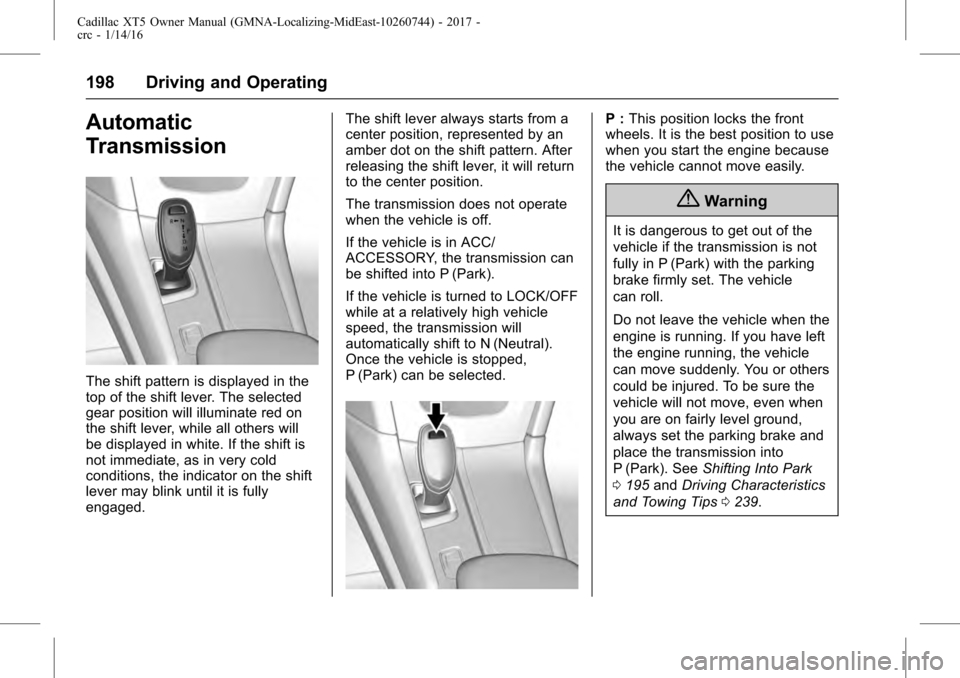
The shift pattern is displayed in the
top of the shift lever. The selected
gear position will illuminate red on
the shift lever, while all others will
be displayed in white. If the shift is
not immediate, as in very cold
conditions, the indicator on the shift
lever may blink until it is fully
engaged.The shift lever always starts from a
center position, represented by an
amber dot on the shift pattern. After
releasing the shift lever, it will return
to the center position.
The transmission does not operate
when the vehicle is off.
If the vehicle is in ACC/
ACCESSORY, the transmission can
be shifted into P (Park).
If the vehicle is turned to LOCK/OFF
while at a relatively high vehicle
speed, the transmission will
automatically shift to N (Neutral).
Once the vehicle is stopped,
P (Park) can be selected.
P :
This position locks the front
wheels. It is the best position to use
when you start the engine because
the vehicle cannot move easily.
{Warning
It is dangerous to get out of the
vehicle if the transmission is not
fully in P (Park) with the parking
brake firmly set. The vehicle
can roll.
Do not leave the vehicle when the
engine is running. If you have left
the engine running, the vehicle
can move suddenly. You or others
could be injured. To be sure the
vehicle will not move, even when
you are on fairly level ground,
always set the parking brake and
place the transmission into
P (Park). See Shifting Into Park
0 195 andDriving Characteristics
and Towing Tips 0239.
Page 200 of 339
Cadillac XT5 Owner Manual (GMNA-Localizing-MidEast-10260744) - 2017 -
crc - 1/14/16
200 Driving and Operating
Caution
Shifting out of P (Park) or
N (Neutral) with the engine
running at high speed may
damage the transmission. The
repairs would not be covered by
the vehicle warranty. Be sure the
engine is not running at high
speed when shifting the vehicle.
Caution
The vehicle is not designed to
stay in N (Neutral) for extended
periods of time. It will
automatically shift into P (Park).
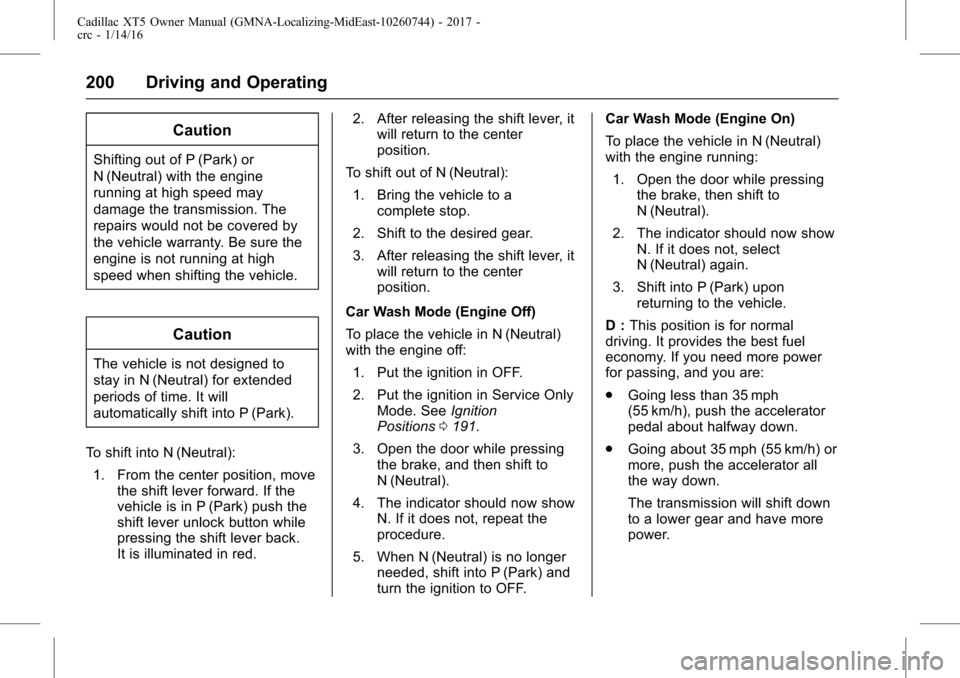
To shift into N (Neutral): 1. From the center position, move the shift lever forward. If the
vehicle is in P (Park) push the
shift lever unlock button while
pressing the shift lever back.
It is illuminated in red. 2. After releasing the shift lever, it
will return to the center
position.
To shift out of N (Neutral): 1. Bring the vehicle to a complete stop.
2. Shift to the desired gear.
3. After releasing the shift lever, it will return to the center
position.
Car Wash Mode (Engine Off)
To place the vehicle in N (Neutral)
with the engine off: 1. Put the ignition in OFF.
2. Put the ignition in Service Only Mode. See Ignition
Positions 0191.
3. Open the door while pressing the brake, and then shift to
N (Neutral).
4. The indicator should now show N. If it does not, repeat the
procedure.
5. When N (Neutral) is no longer needed, shift into P (Park) and
turn the ignition to OFF. Car Wash Mode (Engine On)
To place the vehicle in N (Neutral)
with the engine running:
1. Open the door while pressing the brake, then shift to
N (Neutral).
2. The indicator should now show N. If it does not, select
N (Neutral) again.
3. Shift into P (Park) upon returning to the vehicle.
D : This position is for normal
driving. It provides the best fuel
economy. If you need more power
for passing, and you are:
. Going less than 35 mph
(55 km/h), push the accelerator
pedal about halfway down.
. Going about 35 mph (55 km/h) or
more, push the accelerator all
the way down.
The transmission will shift down
to a lower gear and have more
power.
Page 207 of 339
Cadillac XT5 Owner Manual (GMNA-Localizing-MidEast-10260744) - 2017 -
crc - 1/14/16
Driving and Operating 207
SeeIf the Vehicle Is Stuck 0186
and “Turning the Systems Off and
On” later in this section.
The indicator light for both systems
is in the instrument cluster. This
light will:
.
Flash when TCS is limiting
wheel spin.
. Flash when StabiliTrak is
activated.
. Turn on and stay on when either
system is not working.
If either system fails to turn on or to
activate, a message displays in the
Driver Information Center (DIC),
and
dcomes on and stays on to
indicate that the system is inactive
and is not assisting the driver in
maintaining control. The vehicle is
safe to drive, but driving should be
adjusted accordingly. If
dcomes on and stays on:
1. Stop the vehicle.
2. Turn the engine off and wait 15 seconds.
3. Start the engine.
Drive the vehicle. If
dcomes on
and stays on, the vehicle may need
more time to diagnose the problem.
If the condition persists, see your
dealer.
Turning the Systems Off
and On
Caution
Do not repeatedly brake or
accelerate heavily when TCS is
off. The vehicle driveline could be
damaged.
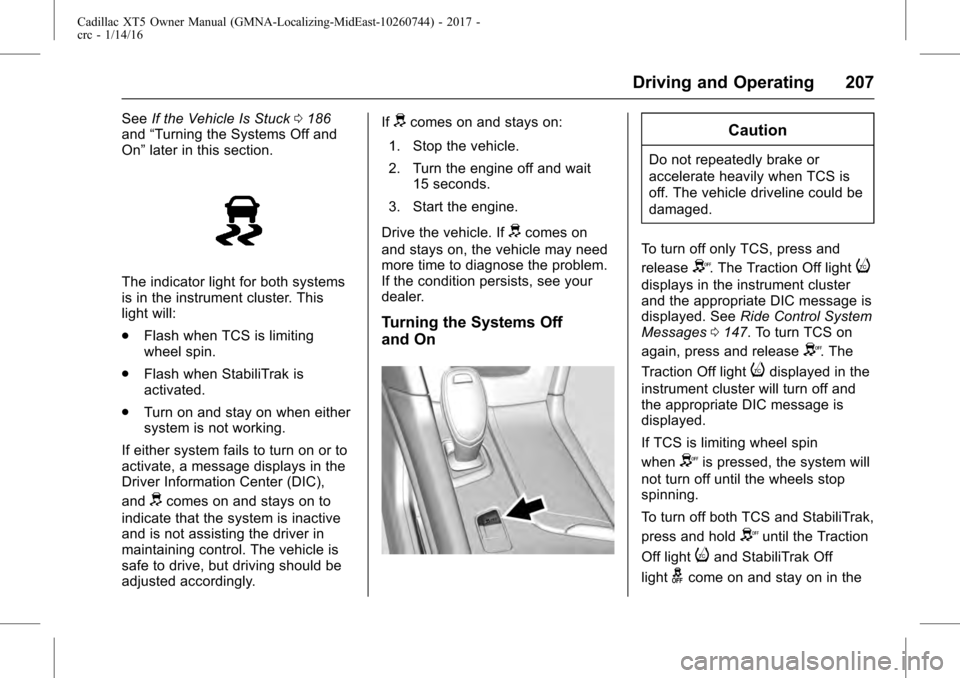
To turn off only TCS, press and
release
Y. The Traction Off lighti
displays in the instrument cluster
and the appropriate DIC message is
displayed. See Ride Control System
Messages 0147. To turn TCS on
again, press and release
Y. The
Traction Off light
idisplayed in the
instrument cluster will turn off and
the appropriate DIC message is
displayed.
If TCS is limiting wheel spin
when
Yis pressed, the system will
not turn off until the wheels stop
spinning.
To turn off both TCS and StabiliTrak,
press and hold
Yuntil the Traction
Off light
iand StabiliTrak Off
light
gcome on and stay on in the
Page 208 of 339
Cadillac XT5 Owner Manual (GMNA-Localizing-MidEast-10260744) - 2017 -
crc - 1/14/16
208 Driving and Operating
instrument cluster. The appropriate
DIC message is displayed. See
Ride Control System Messages
0147. To turn TCS and StabiliTrak
on again, press and release
Y. The
Traction Off light
iand StabiliTrak
Off light
gin the instrument cluster
turn off and the appropriate DIC
message is displayed.
Adding accessories can affect
vehicle performance. See
Accessories and
Modifications 0250.
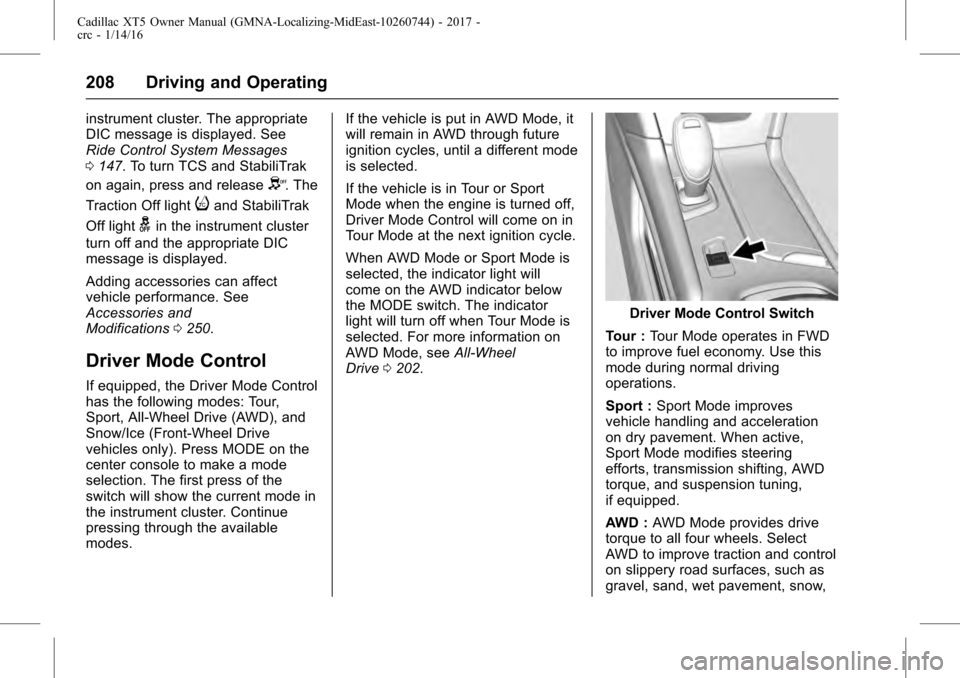
Driver Mode Control
If equipped, the Driver Mode Control
has the following modes: Tour,
Sport, All-Wheel Drive (AWD), and
Snow/Ice (Front-Wheel Drive
vehicles only). Press MODE on the
center console to make a mode
selection. The first press of the
switch will show the current mode in
the instrument cluster. Continue
pressing through the available
modes. If the vehicle is put in AWD Mode, it
will remain in AWD through future
ignition cycles, until a different mode
is selected.
If the vehicle is in Tour or Sport
Mode when the engine is turned off,
Driver Mode Control will come on in
Tour Mode at the next ignition cycle.
When AWD Mode or Sport Mode is
selected, the indicator light will
come on the AWD indicator below
the MODE switch. The indicator
light will turn off when Tour Mode is
selected. For more information on
AWD Mode, see
All-Wheel
Drive 0202.
Driver Mode Control Switch
Tour : Tour Mode operates in FWD
to improve fuel economy. Use this
mode during normal driving
operations.
Sport : Sport Mode improves
vehicle handling and acceleration
on dry pavement. When active,
Sport Mode modifies steering
efforts, transmission shifting, AWD
torque, and suspension tuning,
if equipped.
AWD : AWD Mode provides drive
torque to all four wheels. Select
AWD to improve traction and control
on slippery road surfaces, such as
gravel, sand, wet pavement, snow,
Page 209 of 339
Cadillac XT5 Owner Manual (GMNA-Localizing-MidEast-10260744) - 2017 -
crc - 1/14/16
Driving and Operating 209
and ice. When in AWD Mode, the
AWD Mode indicator light will be on.
For more information on AWD
Mode, seeAll-Wheel Drive 0202.
Snow/Ice (FWD Vehicles Only) :
Snow/Ice Mode improves vehicle
acceleration on snow and ice
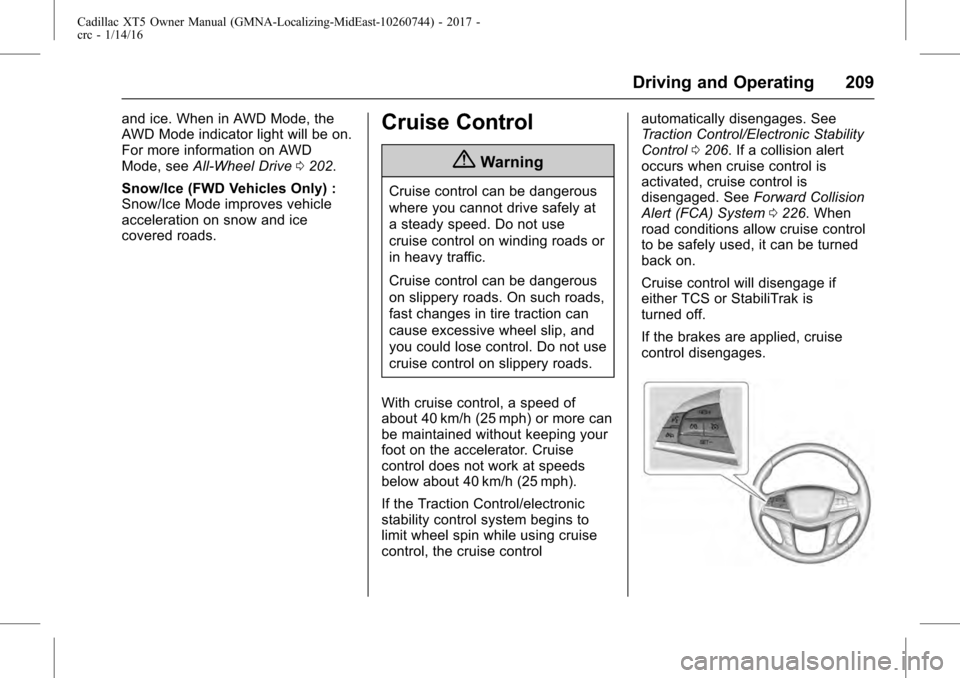
covered roads.Cruise Control
{Warning
Cruise control can be dangerous
where you cannot drive safely at
a steady speed. Do not use
cruise control on winding roads or
in heavy traffic.
Cruise control can be dangerous
on slippery roads. On such roads,
fast changes in tire traction can
cause excessive wheel slip, and
you could lose control. Do not use
cruise control on slippery roads.
With cruise control, a speed of
about 40 km/h (25 mph) or more can
be maintained without keeping your
foot on the accelerator. Cruise
control does not work at speeds
below about 40 km/h (25 mph).
If the Traction Control/electronic
stability control system begins to
limit wheel spin while using cruise
control, the cruise control automatically disengages. See
Traction Control/Electronic Stability
Control
0206. If a collision alert
occurs when cruise control is
activated, cruise control is
disengaged. See Forward Collision
Alert (FCA) System 0226. When
road conditions allow cruise control
to be safely used, it can be turned
back on.
Cruise control will disengage if
either TCS or StabiliTrak is
turned off.
If the brakes are applied, cruise
control disengages.
Page 210 of 339
Cadillac XT5 Owner Manual (GMNA-Localizing-MidEast-10260744) - 2017 -
crc - 1/14/16
210 Driving and Operating
J:Press to turn the system on
and off. A white indicator appears in
the instrument cluster when cruise
is turned on.
RES+ : If there is a set speed in
memory, press briefly to resume to
that speed or press and hold to
accelerate. If the cruise control is
already active, use to increase
vehicle speed. To increase speed by
1 km/h (1 mph), press RES+ to the
first detent. To increase speed to the
next 5 km/h (5 mph) mark on the
speedometer, press RES+ to the
second detent.
SET− :Press briefly to set the
speed and activate cruise control.
If the cruise control is already
active, use to decrease vehicle
speed. To decrease speed by
1 km/h (1 mph), press SET− to the
first detent. To decrease speed to
the next 5 km/h (5 mph) mark on the
speedometer, press SET− to the
second detent.
*: Press to disengage cruise
control without erasing the set
speed from memory. Setting Cruise Control
If
Jis on when not in use, SET−
or
RES+ could get pressed and go into
cruise when not desired. Keep
J
off when cruise is not being used.
1. Press
J.
2. Get up to the desired speed.
3. Press and release SET−. The desired set speed briefly
appears in the instrument
cluster.
4. Remove your foot from the accelerator.
When the cruise control has been
set to the desired speed, a green
cruise control indicator appears on
the instrument cluster and a cruise
set speed message appears on the
Head-Up Display (HUD),
if equipped.
Resuming a Set Speed
If the cruise control is set at a
desired speed and then the brakes
are applied or
*is pressed, the
cruise control is disengaged without
erasing the set speed from memory. Once the vehicle speed reaches
about 40 km/h (25 mph) or more,
press RES+ briefly. The vehicle
returns to the previous set speed.
Increasing Speed While Using
Cruise Control
If the cruise control system is
already activated:
.
Press and hold RES+ until the
desired speed is reached, then
release it.
. To increase vehicle speed in
small increments, briefly press
RES+ to the first detent. For
each press, the vehicle goes
about 1 km/h (1 mph) faster.
. To increase vehicle speed in
larger increments, briefly press
RES+ to the second detent. For
each press, the vehicle speed
increases to the next 5 km/h
(5 mph) mark on the
speedometer.