speed CADILLAC XT5 2018 Owners Manual
[x] Cancel search | Manufacturer: CADILLAC, Model Year: 2018, Model line: XT5, Model: CADILLAC XT5 2018Pages: 380, PDF Size: 6.21 MB
Page 314 of 380
Cadillac XT5 Owner Manual (GMNA-Localizing-U.S./Canada/Mexico-
11349110) - 2018 - CRC - 9/28/17
VEHICLE CARE 313
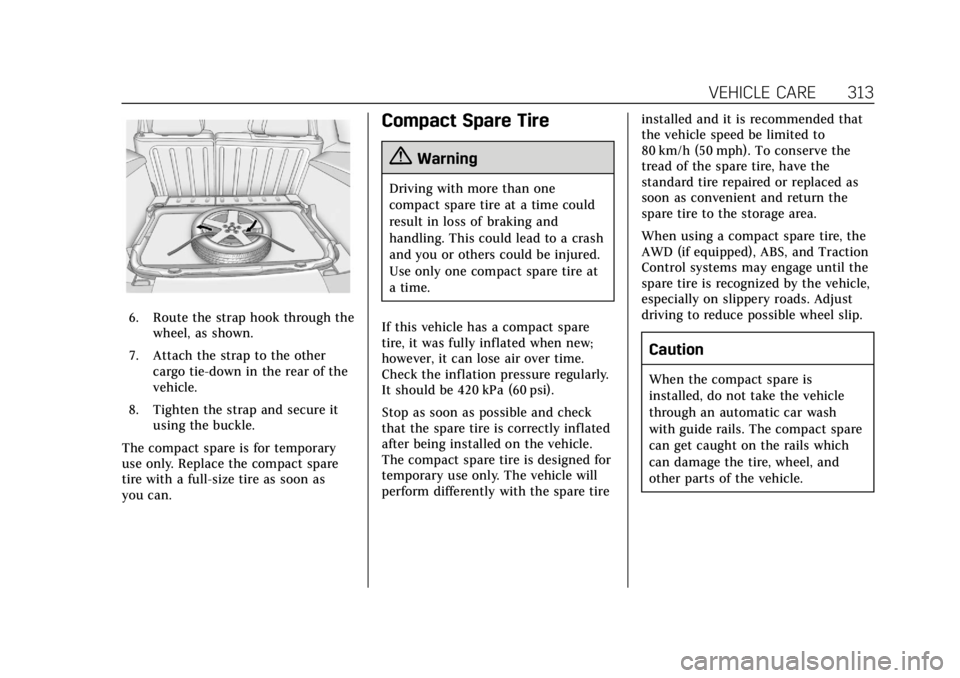
6. Route the strap hook through thewheel, as shown.
7. Attach the strap to the other cargo tie-down in the rear of the
vehicle.
8. Tighten the strap and secure it using the buckle.
The compact spare is for temporary
use only. Replace the compact spare
tire with a full-size tire as soon as
you can.
Compact Spare Tire
{Warning
Driving with more than one
compact spare tire at a time could
result in loss of braking and
handling. This could lead to a crash
and you or others could be injured.
Use only one compact spare tire at
a time.
If this vehicle has a compact spare
tire, it was fully inflated when new;
however, it can lose air over time.
Check the inflation pressure regularly.
It should be 420 kPa (60 psi).
Stop as soon as possible and check
that the spare tire is correctly inflated
after being installed on the vehicle.
The compact spare tire is designed for
temporary use only. The vehicle will
perform differently with the spare tire installed and it is recommended that
the vehicle speed be limited to
80 km/h (50 mph). To conserve the
tread of the spare tire, have the
standard tire repaired or replaced as
soon as convenient and return the
spare tire to the storage area.
When using a compact spare tire, the
AWD (if equipped), ABS, and Traction
Control systems may engage until the
spare tire is recognized by the vehicle,
especially on slippery roads. Adjust
driving to reduce possible wheel slip.
Caution
When the compact spare is
installed, do not take the vehicle
through an automatic car wash
with guide rails. The compact spare
can get caught on the rails which
can damage the tire, wheel, and
other parts of the vehicle.
Page 317 of 380
Cadillac XT5 Owner Manual (GMNA-Localizing-U.S./Canada/Mexico-
11349110) - 2018 - CRC - 9/28/17
316 VEHICLE CARE
{Warning
Using a match near a battery can
cause battery gas to explode. People
have been hurt doing this, and
some have been blinded. Use a
flashlight if you need more light.
Battery fluid contains acid that can
burn you. Do not get it on you.
If you accidentally get it in your
eyes or on your skin, flush the place
with water and get medical help
immediately.
{Warning
Fans or other moving engine parts
can injure you badly. Keep your
hands away from moving parts
once the engine is running.
5. Connect one end of the red positive (+) cable to the remote
positive (+) terminal on the
discharged battery. 6. Connect the other end of the red
positive (+) cable to the
positive (+) terminal of the good
battery.
7. Connect one end of the black negative (–) cable to the
negative (–) terminal of the good
battery.
8. Connect the other end of the black negative (–) cable to the
remote negative (–) ground
terminal on the driver side shock
tower for the discharged battery.
9. Start the engine in the vehicle with the good battery and run
the engine at idle speed for at
least four minutes.
10. Try to start the vehicle that had the dead battery. If it will not
start after a few tries, it probably
needs service.
Caution
If the jumper cables are connected
or removed in the wrong order,
electrical shorting may occur and
damage the vehicle. The repairs
would not be covered by the vehicle
warranty. Always connect and
remove the jumper cables in the
correct order, making sure that the
cables do not touch each other or
other metal.
Jumper Cable Removal
Reverse the sequence exactly when
removing the jumper cables.
After starting the disabled vehicle and
removing the jumper cables, allow it
to idle for several minutes.
Page 330 of 380
Cadillac XT5 Owner Manual (GMNA-Localizing-U.S./Canada/Mexico-
11349110) - 2018 - CRC - 9/28/17
SERVICE AND MAINTENANCE 329
additional maintenance items like
tires, brakes, batteries, and wiper
blades.
Caution
Damage caused by improper
maintenance can lead to costly
repairs and may not be covered by
the vehicle warranty. Maintenance
intervals, checks, inspections,
recommended fluids, and lubricants
are important to keep the vehicle in
good working condition.
Do not have chemical flushes that
are not approved by GM performed
on the vehicle. The use of flushes,
solvents, cleaners, or lubricants that
are not approved by GM could
damage the vehicle, requiring
expensive repairs that are not
covered by the vehicle warranty.
The Tire Rotation and Required
Services are the responsibility of the
vehicle owner. It is recommended to
have your dealer perform these
services every 12 000 km/7,500 mi. Proper vehicle maintenance helps to
keep the vehicle in good working
condition, improves fuel economy, and
reduces vehicle emissions.
Because of the way people use
vehicles, maintenance needs vary.
There may need to be more frequent
checks and services. The Additional
Required Services - Normal are for
vehicles that:
.
Carry passengers and cargo within
recommended limits on the Tire
and Loading Information label. See
Vehicle Load Limits 0184.
. Are driven on reasonable road
surfaces within legal driving limits.
. Use the recommended fuel. See
Fuel 0236.
Refer to the information in the
Maintenance Schedule Additional
Required Services - Normal chart.
The Additional Required Services -
Severe are for vehicles that are:
. Mainly driven in heavy city traffic
in hot weather
. Mainly driven in hilly or
mountainous terrain .
Frequently towing a trailer
. Used for high speed or competitive
driving
. Used for taxi, police, or delivery
service
Refer to the information in the
Maintenance Schedule Additional
Required Services - Severe chart.
{Warning
Performing maintenance work can
be dangerous and can cause serious
injury. Perform maintenance work
only if the required information,
proper tools, and equipment are
available. If they are not, see your
dealer to have a trained technician
do the work. See Doing Your Own
Service Work 0251.
Page 337 of 380
Cadillac XT5 Owner Manual (GMNA-Localizing-U.S./Canada/Mexico-
11349110) - 2018 - CRC - 9/28/17
336 SERVICE AND MAINTENANCE
Shocks and Struts
Shocks and struts help aid in control
for a smoother ride.
.Signs of wear may include steering
wheel vibration, bounce/sway
while braking, longer stopping
distance, or uneven tire wear.
. As part of the multi-point
inspection, trained dealer
technicians can visually inspect
the shocks and struts for signs of
leaking, blown seals, or damage,
and can advise when service is
needed.
Tires
Tires need to be properly inflated,
rotated, and balanced. Maintaining
the tires can save money and fuel, and
can reduce the risk of tire failure.
. Signs that the tires need to be
replaced include three or more
visible treadwear indicators; cord
or fabric showing through the
rubber; cracks or cuts in the tread
or sidewall; or a bulge or split in
the tire. .
Trained dealer technicians can
inspect and recommend the right
tires. Your dealer can also provide
tire/wheel balancing services to
ensure smooth vehicle operation
at all speeds. Your dealer sells and
services name brand tires.
Vehicle Care
To help keep the vehicle looking like
new, vehicle care products are
available from your dealer. For
information on how to clean and
protect the vehicle’s interior and
exterior, see Interior Care 0323 and
Exterior Care 0319.
Wheel Alignment
Wheel alignment is critical for
ensuring that the tires deliver optimal
wear and performance.
. Signs that the alignment may need
to be adjusted include pulling,
improper vehicle handling,
or unusual tire wear.
. Your dealer has the required
equipment to ensure proper wheel
alignment. Windshield
For safety, appearance, and the best
viewing, keep the windshield clean
and clear.
.
Signs of damage include scratches,
cracks, and chips.
. Trained dealer technicians can
inspect the windshield and
recommend proper replacement if
needed.
Wiper Blades
Wiper blades need to be cleaned and
kept in good condition to provide a
clear view.
. Signs of wear include streaking,
skipping across the windshield,
and worn or split rubber.
. Trained dealer technicians can
check the wiper blades and replace
them when needed.
Page 356 of 380
Cadillac XT5 Owner Manual (GMNA-Localizing-U.S./Canada/Mexico-
11349110) - 2018 - CRC - 9/28/17
CUSTOMER INFORMATION 355
Vehicle Data Recording
and Privacy
The vehicle has a number of
computers that record information
about the vehicle’s performance and
how it is driven. For example, the
vehicle uses computer modules to
monitor and control engine and
transmission performance, to monitor
the conditions for airbag deployment
and deploy them in a crash, and,
if equipped, to provide antilock
braking to help the driver control the
vehicle. These modules may store data
to help the dealer technician service
the vehicle. Some modules may also
store data about how the vehicle is
operated, such as rate of fuel
consumption or average speed. These
modules may retain personal
preferences, such as radio presets, seat
positions, and temperature settings.
Event Data Recorders
This vehicle is equipped with an event
data recorder (EDR). The main
purpose of an EDR is to record, in
certain crash or near crash-likesituations, such as an air bag
deployment or hitting a road obstacle,
data that will assist in understanding
how a vehicle’s systems performed.
The EDR is designed to record data
related to vehicle dynamics and safety
systems for a short period of time,
typically 30 seconds or less. The EDR
in this vehicle is designed to record
such data as:
.
How various systems in your
vehicle were operating;
. Whether or not the driver and
passenger safety belts were
buckled/fastened;
. How far (if at all) the driver was
depressing the accelerator and/or
brake pedal; and,
. How fast the vehicle was traveling.
These data can help provide a better
understanding of the circumstances in
which crashes and injuries occur.
Note
EDR data are recorded by your vehicle
only if a non-trivial crash situation
occurs; no data are recorded by the
EDR under normal driving conditions and no personal data (e.g., name,
gender, age, and crash location) are
recorded. However, other parties, such
as law enforcement, could combine
the EDR data with the type of
personally identifying data routinely
acquired during a crash investigation.
To read data recorded by an EDR,
special equipment is required, and
access to the vehicle or the EDR is
needed. In addition to the vehicle
manufacturer, other parties, such as
law enforcement, that have the special
equipment, can read the information
if they have access to the vehicle or
the EDR.
GM will not access these data or share
it with others except: with the consent
of the vehicle owner or, if the vehicle
is leased, with the consent of the
lessee; in response to an official
request by police or similar
government office; as part of GM's
defense of litigation through the
discovery process; or, as required by
law. Data that GM collects or receives
may also be used for GM research
needs or may be made available to
Page 357 of 380
Cadillac XT5 Owner Manual (GMNA-Localizing-U.S./Canada/Mexico-
11349110) - 2018 - CRC - 9/28/17
356 CUSTOMER INFORMATION
others for research purposes, where a
need is shown and the data is not tied
to a specific vehicle or vehicle owner.
OnStar
If the vehicle is equipped with OnStar
and has an active service plan,
additional data may be collected
through the OnStar system. This
includes information about the
vehicle’s operation; collisions involving
the vehicle; the use of the vehicle and
its features; and, in certain situations,
the location and approximate GPS
speed of the vehicle. Refer to the
OnStar Terms and Conditions and
Privacy Statement on the OnStar
website.
SeeOnStar Additional Information
0 363.
Infotainment System
If the vehicle is equipped with a
navigation system as part of the
infotainment system, use of the
system may result in the storage of
destinations, addresses, telephone
numbers, and other trip information. See the infotainment manual for
information on stored data and for
deletion instructions.
Page 361 of 380
Cadillac XT5 Owner Manual (GMNA-Localizing-U.S./Canada/Mexico-
11349110) - 2018 - CRC - 9/28/17
360 ONSTAR
Get My Destination1. Press
=. System responds:
“OnStar ready,” then a tone.
2. Say “Get my destination.” System
responds with the address and
distance to the destination, then
responds with “OnStar ready,”
then a tone.
Send Destination to Vehicle
Directions can be sent to the vehicle’s
navigation screen, if equipped.
Press
Q, then ask the Advisor to
download directions to the vehicle’s
navigation system, if equipped. After
the call ends, the navigation screen
will provide prompts to begin driving
directions. Routes that are sent to the
navigation screen can only be
canceled through the navigation
system.
See www.onstar.com (U.S.) or
www.onstar.ca (Canada).
Connections
The following OnStar services help
with staying connected.
For coverage maps, see
www.onstar.com (U.S.) or
www.onstar.ca (Canada).
Ensuring Security
. Change the default passwords for
the Wi-Fi hotspot and myCadillac
mobile app. Make these passwords
different from each other and use
a combination of letters, numbers,
and symbols to increase the
security.
. Change the default name of the
SSID (Service Set Identifier). This
is your network’s name that is
visible to other wireless devices.
Choose a unique name and avoid
family names or vehicle
descriptions.
OnStar Wi-Fi Hotspot (If Equipped)
The vehicle may have a built-in Wi-Fi
hotspot that provides access to the
Internet and web content at 4G LTE
speed. Up to seven mobile devices can be connected. A data plan is required.
Use the in-vehicle controls only when
it is safe to do so.
1. To retrieve Wi-Fi hotspot information, press
=to open
the OnStar app on the
infotainment display, then select
Wi-Fi Hotspot. On some vehicles,
touch Wi-Fi or Wi-Fi Settings on
the screen.
2. The Wi-Fi settings will display the Wi-Fi hotspot name (SSID),
password, and on some vehicles,
the connection type (no Internet
connection, 3G, 4G, 4G LTE), and
signal quality (poor, good,
excellent).
3. To change the SSID or password, press
Qor call 1-888-4ONSTAR
to connect with an Advisor. On
some vehicles, the SSID and
password can be changed in the
Wi-Fi Hotspot menu.
After initial set-up, your vehicle’s
Wi-Fi hotspot will connect
automatically to your mobile devices.
Manage data usage by turning Wi-Fi
on or off on your mobile device, by
Page 373 of 380

Cadillac XT5 Owner Manual (GMNA-Localizing-U.S./Canada/Mexico-
11349110) - 2018 - CRC - 9/28/17
372 INDEX
Fuses (cont'd)Instrument Panel Fuse Block . . . . 275
Rear Compartment Fuse
Block . . . . . . . . . . . . . . . . . . . . . . . . . . . . . 277
G
Garage Door Opener . . . . . . . . . . . . . . . . 156
Programming . . . . . . . . . . . . . . . . . . . . . . 156
Gas Strut(s) . . . . . . . . . . . . . . . . . . . . . . . . . 268
Gauges Engine Coolant Temperature . . . . 129
Engine Oil Pressure . . . . . . . . . . . . . . . 128
Fuel . . . . . . . . . . . . . . . . . . . . . . . . . . . . . . . . 127
Odometer . . . . . . . . . . . . . . . . . . . . . . . . . . 127
Speedometer . . . . . . . . . . . . . . . . . . . . . . 127
Tachometer . . . . . . . . . . . . . . . . . . . . . . . 127
Trip Odometer . . . . . . . . . . . . . . . . . . . . 127
Voltmeter . . . . . . . . . . . . . . . . . . . . . . . . . . 130
Warning Lights andIndicators . . . . . . . . . . . . . . . . . . . . . . . . 122
General Information Service and Maintenance . . . . . . . . 328
Towing . . . . . . . . . . . . . . . . . . . . . . . . . . . . 240
Vehicle Care . . . . . . . . . . . . . . . . . . . . . . . 250
Glove Box . . . . . . . . . . . . . . . . . . . . . . . . . . . 107
GM Mobility Reimbursement Program . . . . . . . . . . . . . . . . . . . . . . . . . . . . 346
H
Halogen Bulbs . . . . . . . . . . . . . . . . . . . . . . 270
Hazard Warning Flashers . . . . . . . . . . 163
Head Restraints . . . . . . . . . . . . . . . . . . . . . . 58
Head-up Display . . . . . . . . . . . . . . . . . . . . 144
HeadlampsAiming . . . . . . . . . . . . . . . . . . . . . . . . . . . . . 269
Automatic . . . . . . . . . . . . . . . . . . . . . . . . . 162
Bulb Replacement . . . . . . . . . . . . . . . . 270
Daytime RunningLamps (DRL) . . . . . . . . . . . . . . . . . . . . 162
Flash-to-Pass . . . . . . . . . . . . . . . . . . . . . . 162
High-Beam On Light . . . . . . . . . . . . . . 140
High/Low Beam Changer . . . . . . . . . 162
Lamps On Reminder . . . . . . . . . . . . . . 140
Heated Rear Seats . . . . . . . . . . . . . . . . . . . . . . . . . . . 69
Steering Wheel . . . . . . . . . . . . . . . . . . . . 114
Heated and Ventilated Front
Seats . . . . . . . . . . . . . . . . . . . . . . . . . . . . . . . . 64
Heated Mirrors . . . . . . . . . . . . . . . . . . . . . . . 50
Heater Engine . . . . . . . . . . . . . . . . . . . . . . . . . . . . . 192
Heating . . . . . . . . . . . . . . . . . . . . . . . . .168, 173
High-Beam On Light . . . . . . . . . . . . . . . . 140
High-Speed Operation . . . . . . . . . . . . . . 288
Hill and Mountain Roads . . . . . . . . . . 182 Hill Start Assist (HSA) . . . . . . . . . . . . . 204
Hood . . . . . . . . . . . . . . . . . . . . . . . . . . . . . . . . . 252
Horn . . . . . . . . . . . . . . . . . . . . . . . . . . . . . . . . . 114
How to Wear Seat Belts Properly . . . 70
HVAC . . . . . . . . . . . . . . . . . . . . . . . . . . .168, 173
I
Ignition Positions . . . . . . . . . . . . . . . . . . . 188
Immobilizer . . . . . . . . . . . . . . . . . . . . . . . . . . 48
Indicator
Pedestrian Ahead . . . . . . . . . . . . . . . . . 137
Vehicle Ahead . . . . . . . . . . . . . . . . . . . . . 137
Infants and Young Children, Restraints . . . . . . . . . . . . . . . . . . . . . . . . . . . 91
Infotainment . . . . . . . . . . . . . . . . . . . . . . . . 167
Infotainment System . . . . . . . . . . . . . . . 356
Instrument Cluster . . . . . . . . . . . .123, 125
Instrument Panel Overview . . . . . . . . . . . 6
Interior Rearview Mirrors . . . . . . . . . . . 51
Introduction . . . . . . . . . . . . . . . . . . . . . . . . . . . . 2
J
Jump Starting - North America . . . . 314
K
Keyless Entry Remote (RKE) System . . . . . . . . . . . . . . 28
Keys . . . . . . . . . . . . . . . . . . . . . . . . . . . . . . . . . . 27
Page 375 of 380

Cadillac XT5 Owner Manual (GMNA-Localizing-U.S./Canada/Mexico-
11349110) - 2018 - CRC - 9/28/17
374 INDEX
Manual Mode . . . . . . . . . . . . . . . . . . . . . . . 200
Memory Features . . . . . . . . . . . . . . . . . . . . 11
Memory Seats . . . . . . . . . . . . . . . . . . . . . . . . 62
MessagesEngine Power . . . . . . . . . . . . . . . . . . . . . 147
Vehicle . . . . . . . . . . . . . . . . . . . . . . . . . . . . . 147
Vehicle Speed . . . . . . . . . . . . . . . . . . . . . 148
Mirror Rear Camera . . . . . . . . . . . . . . . . . . . . . . . . 51
Mirrors Automatic Dimming . . . . . . . . . . . . . . . . 50
Automatic Dimming Rearview . . . . . 51
Convex . . . . . . . . . . . . . . . . . . . . . . . . . . . . . . . 49
Folding . . . . . . . . . . . . . . . . . . . . . . . . . . . . . . 49
Heated . . . . . . . . . . . . . . . . . . . . . . . . . . . . . . . 50
Manual Rearview . . . . . . . . . . . . . . . . . . . 51
Power . . . . . . . . . . . . . . . . . . . . . . . . . . . . . . . . 49
Tilt in Reverse . . . . . . . . . . . . . . . . . . . . . . 50
Mirrors, Interior Rearview . . . . . . . . . . . 51
Mode . . . . . . . . . . . . . . . . . . . . . . . . . . . . . . . . 207 Driver Control . . . . . . . . . . . . . . . . . . . . . 207
Monitor System, Tire Pressure . . . . . 288
N
Navigation OnStar . . . . . . . . . . . . . . . . . . . . . . . . . . . . . 359
Net, Convenience . . . . . . . . . . . . . . . . . . . 111
New Vehicle Break-In . . . . . . . . . . . . . . . 188
O
Odometer . . . . . . . . . . . . . . . . . . . . . . . . . . . . 127 Trip . . . . . . . . . . . . . . . . . . . . . . . . . . . . . . . . 127
Off-Road Recovery . . . . . . . . . . . . . . . . . . . . . . . . . . . 180
Oil Engine . . . . . . . . . . . . . . . . . . . . . . . . . . . . . 254
Engine Oil Life System . . . . . . . . . . . 256
Engine Oil Pressure Gauge . . . . . . . 128
Pressure Light . . . . . . . . . . . . . . . . . . . . . 139
Older Children, Restraints . . . . . . . . . . . 89
Online Owner Center . . . . . . . . . . . . . . . 346
OnStar . . . . . . . . . . . . . . . . . . . . . . . . . . . . . . . 356
OnStar Additional Information . . . . 363
OnStar Connections . . . . . . . . . . . . . . . . 360
OnStar Diagnostics . . . . . . . . . . . . . . . . . 362
OnStar Emergency . . . . . . . . . . . . . . . . . . 358
OnStar Navigation . . . . . . . . . . . . . . . . . . 359
OnStar Overview . . . . . . . . . . . . . . . . . . . . 357
OnStar Security . . . . . . . . . . . . . . . . . . . . . 359
Ordering Service Publications . . . . . . . . . . . . . . 352
Outlets Power . . . . . . . . . . . . . . . . . . . . . . . . . . . . . . 119
Overheating, Engine . . . . . . . . . . . . . . . . 261
P
Park Shifting Into . . . . . . . . . . . . . . . . . . . . . . 193
Shifting Out of . . . . . . . . . . . . . . . . . . . . 194
Parking
Brake and P (Park)Mechanism Check . . . . . . . . . . . . . . . 266
Extended . . . . . . . . . . . . . . . . . . . . . . . . . . 195
Over Things That Burn . . . . . . . . . . . 194
Parking Assist . . . . . . . . . . . . . . . . . . . . . . . 220
Parking or Backing
Assistance Systems . . . . . . . . . . . . . . . 220
Passenger Airbag Status Indicator . . . . . . . . . . . . . . . . . . . . . . . . . . . 132
Passenger Compartment Air Filter . . . . . . . . . . . . . . . . . . . . . . . . . . . . . . . 176
Passenger Sensing System . . . . . . . . . . 83
Pedestrian Ahead Indicator . . . . . . . . 137
Perchlorate Materials Requirements, California . . . . . . . . . 251
Personalization Vehicle . . . . . . . . . . . . . . . . . . . . . . . . . . . . . 148
Power Door Locks . . . . . . . . . . . . . . . . . . . . . . . . . . 39
Mirrors . . . . . . . . . . . . . . . . . . . . . . . . . . . . . . 49
Outlets . . . . . . . . . . . . . . . . . . . . . . . . . . . . . 119
Protection, Battery . . . . . . . . . . . . . . . . 166
Retained Accessory (RAP) . . . . . . . . 193
Page 377 of 380

Cadillac XT5 Owner Manual (GMNA-Localizing-U.S./Canada/Mexico-
11349110) - 2018 - CRC - 9/28/17
376 INDEX
Seat Belts (cont'd)Use During Pregnancy . . . . . . . . . . . . . . 76
Seats Adjustment, Front . . . . . . . . . . . . . . . . . . 60
Head Restraints . . . . . . . . . . . . . . . . . . . . . 58
Heated and Ventilated Front . . . . . . . 64
Heated, Rear . . . . . . . . . . . . . . . . . . . . . . . . 69
Lumbar Adjustment, Front . . . . . . . . . 61
Memory . . . . . . . . . . . . . . . . . . . . . . . . . . . . . 62
Rear . . . . . . . . . . . . . . . . . . . . . . . . . . . . . . . . . . 66
Reclining Seatbacks . . . . . . . . . . . . . . . . 61
Securing Child Restraints . . . . .102, 104
Security Light . . . . . . . . . . . . . . . . . . . . . . . . . . . . . . . 140
OnStar . . . . . . . . . . . . . . . . . . . . . . . . . . . . . 359
Vehicle . . . . . . . . . . . . . . . . . . . . . . . . . . . . . . . 46
Vehicle Alarm . . . . . . . . . . . . . . . . . . . . . . . 46
Service . . . . . . . . . . . . . . . . . . . . . . . . . . . . . . . 176
Accessories andModifications . . . . . . . . . . . . . . . . . . . . 251
Doing Your Own Work . . . . . . . . . . . 251
Maintenance Records . . . . . . . . . . . . 339
Maintenance, General Information . . . . . . . . . . . . . . . . . . . . . . 328
Parts Identification Label . . . . . . . . 340
Publications Ordering Information . . . . . . . . . . . . . . . . . . . . . . 352
Scheduling Appointments . . . . . . . . 349 Service Electric Parking Brake
Light . . . . . . . . . . . . . . . . . . . . . . . . . . . . . . . 136
Services Special Application . . . . . . . . . . . . . . . 334
Servicing the Airbag . . . . . . . . . . . . . . . . . 87
Shifting Into Park . . . . . . . . . . . . . . . . . . . . . . . . . . 193
Out of Park . . . . . . . . . . . . . . . . . . . . . . . . 194
Side Blind Zone Alert (SBZA) . . . . . . 232
Signals, Turn and Lane-Change . . . . 163
Spare Tire Compact . . . . . . . . . . . . . . . . . . . . . . . . . . . 313
Special Application Services . . . . . . . 334
Specifications and Capacities . . . . . . 341
Speedometer . . . . . . . . . . . . . . . . . . . . . . . . 127
StabiliTrak OFF Light . . . . . . . . . . . . . . . . . . . . . . . . . . 138
Start Assist, Hill . . . . . . . . . . . . . . . . . . . . 204
Start Vehicle, Remote . . . . . . . . . . . . . . . 35
Starter Switch Check . . . . . . . . . . . . . . . 266
Starting the Engine . . . . . . . . . . . . . . . . . 190
Steering . . . . . . . . . . . . . . . . . . . . . . . . . . . . . . 180 Heated Wheel . . . . . . . . . . . . . . . . . . . . . 114
Wheel Adjustment . . . . . . . . . . . . . . . . 114
Wheel Controls . . . . . . . . . . . . . . . . . . . 114
Storage Rear . . . . . . . . . . . . . . . . . . . . . . . . . . . . . . . . 108 Storage Areas
Armrest . . . . . . . . . . . . . . . . . . . . . . . . . . . . 108
Cargo Cover . . . . . . . . . . . . . . . . . . . . . . . 109
Cargo Management System . . . . . . 110
Center Console . . . . . . . . . . . . . . . . . . . . 108
Convenience Net . . . . . . . . . . . . . . . . . . 111
Glove Box . . . . . . . . . . . . . . . . . . . . . . . . . 107
Roof Rack System . . . . . . . . . . . . . . . . 112
Storage Compartments . . . . . . . . . . . . . 107
Storing the Tire Sealant and Compressor Kit . . . . . . . . . . . . . . . . . . . . 307
Struts Gas . . . . . . . . . . . . . . . . . . . . . . . . . . . . . . . . . 268
Stuck Vehicle . . . . . . . . . . . . . . . . . . . . . . . 184
Summer Tires . . . . . . . . . . . . . . . . . . . . . . . 281
Sun Visors . . . . . . . . . . . . . . . . . . . . . . . . . . . . 55
Sunroof . . . . . . . . . . . . . . . . . . . . . . . . . . . . . . . 55
Symbols . . . . . . . . . . . . . . . . . . . . . . . . . . . . . . . . 3
System Forward Collision Alert (FCA) . . . . 226
Infotainment . . . . . . . . . . . . . . . . . 167, 356
Roof Rack . . . . . . . . . . . . . . . . . . . . . . . . . 112
Systems Driver Assistance . . . . . . . . . . . . . . . . . 219