center console CADILLAC XT5 2018 User Guide
[x] Cancel search | Manufacturer: CADILLAC, Model Year: 2018, Model line: XT5, Model: CADILLAC XT5 2018Pages: 380, PDF Size: 6.21 MB
Page 123 of 380
Cadillac XT5 Owner Manual (GMNA-Localizing-U.S./Canada/Mexico-
11349110) - 2018 - CRC - 9/28/17
122 INSTRUMENTS AND CONTROLS
Ashtrays
If equipped, the ashtray is in the
center console cupholder.
Caution
If papers, pins, or other flammable
items are put in the ashtray, hot
cigarettes or other smoking
materials could ignite them and
possibly damage the vehicle. Never
put flammable items in the ashtray.
To remove the ashtray, pull it from
the cupholder. Push it back down to
be sure it is secure.
Warning Lights, Gauges,
and Indicators
Warning lights and gauges can signal
that something is wrong before it
becomes serious enough to cause an
expensive repair or replacement.
Paying attention to the warning lights
and gauges could prevent injury. Some warning lights come on briefly
when the engine is started to indicate
they are working. When one of the
warning lights comes on and stays on
while driving, or when one of the
gauges shows there may be a problem,
check the section that explains what
to do. Waiting to do repairs can be
costly and even dangerous.
Page 133 of 380
Cadillac XT5 Owner Manual (GMNA-Localizing-U.S./Canada/Mexico-
11349110) - 2018 - CRC - 9/28/17
132 INSTRUMENTS AND CONTROLS
{Warning
If the airbag readiness light stays
on after the vehicle is started or
comes on while driving, it means
the airbag system might not be
working properly. The airbags in the
vehicle might not inflate in a crash,
or they could even inflate without a
crash. To help avoid injury, have
the vehicle serviced right away.
If there is a problem with the airbag
system, a Driver Information Center
(DIC) message may also come on.
Passenger Airbag Status
Indicator
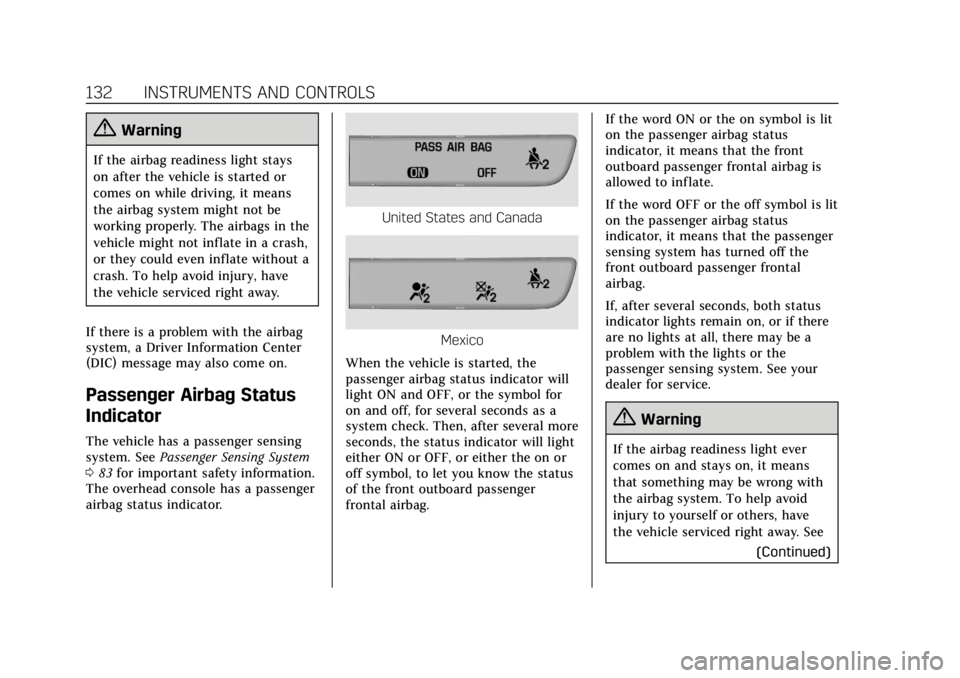
The vehicle has a passenger sensing
system. See Passenger Sensing System
0 83 for important safety information.
The overhead console has a passenger
airbag status indicator.
United States and Canada
Mexico
When the vehicle is started, the
passenger airbag status indicator will
light ON and OFF, or the symbol for
on and off, for several seconds as a
system check. Then, after several more
seconds, the status indicator will light
either ON or OFF, or either the on or
off symbol, to let you know the status
of the front outboard passenger
frontal airbag. If the word ON or the on symbol is lit
on the passenger airbag status
indicator, it means that the front
outboard passenger frontal airbag is
allowed to inflate.
If the word OFF or the off symbol is lit
on the passenger airbag status
indicator, it means that the passenger
sensing system has turned off the
front outboard passenger frontal
airbag.
If, after several seconds, both status
indicator lights remain on, or if there
are no lights at all, there may be a
problem with the lights or the
passenger sensing system. See your
dealer for service.
{Warning
If the airbag readiness light ever
comes on and stays on, it means
that something may be wrong with
the airbag system. To help avoid
injury to yourself or others, have
the vehicle serviced right away. See
(Continued)
Page 166 of 380
Cadillac XT5 Owner Manual (GMNA-Localizing-U.S./Canada/Mexico-
11349110) - 2018 - CRC - 9/28/17
LIGHTING 165
To operate, press the following
buttons:
jOFF :Press to turn off the dome
lamps when a door is open. An
indicator light on the button will turn
on when the dome lamp override is
activated. Press
jOFF again to
deactivate this feature and the
indicator light will turn off. The dome
lamps will come on when doors are
opened.
+ ON/OFF : Press to turn the dome
lamps on manually.
Reading Lamps
There are front and rear reading
lamps on the overhead console and
over the rear passenger doors. These
lamps come on automatically when
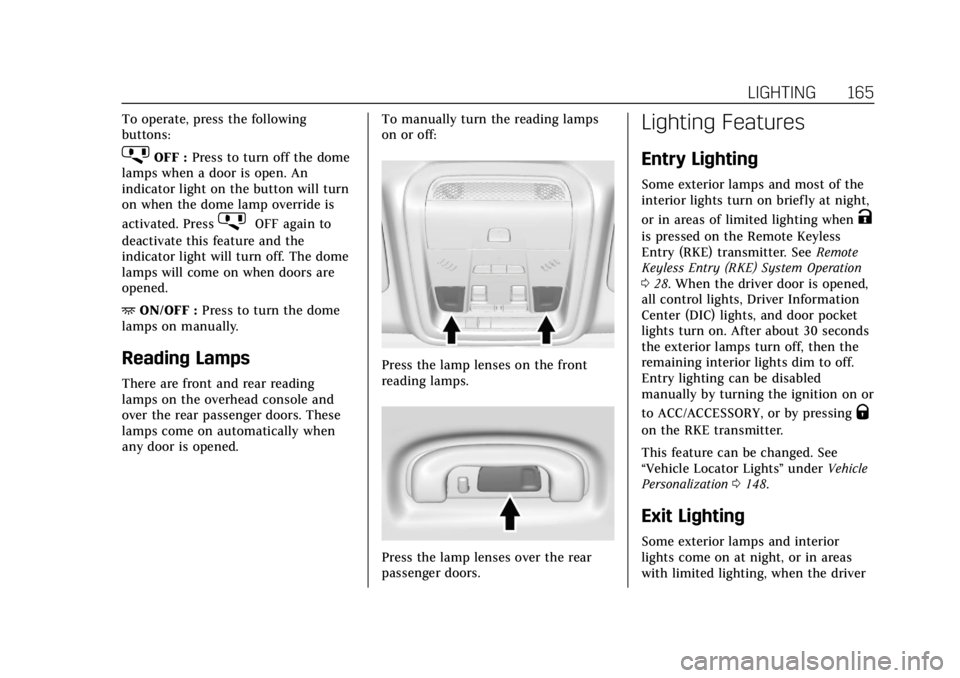
any door is opened. To manually turn the reading lamps
on or off:
Press the lamp lenses on the front
reading lamps.
Press the lamp lenses over the rear
passenger doors.
Lighting Features
Entry Lighting
Some exterior lamps and most of the
interior lights turn on briefly at night,
or in areas of limited lighting when
K
is pressed on the Remote Keyless
Entry (RKE) transmitter. See
Remote
Keyless Entry (RKE) System Operation
0 28. When the driver door is opened,
all control lights, Driver Information
Center (DIC) lights, and door pocket
lights turn on. After about 30 seconds
the exterior lamps turn off, then the
remaining interior lights dim to off.
Entry lighting can be disabled
manually by turning the ignition on or
to ACC/ACCESSORY, or by pressing
Q
on the RKE transmitter.
This feature can be changed. See
“Vehicle Locator Lights” underVehicle
Personalization 0148.
Exit Lighting
Some exterior lamps and interior
lights come on at night, or in areas
with limited lighting, when the driver
Page 174 of 380
Cadillac XT5 Owner Manual (GMNA-Localizing-U.S./Canada/Mexico-
11349110) - 2018 - CRC - 9/28/17
CLIMATE CONTROLS 173
Sensor
The solar sensor, on top of the
instrument panel near the windshield,
monitors the solar heat.
The climate control system uses the
sensor information to adjust the
temperature, fan speed, recirculation,
and air delivery mode for best
comfort.
If the sensor is covered, the automatic
climate control system may not work
properly.
Rear Climate Control System
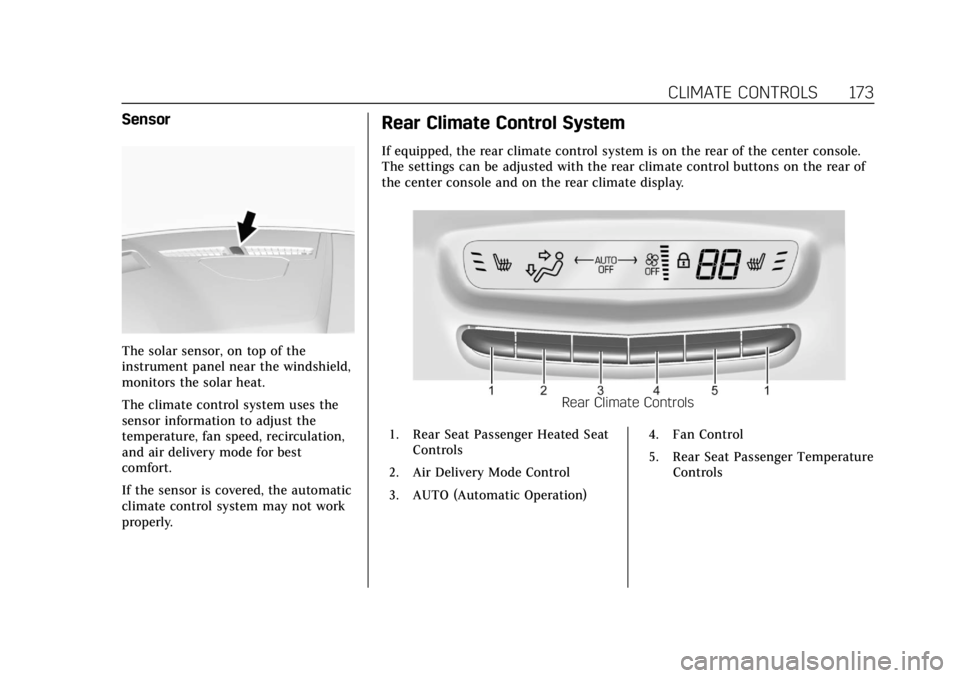
If equipped, the rear climate control system is on the rear of the center console.
The settings can be adjusted with the rear climate control buttons on the rear of
the center console and on the rear climate display.
Rear Climate Controls
1. Rear Seat Passenger Heated Seat Controls
2. Air Delivery Mode Control
3. AUTO (Automatic Operation) 4. Fan Control
5. Rear Seat Passenger Temperature
Controls
Page 176 of 380
Cadillac XT5 Owner Manual (GMNA-Localizing-U.S./Canada/Mexico-
11349110) - 2018 - CRC - 9/28/17
CLIMATE CONTROLS 175
Air Delivery Mode Control :Press up
or down to select the desired air
delivery mode. The air delivery
mode can also be changed by
touching
[,\, orYon the rear
climate display. This changes the
direction of the airflow in the rear
seating area.
If the rear floor air delivery mode is
selected, the rear fan speed indicator
will change when adjusted, but the
airf low amount directed to the floor
will not. This is normal operation for
the system.
To activate the rear floor air delivery
mode, touch
[on the rear climate
display.
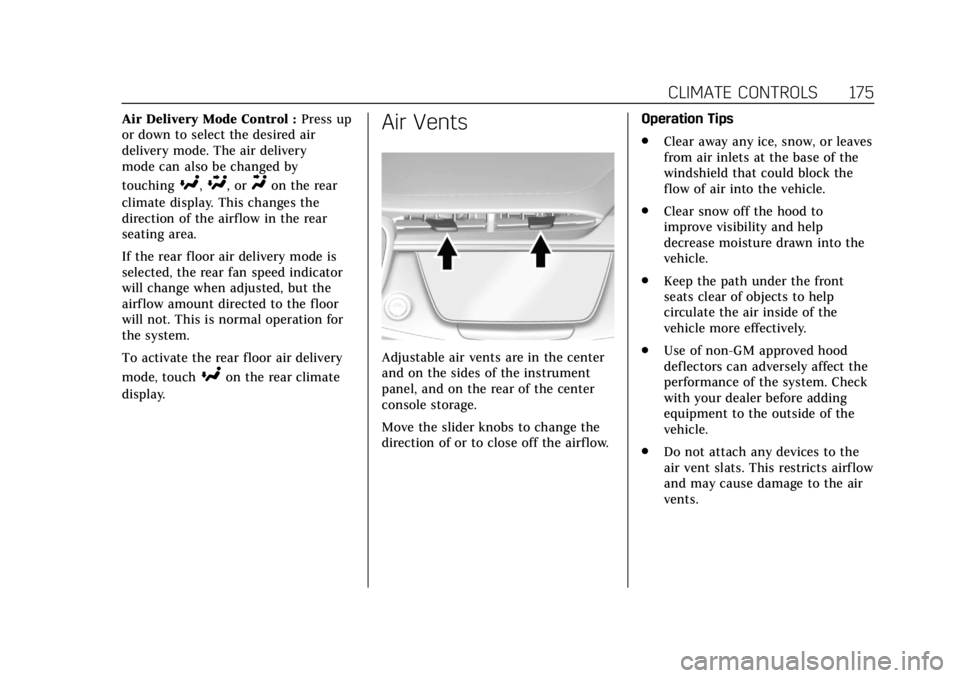
Air Vents
Adjustable air vents are in the center
and on the sides of the instrument
panel, and on the rear of the center
console storage.
Move the slider knobs to change the
direction of or to close off the airf low. Operation Tips
.
Clear away any ice, snow, or leaves
from air inlets at the base of the
windshield that could block the
flow of air into the vehicle.
. Clear snow off the hood to
improve visibility and help
decrease moisture drawn into the
vehicle.
. Keep the path under the front
seats clear of objects to help
circulate the air inside of the
vehicle more effectively.
. Use of non-GM approved hood
deflectors can adversely affect the
performance of the system. Check
with your dealer before adding
equipment to the outside of the
vehicle.
. Do not attach any devices to the
air vent slats. This restricts airflow
and may cause damage to the air
vents.
Page 208 of 380
Cadillac XT5 Owner Manual (GMNA-Localizing-U.S./Canada/Mexico-
11349110) - 2018 - CRC - 9/28/17
DRIVING AND OPERATING 207
and StabiliTrak Off lightgin the
instrument cluster turn off and a DIC
message may display.
Adding accessories can affect vehicle
performance. See Accessories and
Modifications 0251.
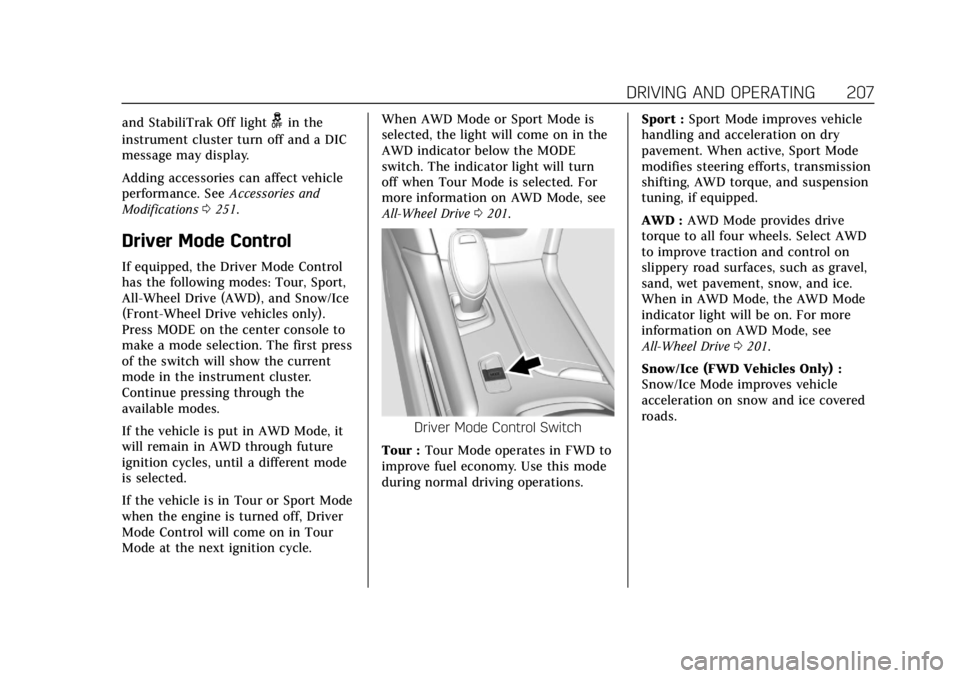
Driver Mode Control
If equipped, the Driver Mode Control
has the following modes: Tour, Sport,
All-Wheel Drive (AWD), and Snow/Ice
(Front-Wheel Drive vehicles only).
Press MODE on the center console to
make a mode selection. The first press
of the switch will show the current
mode in the instrument cluster.
Continue pressing through the
available modes.
If the vehicle is put in AWD Mode, it
will remain in AWD through future
ignition cycles, until a different mode
is selected.
If the vehicle is in Tour or Sport Mode
when the engine is turned off, Driver
Mode Control will come on in Tour
Mode at the next ignition cycle. When AWD Mode or Sport Mode is
selected, the light will come on in the
AWD indicator below the MODE
switch. The indicator light will turn
off when Tour Mode is selected. For
more information on AWD Mode, see
All-Wheel Drive
0201.
Driver Mode Control Switch
Tour : Tour Mode operates in FWD to
improve fuel economy. Use this mode
during normal driving operations. Sport :
Sport Mode improves vehicle
handling and acceleration on dry
pavement. When active, Sport Mode
modifies steering efforts, transmission
shifting, AWD torque, and suspension
tuning, if equipped.
AWD : AWD Mode provides drive
torque to all four wheels. Select AWD
to improve traction and control on
slippery road surfaces, such as gravel,
sand, wet pavement, snow, and ice.
When in AWD Mode, the AWD Mode
indicator light will be on. For more
information on AWD Mode, see
All-Wheel Drive 0201.
Snow/Ice (FWD Vehicles Only) :
Snow/Ice Mode improves vehicle
acceleration on snow and ice covered
roads.
Page 276 of 380
Cadillac XT5 Owner Manual (GMNA-Localizing-U.S./Canada/Mexico-
11349110) - 2018 - CRC - 9/28/17
VEHICLE CARE 275
FusesUsage
F66 Engine control module powertrain 2
F67 Powertrain TRCM
F68 –
F69 –
F70 –
F71 –
F72 –
F73 –
F74 –
F75 –
F76 –
F77 –
Relays Usage
K1 Starter 1
K2 Run/Crank
K3 Starter 3
K4 LED/Automatic headlamps
K5 – Relays
Usage
K6 Coolant pump
K7 Engine control module
K8 Air conditioning
K9 –
K10 Starter 2
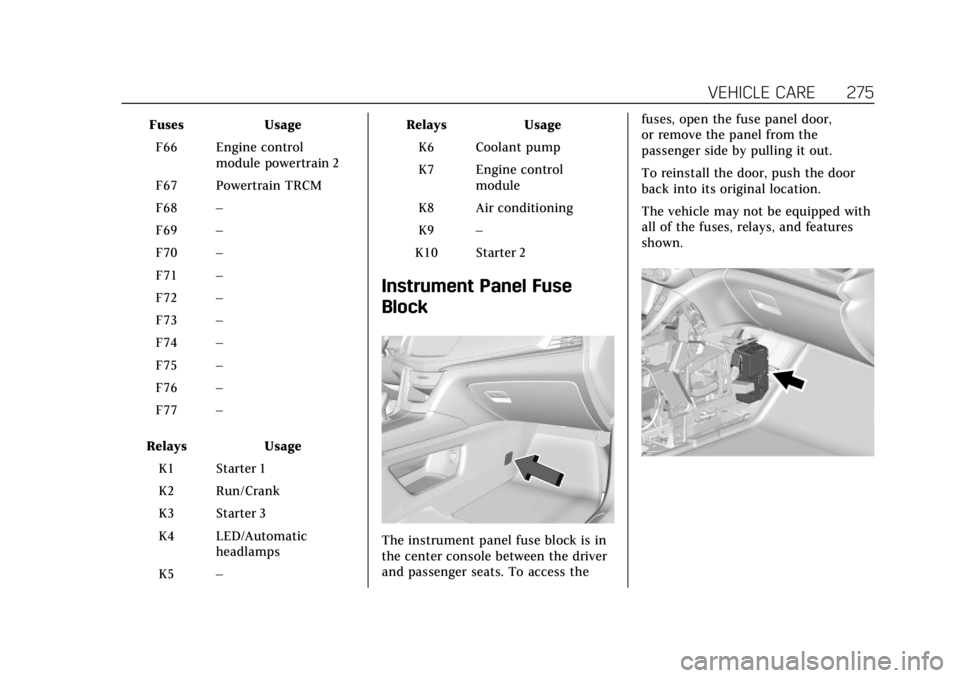
Instrument Panel Fuse
Block
The instrument panel fuse block is in
the center console between the driver
and passenger seats. To access the fuses, open the fuse panel door,
or remove the panel from the
passenger side by pulling it out.
To reinstall the door, push the door
back into its original location.
The vehicle may not be equipped with
all of the fuses, relays, and features
shown.
Page 370 of 380

Cadillac XT5 Owner Manual (GMNA-Localizing-U.S./Canada/Mexico-
11349110) - 2018 - CRC - 9/28/17
INDEX 369
AutomaticDimming Mirrors . . . . . . . . . . . . . . . . . . . 50
Door Locks . . . . . . . . . . . . . . . . . . . . . . . . . . 39
Forward Braking . . . . . . . . . . . . . . . . . . 229
Headlamp System . . . . . . . . . . . . . . . . 162
Transmission . . . . . . . . . . . . . . . . . . . . . . 196
Transmission Fluid . . . . . . . . . . . . . . . 257
Automatic Transmission Manual Mode . . . . . . . . . . . . . . . . . . . . . 200
B
BatteryExterior Lighting BatterySaver . . . . . . . . . . . . . . . . . . . . . . . . . . . . . 166
Power Protection . . . . . . . . . . . . . . . . . . 166
Battery - North America . . . . . .265, 314
Blade Replacement, Wiper . . . . . . . . . 267
Brake Parking, Electric . . . . . . . . . . . . . . . . . . 203
System Warning Light . . . . . . . . . . . . 135
Brakes . . . . . . . . . . . . . . . . . . . . . . . . . . . . . . . 263
Antilock . . . . . . . . . . . . . . . . . . . . . . . . . . . 202
Assist . . . . . . . . . . . . . . . . . . . . . . . . . . . . . . 204
Fluid . . . . . . . . . . . . . . . . . . . . . . . . . . . . . . . 264
Braking . . . . . . . . . . . . . . . . . . . . . . . . . . . . . . 179 Automatic Forward . . . . . . . . . . . . . . . 229
Braking System Front Pedestrian (FPB) . . . . . . . . . . . 230 Break-In, New Vehicle . . . . . . . . . . . . . . 188
Bulb Replacement
Back-up Lamps . . . . . . . . . . . . . . . . . . . 271
Halogen Bulbs . . . . . . . . . . . . . . . . . . . . 270
Headlamp Aiming . . . . . . . . . . . . . . . . 269
Headlamps . . . . . . . . . . . . . . . . . . . . . . . . 270
Headlamps and Front TurnSignal . . . . . . . . . . . . . . . . . . . . . . . . . . . . 270
Buying New Tires . . . . . . . . . . . . . . . . . . . 295
C
Cadillac Premium Care Maintenance . . . . . . . . . . . . . . . . . . . . . . 330
Calibration . . . . . . . . . . . . . . . . . . . . . . . . . . 117
California Fuel Requirements . . . . . . . . . . . . . . . . 237
Perchlorate MaterialsRequirements . . . . . . . . . . . . . . . . . . . 251
California Proposition 65 Warning . . . . . . . . . . . . .250, 265, 314, Back Cover
Canadian Vehicle Owners . . . . . . . . . . . . . 2
Capacities and Specifications . . . . . . 341
Carbon Monoxide Engine Exhaust . . . . . . . . . . . . . . . . . . . 195
Liftgate . . . . . . . . . . . . . . . . . . . . . . . . . . . . . . 41
Winter Driving . . . . . . . . . . . . . . . . . . . . 182 Cargo
Cover . . . . . . . . . . . . . . . . . . . . . . . . . . . . . . 109
Management System . . . . . . . . . . . . . 110
Tie-Downs . . . . . . . . . . . . . . . . . . . . . . . . . 110
Caution, Danger, and Warning . . . . . . . . 3
Center Console Storage . . . . . . . . . . . . . 108
Chains, Tire . . . . . . . . . . . . . . . . . . . . . . . . . 299
Charging Wireless . . . . . . . . . . . . . . . . . . . . . . . . . . . 119
Charging System Light . . . . . . . . . . . . . 133
Check Engine Light (MalfunctionIndicator) . . . . . . . . . . . . . . . . . . . . . . . . 133
Child Restraints Infants and Young Children . . . . . . . . 91
Lower Anchors and Tethers forChildren . . . . . . . . . . . . . . . . . . . . . . . . . . . 96
Older Children . . . . . . . . . . . . . . . . . . . . . . 89
Securing . . . . . . . . . . . . . . . . . . . . . . 102, 104
Systems . . . . . . . . . . . . . . . . . . . . . . . . . . . . . 93
Cigarette Lighter . . . . . . . . . . . . . . . . . . . . 121
Circuit Breakers . . . . . . . . . . . . . . . . . . . . . 272
Cleaning
Exterior Care . . . . . . . . . . . . . . . . . . . . . . 319
Interior Care . . . . . . . . . . . . . . . . . . . . . . 323
Climate Control Systems Dual Automatic . . . . . . . . . . . . . . . . . . . 168
Rear . . . . . . . . . . . . . . . . . . . . . . . . . . . . . . . . 173
Page 377 of 380

Cadillac XT5 Owner Manual (GMNA-Localizing-U.S./Canada/Mexico-
11349110) - 2018 - CRC - 9/28/17
376 INDEX
Seat Belts (cont'd)Use During Pregnancy . . . . . . . . . . . . . . 76
Seats Adjustment, Front . . . . . . . . . . . . . . . . . . 60
Head Restraints . . . . . . . . . . . . . . . . . . . . . 58
Heated and Ventilated Front . . . . . . . 64
Heated, Rear . . . . . . . . . . . . . . . . . . . . . . . . 69
Lumbar Adjustment, Front . . . . . . . . . 61
Memory . . . . . . . . . . . . . . . . . . . . . . . . . . . . . 62
Rear . . . . . . . . . . . . . . . . . . . . . . . . . . . . . . . . . . 66
Reclining Seatbacks . . . . . . . . . . . . . . . . 61
Securing Child Restraints . . . . .102, 104
Security Light . . . . . . . . . . . . . . . . . . . . . . . . . . . . . . . 140
OnStar . . . . . . . . . . . . . . . . . . . . . . . . . . . . . 359
Vehicle . . . . . . . . . . . . . . . . . . . . . . . . . . . . . . . 46
Vehicle Alarm . . . . . . . . . . . . . . . . . . . . . . . 46
Service . . . . . . . . . . . . . . . . . . . . . . . . . . . . . . . 176
Accessories andModifications . . . . . . . . . . . . . . . . . . . . 251
Doing Your Own Work . . . . . . . . . . . 251
Maintenance Records . . . . . . . . . . . . 339
Maintenance, General Information . . . . . . . . . . . . . . . . . . . . . . 328
Parts Identification Label . . . . . . . . 340
Publications Ordering Information . . . . . . . . . . . . . . . . . . . . . . 352
Scheduling Appointments . . . . . . . . 349 Service Electric Parking Brake
Light . . . . . . . . . . . . . . . . . . . . . . . . . . . . . . . 136
Services Special Application . . . . . . . . . . . . . . . 334
Servicing the Airbag . . . . . . . . . . . . . . . . . 87
Shifting Into Park . . . . . . . . . . . . . . . . . . . . . . . . . . 193
Out of Park . . . . . . . . . . . . . . . . . . . . . . . . 194
Side Blind Zone Alert (SBZA) . . . . . . 232
Signals, Turn and Lane-Change . . . . 163
Spare Tire Compact . . . . . . . . . . . . . . . . . . . . . . . . . . . 313
Special Application Services . . . . . . . 334
Specifications and Capacities . . . . . . 341
Speedometer . . . . . . . . . . . . . . . . . . . . . . . . 127
StabiliTrak OFF Light . . . . . . . . . . . . . . . . . . . . . . . . . . 138
Start Assist, Hill . . . . . . . . . . . . . . . . . . . . 204
Start Vehicle, Remote . . . . . . . . . . . . . . . 35
Starter Switch Check . . . . . . . . . . . . . . . 266
Starting the Engine . . . . . . . . . . . . . . . . . 190
Steering . . . . . . . . . . . . . . . . . . . . . . . . . . . . . . 180 Heated Wheel . . . . . . . . . . . . . . . . . . . . . 114
Wheel Adjustment . . . . . . . . . . . . . . . . 114
Wheel Controls . . . . . . . . . . . . . . . . . . . 114
Storage Rear . . . . . . . . . . . . . . . . . . . . . . . . . . . . . . . . 108 Storage Areas
Armrest . . . . . . . . . . . . . . . . . . . . . . . . . . . . 108
Cargo Cover . . . . . . . . . . . . . . . . . . . . . . . 109
Cargo Management System . . . . . . 110
Center Console . . . . . . . . . . . . . . . . . . . . 108
Convenience Net . . . . . . . . . . . . . . . . . . 111
Glove Box . . . . . . . . . . . . . . . . . . . . . . . . . 107
Roof Rack System . . . . . . . . . . . . . . . . 112
Storage Compartments . . . . . . . . . . . . . 107
Storing the Tire Sealant and Compressor Kit . . . . . . . . . . . . . . . . . . . . 307
Struts Gas . . . . . . . . . . . . . . . . . . . . . . . . . . . . . . . . . 268
Stuck Vehicle . . . . . . . . . . . . . . . . . . . . . . . 184
Summer Tires . . . . . . . . . . . . . . . . . . . . . . . 281
Sun Visors . . . . . . . . . . . . . . . . . . . . . . . . . . . . 55
Sunroof . . . . . . . . . . . . . . . . . . . . . . . . . . . . . . . 55
Symbols . . . . . . . . . . . . . . . . . . . . . . . . . . . . . . . . 3
System Forward Collision Alert (FCA) . . . . 226
Infotainment . . . . . . . . . . . . . . . . . 167, 356
Roof Rack . . . . . . . . . . . . . . . . . . . . . . . . . 112
Systems Driver Assistance . . . . . . . . . . . . . . . . . 219