Side mirrors CADILLAC XT5 2018 Owner's Manual
[x] Cancel search | Manufacturer: CADILLAC, Model Year: 2018, Model line: XT5, Model: CADILLAC XT5 2018Pages: 380, PDF Size: 6.21 MB
Page 30 of 380
Cadillac XT5 Owner Manual (GMNA-Localizing-U.S./Canada/Mexico-
11349110) - 2018 - CRC - 9/28/17
KEYS, DOORS, AND WINDOWS 29
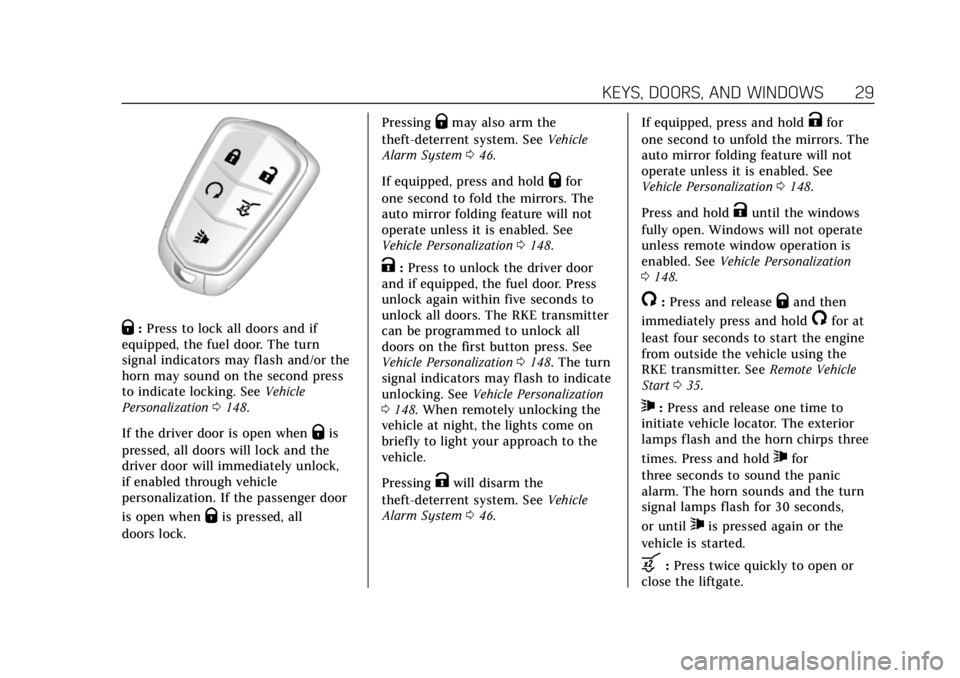
Q:Press to lock all doors and if
equipped, the fuel door. The turn
signal indicators may flash and/or the
horn may sound on the second press
to indicate locking. See Vehicle
Personalization 0148.
If the driver door is open when
Qis
pressed, all doors will lock and the
driver door will immediately unlock,
if enabled through vehicle
personalization. If the passenger door
is open when
Qis pressed, all
doors lock. Pressing
Qmay also arm the
theft-deterrent system. See Vehicle
Alarm System 046.
If equipped, press and hold
Qfor
one second to fold the mirrors. The
auto mirror folding feature will not
operate unless it is enabled. See
Vehicle Personalization 0148.
K:Press to unlock the driver door
and if equipped, the fuel door. Press
unlock again within five seconds to
unlock all doors. The RKE transmitter
can be programmed to unlock all
doors on the first button press. See
Vehicle Personalization 0148. The turn
signal indicators may flash to indicate
unlocking. See Vehicle Personalization
0 148. When remotely unlocking the
vehicle at night, the lights come on
briefly to light your approach to the
vehicle.
Pressing
Kwill disarm the
theft-deterrent system. See Vehicle
Alarm System 046. If equipped, press and hold
Kfor
one second to unfold the mirrors. The
auto mirror folding feature will not
operate unless it is enabled. See
Vehicle Personalization 0148.
Press and hold
Kuntil the windows
fully open. Windows will not operate
unless remote window operation is
enabled. See Vehicle Personalization
0 148.
/:Press and releaseQand then
immediately press and hold
/for at
least four seconds to start the engine
from outside the vehicle using the
RKE transmitter. See Remote Vehicle
Start 035.
7:Press and release one time to
initiate vehicle locator. The exterior
lamps flash and the horn chirps three
times. Press and hold
7for
three seconds to sound the panic
alarm. The horn sounds and the turn
signal lamps flash for 30 seconds,
or until
7is pressed again or the
vehicle is started.
b: Press twice quickly to open or
close the liftgate.
Page 50 of 380

Cadillac XT5 Owner Manual (GMNA-Localizing-U.S./Canada/Mexico-
11349110) - 2018 - CRC - 9/28/17
KEYS, DOORS, AND WINDOWS 49
Exterior Mirrors
Convex Mirrors
{Warning
A convex mirror can make things,
like other vehicles, look farther
away than they really are. If you cut
too sharply into the right lane, you
could hit a vehicle on the right.
Check the inside mirror or glance
over your shoulder before changing
lanes.
The passenger side mirror is convex
shaped. A convex mirror's surface is
curved so more can be seen from the
driver seat.
Power Mirrors
To adjust a mirror: 1. Press
}or|to choose the
driver or passenger mirror.
2. Press the arrows on the control pad to move each mirror in the
desired direction.
Memory Mirrors
The vehicle may have memory
mirrors. See Memory Seats 062.
Lane Change Alert (LCA)
The vehicle may have LCA. See Lane
Change Alert (LCA) 0232.
Folding Mirrors
Manual Folding Mirrors
If equipped, manually fold the mirrors
inward toward the vehicle to prevent
damage when going through an
automatic car wash. Push the mirror
outward to return it to the original
position.
Power Folding Mirrors
If equipped, press to power fold the
mirrors. Press again to unfold.
Page 51 of 380
Cadillac XT5 Owner Manual (GMNA-Localizing-U.S./Canada/Mexico-
11349110) - 2018 - CRC - 9/28/17
50 KEYS, DOORS, AND WINDOWS
Resetting the Power Folding
Mirrors
Reset the power folding mirrors if:
.The mirrors are accidentally
obstructed while folding.
. They are accidentally manually
folded/unfolded.
. The mirrors do not stay in the
unfolded position.
. The mirrors vibrate at normal
driving speeds.
Fold and unfold the mirrors one time
using the mirror controls to reset
them to their normal position. A noise
may be heard during the resetting of
the power folding mirrors. This sound
is normal after a manual folding
operation.
Auto Mirror Folding
If equipped, with the ignition off,
press and hold
Qon the RKE
transmitter for approximately
one second to automatically fold the
exterior mirrors. Press and hold
Kon
the RKE transmitter for approximately
one second to unfold. See Remote
Keyless Entry (RKE) System Operation
0 28.
This feature is turned on or off
through vehicle personalization. See
Vehicle Personalization 0148.
Heated Mirrors
K
:Press to heat the mirrors.
See “Rear Window Defogger” under
Dual Automatic Climate Control System
0 168.
Automatic Dimming Mirror
If the vehicle has the automatic
dimming mirror, the driver outside
mirror automatically adjusts for the
glare of headlamps behind you.
Reverse Tilt Mirrors
If equipped with memory seats, the
passenger and/or driver mirror tilts to
a preselected position when the
vehicle is in R (Reverse). This allows
the curb to be seen when parallel
parking.
The mirror(s) return to the original
position when:
.
The vehicle is shifted out of
R (Reverse), or remains in
R (Reverse) for about 30 seconds.
. The ignition is turned off.
. The vehicle is driven in
R (Reverse) above a set speed.
To turn this feature on or off, see
Vehicle Personalization 0148.
Page 53 of 380
Cadillac XT5 Owner Manual (GMNA-Localizing-U.S./Canada/Mexico-
11349110) - 2018 - CRC - 9/28/17
52 KEYS, DOORS, AND WINDOWS
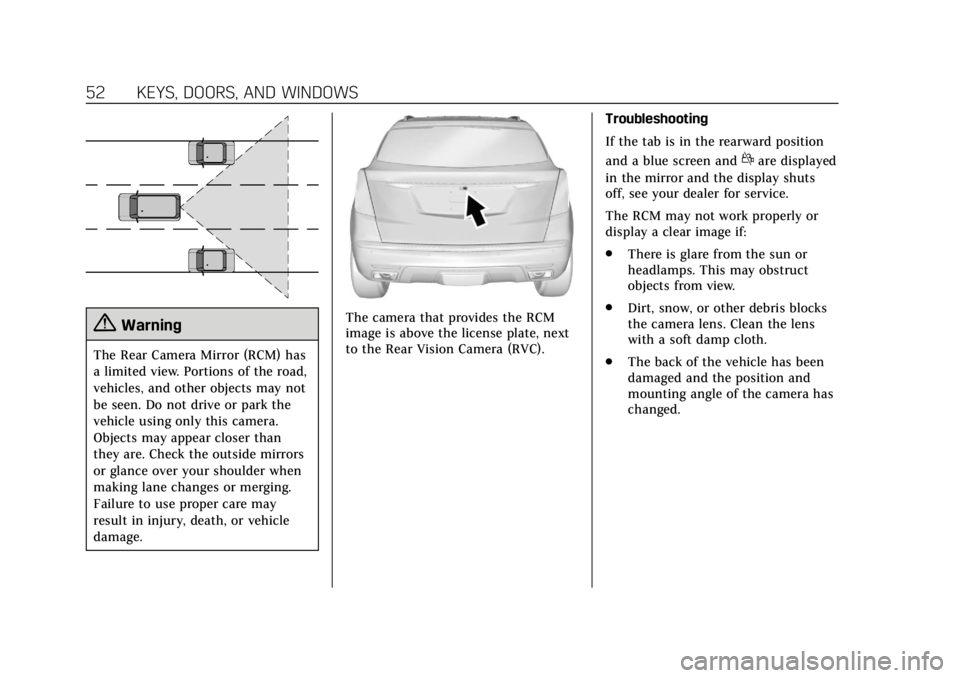
{Warning
The Rear Camera Mirror (RCM) has
a limited view. Portions of the road,
vehicles, and other objects may not
be seen. Do not drive or park the
vehicle using only this camera.
Objects may appear closer than
they are. Check the outside mirrors
or glance over your shoulder when
making lane changes or merging.
Failure to use proper care may
result in injury, death, or vehicle
damage.
The camera that provides the RCM
image is above the license plate, next
to the Rear Vision Camera (RVC).Troubleshooting
If the tab is in the rearward position
and a blue screen and
dare displayed
in the mirror and the display shuts
off, see your dealer for service.
The RCM may not work properly or
display a clear image if:
. There is glare from the sun or
headlamps. This may obstruct
objects from view.
. Dirt, snow, or other debris blocks
the camera lens. Clean the lens
with a soft damp cloth.
. The back of the vehicle has been
damaged and the position and
mounting angle of the camera has
changed.
Page 152 of 380
Cadillac XT5 Owner Manual (GMNA-Localizing-U.S./Canada/Mexico-
11349110) - 2018 - CRC - 9/28/17
INSTRUMENTS AND CONTROLS 151
FAB functions. With the Alert and
Brake setting, both FCA and FAB are
available. The Alert setting disables
FAB. SeeForward Automatic Braking
(FAB) 0229.
Select Off, Alert and Brake, or Alert.
Front Pedestrian Detection
This feature may help avoid or reduce
the harm caused by front-end crashes
with nearby pedestrians.
See Front Pedestrian Braking (FPB)
System 0230.
Select Off, Alert, or Alert and Brake.
Rear Cross Traffic Alert
This allows the Rear Cross Traffic
Alert feature to be turned on or off.
Select Off or On.
Adaptive Cruise Go Notifier
This feature will give a reminder that
Adaptive Cruise Control provides
when it has brought the vehicle to a
complete stop behind another
stopping vehicle, and then that vehicle
drives on.
Select Off or On. Lane Change Alert
This allows the feature to be turned
on or off. See
Lane Change Alert (LCA)
0 232.
Select Off or On.
Comfort and Convenience
Select and the following may display:
. Auto Memory Recall
. Easy Exit Options
. Chime Volume
. Reverse Tilt Mirror
. Auto Mirror Folding
. Rainsense Wipers
. Auto Wipe in Reverse Gear
. Extended Hill Start Assist
Auto Memory Recall
This feature automatically recalls the
current driver’s previously stored 1 or
2 button positions when the ignition
is changed from off to on or ACC/
ACCESSORY. See Memory Seats062.
Select Off or On. Easy Exit Options
This feature automatically recalls the
previously stored Exit button position
when exiting the vehicle. See
Memory
Seats 062.
Select Off or On.
Chime Volume
This allows the selection of the chime
volume level.
Touch + or −to adjust the volume.
Reverse Tilt Mirror
When on, both the driver and
passenger, driver, or passenger outside
mirrors will tilt downward when the
vehicle is shifted to R (Reverse) to
improve visibility of the ground near
the rear wheels. They will return to
their previous driving position when
the vehicle is shifted out of
R (Reverse) or the engine is turned off.
See Reverse Tilt Mirrors 050.
Select Off, On - Driver and Passenger,
On - Driver, or On - Passenger.
Page 153 of 380
Cadillac XT5 Owner Manual (GMNA-Localizing-U.S./Canada/Mexico-
11349110) - 2018 - CRC - 9/28/17
152 INSTRUMENTS AND CONTROLS
Auto Mirror Folding
When on, the outside mirrors will
automatically fold or unfold when the
Remote Keyless Entry (RKE)
transmitter
QorKbutton is pressed
and held. See Remote Keyless Entry
(RKE) System Operation 028.
Select Off or On.
Rainsense Wipers
When on, the normal intermittent
wiper control becomes a Rainsense
sensitivity control. See “Rainsense”in
Windshield Wiper/Washer 0114.
Select Off or On.
Auto Wipe in Reverse Gear
When on and the front wiper is on,
the rear wiper will automatically
activate when the vehicle is shifted to
R (Reverse).
Select Off or On.
Extended Hill Start Assist
This allows the duration of the Hill
Start Assist to be changed. See Hill
Start Assist (HSA) 0204. Select Extended Hold or
Standard Hold.
Lighting
Select and the following may display:
.
Vehicle Locator Lights
. Exit Lighting
Vehicle Locator Lights
This feature will flash the exterior
lamps and allows some of the exterior
lamps and most of the interior lamps
to turn on briefly when
Kon the
Remote Keyless Entry (RKE)
transmitter is pressed to locate the
vehicle.
Select Off or On.
Exit Lighting
This allows the selection of how long
the exterior lamps stay on when
leaving the vehicle when it is dark
outside.
Select Off, 30 Seconds, 60 Seconds,
or 120 Seconds.
Power Door Locks
Select and the following may display:
. Unlocked Door Anti-Lockout
. Auto Door Unlock
. Delayed Door Lock
Unlocked Door Anti-Lockout
When on, this feature will keep the
driver door from locking when the
door is open. If Off is selected, the
Delayed Door Lock menu will be
available.
Select Off or On.
Auto Door Unlock
This allows selection of which of the
doors will automatically unlock when
the vehicle is shifted into P (Park).
Select Off, All Doors, or Driver Door.
Delayed Door Lock
When on, this feature will delay the
locking of the doors. To override the
delay, press the power door lock
switch on the door.
Select Off or On.
Page 172 of 380
Cadillac XT5 Owner Manual (GMNA-Localizing-U.S./Canada/Mexico-
11349110) - 2018 - CRC - 9/28/17
CLIMATE CONTROLS 171
-:Clears the windows of fog or
moisture. Air is directed to the
windshield and floor outlets.
0: Clears the windshield of fog or
frost more quickly. Air is directed to
the windshield. Press
0to turn on or
off. Changing the air delivery mode
also turns the defrost off.
A/C : Touch A/C Mode on the climate
control display to turn the automatic
air conditioning on or off. If the fan is
turned off or the outside temperature
falls below freezing, the air
conditioner will not run.
Press AUTO to return to automatic
operation and the air conditioner runs
as needed.
@: Press to alternate between
recirculating air inside the vehicle or
pulling in outside air. The indicator
light on the button is lit when
recirculation mode is active. This
helps to quickly cool the air inside the
vehicle or reduce the outside air and
odors that might enter. Pressing this control cancels
automatic recirculation. Press AUTO
to return to automatic operation;
recirculation runs automatically as
needed.
Manual recirculation mode is not
available when in Defrost or Defog
modes.
Auto Defog :
The climate control
system may have a sensor to
automatically detect high humidity
inside the vehicle. When high
humidity is detected, the climate
control system may adjust to outside
air supply and turn on the air
conditioner. If the climate control
system does not detect possible
window fogging, it returns to normal
operation. To turn Auto Defog off or
on, see “Climate and Air Quality”
under Vehicle Personalization 0148.
Rear Window Defogger
K:Press to turn the rear window
defogger on or off. An indicator light
on the button comes on to show that
the rear window defogger is on. The defogger only works when the
ignition is on. The defogger turns off
if the ignition is in off or ACC/
ACCESSORY.
The rear window defogger can be set
to automatic operation. See
“Climate
and Air Quality” underVehicle
Personalization 0148. When Auto Rear
Defog is selected, the rear window
defogger turns on automatically when
the interior temperature is cold and
the outside temperature is about 4 °C
(40 °F) and below.
The upper grid lines on the rear
window are antenna lines and are not
intended to heat when the defogger is
activated.
The heated outside mirrors turn on
when the rear window defogger
button is on and help to clear fog or
frost from the surface of the mirrors.
Page 222 of 380
Cadillac XT5 Owner Manual (GMNA-Localizing-U.S./Canada/Mexico-
11349110) - 2018 - CRC - 9/28/17
DRIVING AND OPERATING 221
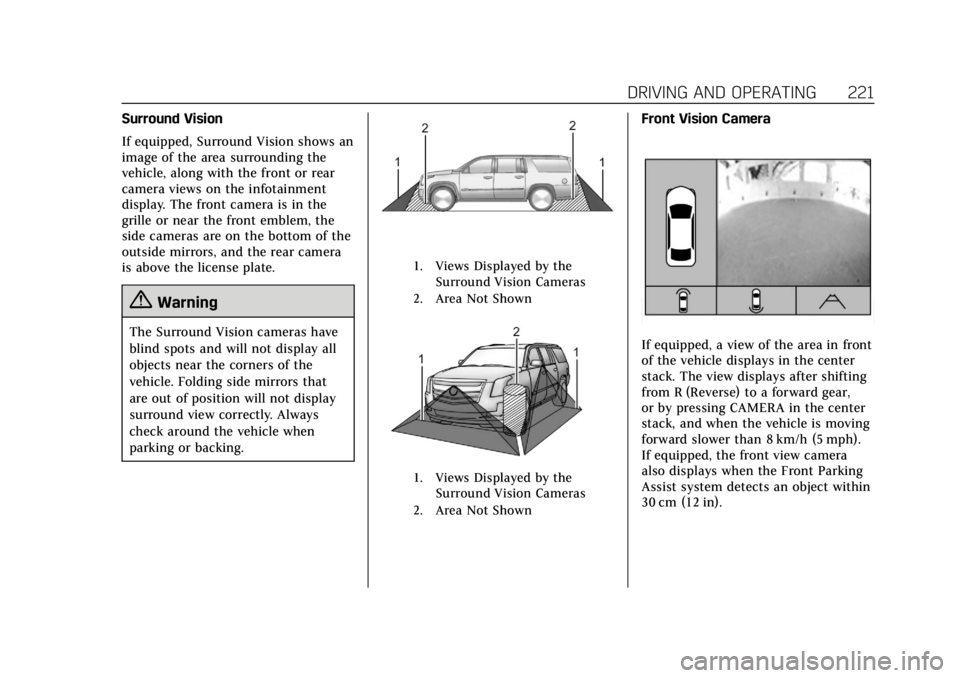
Surround Vision
If equipped, Surround Vision shows an
image of the area surrounding the
vehicle, along with the front or rear
camera views on the infotainment
display. The front camera is in the
grille or near the front emblem, the
side cameras are on the bottom of the
outside mirrors, and the rear camera
is above the license plate.
{Warning
The Surround Vision cameras have
blind spots and will not display all
objects near the corners of the
vehicle. Folding side mirrors that
are out of position will not display
surround view correctly. Always
check around the vehicle when
parking or backing.
1. Views Displayed by theSurround Vision Cameras
2. Area Not Shown
1. Views Displayed by the Surround Vision Cameras
2. Area Not Shown
Front Vision Camera
If equipped, a view of the area in front
of the vehicle displays in the center
stack. The view displays after shifting
from R (Reverse) to a forward gear,
or by pressing CAMERA in the center
stack, and when the vehicle is moving
forward slower than 8 km/h (5 mph).
If equipped, the front view camera
also displays when the Front Parking
Assist system detects an object within
30 cm (12 in).
Page 223 of 380
Cadillac XT5 Owner Manual (GMNA-Localizing-U.S./Canada/Mexico-
11349110) - 2018 - CRC - 9/28/17
222 DRIVING AND OPERATING
{Warning
The camera(s) do not display
children, pedestrians, bicyclists,
crossing traffic, animals, or any
other object outside of the cameras’
field of view, below the bumper,
or under the vehicle. Shown
distances may be different from
actual distances. Do not drive or
park the vehicle using only these
camera(s). Always check behind and
around the vehicle before driving.
Failure to use proper care may
result in injury, death, or vehicle
damage.
Parking Assist
With RPA, and if equipped with FPA,
as the vehicle moves at speeds of less
than 8 km/h (5 mph) the sensors on
the bumpers may detect objects up to
2.5 m (8 ft) behind and 1.2 m (4 ft) in
front of the vehicle within a zone
25 cm (10 in) high off the ground and
below bumper level. These detection
distances may be shorter during
warmer or humid weather. Blocked sensors will not detect objects and
can also cause false detections. Keep
the sensors clean of mud, dirt, snow,
ice, and slush; and clean sensors after
a car wash in freezing temperatures.
{Warning
The Parking Assist system does not
detect children, pedestrians,
bicyclists, animals, or objects
located below the bumper or that
are too close or too far from the
vehicle. It is not available at speeds
greater than 8 km/h (5 mph). To
prevent injury, death, or vehicle
damage, even with Parking Assist,
always check the area around the
vehicle and check all mirrors before
moving forward or backing.
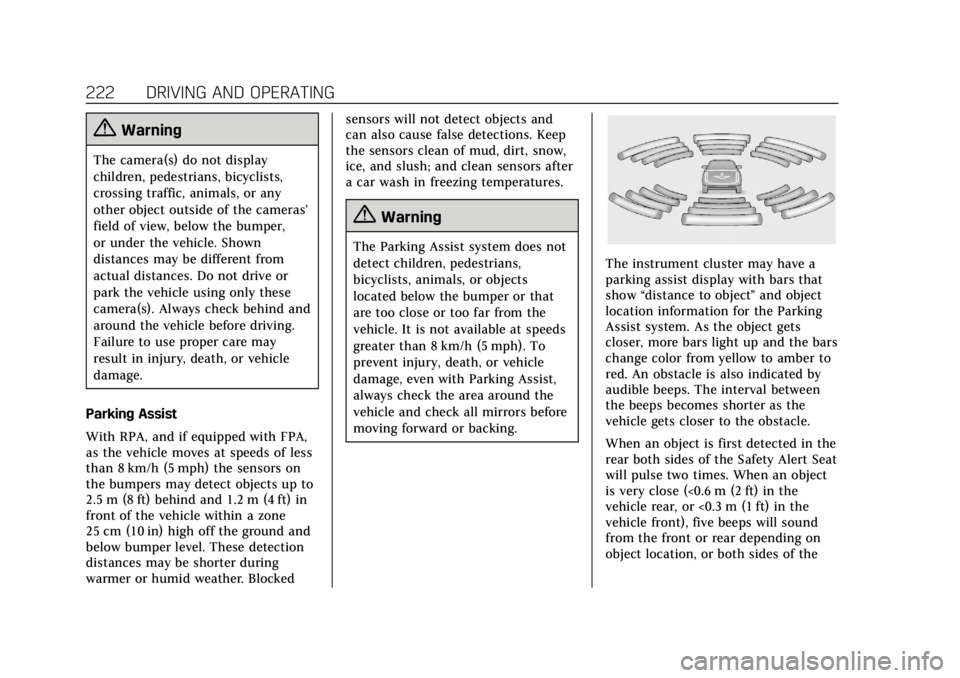
The instrument cluster may have a
parking assist display with bars that
show
“distance to object ”and object
location information for the Parking
Assist system. As the object gets
closer, more bars light up and the bars
change color from yellow to amber to
red. An obstacle is also indicated by
audible beeps. The interval between
the beeps becomes shorter as the
vehicle gets closer to the obstacle.
When an object is first detected in the
rear both sides of the Safety Alert Seat
will pulse two times. When an object
is very close (<0.6 m (2 ft) in the
vehicle rear, or <0.3 m (1 ft) in the
vehicle front), five beeps will sound
from the front or rear depending on
object location, or both sides of the
Page 224 of 380
Cadillac XT5 Owner Manual (GMNA-Localizing-U.S./Canada/Mexico-
11349110) - 2018 - CRC - 9/28/17
DRIVING AND OPERATING 223
Safety Alert Seat will pulse five times.
Beeps for FPA are higher pitched than
for RPA.
Backing Warning and Reverse
Automatic Braking (RAB)
Vehicles with Adaptive Cruise Control
(ACC) have the Backing Warning
System and Reverse Automatic
Braking (RAB) system. When in
R (Reverse), Backing Warning alerts of
rear objects at vehicle speeds greater
than 8 km/h (5 mph), and RAB may
automatically brake hard at speeds
between 1–32 km/h (0.5–20 mph).
The Backing Warning System will
beep once from the rear when an
object is first detected, or pulse twice
on both sides of the Safety Alert Seat.
When the system detects a potential
crash, beeps will be heard from the
rear, or five pulses will be felt on both
sides of the Safety Alert Seat. There
may also be a brief, sharp application
of the brakes.{Warning
The Backing Warning System only
operates at speeds greater than
8 km/h (5 mph). It does not detect
children, pedestrians, bicyclists,
animals, or objects below the
bumper or that are too close or too
far from the vehicle. In some
situations, such as at higher
backing speeds, there may not be
enough time for the short, sharp
application of the vehicle brake
system to occur. To prevent injury,
death, or vehicle damage, even with
the Backing Warning System,
always check the area around the
vehicle and check all mirrors before
backing.
When the vehicle is in R (Reverse),
if the system detects the vehicle is
backing too fast to avoid a crash with
a detected object behind your vehicle
in your path, it may automatically
brake hard to a stop to help avoid or
reduce the harm caused by a backing
crash.
{Warning
RAB may not avoid many types of
backing crashes. Do not wait for the
automatic braking to apply. This
system is not designed to replace
driver braking and only works in
R (Reverse) when an object is
detected directly behind the vehicle.
It may not brake or stop in time to
avoid a crash. It will not brake for
objects when the vehicle is moving
at very low speeds. It does not
detect children, pedestrians,
bicyclists, animals, or objects below
the bumper or that are too close or
too far from the vehicle. To prevent
injury, death, or vehicle damage,
even with RAB, always check the
area around the vehicle before and
while backing.
Pressing the brake pedal after the
vehicle comes to a stop will release
RAB. If the brake pedal is not pressed
soon after the stop, the Electric