climate controls CADILLAC XT5 2018 Owner's Manual
[x] Cancel search | Manufacturer: CADILLAC, Model Year: 2018, Model line: XT5, Model: CADILLAC XT5 2018Pages: 380, PDF Size: 6.21 MB
Page 2 of 380
Cadillac XT5 Owner Manual (GMNA-Localizing-U.S./Canada/Mexico-
11349110) - 2018 - CRC - 9/28/17
ContentsIntroduction . . . . . . . . . . . . . . . . . . . . . . . . . . 2
In Brief . . . . . . . . . . . . . . . . . . . . . . . . . . . . . . . 5
Keys, Doors, and Windows . . . . . . . . . 27
Seats and Restraints . . . . . . . . . . . . . . . 57
Storage . . . . . . . . . . . . . . . . . . . . . . . . . . . . . 107
Instruments and Controls . . . . . . . . 113
Lighting . . . . . . . . . . . . . . . . . . . . . . . . . . . . 160
Infotainment System . . . . . . . . . . . . . 167
Climate Controls . . . . . . . . . . . . . . . . . . 168
Driving and Operating . . . . . . . . . . . . 177
Vehicle Care . . . . . . . . . . . . . . . . . . . . . . . 249
Service and Maintenance . . . . . . . . . 328
Technical Data . . . . . . . . . . . . . . . . . . . . 340
Customer Information . . . . . . . . . . . . 343
Reporting Safety Defects . . . . . . . . . 353
OnStar . . . . . . . . . . . . . . . . . . . . . . . . . . . . . . 357
Index . . . . . . . . . . . . . . . . . . . . . . . . 368
Page 6 of 380
Cadillac XT5 Owner Manual (GMNA-Localizing-U.S./Canada/Mexico-
11349110) - 2018 - CRC - 9/28/17
IN BRIEF 5
In Brief
Instrument Panel
Instrument Panel Overview . . . . . . . . . 6
Initial Drive Information
Initial Drive Information . . . . . . . . . . . 8
Stop/Start System . . . . . . . . . . . . . . . . . . . 8
Remote Keyless Entry (RKE)System . . . . . . . . . . . . . . . . . . . . . . . . . . . . . 8
Remote Vehicle Start . . . . . . . . . . . . . . . 8
Door Locks . . . . . . . . . . . . . . . . . . . . . . . . . . 9
Liftgate . . . . . . . . . . . . . . . . . . . . . . . . . . . . . 10
Windows . . . . . . . . . . . . . . . . . . . . . . . . . . . 10
Seat Adjustment . . . . . . . . . . . . . . . . . . . 10
Memory Features . . . . . . . . . . . . . . . . . . 11
Second Row Seats . . . . . . . . . . . . . . . . . 12
Heated and Ventilated Seats . . . . . . 12
Head Restraint Adjustment . . . . . . . 12
Seat Belts . . . . . . . . . . . . . . . . . . . . . . . . . . . 13
Passenger Sensing System . . . . . . . . 13
Mirror Adjustment . . . . . . . . . . . . . . . . 13
Steering Wheel Adjustment . . . . . . . 14
Interior Lighting . . . . . . . . . . . . . . . . . . . 14
Exterior Lighting . . . . . . . . . . . . . . . . . . . 15
Windshield Wiper/Washer . . . . . . . . 16
Climate Controls . . . . . . . . . . . . . . . . . . . 17
Transmission . . . . . . . . . . . . . . . . . . . . . . . 18
Vehicle Features
Infotainment System . . . . . . . . . . . . . . 18
Steering Wheel Controls . . . . . . . . . . 18
Cruise Control . . . . . . . . . . . . . . . . . . . . . 19
Driver Information Center (DIC) . . . . . . . . . . . . . . . . . . . . . . 19
Forward Collision Alert (FCA) System . . . . . . . . . . . . . . . . . . . . . . . . . . . . 20
Forward Automatic Braking (FAB) . . . . . . . . . . . . . . . . . . . . 20
Front Pedestrian Braking (FPB) System . . . . . . . . . . . . . . . . . . . . . . . . . . . . 20
Lane Keep Assist (LKA) . . . . . . . . . . . 20
Lane Change Alert (LCA) . . . . . . . . . . 20
Surround Vision . . . . . . . . . . . . . . . . . . . 21
Rear Vision Camera (RVC) . . . . . . . . 21
Rear Cross Traffic Alert (RCTA) System . . . . . . . . . . . . . . . . . . . . . . . . . . . . 21
Parking Assist . . . . . . . . . . . . . . . . . . . . . . 21
Automatic Parking Assist (APA) . . . . . . . . . . . . . . . . . . . . . . 21
Reverse Automatic Braking (RAB) . . . . . . . . . . . . . . . . . . . . 22
Power Outlets . . . . . . . . . . . . . . . . . . . . . . 22
Universal Remote System . . . . . . . . . 22
Sunroof . . . . . . . . . . . . . . . . . . . . . . . . . . . . . 23
Performance and Maintenance
Traction Control/Electronic Stability Control . . . . . . . . . . . . . . . . . . 23
Tire Pressure Monitor . . . . . . . . . . . . . 24
Fuel . . . . . . . . . . . . . . . . . . . . . . . . . . . . . . . . . 24
E85 or FlexFuel . . . . . . . . . . . . . . . . . . . . 25
Engine Oil Life System . . . . . . . . . . . . 25
Driving for Better Fuel Economy . . . . . . . . . . . . . . . . . . . . . . . . . . 25
Roadside Service . . . . . . . . . . . . . . . . . . . 26
Page 8 of 380

Cadillac XT5 Owner Manual (GMNA-Localizing-U.S./Canada/Mexico-
11349110) - 2018 - CRC - 9/28/17
IN BRIEF 7
1.Air Vents 0175.
2. Exterior Lamp Controls 0160.
Turn Signal Lever. See Turn and
Lane-Change Signals 0163.
IntelliBeam
®System Button (If
Equipped). See Exterior Lamp
Controls 0160.
3. Tap Shift Controls. See Manual
Mode 0200.
4. Instrument Cluster (Uplevel
Cluster) 0125 orInstrument
Cluster (Base Level Cluster) 0123.
Driver Information Center (DIC)
Display. See Driver Information
Center (DIC) 0141.
5. Windshield Wiper/Washer 0114.
Rear Window Wiper/Washer
0 117.
6. ENGINE START/STOP Button. See Ignition Positions 0188.
7. Parking Assist Button. See Assistance Systems for Parking or
Backing 0220. Automatic Parking Assist (APA)
Button. See
Assistance Systems
for Parking or Backing 0220.
8. Light Sensor. See Automatic
Headlamp System 0162.
9. Hazard Warning Flashers 0163.
10. Infotainment 0167.
11. Heated and Ventilated Front Seats
064 (If Equipped).
12. Dual Automatic Climate Control
System 0168.
13. MODE Switch. See Driver Mode
Control 0207.
Traction Control/Electronic
Stability Control 0205.
All-Wheel Drive 0201 (If
Equipped).
14. Shift Lever. See Automatic
Transmission 0196.
15. Steering Wheel Controls 0114.
Driver Information Center (DIC)
Controls. See Driver Information
Center (DIC) 0141.
16. Steering Wheel Controls 0114. 17.
Horn 0114.
18. Forward Collision Alert (FCA)
System 0226 (If Equipped).
Lane Keep Assist (LKA) 0234 (If
Equipped).
Heated Steering Wheel 0114 (If
Equipped).
19. Cruise Control 0208.
Adaptive Cruise Control 0210 (If
Equipped).
Phone Button. See Steering Wheel
Controls 0114.
20. Steering Wheel Adjustment 0114
(Out of View).
21. Head-Up Display (HUD) 0144 (If
Equipped).
22. Hood Release. See Hood0252.
Data Link Connector (DLC) (Out
of View). See Malfunction
Indicator Lamp (Check Engine
Light) 0133.
23. Instrument Panel Illumination
Control 0164.
24. Electric Parking Brake 0203.
Page 13 of 380
Cadillac XT5 Owner Manual (GMNA-Localizing-U.S./Canada/Mexico-
11349110) - 2018 - CRC - 9/28/17
12 IN BRIEF
Second Row Seats
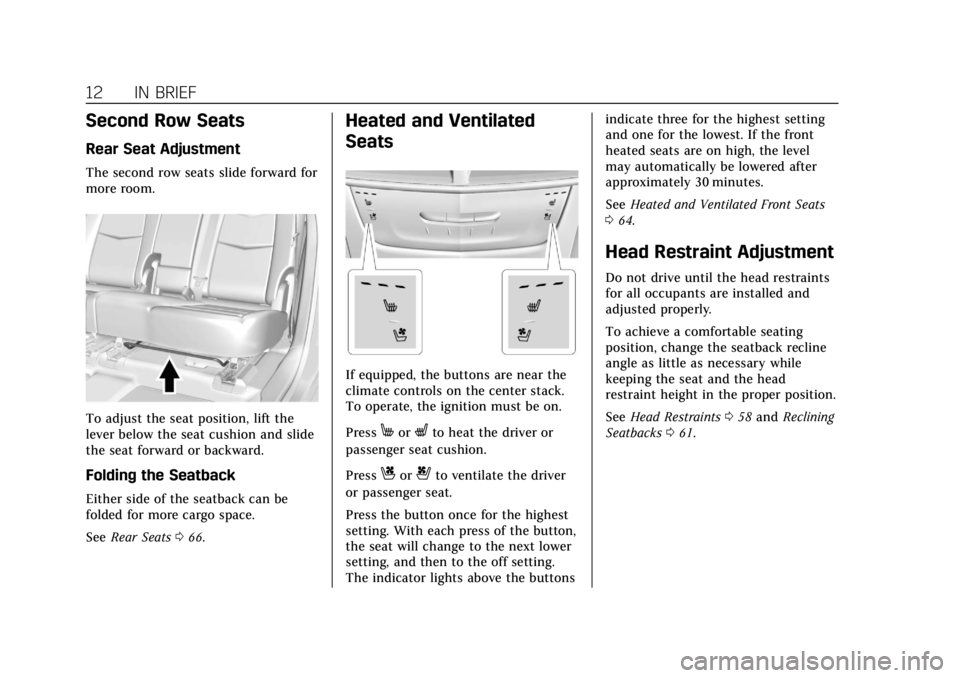
Rear Seat Adjustment
The second row seats slide forward for
more room.
To adjust the seat position, lift the
lever below the seat cushion and slide
the seat forward or backward.
Folding the Seatback
Either side of the seatback can be
folded for more cargo space.
SeeRear Seats 066.
Heated and Ventilated
Seats
If equipped, the buttons are near the
climate controls on the center stack.
To operate, the ignition must be on.
Press
MorLto heat the driver or
passenger seat cushion.
Press
Cor{to ventilate the driver
or passenger seat.
Press the button once for the highest
setting. With each press of the button,
the seat will change to the next lower
setting, and then to the off setting.
The indicator lights above the buttons indicate three for the highest setting
and one for the lowest. If the front
heated seats are on high, the level
may automatically be lowered after
approximately 30 minutes.
See
Heated and Ventilated Front Seats
0 64.
Head Restraint Adjustment
Do not drive until the head restraints
for all occupants are installed and
adjusted properly.
To achieve a comfortable seating
position, change the seatback recline
angle as little as necessary while
keeping the seat and the head
restraint height in the proper position.
See Head Restraints 058 and Reclining
Seatbacks 061.
Page 18 of 380
Cadillac XT5 Owner Manual (GMNA-Localizing-U.S./Canada/Mexico-
11349110) - 2018 - CRC - 9/28/17
IN BRIEF 17
INT :If equipped with Intermittent
wipers only, move the windshield
wiper lever to INT. Turn the band up
for more frequent wipes or down for
less frequent wipes.
OFF : Use to turn the wipers off.
1X : For a single wipe, briefly move
the lever down. For several wipes, hold
the lever down.
f: Pull the lever toward you to
spray windshield washer fluid and
activate the wipers.
See Windshield Wiper/Washer 0114
and Rear Window Wiper/Washer 0117.
Climate Controls
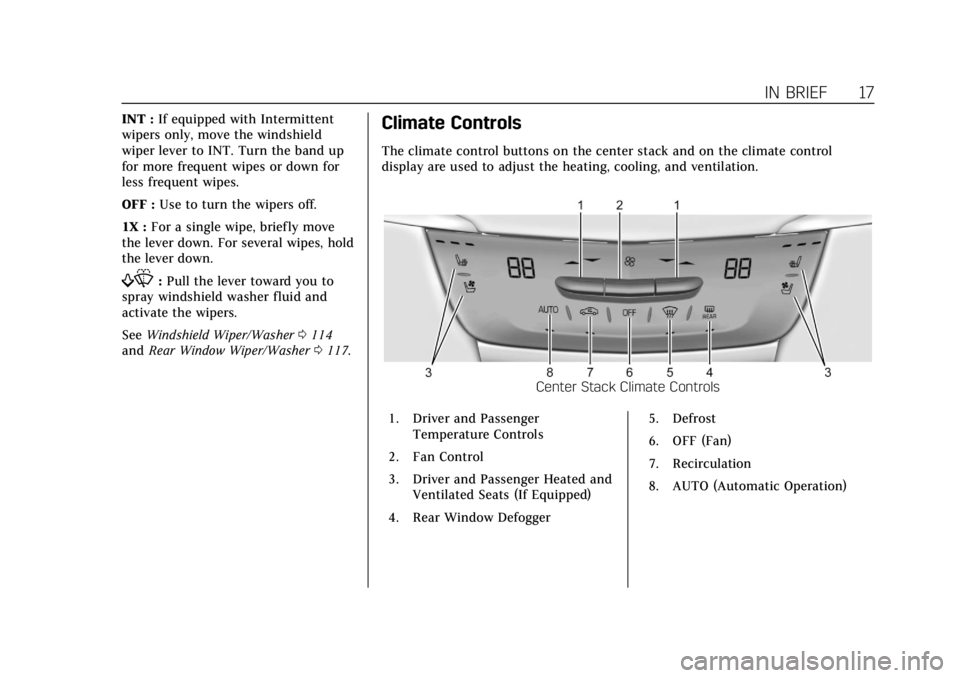
The climate control buttons on the center stack and on the climate control
display are used to adjust the heating, cooling, and ventilation.
Center Stack Climate Controls
1. Driver and Passenger Temperature Controls
2. Fan Control
3. Driver and Passenger Heated and Ventilated Seats (If Equipped)
4. Rear Window Defogger 5. Defrost
6. OFF (Fan)
7. Recirculation
8. AUTO (Automatic Operation)
Page 19 of 380
Cadillac XT5 Owner Manual (GMNA-Localizing-U.S./Canada/Mexico-
11349110) - 2018 - CRC - 9/28/17
18 IN BRIEF
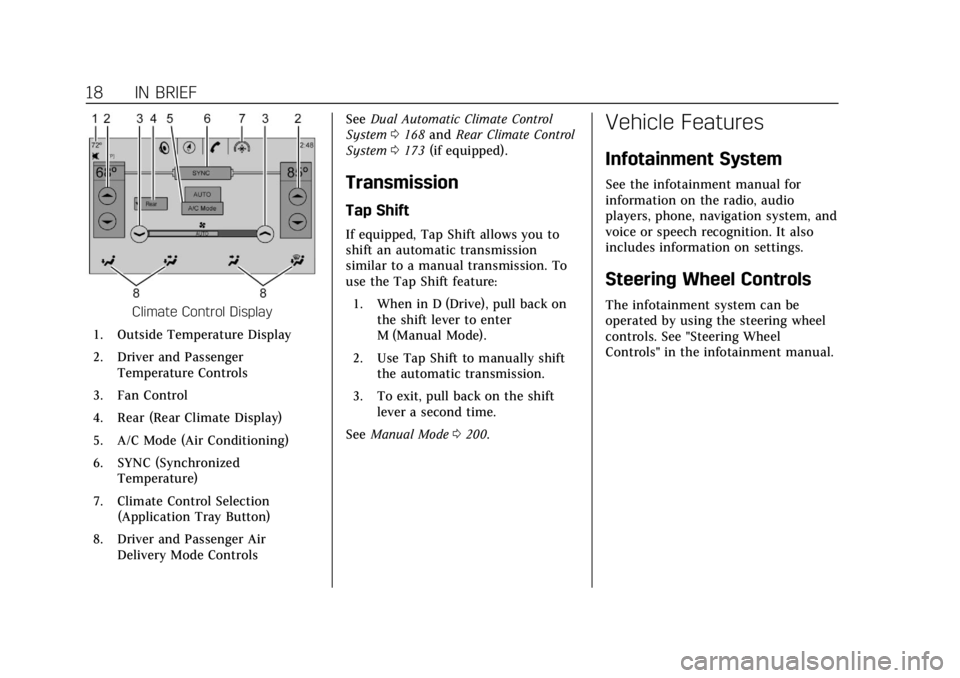
Climate Control Display
1. Outside Temperature Display
2. Driver and Passenger Temperature Controls
3. Fan Control
4. Rear (Rear Climate Display)
5. A/C Mode (Air Conditioning)
6. SYNC (Synchronized Temperature)
7. Climate Control Selection (Application Tray Button)
8. Driver and Passenger Air Delivery Mode Controls See
Dual Automatic Climate Control
System 0168 and Rear Climate Control
System 0173 (if equipped).
Transmission
Tap Shift
If equipped, Tap Shift allows you to
shift an automatic transmission
similar to a manual transmission. To
use the Tap Shift feature:
1. When in D (Drive), pull back on the shift lever to enter
M (Manual Mode).
2. Use Tap Shift to manually shift the automatic transmission.
3. To exit, pull back on the shift lever a second time.
See Manual Mode 0200.
Vehicle Features
Infotainment System
See the infotainment manual for
information on the radio, audio
players, phone, navigation system, and
voice or speech recognition. It also
includes information on settings.
Steering Wheel Controls
The infotainment system can be
operated by using the steering wheel
controls. See "Steering Wheel
Controls" in the infotainment manual.
Page 51 of 380
Cadillac XT5 Owner Manual (GMNA-Localizing-U.S./Canada/Mexico-
11349110) - 2018 - CRC - 9/28/17
50 KEYS, DOORS, AND WINDOWS
Resetting the Power Folding
Mirrors
Reset the power folding mirrors if:
.The mirrors are accidentally
obstructed while folding.
. They are accidentally manually
folded/unfolded.
. The mirrors do not stay in the
unfolded position.
. The mirrors vibrate at normal
driving speeds.
Fold and unfold the mirrors one time
using the mirror controls to reset
them to their normal position. A noise
may be heard during the resetting of
the power folding mirrors. This sound
is normal after a manual folding
operation.
Auto Mirror Folding
If equipped, with the ignition off,
press and hold
Qon the RKE
transmitter for approximately
one second to automatically fold the
exterior mirrors. Press and hold
Kon
the RKE transmitter for approximately
one second to unfold. See Remote
Keyless Entry (RKE) System Operation
0 28.
This feature is turned on or off
through vehicle personalization. See
Vehicle Personalization 0148.
Heated Mirrors
K
:Press to heat the mirrors.
See “Rear Window Defogger” under
Dual Automatic Climate Control System
0 168.
Automatic Dimming Mirror
If the vehicle has the automatic
dimming mirror, the driver outside
mirror automatically adjusts for the
glare of headlamps behind you.
Reverse Tilt Mirrors
If equipped with memory seats, the
passenger and/or driver mirror tilts to
a preselected position when the
vehicle is in R (Reverse). This allows
the curb to be seen when parallel
parking.
The mirror(s) return to the original
position when:
.
The vehicle is shifted out of
R (Reverse), or remains in
R (Reverse) for about 30 seconds.
. The ignition is turned off.
. The vehicle is driven in
R (Reverse) above a set speed.
To turn this feature on or off, see
Vehicle Personalization 0148.
Page 66 of 380
Cadillac XT5 Owner Manual (GMNA-Localizing-U.S./Canada/Mexico-
11349110) - 2018 - CRC - 10/2/17
SEATS AND RESTRAINTS 65
Warning (Continued)
may cause the seat heater to
overheat. An overheated seat heater
may cause a burn or may damage
the seat.
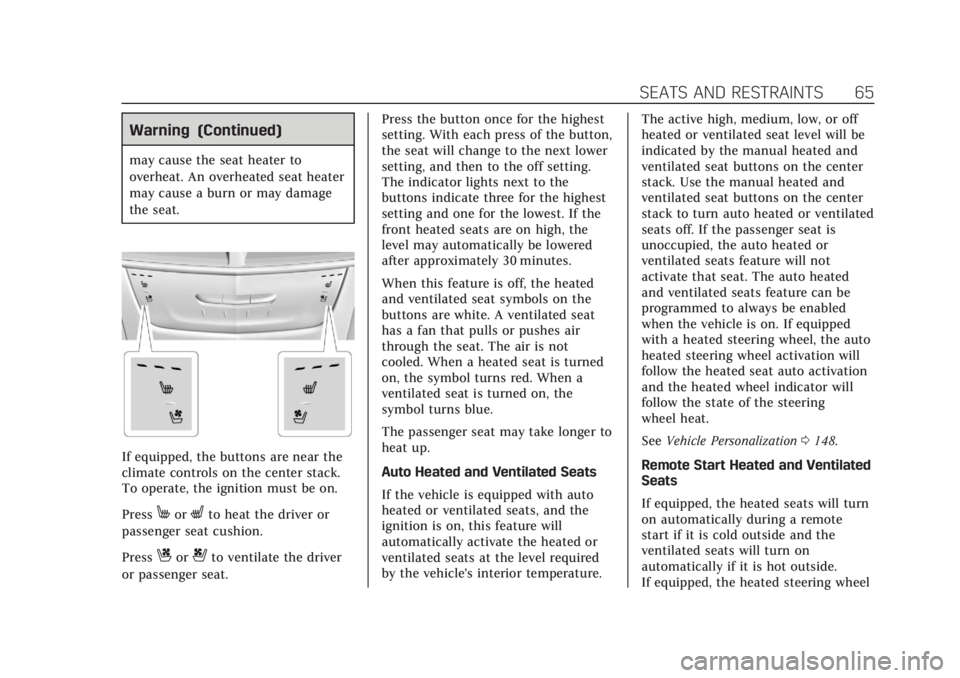
If equipped, the buttons are near the
climate controls on the center stack.
To operate, the ignition must be on.
Press
MorLto heat the driver or
passenger seat cushion.
Press
Cor{to ventilate the driver
or passenger seat. Press the button once for the highest
setting. With each press of the button,
the seat will change to the next lower
setting, and then to the off setting.
The indicator lights next to the
buttons indicate three for the highest
setting and one for the lowest. If the
front heated seats are on high, the
level may automatically be lowered
after approximately 30 minutes.
When this feature is off, the heated
and ventilated seat symbols on the
buttons are white. A ventilated seat
has a fan that pulls or pushes air
through the seat. The air is not
cooled. When a heated seat is turned
on, the symbol turns red. When a
ventilated seat is turned on, the
symbol turns blue.
The passenger seat may take longer to
heat up.
Auto Heated and Ventilated Seats
If the vehicle is equipped with auto
heated or ventilated seats, and the
ignition is on, this feature will
automatically activate the heated or
ventilated seats at the level required
by the vehicle's interior temperature.
The active high, medium, low, or off
heated or ventilated seat level will be
indicated by the manual heated and
ventilated seat buttons on the center
stack. Use the manual heated and
ventilated seat buttons on the center
stack to turn auto heated or ventilated
seats off. If the passenger seat is
unoccupied, the auto heated or
ventilated seats feature will not
activate that seat. The auto heated
and ventilated seats feature can be
programmed to always be enabled
when the vehicle is on. If equipped
with a heated steering wheel, the auto
heated steering wheel activation will
follow the heated seat auto activation
and the heated wheel indicator will
follow the state of the steering
wheel heat.
See
Vehicle Personalization 0148.
Remote Start Heated and Ventilated
Seats
If equipped, the heated seats will turn
on automatically during a remote
start if it is cold outside and the
ventilated seats will turn on
automatically if it is hot outside.
If equipped, the heated steering wheel
Page 70 of 380
Cadillac XT5 Owner Manual (GMNA-Localizing-U.S./Canada/Mexico-
11349110) - 2018 - CRC - 10/2/17
SEATS AND RESTRAINTS 69
Heated Rear Seats
{Warning
If temperature change or pain to
the skin cannot be felt, the seat
heater may cause burns. See the
Warning underHeated and
Ventilated Front Seats 064.
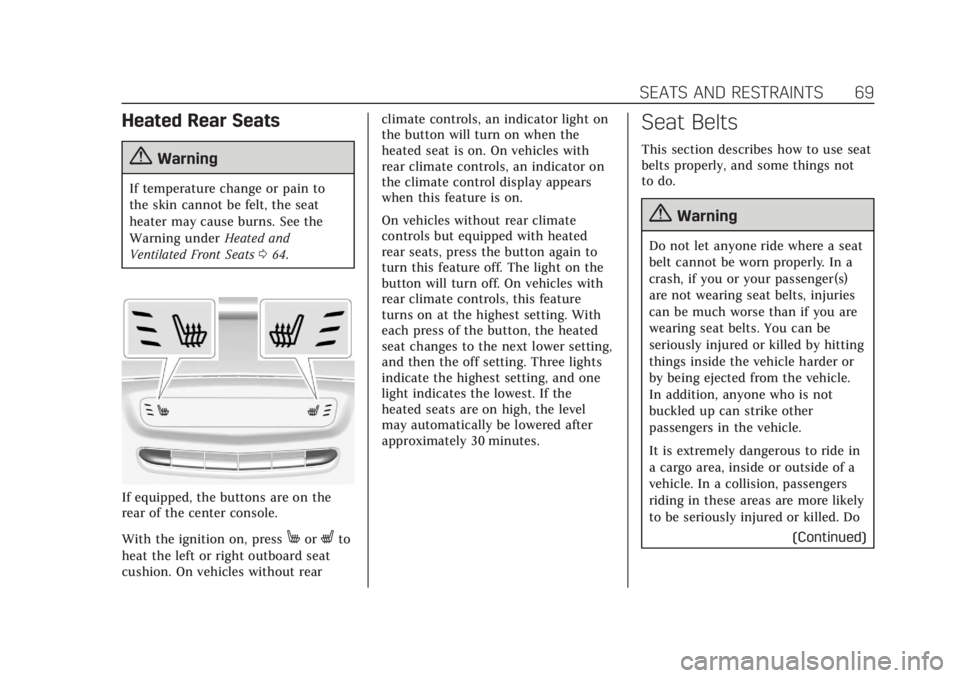
If equipped, the buttons are on the
rear of the center console.
With the ignition on, press
MorLto
heat the left or right outboard seat
cushion. On vehicles without rear climate controls, an indicator light on
the button will turn on when the
heated seat is on. On vehicles with
rear climate controls, an indicator on
the climate control display appears
when this feature is on.
On vehicles without rear climate
controls but equipped with heated
rear seats, press the button again to
turn this feature off. The light on the
button will turn off. On vehicles with
rear climate controls, this feature
turns on at the highest setting. With
each press of the button, the heated
seat changes to the next lower setting,
and then the off setting. Three lights
indicate the highest setting, and one
light indicates the lowest. If the
heated seats are on high, the level
may automatically be lowered after
approximately 30 minutes.
Seat Belts
This section describes how to use seat
belts properly, and some things not
to do.
{Warning
Do not let anyone ride where a seat
belt cannot be worn properly. In a
crash, if you or your passenger(s)
are not wearing seat belts, injuries
can be much worse than if you are
wearing seat belts. You can be
seriously injured or killed by hitting
things inside the vehicle harder or
by being ejected from the vehicle.
In addition, anyone who is not
buckled up can strike other
passengers in the vehicle.
It is extremely dangerous to ride in
a cargo area, inside or outside of a
vehicle. In a collision, passengers
riding in these areas are more likely
to be seriously injured or killed. Do
(Continued)
Page 150 of 380
Cadillac XT5 Owner Manual (GMNA-Localizing-U.S./Canada/Mexico-
11349110) - 2018 - CRC - 9/28/17
INSTRUMENTS AND CONTROLS 149
Rear Seat Reminder
This allows for a chime and a message
when the rear door has been opened
before or during operation of the
vehicle.
Select Off or On.
Language
Select Language, then select from the
available language(s).
The selected language will display on
the system, and voice recognition will
reflect the selected language.
Teen Driver
See“Teen Driver” under“Settings ”in
the infotainment manual.
Valet Mode
This will lock the infotainment system
and steering wheel controls. It may
also limit access to vehicle storage
locations, if equipped.
To enable valet mode:
1. Enter a four-digit code on the keypad. 2. Select Enter to go to the
confirmation screen.
3. Re-enter the four-digit code.
Select Lock or Unlock to lock or
unlock the system. Touch Back to go
back to the previous menu.
Radio
Touch and the following may display:
. Manage Favorites
. Number of Favorites Shown
. Audible Touch Feedback
. Bose Audio Pilot
. Maximum Start Up Volume
Manage Favorites
This allows favorites to be edited. See
“Manage Favorites ”in “Settings” under
“Radio ”in the infotainment manual.
Number of Favorites Shown
Select to set the number of favorites
to display.
Select the desired number or select
Auto and the infotainment system will
automatically adjust the number of
favorites shown. Audible Touch Feedback
This allows Audible Touch Feedback
to be turned on or off.
Select Off or On.
Bose Audio Pilot
This feature adjusts the volume based
on the noise in the vehicle. See
“Bose
AudioPilot Noise Compensation
Technology” under“Infotainment
System Settings” in the infotainment
manual.
Select Off or On.
Maximum Start Up Volume
This feature sets the maximum
startup volume. If the vehicle is
started and the volume is greater than
this level, the volume is adjusted to
this level.
To set the maximum startup volume,
touch + or −to increase or decrease.
Vehicle
Select and the following may display:
.
Climate and Air Quality
. Collision/Detection Systems