speed CADILLAC XT5 2018 Owner's Manual
[x] Cancel search | Manufacturer: CADILLAC, Model Year: 2018, Model line: XT5, Model: CADILLAC XT5 2018Pages: 380, PDF Size: 6.21 MB
Page 17 of 380
Cadillac XT5 Owner Manual (GMNA-Localizing-U.S./Canada/Mexico-
11349110) - 2018 - CRC - 9/28/17
16 IN BRIEF
Windshield Wiper/Washer
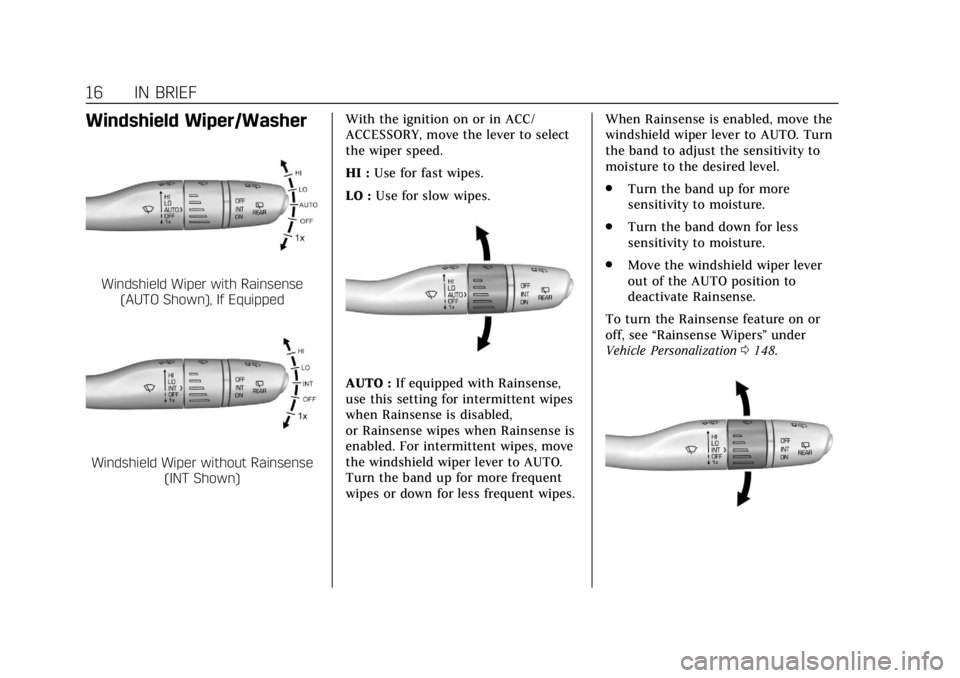
Windshield Wiper with Rainsense(AUTO Shown), If Equipped
Windshield Wiper without Rainsense (INT Shown) With the ignition on or in ACC/
ACCESSORY, move the lever to select
the wiper speed.
HI :
Use for fast wipes.
LO : Use for slow wipes.
AUTO : If equipped with Rainsense,
use this setting for intermittent wipes
when Rainsense is disabled,
or Rainsense wipes when Rainsense is
enabled. For intermittent wipes, move
the windshield wiper lever to AUTO.
Turn the band up for more frequent
wipes or down for less frequent wipes. When Rainsense is enabled, move the
windshield wiper lever to AUTO. Turn
the band to adjust the sensitivity to
moisture to the desired level.
.
Turn the band up for more
sensitivity to moisture.
. Turn the band down for less
sensitivity to moisture.
. Move the windshield wiper lever
out of the AUTO position to
deactivate Rainsense.
To turn the Rainsense feature on or
off, see “Rainsense Wipers ”under
Vehicle Personalization 0148.
Page 20 of 380
Cadillac XT5 Owner Manual (GMNA-Localizing-U.S./Canada/Mexico-
11349110) - 2018 - CRC - 9/28/17
IN BRIEF 19
Cruise Control
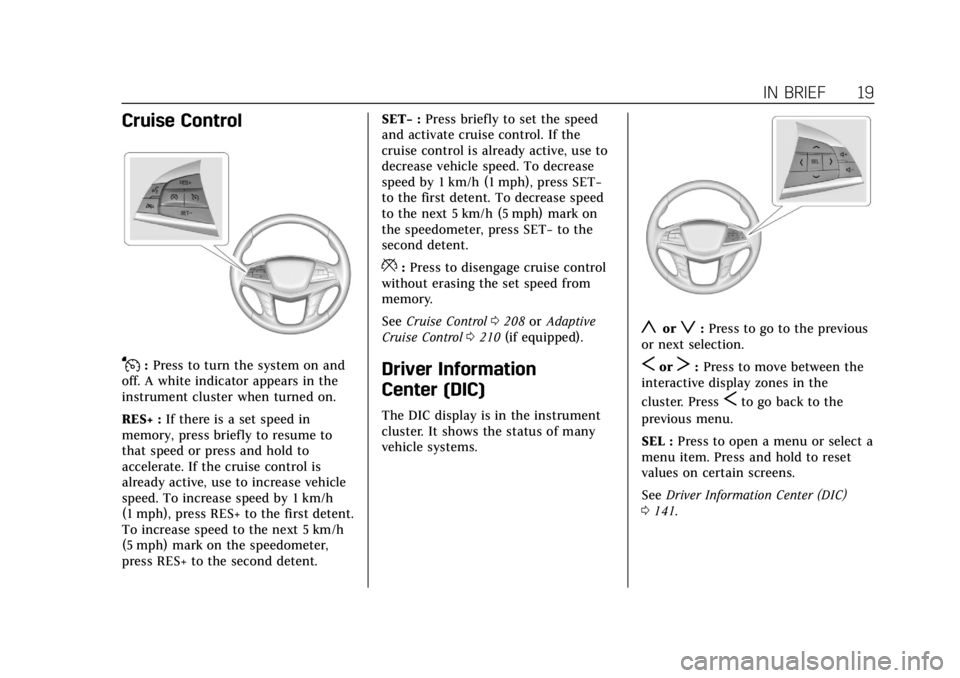
J:Press to turn the system on and
off. A white indicator appears in the
instrument cluster when turned on.
RES+ : If there is a set speed in
memory, press briefly to resume to
that speed or press and hold to
accelerate. If the cruise control is
already active, use to increase vehicle
speed. To increase speed by 1 km/h
(1 mph), press RES+ to the first detent.
To increase speed to the next 5 km/h
(5 mph) mark on the speedometer,
press RES+ to the second detent. SET−
:Press briefly to set the speed
and activate cruise control. If the
cruise control is already active, use to
decrease vehicle speed. To decrease
speed by 1 km/h (1 mph), press SET−
to the first detent. To decrease speed
to the next 5 km/h (5 mph) mark on
the speedometer, press SET− to the
second detent.
*: Press to disengage cruise control
without erasing the set speed from
memory.
See Cruise Control 0208 orAdaptive
Cruise Control 0210 (if equipped).
Driver Information
Center (DIC)
The DIC display is in the instrument
cluster. It shows the status of many
vehicle systems.
yorz:Press to go to the previous
or next selection.
SorT: Press to move between the
interactive display zones in the
cluster. Press
Sto go back to the
previous menu.
SEL : Press to open a menu or select a
menu item. Press and hold to reset
values on certain screens.
See Driver Information Center (DIC)
0 141.
Page 22 of 380
Cadillac XT5 Owner Manual (GMNA-Localizing-U.S./Canada/Mexico-
11349110) - 2018 - CRC - 9/28/17
IN BRIEF 21
display will light up in the
corresponding outside mirror and will
flash if the turn signal is on. The Side
Blind Zone Alert (SBZA) system is
included as part of the LCA system.
SeeSide Blind Zone Alert (SBZA) 0232
and Lane Change Alert (LCA) 0232.
Surround Vision
If equipped, views around the vehicle
appear in the infotainment display to
aid with parking and low-speed
maneuvers.
See “Surround Vision ”under
Assistance Systems for Parking or
Backing 0220.
Front Vision Camera
If equipped, a view of the area in front
of the vehicle appears on the
infotainment display to aid with
parking and low-speed maneuvers.
See “Front Vision Camera ”under
Assistance Systems for Parking or
Backing 0220.
Rear Vision Camera (RVC)
If equipped, RVC shows a view of the
area behind the vehicle on the
infotainment display when the vehicle
is shifted into R (Reverse) to aid with
parking and low-speed backing
maneuvers.
See Assistance Systems for Parking or
Backing 0220.
Rear Cross Traffic Alert
(RCTA) System
If equipped, the RCTA system shows a
triangle with an arrow on the
infotainment display to warn of traffic
behind your vehicle that may cross
your vehicle's path while in
R (Reverse). In addition, beeps will
sound, or the driver seat will pulse.
See Assistance Systems for Parking or
Backing 0220.
Parking Assist
If equipped, Rear Parking Assist (RPA)
uses sensors on the rear bumper to
assist with parking and avoiding
objects while in R (Reverse). It operates at speeds less than 8 km/h
(5 mph). RPA may show a warning
triangle on the infotainment display
and a graphic on the instrument
cluster to provide the object distance.
In addition, multiple beeps or seat
pulses may occur if very close to an
object.
The vehicle may also have the Front
Parking Assist system.
See
Assistance Systems for Parking or
Backing 0220.
Automatic Parking
Assist (APA)
If equipped, the APA system helps to
search for and maneuver the vehicle
into parallel or perpendicular parking
spots using automatic steering,
displays, and beeps. When the vehicle
speed is below 30 km/h (18 mph),
touch
Oto enable the system.
See “Automatic Parking Assist (APA)”
under Assistance Systems for Parking
or Backing 0220.
Page 27 of 380
Cadillac XT5 Owner Manual (GMNA-Localizing-U.S./Canada/Mexico-
11349110) - 2018 - CRC - 9/28/17
26 IN BRIEF
.Always follow posted speed limits
or drive more slowly when
conditions require.
. Keep vehicle tires properly
inflated.
. Combine several trips into a
single trip.
. Replace the vehicle's tires with the
same TPC Spec number molded
into the tire's sidewall near
the size.
. Follow recommended scheduled
maintenance.
Roadside Service
U.S.: 1-800-224-1400
Canada: 1-800-882-1112
TTY Users (U.S. Only): 1-888-889-2438
New Cadillac owners are automatically
enrolled in the Roadside Service
Program.
See Roadside Service 0347.
Page 40 of 380
Cadillac XT5 Owner Manual (GMNA-Localizing-U.S./Canada/Mexico-
11349110) - 2018 - CRC - 9/28/17
KEYS, DOORS, AND WINDOWS 39
Power Door Locks
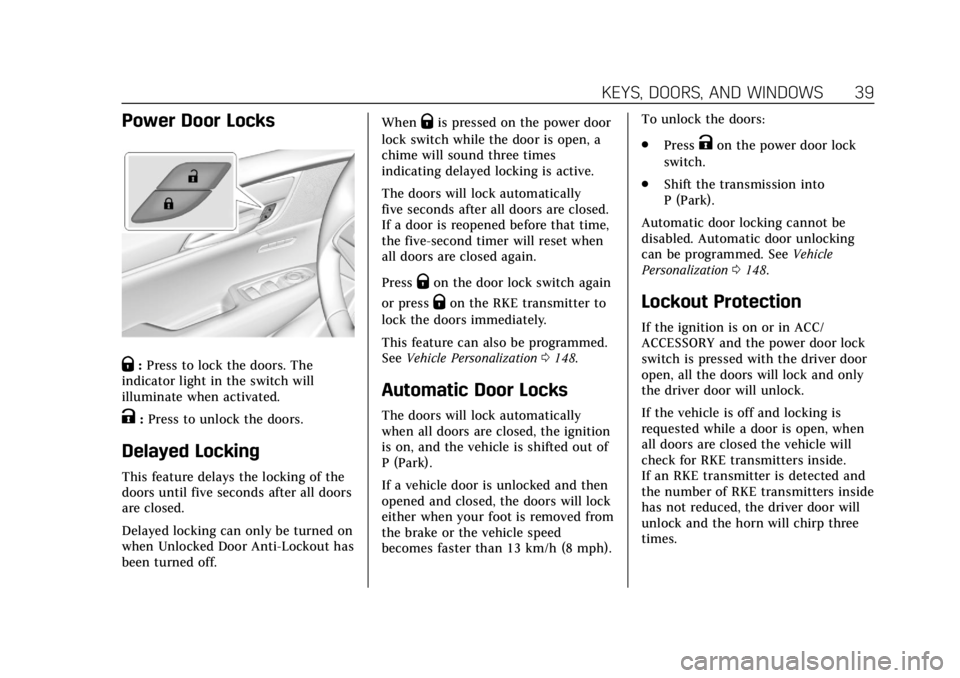
Q:Press to lock the doors. The
indicator light in the switch will
illuminate when activated.
K: Press to unlock the doors.
Delayed Locking
This feature delays the locking of the
doors until five seconds after all doors
are closed.
Delayed locking can only be turned on
when Unlocked Door Anti-Lockout has
been turned off. When
Qis pressed on the power door
lock switch while the door is open, a
chime will sound three times
indicating delayed locking is active.
The doors will lock automatically
five seconds after all doors are closed.
If a door is reopened before that time,
the five-second timer will reset when
all doors are closed again.
Press
Qon the door lock switch again
or press
Qon the RKE transmitter to
lock the doors immediately.
This feature can also be programmed.
See Vehicle Personalization 0148.
Automatic Door Locks
The doors will lock automatically
when all doors are closed, the ignition
is on, and the vehicle is shifted out of
P (Park).
If a vehicle door is unlocked and then
opened and closed, the doors will lock
either when your foot is removed from
the brake or the vehicle speed
becomes faster than 13 km/h (8 mph). To unlock the doors:
.
Press
Kon the power door lock
switch.
. Shift the transmission into
P (Park).
Automatic door locking cannot be
disabled. Automatic door unlocking
can be programmed. See Vehicle
Personalization 0148.
Lockout Protection
If the ignition is on or in ACC/
ACCESSORY and the power door lock
switch is pressed with the driver door
open, all the doors will lock and only
the driver door will unlock.
If the vehicle is off and locking is
requested while a door is open, when
all doors are closed the vehicle will
check for RKE transmitters inside.
If an RKE transmitter is detected and
the number of RKE transmitters inside
has not reduced, the driver door will
unlock and the horn will chirp three
times.
Page 42 of 380
Cadillac XT5 Owner Manual (GMNA-Localizing-U.S./Canada/Mexico-
11349110) - 2018 - CRC - 9/28/17
KEYS, DOORS, AND WINDOWS 41
Doors
Liftgate
{Warning
Exhaust gases can enter the vehicle
if it is driven with the liftgate or
trunk/hatch open, or with any
objects that pass through the seal
between the body and the trunk/
hatch or liftgate. Engine exhaust
contains carbon monoxide (CO)
which cannot be seen or smelled.
It can cause unconsciousness and
even death.
If the vehicle must be driven with
the liftgate or trunk/hatch open:. Close all of the windows.
. Fully open the air outlets on
or under the instrument
panel.
. Adjust the climate control
system to a setting that
brings in only outside air and
(Continued)
Warning (Continued)
set the fan speed to the
highest setting. See “Climate
Control Systems” in the Index.
. If the vehicle is equipped with
a power liftgate, disable the
power liftgate function.
See Engine Exhaust 0195.
Caution
To avoid damage to the liftgate or
liftgate glass, make sure the area
above and behind the liftgate is
clear before opening it.
Power Liftgate Operation
{Warning
You or others could be injured if
caught in the path of the power
liftgate. Make sure there is no one
in the way of the liftgate as it is
opening and closing.
Caution
Driving with an open and
unsecured liftgate may result in
damage to the power liftgate
components.
Page 45 of 380

Cadillac XT5 Owner Manual (GMNA-Localizing-U.S./Canada/Mexico-
11349110) - 2018 - CRC - 9/28/17
44 KEYS, DOORS, AND WINDOWS
Manual Operation
Select OFF to manually operate the
liftgate.
Caution
Attempting to move the liftgate too
quickly and with excessive force
may result in damage to the
vehicle.
Operate the liftgate manually with a
smooth motion and moderate speed.
The system includes a feature which
limits the manual closing speed to
protect the components.
To open the liftgate, pressKon the
power door lock switch or press
Kon
the RKE transmitter twice to unlock
all doors. Press the touch pad on the
underside of the liftgate handle and
lift up.
Use the pull cup to lower and close
the liftgate. Do not press the touch
pad while closing the liftgate. This will
cause the liftgate to be unlatched. The liftgate can be opened when
locked if the RKE transmitter is within
1 m (3 ft) of the touch pad. See
Remote Keyless Entry (RKE) System
Operation
028.
The liftgate has an electric latch.
If the battery is disconnected or has
low voltage, the liftgate will not open.
The liftgate will resume operation
when the battery is reconnected and
charged.
Hands-Free Operation
If equipped, the liftgate may be
operated with a kicking motion under
the left corner of the rear bumper.
The liftgate will not operate if the RKE
transmitter is not within 1 m (3 ft).
The hands-free feature will not work
while the liftgate is moving. To stop
the liftgate while in motion use one of
the liftgate switches.
Page 51 of 380
Cadillac XT5 Owner Manual (GMNA-Localizing-U.S./Canada/Mexico-
11349110) - 2018 - CRC - 9/28/17
50 KEYS, DOORS, AND WINDOWS
Resetting the Power Folding
Mirrors
Reset the power folding mirrors if:
.The mirrors are accidentally
obstructed while folding.
. They are accidentally manually
folded/unfolded.
. The mirrors do not stay in the
unfolded position.
. The mirrors vibrate at normal
driving speeds.
Fold and unfold the mirrors one time
using the mirror controls to reset
them to their normal position. A noise
may be heard during the resetting of
the power folding mirrors. This sound
is normal after a manual folding
operation.
Auto Mirror Folding
If equipped, with the ignition off,
press and hold
Qon the RKE
transmitter for approximately
one second to automatically fold the
exterior mirrors. Press and hold
Kon
the RKE transmitter for approximately
one second to unfold. See Remote
Keyless Entry (RKE) System Operation
0 28.
This feature is turned on or off
through vehicle personalization. See
Vehicle Personalization 0148.
Heated Mirrors
K
:Press to heat the mirrors.
See “Rear Window Defogger” under
Dual Automatic Climate Control System
0 168.
Automatic Dimming Mirror
If the vehicle has the automatic
dimming mirror, the driver outside
mirror automatically adjusts for the
glare of headlamps behind you.
Reverse Tilt Mirrors
If equipped with memory seats, the
passenger and/or driver mirror tilts to
a preselected position when the
vehicle is in R (Reverse). This allows
the curb to be seen when parallel
parking.
The mirror(s) return to the original
position when:
.
The vehicle is shifted out of
R (Reverse), or remains in
R (Reverse) for about 30 seconds.
. The ignition is turned off.
. The vehicle is driven in
R (Reverse) above a set speed.
To turn this feature on or off, see
Vehicle Personalization 0148.
Page 75 of 380
Cadillac XT5 Owner Manual (GMNA-Localizing-U.S./Canada/Mexico-
11349110) - 2018 - CRC - 10/2/17
74 SEATS AND RESTRAINTS
Automatic Seat Belt Tightening
System
The vehicle may have the Automatic
Seat Belt Tightening System.
Each time the vehicle is started with
the front seat belts buckled, the
system activates once to tighten the
seat belts when the forward vehicle
speed exceeds the threshold for
activation.
The system also activates during
emergency braking and/or sudden
driving maneuvers and releases when
driving conditions return to normal.
The system will not activate if the
Traction Control/Electronic Stability
Control system is not functioning
properly. SeeTraction Control/
Electronic Stability Control 0205.
If there is a problem with the
Automatic Seat Belt Tightening
System, a message displays on the
Driver Information Center (DIC). If a
system unavailable message displays
repeatedly or a service message
displays, see your dealer. Other seat belt functions are not affected by the
Automatic Seat Belt Tightening
System.
Seat Belt Pretensioners
This vehicle has seat belt
pretensioners for front outboard
occupants. Although the seat belt
pretensioners cannot be seen, they are
part of the seat belt assembly. They
can help tighten the seat belts during
the early stages of a moderate to
severe frontal, near frontal, or rear
crash if the threshold conditions for
pretensioner activation are met. Seat
belt pretensioners can also help
tighten the seat belts in a side crash
or a rollover event.
Pretensioners work only once. If the
pretensioners activate in a crash, the
pretensioners and probably other
parts of the vehicle’s seat belt system
will need to be replaced. See
Replacing
Seat Belt System Parts after a Crash
0 77. Do not sit on the outboard seat belt
while entering or exiting the vehicle or
at any time while sitting in the seat.
Sitting on the seat belt can damage
the webbing and hardware.Rear Seat Belt Comfort Guides
{Warning
A seat belt that is not properly
worn may not provide the
protection needed in a crash. The
person wearing the belt could be
seriously injured. The shoulder belt
should go over the shoulder and
across the chest. These parts of the
body are best able to take belt
restraining forces.
Rear seat belt comfort guides may
provide added seat belt comfort for
older children who have outgrown
booster seats and for some adults.
When installed on a shoulder belt, the
comfort guide positions the shoulder
belt away from the neck and head.
Page 82 of 380
Cadillac XT5 Owner Manual (GMNA-Localizing-U.S./Canada/Mexico-
11349110) - 2018 - CRC - 10/2/17
SEATS AND RESTRAINTS 81
When Should an Airbag
Inflate?
This vehicle is equipped with airbags.
SeeAirbag System 078. Airbags are
designed to inflate if the impact
exceeds the specific airbag system's
deployment threshold. Deployment
thresholds are used to predict how
severe a crash is likely to be in time
for the airbags to inflate and help
restrain the occupants. The vehicle
has electronic sensors that help the
airbag system determine the severity
of the impact. Deployment thresholds
can vary with specific vehicle design.
Frontal airbags are designed to inflate
in moderate to severe frontal or near
frontal crashes to help reduce the
potential for severe injuries, mainly to
the driver's or front outboard
passenger's head and chest.
Whether the frontal airbags will or
should inflate is not based primarily
on how fast the vehicle is traveling.
It depends on what is hit, the
direction of the impact, and how
quickly the vehicle slows down. Frontal airbags may inflate at
different crash speeds depending on
whether the vehicle hits an object
straight on or at an angle, and
whether the object is fixed or moving,
rigid or deformable, narrow or wide.
Frontal airbags are not intended to
inflate during vehicle rollovers, in rear
impacts, or in many side impacts.
In addition, the vehicle has advanced
technology frontal airbags. Advanced
technology frontal airbags adjust the
restraint according to either crash
severity or occupant interaction.
Knee airbags are designed to inflate in
moderate to severe frontal or near
frontal impacts. Knee airbags are not
designed to inflate during vehicle
rollovers, in rear impacts, or in many
side impacts.
Seat-mounted side impact airbags are
designed to inflate in moderate to
severe side crashes depending on the
location of the impact. Seat-mounted
side impact airbags are not designed
to inflate in frontal impacts, near
frontal impacts, rollovers, or rear
impacts. A seat-mounted side impact
airbag is designed to inflate on the
side of the vehicle that is struck.
Roof-rail airbags are designed to
inflate in moderate to severe side
crashes depending on the location of
the impact. In addition, these roof-rail
airbags are designed to inflate during
a rollover or in a severe frontal
impact. Roof-rail airbags are not
designed to inflate in rear impacts.
Both roof-rail airbags will inflate when
either side of the vehicle is struck,
if the sensing system predicts that the
vehicle is about to roll over on its
side, or in a severe frontal impact.
In any particular crash, no one can
say whether an airbag should have
inflated simply because of the vehicle
damage or repair costs.
What Makes an Airbag
Inflate?
In a deployment event, the sensing
system sends an electrical signal
triggering a release of gas from the
inflator. Gas from the inflator fills the
airbag causing the bag to break out of