Change tire CADILLAC XT5 2020 Owner's Manual
[x] Cancel search | Manufacturer: CADILLAC, Model Year: 2020, Model line: XT5, Model: CADILLAC XT5 2020Pages: 384, PDF Size: 6.52 MB
Page 117 of 384
116 INSTRUMENTS AND CONTROLS
Malfunctions are often indicated by
the system before any problem is
noticeable. Being aware of the light
and seeking service promptly when it
comes on may prevent damage.
Caution
If the vehicle is driven continually
with this light on, the emission
control system may not work as
well, the fuel economy may be
lower, and the vehicle may not run
smoothly. This could lead to costly
repairs that might not be covered
by the vehicle warranty.
Caution
Modifications to the engine,
transmission, exhaust, intake,
or fuel system, or the use of
replacement tires that do not meet
the original tire specifications, can
cause this light to come on. This
could lead to costly repairs not(Continued)
Caution (Continued)
covered by the vehicle warranty.
This could also affect the vehicle’s
ability to pass an Emissions
Inspection/Maintenance test. See
Accessories and Modifications 0249.
If the light is f lashing : A
malfunction has been detected that
could damage the emission control
system and increase vehicle
emissions. Diagnosis and service may
be required.
To help prevent damage, reduce
vehicle speed and avoid hard
accelerations and uphill grades.
If towing a trailer, reduce the amount
of cargo being hauled as soon as
possible.
If the light continues to flash, find a
safe place to park. Turn the vehicle off
and wait at least 10 seconds before
restarting the engine. If the light is
still flashing, follow the previous
guidelines and see your dealer for
service as soon as possible. If the light is on steady :
A
malfunction has been detected.
Diagnosis and service may be
required.
Check the following:
. If fuel has been added to the
vehicle using the capless fuel
funnel adapter, make sure that it
has been removed. See “Filling the
Tank with a Portable Gas Can ”
under Filling the Tank 0231. The
diagnostic system can detect if the
adapter has been left installed in
the vehicle, allowing fuel to
evaporate into the atmosphere.
A few driving trips with the
adapter removed may turn off the
light.
. Poor fuel quality can cause
inefficient engine operation and
poor driveability, which may go
away once the engine is warmed
up. If this occurs, change the fuel
brand. It may require at least one
full tank of the proper fuel to turn
the light off. See Recommended
Fuel (3.6L V6 Engine) 0230 or
Recommended Fuel (2.0L L4 Engine)
0 230.
Page 127 of 384
126 INSTRUMENTS AND CONTROLS
The Oil Life display must be reset
after each oil change. It will not reset
itself. Do not reset the Oil Life display
accidentally at any time other than
when the oil has just been changed.
It cannot be reset accurately until the
next oil change. To reset the engine
oil life system, press SEL and then
select yes or no. SeeEngine Oil Life
System 0257.
Tire Pressure : Shows the
approximate pressures of all four tires.
Tire pressure is displayed in either
kilopascal (kPa) or in pounds per
square inch (psi). If the pressure is
low, the value for that tire is shown in
amber. See Tire Pressure Monitor
System 0291 and
Tire Pressure Monitor Operation 0292.
Air Filter Life : Shows an estimate of
the engine air filter’s remaining useful
life and the state of the system.
Engine Air Filter Life 95% means 95%
of the current air filter life remains.
Messages will display based on the
engine air filter life and the state of
the system. When the REPLACE AT
NEXT OIL CHANGE message displays,
the engine air filter should be replaced at the time of the next oil change.
When the REPLACE SOON message
displays, the engine air filter should
be replaced at the earliest
convenience.
The Air Filter Life display must be
reset after the engine air filter
replacement. To reset, see
Engine Air
Filter Life System 0259.
Fuel Economy : Displays average fuel
economy, the best fuel economy over
the selected distance, and a bar graph
showing instantaneous fuel economy.
Average Speed : Displays the average
vehicle speed of the vehicle in
kilometers per hour (km/h) or miles
per hour (mph). This average is based
on the various vehicle speeds recorded
since the last reset. Reset the average
speed by pressing SEL while this
display is active to show a
confirmation window to select yes
or no.
Timer : This display can be used as a
timer. To start the timer, press SEL
while this display is active. The
display will show the amount of time
that has passed since the timer was last reset. To stop the timer, press SEL
briefly while this display is active and
the timer is running.
Press SEL while this display is active
to reset the timer.
Follow Distance/Gap Setting :
When
Adaptive Cruise Control (ACC) is not
engaged, the current follow time to
the vehicle ahead is displayed as a
time value on this page. When ACC
has been engaged, the display
switches to the gap setting page. This
page shows the current gap setting
along with the vehicle ahead telltale.
Driver Assistance : If equipped,
shows information for Lane Keep
Assist (LKA) and Forward Collision
Alert (FCA).
Battery Voltage : Shows the current
battery voltage.
Coolant Temperature : Shows the
engine coolant temperature in either
degrees Celsius (°C) or degrees
Fahrenheit (°F).
Oil Temperature : Shows the engine
oil temperature in either degrees
Celsius (°C) or degrees Fahrenheit (°F).
Page 164 of 384
DRIVING AND OPERATING 163
Defensive drivers avoid most skids by
taking reasonable care suited to
existing conditions, and by not
overdriving those conditions. But
skids are always possible.
If the vehicle starts to slide, follow
these suggestions:
.Ease your foot off the accelerator
pedal and steer the way you want
the vehicle to go. The vehicle may
straighten out. Be ready for a
second skid if it occurs.
. Slow down and adjust your driving
according to weather conditions.
Stopping distance can be longer
and vehicle control can be affected
when traction is reduced by water,
snow, ice, gravel, or other material
on the road. Learn to recognize
warning clues —such as enough
water, ice, or packed snow on the
road to make a mirrored surface
— and slow down when you have
any doubt.
. Try to avoid sudden steering,
acceleration, or braking, including
reducing vehicle speed by shifting to a lower gear. Any sudden
changes could cause the tires to
slide.
Remember: Antilock brakes help avoid
only the braking skid.
Off-Road Driving
All-Wheel Drive vehicles can be used
for off-road driving. Vehicles without
All-Wheel Drive and vehicles not
equipped with All Terrain (AT) or
On-Off Road (OOR) tires must not be
driven off-road except on a level, solid
surface. To contact the tire
manufacturer for more information
about the original equipment tires, see
the Limited Warranty and Owner
Assistance Information manual.
Controlling the vehicle is the key to
successful off-road driving. One of the
best ways to control the vehicle is to
control the speed.
{Warning
When driving off-road, bouncing
and quick changes in direction can
easily throw you out of position.
This could cause you to lose control
and crash. You and your passengers
should always wear seat belts.
Before Driving Off-Road
. Have all necessary maintenance
and service work completed.
. Fuel the vehicle, fill fluid levels,
and check inflation pressure in all
tires, including the spare,
if equipped.
. Read all the information about
All-Wheel Drive vehicles in this
manual.
. Make sure all underbody shields,
if equipped, are properly attached.
. Know the local laws that apply to
off-road driving.
Page 167 of 384
166 DRIVING AND OPERATING
3.2. Stay clear of the path thevehicle would take if it
rolled downhill.
. Avoid turns that take the vehicle
across the incline of the hill. A hill
that can be driven straight up or
down might be too steep to drive
across. Driving across an incline
puts more weight on the downhill
wheels which could cause a
downhill slide or a rollover.
. Surface conditions can be a
problem. Loose gravel, muddy
spots, or even wet grass can cause
the tires to slip sideways, downhill.
If the vehicle slips sideways, it can
hit something that will trip it –a
rock, a rut, etc. –and roll over.
. Hidden obstacles can make the
steepness of the incline more
severe. If a rock is driven across
with the uphill wheels, or if the
downhill wheels drop into a rut or
depression, the vehicle can tilt
even more. .
If an incline must be driven
across, and the vehicle starts to
slide, turn downhill. This should
help straighten out the vehicle and
prevent the side slipping.
{Warning
Getting out of the vehicle on the
downhill side when stopped across
an incline is dangerous. If the
vehicle rolls over, you could be
crushed or killed. Always get out on
the uphill side of the vehicle and
stay well clear of the rollover path.
Driving in Mud, Sand, Snow,
or Ice
Use a low gear when driving in mud –
the deeper the mud, the lower the
gear. Keep the vehicle moving to avoid
getting stuck.
Traction changes when driving on
sand. On loose sand, such as on
beaches or sand dunes, the tires tend
to sink into the sand. This affects steering, accelerating, and braking.
Drive at a reduced speed and avoid
sharp turns or abrupt maneuvers.
Traction is reduced on hard packed
snow and ice and it is easy to lose
control. Reduce vehicle speed when
driving on hard packed snow and ice.
{Warning
Driving on frozen lakes, ponds,
or rivers can be dangerous. Ice
conditions vary greatly and the
vehicle could fall through the ice;
you and your passengers could
drown. Drive your vehicle on safe
surfaces only.
Driving in Water
{Warning
Driving through rushing water can
be dangerous. Deep water can
sweep your vehicle downstream and
you and your passengers could
drown. If it is only shallow water, it
(Continued)
Page 171 of 384

170 DRIVING AND OPERATING
This keeps the battery charged to
restart the vehicle and to signal for
help with the headlamps. Do this as
little as possible, to save fuel.
If the Vehicle Is Stuck
Slowly and cautiously spin the wheels
to free the vehicle when stuck in sand,
mud, ice, or snow.
If stuck too severely for the traction
system to free the vehicle, turn the
traction system off and use the
rocking method. SeeTraction Control/
Electronic Stability Control 0193.
{Warning
If the vehicle's tires spin at high
speed, they can explode, and you or
others could be injured. The vehicle
can overheat, causing an engine
compartment fire or other damage.
Spin the wheels as little as possible
and avoid going above 56 km/h
(35 mph). For All-Wheel Drive (AWD), select
Off-Road or AWD mode. See
Driver
Mode Control 0195 and
All-Wheel Drive 0190.
Rocking the Vehicle to Get it Out
Turn the steering wheel left and right
to clear the area around the front
wheels. Turn off any traction system.
Shift back and forth between
R (Reverse) and a low forward gear,
spinning the wheels as little as
possible. To prevent transmission
wear, wait until the wheels stop
spinning before shifting gears. Release
the accelerator pedal while shifting,
and press lightly on the accelerator
pedal when the transmission is in
gear. Slowly spinning the wheels in
the forward and reverse directions
causes a rocking motion that could
free the vehicle. If that does not get
the vehicle out after a few tries, it
might need to be towed out. If the
vehicle does need to be towed out, see
Towing the Vehicle 0319.
Vehicle Load Limits
It is very important to know how
much weight the vehicle can carry.
This weight is called the vehicle
capacity weight and includes the
weight of all occupants, cargo, and
all nonfactory-installed options.
Two labels on the vehicle may
show how much weight it may
properly carry, the Tire and
Loading Information label and the
Certification/Tire label.
{Warning
Do not load the vehicle any
heavier than the Gross Vehicle
Weight Rating (GVWR),
or either the maximum front or
rear Gross Axle Weight Rating
(GAWR). This can cause
systems to break and change
the way the vehicle handles.
This could cause loss of control
and a crash. Overloading can
(Continued)
Page 197 of 384
196 DRIVING AND OPERATING
hold the current gear after a quick
release of a heavily applied accelerator
pedal. This provides greater engine
braking and enhanced vehicle control.
When PAL is activated, there may be
an additional green gear symbol which
appears in the instrument cluster
display. SeeGear Shifting Light 0119.
AWD : AWD Mode provides drive
torque to all four wheels. Select AWD
to improve traction and control on
slippery road surfaces, such as gravel,
sand, wet pavement, snow, and ice.
When in AWD Mode, the AWD Mode
indicator light will be on. For more
information on AWD Mode, see
All-Wheel Drive 0190.
Snow/Ice (FWD Vehicles Only) :
Snow/Ice Mode improves vehicle
acceleration on snow and ice covered
roads.
Off-Road (AWD Vehicles Only) : Use
this mode for off-road recreational
driving. Choosing Off-Road Mode also
engages AWD Mode. For more
information on Off-Road Mode, see
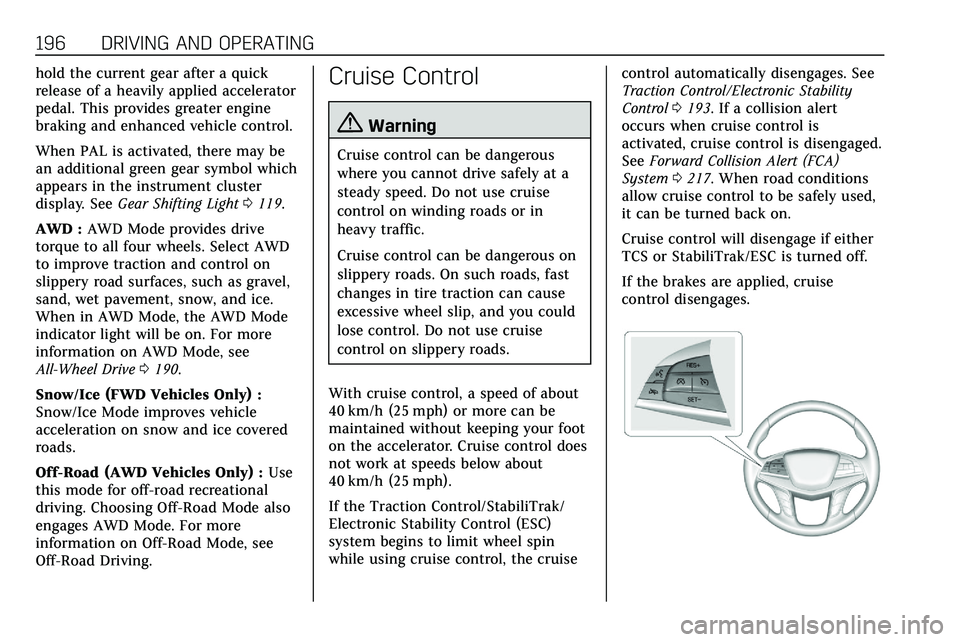
Off-Road Driving.Cruise Control
{Warning
Cruise control can be dangerous
where you cannot drive safely at a
steady speed. Do not use cruise
control on winding roads or in
heavy traffic.
Cruise control can be dangerous on
slippery roads. On such roads, fast
changes in tire traction can cause
excessive wheel slip, and you could
lose control. Do not use cruise
control on slippery roads.
With cruise control, a speed of about
40 km/h (25 mph) or more can be
maintained without keeping your foot
on the accelerator. Cruise control does
not work at speeds below about
40 km/h (25 mph).
If the Traction Control/StabiliTrak/
Electronic Stability Control (ESC)
system begins to limit wheel spin
while using cruise control, the cruise control automatically disengages. See
Traction Control/Electronic Stability
Control
0193. If a collision alert
occurs when cruise control is
activated, cruise control is disengaged.
See Forward Collision Alert (FCA)
System 0217. When road conditions
allow cruise control to be safely used,
it can be turned back on.
Cruise control will disengage if either
TCS or StabiliTrak/ESC is turned off.
If the brakes are applied, cruise
control disengages.
Page 200 of 384

DRIVING AND OPERATING 199
works like regular cruise control. ACC
uses camera and radar sensors. See
Radio Frequency Statement0358.
If a vehicle is detected in your path,
ACC can apply acceleration or limited,
moderate braking to maintain the
selected following gap. To disengage
ACC, apply the brake. If ACC is
controlling your vehicle speed when
the traction control system (TCS) or
StabiliTrak/Electronic Stability Control
(ESC) system activates, the ACC may
automatically disengage. See Traction
Control/Electronic Stability Control
0 193. When road conditions allow
ACC to be safely used, the ACC can be
turned back on.
ACC will not engage if the TCS or
StabiliTrak/ESC system is disabled.
{Warning
ACC has limited braking ability and
may not have time to slow the
vehicle down enough to avoid a
collision with another vehicle you
are following. This can occur when
(Continued)
Warning (Continued)
vehicles suddenly slow or stop
ahead, or enter your lane. Also see
“Alerting the Driver”in this section.
Complete attention is always
required while driving and you
should be ready to take action and
apply the brakes. See Defensive
Driving 0160.
{Warning
ACC will not detect or brake for
children, pedestrians, animals,
or other objects.
Do not use ACC when:
. On winding and hilly roads or
when the sensors are blocked
by snow, ice, or dirt. The
system may not detect a
vehicle ahead. Keep the entire
front of the vehicle clean.
(Continued)
Warning (Continued)
.Visibility is low, such as in
fog, rain, or snow conditions.
ACC performance is limited
under these conditions.
. On slippery roads where fast
changes in tire traction can
cause excessive wheel slip.
J:Press to turn the system on or
off. The indicator turns white on the
instrument cluster when ACC is
turned on.
Page 227 of 384
226 DRIVING AND OPERATING
still looks blurry, use a soft wet cloth
to gently clean the sensor camera lens
and dry thoroughly. The sensor is
behind the lower front grille below the
driver side headlamp.
The camera must also be aligned to
work correctly. If the camera needs
adjustment, see your dealer. Do not
attempt to adjust the camera yourself.
Side Blind Zone
Alert (SBZA)
If equipped, the SBZA system is a
lane-changing aid that assists drivers
with avoiding crashes that occur with
moving vehicles in the side blind zone
(or spot) areas. When the vehicle is in
a forward gear, the left or right side
mirror display will light up if a moving
vehicle is detected in that blind zone.
If the turn signal is activated and a
vehicle is also detected on the same
side, the display will flash as an extra
warning not to change lanes. Since
this system is part of the Lane Change
Alert (LCA) system, read the entire
LCA section before using this feature.
Lane Change Alert (LCA)
If equipped, the LCA system is a
lane-changing aid that assists drivers
with avoiding lane change crashes
that occur with moving vehicles in the
side blind zone (or spot) areas or with
vehicles rapidly approaching these
areas from behind. The LCA warning
display will light up in the
corresponding outside side mirror and
will flash if the turn signal is on.
{Warning
LCA does not alert the driver to
vehicles outside of the system
detection zones, pedestrians,
bicyclists, or animals. It may not
provide alerts when changing lanes
under all driving conditions. Failure
to use proper care when changing
lanes may result in injury, death,
or vehicle damage. Before making a
lane change, always check mirrors,
glance over your shoulder, and use
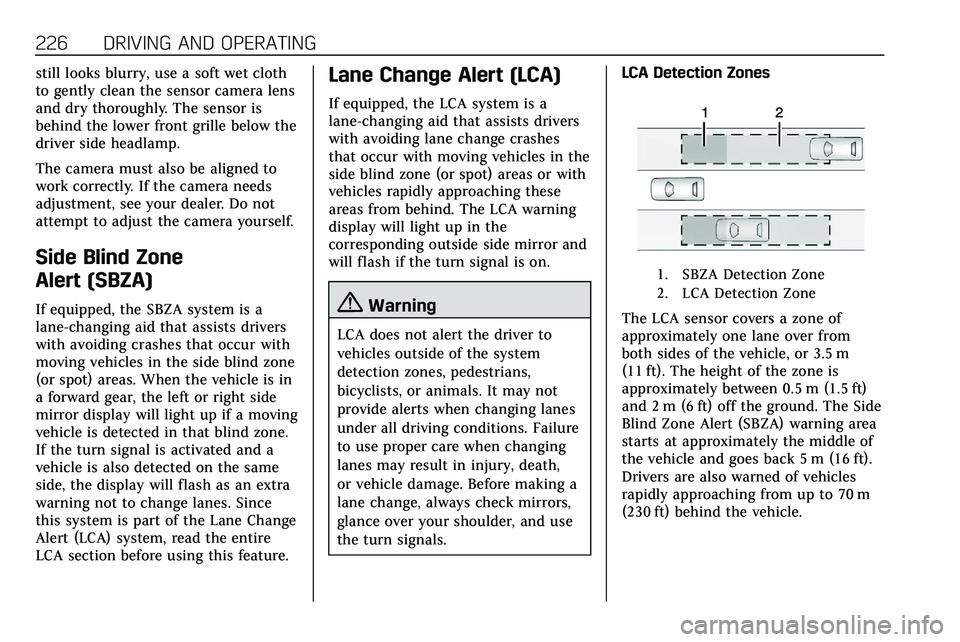
the turn signals.LCA Detection Zones
1. SBZA Detection Zone
2. LCA Detection Zone
The LCA sensor covers a zone of
approximately one lane over from
both sides of the vehicle, or 3.5 m
(11 ft). The height of the zone is
approximately between 0.5 m (1.5 ft)
and 2 m (6 ft) off the ground. The Side
Blind Zone Alert (SBZA) warning area
starts at approximately the middle of
the vehicle and goes back 5 m (16 ft).
Drivers are also warned of vehicles
rapidly approaching from up to 70 m
(230 ft) behind the vehicle.
Page 235 of 384
234 DRIVING AND OPERATING
Trailer Towing
General Towing
Information
Only use towing equipment that has
been designed for the vehicle. Contact
your dealer or trailering dealer for
assistance with preparing the vehicle
to tow a trailer. Read the entire
section before towing a trailer.
To tow a disabled vehicle, seeTowing
the Vehicle 0319. To tow the vehicle
behind another vehicle such as a
motor home, see Recreational Vehicle
Towing 0320.
Driving Characteristics and
Towing Tips
{Warning
You can lose control when towing a
trailer if the correct equipment is
not used or the vehicle is not driven
properly. For example, if the trailer
is too heavy or the trailer brakes are
(Continued)
Warning (Continued)
inadequate for the load, the vehicle
may not stop as expected. You and
others could be seriously injured.
The vehicle may also be damaged,
and the repairs would not be
covered by the vehicle warranty.
Pull a trailer only if all the steps in
this section have been followed. Ask
your dealer for advice and
information about towing a trailer
with the vehicle.
Driving with a Trailer
Trailering is different than just driving
the vehicle by itself. Trailering means
changes in handling, acceleration,
braking, durability, and fuel economy.
Successful, safe trailering takes correct
equipment, and it has to be used
properly.
The following information has many
time-tested, important trailering tips
and safety rules. Many of these are
important for your safety and that of
your passengers. Read this section
carefully before pulling a trailer. When towing a trailer:
.
Become familiar with and follow
all state and local laws that apply
to trailer towing. These
requirements vary from state to
state.
. State laws may require the use of
extended side view mirrors. Even if
not required, you should install
extended side view mirrors if your
visibility is limited or restricted
while towing.
. Do not tow a trailer during the
first 800 km (500 mi) of vehicle
use to prevent damage to the
engine, axle, or other parts.
. It is recommended to perform the
first oil change before heavy
towing.
. During the first 800 km (500 mi)
of trailer towing, do not drive over
80 km/h (50 mph) and do not
make starts at full throttle.
. Vehicles can tow in D (Drive).
If the transmission downshifts too
often, a lower gear may be
selected using Manual Mode See
Manual Mode 0188.
Page 236 of 384

DRIVING AND OPERATING 235
If equipped, the following driver
assistance features should be turned
off when towing a trailer:
.Adaptive Cruise Control (ACC)
. Super Cruise Control
. Lane Keep Assist (LKA)
. Park Assist
. Automatic Parking Assist (APA)
. Reverse Automatic Braking (RAB)
If equipped, the following driver
assistance features should be turned
to alert or off when towing a trailer:
. Automatic Emergency
Braking (AEB)
. Intelligent Brake Assist (IBA)
. Front Pedestrian Braking (FPB)
If equipped with Lane Change Alert
(LCA), the LCA detection zones that
extend back from the side of the
vehicle do not move further back
when a trailer is towed. Use caution
while changing lanes when towing a
trailer. If equipped with Rear Cross Traffic
Alert (RCTA), use caution while
backing up when towing a trailer, as
the RCTA detection zones that extend
out from the back of the vehicle do
not move further back when a trailer
is towed.
{Warning
To prevent serious injury or death
from carbon monoxide (CO), when
towing a trailer:
. Do not drive with the liftgate,
trunk/hatch, or rear-most
window open.
. Fully open the air outlets on
or under the instrument
panel.
. Adjust the climate control
system to a setting that
brings in only outside air. See
“Climate Control Systems” in
the Index.
For more information about carbon
monoxide, see Engine Exhaust
0 183. Towing a trailer requires experience.
The combination of the vehicle and
trailer is longer and not as responsive
as the vehicle itself. Get used to the
handling and braking of the
combination by driving on a level road
surface before driving on public roads.
The trailer structure, the tires, and the
brakes must be all be rated to carry
the intended cargo. Inadequate trailer
equipment can cause the combination
to operate in an unexpected or unsafe
manner. Before driving, inspect all
trailer hitch parts and attachments,
safety chains, electrical connectors,
lamps, tires, and mirrors. See
Towing
Equipment 0241. If the trailer has
electric brakes, start the combination
moving and then manually apply the
trailer brake controller to check the
trailer brakes work. During the trip,
occasionally check that the cargo and
trailer are secure and that the lamps
and any trailer brakes are working.
Towing with a Stability Control
System
When towing, the stability control
system might be heard. The system
reacts to vehicle movement caused by