seats CADILLAC XT5 2021 Workshop Manual
[x] Cancel search | Manufacturer: CADILLAC, Model Year: 2021, Model line: XT5, Model: CADILLAC XT5 2021Pages: 426, PDF Size: 8.73 MB
Page 81 of 426

Cadillac XT5 Owner Manual (GMNA-Localizing-U.S./Canada/Mexico-
14590481) - 2021 - CRC - 10/22/20
80 SEATS AND RESTRAINTS
If the position you are using
does not have a headrest or
head restraint and you are
using a single tether, route the
tether over the seatback.
If the position you are using
does not have a headrest or
head restraint and you are
using a dual tether, route the
tether over the seatback.
3. Before placing a child in the child restraint, make sure it is securely
held in place. To check, grasp the
child restraint at the LATCH path
and attempt to move it side to side
and back and forth. There should
be no more than 2.5 cm (1 in) of
movement for proper installation.
Replacing LATCH System
Parts After a Crash
{Warning
A crash can damage the LATCH
system in the vehicle. A damaged
LATCH system may not properly
secure the child restraint, resulting
in serious injury or even death in a
crash. To help make sure the
LATCH system is working properly
after a crash, see your dealer to
have the system inspected and any
necessary replacements made as
soon as possible.
If the vehicle has the LATCH system
and it was being used during a crash,
new LATCH system parts may be
needed.
New parts and repairs may be
necessary even if the LATCH system
was not being used at the time of the
crash.
Securing Child Restraints
(With the Seat Belt in the
Rear Seat)
When securing a child restraint with
the seat belts in a rear seat position,
study the instructions that came with
the child restraint to make sure it is
compatible with this vehicle.
If the child restraint has the LATCH
system, see Lower Anchors and Tethers
for Children (LATCH System) 074 for
how and where to install the child
restraint using LATCH. If a child
restraint is secured in the vehicle
using a seat belt and it uses a top
tether, see Lower Anchors and Tethers
for Children (LATCH System) 074 for
top tether anchor locations.
Do not secure a child seat in a
position without a top tether anchor if
a national or local law requires that
the top tether be anchored, or if the
instructions that come with the child
restraint say that the top tether must
be anchored.
Page 82 of 426

Cadillac XT5 Owner Manual (GMNA-Localizing-U.S./Canada/Mexico-
14590481) - 2021 - CRC - 10/22/20
SEATS AND RESTRAINTS 81
In Canada, the law requires that
forward-facing child restraints have a
top tether, and that the tether be
attached.
If the child restraint or vehicle seat
position does not have the LATCH
system, you will be using the seat belt
to secure the child restraint. Be sure
to follow the instructions that came
with the child restraint.
If more than one child restraint needs
to be installed in the rear seat, be sure
to readWhere to Put the Restraint 072.
1. Put the child restraint on the seat.
2. Pick up the latch plate, and run the lap and shoulder portions of the
vehicle seat belt through or around
the child restraint. The child
restraint instructions will show
you how.
3. Push the latch plate into the buckleuntil it clicks.
Position the release button on the
buckle, away from the child
restraint, so that the seat belt
could be quickly unbuckled if
necessary.4. Pull the shoulder belt all the wayout of the retractor to set the lock.
When the retractor lock is set, the
belt can be tightened but not
pulled out of the retractor.
Page 83 of 426
Cadillac XT5 Owner Manual (GMNA-Localizing-U.S./Canada/Mexico-
14590481) - 2021 - CRC - 10/22/20
82 SEATS AND RESTRAINTS
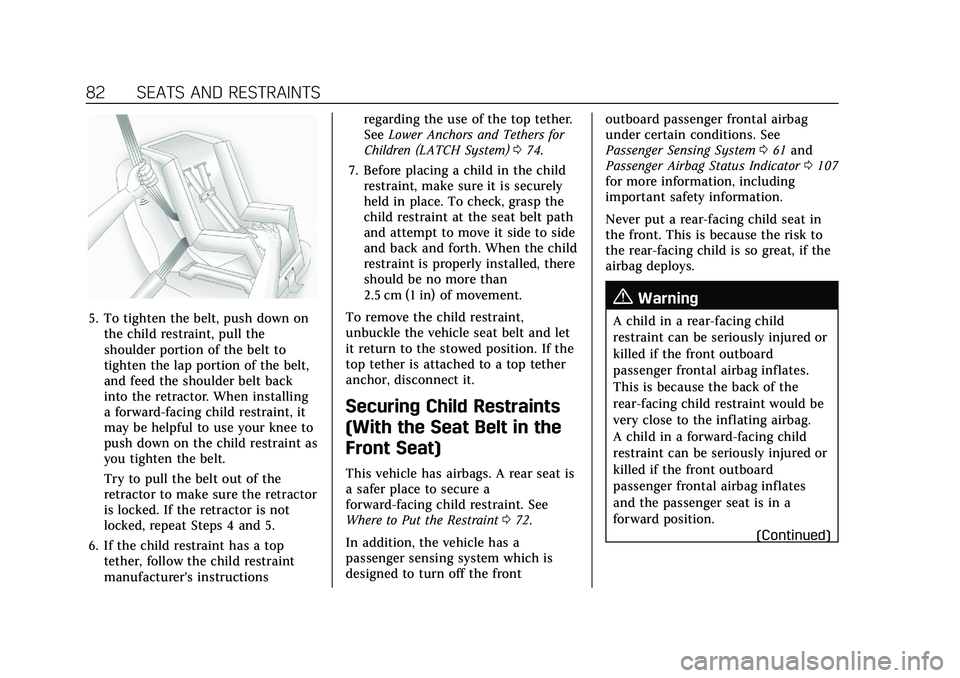
5. To tighten the belt, push down onthe child restraint, pull the
shoulder portion of the belt to
tighten the lap portion of the belt,
and feed the shoulder belt back
into the retractor. When installing
a forward-facing child restraint, it
may be helpful to use your knee to
push down on the child restraint as
you tighten the belt.
Try to pull the belt out of the
retractor to make sure the retractor
is locked. If the retractor is not
locked, repeat Steps 4 and 5.
6. If the child restraint has a top tether, follow the child restraint
manufacturer's instructions regarding the use of the top tether.
See
Lower Anchors and Tethers for
Children (LATCH System) 074.
7. Before placing a child in the child restraint, make sure it is securely
held in place. To check, grasp the
child restraint at the seat belt path
and attempt to move it side to side
and back and forth. When the child
restraint is properly installed, there
should be no more than
2.5 cm (1 in) of movement.
To remove the child restraint,
unbuckle the vehicle seat belt and let
it return to the stowed position. If the
top tether is attached to a top tether
anchor, disconnect it.
Securing Child Restraints
(With the Seat Belt in the
Front Seat)
This vehicle has airbags. A rear seat is
a safer place to secure a
forward-facing child restraint. See
Where to Put the Restraint 072.
In addition, the vehicle has a
passenger sensing system which is
designed to turn off the front outboard passenger frontal airbag
under certain conditions. See
Passenger Sensing System
061 and
Passenger Airbag Status Indicator 0107
for more information, including
important safety information.
Never put a rear-facing child seat in
the front. This is because the risk to
the rear-facing child is so great, if the
airbag deploys.
{Warning
A child in a rear-facing child
restraint can be seriously injured or
killed if the front outboard
passenger frontal airbag inflates.
This is because the back of the
rear-facing child restraint would be
very close to the inflating airbag.
A child in a forward-facing child
restraint can be seriously injured or
killed if the front outboard
passenger frontal airbag inflates
and the passenger seat is in a
forward position.
(Continued)
Page 84 of 426

Cadillac XT5 Owner Manual (GMNA-Localizing-U.S./Canada/Mexico-
14590481) - 2021 - CRC - 10/22/20
SEATS AND RESTRAINTS 83
Warning (Continued)
Even if the passenger sensing
system has turned off the front
outboard passenger frontal airbag,
no system is fail-safe. No one can
guarantee that an airbag will not
deploy under some unusual
circumstance, even though it is
turned off.
Secure rear-facing child restraints
in a rear seat, even if the airbag is
off. If you secure a forward-facing
child restraint in the front outboard
passenger seat, always move the
seat as far back as it will go. It is
better to secure the child restraint
in a rear seat.
SeePassenger Sensing System 061
for additional information.
If the child restraint uses a top tether,
see Lower Anchors and Tethers for
Children (LATCH System) 074 for top
tether anchor locations.
Do not secure a child seat in a
position without a top tether anchor if
a national or local law requires that the top tether be anchored, or if the
instructions that come with the child
restraint say that the top tether must
be anchored.
In Canada, the law requires that
forward-facing child restraints have a
top tether, and that the tether be
attached.
When using the lap-shoulder belt to
secure the child restraint in this
position, follow the instructions that
came with the child restraint and the
following instructions:
1. Move the seat as far back as it will go before securing the
forward-facing child restraint. Move
the seat upward or the seatback to
an upright position, if needed, to
get a tight installation of the child
restraint.
When the passenger sensing
system has turned off the front
outboard passenger frontal airbag,
the OFF indicator on the passenger
airbag status indicator should light
and stay lit when you start the
vehicle. See Passenger Airbag Status
Indicator 0107.
2. Put the child restraint on the seat. 3. Pick up the latch plate, and run the
lap and shoulder portions of the
vehicle seat belt through or around
the child restraint. The child
restraint instructions will show
you how.
Tilt the latch plate to adjust the
belt if needed.
Page 85 of 426

Cadillac XT5 Owner Manual (GMNA-Localizing-U.S./Canada/Mexico-
14590481) - 2021 - CRC - 10/22/20
84 SEATS AND RESTRAINTS
4. Push the latch plate into the buckleuntil it clicks.
Position the release button on the
buckle, away from the child
restraint, so that the seat belt
could be quickly unbuckled if
necessary.5. Pull the shoulder belt all the wayout of the retractor to set the lock.
When the retractor lock is set, the
belt can be tightened but not
pulled out of the retractor.6. To tighten the belt, push down onthe child restraint, pull the
shoulder portion of the belt to
tighten the lap portion of the belt,
and feed the shoulder belt back
into the retractor. When installing
a forward-facing child restraint, it
may be helpful to use your knee to
push down on the child restraint as
you tighten the belt.
Try to pull the belt out of the
retractor to make sure the retractor
is locked. If the retractor is not
locked, repeat Steps 5 and 6.
7. Before placing a child in the child restraint, make sure it is securely
held in place. To check, grasp the
Page 86 of 426

Cadillac XT5 Owner Manual (GMNA-Localizing-U.S./Canada/Mexico-
14590481) - 2021 - CRC - 10/22/20
SEATS AND RESTRAINTS 85
child restraint at the seat belt path
and attempt to move it side to side
and back and forth. When the child
restraint is properly installed, there
should be no more than
2.5 cm (1 in) of movement.
If the airbag is off, the OFF indicator
in the passenger airbag status
indicator will come on and stay on
when the vehicle is started.
If a child restraint has been installed
and the ON indicator is lit, see “If the
On Indicator Is Lit for a Child
Restraint ”under Passenger Sensing
System 061.
To remove the child restraint,
unbuckle the vehicle seat belt and let
it return to the stowed position.
Page 96 of 426

Cadillac XT5 Owner Manual (GMNA-Localizing-U.S./Canada/Mexico-
14590481) - 2021 - CRC - 10/22/20
INSTRUMENTS AND CONTROLS 95
Automatic Heated Steering Wheel
If equipped with a remote start, the
heated steering wheel will turn on
automatically during a remote start
along with the heated seats when it is
cold outside. The heated steering
wheel indicator light may not
come on.
If equipped with auto heated seats,
the heated steering wheel will turn on
when the auto heated seat is
activated. The heated steering wheel
indicator will display the state of the
steering wheel heat.
SeeHeated and Ventilated Front Seats
0 43.
Horn
Pressaon the steering wheel pad to
sound the horn.
Windshield Wiper/Washer
Windshield Wiper with Rainsense (AUTO Shown), If Equipped
Windshield Wiper without Rainsense (INT Shown)
With the ignition on or in ACC/
ACCESSORY, move the windshield
wiper lever to select the wiper speed.
HI : Use for fast wipes. LO :
Use for slow wipes.
AUTO : If equipped with Rainsense,
use this setting for intermittent wipes
when Rainsense is disabled,
or Rainsense wipes when Rainsense is
enabled. For intermittent wipes, move
the windshield wiper lever to AUTO,
then turn the band up for more
frequent wipes or down for less
frequent wipes. If Rainsense is turned
on, see “Rainsense ”later in this
section.
Page 125 of 426
Cadillac XT5 Owner Manual (GMNA-Localizing-U.S./Canada/Mexico-
14590481) - 2021 - CRC - 10/22/20
124 INSTRUMENTS AND CONTROLS
For System, Apps, and Personal
features and functions, seeSettings
0 181.
To access the vehicle
personalization menu: 1. Touch the Settings icon on the Home Page of the infotainment
display.
2. Touch Vehicle to display a list of available options.
3. Touch to select the desired feature setting.
4. Touch
9orRto turn a feature off
or on.
5. Touch
zto go to the top level of
the Settings menu.
The menu may contain the following:
Rear Seat Reminder
This allows for a chime and a message
when the rear door has been opened
before or during operation of the
vehicle.
Touch Off or On.
Climate and Air Quality
Touch and the following may display:
.Auto Fan Speed
.Auto Cooled Seats
.Auto Heated Seats
.Auto Defog
.Auto Rear Defog
.Ionizer
Auto Fan Speed
This setting specifies the amount of
airf low when the climate control fan
setting is Auto Fan.
Touch Low, Medium, or High.
Auto Cooled Seats
This setting automatically turns on
and regulates the ventilated seats
when the cabin temperature is warm.
See Heated and Ventilated Front Seats
0 43.
Touch Off or On.
Auto Heated Seats
This setting automatically turns on
and regulates the heated seats when
the cabin temperature is cool. The
auto heated seats can be turned off by using the heated seat buttons on the
center stack. See
Heated and Ventilated
Front Seats 043.
If equipped with Auto Heated Steering
Wheel, this feature will turn on when
the Auto Heated Seats turn on.
Touch Off or On.
Auto Defog
This setting automatically turns the
front defogger on when the engine is
started.
Touch Off or On.
Auto Rear Defog
Auto Rear Defog turns on the rear
window defogger based on
temperature and humidity conditions.
Touch Off or On.
Ionizer
If equipped and on, this feature helps
to clean the air inside the vehicle and
remove contaminants such as pollen,
odors, and dust. See Dual Automatic
Climate Control System 0201.
Touch Off or On.
Page 128 of 426
Cadillac XT5 Owner Manual (GMNA-Localizing-U.S./Canada/Mexico-
14590481) - 2021 - CRC - 10/22/20
INSTRUMENTS AND CONTROLS 127
Auto Door Unlock
This setting allows selection of which
doors will automatically unlock when
the vehicle is shifted into P (Park).
Touch Off, All Doors, or Driver Door.
Delayed Door Lock
This setting delays the locking of the
vehicle’s doors.
Touch Off or On.
Remote Lock, Unlock, and Start
Touch and the following may display:
.Remote Unlock Light Feedback
.Remote Lock Feedback
.Remote Door Unlock
.Remote Start Auto Cool Seats
.Remote Start Auto Heat Seats
.Remote Window Operation
.Passive Door Unlock
.Passive Door Lock
.Remote Left in Vehicle Alert
Remote Unlock Light Feedback
This setting flashes the exterior lamps
when the vehicle is unlocked with the
RKE transmitter. Touch Off or Flash Lights.
Remote Lock Feedback
This setting specifies how the vehicle
responds when the vehicle is locked
with the RKE transmitter.
Touch Off, Lights and Horn, Lights
Only, or Horn Only.
Remote Door Unlock
This setting specifies whether all
doors, or just the driver door, unlock
when pressing
Kon the RKE
transmitter.
Touch All Doors or Driver Door.
Remote Start Auto Cool Seats
This setting automatically turns on
the ventilated seats when using the
remote start function on warm days.
See Heated and Ventilated Front Seats
0 43 and
Remote Vehicle Start 013.
Touch Off or On.
Remote Start Auto Heat Seats
This setting automatically turns on
the heated seats when using the
remote start function on cold days. See
Heated and Ventilated Front Seats
0 43 and
Remote Vehicle Start 013.
If equipped with Auto Heated Steering
Wheel, this feature will turn on when
the Remote Start Auto Heated Seats
turn on.
Touch Off or On.
Remote Window Operation
If equipped, this feature enables
remote operation of the windows with
the RKE transmitter. See Remote
Keyless Entry (RKE) System Operation
0 7.
Touch Off or On.
Passive Door Unlock
This setting specifies which doors
unlock when using the button on the
driver door handle to unlock the
vehicle.
Touch All Doors or Driver Door Only.
Passive Door Lock
This setting specifies if the vehicle will
automatically lock, or lock and
provide an alert after all the doors are
closed, and you walk away from the
Page 129 of 426
Cadillac XT5 Owner Manual (GMNA-Localizing-U.S./Canada/Mexico-
14590481) - 2021 - CRC - 10/22/20
128 INSTRUMENTS AND CONTROLS
vehicle with the RKE transmitter. See
Remote Keyless Entry (RKE) System
Operation07.
Touch Off, On with Horn Chirp, or On.
Remote Left in Vehicle Alert
This feature sounds an alert when the
RKE transmitter is left in the vehicle.
This menu also enables Remote No
Longer in Vehicle Alert.
Touch Off or On.
Seating Position
Touch and the following may display:
.Seat Entry Memory
.Seat Exit Memory
Seat Entry Memory
This feature automatically recalls the
previously stored 1 or 2 button
positions when the ignition is changed
from off to on or ACC/ACCESSORY.
See Memory Seats 041.
Touch Off or On.
Seat Exit Memory
This feature automatically recalls the
previously stored exit button positions
when the ignition is changed from on or ACC/ACCESSORY to off if the driver
door is open or opened. See
Memory
Seats 041.
Touch Off or On.
Teen Driver
See “Teen Driver” underSettings 0181.
Valet Mode
This will lock the infotainment system
and steering wheel controls. It may
also limit access to vehicle storage
locations, if equipped.
To enable valet mode:
1. Enter a four-digit code on the keypad.
2. Touch Enter to go to the confirmation screen.
3. Re-enter the four-digit code.
Touch Lock or Unlock to lock or
unlock the system. Touch Back to go
back to the previous menu.
Universal Remote
System
See Radio Frequency Statement 0401.
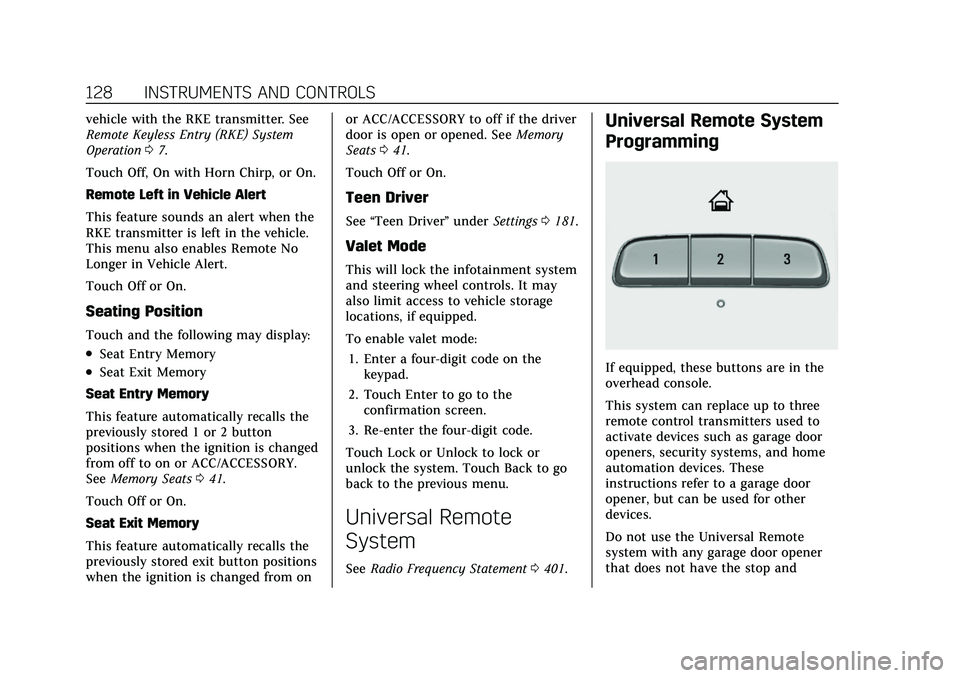
Universal Remote System
Programming
If equipped, these buttons are in the
overhead console.
This system can replace up to three
remote control transmitters used to
activate devices such as garage door
openers, security systems, and home
automation devices. These
instructions refer to a garage door
opener, but can be used for other
devices.
Do not use the Universal Remote
system with any garage door opener
that does not have the stop and