park assist CADILLAC XT5 2021 Owner's Manual
[x] Cancel search | Manufacturer: CADILLAC, Model Year: 2021, Model line: XT5, Model: CADILLAC XT5 2021Pages: 426, PDF Size: 8.73 MB
Page 4 of 426
Cadillac XT5 Owner Manual (GMNA-Localizing-U.S./Canada/Mexico-
14590481) - 2021 - CRC - 10/22/20
INTRODUCTION 3
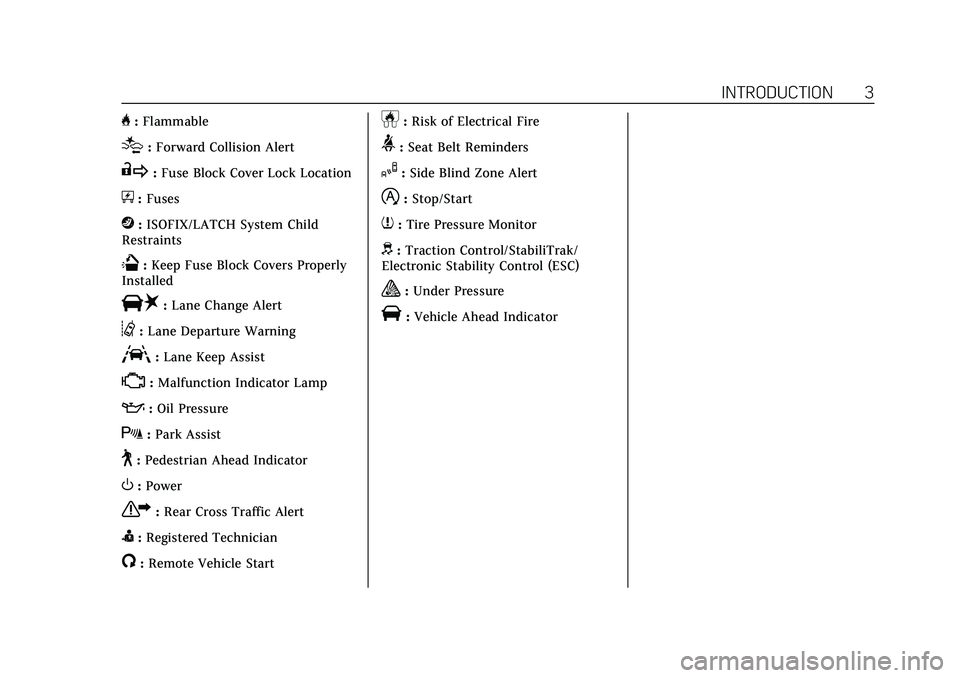
H:Flammable
[:Forward Collision Alert
R:Fuse Block Cover Lock Location
+:Fuses
j:ISOFIX/LATCH System Child
Restraints
Q: Keep Fuse Block Covers Properly
Installed
|: Lane Change Alert
@:Lane Departure Warning
A:Lane Keep Assist
*: Malfunction Indicator Lamp
::Oil Pressure
X:Park Assist
~:Pedestrian Ahead Indicator
O:Power
7:Rear Cross Traffic Alert
I:Registered Technician
/:Remote Vehicle Start
h:Risk of Electrical Fire
>:Seat Belt Reminders
I:Side Blind Zone Alert
h:Stop/Start
7:Tire Pressure Monitor
d:Traction Control/StabiliTrak/
Electronic Stability Control (ESC)
a: Under Pressure
V: Vehicle Ahead Indicator
Page 6 of 426
Cadillac XT5 Owner Manual (GMNA-Localizing-U.S./Canada/Mexico-
14590481) - 2021 - CRC - 10/22/20
INTRODUCTION 5
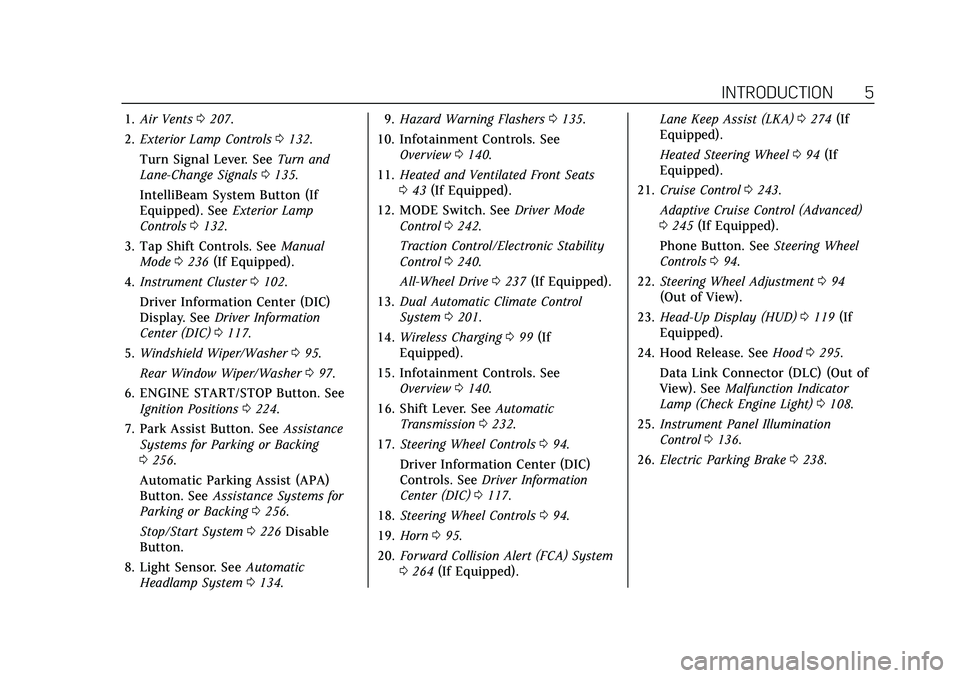
1.Air Vents 0207.
2. Exterior Lamp Controls 0132.
Turn Signal Lever. See Turn and
Lane-Change Signals 0135.
IntelliBeam System Button (If
Equipped). See Exterior Lamp
Controls 0132.
3. Tap Shift Controls. See Manual
Mode 0236 (If Equipped).
4. Instrument Cluster 0102.
Driver Information Center (DIC)
Display. See Driver Information
Center (DIC) 0117.
5. Windshield Wiper/Washer 095.
Rear Window Wiper/Washer 097.
6. ENGINE START/STOP Button. See Ignition Positions 0224.
7. Park Assist Button. See Assistance
Systems for Parking or Backing
0 256.
Automatic Parking Assist (APA)
Button. See Assistance Systems for
Parking or Backing 0256.
Stop/Start System 0226 Disable
Button.
8. Light Sensor. See Automatic
Headlamp System 0134. 9.
Hazard Warning Flashers 0135.
10. Infotainment Controls. See Overview 0140.
11. Heated and Ventilated Front Seats
043 (If Equipped).
12. MODE Switch. See Driver Mode
Control 0242.
Traction Control/Electronic Stability
Control 0240.
All-Wheel Drive 0237 (If Equipped).
13. Dual Automatic Climate Control
System 0201.
14. Wireless Charging 099 (If
Equipped).
15. Infotainment Controls. See Overview 0140.
16. Shift Lever. See Automatic
Transmission 0232.
17. Steering Wheel Controls 094.
Driver Information Center (DIC)
Controls. See Driver Information
Center (DIC) 0117.
18. Steering Wheel Controls 094.
19. Horn 095.
20. Forward Collision Alert (FCA) System
0264 (If Equipped). Lane Keep Assist (LKA)
0274 (If
Equipped).
Heated Steering Wheel 094 (If
Equipped).
21. Cruise Control 0243.
Adaptive Cruise Control (Advanced)
0 245 (If Equipped).
Phone Button. See Steering Wheel
Controls 094.
22. Steering Wheel Adjustment 094
(Out of View).
23. Head-Up Display (HUD) 0119 (If
Equipped).
24. Hood Release. See Hood0295.
Data Link Connector (DLC) (Out of
View). See Malfunction Indicator
Lamp (Check Engine Light) 0108.
25. Instrument Panel Illumination
Control 0136.
26. Electric Parking Brake 0238.
Page 94 of 426
Cadillac XT5 Owner Manual (GMNA-Localizing-U.S./Canada/Mexico-
14590481) - 2021 - CRC - 10/22/20
INSTRUMENTS AND CONTROLS 93
Instruments and
Controls
Controls
Steering Wheel Adjustment . . . . . . . 94
Steering Wheel Controls . . . . . . . . . . 94
Heated Steering Wheel . . . . . . . . . . . . 94
Horn . . . . . . . . . . . . . . . . . . . . . . . . . . . . . . . . 95
Windshield Wiper/Washer . . . . . . . . 95
Rear Window Wiper/Washer . . . . . . 97
Compass . . . . . . . . . . . . . . . . . . . . . . . . . . . . 98
Clock . . . . . . . . . . . . . . . . . . . . . . . . . . . . . . . 98
Power Outlets . . . . . . . . . . . . . . . . . . . . . . 98
Wireless Charging . . . . . . . . . . . . . . . . . 99
Warning Lights, Gauges, and
Indicators
Warning Lights, Gauges, andIndicators . . . . . . . . . . . . . . . . . . . . . . . 101
Instrument Cluster . . . . . . . . . . . . . . . 102
Speedometer . . . . . . . . . . . . . . . . . . . . . . 104
Odometer . . . . . . . . . . . . . . . . . . . . . . . . . 105
Trip Odometer . . . . . . . . . . . . . . . . . . . . 105
Tachometer . . . . . . . . . . . . . . . . . . . . . . . 105
Fuel Gauge . . . . . . . . . . . . . . . . . . . . . . . . 105
Engine Coolant Temperature Gauge . . . . . . . . . . . . . . . . . . . . . . . . . . . . 106
Seat Belt Reminders . . . . . . . . . . . . . . 106
Airbag Readiness Light . . . . . . . . . . 107 Passenger Airbag Status
Indicator . . . . . . . . . . . . . . . . . . . . . . . . . 107
Charging System Light . . . . . . . . . . . 108
Malfunction Indicator Lamp (Check Engine Light) . . . . . . . . . . . 108
Brake System Warning Light . . . . 110
Electric Parking Brake Light . . . . . 110
Service Electric Parking Brake Light . . . . . . . . . . . . . . . . . . . . . . . . . . . . . 111
Antilock Brake System (ABS) Warning Light . . . . . . . . . . . . . . . . . . 111
Performance Shifting Light . . . . . . 111
All-Wheel-Drive Light . . . . . . . . . . . . 112
Lane Keep Assist (LKA) Light . . . 112
Vehicle Ahead Indicator . . . . . . . . . 112
Pedestrian Ahead Indicator . . . . . . 113
Traction Off Light . . . . . . . . . . . . . . . . 113
StabiliTrak OFF Light . . . . . . . . . . . . 113
Traction Control System (TCS)/ StabiliTrak Light . . . . . . . . . . . . . . . . 113
Engine Coolant Temperature Warning Light
(Uplevel Only) . . . . . . . . . . . . . . . . . . . 114
Driver Mode Control Light . . . . . . . 114
Tire Pressure Light . . . . . . . . . . . . . . . 114
Engine Oil Pressure Light . . . . . . . . 115
Low Fuel Warning Light . . . . . . . . . 115
Security Light . . . . . . . . . . . . . . . . . . . . . 116
High-Beam On Light . . . . . . . . . . . . . 116
Lamps On Reminder . . . . . . . . . . . . . 116 Cruise Control Light . . . . . . . . . . . . . . 116
Door Ajar Light . . . . . . . . . . . . . . . . . . . 117
Information Displays
Driver Information
Center (DIC) . . . . . . . . . . . . . . . . . . . . . 117
Head-Up Display (HUD) . . . . . . . . . 119
Vehicle Messages
Vehicle Messages . . . . . . . . . . . . . . . . . 123
Engine Power Messages . . . . . . . . . . 123
Vehicle Speed Messages . . . . . . . . . 123
Vehicle Personalization
Vehicle Personalization . . . . . . . . . . 123
Universal Remote System
Universal Remote System . . . . . . . . 128
Universal Remote System Programming . . . . . . . . . . . . . . . . . . . 128
Universal Remote System Operation . . . . . . . . . . . . . . . . . . . . . . . . 130
Page 111 of 426

Cadillac XT5 Owner Manual (GMNA-Localizing-U.S./Canada/Mexico-
14590481) - 2021 - CRC - 10/22/20
110 INSTRUMENTS AND CONTROLS
vehicle may affect vehicle operation.
SeeAdd-On Electrical Equipment 0290.
See your dealer if assistance is needed.
The vehicle may not pass
inspection if:
.The light is on when the engine is
running.
.The light does not come on when
the ignition is in Service Mode.
.Critical emission control systems
have not been completely
diagnosed. If this happens, the
vehicle would not be ready for
inspection and might require
several days of routine driving
before the system is ready for
inspection. This can happen if the
12-volt battery has recently been
replaced or run down, or if the
vehicle has been recently serviced.
See your dealer if the vehicle will not
pass or cannot be made ready for
the test.
Brake System Warning
Light
MetricEnglish
This light should come on briefly
when the vehicle is turned on. If it
does not come on then, have it fixed
so it will be ready to warn you if there
is a problem.
If the light comes on and stays on at
start up, there is a brake problem.
Have the brake system inspected
right away.
If the light comes on while driving,
pull off the road and stop carefully.
If equipped with electric brake boost,
vehicle speed may be limited when
the brake system warning light comes
on. The brake pedal might be harder
to push, or the brake pedal may go
closer to the floor. It could take longer to stop. If the light is still on, have the
vehicle towed for service. See
Towing
the Vehicle 0361.
{Warning
The brake system might not be
working properly if the brake
system warning light is on. Driving
with the brake system warning light
on can lead to a crash. If the light is
still on after the vehicle has been
pulled off the road and carefully
stopped, have the vehicle towed for
service.
Electric Parking Brake
Light
MetricEnglish Base Level
Page 122 of 426
Cadillac XT5 Owner Manual (GMNA-Localizing-U.S./Canada/Mexico-
14590481) - 2021 - CRC - 10/22/20
INSTRUMENTS AND CONTROLS 121
!:Press to select the display view.
Each press will change the
display view.
D: Lift and hold to brighten the
display. Press and hold to dim the
display. Continue to hold to turn the
display off.
The HUD image will automatically
dim and brighten to compensate for
outside lighting. The HUD brightness
control can also be adjusted as
needed.
The HUD image can temporarily light
up depending on the angle and
position of sunlight on the HUD
display. This is normal.
Polarized sunglasses could make the
HUD image harder to see.
Head-Up Display (HUD) Rotation
Option
This feature allows for adjusting the
angle of the HUD image.
Press SEL on the steering wheel
controls while Head-Up Display
Rotation is highlighted to enter Adjust
Mode. Press
yorzto adjust the
angle of the HUD display. Press
Sor
Tto highlight OK, then press SEL to
save the setting. CANCEL can also be
selected to cancel the setting. The
vehicle must be in P (Park). See
Instrument Cluster 0102.
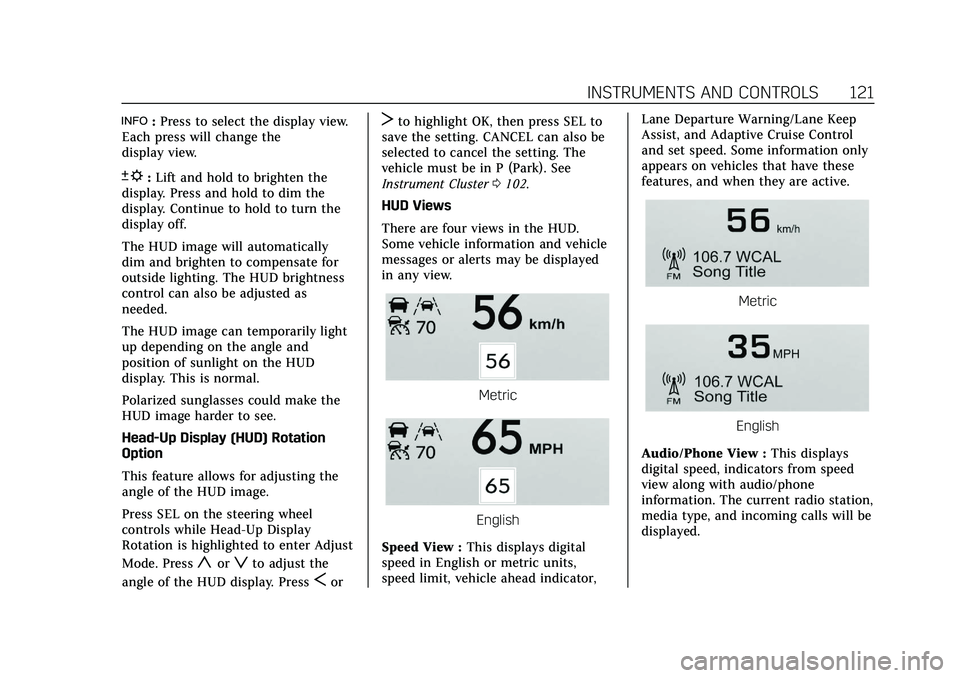
HUD Views
There are four views in the HUD.
Some vehicle information and vehicle
messages or alerts may be displayed
in any view.
Metric
English
Speed View : This displays digital
speed in English or metric units,
speed limit, vehicle ahead indicator, Lane Departure Warning/Lane Keep
Assist, and Adaptive Cruise Control
and set speed. Some information only
appears on vehicles that have these
features, and when they are active.
Metric
English
Audio/Phone View : This displays
digital speed, indicators from speed
view along with audio/phone
information. The current radio station,
media type, and incoming calls will be
displayed.
Page 126 of 426
Cadillac XT5 Owner Manual (GMNA-Localizing-U.S./Canada/Mexico-
14590481) - 2021 - CRC - 10/22/20
INSTRUMENTS AND CONTROLS 125
Collision / Detection Systems
Touch and the following may display:
.Alert Type
.Forward Collision System
.Front Pedestrian Detection
.Rear Pedestrian Detection
.Rear Camera Park Assist Symbols
.Rear Cross Traffic Alert
.Adaptive Cruise Go Notifier
.Lane Change Alert
Alert Type
This setting specifies the type of
vehicle feedback provided, either a
beep or seat vibration, when you are
in danger of colliding with an object.
Touch Beeps or Safety Alert Seat.
Forward Collision System
This setting can alert of a potential
crash with a detected vehicle ahead
and can apply brakes to help reduce a
collision’s severity.
Touch Off, Alert, or Alert and Brake. Front Pedestrian Detection
This feature may help avoid or reduce
the harm caused by front-end crashes
with nearby pedestrians.
See
Front Pedestrian Braking (FPB)
System 0268.
Select Off, Alert, or Alert and Brake.
Rear Pedestrian Detection
This setting specifies if alerts will
display when the vehicle detects
pedestrians behind when in
R (Reverse). See Rear Pedestrian Alert
0 263.
Touch Off, Alert, or Alert and Brake.
Rear Camera Park Assist Symbols
This setting enables the Rear Camera
Park Assist Symbols. See Assistance
Systems for Parking or Backing 0256.
Touch Off or On.
Rear Cross Traffic Alert
This setting specifies if an alert will
display when the vehicle detects
approaching rear cross traffic when in
R (Reverse). See Assistance Systems for
Parking or Backing 0256. Touch Off or On.
Adaptive Cruise Go Notifier
This setting determines if an alert will
appear when Adaptive Cruise Control
brings the vehicle to a complete stop
and the vehicle ahead of you starts
moving again. See
Adaptive Cruise
Control (Advanced) 0245.
Touch Off or On.
Lane Change Alert
This setting specifies if an alert will
display on the outside mirror to help
you avoid crashing into a vehicle in
your blind spot, or rapidly
approaching your blind spot, during a
lane change maneuver. See Lane
Change Alert (LCA) 0272.
When Lane Change Alert is disabled,
Side Blind Zone Alert is also disabled.
Touch Off or On.
Comfort and Convenience
Touch and the following may display:
.Chime Volume
.Hands Free Liftgate/Trunk Control
.Reverse Tilt Mirror
Page 130 of 426
Cadillac XT5 Owner Manual (GMNA-Localizing-U.S./Canada/Mexico-
14590481) - 2021 - CRC - 10/22/20
INSTRUMENTS AND CONTROLS 129
reverse feature. This includes any
garage door opener model
manufactured before April 1, 1982.
Read these instructions completely
before programming the Universal
Remote system. It may help to have
another person assist with the
programming process.
Keep the original hand-held
transmitter for use in other vehicles
as well as for future programming.
Erase the programming when vehicle
ownership is terminated. See“Erasing
Universal Remote System Buttons”
later in this section.
To program a garage door opener,
park outside directly in line with and
facing the garage door opener receiver.
Clear all people and objects near the
garage door.
Make sure the hand-held transmitter
has a new battery for quicker and
more accurate transmission of the
radio-frequency signal.Programming the Universal
Remote System
For questions or programming help,
see www.homelink.com/gm or call
1-800-355-3515. For calls placed
outside the U.S., Canada, or Puerto
Rico, international rates will apply and
may differ based on landline or mobile
phone.
Programming involves time-sensitive
actions, and may time out causing the
procedure to be repeated.
To program up to three devices:
1. Hold the end of the hand-held transmitter about 3 to 8 cm (1 to
3 in) away from the Universal
Remote system buttons with the
indicator light in view. The
hand-held transmitter was supplied
by the manufacturer of the garage
door opener receiver.
2. Press and release one of the three Universal Remote system buttons
to be programmed. Press and hold
the hand-held transmitter button.
Do not release the hand-held
transmitter button until the
indicator light changes from a slow to a rapid flash or continuous light.
Then release the hand-held
transmitter button.
Some garage door openers may
require substitution of Step 2 with
the procedure under
“Radio Signals
for Some Gate Operators ”later in
this section.
3. Press and hold the newly programmed Universal Remote
system button for five seconds
while watching the indicator light
and garage door activation.
.If the indicator light stays on
continuously or the garage door
moves when the button is
pressed, then programming is
complete. There is no need to
complete Steps 4–6.
.If the indicator light does not
come on or the garage door does
not move, a second button press
may be required. For a second
time, press and hold the newly
programmed button for
five seconds. If the indicator
light is continuously lit, or the
garage door moves,
programming is complete.
Page 145 of 426
Cadillac XT5 Owner Manual (GMNA-Localizing-U.S./Canada/Mexico-
14590481) - 2021 - CRC - 10/22/20
144 INFOTAINMENT SYSTEM
OnStar Services
If equipped, touch the OnStar Services
icon to display the OnStar Services
and Account pages. SeeOnStar
Overview 0405 and
OnStar System 0154.
Camera
If equipped, touch the Camera icon to
access the camera application. See
Assistance Systems for Parking or
Backing 0256.
Shortcut Tray
The shortcut menu is on the left side
of the display. It shows the Home
application and four other
applications.
Infotainment Display Features
Infotainment display features show on
the display when available. When a
feature is unavailable, it may gray out.
When a feature is touched, it may
highlight.
Haptic Feedback
If equipped, haptic feedback is a pulse
that occurs when an icon or option is
touched on the display or when
controls below the display are pressed.
Infotainment Gestures
Use the following finger gestures to
control the infotainment system.
Touch/Tap
Touch/tap is used to select an icon or
option, activate an application,
or change the location inside a map. Touch and Hold
Touch and hold can be used to start
another gesture, or to move or delete
an application.
Drag
Drag is used to move applications on
the Home Page, or to pan the map. To
drag the item, it must be held and
moved along the display to the new
location. This can be done up, down,
Page 175 of 426
Cadillac XT5 Owner Manual (GMNA-Localizing-U.S./Canada/Mexico-
14590481) - 2021 - CRC - 10/22/20
174 INFOTAINMENT SYSTEM
can be entered in groups of digits with
each group of digits being repeated
back by the system. If the group of
digits is not correct, the command
“Delete”will remove the last group of
digits and allow them to be re-entered.
Once the entire number has been
entered, the command “Call”will start
dialing the number.
Phone Assistant Voice
Recognition
Press and holdgon the steering
wheel controls to pass through and
launch Google phone assistant or Siri.
For the low radio, whether connected
by Bluetooth or phone projection, the
only available voice recognition is
either Siri (iPhone) or the Google
Assistant (Android).
Phone
Bluetooth (Overview)
The Bluetooth-capable system can
interact with many mobile devices,
allowing:
.Placement and receipt of calls in a
hands-free mode.
.Sharing of the device’s address book
or contact list with the vehicle.
To minimize driver distraction, before
driving, and with the vehicle parked:
.Become familiar with the features of
the mobile device. Organize the
phone book and contact lists clearly
and delete duplicate or rarely used
entries. If possible, program speed
dial or other shortcuts.
.Review the controls and operation
of the infotainment system.
.Pair mobile device(s) to the vehicle.
The system may not work with all
mobile devices. See “Pairing”later in
this section.
Vehicles with a Bluetooth system can
use a Bluetooth-capable mobile device
with a Hands-Free Profile to make and
receive phone calls. The infotainment
system and voice recognition are used
to control the system. The system can
be used while the ignition is on or in
ACC/ACCESSORY. The range of the
Bluetooth system can be up to 9.1 m
(30 ft). Not all mobile devices support
all functions and not all mobile devices work with the Bluetooth
system. See my.cadillac.com for more
information about compatible mobile
devices.
Controls
Use the controls on the center stack
and the steering wheel to operate the
Bluetooth system.
Steering Wheel Controls
g:
Press to answer incoming calls
and start voice recognition on your
connected Bluetooth mobile device.
i: Press to end a call, decline a call,
or cancel an operation. Press to mute
or unmute the infotainment system
when not on a call.
Infotainment System Controls
For information about how to navigate
the menu system using the
infotainment controls, see Using the
System 0143.
Audio System
When using the Bluetooth mobile
device system, sound comes through
the vehicle's front audio system
speakers and overrides the audio
Page 210 of 426
Cadillac XT5 Owner Manual (GMNA-Localizing-U.S./Canada/Mexico-
14590481) - 2021 - CRC - 10/22/20
DRIVING AND OPERATING 209
Driving and
Operating
Driving Information
Driving for Better FuelEconomy . . . . . . . . . . . . . . . . . . . . . . . . 210
Distracted Driving . . . . . . . . . . . . . . . . 210
Defensive Driving . . . . . . . . . . . . . . . . 211
Impaired Driving . . . . . . . . . . . . . . . . . 211
Control of a Vehicle . . . . . . . . . . . . . . 211
Braking . . . . . . . . . . . . . . . . . . . . . . . . . . . . 211
Steering . . . . . . . . . . . . . . . . . . . . . . . . . . . 212
Off-Road Recovery . . . . . . . . . . . . . . . . 213
Loss of Control . . . . . . . . . . . . . . . . . . . 213
Off-Road Driving . . . . . . . . . . . . . . . . . 214
Driving on Wet Roads . . . . . . . . . . . 217
Hill and Mountain Roads . . . . . . . . 218
Winter Driving . . . . . . . . . . . . . . . . . . . . 218
If the Vehicle Is Stuck . . . . . . . . . . . 220
Vehicle Load Limits . . . . . . . . . . . . . . 220
Starting and Operating
New Vehicle Break-In . . . . . . . . . . . . 224
Ignition Positions . . . . . . . . . . . . . . . . 224
Starting the Engine . . . . . . . . . . . . . . 225
Stop/Start System . . . . . . . . . . . . . . . . 226
Engine Heater . . . . . . . . . . . . . . . . . . . . 227
Retained Accessory Power (RAP) . . . . . . . . . . . . . . . . . . . . 229 Shifting Into Park . . . . . . . . . . . . . . . . 229
Shifting out of Park . . . . . . . . . . . . . . 230
Parking over Things
That Burn . . . . . . . . . . . . . . . . . . . . . . . 230
Active Fuel Management . . . . . . . . 230
Extended Parking . . . . . . . . . . . . . . . . . 231
Engine Exhaust
Engine Exhaust . . . . . . . . . . . . . . . . . . . 231
Running the Vehicle While
Parked . . . . . . . . . . . . . . . . . . . . . . . . . . . 231
Automatic Transmission
Automatic Transmission . . . . . . . . . 232
Manual Mode . . . . . . . . . . . . . . . . . . . . . 236
Drive Systems
All-Wheel Drive . . . . . . . . . . . . . . . . . . 237
Brakes
Electric Brake Boost . . . . . . . . . . . . . . 237
Antilock Brake System (ABS) . . . . 238
Electric Parking Brake . . . . . . . . . . . . 238
Brake Assist . . . . . . . . . . . . . . . . . . . . . . . 240
Hill Start Assist (HSA) . . . . . . . . . . . 240
Ride Control Systems
Traction Control/ElectronicStability Control . . . . . . . . . . . . . . . . 240
Driver Mode Control . . . . . . . . . . . . . 242
Cruise Control
Cruise Control . . . . . . . . . . . . . . . . . . . . 243
Adaptive Cruise Control (Advanced) . . . . . . . . . . . . . . . . . . . . . . 245
Driver Assistance Systems
Driver Assistance Systems . . . . . . . 254
Assistance Systems for Parkingor Backing . . . . . . . . . . . . . . . . . . . . . . . 256
Rear Pedestrian Alert . . . . . . . . . . . . 263
Assistance Systems for Driving . . . . . . . . . . . . . . . . . . . . . . . . . . 264
Forward Collision Alert (FCA) System . . . . . . . . . . . . . . . . . . . . . . . . . . 264
Automatic Emergency Braking (AEB) . . . . . . . . . . . . . . . . . . . 266
Front Pedestrian Braking (FPB) System . . . . . . . . . . . . . . . . . . . . . . . . . . 268
Night Vision System . . . . . . . . . . . . . 269
Side Blind Zone Alert (SBZA) . . . . 272
Lane Change Alert (LCA) . . . . . . . . 272
Lane Keep Assist (LKA) . . . . . . . . . . 274
Fuel
Top Tier Fuel . . . . . . . . . . . . . . . . . . . . . 275
Recommended Fuel (2.0L L4 Engine) . . . . . . . . . . . . . . . . . . . . . . . . . . 276
Recommended Fuel (3.6L V6 Engine) . . . . . . . . . . . . . . . . . . . . . . 276
Prohibited Fuels . . . . . . . . . . . . . . . . . . 276
Fuels in Foreign Countries . . . . . . . 277