parking brake CADILLAC XT5 2021 Owner's Manual
[x] Cancel search | Manufacturer: CADILLAC, Model Year: 2021, Model line: XT5, Model: CADILLAC XT5 2021Pages: 426, PDF Size: 8.73 MB
Page 6 of 426
Cadillac XT5 Owner Manual (GMNA-Localizing-U.S./Canada/Mexico-
14590481) - 2021 - CRC - 10/22/20
INTRODUCTION 5
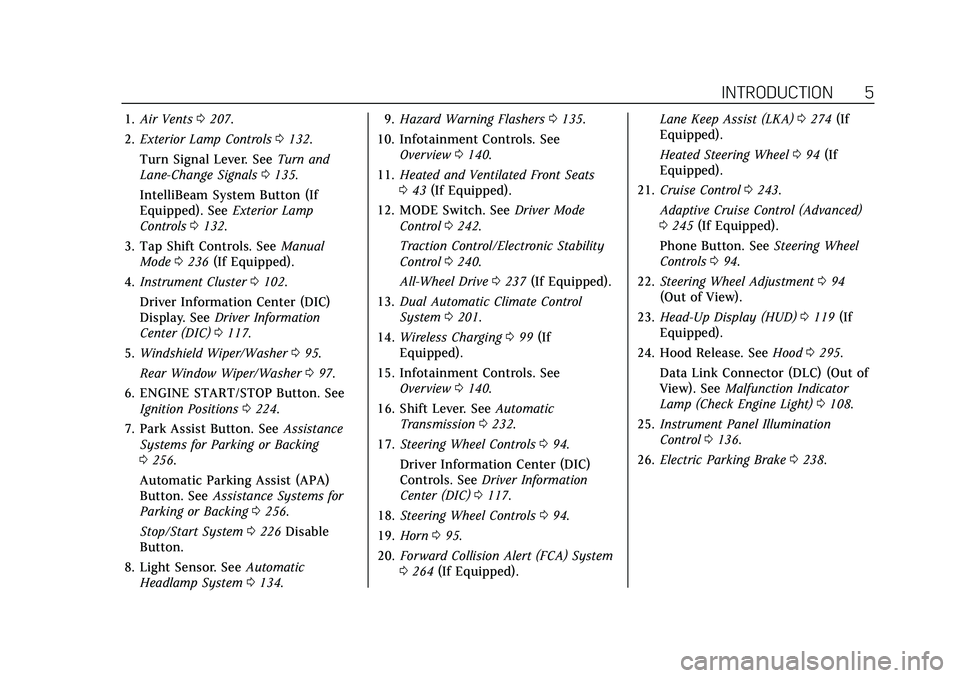
1.Air Vents 0207.
2. Exterior Lamp Controls 0132.
Turn Signal Lever. See Turn and
Lane-Change Signals 0135.
IntelliBeam System Button (If
Equipped). See Exterior Lamp
Controls 0132.
3. Tap Shift Controls. See Manual
Mode 0236 (If Equipped).
4. Instrument Cluster 0102.
Driver Information Center (DIC)
Display. See Driver Information
Center (DIC) 0117.
5. Windshield Wiper/Washer 095.
Rear Window Wiper/Washer 097.
6. ENGINE START/STOP Button. See Ignition Positions 0224.
7. Park Assist Button. See Assistance
Systems for Parking or Backing
0 256.
Automatic Parking Assist (APA)
Button. See Assistance Systems for
Parking or Backing 0256.
Stop/Start System 0226 Disable
Button.
8. Light Sensor. See Automatic
Headlamp System 0134. 9.
Hazard Warning Flashers 0135.
10. Infotainment Controls. See Overview 0140.
11. Heated and Ventilated Front Seats
043 (If Equipped).
12. MODE Switch. See Driver Mode
Control 0242.
Traction Control/Electronic Stability
Control 0240.
All-Wheel Drive 0237 (If Equipped).
13. Dual Automatic Climate Control
System 0201.
14. Wireless Charging 099 (If
Equipped).
15. Infotainment Controls. See Overview 0140.
16. Shift Lever. See Automatic
Transmission 0232.
17. Steering Wheel Controls 094.
Driver Information Center (DIC)
Controls. See Driver Information
Center (DIC) 0117.
18. Steering Wheel Controls 094.
19. Horn 095.
20. Forward Collision Alert (FCA) System
0264 (If Equipped). Lane Keep Assist (LKA)
0274 (If
Equipped).
Heated Steering Wheel 094 (If
Equipped).
21. Cruise Control 0243.
Adaptive Cruise Control (Advanced)
0 245 (If Equipped).
Phone Button. See Steering Wheel
Controls 094.
22. Steering Wheel Adjustment 094
(Out of View).
23. Head-Up Display (HUD) 0119 (If
Equipped).
24. Hood Release. See Hood0295.
Data Link Connector (DLC) (Out of
View). See Malfunction Indicator
Lamp (Check Engine Light) 0108.
25. Instrument Panel Illumination
Control 0136.
26. Electric Parking Brake 0238.
Page 15 of 426
Cadillac XT5 Owner Manual (GMNA-Localizing-U.S./Canada/Mexico-
14590481) - 2021 - CRC - 10/22/20
14 KEYS, DOORS, AND WINDOWS
The climate control system will use
the previous settings during a remote
start. The rear window defogger may
come on during remote start based on
cold ambient conditions. The rear
window defogger indicator light does
not come on during remote start.
If the vehicle has auto heated or
ventilated seats they may come on
during a remote start. SeeHeated and
Ventilated Front Seats 043.
Laws in some local communities may
restrict the use of remote starters. For
example, some laws may require a
person using remote start to have the
vehicle in view. Check local
regulations for any requirements.
Do not use the remote start feature if
the vehicle is low on fuel. The vehicle
could run out of fuel.
Other conditions can affect the
performance of the transmitter. See
Remote Keyless Entry (RKE) System
0 7.
Starting the Engine Using Remote
Start
1. Press and release
Qon the RKE
transmitter. 2. Immediately press and hold
/for
at least four seconds or until the
turn signal lamps flash. The turn
signal lamps flashing confirms the
request to remote start the vehicle
has been received.
During the remote start the doors
will be locked and the parking
lamps will remain on as long as the
engine is running.
The engine will shut off after
15 minutes unless a time extension
is done or the ignition is turned on.
3. With the RKE transmitter in the vehicle, press the brake pedal and
start the vehicle to drive.
Extending Engine Run Time
The engine run time can also be
extended by another 15 minutes,
if during the first 15 minutes
Steps 1 and 2 are repeated while the
engine is still running. An extension
can be requested 30 seconds after
starting. This provides a total of
30 minutes.
The remote start can only be
extended once. When the remote start is extended,
the second 15-minute period is added
on to the first 15 minutes for a total
of 30 minutes.
A maximum of two remote starts, or a
remote start with an extension, are
allowed between ignition cycles.
The ignition must be turned on and
then off before the remote start
procedure can be used again.
Canceling a Remote Start
To cancel a remote start, do any of
the following:
.Press and hold/until the parking
lamps turn off.
.Turn on the hazard warning
flashers.
.Turn the vehicle on and then off.
Conditions in Which Remote Start
Will Not Work
The remote start will not operate if
any of the following occur:
.The RKE transmitter is in the
vehicle.
.The ignition is on.
.The hood is not closed.
Page 94 of 426
Cadillac XT5 Owner Manual (GMNA-Localizing-U.S./Canada/Mexico-
14590481) - 2021 - CRC - 10/22/20
INSTRUMENTS AND CONTROLS 93
Instruments and
Controls
Controls
Steering Wheel Adjustment . . . . . . . 94
Steering Wheel Controls . . . . . . . . . . 94
Heated Steering Wheel . . . . . . . . . . . . 94
Horn . . . . . . . . . . . . . . . . . . . . . . . . . . . . . . . . 95
Windshield Wiper/Washer . . . . . . . . 95
Rear Window Wiper/Washer . . . . . . 97
Compass . . . . . . . . . . . . . . . . . . . . . . . . . . . . 98
Clock . . . . . . . . . . . . . . . . . . . . . . . . . . . . . . . 98
Power Outlets . . . . . . . . . . . . . . . . . . . . . . 98
Wireless Charging . . . . . . . . . . . . . . . . . 99
Warning Lights, Gauges, and
Indicators
Warning Lights, Gauges, andIndicators . . . . . . . . . . . . . . . . . . . . . . . 101
Instrument Cluster . . . . . . . . . . . . . . . 102
Speedometer . . . . . . . . . . . . . . . . . . . . . . 104
Odometer . . . . . . . . . . . . . . . . . . . . . . . . . 105
Trip Odometer . . . . . . . . . . . . . . . . . . . . 105
Tachometer . . . . . . . . . . . . . . . . . . . . . . . 105
Fuel Gauge . . . . . . . . . . . . . . . . . . . . . . . . 105
Engine Coolant Temperature Gauge . . . . . . . . . . . . . . . . . . . . . . . . . . . . 106
Seat Belt Reminders . . . . . . . . . . . . . . 106
Airbag Readiness Light . . . . . . . . . . 107 Passenger Airbag Status
Indicator . . . . . . . . . . . . . . . . . . . . . . . . . 107
Charging System Light . . . . . . . . . . . 108
Malfunction Indicator Lamp (Check Engine Light) . . . . . . . . . . . 108
Brake System Warning Light . . . . 110
Electric Parking Brake Light . . . . . 110
Service Electric Parking Brake Light . . . . . . . . . . . . . . . . . . . . . . . . . . . . . 111
Antilock Brake System (ABS) Warning Light . . . . . . . . . . . . . . . . . . 111
Performance Shifting Light . . . . . . 111
All-Wheel-Drive Light . . . . . . . . . . . . 112
Lane Keep Assist (LKA) Light . . . 112
Vehicle Ahead Indicator . . . . . . . . . 112
Pedestrian Ahead Indicator . . . . . . 113
Traction Off Light . . . . . . . . . . . . . . . . 113
StabiliTrak OFF Light . . . . . . . . . . . . 113
Traction Control System (TCS)/ StabiliTrak Light . . . . . . . . . . . . . . . . 113
Engine Coolant Temperature Warning Light
(Uplevel Only) . . . . . . . . . . . . . . . . . . . 114
Driver Mode Control Light . . . . . . . 114
Tire Pressure Light . . . . . . . . . . . . . . . 114
Engine Oil Pressure Light . . . . . . . . 115
Low Fuel Warning Light . . . . . . . . . 115
Security Light . . . . . . . . . . . . . . . . . . . . . 116
High-Beam On Light . . . . . . . . . . . . . 116
Lamps On Reminder . . . . . . . . . . . . . 116 Cruise Control Light . . . . . . . . . . . . . . 116
Door Ajar Light . . . . . . . . . . . . . . . . . . . 117
Information Displays
Driver Information
Center (DIC) . . . . . . . . . . . . . . . . . . . . . 117
Head-Up Display (HUD) . . . . . . . . . 119
Vehicle Messages
Vehicle Messages . . . . . . . . . . . . . . . . . 123
Engine Power Messages . . . . . . . . . . 123
Vehicle Speed Messages . . . . . . . . . 123
Vehicle Personalization
Vehicle Personalization . . . . . . . . . . 123
Universal Remote System
Universal Remote System . . . . . . . . 128
Universal Remote System Programming . . . . . . . . . . . . . . . . . . . 128
Universal Remote System Operation . . . . . . . . . . . . . . . . . . . . . . . . 130
Page 111 of 426

Cadillac XT5 Owner Manual (GMNA-Localizing-U.S./Canada/Mexico-
14590481) - 2021 - CRC - 10/22/20
110 INSTRUMENTS AND CONTROLS
vehicle may affect vehicle operation.
SeeAdd-On Electrical Equipment 0290.
See your dealer if assistance is needed.
The vehicle may not pass
inspection if:
.The light is on when the engine is
running.
.The light does not come on when
the ignition is in Service Mode.
.Critical emission control systems
have not been completely
diagnosed. If this happens, the
vehicle would not be ready for
inspection and might require
several days of routine driving
before the system is ready for
inspection. This can happen if the
12-volt battery has recently been
replaced or run down, or if the
vehicle has been recently serviced.
See your dealer if the vehicle will not
pass or cannot be made ready for
the test.
Brake System Warning
Light
MetricEnglish
This light should come on briefly
when the vehicle is turned on. If it
does not come on then, have it fixed
so it will be ready to warn you if there
is a problem.
If the light comes on and stays on at
start up, there is a brake problem.
Have the brake system inspected
right away.
If the light comes on while driving,
pull off the road and stop carefully.
If equipped with electric brake boost,
vehicle speed may be limited when
the brake system warning light comes
on. The brake pedal might be harder
to push, or the brake pedal may go
closer to the floor. It could take longer to stop. If the light is still on, have the
vehicle towed for service. See
Towing
the Vehicle 0361.
{Warning
The brake system might not be
working properly if the brake
system warning light is on. Driving
with the brake system warning light
on can lead to a crash. If the light is
still on after the vehicle has been
pulled off the road and carefully
stopped, have the vehicle towed for
service.
Electric Parking Brake
Light
MetricEnglish Base Level
Page 112 of 426

Cadillac XT5 Owner Manual (GMNA-Localizing-U.S./Canada/Mexico-
14590481) - 2021 - CRC - 10/22/20
INSTRUMENTS AND CONTROLS 111
English Uplevel
This light comes on when the parking
brake is applied. If the light continues
flashing after the parking brake is
released, or while driving, there is a
problem with the Electric Parking
Brake system. A message may also
display in the Driver Information
Center (DIC).
If the light does not come on,
or remains flashing, see your dealer.
Service Electric Parking
Brake Light
The service electric parking brake light
should come on briefly when the
vehicle is started. If it does not come
on, have it fixed so it will be ready to
warn if there is a problem. For
vehicles with the reconfigurable
cluster, this light may not come on
when the vehicle is started.
If this light stays on, the vehicle
should be taken to a dealer as soon as
possible. See Electric Parking Brake
0 238. A message may also display in
the Driver Information Center (DIC).
Antilock Brake System
(ABS) Warning Light
This warning light should come on
briefly when the vehicle is turned on.
If the light does not come on, have it
fixed so it will be ready to warn if
there is a problem. If the light comes on while driving,
safely stop as soon as it is possible
and turn off the vehicle. Then turn on
the vehicle again to reset the system.
If the ABS warning light stays on,
or comes on again while driving, the
vehicle needs service. A chime may
also sound when the light stays on.
If the ABS warning light is the only
light on, the vehicle has regular
brakes, but ABS is not functioning.
If both the ABS warning light and the
brake system warning light are on,
ABS is not functioning and there is a
problem with the regular brakes. See
your dealer for service.
See
Brake System Warning Light 0110.
Performance Shifting Light
If equipped, this light may display
green when Sport Mode is activated
and certain driving conditions are
Page 126 of 426
Cadillac XT5 Owner Manual (GMNA-Localizing-U.S./Canada/Mexico-
14590481) - 2021 - CRC - 10/22/20
INSTRUMENTS AND CONTROLS 125
Collision / Detection Systems
Touch and the following may display:
.Alert Type
.Forward Collision System
.Front Pedestrian Detection
.Rear Pedestrian Detection
.Rear Camera Park Assist Symbols
.Rear Cross Traffic Alert
.Adaptive Cruise Go Notifier
.Lane Change Alert
Alert Type
This setting specifies the type of
vehicle feedback provided, either a
beep or seat vibration, when you are
in danger of colliding with an object.
Touch Beeps or Safety Alert Seat.
Forward Collision System
This setting can alert of a potential
crash with a detected vehicle ahead
and can apply brakes to help reduce a
collision’s severity.
Touch Off, Alert, or Alert and Brake. Front Pedestrian Detection
This feature may help avoid or reduce
the harm caused by front-end crashes
with nearby pedestrians.
See
Front Pedestrian Braking (FPB)
System 0268.
Select Off, Alert, or Alert and Brake.
Rear Pedestrian Detection
This setting specifies if alerts will
display when the vehicle detects
pedestrians behind when in
R (Reverse). See Rear Pedestrian Alert
0 263.
Touch Off, Alert, or Alert and Brake.
Rear Camera Park Assist Symbols
This setting enables the Rear Camera
Park Assist Symbols. See Assistance
Systems for Parking or Backing 0256.
Touch Off or On.
Rear Cross Traffic Alert
This setting specifies if an alert will
display when the vehicle detects
approaching rear cross traffic when in
R (Reverse). See Assistance Systems for
Parking or Backing 0256. Touch Off or On.
Adaptive Cruise Go Notifier
This setting determines if an alert will
appear when Adaptive Cruise Control
brings the vehicle to a complete stop
and the vehicle ahead of you starts
moving again. See
Adaptive Cruise
Control (Advanced) 0245.
Touch Off or On.
Lane Change Alert
This setting specifies if an alert will
display on the outside mirror to help
you avoid crashing into a vehicle in
your blind spot, or rapidly
approaching your blind spot, during a
lane change maneuver. See Lane
Change Alert (LCA) 0272.
When Lane Change Alert is disabled,
Side Blind Zone Alert is also disabled.
Touch Off or On.
Comfort and Convenience
Touch and the following may display:
.Chime Volume
.Hands Free Liftgate/Trunk Control
.Reverse Tilt Mirror
Page 135 of 426

Cadillac XT5 Owner Manual (GMNA-Localizing-U.S./Canada/Mexico-
14590481) - 2021 - CRC - 10/22/20
134 LIGHTING
Exterior Lamps Off
Reminder
A warning chime sounds if the driver
door is opened while the ignition is off
and the exterior lamps are on.
Headlamp High/Low-Beam
Changer
3:Push the turn signal lever away
from you and release, to turn the high
beams on. To return to low beams,
push the lever again or pull it toward
you and release.
This indicator light turns on in the
instrument cluster when the
high-beam headlamps are on.
Flash-to-Pass
To flash the high beams, pull the turn
signal lever toward you, and release.
Daytime Running
Lamps (DRL)
DRL can make it easier for others to
see the front of your vehicle during
the day. Fully functional DRL are
required on all vehicles first sold in
Canada.
The dedicated DRL will come on when
all of the following conditions are met:
.The ignition is on.
.The exterior lamp control is
in AUTO.
.The light sensor determines it is
daytime.
.The parking brake is released or the
vehicle is not in P (Park).
When the DRL are on, the taillamps,
sidemarker lamps, and other lamps
will not be on.
The DRL turn off when the headlamps
are turned to
Oor the ignition is off.
For vehicles first sold in Canada, the
DRL can only be turned off when the
vehicle is parked.
Automatic Headlamp
System
When the exterior lamp control is set
to AUTO and it is dark enough
outside, the headlamps come on
automatically.
There is a light sensor on top of the
instrument panel. Do not cover the
sensor.
The system may also turn on the
headlamps when driving through a
parking garage or tunnel.
If the vehicle is started in a dark
garage, the automatic headlamp
system comes on immediately. If it is
Page 190 of 426
Cadillac XT5 Owner Manual (GMNA-Localizing-U.S./Canada/Mexico-
14590481) - 2021 - CRC - 10/22/20
INFOTAINMENT SYSTEM 189
.Change Teen Driver settings.
.Change or clear the Teen
Driver PIN.
.Access or delete Report Card data.
Register keys to activate Teen
Driver and assign restrictions to
the key:
Any vehicle key can be registered, up
to a maximum of eight keys. Label the
key to tell it apart from the
other keys.
For a pushbutton start system: 1. Start the engine.
2. For automatic transmissions, the vehicle must be in P (Park). For
manual transmissions, the vehicle
must be stopped with the parking
brake set.
3. From the Settings menu, touch Vehicle and then Teen Driver.
4. Enter the PIN.
5. Place the Remote Keyless Entry (RKE) transmitter key you wish to
register in the transmitter pocket.
The key does not need to be the one that started the vehicle. See
Remote Keyless Entry (RKE) System
Operation
07for transmitter
pocket location.
6. From the Teen Driver menu, touch Setup Keys.
.If the transmitter key has not
previously been registered, the
option to add the key displays.
Touch Setup and a confirmation
message displays. Teen Driver
restrictions will be applied
whenever this key is used to
operate the vehicle.
.If the transmitter key has
already been registered, the
option to remove the key
displays. If Remove is touched,
the transmitter key is no longer
registered. A confirmation
message displays, and Teen
Driver restrictions will not be
applied if this transmitter key is
used to operate the vehicle.
In vehicles with a pushbutton start
system, if a Teen Driver and a
non-Teen Driver key are both present
at start up, the vehicle will recognize the non-Teen Driver key to start the
vehicle. The Teen Driver settings will
not be active.
For a keyed ignition system:
1. Start the engine.
2. For automatic transmissions, the vehicle must be in P (Park). For
manual transmissions, the vehicle
must be stopped with the parking
brake set.
3. From the Settings menu, touch Vehicle and then Teen Driver.
4. Enter the PIN.
5. Touch Setup Keys. The system displays instructions for registering
or unregistering a key.
A confirmation message displays.
Manage Settings
Audio Volume Limit : Allows the
audio volume limit to be turned on or
off. Touch Set Audio Volume Limit to
choose the maximum allowable audio
volume level.
Set Audio Volume Limit : Allows a
maximum radio volume to be set. Use
the arrows to choose the maximum
allowable level for the audio volume.
Page 210 of 426
Cadillac XT5 Owner Manual (GMNA-Localizing-U.S./Canada/Mexico-
14590481) - 2021 - CRC - 10/22/20
DRIVING AND OPERATING 209
Driving and
Operating
Driving Information
Driving for Better FuelEconomy . . . . . . . . . . . . . . . . . . . . . . . . 210
Distracted Driving . . . . . . . . . . . . . . . . 210
Defensive Driving . . . . . . . . . . . . . . . . 211
Impaired Driving . . . . . . . . . . . . . . . . . 211
Control of a Vehicle . . . . . . . . . . . . . . 211
Braking . . . . . . . . . . . . . . . . . . . . . . . . . . . . 211
Steering . . . . . . . . . . . . . . . . . . . . . . . . . . . 212
Off-Road Recovery . . . . . . . . . . . . . . . . 213
Loss of Control . . . . . . . . . . . . . . . . . . . 213
Off-Road Driving . . . . . . . . . . . . . . . . . 214
Driving on Wet Roads . . . . . . . . . . . 217
Hill and Mountain Roads . . . . . . . . 218
Winter Driving . . . . . . . . . . . . . . . . . . . . 218
If the Vehicle Is Stuck . . . . . . . . . . . 220
Vehicle Load Limits . . . . . . . . . . . . . . 220
Starting and Operating
New Vehicle Break-In . . . . . . . . . . . . 224
Ignition Positions . . . . . . . . . . . . . . . . 224
Starting the Engine . . . . . . . . . . . . . . 225
Stop/Start System . . . . . . . . . . . . . . . . 226
Engine Heater . . . . . . . . . . . . . . . . . . . . 227
Retained Accessory Power (RAP) . . . . . . . . . . . . . . . . . . . . 229 Shifting Into Park . . . . . . . . . . . . . . . . 229
Shifting out of Park . . . . . . . . . . . . . . 230
Parking over Things
That Burn . . . . . . . . . . . . . . . . . . . . . . . 230
Active Fuel Management . . . . . . . . 230
Extended Parking . . . . . . . . . . . . . . . . . 231
Engine Exhaust
Engine Exhaust . . . . . . . . . . . . . . . . . . . 231
Running the Vehicle While
Parked . . . . . . . . . . . . . . . . . . . . . . . . . . . 231
Automatic Transmission
Automatic Transmission . . . . . . . . . 232
Manual Mode . . . . . . . . . . . . . . . . . . . . . 236
Drive Systems
All-Wheel Drive . . . . . . . . . . . . . . . . . . 237
Brakes
Electric Brake Boost . . . . . . . . . . . . . . 237
Antilock Brake System (ABS) . . . . 238
Electric Parking Brake . . . . . . . . . . . . 238
Brake Assist . . . . . . . . . . . . . . . . . . . . . . . 240
Hill Start Assist (HSA) . . . . . . . . . . . 240
Ride Control Systems
Traction Control/ElectronicStability Control . . . . . . . . . . . . . . . . 240
Driver Mode Control . . . . . . . . . . . . . 242
Cruise Control
Cruise Control . . . . . . . . . . . . . . . . . . . . 243
Adaptive Cruise Control (Advanced) . . . . . . . . . . . . . . . . . . . . . . 245
Driver Assistance Systems
Driver Assistance Systems . . . . . . . 254
Assistance Systems for Parkingor Backing . . . . . . . . . . . . . . . . . . . . . . . 256
Rear Pedestrian Alert . . . . . . . . . . . . 263
Assistance Systems for Driving . . . . . . . . . . . . . . . . . . . . . . . . . . 264
Forward Collision Alert (FCA) System . . . . . . . . . . . . . . . . . . . . . . . . . . 264
Automatic Emergency Braking (AEB) . . . . . . . . . . . . . . . . . . . 266
Front Pedestrian Braking (FPB) System . . . . . . . . . . . . . . . . . . . . . . . . . . 268
Night Vision System . . . . . . . . . . . . . 269
Side Blind Zone Alert (SBZA) . . . . 272
Lane Change Alert (LCA) . . . . . . . . 272
Lane Keep Assist (LKA) . . . . . . . . . . 274
Fuel
Top Tier Fuel . . . . . . . . . . . . . . . . . . . . . 275
Recommended Fuel (2.0L L4 Engine) . . . . . . . . . . . . . . . . . . . . . . . . . . 276
Recommended Fuel (3.6L V6 Engine) . . . . . . . . . . . . . . . . . . . . . . 276
Prohibited Fuels . . . . . . . . . . . . . . . . . . 276
Fuels in Foreign Countries . . . . . . . 277
Page 213 of 426
Cadillac XT5 Owner Manual (GMNA-Localizing-U.S./Canada/Mexico-
14590481) - 2021 - CRC - 10/22/20
212 DRIVING AND OPERATING
(60 mph) travels 20 m (66 ft), which
could be a lot of distance in an
emergency.
Helpful braking tips to keep in mind
include:
.Keep enough distance between you
and the vehicle in front of you.
.Avoid needless heavy braking.
.Keep pace with traffic.
If the engine ever stops while the
vehicle is being driven, brake normally
but do not pump the brakes. Doing so
could make the pedal harder to push
down. If the engine stops, there will
be some power brake assist but it will
be used when the brake is applied.
Once the power assist is used up, it
can take longer to stop and the brake
pedal will be harder to push.
Steering
Electric Power Steering
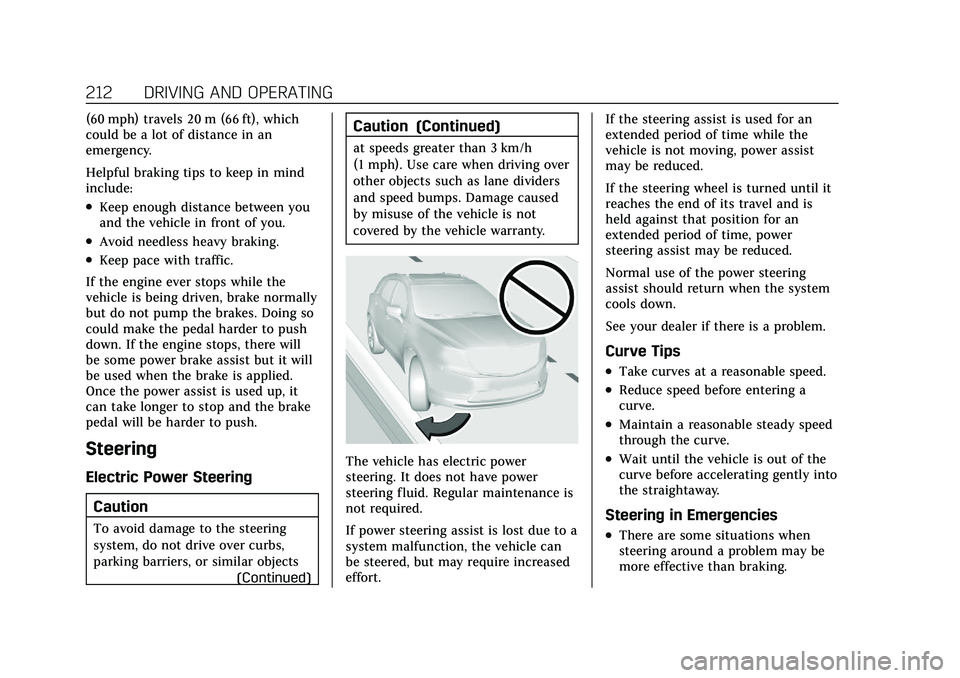
Caution
To avoid damage to the steering
system, do not drive over curbs,
parking barriers, or similar objects (Continued)
Caution (Continued)
at speeds greater than 3 km/h
(1 mph). Use care when driving over
other objects such as lane dividers
and speed bumps. Damage caused
by misuse of the vehicle is not
covered by the vehicle warranty.
The vehicle has electric power
steering. It does not have power
steering fluid. Regular maintenance is
not required.
If power steering assist is lost due to a
system malfunction, the vehicle can
be steered, but may require increased
effort. If the steering assist is used for an
extended period of time while the
vehicle is not moving, power assist
may be reduced.
If the steering wheel is turned until it
reaches the end of its travel and is
held against that position for an
extended period of time, power
steering assist may be reduced.
Normal use of the power steering
assist should return when the system
cools down.
See your dealer if there is a problem.
Curve Tips
.Take curves at a reasonable speed.
.Reduce speed before entering a
curve.
.Maintain a reasonable steady speed
through the curve.
.Wait until the vehicle is out of the
curve before accelerating gently into
the straightaway.
Steering in Emergencies
.There are some situations when
steering around a problem may be
more effective than braking.