transmission CADILLAC XT5 2021 Owner's Manual
[x] Cancel search | Manufacturer: CADILLAC, Model Year: 2021, Model line: XT5, Model: CADILLAC XT5 2021Pages: 426, PDF Size: 8.73 MB
Page 6 of 426
Cadillac XT5 Owner Manual (GMNA-Localizing-U.S./Canada/Mexico-
14590481) - 2021 - CRC - 10/22/20
INTRODUCTION 5
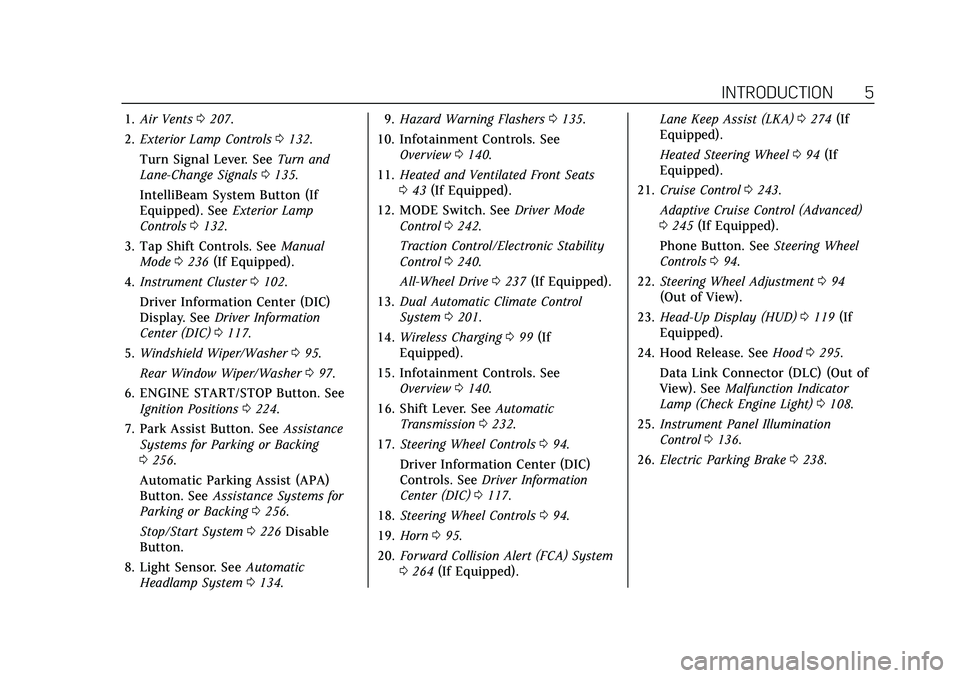
1.Air Vents 0207.
2. Exterior Lamp Controls 0132.
Turn Signal Lever. See Turn and
Lane-Change Signals 0135.
IntelliBeam System Button (If
Equipped). See Exterior Lamp
Controls 0132.
3. Tap Shift Controls. See Manual
Mode 0236 (If Equipped).
4. Instrument Cluster 0102.
Driver Information Center (DIC)
Display. See Driver Information
Center (DIC) 0117.
5. Windshield Wiper/Washer 095.
Rear Window Wiper/Washer 097.
6. ENGINE START/STOP Button. See Ignition Positions 0224.
7. Park Assist Button. See Assistance
Systems for Parking or Backing
0 256.
Automatic Parking Assist (APA)
Button. See Assistance Systems for
Parking or Backing 0256.
Stop/Start System 0226 Disable
Button.
8. Light Sensor. See Automatic
Headlamp System 0134. 9.
Hazard Warning Flashers 0135.
10. Infotainment Controls. See Overview 0140.
11. Heated and Ventilated Front Seats
043 (If Equipped).
12. MODE Switch. See Driver Mode
Control 0242.
Traction Control/Electronic Stability
Control 0240.
All-Wheel Drive 0237 (If Equipped).
13. Dual Automatic Climate Control
System 0201.
14. Wireless Charging 099 (If
Equipped).
15. Infotainment Controls. See Overview 0140.
16. Shift Lever. See Automatic
Transmission 0232.
17. Steering Wheel Controls 094.
Driver Information Center (DIC)
Controls. See Driver Information
Center (DIC) 0117.
18. Steering Wheel Controls 094.
19. Horn 095.
20. Forward Collision Alert (FCA) System
0264 (If Equipped). Lane Keep Assist (LKA)
0274 (If
Equipped).
Heated Steering Wheel 094 (If
Equipped).
21. Cruise Control 0243.
Adaptive Cruise Control (Advanced)
0 245 (If Equipped).
Phone Button. See Steering Wheel
Controls 094.
22. Steering Wheel Adjustment 094
(Out of View).
23. Head-Up Display (HUD) 0119 (If
Equipped).
24. Hood Release. See Hood0295.
Data Link Connector (DLC) (Out of
View). See Malfunction Indicator
Lamp (Check Engine Light) 0108.
25. Instrument Panel Illumination
Control 0136.
26. Electric Parking Brake 0238.
Page 19 of 426

Cadillac XT5 Owner Manual (GMNA-Localizing-U.S./Canada/Mexico-
14590481) - 2021 - CRC - 10/22/20
18 KEYS, DOORS, AND WINDOWS
This feature can also be programmed.
SeeVehicle Personalization 0123.
Automatic Door Locks
The doors will lock automatically
when all doors are closed, the ignition
is on, and the vehicle is shifted out of
P (Park).
If a vehicle door is unlocked and then
opened and closed, the doors will lock
either when your foot is removed from
the brake or the vehicle speed
becomes faster than 13 km/h (8 mph).
To unlock the doors:
.PressKon the power door lock
switch.
.Shift the transmission into P (Park).
Automatic door locking cannot be
disabled. Automatic door unlocking
can be programmed. See Vehicle
Personalization 0123.
Lockout Protection
If the ignition is on or in ACC/
ACCESSORY and the power door lock
switch is pressed with the driver door
open, all the doors will lock and only
the driver door will unlock. If the vehicle is off and locking is
requested while a door is open, when
all doors are closed the vehicle will
check for RKE transmitters inside.
If an RKE transmitter is detected and
the number of RKE transmitters inside
has not reduced, the driver door will
unlock and the horn will chirp three
times.
Lockout Protection can be manually
overridden with the driver door open
by pressing and holding
Qon the
power door lock switch.
Open Door Anti-Lockout
If Open Door Anti Lockout is turned
on and the vehicle is off, the driver
door is open, and locking is requested,
all the doors will lock and the driver
door will remain unlocked. The Open
Door Anti Lockout feature can be
turned on or off. See Vehicle
Personalization 0123.
Safety Locks
The rear door safety locks prevent
passengers from opening the rear
doors from inside the vehicle.
Manual Safety Locks
If equipped, the safety lock is on the
inside edge of the rear doors. To use
the safety lock:
1. Move the lever down to the lock position.
2. Close the door.
3. Do the same for the other rear door.
To open a rear door when the safety
lock is on:
Page 25 of 426

Cadillac XT5 Owner Manual (GMNA-Localizing-U.S./Canada/Mexico-
14590481) - 2021 - CRC - 10/22/20
24 KEYS, DOORS, AND WINDOWS
The projected logo will not work
under these conditions:
.The vehicle battery is low.
.The transmission is not in P (Park).
.Hands Free Liftgate Control is set to
Off in vehicle personalization. See
Vehicle Personalization0123.
.The power liftgate is turned off.
.The vehicle remains parked for
72 hours or more, with no RKE
transmitter use or Keyless Access
operation. To re-enable, press any
button on the RKE transmitter or
open and close a vehicle door. The projected logo will not work for a
single RKE transmitter when a
transmitter:
.Has been left within approximately
5 m (15 ft) of the liftgate for several
minutes.
.Has been left inside the vehicle and
all vehicle doors are closed.
.Has approached the area outside of
the liftgate five times within
10 minutes.
Lens Cleaning
Use a soft, damp cloth to clean the
recessed lens.
Page 26 of 426
Cadillac XT5 Owner Manual (GMNA-Localizing-U.S./Canada/Mexico-
14590481) - 2021 - CRC - 10/22/20
KEYS, DOORS, AND WINDOWS 25
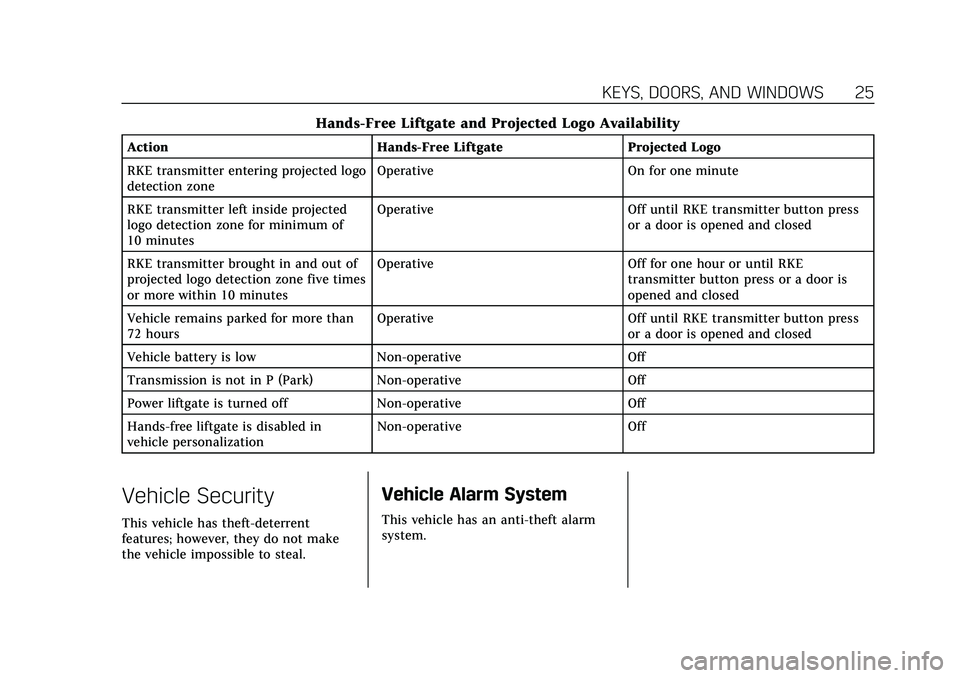
Hands-Free Liftgate and Projected Logo Availability
ActionHands-Free Liftgate Projected Logo
RKE transmitter entering projected logo
detection zone Operative
On for one minute
RKE transmitter left inside projected
logo detection zone for minimum of
10 minutes Operative
Off until RKE transmitter button press
or a door is opened and closed
RKE transmitter brought in and out of
projected logo detection zone five times
or more within 10 minutes Operative
Off for one hour or until RKE
transmitter button press or a door is
opened and closed
Vehicle remains parked for more than
72 hours Operative
Off until RKE transmitter button press
or a door is opened and closed
Vehicle battery is low Non-operative Off
Transmission is not in P (Park) Non-operative Off
Power liftgate is turned off Non-operative Off
Hands-free liftgate is disabled in
vehicle personalization Non-operative
Off
Vehicle Security
This vehicle has theft-deterrent
features; however, they do not make
the vehicle impossible to steal.
Vehicle Alarm System
This vehicle has an anti-theft alarm
system.
Page 98 of 426

Cadillac XT5 Owner Manual (GMNA-Localizing-U.S./Canada/Mexico-
14590481) - 2021 - CRC - 10/22/20
INSTRUMENTS AND CONTROLS 97
Keep this area of the windshield clear
of debris to allow for best system
performance.
AUTO :Move the windshield wiper
lever to AUTO. Turn the band on the
wiper lever to adjust the sensitivity.
.Turn the band up for more
sensitivity to moisture.
.Turn the band down for less
sensitivity to moisture.
.Move the windshield wiper lever out
of the AUTO position to deactivate
Rainsense.
To turn the Rainsense feature on or
off, see “Rain Sense Wipers ”under
Vehicle Personalization 0123. Wiper Arm Assembly Protection
When using an automatic car wash,
move the windshield wiper lever to
OFF. This disables the automatic
Rainsense windshield wipers.
With Rainsense, if the transmission is
in N (Neutral) and the vehicle speed is
very slow, the wipers will
automatically stop at the base of the
windshield.
The wiper operations return to normal
when the transmission is no longer in
N (Neutral) or the vehicle speed has
increased.
Rear Window Wiper/
Washer
The rear window wiper/washer
controls are on the end of the
windshield wiper lever.
Turn the controls to adjust the
setting.
OFF :
Turns the wiper off.
INT : Turns on the rear wiper with a
delay between wipes.
ON : Turns on the rear wiper.
1:Push the windshield wiper lever
forward to spray washer fluid on the
rear window and the Rear Mirror
Camera Lens, if equipped. See Rear
Camera Mirror 031. The wipers will
clear the rear window and either stop
or return to your preset speed. For
more washer cycles, push and hold
the lever.
The rear window wiper/washer will
not operate if the liftgate is open or
ajar. If the liftgate is opened while the
rear wiper is on, the wiper returns to
the parked position and stops.
Page 110 of 426
Cadillac XT5 Owner Manual (GMNA-Localizing-U.S./Canada/Mexico-
14590481) - 2021 - CRC - 10/22/20
INSTRUMENTS AND CONTROLS 109
Caution
Modifications to the engine,
transmission, exhaust, intake,
or fuel system, or the use of
replacement tires that do not meet
the original tire specifications, can
cause this light to come on. This
could lead to costly repairs not
covered by the vehicle warranty.
This could also affect the vehicle’s
ability to pass an Emissions
Inspection/Maintenance test. See
Accessories and Modifications0294.
If the light is f lashing : A
malfunction has been detected that
could damage the emission control
system and increase vehicle
emissions. Diagnosis and service may
be required.
To help prevent damage, reduce
vehicle speed and avoid hard
accelerations and uphill grades.
If towing a trailer, reduce the amount
of cargo being hauled as soon as
possible. If the light continues to flash, find a
safe place to park. Turn the vehicle off
and wait at least 10 seconds before
restarting the engine. If the light is
still flashing, follow the previous
guidelines and see your dealer for
service as soon as possible.
If the light is on steady :
A
malfunction has been detected.
Diagnosis and service may be
required.
Check the following:
.If fuel has been added to the vehicle
using the capless fuel funnel
adapter, make sure that it has been
removed. See “Filling the Tank with
a Portable Gas Can ”under Filling the
Tank 0277. The diagnostic system
can detect if the adapter has been
left installed in the vehicle, allowing
fuel to evaporate into the
atmosphere. A few driving trips with
the adapter removed may turn off
the light.
.Poor fuel quality can cause
inefficient engine operation and
poor driveability, which may go
away once the engine is warmed up.
If this occurs, change the fuel brand. It may require at least one
full tank of the proper fuel to turn
the light off. See
Recommended Fuel
(3.6L V6 Engine) 0276 or
Recommended Fuel (2.0L L4 Engine)
0 276.
If the light remains on, see your
dealer.
Emissions Inspection and
Maintenance Programs
If the vehicle requires an Emissions
Inspection/Maintenance test, the test
equipment will likely connect to the
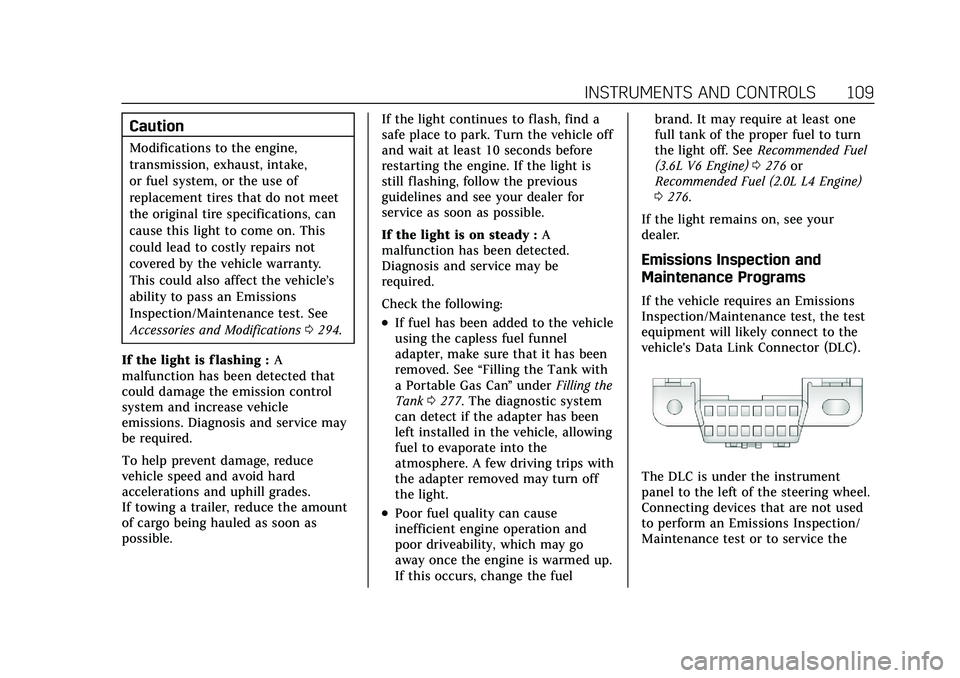
vehicle's Data Link Connector (DLC).
The DLC is under the instrument
panel to the left of the steering wheel.
Connecting devices that are not used
to perform an Emissions Inspection/
Maintenance test or to service the
Page 120 of 426
Cadillac XT5 Owner Manual (GMNA-Localizing-U.S./Canada/Mexico-
14590481) - 2021 - CRC - 10/22/20
INSTRUMENTS AND CONTROLS 119
The Air Filter Life display must be
reset after the engine air filter
replacement. To reset, seeEngine Air
Filter Life System 0302.
Fuel Economy : Displays average fuel
economy, the best fuel economy over
the selected distance, and a bar graph
showing instantaneous fuel economy.
Average Speed : Displays the average
vehicle speed of the vehicle in
kilometers per hour (km/h) or miles
per hour (mph). This average is based
on the various vehicle speeds recorded
since the last reset. Reset the average
speed by pressing SEL while this
display is active to show a
confirmation window to select yes
or no.
Timer : This display can be used as a
timer. To start the timer, press SEL
while this display is active. The
display will show the amount of time
that has passed since the timer was
last reset. To stop the timer, press SEL
briefly while this display is active and
the timer is running.
Press SEL while this display is active
to reset the timer. Follow Distance/Gap Setting :
When
Adaptive Cruise Control (ACC) is not
engaged, the current follow time to
the vehicle ahead is displayed as a
time value on this page. When ACC
has been engaged, the display
switches to the gap setting page. This
page shows the current gap setting
along with the vehicle ahead telltale.
Driver Assistance : If equipped,
shows information for Lane Keep
Assist (LKA) and Forward Collision
Alert (FCA).
Battery Voltage : Shows the current
battery voltage.
Coolant Temperature : Shows the
engine coolant temperature in either
degrees Celsius (°C) or degrees
Fahrenheit (°F).
Oil Temperature : Shows the engine
oil temperature in either degrees
Celsius (°C) or degrees Fahrenheit (°F).
Transmission Fluid Temperature :
Shows the temperature of the
automatic transmission fluid in either
degrees Celsius (°C) or degrees
Fahrenheit (°F). Off Road :
Displays vehicle pitch and
roll information, road wheel angle,
and four-wheel drive (4WD) status.
Engine Boost : If equipped, displays
engine manifold pressure relative to
ambient air pressure. It will display
boost pressure generated by the
turbocharging system.
Info Page Options : Scroll to choose
which info pages appear on the DIC.
Press SEL to select or deselect.
Blank Page : Allows for no
information to be displayed in the
cluster info display areas.
Head-Up Display (HUD)
{Warning
If the HUD image is too bright or
too high in your field of view, it
may take you more time to see
things you need to see when it is
dark outside. Be sure to keep the
HUD image dim and placed low in
your field of view.
Page 123 of 426
Cadillac XT5 Owner Manual (GMNA-Localizing-U.S./Canada/Mexico-
14590481) - 2021 - CRC - 10/22/20
122 INSTRUMENTS AND CONTROLS
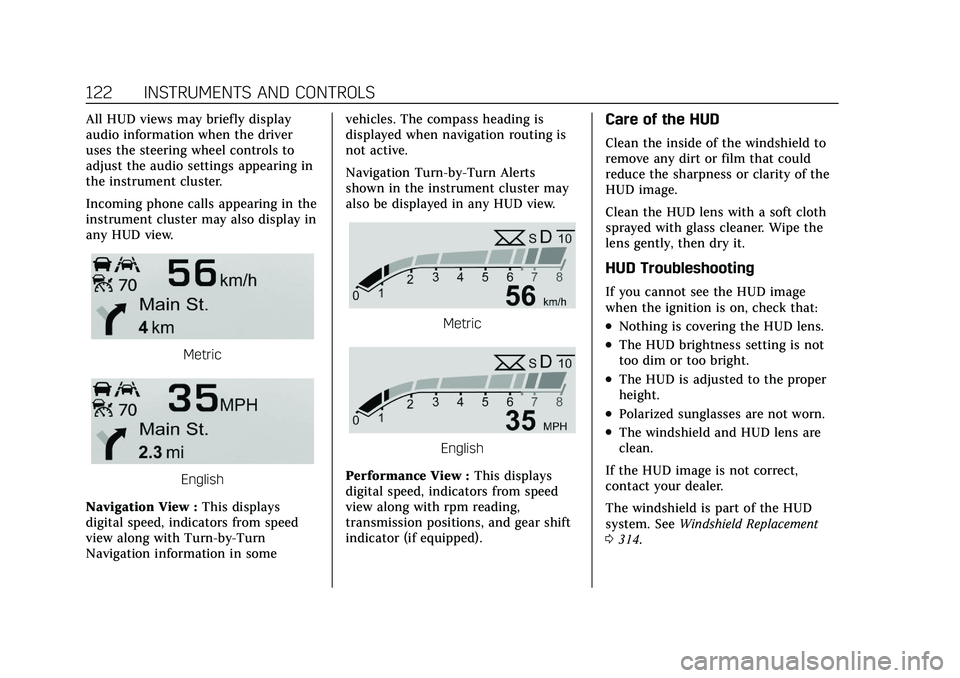
All HUD views may briefly display
audio information when the driver
uses the steering wheel controls to
adjust the audio settings appearing in
the instrument cluster.
Incoming phone calls appearing in the
instrument cluster may also display in
any HUD view.
Metric
English
Navigation View : This displays
digital speed, indicators from speed
view along with Turn-by-Turn
Navigation information in some vehicles. The compass heading is
displayed when navigation routing is
not active.
Navigation Turn-by-Turn Alerts
shown in the instrument cluster may
also be displayed in any HUD view.
Metric
English
Performance View : This displays
digital speed, indicators from speed
view along with rpm reading,
transmission positions, and gear shift
indicator (if equipped).
Care of the HUD
Clean the inside of the windshield to
remove any dirt or film that could
reduce the sharpness or clarity of the
HUD image.
Clean the HUD lens with a soft cloth
sprayed with glass cleaner. Wipe the
lens gently, then dry it.
HUD Troubleshooting
If you cannot see the HUD image
when the ignition is on, check that:
.Nothing is covering the HUD lens.
.The HUD brightness setting is not
too dim or too bright.
.The HUD is adjusted to the proper
height.
.Polarized sunglasses are not worn.
.The windshield and HUD lens are
clean.
If the HUD image is not correct,
contact your dealer.
The windshield is part of the HUD
system. See Windshield Replacement
0 314.
Page 124 of 426
Cadillac XT5 Owner Manual (GMNA-Localizing-U.S./Canada/Mexico-
14590481) - 2021 - CRC - 10/22/20
INSTRUMENTS AND CONTROLS 123
Vehicle Messages
Messages displayed on the DIC
indicate the status of the vehicle or
some action that may be needed to
correct a condition. Multiple messages
may appear one after another.
The messages that do not require
immediate action can be
acknowledged and cleared by pressing
V. The messages that require
immediate action cannot be cleared
until that action is performed.
All messages should be taken
seriously; clearing the message does
not correct the problem.
If a SERVICE message appears, see
your dealer.
Follow the instructions given in the
messages. The system displays
messages regarding the following
topics:
.Service Messages
.Fluid Levels
.Vehicle Security
.Brakes
.Steering
.Ride Control Systems
.Driver Assistance Systems
.Cruise Control
.Lighting and Bulb Replacement
.Wiper/Washer Systems
.Doors and Windows
.Seat Belts
.Airbag Systems
.Engine and Transmission
.Tire Pressure
.Battery
Engine Power Messages
ENGINE POWER IS REDUCED
This message displays when the
vehicle's propulsion power is reduced.
A reduction in propulsion power can
affect the vehicle's ability to
accelerate. If this message is on, but
there is no observed reduction in
performance, proceed to your
destination. Under certain conditions
the performance may be reduced the
next time the vehicle is driven. The
vehicle may be driven while this
message is on, but maximum
acceleration and speed may be reduced. Anytime this message stays
on, or displays repeatedly, the vehicle
should be taken to your dealer for
service as soon as possible.
Under certain operating conditions,
propulsion will be disabled. Try
restarting after the ignition has been
off for 30 seconds.
Vehicle Speed Messages
SPEED LIMITED TO XXX
KM/H (MPH)
This message shows that the vehicle
speed has been limited to the speed
displayed. The limited speed is a
protection for various propulsion and
vehicle systems, such as lubrication,
thermal, brakes, suspension, Teen
Driver if equipped, or tires.
Vehicle Personalization
The following are all possible vehicle
personalization features. Depending
on the vehicle, some may not be
available.
Page 130 of 426
Cadillac XT5 Owner Manual (GMNA-Localizing-U.S./Canada/Mexico-
14590481) - 2021 - CRC - 10/22/20
INSTRUMENTS AND CONTROLS 129
reverse feature. This includes any
garage door opener model
manufactured before April 1, 1982.
Read these instructions completely
before programming the Universal
Remote system. It may help to have
another person assist with the
programming process.
Keep the original hand-held
transmitter for use in other vehicles
as well as for future programming.
Erase the programming when vehicle
ownership is terminated. See“Erasing
Universal Remote System Buttons”
later in this section.
To program a garage door opener,
park outside directly in line with and
facing the garage door opener receiver.
Clear all people and objects near the
garage door.
Make sure the hand-held transmitter
has a new battery for quicker and
more accurate transmission of the
radio-frequency signal.Programming the Universal
Remote System
For questions or programming help,
see www.homelink.com/gm or call
1-800-355-3515. For calls placed
outside the U.S., Canada, or Puerto
Rico, international rates will apply and
may differ based on landline or mobile
phone.
Programming involves time-sensitive
actions, and may time out causing the
procedure to be repeated.
To program up to three devices:
1. Hold the end of the hand-held transmitter about 3 to 8 cm (1 to
3 in) away from the Universal
Remote system buttons with the
indicator light in view. The
hand-held transmitter was supplied
by the manufacturer of the garage
door opener receiver.
2. Press and release one of the three Universal Remote system buttons
to be programmed. Press and hold
the hand-held transmitter button.
Do not release the hand-held
transmitter button until the
indicator light changes from a slow to a rapid flash or continuous light.
Then release the hand-held
transmitter button.
Some garage door openers may
require substitution of Step 2 with
the procedure under
“Radio Signals
for Some Gate Operators ”later in
this section.
3. Press and hold the newly programmed Universal Remote
system button for five seconds
while watching the indicator light
and garage door activation.
.If the indicator light stays on
continuously or the garage door
moves when the button is
pressed, then programming is
complete. There is no need to
complete Steps 4–6.
.If the indicator light does not
come on or the garage door does
not move, a second button press
may be required. For a second
time, press and hold the newly
programmed button for
five seconds. If the indicator
light is continuously lit, or the
garage door moves,
programming is complete.