center console CADILLAC XT5 2022 User Guide
[x] Cancel search | Manufacturer: CADILLAC, Model Year: 2022, Model line: XT5, Model: CADILLAC XT5 2022Pages: 432, PDF Size: 8.72 MB
Page 143 of 432
Cadillac XT5 Owner Manual (GMNA-Localizing-U.S./Canada/Mexico-
15227431) - 2022 - CRC - 8/11/21
142 INFOTAINMENT SYSTEM
.Set up the audio by presetting
favorite stations, setting the tone,
and adjusting the speakers.
.Set up phone numbers in advance
so they can be called easily by
pressing a single control or by using
a single voice command.
See Distracted Driving 0210.
Active Noise Cancellation (ANC)
If equipped, ANC reduces engine noise
in the vehicle’s interior. ANC requires
the factory-installed audio system,
radio, speakers, amplifier (if
equipped), induction system, and
exhaust system to work properly.
Deactivation is required by your dealer
if related aftermarket equipment is
installed.
Overview
Infotainment System
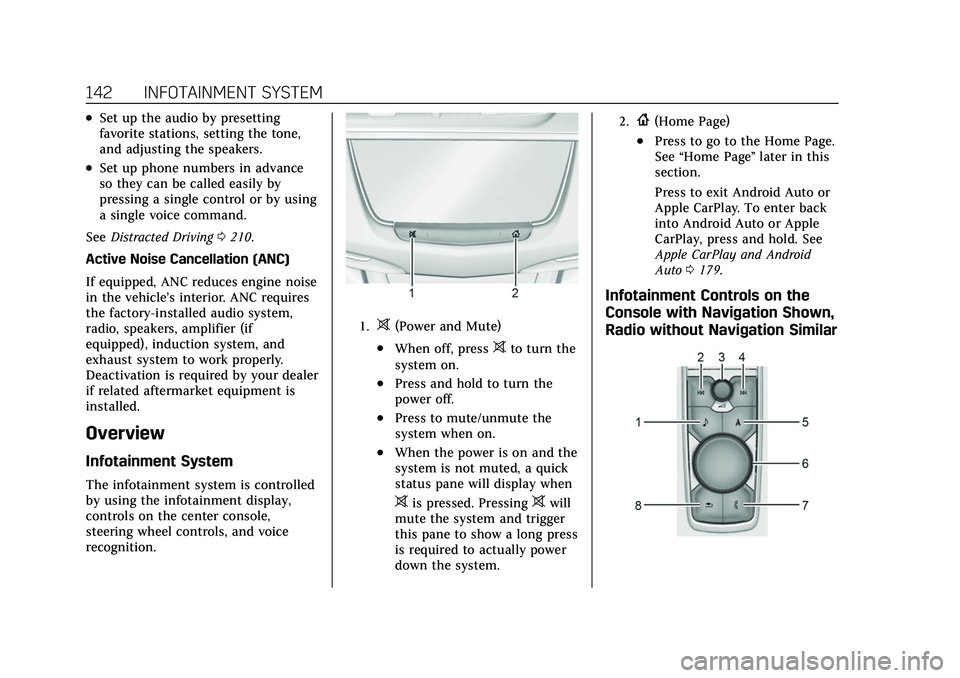
The infotainment system is controlled
by using the infotainment display,
controls on the center console,
steering wheel controls, and voice
recognition.
1.>(Power and Mute)
.When off, press>to turn the
system on.
.Press and hold to turn the
power off.
.Press to mute/unmute the
system when on.
.When the power is on and the
system is not muted, a quick
status pane will display when
>is pressed. Pressing>will
mute the system and trigger
this pane to show a long press
is required to actually power
down the system.
2.{(Home Page)
.Press to go to the Home Page.
See “Home Page ”later in this
section.
Press to exit Android Auto or
Apple CarPlay. To enter back
into Android Auto or Apple
CarPlay, press and hold. See
Apple CarPlay and Android
Auto 0179.
Infotainment Controls on the
Console with Navigation Shown,
Radio without Navigation Similar
Page 149 of 432
Cadillac XT5 Owner Manual (GMNA-Localizing-U.S./Canada/Mexico-
15227431) - 2022 - CRC - 8/11/21
148 INFOTAINMENT SYSTEM
Infotainment System
Sound Menu
From any of the audio source main
pages, touch Sound to display the
following:
Equalizer :Touch to adjust Bass,
Midrange, Treble, and Surround (if
equipped) using the options on the
infotainment display.
Fade/Balance : Touch to adjust by
using the controls on the
infotainment display or by tapping/
dragging the crosshair.
Sound Mode (If Equipped)
.Bose Centerpoint surround sound
systems have four sound modes:
‐Normal: Adjusts the audio to
provide the best sound for all
seating positions.
‐ Driver: Adjusts the audio to
provide the best sound for the
driver.
‐ Rear: Adjusts the audio to provide
the best sound for the rear seat
occupants. ‐
Centerpoint: Turns on Bose
Centerpoint surround technology.
This setting creates a surround
sound from nearly any audio
source: existing stereo and MP3
players. For more information on
Bose Centerpoint surround
technology, see
www.boseautomotive.com.
Finding a Station
Seeking a Station
From the AM, FM, or SXM (if
equipped) option, press
7or6on
the console controls or from the AM
or FM menu, touch
7or6to search
for the previous or next strong station
or channel. Browsing Stations
Touch the Browse option to list all
available stations or channels.
Navigate up and down through all
stations and channels by scrolling the
list. Touch the station you want to
listen to. Touch
Hto save the station
or channel as a favorite.
If equipped, touch Update Station List
to update the active stations or
channels in your area.
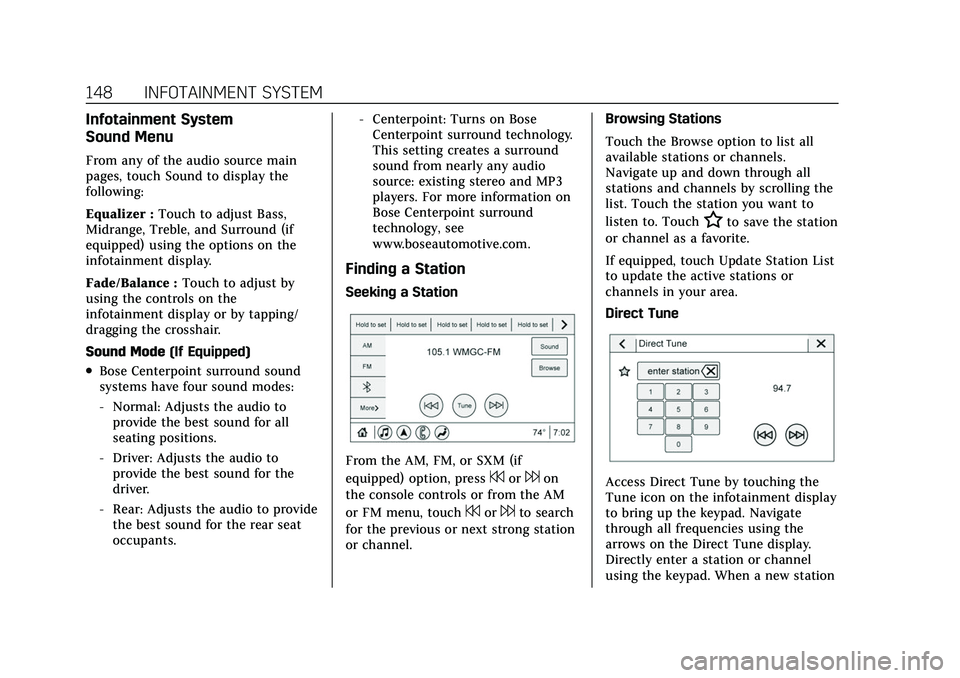
Direct Tune
Access Direct Tune by touching the
Tune icon on the infotainment display
to bring up the keypad. Navigate
through all frequencies using the
arrows on the Direct Tune display.
Directly enter a station or channel
using the keypad. When a new station
Page 153 of 432
Cadillac XT5 Owner Manual (GMNA-Localizing-U.S./Canada/Mexico-
15227431) - 2022 - CRC - 8/11/21
152 INFOTAINMENT SYSTEM
reception. If the vehicle has a sunroof,
and it is open, reception can also be
affected.
Audio Players
Avoiding Untrusted Media
Devices
When using media devices such as SD
cards, USB devices, and mobile
devices, consider the source.
Untrusted media devices could
contain files that affect system
operation or performance. Avoid use if
the content or origin cannot be
trusted.
USB Port
Audio stored on a USB device may be
listened to.
The vehicle may be equipped with two
USB ports in the center console under
the armrest. These ports are for data
and charging. There may also be two
USB ports for charging only at the rear
of the center console.
Caution
To avoid vehicle damage, unplug all
accessories and disconnect all
accessory cables from the vehicle
when not in use. Accessory cables
left plugged into the vehicle,
unconnected to a device, could be
damaged or cause an electrical
short if the unconnected end comes
in contact with liquids or another
power source such as the accessory
power outlet.
Playing from a USB
A USB mass storage device can be
connected to the USB port.
Audio extensions supported by the
USB may include:
.MP3
.AAC
.OGG
.3GP
Gracenote
When plugging in a USB device,
Gracenote service builds voice tags for
music. Voice tags allow artists, albums with hard to pronounce names, and
nicknames to be used to play music
through voice recognition, if equipped.
While indexing, infotainment features
may be available.
My Media Library
MyMedia is only available when more
than one indexed device is connected.
It allows access to content from all
indexed media sources. MyMedia will
show as an available source in the
Source page.
USB MP3 Player and USB Devices
The USB MP3 players and USB devices
connected must comply with the USB
Mass Storage Class specification
(USB MSC).
To play a USB device:
1. Connect the USB.
2. Touch Audio from the Home Page.
3. Touch the More option and then touch the USB device.
Use the following when playing an
active USB source:
p: Touch to play the current media
source.
Page 207 of 432

Cadillac XT5 Owner Manual (GMNA-Localizing-U.S./Canada/Mexico-
15227431) - 2022 - CRC - 8/11/21
206 CLIMATE CONTROLS
The climate control system uses the
sensor information to adjust the
temperature, fan speed, recirculation,
and air delivery mode for best
comfort.
If the sensor is covered, the automatic
climate control system may not work
properly.
Afterblow Feature
If equipped, under certain conditions,
the fan may stay on or may turn on
and off several times after you turn
off and lock the vehicle. This is
normal.
Rear Climate Control
System
If equipped, the rear climate control
system is on the rear of the center
console. The settings can be adjusted
with the rear climate control buttons
on the rear of the center console and
on the rear climate display.
Rear Climate Controls
1. Rear Seat Passenger Heated Seat Controls
2. Air Delivery Mode Control
3. AUTO (Automatic Operation)
4. Fan Control
5. Rear Seat Passenger Temperature Controls
Rear Climate Display
1. Rear Temperature Display
Page 209 of 432

Cadillac XT5 Owner Manual (GMNA-Localizing-U.S./Canada/Mexico-
15227431) - 2022 - CRC - 8/11/21
208 CLIMATE CONTROLS
Air Vents
Adjustable air vents are in the center
and on the sides of the instrument
panel, and on the rear of the center
console storage.
Move the slider knobs to change the
direction of or to close off the airf low.
Operation Tips
.Clear away any ice, snow, or leaves
from air inlets at the base of the
windshield that could block the
flow of air into the vehicle.
.Clear snow off the hood to improve
visibility and help decrease moisture
drawn into the vehicle.
.Keep the path under the front seats
clear of objects to help circulate the
air inside of the vehicle more
effectively.
.Use of non-GM approved hood
deflectors can adversely affect the
performance of the system. Check
with your dealer before adding
equipment to the outside of the
vehicle.
.Do not attach any devices to the air
vent slats. This restricts airf low and
may cause damage to the air vents.
Maintenance
Passenger Compartment
Air Filter
The filter reduces dust, pollen, and
other airborne irritants from outside
air that is pulled into the vehicle. The
filter should be replaced as part of
routine scheduled maintenance. See
Maintenance Schedule0380.
See your dealer regarding replacement
of the filter.
Service
All vehicles have a label underhood
that identifies the refrigerant used in
the vehicle. The refrigerant system
should only be serviced by trained and
certified technicians. The air
conditioning evaporator should never
be repaired or replaced by one from a
salvage vehicle. It should only be
replaced by a new evaporator to
ensure proper and safe operation.
During service, all refrigerants should
be reclaimed with proper equipment.
Venting refrigerants directly to the
atmosphere is harmful to the
environment and may also create
unsafe conditions based on inhalation,
combustion, frostbite, or other
health-based concerns.
The air conditioning system requires
periodic maintenance. See
Maintenance Schedule 0380.
Page 244 of 432

Cadillac XT5 Owner Manual (GMNA-Localizing-U.S./Canada/Mexico-
15227431) - 2022 - CRC - 8/11/21
DRIVING AND OPERATING 243
If TCS is limiting wheel spin wheng
is pressed, the system will not turn off
until the wheels stop spinning.
To turn off both TCS and StabiliTrak/
ESC, press and hold
guntil the
Traction Off light
iand StabiliTrak/
ESC Off light
gcome on and stay on
in the instrument cluster. A DIC
message may display. To turn TCS and
StabiliTrak/ESC on again, press and
release
g. The Traction Off lighti
and StabiliTrak/ESC Off lightgin the
instrument cluster turn off and a DIC
message may display.
StabiliTrak will automatically turn on
if the vehicle exceeds 56 km/h
(36 mph). Traction control will
remain off.
Adding accessories can affect vehicle
performance. See Accessories and
Modifications 0297.
Driver Mode Control
Driver Mode Control allows the driver
to adjust the overall driving
experience by selecting different
modes. If equipped, the Driver Mode Control has the following modes:
Tour, Sport, All-Wheel Drive (AWD),
Snow/Ice (in Front-Wheel Drive
vehicles only), and Off-Road (in AWD
vehicles only). Driver mode availability
and affected vehicle subsystems are
dependent upon vehicle trim level,
region, and optional features.
Press MODE on the center console to
make a mode selection. The first press
of the switch will show the current
mode in the instrument cluster.
Continue pressing through the
available modes.
If the vehicle is in Tour or AWD, it
will stay in that mode through future
ignition cycles. If the vehicle is in any
other mode, it will return to Tour
Mode when the vehicle is restarted.
When a mode is selected, an indicator
will come on in the instrument cluster
and stay on.
Driver Mode Control Switch
Tour : Tour Mode operates in FWD to
improve fuel economy. Use this mode
during normal driving operations.
Sport : Sport Mode improves vehicle
handling and acceleration on dry
pavement. When active, Sport Mode
modifies steering efforts, transmission
shifting, AWD, ESC, engine sound
enhancement, and suspension tuning,
if equipped.
The Performance Algorithm Liftfoot
(PAL) feature is enabled in Sport
Mode. PAL allows the transmission to
hold the current gear after a quick
Page 326 of 432

Cadillac XT5 Owner Manual (GMNA-Localizing-U.S./Canada/Mexico-
15227431) - 2022 - CRC - 8/11/21
VEHICLE CARE 325
FusesUsage
F61 O2 Sensor 1/ Aeroshutter/Mass Air
Flow Sensor
F62 Engine Control Module–Odd
F63 O2 Sensor 2
F64 Engine Control Module–Even
F65 Engine Control Module Powertrain 1
F66 Engine Control Module Powertrain 2
F67 Engine Control Module Powertrain 3
F68 –
F69 –
F70 –
F71 –
F72 –
F73 –
F74 –
F75 – Fuses
Usage
F76 –
F77 –
Relays Usage
K1 Starter 1
K2 Run/Crank
K3 Starter 3
K4 LED/Automatic Headlamps
K5 –
K6 –
K7 Engine Control Module
K8 Air Conditioning
K9 –
K10 Starter 2Instrument Panel Fuse
Block
The instrument panel fuse block is in
the center console between the driver
and passenger seats. To access the
fuses, open the fuse panel door,
or remove the panel from the
passenger side by pulling it out or see
your dealer.
To reinstall the door, push the door
back into its original location.
Page 421 of 432
Cadillac XT5 Owner Manual (GMNA-Localizing-U.S./Canada/Mexico-
15227431) - 2022 - CRC - 8/11/21
420 INDEX
AntennaMulti-band . . . . . . . . . . . . . . . . . . . . . . . . 151
Antilock Brake System (ABS) . . . . . . 239 Warning Light . . . . . . . . . . . . . . . . . . . . 113
Appearance Care Exterior . . . . . . . . . . . . . . . . . . . . . . . . . . . . 370
Interior . . . . . . . . . . . . . . . . . . . . . . . . . . . . 374
Apple CarPlay and Android Auto . . . . . . . . . . . . . . . . . . . . . . 179
Armrest Rear Seat . . . . . . . . . . . . . . . . . . . . . . . . . . . 49
Armrest Storage . . . . . . . . . . . . . . . . . . . . . . 89
Assistance Systems for Driving . . . . 267
Assistance Systems for Parking and Backing . . . . . . . . . . . . . . . . . . . . . . . 257
Audio
Bluetooth . . . . . . . . . . . . . . . . . . . . . . . . . . 155
Auto Stop Stop/Start System . . . . . . . . . . . . . . . . 227
Automatic Dimming Mirrors . . . . . . . . . . . . . . . . . . 32
Door Locks . . . . . . . . . . . . . . . . . . . . . . . . . 19
Emergency Braking (AEB) . . . . . . . . 269
Headlamp System . . . . . . . . . . . . . . . . 136
Parking Assist (APA) . . . . . . . . . . . . . 262
Transmission . . . . . . . . . . . . . . . . . . . . . . 233
Transmission Fluid . . . . . . . . . . . . . . . 306 Automatic Transmission
Manual Mode . . . . . . . . . . . . . . . . . . . . . 237
Avoiding Untrusted Media Devices . . . . . . . . . . . . . . . . . . . . . . . . . . . . . 152
B
BatteryExterior Lighting BatterySaver . . . . . . . . . . . . . . . . . . . . . . . . . . . . . 140
Power Protection . . . . . . . . . . . . . . . . . . 140
Battery - North America . . . . . .316, 364
Blade Replacement, Wiper . . . . . . . . . 317
Bluetooth Overview . . . . . . . . . . . . . . . . . . . . 174, 175
Bluetooth Audio . . . . . . . . . . . . . . . . . . . . 155
Brake Electric Boost . . . . . . . . . . . . . . . . . . . . . 238
Parking, Electric . . . . . . . . . . . . . . . . . . 239
System Warning Light . . . . . . . . . . . . 112
Brakes . . . . . . . . . . . . . . . . . . . . . . . . . . . . . . . 314 Antilock . . . . . . . . . . . . . . . . . . . . . . . . . . . 239
Assist . . . . . . . . . . . . . . . . . . . . . . . . . . . . . . 241
Fluid . . . . . . . . . . . . . . . . . . . . . . . . . . . . . . . 315
Braking . . . . . . . . . . . . . . . . . . . . . . . . . . . . . . 211 Automatic Emergency (AEB) . . . . . 269
Reverse Automatic . . . . . . . . . . . . . . . . 264
Braking System Front Pedestrian (FPB) . . . . . . . . . . . 271 Break-In, New Vehicle . . . . . . . . . . . . . . 224
Bulb Replacement
Headlamp Aiming . . . . . . . . . . . . . . . . 319
Headlamps . . . . . . . . . . . . . . . . . . . . . . . . 319
Buying New Tires . . . . . . . . . . . . . . . . . . . 346C
Calibration . . . . . . . . . . . . . . . . . . . . . . . . . . 100
California Perchlorate MaterialsRequirements . . . . . . . . . . . . . . . . . . . 297
California Proposition
65 Warning . . . . . . . . . . . . . . . . . . .316, 364, Back Cover
Camera Rear Vision (RVC) . . . . . . . . . . . . . . . . . 257
Canadian Vehicle Owners . . . . . . . . . . . . . 1
Capacities and Specifications . . . . . . 394
Carbon Monoxide
Engine Exhaust . . . . . . . . . . . . . . . . . . . 232
Liftgate . . . . . . . . . . . . . . . . . . . . . . . . . . . . . 20
Winter Driving . . . . . . . . . . . . . . . . . . . . 219
Cargo Cover . . . . . . . . . . . . . . . . . . . . . . . . . . . . . . . 90
Management System . . . . . . . . . . . . . . 92
Tie-Downs . . . . . . . . . . . . . . . . . . . . . . . . . . 92
Caution, Danger, and Warning . . . . . . . . 2
Center Console Storage . . . . . . . . . . . . . . 90
Page 429 of 432
Cadillac XT5 Owner Manual (GMNA-Localizing-U.S./Canada/Mexico-
15227431) - 2022 - CRC - 8/11/21
428 INDEX
Seat Belts (cont'd)Replacing after a Crash . . . . . . . . . . . . 58
Use During Pregnancy . . . . . . . . . . . . . 56
Seats Adjustment, Front . . . . . . . . . . . . . . . . . 41
Head Restraints . . . . . . . . . . . . . . . . . . . . 40
Heated and Ventilated Front . . . . . . 46
Heated, Rear . . . . . . . . . . . . . . . . . . . . . . . 50
Lumbar Adjustment, Front . . . . . . . . 43
Memory . . . . . . . . . . . . . . . . . . . . . . . . . . . . 43
Rear . . . . . . . . . . . . . . . . . . . . . . . . . . . . . . . . . 47
Reclining Seatbacks . . . . . . . . . . . . . . . 42
Securing Child Restraints . . . . . . . 82, 84
Security Light . . . . . . . . . . . . . . . . . . . . . . . . . . . . . . . 118
OnStar . . . . . . . . . . . . . . . . . . . . . . . . . . . . . 411
Vehicle . . . . . . . . . . . . . . . . . . . . . . . . . . . . . . 27
Vehicle Alarm . . . . . . . . . . . . . . . . . . . . . . 27
Service . . . . . . . . . . . . . . . . . . . . . . . . . . . . . . . 208 Accessories andModifications . . . . . . . . . . . . . . . . . . . . 297
Doing Your Own Work . . . . . . . . . . . 298
Maintenance Records . . . . . . . . . . . . 392
Maintenance, General Information . . . . . . . . . . . . . . . . . . . . . . 379
Parts Identification . . . . . . . . . . . . . . . 393
Scheduling Appointments . . . . . . . . 402 Service Electric Parking Brake
Light . . . . . . . . . . . . . . . . . . . . . . . . . . . . . . . 113
Services Special Application . . . . . . . . . . . . . . . 386
Servicing System . . . . . . . . . . . . . . . . . . . . 168
Servicing the Airbag . . . . . . . . . . . . . . . . . 67
Settings . . . . . . . . . . . . . . . . . . . . . . . . . . . . . . 181
Shifting Into Park . . . . . . . . . . . . . . . . . . . . . . . . . . 230
Out of Park . . . . . . . . . . . . . . . . . . . . . . . . 231
Side Blind Zone Alert (SBZA) . . . . . . 275
Signals, Turn and Lane-Change . . . . 137
Software Updates . . . . . . . . . . . . . . . . . . . 147
Spare Tire
Compact . . . . . . . . . . . . . . . . . . . . . . . . . . . 363
Special Application Services . . . . . . . 386
Specifications and Capacities . . . . . . 394
Speedometer . . . . . . . . . . . . . . . . . . . . . . . . 106
StabiliTrak
OFF Light . . . . . . . . . . . . . . . . . . . . . . . . . . 115
Start Assist, Hill . . . . . . . . . . . . . . . . . . . . 241
Start Vehicle, Remote . . . . . . . . . . . . . . . 15
Starting the Engine . . . . . . . . . . . . . . . . . 226
Steering . . . . . . . . . . . . . . . . . . . . . . . . . . . . . . 212 Heated Wheel . . . . . . . . . . . . . . . . . . . . . . 96
Wheel Adjustment . . . . . . . . . . . . . . . . . 96
Wheel Controls . . . . . . . . . . . . . . . . . . . . 96
Steering Column Lock . . . . . . . . . . . . . . . 28 Steering Wheel Controls . . . . . . . . . . . 144
Stop/Start System . . . . . . . . . . . . . . . . . . 227
Storage
Rear . . . . . . . . . . . . . . . . . . . . . . . . . . . . . . . . . 89
Storage Areas Armrest . . . . . . . . . . . . . . . . . . . . . . . . . . . . . 89
Cargo Cover . . . . . . . . . . . . . . . . . . . . . . . . 90
Cargo Management System . . . . . . . 92
Center Console . . . . . . . . . . . . . . . . . . . . . 90
Convenience Net . . . . . . . . . . . . . . . . . . . 93
Glove Box . . . . . . . . . . . . . . . . . . . . . . . . . . 88
Roof Rack System . . . . . . . . . . . . . . . . . 93
Sunglasses . . . . . . . . . . . . . . . . . . . . . . . . . . 89
Storage Compartments . . . . . . . . . . . . . . 88
Storing the Tire Sealant and Compressor Kit . . . . . . . . . . . . . . . . . . . . 357
Struts Gas . . . . . . . . . . . . . . . . . . . . . . . . . . . . . . . . . 318
Stuck Vehicle . . . . . . . . . . . . . . . . . . . . . . . 220
Summer Tires . . . . . . . . . . . . . . . . . . . . . . . 331
Sun Visors . . . . . . . . . . . . . . . . . . . . . . . . . . . . 36
Sunglass Storage . . . . . . . . . . . . . . . . . . . . . 89
Sunroof . . . . . . . . . . . . . . . . . . . . . . . . . . . . . . . 36
Surround Vision System . . . . . . . . . . . . 258
Symbols . . . . . . . . . . . . . . . . . . . . . . . . . . . . . . . . 2 Navigation . . . . . . . . . . . . . . . . . . . . . . . . . 159
System Engine Air Filter Life . . . . . . . . . . . . . 306