brake light CADILLAC XT5 2023 Owner's Manual
[x] Cancel search | Manufacturer: CADILLAC, Model Year: 2023, Model line: XT5, Model: CADILLAC XT5 2023Pages: 482, PDF Size: 7.1 MB
Page 278 of 482

Cadillac XT5 Owner Manual (GMNA-Localizing-U.S./Canada/Mexico-
16406251) - 2023 - CRC - 3/25/22
Driving and Operating 277
.Press and hold SET−until
the desired lower speed is
reached, then release it.
.To decrease the vehicle
speed in small increments,
briefly press SET− to the
first detent. For each press,
the vehicle goes about
1 km/h (1 mph) slower.
.To decrease the vehicle
speed in larger increments,
briefly press SET− to the
second detent. For each
press, the vehicle speed
decreases to the next
5 km/h (5 mph) mark on the
speedometer.
The cruise control system may
automatically brake to slow
the vehicle down.
The speedometer reading can
be displayed in either English
or metric units. See
Instrument Cluster 0122. The
increment value used depends
on the units displayed. Passing Another Vehicle
While Using Cruise Control
Use the accelerator pedal to
increase the vehicle speed.
When you take your foot off
the pedal, the vehicle will slow
down to the previous set
cruise speed.
While pressing the accelerator
pedal or shortly following the
release to override cruise,
briefly applying SET−
will
result in cruise set to the
current vehicle speed.
Using Cruise Control on Hills
How well the cruise control will
work on hills depends upon
the vehicle speed, load, and
the steepness of the hills.
When going up steep hills, you
might have to step on the
accelerator pedal to maintain
your speed. When going
downhill, the cruise control
system may automatically
brake to slow the vehicle
down. Also, you may have to
brake or shift to a lower gear to keep your speed down.
If the brake pedal is applied,
cruise control disengages.
Ending Cruise Control
There are four ways to end
cruise control:
.Step lightly on the brake
pedal.
.Press*.
.Shift the transmission to
N (Neutral).
.PressJ.
Erasing Speed Memory
The cruise control set speed is
erased from memory if
Jis
pressed or if the ignition is
turned off.
Adaptive Cruise
Control (Advanced)
If equipped, Adaptive Cruise
Control (ACC) allows the
cruise control set speed and
following gap to be selected.
Read this entire section
before using this system. The
Page 286 of 482

Cadillac XT5 Owner Manual (GMNA-Localizing-U.S./Canada/Mexico-
16406251) - 2023 - CRC - 3/25/22
Driving and Operating 285
.The sensors are blocked.
.The Traction Control System
(TCS) or StabiliTrak/ESC has
activated or been disabled.
.There is a fault in the
system.
.The radar falsely reports
blockage when driving in a
desert or remote area with
no other vehicles or
roadside objects.
.A DIC message may display
to indicate that ACC is
temporarily unavailable.
The ACC active symbol will
turn white when ACC is no
longer active.
In some cases, when ACC will
not activate, regular cruise
control may be used. See
“Switching Between ACC and
Regular Cruise Control”
previously in this section.
Always consider driving
conditions before using either
cruise control system. Notification to Resume ACC
ACC will maintain a following
gap behind a detected vehicle
and slow your vehicle to a
stop behind that vehicle.
If the stopped vehicle ahead
has driven away and ACC has
not resumed, the vehicle
ahead indicator will flash as a
reminder to check traffic
ahead before proceeding. In
addition, the left and right
sides of the Safety Alert Seat
will pulse three times, or three
beeps will sound. Touch the
Settings icon on the
infotainment home page.
Select
“Vehicle” to display the
list of available options and
select ”Alert Type” and
“Adaptive Cruise Go Notifier”
in “Collision/Detection
Systems”.
When the vehicle ahead drives
away, ACC resumes
automatically if the stop was
brief. If necessary, press RES+
or the accelerator pedal to
resume ACC. If stopped for more than two minutes or if
the driver door is opened and
the driver seat belt is
unbuckled, ACC automatically
applies the Electric Parking
Brake (EPB) to hold the
vehicle. The Electric Parking
Brake light will turn on. See
Electric Parking Brake
0269.
To release the EPB, press the
accelerator pedal.
A DIC warning message may
display indicating to shift to
P (Park) before exiting the
vehicle. See Vehicle Messages
0 146.
{Warning
If ACC has stopped the
vehicle, and if ACC is
disengaged, turned off,
or canceled, the vehicle will
no longer be held at a stop.
The vehicle can move. When
ACC is holding the vehicle at
a stop, always be prepared
to manually apply the
brakes.
Page 289 of 482

Cadillac XT5 Owner Manual (GMNA-Localizing-U.S./Canada/Mexico-
16406251) - 2023 - CRC - 3/25/22
288 Driving and Operating
Do not use ACC when driving
on steep hills or when towing
a trailer. ACC will not detect a
vehicle in the lane while driving
on steep hills. If the brakes are
applied, ACC disengages.
Disengaging ACC
There are three ways to
disengage ACC:
.Step lightly on the brake
pedal.
.Press*.
.Press5.
Erasing Speed Memory
The cruise control set speed is
erased from memory if
5is
pressed or if the ignition is
turned off.
Weather Conditions
Affecting ACC
System operation may be
limited under snow, heavy rain,
or road spray conditions. Accessory Installations and
Vehicle Modifications
Do not install or place any
object around the front
camera windshield area that
would obstruct the front
camera view.
Do not install objects on top of
the vehicle that overhang and
obstruct the front camera,
such as a canoe, kayak,
or other items that can be
transported on a roof rack
system. See Roof Rack
System
0109.
Do not modify the hood,
headlamps, or fog lamps, as
this may limit the camera’s
ability to detect an object.
Cleaning the Sensing System
The camera sensor on the
windshield behind the
rearview mirror can become
blocked by snow, ice, dirt, mud,
or debris. This area needs to
be cleaned for ACC to operate
properly. The vehicle headlamps may
need to be cleaned due to dirt,
snow, or ice. Objects that are
not illuminated correctly may
be difficult to detect.
If ACC will not operate, regular
cruise control may be
available. See
“Switching
Between ACC and Regular
Cruise Control” previously in
this section. Always consider
driving conditions before using
either cruise control system.
For cleaning instructions, see
“Washing the Vehicle” under
Exterior Care 0416.Driver Assistance
Systems
This vehicle may have features
that work together to help
avoid crashes or reduce crash
damage while driving, backing,
and parking. Read this entire
section before using these
systems.
Page 304 of 482

Cadillac XT5 Owner Manual (GMNA-Localizing-U.S./Canada/Mexico-
16406251) - 2023 - CRC - 3/25/22
Driving and Operating 303
Forward Collision
Alert (FCA) System
If equipped, the FCA system
may help to avoid or reduce
the harm caused by front-end
crashes. When approaching a
vehicle ahead too quickly, FCA
provides a red flashing alert
on the windshield and rapidly
beeps or pulses the driver
seat. FCA also lights an amber
visual alert if following another
vehicle much too closely.
FCA detects vehicles within a
distance of approximately
60 m (197 ft) and operates at
speeds above 8 km/h (5 mph).
If the vehicle has Adaptive
Cruise Control (ACC), it can
detect vehicles to distances of
approximately 110 m (360 ft)
and operates at all speeds.
See Adaptive Cruise Control
(Advanced)0277.
{Warning
FCA is a warning system and
does not apply the brakes.
When approaching a
slower-moving or stopped
vehicle ahead too rapidly,
or when following a vehicle
too closely, FCA may not
provide a warning with
enough time to help avoid a
crash. It also may not
provide any warning at all.
FCA does not warn of
pedestrians, animals, signs,
guardrails, bridges,
construction barrels,
or other objects. Be ready to
take action and apply the
brakes. See Defensive
Driving 0235.
To view available settings for
this feature, touch the
Settings icon on the
infotainment home page.
Select “Vehicle” to display the list of available options and
select
“Collision/Detection
Systems”.
Detecting the Vehicle
Ahead
FCA warnings will not occur
unless the FCA system
detects a vehicle ahead. When
a vehicle is detected, the
vehicle ahead indicator will
display green. Vehicles may
not be detected on curves,
highway exit ramps, or hills,
due to poor visibility; or if a
vehicle ahead is partially
blocked by pedestrians or
other objects. FCA will not
detect another vehicle ahead
until it is completely in the
driving lane.
Page 312 of 482

Cadillac XT5 Owner Manual (GMNA-Localizing-U.S./Canada/Mexico-
16406251) - 2023 - CRC - 3/25/22
Driving and Operating 311
Adjust the instrument panel
brightness to make the image
no brighter than necessary.
Turn the image off by
selecting another view on the
instrument cluster.
Warm objects, such as
pedestrians, animals, and
other moving vehicles, should
appear whiter on the Night
Vision display. Cold objects,
such as the sky, signs, and
parked vehicles, should appear
darker. Night Vision only
shows objects that are
warmer or colder than the
surroundings. It does not
detect brake lamps, turn
signals, emergency flashers,
traffic lights, or sign
information.
Use this system as an aid by
occasionally glancing at the
image. Do not stare at the
image or use the image under
well-lit conditions.{Warning
Do not stare at the image
while driving as this might
cause important objects
ahead not to be seen. You
could crash, and you or
others could be injured.
When a pedestrian or large
animal is detected, an amber
box displays around the
pedestrian or animal on the
Night Vision display and an
amber pedestrian icon,
~,
or animal icon,
!, displays on
the instrument cluster. This
pedestrian icon is also shown
on the Head-Up Display (HUD).
When the system detects the
vehicle is approaching a
pedestrian too quickly, the
amber pedestrian icon and box
turns red, and a red flashing
icon,
~, displays on the HUD
with rapid beeping or pulsing
of the Safety Alert Seat,
if equipped. System pedestrian icons,
beeps, and (if equipped) Safety
Alert Seat pulses can be set to
Off through vehicle settings
by turning off the Front
Pedestrian Braking system. To
view available settings from
the infotainment screen, touch
Settings > Vehicle > Collision/
Detection Systems > Front
Pedestrian Detection.
{Warning
The Night Vision system
does not automatically brake
the vehicle. It does not
provide alerts unless it
detects a pedestrian or
large animal. The system
may not detect pedestrians,
including children, or animals:
.If they are less than 25 m
(82 ft) away.
.If they are not directly
ahead in the sensor
coverage area, fully visible,
standing upright, or part
of a group.
(Continued)
Page 313 of 482

Cadillac XT5 Owner Manual (GMNA-Localizing-U.S./Canada/Mexico-
16406251) - 2023 - CRC - 3/25/22
312 Driving and Operating
Warning (Continued)
.If the person or animal is
moving too quickly
through the field of view,
such as a bicyclist.
.If the pedestrian is
wearing certain types of
clothing.
.If headlamps are off,
except when parked.
.If the outside temperature
is higher than 30 °C
(86 °F).
.Due to poor visibility,
including in heavy fog, rain,
or snow.
.If the sensor is blocked by
dirt, snow, rain, or ice.
Be ready to take action and
apply the brakes. For more
information, see Defensive
Driving 0235. Keep the
Night Vision sensor clean
and in good repair. Pedestrian detection may not
be available in high outside
temperatures. An amber icon,
*, displays. The system does
not need service.
In rain, snow, or fog the image
may not be clear and the
direction of the road ahead
may not be seen. In more
severe weather conditions,
the image may be unclear and
unusable. The system does
not need service.
Keep the system sensor clean
by activating the rear window
washer when it is dark enough
for the system to operate.
If the Night Vision image still
looks blurry, use a soft wet
cloth to gently clean the
sensor camera lens and dry
thoroughly. The sensor is
behind the lower front grille
below the driver side
headlamp.
The camera must also be
aligned to work correctly.
If the camera needs adjustment, see your dealer.
Do not attempt to adjust the
camera yourself.Side Blind Zone
Alert (SBZA)
If equipped, the SBZA system
is a lane-changing aid that
assists drivers with avoiding
crashes that occur with
moving vehicles in the side
blind zone, or blind spot areas.
When the vehicle is in a
forward gear, the left or right
side mirror display will light up
if a moving vehicle is detected
in that blind zone. If the turn
signal is activated and a
vehicle is also detected on the
same side, the display will flash
as an extra warning not to
change lanes. Since this
system is part of the Lane
Change Alert (LCA) system,
read the entire LCA section
before using this feature.
Page 335 of 482

Cadillac XT5 Owner Manual (GMNA-Localizing-U.S./Canada/Mexico-
16406251) - 2023 - CRC - 3/25/22
334 Driving and Operating
trailer wiring package. The
harness contains the following
circuits:Electric
Trailer Brakes Blue
Battery Feed Red/Green or
Red/Blue
Brake Apply
Signal White/Blue
Ground Black or
White
Refer to the aftermarket
electric trailer brake controller
owner's manual to determine
wire color coding of the
electric trailer brake controller.
The wire colors on the brake
controller may be different
from the vehicle. The electric
trailer brake controller should
be installed by your dealer or a
qualified service center.
If equipped, there are four
blunt cut wires inside the front
driver side instrument panel.
It will be necessary to have a technician connect the 12-volt
power to the engine
compartment fuse block.
Trailer Lamps
Always check that all trailer
lamps are working at the
beginning of each trip, and
periodically on longer trips.
Turn Signals When
Towing a Trailer
When properly connected, the
trailer turn signals will
illuminate to indicate the
vehicle is turning, changing
lanes, or stopping. When
towing a trailer, the arrows on
the instrument cluster will
illuminate even if the trailer is
not properly connected or the
bulbs are burned out.
Trailer Sway
Control (TSC)
Vehicles with StabiliTrak/
Electronic Stability Control
(ESC) have a Trailer Sway
Control (TSC) feature. Trailersway is unintended
side-to-side motion of a trailer
while towing. If the vehicle is
towing a trailer and the TSC
detects that sway is
increasing, the vehicle brakes
are selectively applied at each
wheel, to help reduce
excessive trailer sway.
If equipped with the
Integrated Trailer Brake
Control (ITBC) system, and the
trailer has an electric brake
system, StabiliTrak/ESC may
also apply the trailer brakes.
If TSC is enabled, the Traction
Control System (TCS)/
StabiliTrak/ESC warning light
will flash on the instrument
cluster. Reduce vehicle speed
by gradually removing your
foot from the accelerator.
If trailer sway continues,
Page 338 of 482
Cadillac XT5 Owner Manual (GMNA-Localizing-U.S./Canada/Mexico-
16406251) - 2023 - CRC - 3/28/22
Vehicle Care 337
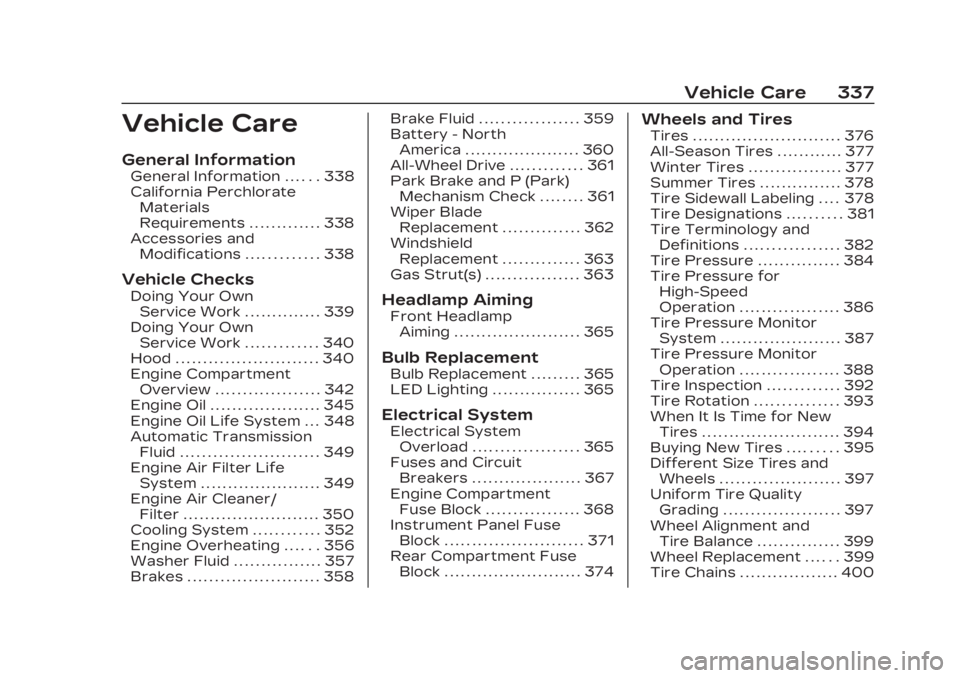
Vehicle Care
General Information
General Information . . . . . . 338
California PerchlorateMaterials
Requirements . . . . . . . . . . . . . 338
Accessories and Modifications . . . . . . . . . . . . . 338
Vehicle Checks
Doing Your OwnService Work . . . . . . . . . . . . . . 339
Doing Your Own Service Work . . . . . . . . . . . . . 340
Hood . . . . . . . . . . . . . . . . . . . . . . . . . . 340
Engine Compartment Overview . . . . . . . . . . . . . . . . . . . 342
Engine Oil . . . . . . . . . . . . . . . . . . . . 345
Engine Oil Life System . . . 348
Automatic Transmission Fluid . . . . . . . . . . . . . . . . . . . . . . . . . 349
Engine Air Filter Life System . . . . . . . . . . . . . . . . . . . . . . 349
Engine Air Cleaner/ Filter . . . . . . . . . . . . . . . . . . . . . . . . . 350
Cooling System . . . . . . . . . . . . 352
Engine Overheating . . . . . . 356
Washer Fluid . . . . . . . . . . . . . . . . 357
Brakes . . . . . . . . . . . . . . . . . . . . . . . . 358 Brake Fluid . . . . . . . . . . . . . . . . . . 359
Battery - North
America . . . . . . . . . . . . . . . . . . . . . 360
All-Wheel Drive . . . . . . . . . . . . . 361
Park Brake and P (Park) Mechanism Check . . . . . . . . 361
Wiper Blade Replacement . . . . . . . . . . . . . . 362
Windshield Replacement . . . . . . . . . . . . . . 363
Gas Strut(s) . . . . . . . . . . . . . . . . . 363Headlamp Aiming
Front Headlamp Aiming . . . . . . . . . . . . . . . . . . . . . . . 365
Bulb Replacement
Bulb Replacement . . . . . . . . . 365
LED Lighting . . . . . . . . . . . . . . . . 365
Electrical System
Electrical SystemOverload . . . . . . . . . . . . . . . . . . . 365
Fuses and Circuit Breakers . . . . . . . . . . . . . . . . . . . . 367
Engine Compartment Fuse Block . . . . . . . . . . . . . . . . . 368
Instrument Panel Fuse Block . . . . . . . . . . . . . . . . . . . . . . . . . 371
Rear Compartment Fuse Block . . . . . . . . . . . . . . . . . . . . . . . . . 374
Wheels and Tires
Tires . . . . . . . . . . . . . . . . . . . . . . . . . . . 376
All-Season Tires . . . . . . . . . . . . 377
Winter Tires . . . . . . . . . . . . . . . . . 377
Summer Tires . . . . . . . . . . . . . . . 378
Tire Sidewall Labeling . . . . 378
Tire Designations . . . . . . . . . . 381
Tire Terminology andDefinitions . . . . . . . . . . . . . . . . . 382
Tire Pressure . . . . . . . . . . . . . . . 384
Tire Pressure for High-Speed
Operation . . . . . . . . . . . . . . . . . . 386
Tire Pressure Monitor System . . . . . . . . . . . . . . . . . . . . . . 387
Tire Pressure Monitor Operation . . . . . . . . . . . . . . . . . . 388
Tire Inspection . . . . . . . . . . . . . 392
Tire Rotation . . . . . . . . . . . . . . . 393
When It Is Time for New Tires . . . . . . . . . . . . . . . . . . . . . . . . . 394
Buying New Tires . . . . . . . . . 395
Different Size Tires and Wheels . . . . . . . . . . . . . . . . . . . . . . 397
Uniform Tire Quality Grading . . . . . . . . . . . . . . . . . . . . . 397
Wheel Alignment and Tire Balance . . . . . . . . . . . . . . . 399
Wheel Replacement . . . . . . 399
Tire Chains . . . . . . . . . . . . . . . . . . 400
Page 361 of 482

Cadillac XT5 Owner Manual (GMNA-Localizing-U.S./Canada/Mexico-
16406251) - 2023 - CRC - 3/28/22
360 Vehicle Care
Warning (Continued)
damaged. Add brake fluid
only when work is done on
the brake hydraulic system.
When the brake fluid falls to a
low level, the brake warning
light comes on. See Brake
System Warning Light 0131.
Brake fluid absorbs water over
time which degrades the
effectiveness of the brake
fluid. Replace brake fluid at the
specified intervals to prevent
increased stopping distance.
See Maintenance Schedule
0 429.
What to Add
Use only GM approved DOT 4
brake fluid from a clean, sealed
container. See Recommended
Fluids and Lubricants 0433.
{Warning
The wrong or contaminated
brake fluid could result in
damage to the brake
system. This could result in
the loss of braking leading to
a possible injury. Always use
the proper GM approved
brake fluid.
Caution
If brake fluid is spilled on the
vehicle's painted surfaces,
the paint finish can be
damaged. Immediately wash
off any painted surface.
Battery - North
America
The original equipment battery
is maintenance free. Do not
remove the cap and do not
add fluid. Refer to the replacement
number on the original battery
label when a new battery is
needed. For replacement of
the battery, see your dealer.
The vehicle has an Absorbent
Glass Mat (AGM) 12-volt
battery. Installation of a
standard 12-volt battery will
result in reduced 12-volt
battery life.
When using a 12-volt battery
charger on the 12-volt AGM
battery, some chargers have
an AGM battery setting on the
charger. If available, use the
AGM setting on the charger,
to limit charge voltage to
14.8 volts.
{Warning
WARNING:
Battery posts,
terminals and related
accessories can expose you
to chemicals including lead
and lead compounds, which
are known to the State of
(Continued)
Page 371 of 482

Cadillac XT5 Owner Manual (GMNA-Localizing-U.S./Canada/Mexico-
16406251) - 2023 - CRC - 3/28/22
370 Vehicle Care
Fuses UsageF19 –
F20 –
F21 –
F22 Electronic Brake Control Module
F23 Parking/Trailer Lamps
F24 Right Trailer Stoplamp/
Turnlamp
F25 Steering Column Lock
F26 –
F27 Left Trailer Stoplamp/
Turnlamp
F28 –
F29 –
F30 Washer Pump F31 –
F32 –
F33 Fog Lamps Fuses Usage
F34 Horn
F35 –
F36 Headlamp High-beam –Left
F37 Headlamp high-beam –Right
F38 Spare
F39 Transmission Control Module/
Battery 1
F40 Left Rear Bus Electrical Center/
DC DC Ignition
F41 Instrument Cluster
F42 Heating, Ventilation, and
Air Conditioning/
Central Gateway
Module run crank
F43 Head-Up Display/ Reflective Light
Auxiliary Fuses Usage
F44 Electronic Brake Control Module
Electric Brake
Booster/Run/
Crank
F45 –
F46 –
F47 –
F48 Rear Wiper 2
F49 Interior Rearview Mirror/Trailer/
Rear Heated
Seat Run Crank
F50 Fuel Tank Zone Module Run
Crank
F51 Heated Steering Wheel
F52 Air Conditioning Clutch
F53 Coolant Pump
F54 –
F55 –