seats CADILLAC XT5 2023 Repair Manual
[x] Cancel search | Manufacturer: CADILLAC, Model Year: 2023, Model line: XT5, Model: CADILLAC XT5 2023Pages: 482, PDF Size: 7.1 MB
Page 100 of 482
Cadillac XT5 Owner Manual (GMNA-Localizing-U.S./Canada/Mexico-
16406251) - 2023 - CRC - 3/25/22
Seats and Restraints 99
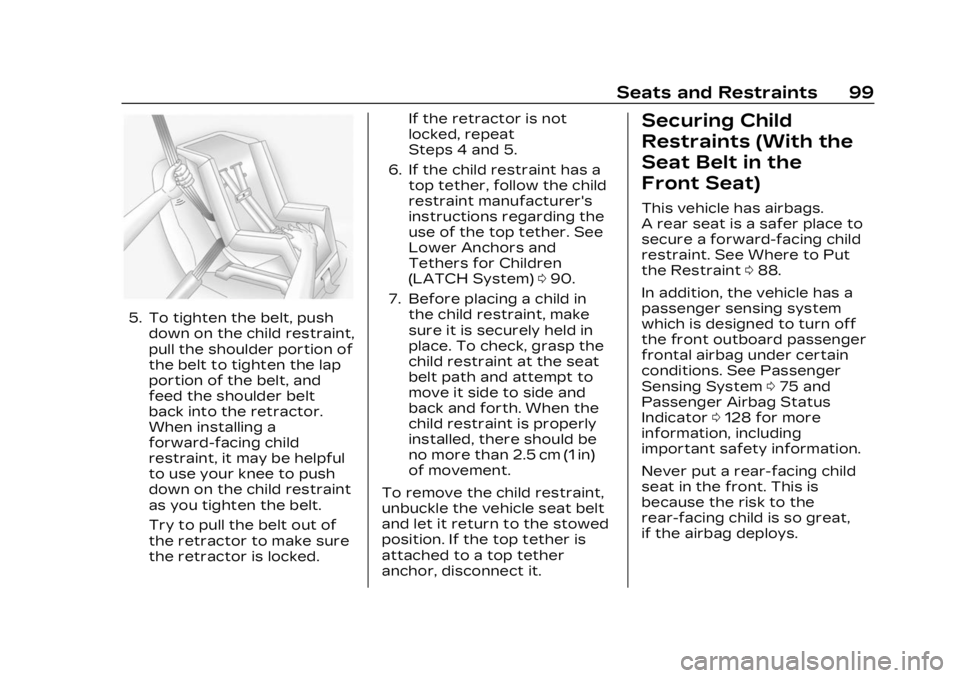
5. To tighten the belt, pushdown on the child restraint,
pull the shoulder portion of
the belt to tighten the lap
portion of the belt, and
feed the shoulder belt
back into the retractor.
When installing a
forward-facing child
restraint, it may be helpful
to use your knee to push
down on the child restraint
as you tighten the belt.
Try to pull the belt out of
the retractor to make sure
the retractor is locked. If the retractor is not
locked, repeat
Steps 4 and 5.
6. If the child restraint has a top tether, follow the child
restraint manufacturer's
instructions regarding the
use of the top tether. See
Lower Anchors and
Tethers for Children
(LATCH System) 090.
7. Before placing a child in the child restraint, make
sure it is securely held in
place. To check, grasp the
child restraint at the seat
belt path and attempt to
move it side to side and
back and forth. When the
child restraint is properly
installed, there should be
no more than 2.5 cm (1 in)
of movement.
To remove the child restraint,
unbuckle the vehicle seat belt
and let it return to the stowed
position. If the top tether is
attached to a top tether
anchor, disconnect it.
Securing Child
Restraints (With the
Seat Belt in the
Front Seat)
This vehicle has airbags.
A rear seat is a safer place to
secure a forward-facing child
restraint. See Where to Put
the Restraint 088.
In addition, the vehicle has a
passenger sensing system
which is designed to turn off
the front outboard passenger
frontal airbag under certain
conditions. See Passenger
Sensing System 075 and
Passenger Airbag Status
Indicator 0128 for more
information, including
important safety information.
Never put a rear-facing child
seat in the front. This is
because the risk to the
rear-facing child is so great,
if the airbag deploys.
Page 101 of 482

Cadillac XT5 Owner Manual (GMNA-Localizing-U.S./Canada/Mexico-
16406251) - 2023 - CRC - 3/25/22
100 Seats and Restraints
{Warning
A child in a rear-facing child
restraint can be seriously
injured or killed if the front
outboard passenger frontal
airbag inflates. This is
because the back of the
rear-facing child restraint
would be very close to the
inflating airbag. A child in a
forward-facing child
restraint can be seriously
injured or killed if the front
outboard passenger frontal
airbag inflates and the
passenger seat is in a
forward position.
Even if the passenger
sensing system has turned
off the front outboard
passenger frontal airbag, no
system is fail-safe. No one
can guarantee that an
airbag will not deploy under
some unusual circumstance,
even though it is turned off.(Continued)
Warning (Continued)
Secure rear-facing child
restraints in a rear seat,
even if the airbag is off.
If you secure a
forward-facing child
restraint in the front
outboard passenger seat,
always move the seat as far
back as it will go. It is better
to secure the child restraint
in a rear seat.
See Passenger Sensing
System075 for additional
information.
If the child restraint uses a top
tether, see Lower Anchors
and Tethers for Children
(LATCH System) 090 for top
tether anchor locations.
Do not secure a child seat in a
position without a top tether
anchor if a national or local law
requires that the top tether be
anchored, or if the instructions that come with the child
restraint say that the top
tether must be anchored.
In Canada, the law requires
that forward-facing child
restraints have a top tether,
and that the tether be
attached.
When using the lap-shoulder
belt to secure the child
restraint in this position, follow
the instructions that came
with the child restraint and the
following instructions:
1. Move the seat as far back as it will go before
securing the
forward-facing child
restraint. Move the seat
upward or the seatback to
an upright position,
if needed, to get a tight
installation of the child
restraint. There must be
finger clearance between
the push button and the
child restraint.
Page 102 of 482

Cadillac XT5 Owner Manual (GMNA-Localizing-U.S./Canada/Mexico-
16406251) - 2023 - CRC - 3/25/22
Seats and Restraints 101
When the passenger
sensing system has turned
off the front outboard
passenger frontal airbag,
the OFF indicator on the
passenger airbag status
indicator should light and
stay lit when you start the
vehicle. See Passenger
Airbag Status Indicator
0128.
2. Put the child restraint on the seat.
3. Pick up the latch plate and run the lap and shoulder
portions of the vehicle
seat belt through or
around the restraint.
Ensure the seat belt
webbing is routed as direct
as possible and is not
caught on seat handles or
plastic trim. The child
restraint instructions will
show you how.
Tilt the latch plate to
adjust the belt if needed.
4. Push the latch plate intothe buckle until it clicks. Position the release button
on the buckle, away from
the child restraint, so that
the seat belt could be
quickly unbuckled if
necessary.
5. Pull the shoulder belt all
the way out of the
retractor to set the lock.
When the retractor lock is
set, the belt can be
tightened but not pulled
out of the retractor.
Page 103 of 482
Cadillac XT5 Owner Manual (GMNA-Localizing-U.S./Canada/Mexico-
16406251) - 2023 - CRC - 3/25/22
102 Seats and Restraints
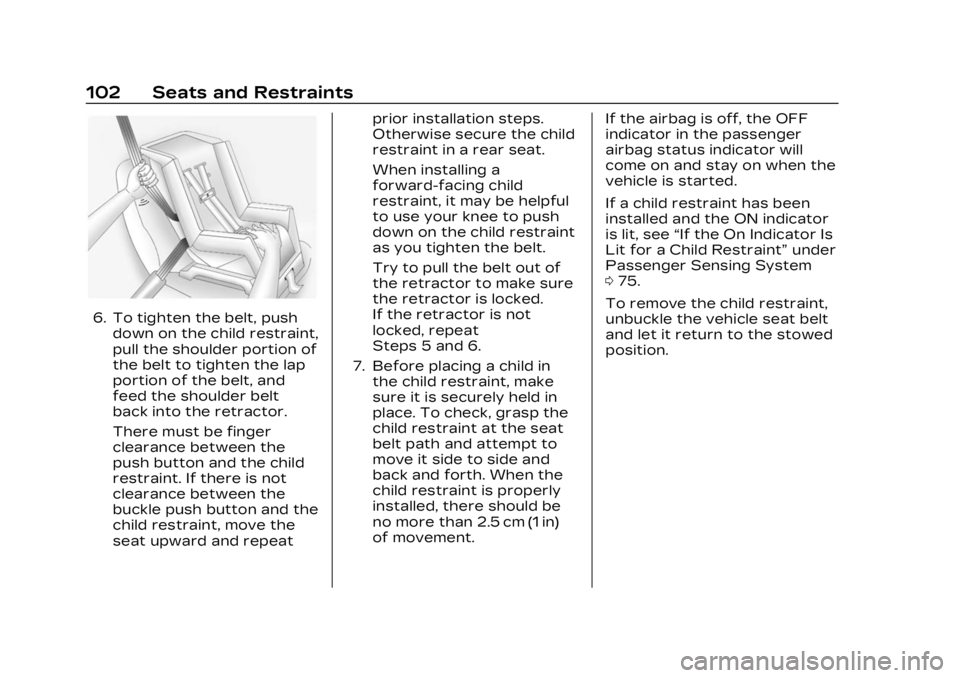
6. To tighten the belt, pushdown on the child restraint,
pull the shoulder portion of
the belt to tighten the lap
portion of the belt, and
feed the shoulder belt
back into the retractor.
There must be finger
clearance between the
push button and the child
restraint. If there is not
clearance between the
buckle push button and the
child restraint, move the
seat upward and repeat prior installation steps.
Otherwise secure the child
restraint in a rear seat.
When installing a
forward-facing child
restraint, it may be helpful
to use your knee to push
down on the child restraint
as you tighten the belt.
Try to pull the belt out of
the retractor to make sure
the retractor is locked.
If the retractor is not
locked, repeat
Steps 5 and 6.
7. Before placing a child in the child restraint, make
sure it is securely held in
place. To check, grasp the
child restraint at the seat
belt path and attempt to
move it side to side and
back and forth. When the
child restraint is properly
installed, there should be
no more than 2.5 cm (1 in)
of movement. If the airbag is off, the OFF
indicator in the passenger
airbag status indicator will
come on and stay on when the
vehicle is started.
If a child restraint has been
installed and the ON indicator
is lit, see
“If the On Indicator Is
Lit for a Child Restraint” under
Passenger Sensing System
0 75.
To remove the child restraint,
unbuckle the vehicle seat belt
and let it return to the stowed
position.
Page 114 of 482
Cadillac XT5 Owner Manual (GMNA-Localizing-U.S./Canada/Mexico-
16406251) - 2023 - CRC - 3/25/22
Instruments and Controls 113
Heated Steering
Wheel
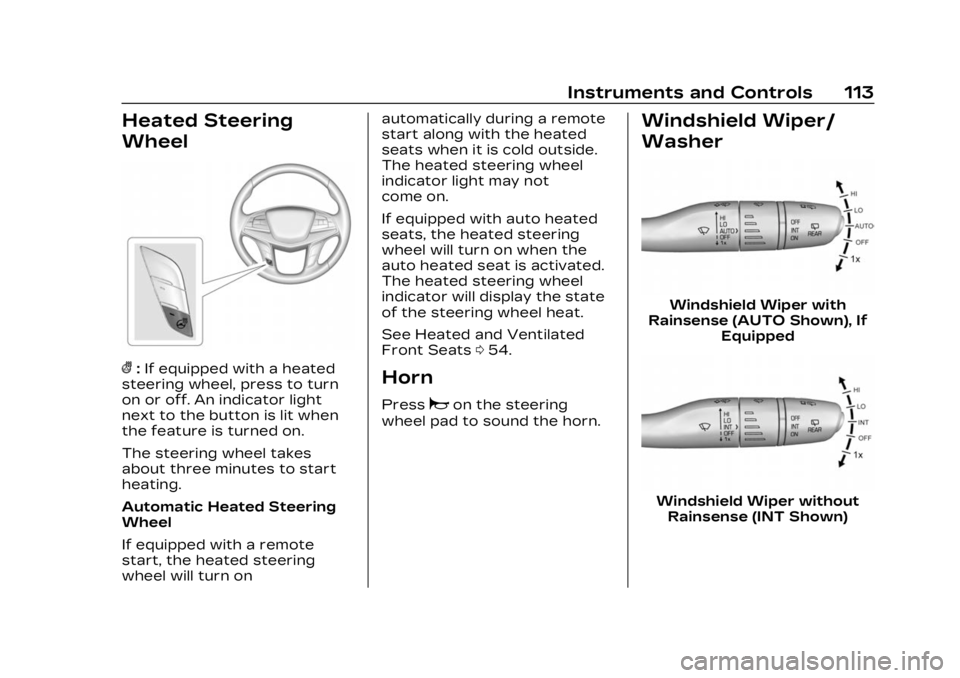
(:If equipped with a heated
steering wheel, press to turn
on or off. An indicator light
next to the button is lit when
the feature is turned on.
The steering wheel takes
about three minutes to start
heating.
Automatic Heated Steering
Wheel
If equipped with a remote
start, the heated steering
wheel will turn on automatically during a remote
start along with the heated
seats when it is cold outside.
The heated steering wheel
indicator light may not
come on.
If equipped with auto heated
seats, the heated steering
wheel will turn on when the
auto heated seat is activated.
The heated steering wheel
indicator will display the state
of the steering wheel heat.
See Heated and Ventilated
Front Seats
054.Horn
Pressaon the steering
wheel pad to sound the horn.
Windshield Wiper/
Washer
Windshield Wiper with
Rainsense (AUTO Shown), If Equipped
Windshield Wiper withoutRainsense (INT Shown)
Page 157 of 482

Cadillac XT5 Owner Manual (GMNA-Localizing-U.S./Canada/Mexico-
16406251) - 2023 - CRC - 3/25/22
156 Lighting
Interior Lighting
Instrument Panel
Illumination Control
This feature adjusts the
brightness of all illuminated
controls. This feature is on the
left side of the instrument
panel.
D:Move the thumbwheel up
or down to brighten or dim the
lights. The thumbwheel is functional
at night, or when the
headlamps or parking lamps
are ON.
Courtesy Lamps
The courtesy lamps come on
when any door is opened,
Kon
the remote key is pressed,
or when the vehicle is turned
off. See Dome Lamps 0156.
Dome Lamps
The dome lamp controls are in
the overhead console. To operate, press the
following buttons:
jOFF :
Press to turn off
the dome lamps when any
door is opened,
Kon the
remote key is pressed,
or when the vehicle is turned
off. An indicator light on the
button will turn on when the
dome lamp override is
activated. Press
jOFF
again to deactivate this
feature and the indicator light
will turn off.
+ON/OFF : Press to turn the
dome lamps on or off manually.
Reading Lamps
There are reading lamps on
the overhead console and
over the rear seats. These
lamps come on automatically
when any door is opened.
Front Reading Lamps
The front reading lamps are in
the overhead console.
Page 158 of 482

Cadillac XT5 Owner Manual (GMNA-Localizing-U.S./Canada/Mexico-
16406251) - 2023 - CRC - 3/25/22
Lighting 157
Press the lamp lenses to turn
the front reading lamps on
or off.
Rear Reading Lamps
The rear reading lamps are
over the rear seats.
Press the lamp lens to turn
the rear reading lamps on
or off.
Lighting Features
Entry Lighting
The interior lamps turn on
when pressing
Kon the
remote key or opening any
doors, and the dome lamp
control is in the door position.
Some exterior lamps also turn
on when pressing
Kon the
remote key or opening any
doors. Low-Beam lamps will
only turn on briefly at night,
or in areas with limited lighting.
All lamps will gradually fade
out after about 30 seconds.
Entry lighting can be disabled
manually by closing all doors,
pressing
Qon the remote key,
or starting the vehicle. This feature can be changed.
On the infotainment home
page, select the Settings icon
TVehicleTVehicle Locator
Lights.
Exit Lighting
Some exterior lamps and
interior lamps turn on when
the driver door is opened after
the vehicle is turned off.
The exterior and interior lamps
remain on for a set amount of
time, then automatically
turn off.
The interior lights turn on
when the vehicle is turned off.
The exterior lamps turn off
immediately by turning the
exterior lamp control off.
This feature can be changed.
On the infotainment home
screen, select the Settings
icon
TVehicleTExit Lighting.
Page 172 of 482
Cadillac XT5 Owner Manual (GMNA-Localizing-U.S./Canada/Mexico-
16406251) - 2023 - CRC - 3/25/22
Infotainment System 171
Multi-Band Antenna
The roof antenna may be used
for radio, navigation, and other
communication systems,
depending on the equipped
options. Keep clear of
obstructions for clear
reception. If the vehicle has a
sunroof, and it is open,
reception can also be affected.
Audio Players
Avoiding Untrusted
Media Devices
When using media devices
such as USB and mobile
devices, consider the source.
Untrusted media devices could
contain files that affect
system operation or
performance and should be
avoided.
USB Port
Audio stored on a USB device
may be listened to.Depending on your vehicle, it
may be equipped with two
USB ports in the center
console under the armrest and
another two on the center
stack. These ports are for
data and charging. There may
also be two USB ports at the
rear of the center console and
a USB port on each side of the
third row seats for
charging only.
Caution
To avoid vehicle damage,
unplug all accessories and
disconnect all accessory
cables from the vehicle
when not in use. Accessory
cables left plugged into the
vehicle, unconnected to a
device, could be damaged or
cause an electrical short if
the unconnected end comes
in contact with liquids or
another power source such
as the accessory power
outlet.
Playing from a USB
A USB mass storage device
can be connected to the
USB port.
Audio extensions supported
by the USB may include:
.MP3
.AAC
.OGG
.3GP
My Media Library
MyMedia is only available
when more than one indexed
device is connected. It allows
access to content from all
indexed media sources.
MyMedia will show as an
available source in the
Source page.
USB MP3 Player and USB
Devices
The USB MP3 players and
USB devices connected must
comply with the USB Mass
Storage Class specification
(USB MSC).
Page 224 of 482
Cadillac XT5 Owner Manual (GMNA-Localizing-U.S./Canada/Mexico-
16406251) - 2023 - CRC - 3/25/22
Climate Controls 223
Climate Controls
Climate Control Systems
Dual Automatic ClimateControl System . . . . . . . . . . . 223
Rear Climate Control System . . . . . . . . . . . . . . . . . . . . . . 229
Air Vents
Air Vents . . . . . . . . . . . . . . . . . . . . . 231
Maintenance
Passenger CompartmentAir Filter . . . . . . . . . . . . . . . . . . . . . 231
Service . . . . . . . . . . . . . . . . . . . . . . . . 231
Climate Control Systems
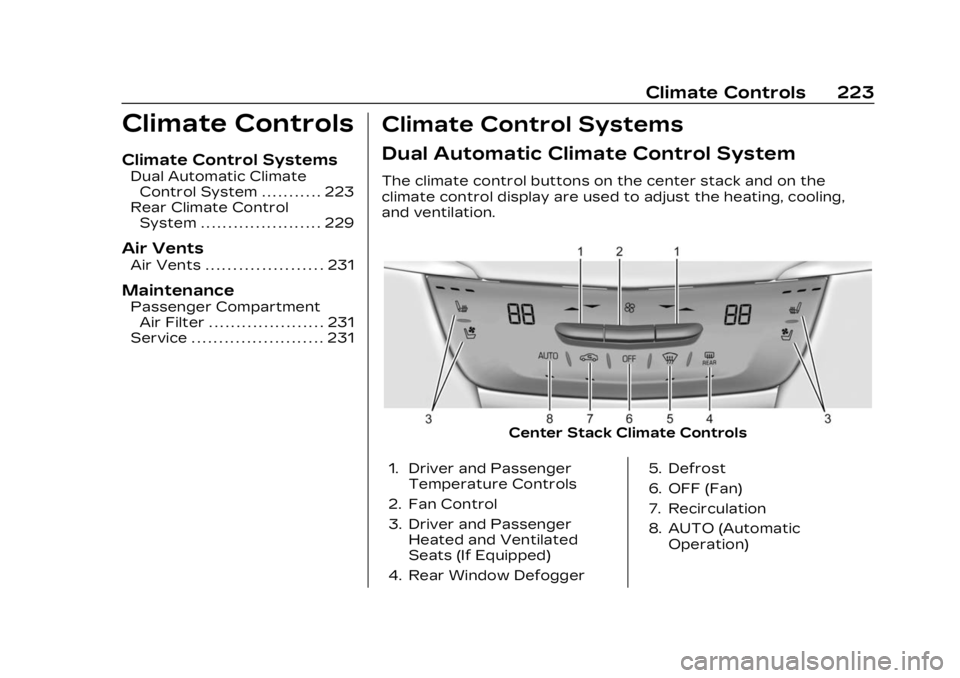
Dual Automatic Climate Control System
The climate control buttons on the center stack and on the
climate control display are used to adjust the heating, cooling,
and ventilation.
Center Stack Climate Controls
1. Driver and Passenger Temperature Controls
2. Fan Control
3. Driver and Passenger Heated and Ventilated
Seats (If Equipped)
4. Rear Window Defogger 5. Defrost
6. OFF (Fan)
7. Recirculation
8. AUTO (Automatic
Operation)
Page 228 of 482
Cadillac XT5 Owner Manual (GMNA-Localizing-U.S./Canada/Mexico-
16406251) - 2023 - CRC - 3/25/22
Climate Controls 227
Ionizer :If equipped with an
ionizer, this feature helps to
clean the air inside the vehicle
and remove contaminants
such as pollen, odors, and
dust. If the climate control
system is on and the ionizer is
enabled, the ionizer status
indicator will be lit on the
climate control display. To turn
the Ionizer off or on, select
Settings > Climate and Air
Quality > Ionizer > Select ON
or OFF.
Rear Window Defogger
K: Press to turn the rear
window defogger on or off. An
indicator light on the button
comes on to show that the
rear window defogger is on.
The defogger only works
when the vehicle is on. The
defogger turns off if the
vehicle is off or in
accessory mode.
To turn Auto Defog off or on,
select Settings > Climate and
Air Quality > Auto Rear Defog > Select ON or OFF. When
Auto Rear Defog is selected,
the rear window defogger
turns on automatically when
the interior temperature is
cold and the outside
temperature is about 4 °C
(40 °F) and below.
The upper grid lines on the
rear window are antenna lines
and are not intended to heat
when the defogger is
activated.
The heated outside mirrors
turn on when the rear window
defogger button is on and help
to clear fog or frost from the
surface of the mirrors.
Caution
Do not try to clear frost or
other material from the
inside of the front
windshield and rear window
with a razor blade or
anything else that is sharp.
This may damage the rear
window defogger grid and
(Continued)
Caution (Continued)
affect the radio's ability to
pick up stations clearly. The
repairs would not be
covered by the vehicle
warranty.
Driver and Passenger
Heated and Ventilated Seats
(If Equipped) : Press
MorLto
heat the driver or passenger
seat cushion.
Press
Cor{to ventilate the
driver or passenger seat. See
Heated and Ventilated Front
Seats 054.
Auto Heated and Ventilated
Seats : When the vehicle is on,
this feature will automatically
activate the heated or
ventilated seats at the level
required by the vehicle's
interior temperature. The
active high, medium, low, or off
heated or ventilated seat level
will be indicated by the manual
heated and ventilated seat
buttons on the center stack.