garage door CADILLAC XT5 2023 Owners Manual
[x] Cancel search | Manufacturer: CADILLAC, Model Year: 2023, Model line: XT5, Model: CADILLAC XT5 2023Pages: 482, PDF Size: 7.1 MB
Page 27 of 482

Cadillac XT5 Owner Manual (GMNA-Localizing-U.S./Canada/Mexico-
16406251) - 2023 - CRC - 3/25/22
26 Keys, Doors, and Windows
Power Liftgate Operation
{Warning
You or others could be
injured if caught in the path
of the power liftgate. Make
sure there is no one in the
way of the liftgate as it is
opening and closing.
Caution
Driving with an open and
unsecured liftgate may
result in damage to the
power liftgate components.The power liftgate switch is on
the driver door. The vehicle
must be in P (Park).
The modes are:
MAX :Opens to maximum
height.
3/4 : Opens to a reduced
height that can be set from
3/4 to fully open. Use to
prevent the liftgate from
opening into overhead
obstructions such as a garage
door or roof-mounted cargo.
The liftgate can be manually
opened all the way.
OFF : Opens manually only. To power open or close the
liftgate, select MAX or
3/4 mode.
.Pressbtwice quickly on the
remote key until the liftgate
moves.
.Press8on the driver door.
The driver door must either
be unlocked or locked
without the security armed.
.Press the touch pad on the
underside of the liftgate
handle after unlocking all
doors. A locked vehicle can
be opened if the remote key
is within 1 m (3 ft) of the
touch pad.
Page 148 of 482
Cadillac XT5 Owner Manual (GMNA-Localizing-U.S./Canada/Mexico-
16406251) - 2023 - CRC - 3/25/22
Instruments and Controls 147
Under certain operating
conditions, propulsion will be
disabled. Try restarting after
the ignition has been off for
30 seconds.
Vehicle Speed
Messages
SPEED LIMITED TO XXX
KM/H (MPH)
This message shows that the
vehicle speed has been limited
to the speed displayed. The
limited speed is a protection
for various propulsion and
vehicle systems, such as
lubrication, thermal, brakes,
suspension, Teen Driver if
equipped, or tires.
Universal Remote
System
See Radio Frequency
Statement0452.
Universal Remote
System Programming
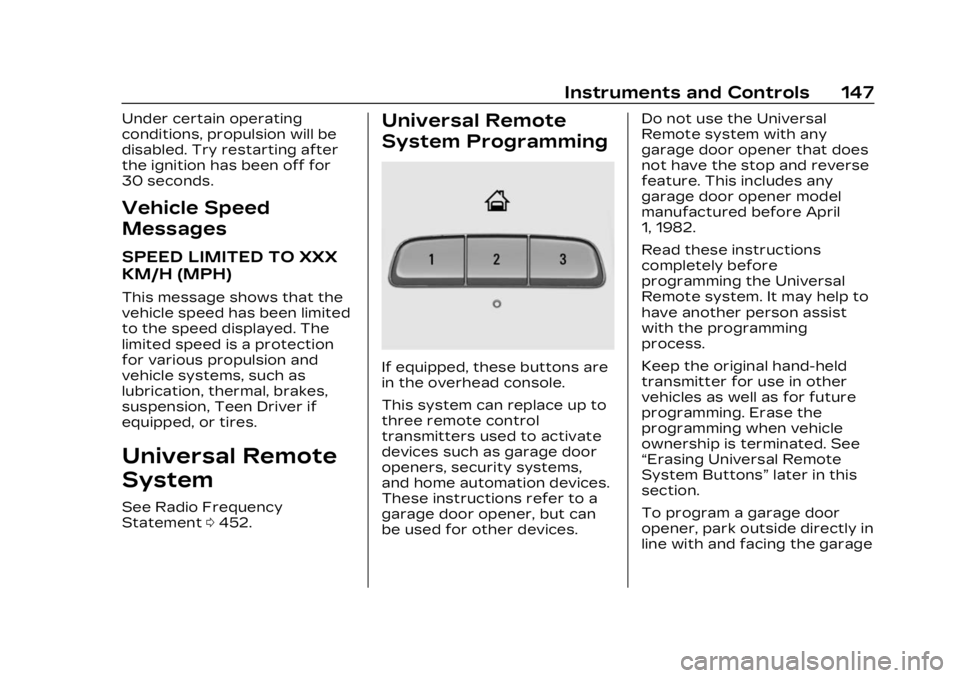
If equipped, these buttons are
in the overhead console.
This system can replace up to
three remote control
transmitters used to activate
devices such as garage door
openers, security systems,
and home automation devices.
These instructions refer to a
garage door opener, but can
be used for other devices. Do not use the Universal
Remote system with any
garage door opener that does
not have the stop and reverse
feature. This includes any
garage door opener model
manufactured before April
1, 1982.
Read these instructions
completely before
programming the Universal
Remote system. It may help to
have another person assist
with the programming
process.
Keep the original hand-held
transmitter for use in other
vehicles as well as for future
programming. Erase the
programming when vehicle
ownership is terminated. See
“Erasing Universal Remote
System Buttons”
later in this
section.
To program a garage door
opener, park outside directly in
line with and facing the garage
Page 149 of 482
Cadillac XT5 Owner Manual (GMNA-Localizing-U.S./Canada/Mexico-
16406251) - 2023 - CRC - 3/25/22
148 Instruments and Controls
door opener receiver. Clear all
people and objects near the
garage door.
Make sure the hand-held
transmitter has a new battery
for quicker and more accurate
transmission of the
radio-frequency signal.
Programming the
Universal Remote System
For questions or programming
help, see www.homelink.com/
gm or call 1-800-355-3515.
For calls placed outside the
U.S., Canada, or Puerto Rico,
international rates will apply
and may differ based on
landline or mobile phone.
Programming involves
time-sensitive actions, and
may time out causing the
procedure to be repeated.
To program up to three
devices:1. Hold the end of the hand-held transmitter
about 3 to 8 cm (1 to 3 in) away from the Universal
Remote system buttons
with the indicator light in
view. The hand-held
transmitter was supplied
by the manufacturer of the
garage door opener
receiver.
2. Press and release one of the three Universal
Remote system buttons to
be programmed. Press and
hold the hand-held
transmitter button. Do not
release the hand-held
transmitter button until
the indicator light changes
from a slow to a rapid flash
or continuous light. Then
release the hand-held
transmitter button.
Some garage door
openers may require
substitution of Step 2 with
the procedure under
“Radio Signals for Some
Gate Operators” later in
this section. 3. Press and hold the newly
programmed Universal
Remote system button for
five seconds while
watching the indicator light
and garage door
activation.
.If the indicator light
stays on continuously or
the garage door moves
when the button is
pressed, then
programming is
complete. There is no
need to complete
Steps 4–6.
.If the indicator light does
not come on or the
garage door does not
move, a second button
press may be required.
For a second time, press
and hold the newly
programmed button for
five seconds. If the
indicator light is
continuously lit, or the
garage door moves,
programming is
complete.
Page 150 of 482

Cadillac XT5 Owner Manual (GMNA-Localizing-U.S./Canada/Mexico-
16406251) - 2023 - CRC - 3/25/22
Instruments and Controls 149
.If the indicator light
flashes rapidly and the
garage door does not
move, continue with
programming Steps 4–6.
Learn or Smart Button
4. After completing Steps 1– 3, locate the Learn or
Smart button inside the
garage on the garage door
opener receiver. The name
and color of the button
may vary by manufacturer.
5. Press and release the Learn or Smart button.
Step 6 must be completed
within 30 seconds of
pressing this button. 6. Return to the vehicle and
firmly press and hold the
trained Universal Remote
system button for
two seconds and release.
Repeat the “press/hold/
release” sequence up to
three times to complete
the training process.
The Universal Remote system
should now activate the
garage door.
Repeat the process for
programming the two
remaining buttons.
Radio Signals for Some
Gate Operators
For questions or programming
help, see www.homelink.com/
gm or call 1-800-355-3515.
For calls placed outside the
U.S., Canada, or Puerto Rico,
international rates will apply
and may differ based on
landline or mobile phone.
Some radio-frequency laws
and gate operators require
transmitter signals to time out or quit after several seconds
of transmission. This may not
be long enough for the
Universal Remote system to
pick up the signal during
programming.
If the programming did not
work, replace Step 2 under
“Programming the Universal
Remote System”
with the
following:
Press and hold the Universal
Remote system button while
pressing and releasing the
hand-held transmitter button
every two seconds until the
signal has been successfully
accepted by the Universal
Remote system. The Universal
Remote system indicator light
will flash slowly at first and
then change to a rapid flash or
continuous solid-light. Proceed
with Step 3 under
“Programming the Universal
Remote System” to complete.
Page 257 of 482

Cadillac XT5 Owner Manual (GMNA-Localizing-U.S./Canada/Mexico-
16406251) - 2023 - CRC - 3/25/22
256 Driving and Operating
.The driver door has been
opened or the driver seat
belt has been unbuckled.
.The hood has been opened.
.The Auto Stop has reached
the maximum allowed time.
Auto Stop Disable Switch
The automatic engine Stop/
Start feature can be disabled
and enabled by touching the
hsymbol on the center stack.
Auto Stop is enabled each
time you start the vehicle. When the light next to the
h
is illuminated, the system is
enabled.
Engine Heater
The engine heater can provide
easier starting and better fuel
economy during engine
warm-up in cold weather
conditions at or below
−18 °C (0 °F). Vehicles with an
engine heater should be
plugged in at least four hours
before starting. An internal
thermostat in the plug-end of
the cord may exist, which will
prevent engine heater
operation at temperatures
above
−18 °C (0 °F).
{Warning
Do not plug in the engine
block heater while the
vehicle is parked in a garage
or under a carport. Property
damage or personal injury
may result. Always park the
(Continued)
Warning (Continued)
vehicle in a clear open area
away from buildings or
structures.
To Use the Engine Heater
1. Turn off the engine.
2. Check the heater cord fordamage. If it is damaged,
do not use it. See your
dealer for a replacement.
Inspect the cord for
damage yearly.
Page 377 of 482

Cadillac XT5 Owner Manual (GMNA-Localizing-U.S./Canada/Mexico-
16406251) - 2023 - CRC - 3/28/22
376 Vehicle Care
Fuses UsageF42 Trailer Battery 2
F43 Blower Console
F44 –
F45 Liftgate Motor
F46 Rear Heated Seats
F47 –
F48 Glass Break Sensor
F49 –
F50 –
F51 –
F52 Active Dampening
System Module
F53 –
F54 External Object Calculating/Side
Blind Zone Alert
F55 – Fuses Usage
F56 Universal Garage Door Opener/
Rain Sensor
F57 Theft Deterrent
Circuit
Breakers Usage
CB1 –
CB2 –
CB3 Rear Auxiliary Power Outlet
Relays Usage K1 –
K2 –
Wheels and Tires
Tires
Every new GM vehicle has
high-quality tires made by a
leading tire manufacturer.
See the warranty manual
for information regarding the tire warranty and
where to get service. For
additional information refer
to the tire manufacturer.
{Warning
.Poorly maintained and
improperly used tires
are dangerous.
.Overloading the tires
can cause overheating
as a result of too much
flexing. There could be
a blowout and a serious
crash. See Vehicle Load
Limits
0247.
.Underinflated tires
pose the same danger
as overloaded tires. The
resulting crash could
cause serious injury.
Check all tires
frequently to maintain
the recommended
(Continued)
Page 462 of 482
Cadillac XT5 Owner Manual (GMNA-Localizing-U.S./Canada/Mexico-
16406251) - 2023 - CRC - 3/25/22
OnStar 461
OnStar Personal
Identification
Number (PIN)
A PIN is needed to access
some OnStar services. The
PIN will need to be changed
the first time when speaking
with an Advisor. To change the
OnStar PIN, contact an
OnStar Advisor by pressing
Q
or calling 1-888-4ONSTAR.
Warranty
OnStar equipment may be
warranted as part of the
vehicle warranty.
Languages
The vehicle can be
programmed to respond in
multiple languages. Press
Q
and ask for an Advisor.
Advisors are available in
English, Spanish, and French.
Available languages may vary
by country.
Potential Issues
OnStar cannot perform
Remote Door Unlock or Stolen
Vehicle Assistance after the
vehicle has been off
continuously for an extended
period of time without an
ignition cycle. To find out the
duration of time that applies
for the vehicle, contact an
OnStar Advisor by pressing
Q
or calling 1-888-4ONSTAR.
If the vehicle has not been
started for an extended period
of time, OnStar can contact
Roadside Service or a
locksmith to help gain access
to the vehicle.
Global Positioning
System (GPS)
.Obstruction of the GPS can
occur in a large city with tall
buildings; in parking garages;
around airports; in tunnels
and underpasses; or in an
area with very dense trees.
If GPS signals are not
available, the OnStar system
should still operate to callOnStar. However, OnStar
could have difficulty
identifying the exact
location.
.In emergency situations,
OnStar can use the last
stored GPS location to send
to emergency responders.
A temporary loss of GPS can
cause loss of the ability to
send a Turn-by-Turn
Navigation route. The Advisor
may give a verbal route or may
ask for a call back after the
vehicle is driven into an
open area.
Cellular and GPS
Antennas
Cellular reception is required
for OnStar to send remote
signals to the vehicle. Do not
place items over or near the
antenna to prevent blocking
cellular and GPS signal
reception.
Page 473 of 482

Cadillac XT5 Owner Manual (GMNA-Localizing-U.S./Canada/Mexico-
16406251) - 2023 - CRC - 3/25/22
472 INDEX
Fuel (cont'd)Recommended . . . . . . . . . . . . . . 318
Top Tier . . . . . . . . . . . . . . . . . . . . . . . 317
Fuses Engine CompartmentFuse Block . . . . . . . . . . . . . . . . . 368
Fuses and Circuit
Breakers . . . . . . . . . . . . . . . . . . . . 367
Instrument Panel Fuse Block . . . . . . . . . . . . . . . . . . . . . . . . . . 371
Rear Compartment Fuse Block . . . . . . . . . . . . . . . . . 374
G
Garage Door Opener . . . . . . . . 147
Programming . . . . . . . . . . . . . . . . 147
Gas Strut(s) . . . . . . . . . . . . . . . . . . . 363
Gauges
Engine CoolantTemperature . . . . . . . . . . . . . . . 126
Fuel . . . . . . . . . . . . . . . . . . . . . . . . . . . . . 125
Odometer . . . . . . . . . . . . . . . . . . . . . 125
Speedometer . . . . . . . . . . . . . . . . 125
Tachometer . . . . . . . . . . . . . . . . . . 125
Trip Odometer . . . . . . . . . . . . . . 125
Warning Lights and Indicators . . . . . . . . . . . . . . . . . . . . 121 General Information
Service and
Maintenance . . . . . . . . . . . . . . . 427
Towing . . . . . . . . . . . . . . . . . . . . . . . . 322
Vehicle Care . . . . . . . . . . . . . . . . 338
Global Positioning System (GPS) . . . . . . . . . . . . . . . . 187
Glove Box . . . . . . . . . . . . . . . . . . . . . . . 103
GM Mobility Reimbursement
Program . . . . . . . . . . . . . . . . . . . . . . 445
Guidance Problems with theRoute . . . . . . . . . . . . . . . . . . . . . . . . . 188
H
Hazard WarningFlashers . . . . . . . . . . . . . . . . . . . . . . . 155
Head Restraints . . . . . . . . . . . . . . . 48
Head-Up Display (HUD) . . . . . 142
Headlamps Aiming . . . . . . . . . . . . . . . . . . . . . . . . 365
Automatic . . . . . . . . . . . . . . . . . . . . . 154
Bulb Replacement . . . . . . . . . 365
Daytime RunningLamps (DRL) . . . . . . . . . . . . . . . 153
Flash-to-Pass . . . . . . . . . . . . . . . . 153
High-Beam On Light . . . . . . . 138 Headlamps (cont'd)
High/Low Beam
Changer . . . . . . . . . . . . . . . . . . . . . 153
Lamps On Reminder . . . . . . . 138
Heated Mirrors . . . . . . . . . . . . . . . . . . . . . . . . . . 38
Rear Seats . . . . . . . . . . . . . . . . . . . . 59
Steering Wheel . . . . . . . . . . . . . 113
Ventilated Front Seats . . . . 54
Heater Engine . . . . . . . . . . . . . . . . . . . . . . . . 256
Heating . . . . . . . . . . . . . . . . . . . 223, 229
High-Beam On Light . . . . . . . . . 138
High-Speed Operation . . . . . 386
Hill and Mountain Roads . . . . . . . . . . . . . . . . . . . . . . . . . 244
Hill Start Assist (HSA) . . . . . . . 271
Hood . . . . . . . . . . . . . . . . . . . . . . . . . . . . 340
Horn . . . . . . . . . . . . . . . . . . . . . . . . . . . . . . .113
How to Wear Seat Belts Properly . . . . . . . . . . . . . . . . . . . . . . . . . 61
HVAC . . . . . . . . . . . . . . . . . . . . . 223, 229
I
If the System Needs Service . . . . . . . . . . . . . . . . . . . . . . . . . 189
Ignition Positions . . . . . . . . . . . . 252
Immobilizer . . . . . . . . . . . . . . . . . . . . . . 35