mirror CADILLAC XT5 2023 Owners Manual
[x] Cancel search | Manufacturer: CADILLAC, Model Year: 2023, Model line: XT5, Model: CADILLAC XT5 2023Pages: 482, PDF Size: 7.1 MB
Page 9 of 482
Cadillac XT5 Owner Manual (GMNA-Localizing-U.S./Canada/Mexico-
16406251) - 2023 - CRC - 3/25/22
8 Keys, Doors, and Windows
Keys, Doors, and
Windows
Keys and Locks
Keys . . . . . . . . . . . . . . . . . . . . . . . . . . . . . . . 8
Remote Key . . . . . . . . . . . . . . . . . . . . . 9
Remote Key Operation . . . . . . 9
Remote Vehicle Start . . . . . . . 19
Door Locks . . . . . . . . . . . . . . . . . . . . 20
Power Door Locks . . . . . . . . . . 23
Delayed Locking . . . . . . . . . . . . . 23
Automatic Door Locks . . . . . 23
Lockout Protection . . . . . . . . . 24
Safety Locks . . . . . . . . . . . . . . . . . 24
Doors
Liftgate . . . . . . . . . . . . . . . . . . . . . . . . . 25
Vehicle Security
Vehicle Security . . . . . . . . . . . . . 33
Vehicle Alarm System . . . . . . 33
Steering Column Lock . . . . . 35
Immobilizer . . . . . . . . . . . . . . . . . . . . 35
Immobilizer Operation . . . . . 35
Exterior Mirrors
Convex Mirrors . . . . . . . . . . . . . . 37
Power Mirrors . . . . . . . . . . . . . . . . 37
Folding Mirrors . . . . . . . . . . . . . . 38
Heated Mirrors . . . . . . . . . . . . . . 38Automatic Dimming
Mirror . . . . . . . . . . . . . . . . . . . . . . . . . 38
Reverse Tilt Mirrors . . . . . . . . 39
Interior Mirrors
Interior Rearview Mirrors . . . . . . . . . . . . . . . . . . . . . . . . 39
Manual Rearview Mirror . . . 39
Automatic Dimming Rearview Mirror . . . . . . . . . . . . 39
Rear Camera Mirror . . . . . . . . 39
Windows
Windows . . . . . . . . . . . . . . . . . . . . . . . 42
Power Windows . . . . . . . . . . . . . 42
Sun Visors . . . . . . . . . . . . . . . . . . . . . 44
Roof
Sunroof . . . . . . . . . . . . . . . . . . . . . . . . 44
Keys and Locks
Keys
{Warning
Leaving children in a vehicle
with a remote key is
dangerous and children or
others could be seriously
injured or killed. They could
operate the power windows
or other controls or make
the vehicle move. The
windows will function with
the remote key in the
vehicle, and children or
others could be caught in
the path of a closing
window. Do not leave
children in a vehicle with a
remote key.
Page 11 of 482
Cadillac XT5 Owner Manual (GMNA-Localizing-U.S./Canada/Mexico-
16406251) - 2023 - CRC - 3/25/22
10 Keys, Doors, and Windows
Other conditions can impact
the performance of the
remote key. See Remote Key
09.
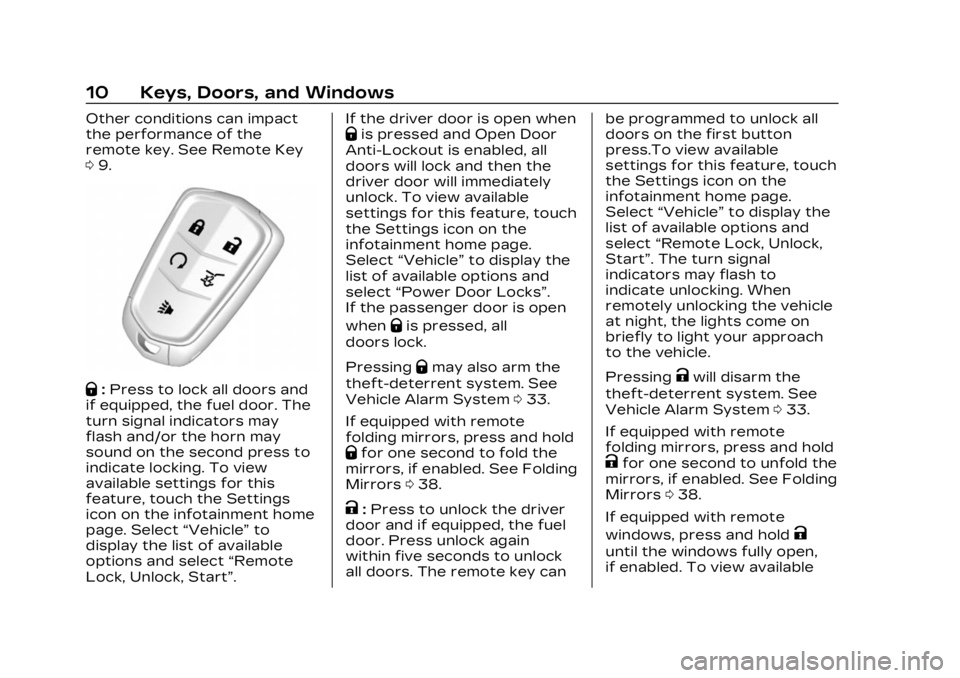
Q:Press to lock all doors and
if equipped, the fuel door. The
turn signal indicators may
flash and/or the horn may
sound on the second press to
indicate locking. To view
available settings for this
feature, touch the Settings
icon on the infotainment home
page. Select “Vehicle”to
display the list of available
options and select “Remote
Lock, Unlock, Start”. If the driver door is open when
Qis pressed and Open Door
Anti-Lockout is enabled, all
doors will lock and then the
driver door will immediately
unlock. To view available
settings for this feature, touch
the Settings icon on the
infotainment home page.
Select “Vehicle” to display the
list of available options and
select “Power Door Locks”.
If the passenger door is open
when
Qis pressed, all
doors lock.
Pressing
Qmay also arm the
theft-deterrent system. See
Vehicle Alarm System 033.
If equipped with remote
folding mirrors, press and hold
Qfor one second to fold the
mirrors, if enabled. See Folding
Mirrors 038.
K:Press to unlock the driver
door and if equipped, the fuel
door. Press unlock again
within five seconds to unlock
all doors. The remote key can be programmed to unlock all
doors on the first button
press.To view available
settings for this feature, touch
the Settings icon on the
infotainment home page.
Select
“Vehicle” to display the
list of available options and
select “Remote Lock, Unlock,
Start”. The turn signal
indicators may flash to
indicate unlocking. When
remotely unlocking the vehicle
at night, the lights come on
briefly to light your approach
to the vehicle.
Pressing
Kwill disarm the
theft-deterrent system. See
Vehicle Alarm System 033.
If equipped with remote
folding mirrors, press and hold
Kfor one second to unfold the
mirrors, if enabled. See Folding
Mirrors 038.
If equipped with remote
windows, press and hold
K
until the windows fully open,
if enabled. To view available
Page 38 of 482

Cadillac XT5 Owner Manual (GMNA-Localizing-U.S./Canada/Mexico-
16406251) - 2023 - CRC - 3/25/22
Keys, Doors, and Windows 37
Exterior Mirrors
Convex Mirrors
{Warning
A convex mirror can make
things, like other vehicles,
look farther away than they
really are. If you cut too
sharply into the right lane,
you could hit a vehicle on
the right. Check the inside
mirror or glance over your
shoulder before changing
lanes.
The passenger side mirror is
convex shaped. A convex
mirror surface is curved so
more can be seen from the
driver seat.
Power Mirrors
To adjust a mirror: 1. Press
}or|to select the
driver or passenger side
mirror. The indicator light
will illuminate.
2. Press the arrows on the control pad to move the
mirror in the desired
direction.
3. Adjust each outside mirror so that a little of the
vehicle and the area
behind it can be seen. 4. Press
}or|again to
deselect the mirror.
Memory Mirrors
The vehicle may have memory
mirrors. See Memory Seats
0 51.
Side Blind Zone Alert (SBZA)
The vehicle may have SBZA.
See Side Blind Zone Alert
(SBZA) 0312.
Lane Change Alert (LCA)
The vehicle may have LCA.
See Lane Change Alert (LCA)
0 313.
Turn Signal Indicator
The vehicle may have a turn
signal indicator lamp built into
the mirror housing. The turn
signal lamp flashes when the
turn signals or hazard flashers
are used.
Page 39 of 482
Cadillac XT5 Owner Manual (GMNA-Localizing-U.S./Canada/Mexico-
16406251) - 2023 - CRC - 3/25/22
38 Keys, Doors, and Windows
Folding Mirrors
Manual Folding Mirrors
If equipped, manually fold the
mirrors inward toward the
vehicle to prevent damage
when going through an
automatic car wash. Push the
mirror outward to return it to
the original position.
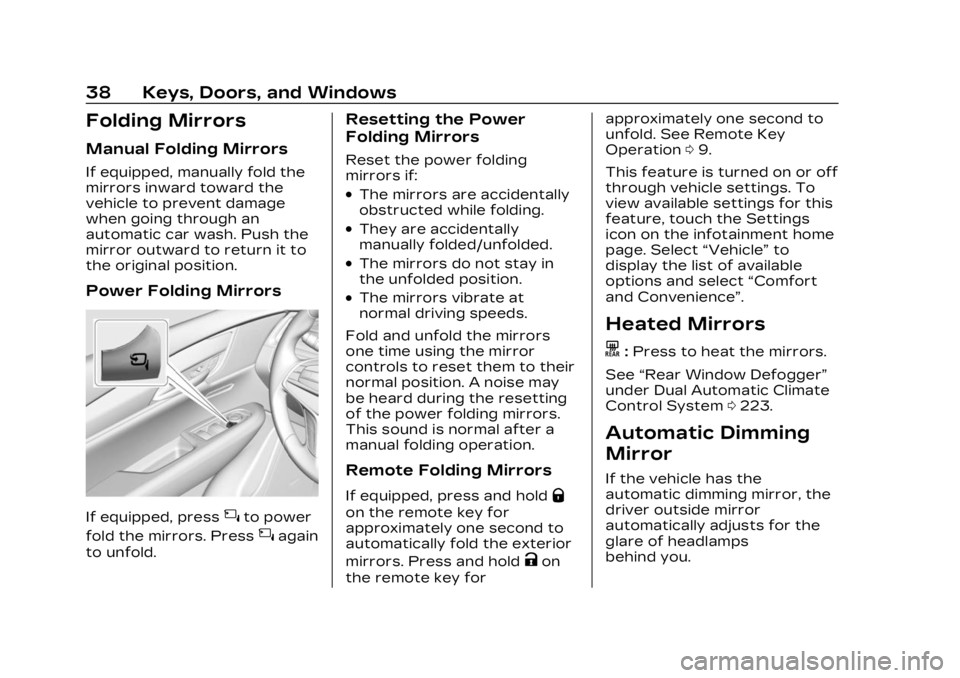
Power Folding Mirrors
If equipped, press{to power
fold the mirrors. Press
{again
to unfold.
Resetting the Power
Folding Mirrors
Reset the power folding
mirrors if:
.The mirrors are accidentally
obstructed while folding.
.They are accidentally
manually folded/unfolded.
.The mirrors do not stay in
the unfolded position.
.The mirrors vibrate at
normal driving speeds.
Fold and unfold the mirrors
one time using the mirror
controls to reset them to their
normal position. A noise may
be heard during the resetting
of the power folding mirrors.
This sound is normal after a
manual folding operation.
Remote Folding Mirrors
If equipped, press and holdQ
on the remote key for
approximately one second to
automatically fold the exterior
mirrors. Press and hold
Kon
the remote key for approximately one second to
unfold. See Remote Key
Operation
09.
This feature is turned on or off
through vehicle settings. To
view available settings for this
feature, touch the Settings
icon on the infotainment home
page. Select “Vehicle”to
display the list of available
options and select “Comfort
and Convenience”.
Heated Mirrors
K: Press to heat the mirrors.
See “Rear Window Defogger”
under Dual Automatic Climate
Control System 0223.
Automatic Dimming
Mirror
If the vehicle has the
automatic dimming mirror, the
driver outside mirror
automatically adjusts for the
glare of headlamps
behind you.
Page 40 of 482

Cadillac XT5 Owner Manual (GMNA-Localizing-U.S./Canada/Mexico-
16406251) - 2023 - CRC - 3/25/22
Keys, Doors, and Windows 39
Reverse Tilt Mirrors
If equipped with reverse tilt
mirrors and memory seats, the
passenger and/or driver
mirror tilts to a preselected
position when the vehicle is in
R (Reverse). This allows the
curb to be seen when parallel
parking.
The mirror(s) may move from
their tilted position when:
.The vehicle is shifted out of
R (Reverse), or remains in
R (Reverse) for about
30 seconds.
.The vehicle is turned off.
.The vehicle is driven in
R (Reverse) above a set
speed.
To view available settings
from the infotainment screen,
touch Settings > Vehicle >
Comfort and Convenience.
Interior Mirrors
Interior Rearview
Mirrors
Adjust the rearview mirror for
a clear view of the area behind
the vehicle.
Do not spray glass cleaner
directly on the mirror. Use a
soft towel dampened with
water.
Manual Rearview
Mirror
If equipped, push the tab
forward for daytime use and
pull it rearward for nighttime
use to avoid glare of the
headlamps from behind.
Automatic Dimming
Rearview Mirror
If equipped, automatic
dimming reduces the glare of
headlamps from behind. The
dimming feature comes on
when the vehicle is started.
Rear Camera Mirror
If equipped, this automatic
dimming mirror provides a
wide angle camera view of the
area behind the vehicle.
Pull the tab to turn on the
display. Push the tab to turn it
off. When off the mirror is
automatic dimming. Adjust the
mirror for a clear view of the
area behind the vehicle while
the display is off.
Page 41 of 482

Cadillac XT5 Owner Manual (GMNA-Localizing-U.S./Canada/Mexico-
16406251) - 2023 - CRC - 3/25/22
40 Keys, Doors, and Windows
PressVto scroll through the
adjustment options.
Press
tanduto adjust the
settings using the indicators
on the mirror. The indicators
will remain visible for
five seconds after the last
button activation, and the
settings will remain saved. The adjustment options are:
.Brightness
.Zoom
.Tilt
Page 42 of 482

Cadillac XT5 Owner Manual (GMNA-Localizing-U.S./Canada/Mexico-
16406251) - 2023 - CRC - 3/25/22
Keys, Doors, and Windows 41
{Warning
The Rear Camera Mirror
(RCM) has a limited view.
Portions of the road,
vehicles, and other objects
may not be seen. Do not
drive or park the vehicle
using only this camera.
Objects may appear closer
than they are. Check the
outside mirrors or glance
over your shoulder when
making lane changes or
merging. Failure to use
proper care may result in
injury, death, or vehicle
damage.Troubleshooting
See your dealer for service if a
blue screen and
3are
displayed in the mirror, and
the display shuts off. Also,
push the tab as indicated to
return to the automatic
dimming mode.
The Rear Camera Mirror may
not work properly or display a
clear image if:
.There is glare from the sun
or headlamps. This may
obstruct objects from view.
If needed, push the tab to
turn off the display.
.Dirt, snow, or other debris
blocks the camera lens.
Clean the lens with a soft
damp cloth, or if equipped,
with the Rear Camera
Washer. See Rear Window
Wiper/Washer 0116.
.The camera’s mounting on
the vehicle has been
damaged, and/or the
position or the mounting
angle of the camera has
changed.
Page 117 of 482
Cadillac XT5 Owner Manual (GMNA-Localizing-U.S./Canada/Mexico-
16406251) - 2023 - CRC - 3/25/22
116 Instruments and Controls
Wiper Arm Assembly
Protection
When using an automatic car
wash, move the windshield
wiper lever to OFF. This
disables the automatic
Rainsense windshield wipers.
With Rainsense, if the
transmission is in N (Neutral)
and the vehicle speed is very
slow, the wipers will
automatically stop at the base
of the windshield.
The wiper operations return
to normal when the
transmission is no longer in
N (Neutral) or the vehicle
speed has increased.Rear Window Wiper/
Washer
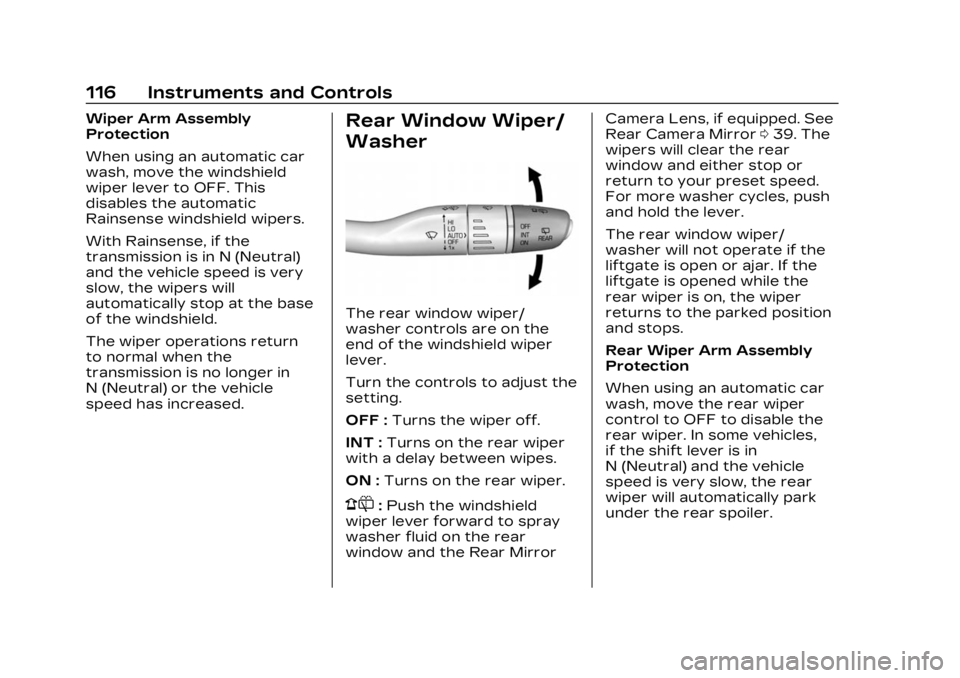
The rear window wiper/
washer controls are on the
end of the windshield wiper
lever.
Turn the controls to adjust the
setting.
OFF :Turns the wiper off.
INT : Turns on the rear wiper
with a delay between wipes.
ON : Turns on the rear wiper.
1:Push the windshield
wiper lever forward to spray
washer fluid on the rear
window and the Rear Mirror Camera Lens, if equipped. See
Rear Camera Mirror
039. The
wipers will clear the rear
window and either stop or
return to your preset speed.
For more washer cycles, push
and hold the lever.
The rear window wiper/
washer will not operate if the
liftgate is open or ajar. If the
liftgate is opened while the
rear wiper is on, the wiper
returns to the parked position
and stops.
Rear Wiper Arm Assembly
Protection
When using an automatic car
wash, move the rear wiper
control to OFF to disable the
rear wiper. In some vehicles,
if the shift lever is in
N (Neutral) and the vehicle
speed is very slow, the rear
wiper will automatically park
under the rear spoiler.
Page 118 of 482
Cadillac XT5 Owner Manual (GMNA-Localizing-U.S./Canada/Mexico-
16406251) - 2023 - CRC - 3/25/22
Instruments and Controls 117
The wiper operations return
to normal when the shift lever
is no longer in N (Neutral) or
the vehicle speed has
increased.
Auto Wipe in Reverse Gear
If the rear wiper control is off,
the rear wiper will
automatically operate
continuously when the shift
lever is in R (Reverse), and the
front windshield wiper is
performing low or high speed
wipes. If the rear wiper control
is off, the shift lever is in
R (Reverse), and the front
windshield wiper is performing
INT wipes, then the rear wiper
automatically performs INT
wipes.
This feature can be turned on
or off. Go to Settings > Vehicle
> Comfort and Convenience >
Auto Wipe in Reverse Gear >
Select ON or OFF.The windshield washer
reservoir is used for the
windshield, rear window, and
rear mirror camera,
if equipped. See Rear Camera
Mirror
039. Check the fluid
level in the reservoir if either
washer is not working. See
Washer Fluid 0357.
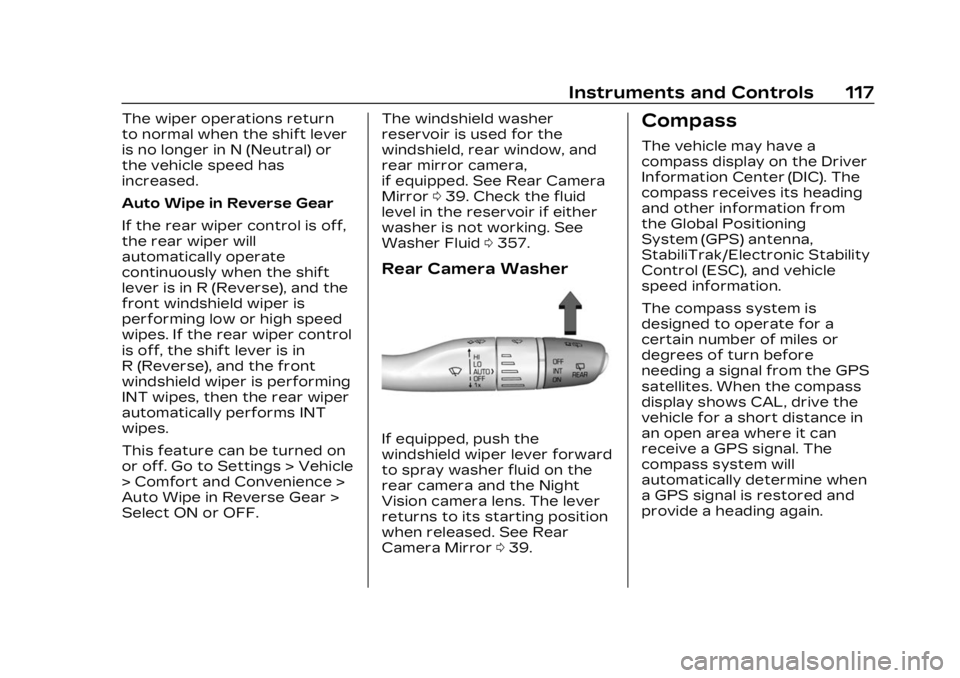
Rear Camera Washer
If equipped, push the
windshield wiper lever forward
to spray washer fluid on the
rear camera and the Night
Vision camera lens. The lever
returns to its starting position
when released. See Rear
Camera Mirror 039.
Compass
The vehicle may have a
compass display on the Driver
Information Center (DIC). The
compass receives its heading
and other information from
the Global Positioning
System (GPS) antenna,
StabiliTrak/Electronic Stability
Control (ESC), and vehicle
speed information.
The compass system is
designed to operate for a
certain number of miles or
degrees of turn before
needing a signal from the GPS
satellites. When the compass
display shows CAL, drive the
vehicle for a short distance in
an open area where it can
receive a GPS signal. The
compass system will
automatically determine when
a GPS signal is restored and
provide a heading again.
Page 228 of 482
Cadillac XT5 Owner Manual (GMNA-Localizing-U.S./Canada/Mexico-
16406251) - 2023 - CRC - 3/25/22
Climate Controls 227
Ionizer :If equipped with an
ionizer, this feature helps to
clean the air inside the vehicle
and remove contaminants
such as pollen, odors, and
dust. If the climate control
system is on and the ionizer is
enabled, the ionizer status
indicator will be lit on the
climate control display. To turn
the Ionizer off or on, select
Settings > Climate and Air
Quality > Ionizer > Select ON
or OFF.
Rear Window Defogger
K: Press to turn the rear
window defogger on or off. An
indicator light on the button
comes on to show that the
rear window defogger is on.
The defogger only works
when the vehicle is on. The
defogger turns off if the
vehicle is off or in
accessory mode.
To turn Auto Defog off or on,
select Settings > Climate and
Air Quality > Auto Rear Defog > Select ON or OFF. When
Auto Rear Defog is selected,
the rear window defogger
turns on automatically when
the interior temperature is
cold and the outside
temperature is about 4 °C
(40 °F) and below.
The upper grid lines on the
rear window are antenna lines
and are not intended to heat
when the defogger is
activated.
The heated outside mirrors
turn on when the rear window
defogger button is on and help
to clear fog or frost from the
surface of the mirrors.
Caution
Do not try to clear frost or
other material from the
inside of the front
windshield and rear window
with a razor blade or
anything else that is sharp.
This may damage the rear
window defogger grid and
(Continued)
Caution (Continued)
affect the radio's ability to
pick up stations clearly. The
repairs would not be
covered by the vehicle
warranty.
Driver and Passenger
Heated and Ventilated Seats
(If Equipped) : Press
MorLto
heat the driver or passenger
seat cushion.
Press
Cor{to ventilate the
driver or passenger seat. See
Heated and Ventilated Front
Seats 054.
Auto Heated and Ventilated
Seats : When the vehicle is on,
this feature will automatically
activate the heated or
ventilated seats at the level
required by the vehicle's
interior temperature. The
active high, medium, low, or off
heated or ventilated seat level
will be indicated by the manual
heated and ventilated seat
buttons on the center stack.