reverse light CADILLAC XT5 2023 Owners Manual
[x] Cancel search | Manufacturer: CADILLAC, Model Year: 2023, Model line: XT5, Model: CADILLAC XT5 2023Pages: 482, PDF Size: 7.1 MB
Page 29 of 482

Cadillac XT5 Owner Manual (GMNA-Localizing-U.S./Canada/Mexico-
16406251) - 2023 - CRC - 3/25/22
28 Keys, Doors, and Windows
Obstacle Detection
Features
If the liftgate encounters an
obstacle during a power open
or close cycle, the liftgate will
automatically reverse direction
and move a short distance
away from the obstacle. After
removing the obstruction, the
power liftgate operation can
be used again. If the liftgate
encounters multiple obstacles
on the same power cycle, the
power function will deactivate.
After removing the
obstructions, manually close
the liftgate. This will allow
normal power operation
functions to resume.
If the vehicle is locked while
the liftgate is closing, and an
obstacle is encountered that
prevents the liftgate from
completely closing, the horn
will sound as an alert that the
liftgate did not close.
Setting the 3/4 Mode
To change the position the
liftgate stops at when
opening:1. Select MAX or 3/4 mode and power open the
liftgate.
2. Stop the liftgate movement at the desired
height by pressing any
liftgate button. Manually
adjust the liftgate position
if needed.
3. Press and hold
lnext to
the pull cup on the outside
of the liftgate until the turn
signals flash and a beep
sounds. This indicates the
setting has been recorded.
The liftgate cannot be set
below a minimum
programmable height. If there
is no light flash or sound, then
the height adjustment may be
too low.
Manual Operation
Select OFF to manually
operate the liftgate.
Caution
Attempting to move the
liftgate too quickly and with
excessive force may result
in damage to the vehicle.
Operate the liftgate manually
with a smooth motion and
moderate speed. The system
includes a feature which limits
the manual closing speed to
protect the components.
To unlock the liftgate, press
K
on the power door lock switch
or press
Kon the remote key
twice within five seconds. See
Remote Key Operation 09.
Page 44 of 482
Cadillac XT5 Owner Manual (GMNA-Localizing-U.S./Canada/Mexico-
16406251) - 2023 - CRC - 3/25/22
Keys, Doors, and Windows 43
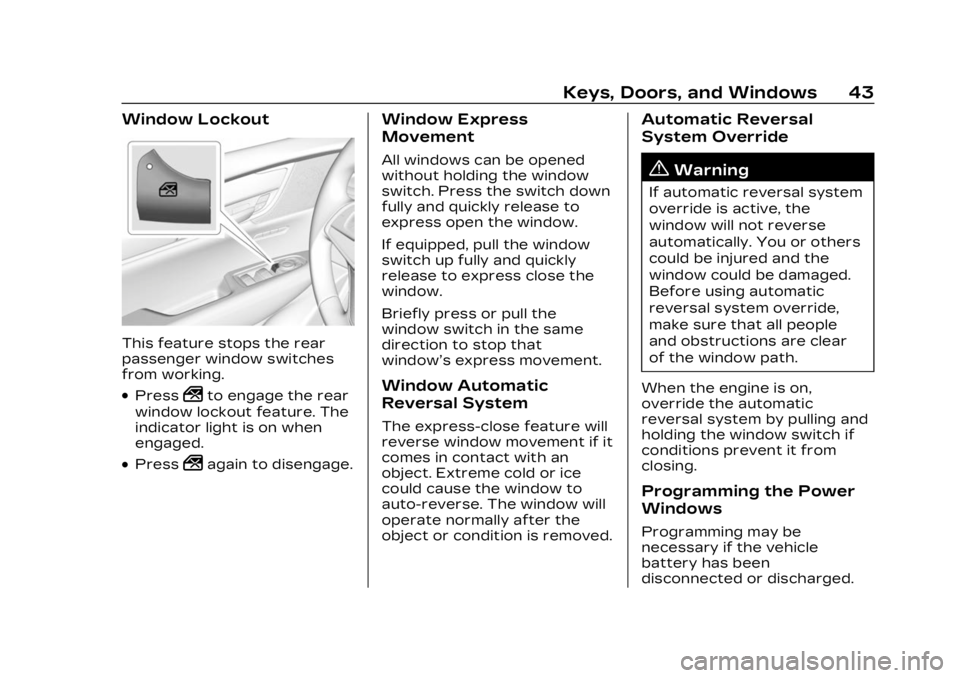
Window Lockout
This feature stops the rear
passenger window switches
from working.
.Press2to engage the rear
window lockout feature. The
indicator light is on when
engaged.
.Press2again to disengage.
Window Express
Movement
All windows can be opened
without holding the window
switch. Press the switch down
fully and quickly release to
express open the window.
If equipped, pull the window
switch up fully and quickly
release to express close the
window.
Briefly press or pull the
window switch in the same
direction to stop that
window’s express movement.
Window Automatic
Reversal System
The express-close feature will
reverse window movement if it
comes in contact with an
object. Extreme cold or ice
could cause the window to
auto-reverse. The window will
operate normally after the
object or condition is removed.
Automatic Reversal
System Override
{Warning
If automatic reversal system
override is active, the
window will not reverse
automatically. You or others
could be injured and the
window could be damaged.
Before using automatic
reversal system override,
make sure that all people
and obstructions are clear
of the window path.
When the engine is on,
override the automatic
reversal system by pulling and
holding the window switch if
conditions prevent it from
closing.
Programming the Power
Windows
Programming may be
necessary if the vehicle
battery has been
disconnected or discharged.
Page 162 of 482
Cadillac XT5 Owner Manual (GMNA-Localizing-U.S./Canada/Mexico-
16406251) - 2023 - CRC - 3/25/22
Infotainment System 161
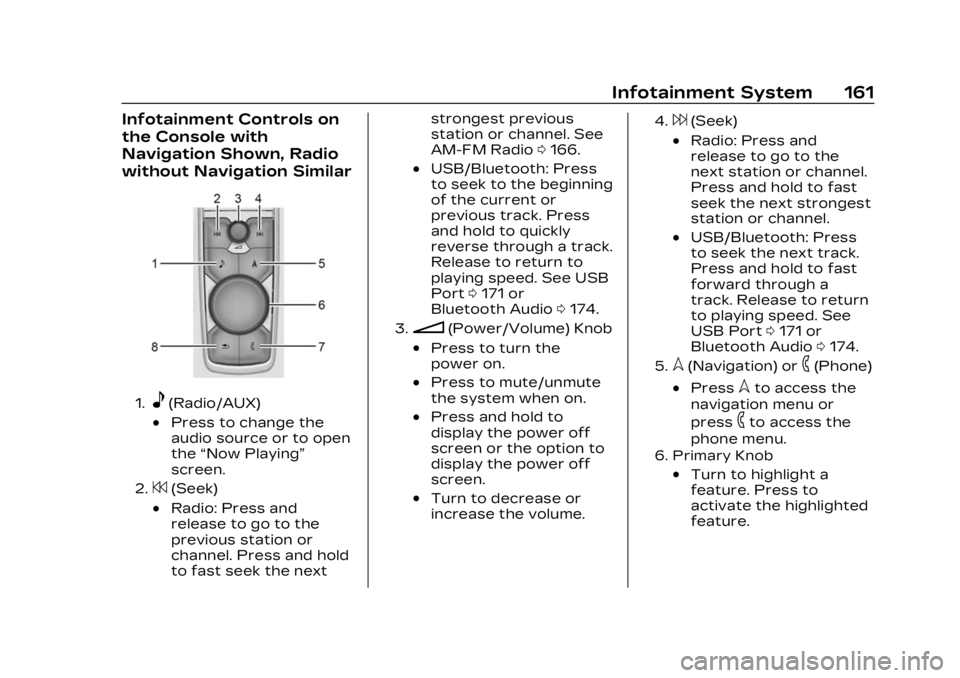
Infotainment Controls on
the Console with
Navigation Shown, Radio
without Navigation Similar
1.e(Radio/AUX)
.Press to change the
audio source or to open
the“Now Playing”
screen.
2.7(Seek)
.Radio: Press and
release to go to the
previous station or
channel. Press and hold
to fast seek the next strongest previous
station or channel. See
AM-FM Radio
0166.
.USB/Bluetooth: Press
to seek to the beginning
of the current or
previous track. Press
and hold to quickly
reverse through a track.
Release to return to
playing speed. See USB
Port 0171 or
Bluetooth Audio 0174.
3.n(Power/Volume) Knob
.Press to turn the
power on.
.Press to mute/unmute
the system when on.
.Press and hold to
display the power off
screen or the option to
display the power off
screen.
.Turn to decrease or
increase the volume.
4.6(Seek)
.Radio: Press and
release to go to the
next station or channel.
Press and hold to fast
seek the next strongest
station or channel.
.USB/Bluetooth: Press
to seek the next track.
Press and hold to fast
forward through a
track. Release to return
to playing speed. See
USB Port 0171 or
Bluetooth Audio 0174.
5.l(Navigation) or6(Phone)
.Presslto access the
navigation menu or
press
6to access the
phone menu.
6. Primary Knob
.Turn to highlight a
feature. Press to
activate the highlighted
feature.
Page 242 of 482

Cadillac XT5 Owner Manual (GMNA-Localizing-U.S./Canada/Mexico-
16406251) - 2023 - CRC - 3/25/22
Driving and Operating 241
.Avoid turns that take the
vehicle across the incline of
the hill. Driving across an
incline puts more weight on
the downhill wheels which
could cause a downhill slide
or a rollover.
.Loose gravel, muddy spots,
or even wet grass can cause
the tires to slip sideways,
downhill. If the vehicle slips
sideways, it can hit
something and potentially
roll over.
.Hidden obstacles can make
the steepness of the incline
more severe. If a rock is
driven across with the uphill
wheels, or if the downhill
wheels drop into a rut or
depression, the vehicle can
tilt even more.
.If an incline must be driven
across, and the vehicle
starts to slide, turn downhill.
This should help straighten
out the vehicle and prevent
the side slipping.
.Never go downhill forward
or backward with the
transmission in N (Neutral).
The brakes could overheat
and you could lose control.
.When driving down a hill,
keep the vehicle headed
straight down. Use a low
gear because the engine will
work with the brakes to slow
the vehicle and help keep
the vehicle under control.
{Warning
Heavy braking when going
down a hill can cause your
brakes to overheat and fade.
This could cause loss of
control and you or others
could be injured or killed.
Apply the brakes lightly
when descending a hill and
use a low gear to keep
vehicle speed under control.
If the vehicle stalls on a hill: 1. Apply the brakes to stop the vehicle, and then apply
the parking brake. 2. Shift into P (Park) and then
restart the engine.
.If driving uphill when the
vehicle stalls, shift to
R (Reverse), release the
parking brake, and back
straight down.
.Never try to turn the
vehicle around. If the hill
is steep enough to stall
the vehicle, it is steep
enough to cause it to
roll over.
.If you cannot make it up
the hill, back straight
down the hill.
.Never back down a hill in
N (Neutral) using only
the brake.
.The vehicle can roll
backward quickly and
you could lose control.
.If driving downhill when
the vehicle stalls, shift to
a lower gear, release the
parking brake, and drive
straight down the hill.
Page 248 of 482

Cadillac XT5 Owner Manual (GMNA-Localizing-U.S./Canada/Mexico-
16406251) - 2023 - CRC - 3/25/22
Driving and Operating 247
For All-Wheel Drive (AWD),
select Off-Road or AWD mode.
See Driver Mode Control
0273 and
All-Wheel Drive 0267.
Rocking the Vehicle to Get
it Out
Turn the steering wheel left
and right to clear the area
around the front wheels. Turn
off any traction system. Shift
back and forth between
R (Reverse) and a low forward
gear, spinning the wheels as
little as possible. To prevent
transmission wear, wait until
the wheels stop spinning
before shifting gears. Release
the accelerator pedal while
shifting, and press lightly on
the accelerator pedal when
the transmission is in gear.
Slowly spinning the wheels in
the forward and reverse
directions causes a rocking
motion that could free the vehicle. If that does not get
the vehicle out after a few
tries, it might need to be
towed out. If the vehicle does
need to be towed out, see
Transporting a Disabled
Vehicle
0412.Vehicle Load Limits
It is very important to know
how much weight the
vehicle can carry. This
weight is called the vehicle
capacity weight and
includes the weight of all
occupants, cargo, and all
nonfactory-installed
options. Two labels on the
vehicle may show how
much weight it may
properly carry, the Tire and
Loading Information label
and the Certification/Tire
label.
{Warning
Do not load the vehicle
any heavier than the
Gross Vehicle Weight
Rating (GVWR), or either
the maximum front or
rear Gross Axle Weight
Rating (GAWR). This can
cause systems to break
and change the way the
vehicle handles. This
could cause loss of
control and a crash.
Overloading can also
reduce stopping
performance, damage the
tires, and shorten the life
of the vehicle.
Page 253 of 482

Cadillac XT5 Owner Manual (GMNA-Localizing-U.S./Canada/Mexico-
16406251) - 2023 - CRC - 3/25/22
252 Driving and Operating
“break-in”period during the
first 6 400 km (4,000 mi) of
routine driving. As the vehicle
is driven, the mechanical
systems adjust to provide
optimal fuel economy and
transmission shift
performance.
Electrical systems will adapt
and calibrate during the
break-in period. A one-time
occurrence of clicks and
similar vehicle noises is normal
during this process.
Normal driving charges the
vehicle’s battery to achieve
the best operation of the
vehicle, including fuel economy
and the Stop/Start System.
See Stop/Start System 0255.Ignition Positions
The vehicle has an electronic
keyless ignition with
pushbutton start.
If the pushbutton start is not
working, the vehicle may be
near a strong radio antenna
signal causing interference to
the Keyless Access system.
See Remote Key Operation
09.
To shift out of P (Park), the
vehicle must be turned on and
the brake pedal must be
applied. Stopping the Engine/OFF
(No Indicator Light) :
When
the vehicle is stopped, press
ENGINE START/STOP once to
turn the engine off.
If the vehicle is in P (Park), the
ignition will turn off, and
Retained Accessory
Power (RAP) will remain active.
See Retained Accessory
Power (RAP) 0258.
If the vehicle is in R (Reverse),
D (Drive) or M (Manual Mode),
the vehicle will shift to
P (Park), the ignition will turn
off, and Retained Accessory
Power (RAP) will remain active.
See Retained Accessory
Power (RAP) 0258.
If the vehicle is in N (Neutral),
the ignition will return to
accessory mode and display
the message SHIFT TO PARK
in the Driver Information
Center (DIC). When the vehicle
is shifted into P (Park), the
ignition will turn off.
Page 296 of 482

Cadillac XT5 Owner Manual (GMNA-Localizing-U.S./Canada/Mexico-
16406251) - 2023 - CRC - 3/25/22
Driving and Operating 295
Different environmental
conditions may affect whether
and how far the Park Assist
system can detect objects.
Keep the sensors clean of
mud, dirt, snow, ice, and slush;
and clean sensors after a car
wash in freezing
temperatures. Sensors that
are not clean may not detect
objects or may cause the
system to alert when not
required.
{Warning
The Park Assist System is
no substitute for careful and
attentive driving. The Park
Assist system does not
detect children, pedestrians,
bicyclists, animals, or objects
located below the bumper or
that are too close or too far
from the vehicle. It is not
available at speeds greater
than 9 km/h (6 mph). To
prevent injury, death,
or vehicle damage, even with(Continued)
Warning (Continued)
Park Assist, always check
the area around the vehicle
and check all mirrors before
moving forward or backing.
How the System Works
The vehicle may have a Park
Assist amphitheatre-like
display on the cluster with
bars that represent the
estimated location of a
detected object and the
vehicle’s distance from the
object. As a detected object
becomes closer, more bars
light up and change color from
yellow to amber to red.
When an object is first
detected in the rear, one beep
will be heard from the rear,
or the driver's seat will pulse
two times, if equipped with
Safety Alert Seat. When an
object is very close, five beeps
will sound from the front or
rear (depending on the
object's location), or the driver's seat will pulse five
times. Beeps for front are
higher pitched than the rear.
Turning the System On
and Off
The Park Assist System can
be turned on or off using the
infotainment system. To view
available settings for this
feature, touch the Settings
icon on the infotainment home
page. Select
“Vehicle”to
display the list of available
options and select “Collision/
Detection Systems”.
The
Xbutton is used to turn
on or off the Park Assist,
which also turns on or off the
Backing Warning and Reverse
Page 303 of 482

Cadillac XT5 Owner Manual (GMNA-Localizing-U.S./Canada/Mexico-
16406251) - 2023 - CRC - 3/25/22
302 Driving and Operating
If equipped, alerts can be set
to beeps or seat pulses. To
view available settings from
the infotainment screen, touch
Settings > Vehicle > Collision/
Detection Systems >
Alert Type.
Rear Cross Traffic
Alert (RCTA) System
If equipped, Rear Cross Traffic
Alert (RCTA) displays a red
warning triangle with a left or
right pointing arrow on the
infotainment display to warn
of traffic coming from the left
or right. This system detects
objects coming from up to
20 m (65 ft) from the left or
right side of the vehicle. When
an object is detected, either
three beeps sound from the
left or right or three Safety
Alert Seat pulses occur on the
left or right side, depending on
the direction of the detected
vehicle.Use caution while backing up
when towing a trailer, as the
RCTA detection zones that
extend out from the back of
the vehicle do not move
farther back when a trailer is
attached to the vehicle.
Driving With a Trailer
Use caution while backing up
when towing a trailer. The
RCTA feature is automatically
disabled when a trailer is
attached to the vehicle.
Turning the Features On
or Off
The
Xbutton on the center
stack is used to turn on or off
the Front and Rear Park
Assist, and Backing Warning
and Reverse Automatic
Braking (RAB) systems at the
same time. The indicator light
next to the button comes on
when the features are on and
turns off when the features
have been disabled. RCTA can be turned on or off
using the infotainment system.
To view available settings for
this feature, touch the
Settings icon on the
infotainment home page.
Select
“Vehicle” to display the
list of available options and
select “Collision/Detection
Systems”.
Assistance Systems
for Driving
If equipped, when driving the
vehicle in a forward gear,
Forward Collision Alert (FCA),
Lane Keep Assist (LKA), Side
Blind Zone Alert (SBZA), Lane
Change Alert (LCA), Automatic
Emergency Braking (AEB),
Front Pedestrian Braking
(FPB) System, and/or the
Night Vision System can help
to avoid a crash or reduce
crash damage.
Page 469 of 482

Cadillac XT5 Owner Manual (GMNA-Localizing-U.S./Canada/Mexico-
16406251) - 2023 - CRC - 3/25/22
468 INDEX
Alert (cont'd)Side Blind
Zone (SBZA) . . . . . . . . . . . . . . . . 312
All-Season Tires . . . . . . . . . . . . . .377
All-Wheel Drive . . . . . . . . . 267, 361 Light . . . . . . . . . . . . . . . . . . . . . . . . . . . . 133
AM-FM Radio . . . . . . . . . . . . . . . . . . 166
Antenna
Multi-band . . . . . . . . . . . . . . . . . . . . . 171
Antilock Brake System (ABS) . . . . . . . . . . . . . . . 268
Warning Light . . . . . . . . . . . . . . . 132
Appearance Care Exterior . . . . . . . . . . . . . . . . . . . . . . . . 416
Interior . . . . . . . . . . . . . . . . . . . . . . . . . 421
Apple CarPlay and
Android Auto . . . . . . . . . . . . . . . . 203
Armrest Rear Seat . . . . . . . . . . . . . . . . . . . . . . 59
Storage . . . . . . . . . . . . . . . . . . . . . . . 104
Assistance Program,
Roadside . . . . . . . . . . . . . . . . . . . . . 446
Assistance Systems Driving . . . . . . . . . . . . . . . . . . . . . . . . 302
Parking and Backing . . . . . . 290
Audio
Bluetooth . . . . . . . . . . . . . . . . . . . . . 174 Automatic
Dimming Mirrors . . . . . . . . . . . . . 38
Door Locks . . . . . . . . . . . . . . . . . . . . 23
Emergency
Braking (AEB) . . . . . . . . . . . . . 305
Headlamp System . . . . . . . . . . 154
Parking Assist (APA) . . . . . 296
Transmission . . . . . . . . . . . . . . . . 261
Transmission Fluid . . . . . . . . 349
Automatic Transmission Manual Mode . . . . . . . . . . . . . . . 266
Avoiding Untrusted Media Devices . . . . . . . . . . . . . . . . 171
B
BatteryExterior Lighting
Battery Saver . . . . . . . . . . . . . . 158
Power Protection . . . . . . . . . . 158
Battery - North America . . . . . . . . . . . . . . . . 360, 409
Blade Replacement, Wiper . . . . . . . . . . . . . . . . . . . . . . . . . . 362
Bluetooth Audio . . . . . . . . . . . . . . . . . . . . . . . . . . . 174
Overview . . . . . . . . . . . . . . . . 197, 198
Brake Fluid . . . . . . . . . . . . . . . . . . . . . . . . . . . 359 Brake (cont'd)
System Warning Light . . . . 131
Brakes . . . . . . . . . . . . . . . . . . . . . . . . . . 358 Antilock . . . . . . . . . . . . . . . . . . . . . . . 268
Brake Assist . . . . . . . . . . . . . . . . . 271
Electric Brake Boost . . . . . 268
Electric Parking Brake . . . 269
Braking . . . . . . . . . . . . . . . . . . . . . . . . . 236 AutomaticEmergency (AEB) . . . . . . . . 305
Reverse Automatic . . . . . . . 299
Braking System
FrontPedestrian (FPB) . . . . . . . . . 307
Break-In, New Vehicle . . . . . . . 251
Bulb Replacement . . . . . . . . . . . 365 Headlamp Aiming . . . . . . . . . . 365
Buying New Tires . . . . . . . . . . . . 395
C
Calibration Compass . . . . . . . . . . . . . . . . . . . . . . . 117
California Perchlorate MaterialsRequirements . . . . . . . . . . . . . 338
California Proposition
65 Warning . . . . . . . . . . . . . . . 1, 409
Page 475 of 482

Cadillac XT5 Owner Manual (GMNA-Localizing-U.S./Canada/Mexico-
16406251) - 2023 - CRC - 3/25/22
474 INDEX
Lights (cont'd)Engine Coolant
Temperature
Warning . . . . . . . . . . . . . . . . . . . . . 135
Engine Oil Pressure . . . . . . . . 137
Gauges and Indicators . . . . . 121
High-Beam On . . . . . . . . . . . . . . . 138
Lane Keep Assist . . . . . . . . . . . 133
Low Fuel Warning . . . . . . . . . . 137
Performance Shifting . . . . . 133
Seat Belt Reminders . . . . . . 126
Security . . . . . . . . . . . . . . . . . . . . . . . 138
Service Electric Parking Brake . . . . . . . . . . . . . . 132
StabiliTrak OFF . . . . . . . . . . . . . 135
Tire Pressure . . . . . . . . . . . . . . . . 136
Traction Control System
(TCS)/StabiliTrak . . . . . . . . . . 135
Traction Off . . . . . . . . . . . . . . . . . . 134
Lock
Steering Column . . . . . . . . . . . . . 35
Locks Automatic Door . . . . . . . . . . . . . . 23
Delayed Locking . . . . . . . . . . . . . 23
Door . . . . . . . . . . . . . . . . . . . . . . . . . . . . . 20
Lockout Protection . . . . . . . . . 24
Power Door . . . . . . . . . . . . . . . . . . . 23 Locks (cont'd)
Safety . . . . . . . . . . . . . . . . . . . . . . . . . . . 24
Loss of Control . . . . . . . . . . . . . . 238
Low Fuel Warning Light . . . . 137
Lower Anchors and Tethers for Children
(LATCH System) . . . . . . . . . . . . . 90
Lumbar Adjustment . . . . . . . . . . . 51 Front Seats . . . . . . . . . . . . . . . . . . . . 51
M
MaintenanceRecords . . . . . . . . . . . . . . . . . . . . . . 436
Maintenance Schedule . . . . 429 Recommended Fluidsand Lubricants . . . . . . . . . . . 433
Malfunction
Indicator Lamp . . . . . . . . . . . . . . 129
Manual Mode . . . . . . . . . . . . . . . . . . . . . . . . . . 266
Map Data Updates . . . . . . . . . . . 189
Maps . . . . . . . . . . . . . . . . . . . . . . . . . . . . . 179
Media Avoiding UntrustedDevices . . . . . . . . . . . . . . . . . . . . . . . 171
Memory Seats . . . . . . . . . . . . . . . . . . . 51
Messages
Engine Power . . . . . . . . . . . . . . . 146 Messages (cont'd)
Vehicle . . . . . . . . . . . . . . . . . . . . . . . . . 146
Vehicle Speed . . . . . . . . . . . . . . . 147
Mirrors Automatic Dimming . . . . . . . . . 38
Automatic DimmingRearview . . . . . . . . . . . . . . . . . . . . . 39
Convex . . . . . . . . . . . . . . . . . . . . . . . . . 37
Folding . . . . . . . . . . . . . . . . . . . . . . . . . . 38
Heated . . . . . . . . . . . . . . . . . . . . . . . . . . 38
Interior Rearview . . . . . . . . . . . . 39
Manual Rearview . . . . . . . . . . . . 39
Power . . . . . . . . . . . . . . . . . . . . . . . . . . . 37
Rear Camera . . . . . . . . . . . . . . . . . . 39
Tilt in Reverse . . . . . . . . . . . . . . . . 39
Mode
Driver Control . . . . . . . . . . . . . . . 273
Monitor System, Tire Pressure . . . . . . . . . . . . . . . . . . . . . 387
Multi-band Antenna . . . . . . . . . . . 171
Multi-Point Vehicle Inspection (MPVI) . . . . . . . . . . . 431
N
NavigationConnected Services . . . . . . 464
Destination . . . . . . . . . . . . . . . . . . . 180
Symbols . . . . . . . . . . . . . . . . . . . . . . . 179