automatic transmission CADILLAC XT6 2020 User Guide
[x] Cancel search | Manufacturer: CADILLAC, Model Year: 2020, Model line: XT6, Model: CADILLAC XT6 2020Pages: 385, PDF Size: 6.63 MB
Page 192 of 385

Cadillac XT6 Owner Manual (GMNA-Localizing-U.S./Canada-12984300) -
2020 - CRC - 3/19/19
DRIVING AND OPERATING 191
The transmission does not operate
when the vehicle is off.
If the vehicle is in ACC/ACCESSORY,
the transmission can be shifted into
P (Park).
If the vehicle is turned off while at a
relatively high vehicle speed, the
transmission will automatically shift
to N (Neutral). Once the vehicle is
stopped, P (Park) is automatically
selected.
P :This position locks the drive
wheels. Use P (Park) when starting the
engine because the vehicle cannot
move easily.
{Warning
It is dangerous to get out of the
vehicle if the transmission is not in
P (Park) with the parking brake set.
The vehicle can roll.
Do not leave the vehicle when the
engine is running. If the engine has
been left running, the vehicle can
move suddenly. You or others could
be injured. To be sure the vehicle
will not move, even when on fairly
level ground, always set the parking
brake and place the transmission
into P (Park). See Shifting Into Park
0 186 and
Electric Parking Brake 0198.
This vehicle is equipped with an
electronically controlled transmission.
The shift lock release button is
designed to prevent inadvertent
shifting out of P (Park) unless the
ignition is on, the brake pedal is
applied, and the shift lock release
button is pressed.
When the vehicle is stopped, press
ENGINE START/STOP to turn off the
vehicle. The transmission will shift to
P (Park) automatically unless the
vehicle is in N (Neutral), See “Car
Wash Mode ”later in this section.
Page 193 of 385

Cadillac XT6 Owner Manual (GMNA-Localizing-U.S./Canada-12984300) -
2020 - CRC - 3/19/19
192 DRIVING AND OPERATING
The vehicle will not shift into P (Park)
if it is moving too fast. Stop the
vehicle and shift into P (Park).
To shift into and out of P (Park), see
Shifting Into Park0186 and
Shifting out of Park 0186.
Service Shift Lever Message
If the message SERVICE SHIFTER SEE
OWNER’S MANUAL appears in the
Driver Information Center (DIC), the
shift lever needs service. Have the
vehicle serviced as soon as possible.
If the vehicle is automatically shifting
into P (Park), check to see if the
P (Park) button on top of the shift
lever is stuck. To operate the vehicle,
hold the shift lever in the desired gear,
R (Reverse) or D (Drive), until vehicle
speed exceeds 15 km/h (10 mph), then
release the shift lever.
R : Use this gear to back up.
If the vehicle is shifted from either
R (Reverse) to D (Drive) or M (Manual
Mode), or M (Manual Mode) or
D (Drive) to R (Reverse) while the
speed is too high, the vehicle will shift
to N (Neutral). Reduce the vehicle
speed and try the shift again. To shift into R (Reverse):
1. Bring the vehicle to a complete stop.
2. Press and hold the shift lock release button on the side of the
shift lever.
3. From the center position, move the shift lever forward through
the first detent to the end of
travel. R is illuminated in red.
4. After releasing the shift lever, it will return to the center position.
To shift out of R (Reverse):
1. Bring the vehicle to a complete stop.
2. Shift to the desired gear.
3. After releasing the shift lever, it will return to the center position.
At low vehicle speeds, R (Reverse) can
be used to rock the vehicle back and
forth to get out of snow, ice, or sand
without damaging the transmission.
See If the Vehicle Is Stuck 0176. N :
In this position, the engine does
not connect with the wheels. To
restart the engine when the vehicle is
already moving, use N (Neutral) only.
{Warning
Shifting into a drive gear while the
engine is running at high speed is
dangerous. Unless your foot is
firmly on the brake pedal, the
vehicle could move very rapidly.
You could lose control and hit
people or objects. Do not shift into
a drive gear while the engine is
running at high speed.
Caution
Shifting out of P (Park) or
N (Neutral) with the engine running
at high speed may damage the
transmission. The repairs would not
be covered by the vehicle warranty.
Be sure the engine is not running at
high speed when shifting the
vehicle.
Page 195 of 385
Cadillac XT6 Owner Manual (GMNA-Localizing-U.S./Canada-12984300) -
2020 - CRC - 3/19/19
194 DRIVING AND OPERATING
Car Wash Mode (Engine On–Driver
in Vehicle)
To place the vehicle in N (Neutral)
with the engine on and the vehicle
occupied:
1. Drive to the entrance of the car wash.
2. Apply the brake pedal.
3. Shift to N (Neutral).
4. Release the brake pedal. The vehicle is now ready for the
car wash.
Car Wash Mode (Engine On –Driver
out of Vehicle)
To place the vehicle in N (Neutral)
with the engine on and the vehicle
unoccupied:
1. Drive to the entrance of the car wash.
2. Apply the brake pedal.
3. Open the door.
4. Shift to N (Neutral), then release the brake pedal. 5. The indicator should continue to
show N. If it does not, repeat
Steps 2–4.
6. Exit the vehicle and close the door. The vehicle is now ready
for the car wash.
7. The vehicle may automatically shift to P (Park) when the door is
opened.
Caution
A transmission hot message may
display if the automatic
transmission fluid is too hot.
Driving under this condition can
damage the vehicle. Stop and idle
the engine to cool the automatic
transmission fluid. This message
clears when the transmission fluid
has cooled sufficiently.
D : This position is for normal driving.
If more power is needed for passing,
press the accelerator pedal down. To shift into D (Drive):
1. Bring the vehicle to a complete stop.
2. From the center position, move the shift lever back.
.If the vehicle is in P (Park),
press the shift lock release
button while pulling the shift
lever back.
. D will illuminate in red.
. After releasing the shift lever,
it will return to the center
position.
To shift out of D (Drive): 1. Bring the vehicle to a complete stop.
2. Shift to the desired gear.
3. After releasing the shift lever, it will return to the center position.
Downshifting the transmission in
slippery road conditions could result
in skidding. See “Skidding”underLoss
of Control 0168.
Page 196 of 385

Cadillac XT6 Owner Manual (GMNA-Localizing-U.S./Canada-12984300) -
2020 - CRC - 3/19/19
DRIVING AND OPERATING 195
Caution
Spinning the tires or holding the
vehicle in one place on a hill using
only the accelerator pedal may
damage the transmission. The
repair will not be covered by the
vehicle warranty. If the vehicle is
stuck, do not spin the tires. When
stopping on a hill, use the brakes to
hold the vehicle in place.
Manual Mode
Tap ShiftCaution
Driving with the engine at a high
rpm without upshifting while using
Tap Shift, could damage the vehicle.
Always upshift when necessary
while using Tap Shift.
If equipped, vehicles with Tap Shift
have controls on the back of the
steering wheel to manually shift the
automatic transmission.
Permanent Tap Shift Mode
To enter Permanent Tap Shift Mode: 1. With the vehicle in D (Drive), pull back on the shift lever to
activate M (Manual Mode). The
M in the shift pattern will
illuminate in red, and the D will
switch to white.
2. After releasing the shift lever, it will return to the center position. 3. Pull the control toward you to
shift. Pull the left control to
downshift, and the right control
to upshift. To shift to the lowest
available gear, pull and hold the
left control.
To exit Permanent Tap Shift Mode: 1. To exit M (Manual Mode) and return to D (Drive), pull back on
the shift lever. The D in the shift
pattern will illuminate in red,
and the M will switch to white.
2. After releasing the shift lever, it will return to the center position.
M (Manual Mode) can be exited to
return to D (Drive) at any speed by
pulling the lever rearward from the
center position. It is not necessary to
stop the vehicle or shift to N (Neutral)
or P (Park) prior to shifting back to
D (Drive).
Page 197 of 385
Cadillac XT6 Owner Manual (GMNA-Localizing-U.S./Canada-12984300) -
2020 - CRC - 3/19/19
196 DRIVING AND OPERATING
Temporary Tap Shift Mode
To enter Temporary Tap Shift Mode:1. With the transmission in D (Drive) and not in Permanent
Tap Shift Mode, the Tap Shift
controls will activate a
Temporary Tap Shift Mode,
allowing the transmission to be
manually shifted.
2. To shift to the lowest available gear, press and hold the left
control.
3. To deactivate, hold the right control briefly. Automatic shifts
return after no manual shifts
have been done for seven to
10 seconds.
While using Tap Shift, the vehicle will
have firmer, quicker shifting. This can
be used for sport driving or when
climbing or descending hills, to stay in
gear longer, or to downshift for more
power or engine braking. The transmission will only allow
shifting into gears appropriate for the
vehicle speed and engine revolutions
per minute (rpm). If shifting is
prevented for any reason, the M or D
will flash in the instrument cluster.
The transmission will not
automatically shift to the next higher
gear if the engine rpm is too high.
It will only automatically shift to the
next lower gear if the engine rpm is
much too low.Drive Systems
All-Wheel Drive
Vehicles with this feature can operate
in All-Wheel Drive (AWD) Mode. See
Driver Mode Control
0202.
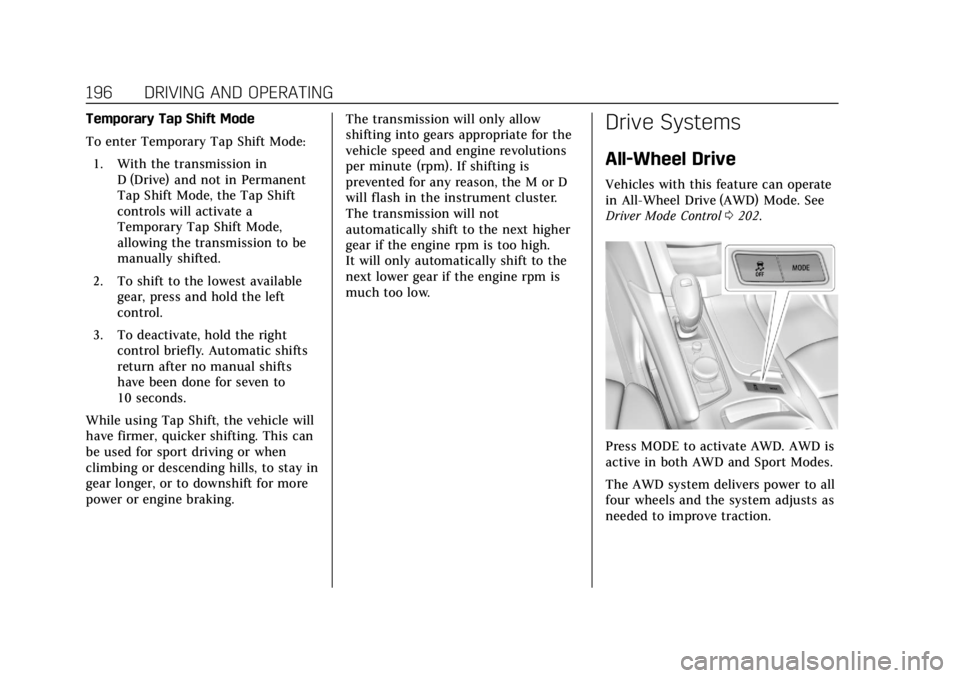
Press MODE to activate AWD. AWD is
active in both AWD and Sport Modes.
The AWD system delivers power to all
four wheels and the system adjusts as
needed to improve traction.
Page 206 of 385
Cadillac XT6 Owner Manual (GMNA-Localizing-U.S./Canada-12984300) -
2020 - CRC - 3/19/19
DRIVING AND OPERATING 205
The speedometer reading can be
displayed in either English or metric
units. SeeInstrument Cluster 0113.
The increment value used depends on
the units displayed.
Reducing Speed While Using Cruise
Control
If the cruise control system is already
activated:
. Move the thumbwheel down
toward SET− until the desired
lower speed is reached, then
release it.
. To decrease the vehicle speed in
small increments, briefly press
SET− to the first detent. For each
press, the vehicle goes about
1 km/h (1 mph) slower.
. To decrease the vehicle speed in
larger increments, briefly press
SET− to the second detent. For
each press, the vehicle speed
decreases to the next 5 km/h
(5 mph) mark on the speedometer.
The cruise control system may
automatically brake to slow the
vehicle. The speedometer reading can be
displayed in either English or metric
units. See
Instrument Cluster 0113.
The increment value used depends on
the units displayed.
Passing Another Vehicle While
Using Cruise Control
Use the accelerator pedal to increase
the vehicle speed. When you take your
foot off the pedal, the vehicle will slow
down to the previous set cruise speed.
While pressing the accelerator pedal
or shortly following the release to
override cruise, briefly moving the
thumbwheel down toward SET− will
result in cruise set to the current
vehicle speed.
Using Cruise Control on Hills
How well cruise control will work on
hills depends upon the vehicle speed,
load, and the steepness of the hills.
When going up steep hills, you might
have to step on the accelerator pedal
to maintain speed. When going
downhill, the cruise control system
may automatically brake to slow the
vehicle. Also, you may have to brake or shift to a lower gear to keep your
speed down. If the brake pedal is
applied, cruise control disengages.
Ending Cruise Control
There are four ways to end cruise
control:
.
Step lightly on the brake pedal.
. Press
*.
. Shift the transmission to
N (Neutral).
. Press
J.
Erasing Speed Memory
The cruise control set speed is erased
from memory if
Jis pressed or if
the ignition is turned off.
Adaptive Cruise Control
If equipped, Adaptive Cruise Control
(ACC) allows the cruise control set
speed and following gap to be
selected. Read this entire section
before using this system. The
following gap is the following time
between your vehicle and a vehicle
detected directly ahead in your path,
Page 246 of 385
Cadillac XT6 Owner Manual (GMNA-Localizing-U.S./Canada-12984300) -
2020 - CRC - 3/19/19
DRIVING AND OPERATING 245
Warning (Continued)
inadequate for the load, the vehicle
may not stop as expected. You and
others could be seriously injured.
The vehicle may also be damaged,
and the repairs would not be
covered by the vehicle warranty.
Pull a trailer only if all the steps in
this section have been followed. Ask
your dealer for advice and
information about towing a trailer
with the vehicle.
Driving with a Trailer
Trailering is different than just driving
the vehicle by itself. Trailering means
changes in handling, acceleration,
braking, durability, and fuel economy.
Successful, safe trailering takes correct
equipment, and it has to be used
properly.
The following information has many
time-tested, important trailering tips
and safety rules. Many of these areimportant for your safety and that of
your passengers. Read this section
carefully before pulling a trailer.
When towing a trailer:
.
Become familiar with and follow
all state and local laws that apply
to trailer towing. These
requirements vary from state to
state.
. State laws may require the use of
extended side view mirrors. Even if
not required, you should install
extended side view mirrors if your
visibility is limited or restricted
while towing.
. Do not tow a trailer during the
first 800 km (500 mi) of vehicle
use to prevent damage to the
engine, axle, or other parts.
. It is recommended to perform the
first oil change before heavy
towing.
. During the first 800 km (500 mi) of
trailer towing, do not drive over
80 km/h (50 mph) and do not
make starts at full throttle. .
Vehicles can tow in D (Drive).
If the transmission downshifts too
often, a lower gear may be
selected using Manual Mode. See
Manual Mode 0195.
If equipped, the following driver
assistance features should be turned
off when towing a trailer:
. Adaptive Cruise Control (ACC)
. Super Cruise Control
. Lane Keep Assist (LKA)
. Park Assist
. Automatic Parking Assist (APA)
. Reverse Automatic Braking (RAB)
If equipped, the following driver
assistance features should be turned
to alert or off when towing a trailer:
. Automatic Emergency
Braking (AEB)
. Intelligent Brake Assist (IBA)
. Front Pedestrian Braking (FPB)
Page 249 of 385
Cadillac XT6 Owner Manual (GMNA-Localizing-U.S./Canada-12984300) -
2020 - CRC - 3/19/19
248 DRIVING AND OPERATING
Leaving After Parking on a Hill
1. Apply and hold the brake pedal:.Start the engine.
. Shift into a gear.
. Release the parking brake.
2. Let up on the brake pedal.
3. Drive slowly until the trailer is clear of the chocks.
4. Stop and have someone pick up and store the chocks.
Maintenance When Trailer
Towing
The vehicle needs service more often
when used to tow trailers. See
Maintenance Schedule 0333. It is
especially important to check the
automatic transmission fluid, engine
oil, axle lubricant, belts, cooling
system, and brake system before and
during each trip.
Check periodically that all nuts and
bolts on the trailer hitch are tight.
Engine Cooling When Trailer
Towing
The cooling system may temporarily
overheat during severe operating
conditions. See Engine Overheating
0 272.
Trailer Towing
Caution
Towing a trailer improperly can
damage the vehicle and result in
costly repairs not covered by the
vehicle warranty. To tow a trailer
correctly, follow the directions in
this section and see your dealer for
important information about
towing a trailer with the vehicle.
Trailer Weight
{Warning
Never exceed the towing capacity
for your vehicle. Safe trailering requires monitoring the
weight, speed, altitude, road grades,
outside temperature, dimensions of
the front of the trailer, and how
frequently the vehicle is used to tow a
trailer.
Trailer Weight Ratings
When towing a trailer, the combined
weight of the vehicle, vehicle contents,
trailer, and trailer contents must be
below all of the maximum weight
ratings for the vehicle including:
.
GCWR: Gross Combined Weight
Rating
. GVWR: Gross Vehicle Weight
Rating
. Maximum Trailer Weight Rating
. Maximum Trailer Tongue Weight
See “Weight-Distributing Hitch
Adjustment ”under Towing Equipment
0 252 to determine if equalizer bars
are required to obtain the maximum
trailer weight rating.
Page 259 of 385
Cadillac XT6 Owner Manual (GMNA-Localizing-U.S./Canada-12984300) -
2020 - CRC - 3/19/19
258 VEHICLE CARE
Vehicle Care
General Information
General Information . . . . . . . . . . . . . 259
California Proposition65 Warning . . . . . . . . . . . . . . . . . . . . . 259
California Perchlorate Materials Requirements . . . . . . . . . . . . . . . . . . . 260
Accessories and Modifications . . . . . . . . . . . . . . . . . . . 260
Vehicle Checks
Doing Your OwnService Work . . . . . . . . . . . . . . . . . . . . 260
Hood . . . . . . . . . . . . . . . . . . . . . . . . . . . . . . 261
Engine Compartment Overview . . . . . . . . . . . . . . . . . . . . . . . . . 263
Engine Oil . . . . . . . . . . . . . . . . . . . . . . . . . 264
Engine Oil Life System . . . . . . . . . . . 266
Automatic Transmission Fluid . . . . . . . . . . . . . . . . . . . . . . . . . . . . . 267
Engine Air Filter Life System . . . . 267
Engine Air Cleaner/Filter . . . . . . . . . 268
Cooling System . . . . . . . . . . . . . . . . . . . 269
Engine Overheating . . . . . . . . . . . . . . 272
Washer Fluid . . . . . . . . . . . . . . . . . . . . . 273
Brakes . . . . . . . . . . . . . . . . . . . . . . . . . . . . . 274 Brake Fluid . . . . . . . . . . . . . . . . . . . . . . . 275
Battery - North America . . . . . . . . . 276
Starter Switch Check . . . . . . . . . . . . . 276
Park Brake and P (Park)
Mechanism Check . . . . . . . . . . . . . . 277
Wiper Blade Replacement . . . . . . . 277
Windshield Replacement . . . . . . . . 278
Gas Strut(s) . . . . . . . . . . . . . . . . . . . . . . . 279
Headlamp Aiming
Headlamp Aiming . . . . . . . . . . . . . . . . 280
Bulb Replacement
LED Lighting . . . . . . . . . . . . . . . . . . . . . 280
Electrical System
Electrical System Overload . . . . . . 281
Fuses and Circuit Breakers . . . . . . 281
Engine Compartment Fuse Block . . . . . . . . . . . . . . . . . . . . . . . . . . . . 282
Instrument Panel Fuse Block . . . . 285
Rear Compartment Fuse Block . . . . . . . . . . . . . . . . . . . . . . . . . . . . 287
Wheels and Tires
Tires . . . . . . . . . . . . . . . . . . . . . . . . . . . . . . . 289
All-Season Tires . . . . . . . . . . . . . . . . . . 290
Winter Tires . . . . . . . . . . . . . . . . . . . . . . 290
Summer Tires . . . . . . . . . . . . . . . . . . . . 291 Tire Sidewall Labeling . . . . . . . . . . . 291
Tire Designations . . . . . . . . . . . . . . . . . 293
Tire Terminology and
Definitions . . . . . . . . . . . . . . . . . . . . . . 294
Tire Pressure . . . . . . . . . . . . . . . . . . . . . . 296
Tire Pressure for High-Speed
Operation . . . . . . . . . . . . . . . . . . . . . . . . 298
Tire Pressure Monitor System . . . 298
Tire Pressure Monitor Operation . . . . . . . . . . . . . . . . . . . . . . . . 299
Tire Inspection . . . . . . . . . . . . . . . . . . . 303
Tire Rotation . . . . . . . . . . . . . . . . . . . . . 303
When It Is Time for New Tires . . . . . . . . . . . . . . . . . . . . . . . . . . . . . 304
Buying New Tires . . . . . . . . . . . . . . . . 305
Different Size Tires and Wheels . . . . . . . . . . . . . . . . . . . . . . . . . . 306
Uniform Tire Quality Grading . . . 307
Wheel Alignment and Tire Balance . . . . . . . . . . . . . . . . . . . . . . . . . . 308
Wheel Replacement . . . . . . . . . . . . . . 308
Tire Chains . . . . . . . . . . . . . . . . . . . . . . . 309
If a Tire Goes Flat . . . . . . . . . . . . . . . . 310
Tire Changing . . . . . . . . . . . . . . . . . . . . . 311
Compact Spare Tire . . . . . . . . . . . . . . 317
Page 268 of 385
Cadillac XT6 Owner Manual (GMNA-Localizing-U.S./Canada-12984300) -
2020 - CRC - 3/19/19
VEHICLE CARE 267
If the system is ever reset accidentally,
the oil must be changed at 5 000 km
(3,000 mi) since the last oil change.
Remember to reset the oil life system
whenever the oil is changed.
How to Reset the Engine Oil Life
System
Reset the system whenever the engine
oil is changed so that the system can
calculate the next engine oil change.
To reset the system:1. Using the DIC controls on the right side of the steering wheel,
display REMAINING OIL LIFE on
the DIC. See Driver Information
Center (DIC) 0128. When
remaining oil life is low, the
CHANGE ENGINE OIL SOON
message will appear on the
display.
2. Press the thumbwheel on the DIC controls and hold down for a
few seconds to clear the
CHANGE ENGINE OIL SOON
message and reset the oil life
at 100%. Be careful not to reset the oil life
display accidentally at any time
other than after the oil is
changed. It cannot be reset
accurately until the next oil
change.
The oil life system can also be reset as
follows: 1. Display REMAINING OIL LIFE on the DIC. See Driver Information
Center (DIC) 0128.
2. Fully press and release the accelerator pedal three times
within five seconds.
If the CHANGE ENGINE OIL
SOON message is not on, the
system is reset.
The system is reset when the
CHANGE ENGINE OIL SOON message
is off.
If the CHANGE ENGINE OIL SOON
message comes back on when the
vehicle is started, the engine oil life
system has not been reset. Repeat the
procedure.
Automatic Transmission
Fluid
A transmission fluid leak is the only
reason for fluid loss. If a leak occurs,
take the vehicle to your dealer and
have it repaired as soon as possible.
Caution
Use of the incorrect automatic
transmission fluid may damage the
vehicle, and the damage may not be
covered by the vehicle warranty.
Always use the correct automatic
transmission fluid. See
Recommended Fluids and Lubricants
0 343.
See your dealer to have the fluid and
filter changed at the intervals listed in
the Maintenance Schedule 0333.
Engine Air Filter Life
System
If equipped, this feature provides the
engine air filter’s remaining life and
best timing for a change. The timing